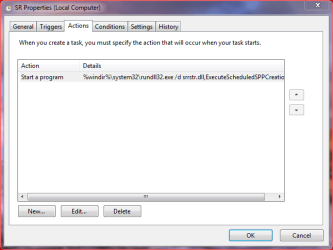
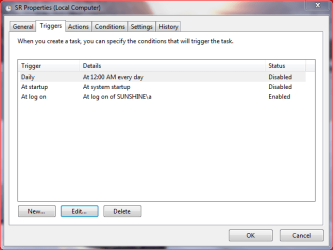
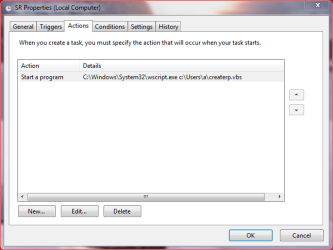
After I read the link you provided above, I did not change anything yet. The system says it has done restore points daily and they do not show up, so I took snaps of everything to show you.
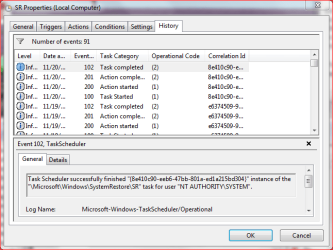
This image shows that SR ran this morning and completed successful.
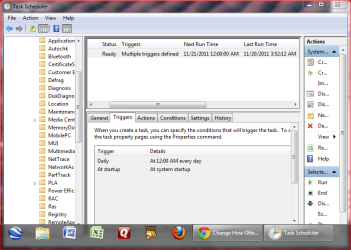
This image is of the history tab
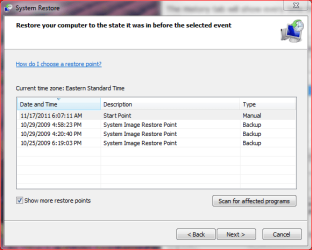
This image shows all the choices I get when I go to system restore.
All the other tabs in SR Properties are the same as on the Tutorial
Here is the xml readout of the details history tab in case you might need to see it.
Log Name: Microsoft-Windows-TaskScheduler/Operational
Source: Microsoft-Windows-TaskScheduler
Date: 11/20/2011 3:52:12 AM
Event ID: 102
Task Category: Task completed
Level: Information
Keywords: (1)
User: SYSTEM
Computer: Sunshine
Description:
Task Scheduler successfully finished "{8e410c90-eeb6-47bb-801a-ed1a215bd304}" instance of the "\Microsoft\Windows\SystemRestore\SR" task for user "NT AUTHORITY\SYSTEM".
Event Xml:
<Event xmlns="http://schemas.microsoft.com/win/2004/08/events/event">
<System>
<Provider Name="Microsoft-Windows-TaskScheduler" Guid="{DE7B24EA-73C8-4A09-985D-5BDADCFA9017}" />
<EventID>102</EventID>
<Version>0</Version>
<Level>4</Level>
<Task>102</Task>
<Opcode>2</Opcode>
<Keywords>0x8000000000000001</Keywords>
<TimeCreated SystemTime="2011-11-20T08:52:12.437863800Z" />
<EventRecordID>551989</EventRecordID>
<Correlation ActivityID="{8E410C90-EEB6-47BB-801A-ED1A215BD304}" />
<Execution ProcessID="748" ThreadID="6552" />
<Channel>Microsoft-Windows-TaskScheduler/Operational</Channel>
<Computer>Sunshine</Computer>
<Security UserID="S-1-5-18" />
</System>
<EventData Name="TaskSuccessEvent">
<Data Name="TaskName">\Microsoft\Windows\SystemRestore\SR</Data>
<Data Name="UserContext">NT AUTHORITY\SYSTEM</Data>
<Data Name="InstanceId">{8E410C90-EEB6-47BB-801A-ED1A215BD304}</Data>
</EventData>
</Event>
I am in a holding pattern until I hear back from you about what may be causing the restore points from being listed in the third picture above.