Solved I lost everything.....

paulobao

New member
Member
VIP
Local time
8:44 AM
Messages
197
Dear group,

Running a Toshiba Tecra laptop in win7 pro 64 bit + plextor m5pro 512 gb ss dwith more that 100 gb of sw installed I lost it all! I have regulary made images using free Macrium but I was unable to restore none! Now I am reinstalling win7 from scratch but it will take ages to get all my sw and settings installed again!
My question is (because I still have some remanescent faith): if I buy the pay version of macrium could I try to restore the images made with the free version?

I'm really down now with this! I thought I was safe but a total disaster!

I would apreciate any help.

Cheers,
Paulo
 

My Computer

Computer Manufacturer/Model Number
Toshiba Tecra R840
OS
Windows 7 Professional 64 bit
CPU
I7 2640M
Memory
8 GB
Graphics Card(s)
AMD Radeo HD 6450M
Monitor(s) Displays
HD+ 14 inch
Hard Drives
HDD 500GB 7200 rpm
I forgot to say that after insert the bootable disk I was able to navigate to my external hdd and see all the images saved before! When I try to restore, the first partition ( the small system one of about 146 or so mb) restored ok (aparentely since macrium reported as successful) but then in step 2 of 2 the restore of the larger partition never hapened ( macrium reported processing but I never saw any disc activity and the progression bars remaining at 0%).

Paulo
 

My Computer

Computer Manufacturer/Model Number
Toshiba Tecra R840
OS
Windows 7 Professional 64 bit
CPU
I7 2640M
Memory
8 GB
Graphics Card(s)
AMD Radeo HD 6450M
Monitor(s) Displays
HD+ 14 inch
Hard Drives
HDD 500GB 7200 rpm
if I buy the pay version of macrium could I try to restore the images made with the free version?

From my experience, the backup/restore engine used in the free version is essentially the same as that used in the paid versions. What varies in each version is extra features.

Have used both the free and paid versions of MR for years and have not encountered the problems you're having. With the paid version, you can post on their forums to get help.

Also, with MR, you can "mount" a saved image -- which assigns it a drive letter so you can access it like any other partition. Don't know if this is available in the free version or not, sorry.
 

My Computer

Computer type
PC/Desktop
Computer Manufacturer/Model Number
Custom
OS
Win7 Pro 32-bit, Win8 Pro 32-bit
CPU
AMD Phenom II X6 1090T
Motherboard
Gigabyte
Memory
4GB ddr3 1300
Graphics Card(s)
AMD HD 4290 onboard
Sound Card
Builtin Realtek HD Audio
Monitor(s) Displays
Samsung 24" widescreen, LG 23" widescreen
Screen Resolution
1920x1200/1920x1080
Hard Drives
Kingston 256GB SSD
Keyboard
Logitech Illuminated Keyboard
Mouse
Logitech M705 wireless mouse
Antivirus
Norton Av 2013
Browser
IE v10
The only way to know for sure is to make a backup image, then boot the bootable media with the restore program, then restore it and boot the PC.

Needless to say it's best to do this experiment before you've made a lot of customizations. In fact, since you are installing Windows now, before adding a bunch of programs is the ideal time to test imaging programs. Just install one or two programs that don't come with the PC, that have a bunch of options that you can check after you restore the image. I would try EaseUS ToDo Backup Free. Also you can find other free imaging and cloning software on thefreecountry.com: Free Programmers' Resources, Free Webmasters' Resources, Free Security Resources

By the way, I was in a similar situation using Paragon Drive Backup. My machine had a funky raid controller. When I tried to restore I could not see the HD. But I set the restore program to use "compatibility mode." A 45 minute restore took 9 hours overnight. But it went on and the machine booted fine. Now that I knew I could get it back, albeit at the cost of another 9 hour session, I decided to do an image backup and actually go through with the restore. Coincidentally that was Macrium that worked on that PC.

There's so many different hardware setups that no imaging software is guaranteed to work on everything. Best is to find one where the Linux boot CD boots and restores with no problems. That way you don't have to mess around configuring your own driver disks and all that. That's fine if you do it all the time as in you are a PC technician. But for the casual user you won't do it often enough to get good at it. Just often enough to pull your hair out. :)
 

My Computer

Computer Manufacturer/Model Number
HP Media Center
OS
Windows 7 32 bit
CPU
AMD 5200+ dual core
Memory
2 GB
Graphics Card(s)
NVidia GeForce 6150SE 128 MB
Monitor(s) Displays
CRT
Screen Resolution
1280x1024
Hard Drives
500 GB Sata internal :

SIIG USB 3.0 docking stations w/WD Caviar Black 6 Gb/s drives
Keyboard
PS/2
Mouse
PS/2 Wheel Mouse
Other Info
SIIG USB 3.0 PCIexpress card.
32 hours later.....success :-)

Hi :)

Stop the press!
Please see my post "I Lost everything...!".

I thought so because after I click restore aparentely nothing happened and then I cancelled (after 3 or so minutes of no HDD and SSD activity!). WRONG move!
It took 32+ hours to successful restore a 100GB partition from my USB3.0 external HDD to my Plextor M5Pro 512GB SSD! Yes...but 100% success! Everything it is exactly how I left it the last time I imaged my system :-)


So, do not cancel it! And Forget the Macrium vídeo when they say "go take a cup of tea"! You should go for a whole weekend and then you will have it done :-)

I'm very pleased with the result despite all that time! But now I know it works not only for the backup but for the restore too!

Cheers,
paulo
 
Last edited by a moderator:

My Computer

Computer Manufacturer/Model Number
Toshiba Tecra R840
OS
Windows 7 Professional 64 bit
CPU
I7 2640M
Memory
8 GB
Graphics Card(s)
AMD Radeo HD 6450M
Monitor(s) Displays
HD+ 14 inch
Hard Drives
HDD 500GB 7200 rpm
glad to hear it sounds like your problem(s) have been resolved for now!!!; let us know if you need any further assistance and one of us will be glad to try and assist ya if needed. :)
 

My Computer

Computer type
PC/Desktop
Computer Manufacturer/Model Number
custom built
OS
Windows 7 ultimate 64-bit
CPU
Intel I7 2600K 3.4ghz
Motherboard
Asus Evo P8P67
Memory
Corsair 16gb ddr3 1600mhz
Graphics Card(s)
Nvidia Geforce gt 430
Sound Card
Sound Blaster Titanium x-fi pci express
Monitor(s) Displays
Dell E198WFP
Hard Drives
1 western digital 2TB drive.
PSU
Antec 1200 watt
Case
Inwin Dragon Rider
Cooling
6 case supplied cooling fans
Keyboard
logitech mk700
Mouse
logitech m705
Internet Speed
25-50mbps download; 10mbps upload(i think)
Antivirus
avg free 2014
Browser
mozilla firefox
Other Info
Also have a pretty bad speaker setup which is a klipsch promedia 5.1 surround speaker setup with huge subwoofer and lg blu ray player/writer. Also a hp officejet pro 8600 plus wireless all in one and a logitech s7500 webcam.
yuppp. it took me 10 hrs to restore a 30GB image. i accidently hit cancel before and wrecked my whole system. good thing i di dtho, cause that was 300GB image! lol it would have taken a year!
 

My Computer

Computer type
PC/Desktop
Computer Manufacturer/Model Number
Weekend Warrior Rig
OS
Windows 10 Pro
CPU
Intel i7-3770K 4.4GHz
Motherboard
ASUS P8Z77-V Pro
Memory
8GB G.SKILL Ripjaws 1866 MHz
Graphics Card(s)
EVGA GTX 980 Classified
Monitor(s) Displays
Asus VH238H 23" 2ms
Screen Resolution
1920x1080
Hard Drives
Intel 330 120GB SSD /
WD Blue 1TB /
WD Black 500GB
PSU
Corsair CX750M
Case
NZXT H440
Cooling
Corsair H80i- CPU / Corsair H90- GPU
Keyboard
Logitech K360 LE
Mouse
Logitech G500
Antivirus
Avast
Browser
Chrome
Other Info
1200W 2.1 Surround Sound Audio
There is something wrong with those restore timings you guys post.

1. It takes me appr. 20 minutes to restore a 40GB image - that is the Windows 7 OS and a couple of embedded folders of Linux virtual partitions.

2. If you get images beyond that size, you left your user data on C - bad move. Your user data should be on a seperate data partition. Then the C partition image will be less than 30GBs and will restore fast.

3. 32 hours for a restore from a USB3 drive to a SSD is not normal. Something else is wrong - even if the image is 100GB.

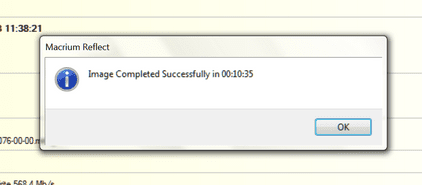
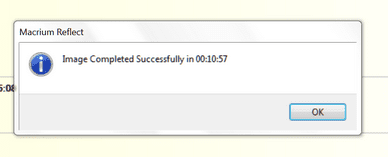
4. Here are my typical restore times for the C partition without the virtual partitions.
 

Attachments

  • Data to eSata 43GB.png
    Data to eSata 43GB.png
    8.5 KB · Views: 31
  • Mushkin to eSata3.png
    Mushkin to eSata3.png
    5.3 KB · Views: 31

My Computer

Computer Manufacturer/Model Number
HP, Dell, Gateway, Toshiba - 4 laptops and 2 desktops
OS
Vista, Windows7, Mint Mate, Zorin, Windows 8
CPU
from 1.6GHz Duo to i7
Monitor(s) Displays
2x HP w2207
Hard Drives
5x HDD, 7x SSD, 12x Externals
Keyboard
with trackball - no mices
Mouse
Trackball mice
Internet Speed
DSL 6000
Yes, I can image (bckup) the whole system in less that 20 mins! But the restore (and I don't keep much data in my lap, only sw...) took more that 32 hours! If it is wrong please let me know how to fix it!

Cheers,
paulo
 

My Computer

Computer Manufacturer/Model Number
Toshiba Tecra R840
OS
Windows 7 Professional 64 bit
CPU
I7 2640M
Memory
8 GB
Graphics Card(s)
AMD Radeo HD 6450M
Monitor(s) Displays
HD+ 14 inch
Hard Drives
HDD 500GB 7200 rpm
Yes, I can image (bckup) the whole system in less that 20 mins! But the restore (and I don't keep much data in my lap, only sw...) took more that 32 hours! If it is wrong please let me know how to fix it!

Cheers,
paulo
32 hours is definitely wrong. The restore should not take much more time than the imaging.

Download the recovery .iso from my Skydrive and burn that to CD. Use that CD next time you recover.
 

My Computer

Computer Manufacturer/Model Number
HP, Dell, Gateway, Toshiba - 4 laptops and 2 desktops
OS
Vista, Windows7, Mint Mate, Zorin, Windows 8
CPU
from 1.6GHz Duo to i7
Monitor(s) Displays
2x HP w2207
Hard Drives
5x HDD, 7x SSD, 12x Externals
Keyboard
with trackball - no mices
Mouse
Trackball mice
Internet Speed
DSL 6000
I agree with whs. My 80GB restore takes 30min and that is from USB2 to a spinner.
 

My Computer

Computer type
Laptop
Computer Manufacturer/Model Number
Hewlett-Packard/G62-107SA Notebook
OS
Microsoft Windows 7 Home Premium 64-bit Service Pack 1
CPU
Intel(R) Core(TM) i3 CPU M 330 @ 2.13GHz
Motherboard
Hewlett-Packard 1425
Memory
8 GB DDR3
Graphics Card(s)
Intel(R) HD Graphics
Sound Card
Realtek High Definition Audio
Monitor(s) Displays
Builtin
Screen Resolution
1366 x 768 x 32 bits (4294967296 colors) @ 60 Hz
Hard Drives
250 GB SATA Hard Disk Drive 7200 rpm
2TB Seagate GoFlex USB 2 Drive
1TB Iomega Prestige USB 2 Drive
1.5TB Iomega Prestige USB 2 Drive (Samsung)
2TB WD MyBook Live NAS.
Mouse
Logitech Anywhere MX
Internet Speed
152 Mbs download 10 Mbs upload
Antivirus
Norton 360
Browser
Chrome
Thanks whs :-) (even I would prefer do not needed :))

Cheers,
paulo
 

My Computer

Computer Manufacturer/Model Number
Toshiba Tecra R840
OS
Windows 7 Professional 64 bit
CPU
I7 2640M
Memory
8 GB
Graphics Card(s)
AMD Radeo HD 6450M
Monitor(s) Displays
HD+ 14 inch
Hard Drives
HDD 500GB 7200 rpm
Back
Top