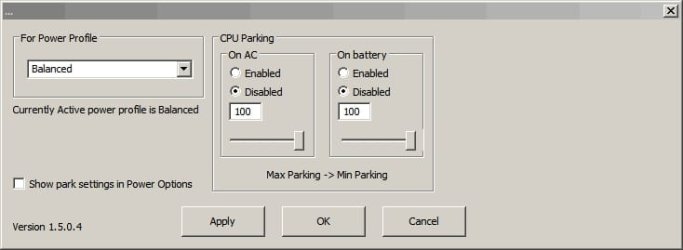
I read about a tweak that slves "Core Parking" issues

netadict

New member
Member
VIP
Local time
1:31 PM
Messages
155
Location
Egypt
The procedure was:
- Go to Regedit
- Select Edit > Find... and find this key: " 0cc5b647-c1df-4637-891a-dec35c318583 " just copy and paste without the quotes in the find box.
- Within this key, there is a value called: " ValueMax " This value represents the % number of cores the system will park
- Change the value of " ValueMax" to 0 so that, it matches " ValueMin "
- You will have to find the key a few times and repeat the process for each time it is found - the number of instances will depend on the number of power profiles in your system. To do this go back up to Edit > Find Next. (I had 3 instances of this key in my registry.)
- Do a full shutdown and power-off and cold-re-start.

Is this safe? Does it really improve performance?
 

My Computer My Computer

At a glance

Windows 7 Professional 32 bitPentium D 3.4 GHYz4GBNvidia GE Force 9600 GT
Computer Manufacturer/Model Number
HP Compaq dc7600 Convertible Minitower PC
OS
Windows 7 Professional 32 bit
CPU
Pentium D 3.4 GHYz
Motherboard
original that came with the PC
Memory
4GB
Graphics Card(s)
Nvidia GE Force 9600 GT
Sound Card
intergrated on the motherboard
Monitor(s) Displays
Samsung SyncMaster 713N
Screen Resolution
1280X1024
Hard Drives
Maxtor 6V160E0 ATA
Case
mini tower
Keyboard
standard PS/2
Mouse
PS/2 compatible
Internet Speed
2 M/s ADSL
If you are doing it for performance when gaming I would just switch to high performance mode. It is a built in power saving feature applied when using balanced power mode. I would leave it, then when gaming or using whatever program has you looking at this switch to high performance mode.
 

My Computer My Computer

At a glance

Windows 10 Pro X64Intel(R) Core(TM) i5-3570K CPU OC@ 4.5GHZ Turbo8.00 GB DDR3 1600MhzMSI Gaming X GTX 1070
Computer type
PC/Desktop
Computer Manufacturer/Model Number
Dude Build
OS
Windows 10 Pro X64
CPU
Intel(R) Core(TM) i5-3570K CPU OC@ 4.5GHZ Turbo
Motherboard
MSI Z77A-G45 Gaming
Memory
8.00 GB DDR3 1600Mhz
Graphics Card(s)
MSI Gaming X GTX 1070
Sound Card
Realtek High Definition
Monitor(s) Displays
Dell S23O9W, HP L1710
Screen Resolution
DELL-1920 x 1080 HP-1280 x1024
Hard Drives
Crucial m4 256 SSD, WD 7200RPM 500GB WD 1TB
PSU
Seasonic X650 GOLD
Case
Zalman Z12
Cooling
Antec Kuhler 920
Keyboard
Logitech
Mouse
MSI DS100 Interceptor
Internet Speed
50 down and 5 up
Antivirus
MSE
Browser
Chrome, IE 11
Other Info
Logitech X-620 Speakers
Bad tweak or not?

You can try disabling core parking in a safe way:

Quote:
"A reader asked whether the “core parking” tweak was a myth. This tweak involves using either a program or editing the registry to prevent Windows from using the power saving options for your CPU. However Windows can do this without 3rd party tweaks and manually editing the registry."

Article to read: Bad Tweak ? Core Parking » TweakHound

Personally I've disabled core parking on my machine and found that it does make a difference. I tried a few ways to apply the tweak and even used a couple of third party programs that claimed to disable core parking. None of them actually worked!

If you want to apply the tweak for gaming purposes my suggestion is that you'd be better off installing "Process Lasso" - the free version has the ability to disable core parking built in along with a gaming mode and settings to switch between available power profiles. You might like to take it for a test drive. I use this on my machine and can guarantee that it works. The only caveat is that you need to remember to either exclude data intensive stuff from the "active process management" or else shut down Process Lasso when data intensive tasks are running like installing windows updates or defragging.

Screenshots:
 

Attachments

  • ProcessLasso.jpg
    ProcessLasso.jpg
    10.7 KB · Views: 18
  • ProcessLasso2.jpg
    ProcessLasso2.jpg
    17.5 KB · Views: 1
Last edited:

My Computer My Computer

At a glance

Microsoft Windows 7 Home Premium 64-bit 7601 ...AMD C-60 APU with Radeon(tm) HD Graphics4.00 GBAMD Radeon HD 6290 Graphics
Computer type
Laptop
Computer Manufacturer/Model Number
ASUS
OS
Microsoft Windows 7 Home Premium 64-bit 7601 Multiprocessor Free Service Pack 1
CPU
AMD C-60 APU with Radeon(tm) HD Graphics
Motherboard
ASUSTeK COMPUTER INC. X501U
Memory
4.00 GB
Graphics Card(s)
AMD Radeon HD 6290 Graphics
Sound Card
(1) AMD High Definition Audio Device (2) Realtek High Defi
Screen Resolution
1366 x 768 x 32 bits (4294967296 colors) @ 60 Hz
Hard Drives
Hitachi HTS545050A7E380 SATA Disk Device
Antivirus
Comodo CIS & FW, SecureAplus App Whitelisting, Threatfire
Browser
Cyberfox 64bit, Opera 64bit, Airfox
Other Info
Spy-The-Spy, HitmanPro.Alert, Norton Connect Safe, MJRegWatcher, BitDefender TrafficLight, Voodoo Shield, Zemana AntiMalware
Back
Top