Solved I recently started having a problem with internet explorer

I downloaded hitman pro, duid a scan and it fount 2 things but I had to buy the product to remove the threats so I uninstalled it.

cant I just do a system recovery to remove everything?

I suppose that depends on how long you've had this issue and how far back any of your backups go...
For where you're at now, that would be the easiest way. If you provide more in the way of your system specs like Make and Model, we can help you to get started.

In lieu of that, you may find this useful, see the first part *Use the Recovery Partition*: 4 Ways To Factory Reset Your Windows Computer
 
Last edited:

My Computer My Computer

Computer type
PC/Desktop
Computer Manufacturer/Model Number
Gateway DX4831-01e (Mid-Tower Desktop)
OS
Originally Win 7 Hm Prem x64 Ver 6.1.7600 Build 7601-SP1 | Upgraded to Windows 10 December 14, 2019
CPU
Intel i3 530 2.93GHz, 2933MHz 2 Cores 4 Logical Processors
Motherboard
Gateway H57M01 133 megahertz
Memory
6GB of 1,333MHz DDR3 SDRAM
Graphics Card(s)
32MB Intel Graphics Media Accelerator HD IGChip
Sound Card
Realtek High Definition Audio
Monitor(s) Displays
Gateway HX2000 20inch TFT active matrix TN
Screen Resolution
1600 x 900 x 59 hertz
Hard Drives
WDC WD10EADS-00M2B0 [HDD] (1000.20 GB) -- drive 0,
HL-DT-ST DVDRAM GH41N [CD-ROM dr]
Four card readers, and Four USB 2.0
PSU
300watts.
Case
Mid-Tower Desktop
Cooling
Stock from Gateway
Keyboard
Natural Ergonomic Keyboard 4000, see Other Info
Mouse
Orig. Gateway wore out now using Insignia USB wired optical
Internet Speed
Vz FIOS 10ms png 57.64Mbps down 65.53Mbps up Speedtest.org
Antivirus
Zamana Anti-logger with Anti-malware, MSE, Windows Firewall,
Browser
IE11.0.9600.19399-Upd ver11.0.135, Firefox 68.0.1 x64
Other Info
System Specs by Belarc.

BIOS: American Megatrends Inc. P01-A0 11/17/2009

Replaced the MS 'Natural' Standard PS/2 Enhanced 101-102 Keyboard with a new Natural Ergonomic Keyboard 4000 on August 1st 2014.

Canon Pixma MG3222 Printer.

Updated to IE11 on 12102015 | Fios Quantum Router g1100

Additional AV: SpywareBlaster, manual Mbam, SAS
Thanks for the reply but I have system recovery disks that I use.
 

My Computer My Computer

Computer type
Laptop
Computer Manufacturer/Model Number
HP 15-f010wm TouchSmart notebook
OS
Microsoft Windows 8.1 with Bing 64-bit 9600 Multiprocessor Free
CPU
Intel(R) Celeron(R) CPU N2830 @ 2.16GHz
Motherboard
Hewlett-Packard 233F
Memory
4.00gb DDR3 SDRAM
Graphics Card(s)
intel HD graphics
Sound Card
Realtek High Definition Audio intel display audio
Screen Resolution
1366 x 768 x 59 Hz
Antivirus
Avast free & Malwarebytes anti malware (premium)
Browser
Firefox 34.0.5
Let us know how you make out, okay?
 

My Computer My Computer

Computer type
PC/Desktop
Computer Manufacturer/Model Number
Gateway DX4831-01e (Mid-Tower Desktop)
OS
Originally Win 7 Hm Prem x64 Ver 6.1.7600 Build 7601-SP1 | Upgraded to Windows 10 December 14, 2019
CPU
Intel i3 530 2.93GHz, 2933MHz 2 Cores 4 Logical Processors
Motherboard
Gateway H57M01 133 megahertz
Memory
6GB of 1,333MHz DDR3 SDRAM
Graphics Card(s)
32MB Intel Graphics Media Accelerator HD IGChip
Sound Card
Realtek High Definition Audio
Monitor(s) Displays
Gateway HX2000 20inch TFT active matrix TN
Screen Resolution
1600 x 900 x 59 hertz
Hard Drives
WDC WD10EADS-00M2B0 [HDD] (1000.20 GB) -- drive 0,
HL-DT-ST DVDRAM GH41N [CD-ROM dr]
Four card readers, and Four USB 2.0
PSU
300watts.
Case
Mid-Tower Desktop
Cooling
Stock from Gateway
Keyboard
Natural Ergonomic Keyboard 4000, see Other Info
Mouse
Orig. Gateway wore out now using Insignia USB wired optical
Internet Speed
Vz FIOS 10ms png 57.64Mbps down 65.53Mbps up Speedtest.org
Antivirus
Zamana Anti-logger with Anti-malware, MSE, Windows Firewall,
Browser
IE11.0.9600.19399-Upd ver11.0.135, Firefox 68.0.1 x64
Other Info
System Specs by Belarc.

BIOS: American Megatrends Inc. P01-A0 11/17/2009

Replaced the MS 'Natural' Standard PS/2 Enhanced 101-102 Keyboard with a new Natural Ergonomic Keyboard 4000 on August 1st 2014.

Canon Pixma MG3222 Printer.

Updated to IE11 on 12102015 | Fios Quantum Router g1100

Additional AV: SpywareBlaster, manual Mbam, SAS
The computer is fine now since I did the system recovery. I'm curious about something, can doing a full system recovery cause a computer to not work properly if you do it a lot?
 

My Computer My Computer

Computer type
Laptop
Computer Manufacturer/Model Number
HP 15-f010wm TouchSmart notebook
OS
Microsoft Windows 8.1 with Bing 64-bit 9600 Multiprocessor Free
CPU
Intel(R) Celeron(R) CPU N2830 @ 2.16GHz
Motherboard
Hewlett-Packard 233F
Memory
4.00gb DDR3 SDRAM
Graphics Card(s)
intel HD graphics
Sound Card
Realtek High Definition Audio intel display audio
Screen Resolution
1366 x 768 x 59 Hz
Antivirus
Avast free & Malwarebytes anti malware (premium)
Browser
Firefox 34.0.5
Use of System Recovery should not have any effects that would cause the computer not to work properly.
 

My Computer My Computer

Computer type
PC/Desktop
Computer Manufacturer/Model Number
Dell XPS 420
OS
Windows 10, Home Clean Install
CPU
Intel Core2 processsor Q8200(2.33Ghz 1333FSB) Quad Core Tech
Motherboard
Dell
Memory
6 gb
Graphics Card(s)
ATI Radeon 256MB HD3650
Sound Card
Intergrated 7.1 Channel Audio
Monitor(s) Displays
Dell SP2009W 20"
Hard Drives
640 GB Serial ATA Hard drive
Cooling
Fan
Keyboard
Dell USB Keyboard
Mouse
Dell Premium Optical USB
Internet Speed
DSL 2.85
I wouldn't think so unless you're having problems with the hardware.

Your main concern is to try and stay away from sites that offer innocent looking programs or add-ons. That will require you to adjust your learning curve and be more alert to what you're downloading, and think before you click.

Here's one site to help in that regard: Safe Internet Practices

At the very least you should have an Internet watchdog for your browsers like: https://www.mywot.com/en/download

And please; It would be very helpful if you would fill out your System Specs, you can use the tool included in the Tutorial here: System Info - See Your System Specs just read through the tutorial, use one of the downloads, and it will automagically fill them in for you.

That way we can see what you're working with and it would include items like what type of anti-virus program you're using.

I have an appointment so I won't be able to reply until about 3pm my time. Hang in there, Safe Surfing doesn't mean Boring Surfing. :cool:
 

My Computer My Computer

Computer type
PC/Desktop
Computer Manufacturer/Model Number
Gateway DX4831-01e (Mid-Tower Desktop)
OS
Originally Win 7 Hm Prem x64 Ver 6.1.7600 Build 7601-SP1 | Upgraded to Windows 10 December 14, 2019
CPU
Intel i3 530 2.93GHz, 2933MHz 2 Cores 4 Logical Processors
Motherboard
Gateway H57M01 133 megahertz
Memory
6GB of 1,333MHz DDR3 SDRAM
Graphics Card(s)
32MB Intel Graphics Media Accelerator HD IGChip
Sound Card
Realtek High Definition Audio
Monitor(s) Displays
Gateway HX2000 20inch TFT active matrix TN
Screen Resolution
1600 x 900 x 59 hertz
Hard Drives
WDC WD10EADS-00M2B0 [HDD] (1000.20 GB) -- drive 0,
HL-DT-ST DVDRAM GH41N [CD-ROM dr]
Four card readers, and Four USB 2.0
PSU
300watts.
Case
Mid-Tower Desktop
Cooling
Stock from Gateway
Keyboard
Natural Ergonomic Keyboard 4000, see Other Info
Mouse
Orig. Gateway wore out now using Insignia USB wired optical
Internet Speed
Vz FIOS 10ms png 57.64Mbps down 65.53Mbps up Speedtest.org
Antivirus
Zamana Anti-logger with Anti-malware, MSE, Windows Firewall,
Browser
IE11.0.9600.19399-Upd ver11.0.135, Firefox 68.0.1 x64
Other Info
System Specs by Belarc.

BIOS: American Megatrends Inc. P01-A0 11/17/2009

Replaced the MS 'Natural' Standard PS/2 Enhanced 101-102 Keyboard with a new Natural Ergonomic Keyboard 4000 on August 1st 2014.

Canon Pixma MG3222 Printer.

Updated to IE11 on 12102015 | Fios Quantum Router g1100

Additional AV: SpywareBlaster, manual Mbam, SAS
I wouldn't think so unless you're having problems with the hardware.

Your main concern is to try and stay away from sites that offer innocent looking programs or add-ons. That will require you to adjust your learning curve and be more alert to what you're downloading, and think before you click.

Here's one site to help in that regard: Safe Internet Practices

At the very least you should have an Internet watchdog for your browsers like: https://www.mywot.com/en/download

And please; It would be very helpful if you would fill out your System Specs, you can use the tool included in the Tutorial here: System Info - See Your System Specs just read through the tutorial, use one of the downloads, and it will automagically fill them in for you.

That way we can see what you're working with and it would include items like what type of anti-virus program you're using.

I have an appointment so I won't be able to reply until about 3pm my time. Hang in there, Safe Surfing doesn't mean Boring Surfing. :cool:

I filled out all the system specs that I could
 

My Computer My Computer

Computer type
Laptop
Computer Manufacturer/Model Number
HP 15-f010wm TouchSmart notebook
OS
Microsoft Windows 8.1 with Bing 64-bit 9600 Multiprocessor Free
CPU
Intel(R) Celeron(R) CPU N2830 @ 2.16GHz
Motherboard
Hewlett-Packard 233F
Memory
4.00gb DDR3 SDRAM
Graphics Card(s)
intel HD graphics
Sound Card
Realtek High Definition Audio intel display audio
Screen Resolution
1366 x 768 x 59 Hz
Antivirus
Avast free & Malwarebytes anti malware (premium)
Browser
Firefox 34.0.5
Hi,
Click Start and type in the search box,
msconfig
Click on the suggestion on top or hit the Enter key,
Go to the Startup section and take some screen shots for a complete list,
Go to the Services section and on the bottom left Check the box to Hide All Microsoft services,
Repeat the screen shots,
See the links above my signature on how to take and upload screen shots here,
Cheers.
 

My Computer My Computer

Computer type
PC/Desktop
Computer Manufacturer/Model Number
Custom assembled by me :}
OS
Win-7-Pro64bit 7-H-Prem-64bit
CPU
i7-5930K 2nd i9-9940x both water blocked VRM's too
Motherboard
ASUS SABERTOOTH X99 2nd ASUS x299 Apex
Memory
Trident-z 3200C14 2nd Trident-z 3600C16
Graphics Card(s)
EVGA 1080ti ftw3 2nd Titan Xp both water blocked
Sound Card
Built-in Realtek
Monitor(s) Displays
1-AOC G2460PG 24"G-Sync 144Hz/ 2nd 1-ASUS VG248QE 24" 144Hz
Screen Resolution
1920 x 1080 144Hz
Hard Drives
2-Samsung M.2 Evo & Evo Plus
2-Samsung 850 EVO 500GB SSD's/ 3-2.5 W.D. Black 1tb-&3-1tb/3-3.5 WD Black 1tb hdd's
PSU
EVGA SuperNOVA 1000-P2 2nd 1200-P2
Case
2-Corsair Obsidian Series 450D Black ATX Mid Tower
Cooling
Custom water loops
Keyboard
Logitech G710+/ 2nd Logitech G910
Mouse
2-RedDragon M901 Perdition 16400 dpi Gaming mouse = wired
Internet Speed
Comcast Ping 19ms 89.31mbps download speed 6.12mbps upload
Antivirus
Malwarebytes Pro/ Superantispyware Pro
Browser
FireFox & Pale moon
Other Info
2nd ASUS X299 Apex/Intel i9-9940x with Custom water loop/7H-Prem-x64/Corsair 450D case/Ram Trident-z 3600C16 4x8gb / Samsung970Evo plus 500gb SSD/Dual ssd EZ swap evo/PSU EVGA SuperNova 1200w-P2 80+Platinum/GPU Titan Xp /8-ML-140 on push-pull on 2-280GTX rads
I filled out all the system specs that I could
That's great! There's so much info there it will take a while to absorb it all...:thumbsup:

For now, follow ThrashZone's (TZ's) lead, he's asking for a screenshot of your startup programs after a reboot and what Services are running on your machine, this will allow us to determine if there are any nastie's still lurking.


For everyone;
crashhat's FF problem has resurfaced, from the other thread. This would lead me to believe his/her problem has invaded his/her recovery partition.

We may have to resort to an ISO download from heidoc.net for a fresh install..


crashhat, could you fill out a bit more on your *About Me* profile page? I'm uncomfortable referring to you as s/he.
 

My Computer My Computer

Computer type
PC/Desktop
Computer Manufacturer/Model Number
Gateway DX4831-01e (Mid-Tower Desktop)
OS
Originally Win 7 Hm Prem x64 Ver 6.1.7600 Build 7601-SP1 | Upgraded to Windows 10 December 14, 2019
CPU
Intel i3 530 2.93GHz, 2933MHz 2 Cores 4 Logical Processors
Motherboard
Gateway H57M01 133 megahertz
Memory
6GB of 1,333MHz DDR3 SDRAM
Graphics Card(s)
32MB Intel Graphics Media Accelerator HD IGChip
Sound Card
Realtek High Definition Audio
Monitor(s) Displays
Gateway HX2000 20inch TFT active matrix TN
Screen Resolution
1600 x 900 x 59 hertz
Hard Drives
WDC WD10EADS-00M2B0 [HDD] (1000.20 GB) -- drive 0,
HL-DT-ST DVDRAM GH41N [CD-ROM dr]
Four card readers, and Four USB 2.0
PSU
300watts.
Case
Mid-Tower Desktop
Cooling
Stock from Gateway
Keyboard
Natural Ergonomic Keyboard 4000, see Other Info
Mouse
Orig. Gateway wore out now using Insignia USB wired optical
Internet Speed
Vz FIOS 10ms png 57.64Mbps down 65.53Mbps up Speedtest.org
Antivirus
Zamana Anti-logger with Anti-malware, MSE, Windows Firewall,
Browser
IE11.0.9600.19399-Upd ver11.0.135, Firefox 68.0.1 x64
Other Info
System Specs by Belarc.

BIOS: American Megatrends Inc. P01-A0 11/17/2009

Replaced the MS 'Natural' Standard PS/2 Enhanced 101-102 Keyboard with a new Natural Ergonomic Keyboard 4000 on August 1st 2014.

Canon Pixma MG3222 Printer.

Updated to IE11 on 12102015 | Fios Quantum Router g1100

Additional AV: SpywareBlaster, manual Mbam, SAS
I agree Anak something definitely sneaked though the factory restore partition if used :/

Also Crashhat if you can bare it,
Please post a screen shot of your Uninstall a program list,

Click start and type in the search box,
uninstall a program
Click on the suggestion at any time you see it appear as a suggestion,
On the top right on the next page next to the "?" question mark click on the drop down arrow and switch to List,
This might get all the listings on one page and only one screen shot will be needed here ;)
Cheers.
 

My Computer My Computer

Computer type
PC/Desktop
Computer Manufacturer/Model Number
Custom assembled by me :}
OS
Win-7-Pro64bit 7-H-Prem-64bit
CPU
i7-5930K 2nd i9-9940x both water blocked VRM's too
Motherboard
ASUS SABERTOOTH X99 2nd ASUS x299 Apex
Memory
Trident-z 3200C14 2nd Trident-z 3600C16
Graphics Card(s)
EVGA 1080ti ftw3 2nd Titan Xp both water blocked
Sound Card
Built-in Realtek
Monitor(s) Displays
1-AOC G2460PG 24"G-Sync 144Hz/ 2nd 1-ASUS VG248QE 24" 144Hz
Screen Resolution
1920 x 1080 144Hz
Hard Drives
2-Samsung M.2 Evo & Evo Plus
2-Samsung 850 EVO 500GB SSD's/ 3-2.5 W.D. Black 1tb-&3-1tb/3-3.5 WD Black 1tb hdd's
PSU
EVGA SuperNOVA 1000-P2 2nd 1200-P2
Case
2-Corsair Obsidian Series 450D Black ATX Mid Tower
Cooling
Custom water loops
Keyboard
Logitech G710+/ 2nd Logitech G910
Mouse
2-RedDragon M901 Perdition 16400 dpi Gaming mouse = wired
Internet Speed
Comcast Ping 19ms 89.31mbps download speed 6.12mbps upload
Antivirus
Malwarebytes Pro/ Superantispyware Pro
Browser
FireFox & Pale moon
Other Info
2nd ASUS X299 Apex/Intel i9-9940x with Custom water loop/7H-Prem-x64/Corsair 450D case/Ram Trident-z 3600C16 4x8gb / Samsung970Evo plus 500gb SSD/Dual ssd EZ swap evo/PSU EVGA SuperNova 1200w-P2 80+Platinum/GPU Titan Xp /8-ML-140 on push-pull on 2-280GTX rads
I filled out all the system specs that I could
That's great! There's so much info there it will take a while to absorb it all...:thumbsup:

For now, follow ThrashZone's (TZ's) lead, he's asking for a screenshot of your startup programs after a reboot and what Services are running on your machine, this will allow us to determine if there are any nastie's still lurking.


For everyone;
crashhat's FF problem has resurfaced, from the other thread. This would lead me to believe his/her problem has invaded his/her recovery partition.

We may have to resort to an ISO download from heidoc.net for a fresh install..


crashhat, could you fill out a bit more on your *About Me* profile page? I'm uncomfortable referring to you as s/he.

But I did the full system recover with the 3 recover disks I have. Doesn't it formate the partition when it formats the harddrive?
 

My Computer My Computer

Computer type
Laptop
Computer Manufacturer/Model Number
HP 15-f010wm TouchSmart notebook
OS
Microsoft Windows 8.1 with Bing 64-bit 9600 Multiprocessor Free
CPU
Intel(R) Celeron(R) CPU N2830 @ 2.16GHz
Motherboard
Hewlett-Packard 233F
Memory
4.00gb DDR3 SDRAM
Graphics Card(s)
intel HD graphics
Sound Card
Realtek High Definition Audio intel display audio
Screen Resolution
1366 x 768 x 59 Hz
Antivirus
Avast free & Malwarebytes anti malware (premium)
Browser
Firefox 34.0.5
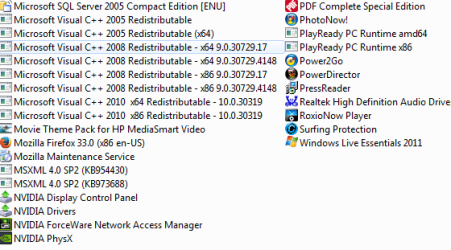
here's all the programs installed on my computer

Capture.PNG

Capture 2.PNG
 

My Computer My Computer

Computer type
Laptop
Computer Manufacturer/Model Number
HP 15-f010wm TouchSmart notebook
OS
Microsoft Windows 8.1 with Bing 64-bit 9600 Multiprocessor Free
CPU
Intel(R) Celeron(R) CPU N2830 @ 2.16GHz
Motherboard
Hewlett-Packard 233F
Memory
4.00gb DDR3 SDRAM
Graphics Card(s)
intel HD graphics
Sound Card
Realtek High Definition Audio intel display audio
Screen Resolution
1366 x 768 x 59 Hz
Antivirus
Avast free & Malwarebytes anti malware (premium)
Browser
Firefox 34.0.5
IOBIT
Advanced system care 7
Avast
Surfing protection ?
I'm sure anyone or all are clashing with each other ?
Pick One and uninstall the rest.
I would guess keep Avast or get rid of all and use Panda ;)
 

My Computer My Computer

Computer type
PC/Desktop
Computer Manufacturer/Model Number
Custom assembled by me :}
OS
Win-7-Pro64bit 7-H-Prem-64bit
CPU
i7-5930K 2nd i9-9940x both water blocked VRM's too
Motherboard
ASUS SABERTOOTH X99 2nd ASUS x299 Apex
Memory
Trident-z 3200C14 2nd Trident-z 3600C16
Graphics Card(s)
EVGA 1080ti ftw3 2nd Titan Xp both water blocked
Sound Card
Built-in Realtek
Monitor(s) Displays
1-AOC G2460PG 24"G-Sync 144Hz/ 2nd 1-ASUS VG248QE 24" 144Hz
Screen Resolution
1920 x 1080 144Hz
Hard Drives
2-Samsung M.2 Evo & Evo Plus
2-Samsung 850 EVO 500GB SSD's/ 3-2.5 W.D. Black 1tb-&3-1tb/3-3.5 WD Black 1tb hdd's
PSU
EVGA SuperNOVA 1000-P2 2nd 1200-P2
Case
2-Corsair Obsidian Series 450D Black ATX Mid Tower
Cooling
Custom water loops
Keyboard
Logitech G710+/ 2nd Logitech G910
Mouse
2-RedDragon M901 Perdition 16400 dpi Gaming mouse = wired
Internet Speed
Comcast Ping 19ms 89.31mbps download speed 6.12mbps upload
Antivirus
Malwarebytes Pro/ Superantispyware Pro
Browser
FireFox & Pale moon
Other Info
2nd ASUS X299 Apex/Intel i9-9940x with Custom water loop/7H-Prem-x64/Corsair 450D case/Ram Trident-z 3600C16 4x8gb / Samsung970Evo plus 500gb SSD/Dual ssd EZ swap evo/PSU EVGA SuperNova 1200w-P2 80+Platinum/GPU Titan Xp /8-ML-140 on push-pull on 2-280GTX rads
The surfing protection is part of the iobit advanced system care, it tells me if a site is safe or not. I've always had ASC and my AV and I never had this problem. BTW Since I did the system recovery, IE has stopped randomly popping up..
 

My Computer My Computer

Computer type
Laptop
Computer Manufacturer/Model Number
HP 15-f010wm TouchSmart notebook
OS
Microsoft Windows 8.1 with Bing 64-bit 9600 Multiprocessor Free
CPU
Intel(R) Celeron(R) CPU N2830 @ 2.16GHz
Motherboard
Hewlett-Packard 233F
Memory
4.00gb DDR3 SDRAM
Graphics Card(s)
intel HD graphics
Sound Card
Realtek High Definition Audio intel display audio
Screen Resolution
1366 x 768 x 59 Hz
Antivirus
Avast free & Malwarebytes anti malware (premium)
Browser
Firefox 34.0.5
Hi,
Click Start and type in the search box,
msconfig
Click on the suggestion on top or hit the Enter key,
Go to the Startup section and take some screen shots for a complete list,
Go to the Services section and on the bottom left Check the box to Hide All Microsoft services,
Repeat the screen shots,
See the links above my signature on how to take and upload screen shots here,
Cheers.
crashhat (CH) It is good that you showed us screenshots of your installed programs, but you missed these:

  • Screenshots of your Startup Programs, and,

  • Screenshots of your Services Section.
Please provide these.
 

My Computer My Computer

Computer type
PC/Desktop
Computer Manufacturer/Model Number
Gateway DX4831-01e (Mid-Tower Desktop)
OS
Originally Win 7 Hm Prem x64 Ver 6.1.7600 Build 7601-SP1 | Upgraded to Windows 10 December 14, 2019
CPU
Intel i3 530 2.93GHz, 2933MHz 2 Cores 4 Logical Processors
Motherboard
Gateway H57M01 133 megahertz
Memory
6GB of 1,333MHz DDR3 SDRAM
Graphics Card(s)
32MB Intel Graphics Media Accelerator HD IGChip
Sound Card
Realtek High Definition Audio
Monitor(s) Displays
Gateway HX2000 20inch TFT active matrix TN
Screen Resolution
1600 x 900 x 59 hertz
Hard Drives
WDC WD10EADS-00M2B0 [HDD] (1000.20 GB) -- drive 0,
HL-DT-ST DVDRAM GH41N [CD-ROM dr]
Four card readers, and Four USB 2.0
PSU
300watts.
Case
Mid-Tower Desktop
Cooling
Stock from Gateway
Keyboard
Natural Ergonomic Keyboard 4000, see Other Info
Mouse
Orig. Gateway wore out now using Insignia USB wired optical
Internet Speed
Vz FIOS 10ms png 57.64Mbps down 65.53Mbps up Speedtest.org
Antivirus
Zamana Anti-logger with Anti-malware, MSE, Windows Firewall,
Browser
IE11.0.9600.19399-Upd ver11.0.135, Firefox 68.0.1 x64
Other Info
System Specs by Belarc.

BIOS: American Megatrends Inc. P01-A0 11/17/2009

Replaced the MS 'Natural' Standard PS/2 Enhanced 101-102 Keyboard with a new Natural Ergonomic Keyboard 4000 on August 1st 2014.

Canon Pixma MG3222 Printer.

Updated to IE11 on 12102015 | Fios Quantum Router g1100

Additional AV: SpywareBlaster, manual Mbam, SAS
Hi,
Click Start and type in the search box,
msconfig
Click on the suggestion on top or hit the Enter key,
Go to the Startup section and take some screen shots for a complete list,
Go to the Services section and on the bottom left Check the box to Hide All Microsoft services,
Repeat the screen shots,
See the links above my signature on how to take and upload screen shots here,
Cheers.
crashhat (CH) It is good that you showed us screenshots of your installed programs, but you missed these:

  • Screenshots of your Startup Programs, and,

  • Screenshots of your Services Section.
Please provide these.

Do I actually have to do screen shots of those if the problem seems to be fixed?
 

My Computer My Computer

Computer type
Laptop
Computer Manufacturer/Model Number
HP 15-f010wm TouchSmart notebook
OS
Microsoft Windows 8.1 with Bing 64-bit 9600 Multiprocessor Free
CPU
Intel(R) Celeron(R) CPU N2830 @ 2.16GHz
Motherboard
Hewlett-Packard 233F
Memory
4.00gb DDR3 SDRAM
Graphics Card(s)
intel HD graphics
Sound Card
Realtek High Definition Audio intel display audio
Screen Resolution
1366 x 768 x 59 Hz
Antivirus
Avast free & Malwarebytes anti malware (premium)
Browser
Firefox 34.0.5
If the issue is fixed mark your questions as Answered ;)
 

My Computer My Computer

Computer type
PC/Desktop
Computer Manufacturer/Model Number
Custom assembled by me :}
OS
Win-7-Pro64bit 7-H-Prem-64bit
CPU
i7-5930K 2nd i9-9940x both water blocked VRM's too
Motherboard
ASUS SABERTOOTH X99 2nd ASUS x299 Apex
Memory
Trident-z 3200C14 2nd Trident-z 3600C16
Graphics Card(s)
EVGA 1080ti ftw3 2nd Titan Xp both water blocked
Sound Card
Built-in Realtek
Monitor(s) Displays
1-AOC G2460PG 24"G-Sync 144Hz/ 2nd 1-ASUS VG248QE 24" 144Hz
Screen Resolution
1920 x 1080 144Hz
Hard Drives
2-Samsung M.2 Evo & Evo Plus
2-Samsung 850 EVO 500GB SSD's/ 3-2.5 W.D. Black 1tb-&3-1tb/3-3.5 WD Black 1tb hdd's
PSU
EVGA SuperNOVA 1000-P2 2nd 1200-P2
Case
2-Corsair Obsidian Series 450D Black ATX Mid Tower
Cooling
Custom water loops
Keyboard
Logitech G710+/ 2nd Logitech G910
Mouse
2-RedDragon M901 Perdition 16400 dpi Gaming mouse = wired
Internet Speed
Comcast Ping 19ms 89.31mbps download speed 6.12mbps upload
Antivirus
Malwarebytes Pro/ Superantispyware Pro
Browser
FireFox & Pale moon
Other Info
2nd ASUS X299 Apex/Intel i9-9940x with Custom water loop/7H-Prem-x64/Corsair 450D case/Ram Trident-z 3600C16 4x8gb / Samsung970Evo plus 500gb SSD/Dual ssd EZ swap evo/PSU EVGA SuperNova 1200w-P2 80+Platinum/GPU Titan Xp /8-ML-140 on push-pull on 2-280GTX rads
Back
Top