Solved i screwed up my boot wondering if imaging can save me

warlord

New member
Local time
6:53 PM
Messages
21
long story short i did something that wont let me get into windows 7.

i have windows 10 on a seperate drive on the same computer so i can access the drive from in there.

ive already gone thru the steps to repair it traditionally and they diddnt work.

i have 2 options id like to try before all hope is lost.

1. i have another computer that has win 7 on it, could i create an image of the boot partition on that drive and replace my faulty one with it?

2. could i create an image of my current c: drive, then reinstall windows fresh, then replace the c: with the image?
 

My Computer My Computer

At a glance

win 7 x64/win xp x64intel 2.66 quad6g ddr39800gx2 quad sli
OS
win 7 x64/win xp x64
CPU
intel 2.66 quad
Motherboard
xfx 790i
Memory
6g ddr3
Graphics Card(s)
9800gx2 quad sli
Sound Card
realtec something
Monitor(s) Displays
22"
Screen Resolution
1680 1050
Hard Drives
150g 10000rpm sata (main)
1tb 7200rpm sata
PSU
kingwin gigawatt
Case
antec
Internet Speed
20/20
Neither of the option you list will work 100%
1 your other machine will have different hardware so when you transfer image to other system you may well BSOD unless you have similar hardware then it may be able to install drivers for new hardware and run, you wont know until you try
2 when you reimage the C drive you will import your corrupt startup/boot files and you will be in the same place you are now

If you list in more detail what you have done and what you have tried someone may well be able to help you get the machine up and running again
 

My Computer My Computer

At a glance

Win7 Ultimate X64Intel i5 3570K8GB DDR3 1600Onboard
Computer type
PC/Desktop
Computer Manufacturer/Model Number
Pauly Special
OS
Win7 Ultimate X64
CPU
Intel i5 3570K
Motherboard
Gigabyte Z77X-DS3H
Memory
8GB DDR3 1600
Graphics Card(s)
Onboard
Sound Card
Onboard
Screen Resolution
1280x1024
Hard Drives
Samsung 840 Evo SSD (OS)
1TB Spinner (Data)
PSU
800W Arctic
Case
Cooler Master
Cooling
3x120mm Fans
Keyboard
MS Wireless
Mouse
MS Wireless
Internet Speed
20M
well it started when I installed 10 on a separate drive (not partition). when rebooting I wasn't getting the is selection screen. I used easy boot disk creator. at that point I was able to get into 7. but after restarting I wasn't seeing the is screen again so I tried the same program to get 10 to show up. but it screwed it up too.

so at that point I tried both the 7 and 10 windows CDs and used the repair utilities. both failed several attempts.

at that point both os
were not loading.

I decided to reinstall 10 since there was nothing to lose yet.
 

My Computer My Computer

At a glance

win 7 x64/win xp x64intel 2.66 quad6g ddr39800gx2 quad sli
OS
win 7 x64/win xp x64
CPU
intel 2.66 quad
Motherboard
xfx 790i
Memory
6g ddr3
Graphics Card(s)
9800gx2 quad sli
Sound Card
realtec something
Monitor(s) Displays
22"
Screen Resolution
1680 1050
Hard Drives
150g 10000rpm sata (main)
1tb 7200rpm sata
PSU
kingwin gigawatt
Case
antec
Internet Speed
20/20
I thought all the boot information was stored on the hidden 100meg partition. am I wrong?
 

My Computer My Computer

At a glance

win 7 x64/win xp x64intel 2.66 quad6g ddr39800gx2 quad sli
OS
win 7 x64/win xp x64
CPU
intel 2.66 quad
Motherboard
xfx 790i
Memory
6g ddr3
Graphics Card(s)
9800gx2 quad sli
Sound Card
realtec something
Monitor(s) Displays
22"
Screen Resolution
1680 1050
Hard Drives
150g 10000rpm sata (main)
1tb 7200rpm sata
PSU
kingwin gigawatt
Case
antec
Internet Speed
20/20

My Computer My Computer

At a glance

Windows 10 Pro. 64/ version 1709 Windows 7 Pr...Intel i7-6800K @ 4.3Corsair Platinum 16 gig @2400EVGA GTX 1070 OC
Computer type
PC/Desktop
Computer Manufacturer/Model Number
Home made Desktop
OS
Windows 10 Pro. 64/ version 1709 Windows 7 Pro/64
CPU
Intel i7-6800K @ 4.3
Motherboard
ASUS X-99 Deluxe II
Memory
Corsair Platinum 16 gig @2400
Graphics Card(s)
EVGA GTX 1070 OC
Monitor(s) Displays
Asus 27" LED LCD/VE278Q
Screen Resolution
1920-1080 or 1280-720 HDMI
Hard Drives
INTEL SSD 730-240 Gb Sata 3.0/
PSU
EVGA Platium 1200W
Case
Phanteks Luxe Tempered Glass 8 fans/ one radiator
Cooling
XSPC/ Water Cooled CPU
Keyboard
Das 4 Professional
Mouse
Logitech M705/MX Anywhere 2-S
Internet Speed
100 mbits
Antivirus
Microsoft Security Essentials/ Malwarebytes Premium 3.0/ SAS
Browser
I.E. 11 default/Firefox/ ISP Time Warner Cable/Spectrum
Other Info
LG BluRay Burner/
Sound system-KLipsch-THX/
Icy Dock ssd Hot Swap bays.
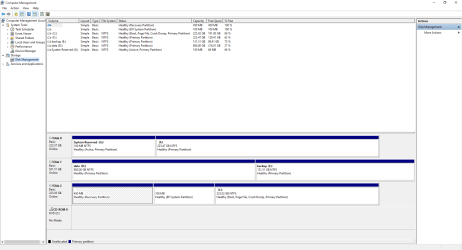
ok heres manager.

when i originally installed win 10 i had all drives still connected

G and F are the drives in question
 

Attachments

  • Capture.PNG
    Capture.PNG
    32 KB · Views: 10

My Computer My Computer

At a glance

win 7 x64/win xp x64intel 2.66 quad6g ddr39800gx2 quad sli
OS
win 7 x64/win xp x64
CPU
intel 2.66 quad
Motherboard
xfx 790i
Memory
6g ddr3
Graphics Card(s)
9800gx2 quad sli
Sound Card
realtec something
Monitor(s) Displays
22"
Screen Resolution
1680 1050
Hard Drives
150g 10000rpm sata (main)
1tb 7200rpm sata
PSU
kingwin gigawatt
Case
antec
Internet Speed
20/20
What a mess.
What operating system were you booted into when you took the picture?

What is installed on (F)?

What operating system is on (C) at the time of the picture?
 

My Computer My Computer

At a glance

Windows 10 Pro. 64/ version 1709 Windows 7 Pr...Intel i7-6800K @ 4.3Corsair Platinum 16 gig @2400EVGA GTX 1070 OC
Computer type
PC/Desktop
Computer Manufacturer/Model Number
Home made Desktop
OS
Windows 10 Pro. 64/ version 1709 Windows 7 Pro/64
CPU
Intel i7-6800K @ 4.3
Motherboard
ASUS X-99 Deluxe II
Memory
Corsair Platinum 16 gig @2400
Graphics Card(s)
EVGA GTX 1070 OC
Monitor(s) Displays
Asus 27" LED LCD/VE278Q
Screen Resolution
1920-1080 or 1280-720 HDMI
Hard Drives
INTEL SSD 730-240 Gb Sata 3.0/
PSU
EVGA Platium 1200W
Case
Phanteks Luxe Tempered Glass 8 fans/ one radiator
Cooling
XSPC/ Water Cooled CPU
Keyboard
Das 4 Professional
Mouse
Logitech M705/MX Anywhere 2-S
Internet Speed
100 mbits
Antivirus
Microsoft Security Essentials/ Malwarebytes Premium 3.0/ SAS
Browser
I.E. 11 default/Firefox/ ISP Time Warner Cable/Spectrum
Other Info
LG BluRay Burner/
Sound system-KLipsch-THX/
Icy Dock ssd Hot Swap bays.
I was booted in 10 for the picture. c:is win 10. f:is win 7. D and E are larger storage drives
 

My Computer My Computer

At a glance

win 7 x64/win xp x64intel 2.66 quad6g ddr39800gx2 quad sli
OS
win 7 x64/win xp x64
CPU
intel 2.66 quad
Motherboard
xfx 790i
Memory
6g ddr3
Graphics Card(s)
9800gx2 quad sli
Sound Card
realtec something
Monitor(s) Displays
22"
Screen Resolution
1680 1050
Hard Drives
150g 10000rpm sata (main)
1tb 7200rpm sata
PSU
kingwin gigawatt
Case
antec
Internet Speed
20/20
I'm going to go through the 7 drive and backup any important files I'll be needing. then I'm going to try my image idea.

I'll report back if this was a failure or not
 

My Computer My Computer

At a glance

win 7 x64/win xp x64intel 2.66 quad6g ddr39800gx2 quad sli
OS
win 7 x64/win xp x64
CPU
intel 2.66 quad
Motherboard
xfx 790i
Memory
6g ddr3
Graphics Card(s)
9800gx2 quad sli
Sound Card
realtec something
Monitor(s) Displays
22"
Screen Resolution
1680 1050
Hard Drives
150g 10000rpm sata (main)
1tb 7200rpm sata
PSU
kingwin gigawatt
Case
antec
Internet Speed
20/20
ok everything seems to be working now.

i decided to try the repair tool on the 7 cd one more time and for some reason this time it actually worked. why? i don't know. but at this point it wouldn't be worth the effort to find out.

thank you for taking the time to help me out.
 

My Computer My Computer

At a glance

win 7 x64/win xp x64intel 2.66 quad6g ddr39800gx2 quad sli
OS
win 7 x64/win xp x64
CPU
intel 2.66 quad
Motherboard
xfx 790i
Memory
6g ddr3
Graphics Card(s)
9800gx2 quad sli
Sound Card
realtec something
Monitor(s) Displays
22"
Screen Resolution
1680 1050
Hard Drives
150g 10000rpm sata (main)
1tb 7200rpm sata
PSU
kingwin gigawatt
Case
antec
Internet Speed
20/20
If your happy I'm happy.

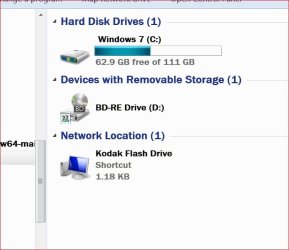
A little handy trick.

Start Orb then right tick on Computer and select Open.
From there right tick on every partition and rename them to indicated what they are use for. That way when you are in Disk Management or some 3rd party programs that change drive numbers you will alway know what is what.

Example:

yes today.JPG


Happy computing.
 

My Computer My Computer

At a glance

Windows 10 Pro. 64/ version 1709 Windows 7 Pr...Intel i7-6800K @ 4.3Corsair Platinum 16 gig @2400EVGA GTX 1070 OC
Computer type
PC/Desktop
Computer Manufacturer/Model Number
Home made Desktop
OS
Windows 10 Pro. 64/ version 1709 Windows 7 Pro/64
CPU
Intel i7-6800K @ 4.3
Motherboard
ASUS X-99 Deluxe II
Memory
Corsair Platinum 16 gig @2400
Graphics Card(s)
EVGA GTX 1070 OC
Monitor(s) Displays
Asus 27" LED LCD/VE278Q
Screen Resolution
1920-1080 or 1280-720 HDMI
Hard Drives
INTEL SSD 730-240 Gb Sata 3.0/
PSU
EVGA Platium 1200W
Case
Phanteks Luxe Tempered Glass 8 fans/ one radiator
Cooling
XSPC/ Water Cooled CPU
Keyboard
Das 4 Professional
Mouse
Logitech M705/MX Anywhere 2-S
Internet Speed
100 mbits
Antivirus
Microsoft Security Essentials/ Malwarebytes Premium 3.0/ SAS
Browser
I.E. 11 default/Firefox/ ISP Time Warner Cable/Spectrum
Other Info
LG BluRay Burner/
Sound system-KLipsch-THX/
Icy Dock ssd Hot Swap bays.
Back
Top