I used a Registry Cleaner

lordpuffer

New member
Local time
1:15 PM
Messages
22
Location
Rio Rancho, NM
I'm running Win 7 64 bit. I researched and then purchased Ace Utilities, which Cnet gave 5 stars to. I used it, and also used it's Registry Cleaner. I don't notice that the cleaner did any harm.

What do you think of Ace Utilities' Registry Cleaner, or Registry Cleaners in general for Win 7? :)
 

My Computer My Computer

At a glance

Windows 7 Home Premium 64 bitCore 178 gigs
Computer Manufacturer/Model Number
ASUS G73JH-X1
OS
Windows 7 Home Premium 64 bit
CPU
Core 17
Memory
8 gigs
Screen Resolution
1920 x 1080
Hard Drives
500GB
Mouse
External Verbatim Nano
Internet Speed
40/20
I've never felt with Windows 7 that a registry cleaner is even necessary. After you ran your cleaner....did you notice any improvement?
 

My Computer My Computer

At a glance

Windows 7 Ultimate x64Intel Q9550 2.83Ghz OC'd to 3.40Ghz8GB G.Skill PI DDR2-800, 4-4-4-12 timingsEVGA 1280MB Nvidia GeForce GTX570
Computer Manufacturer/Model Number
Self-Built in July 2009
OS
Windows 7 Ultimate x64
CPU
Intel Q9550 2.83Ghz OC'd to 3.40Ghz
Motherboard
Gigabyte GA-EP45-UD3R rev. 1.1, F12 BIOS
Memory
8GB G.Skill PI DDR2-800, 4-4-4-12 timings
Graphics Card(s)
EVGA 1280MB Nvidia GeForce GTX570
Sound Card
Realtek ALC899A 8 channel onboard audio
Monitor(s) Displays
23" Acer x233H
Screen Resolution
1920x1080
Hard Drives
Intel X25-M 80GB Gen 2 SSD
Western Digital 1TB Caviar Black, 32MB cache. WD1001FALS
PSU
Corsair 620HX modular
Case
Antec P182
Cooling
stock
Keyboard
ABS M1 Mechanical
Mouse
Logitech G9 Laser Mouse
Internet Speed
15/2 cable modem
Other Info
Windows and Linux enthusiast. Logitech G35 Headset.
I may notice a little increase in performance, however, I can't really tell. It may just seem that way.
 

My Computer My Computer

At a glance

Windows 7 Home Premium 64 bitCore 178 gigs
Computer Manufacturer/Model Number
ASUS G73JH-X1
OS
Windows 7 Home Premium 64 bit
CPU
Core 17
Memory
8 gigs
Screen Resolution
1920 x 1080
Hard Drives
500GB
Mouse
External Verbatim Nano
Internet Speed
40/20
I may notice a little increase in performance, however, I can't really tell. It may just seem that way.

I have had a bad experience with CCleaner. It conflicted with some devices and I had to remove it. I tend to stay away from registry cleaners now. I believe Win 7 has so many built in features, it will take care of everything.
 

My Computer My Computer

At a glance

Windows 7 Home Premium 32-Bit - Build 7600 SP1Intel Core i3-2120 3.30GhzKingston 4 GB DDR3 1333 mhzAMD Radeon HD6670
Computer type
PC/Desktop
Computer Manufacturer/Model Number
Custom Build
OS
Windows 7 Home Premium 32-Bit - Build 7600 SP1
CPU
Intel Core i3-2120 3.30Ghz
Motherboard
Asus P8Z68-V LX Intel Z68 Socket H2 ATX
Memory
Kingston 4 GB DDR3 1333 mhz
Graphics Card(s)
AMD Radeon HD6670
Sound Card
Sound Blaster Audigy SE 24-Bit
Monitor(s) Displays
Asus VE228
Screen Resolution
1440 X 900
Hard Drives
OCZ Vertex 3 120 GB Sata 3 SSD ==
Kingston SH103/S3 120 G Hyper X 120 GB SSD ==
Western Digital 500 GB Caviar Green 7200 RPM ==
PSU
Corsair CX600M == 600 Watt
Case
NZXT Apollo - Silver with Clear Side Panel
Cooling
Three 120 mm Fans
Keyboard
Microsoft Natural 4000
Mouse
Microsoft Custom Optical 3000
Internet Speed
AT&T Fiber Optic Wireless Network
Antivirus
Microsoft Security Essentials
Browser
Chrome
Other Info
120 mm Blue LED Fan -- Three Blue LED Lazer Light Sticks
I am a hard and heavy user of CCleaner. I have never had any problems caused by CCleaner, which incidentally is on the MS "approved" list.

To have problems is not unusual and many are the machinations of many users, but if you seriously believe that your problems came from CCleaner, then by all means contact them. They will be more that glad to hear from you.

I use CCleaner, not to "clean" the registry but to let me know what some programs have tried to implant into my registry. I've detected malware simply by running CCleaner and Auslogic's registry cleaner.

When I remove a program, then I expect the program's uninstall feature to clean up behind itself. Most don't with Microsoft being one of the very worst offenders.
 

My Computer My Computer

At a glance

MS Windows 7 Ultimate SP1 64-bitAMD A10-4600M6.00 GB Dual-Channel DDR3 @ 798MHz (11-11-12-28)AMD Radeon HD 7660G
Computer Manufacturer/Model Number
Toshiba Satellite S875D-S7239 laptop
OS
MS Windows 7 Ultimate SP1 64-bit
CPU
AMD A10-4600M
Motherboard
AMD Pumori (Socket FT1)
Memory
6.00 GB Dual-Channel DDR3 @ 798MHz (11-11-12-28)
Graphics Card(s)
AMD Radeon HD 7660G
Sound Card
High Definition Audio Device
Monitor(s) Displays
Generic PnP Monitor (1600x900@60Hz)
Screen Resolution
1600x900@60Hz
Hard Drives
SSD 119GB Corsair CSSD-V128GB2 ATA Device
Keyboard
Standard PS/2 Keyboard
Mouse
HP Wireless Optical Mobile Mouse Model FHA-3410
Internet Speed
What the local pub, local coffee shop offers.
Other Info
Optical Drive:MATSHITA BD-CMB UJ160B ATA Device


Also have an Asus ha1002xp netbook with Win 7 Ultimate installed.
I'm running Win 7 64 bit. I researched and then purchased Ace Utilities, which Cnet gave 5 stars to. I used it, and also used it's Registry Cleaner. I don't notice that the cleaner did any harm.

What do you think of
Ace Utilities' Registry Cleaner,or Registry Cleaners in general for Win 7? :)

lordpuffer,

You will get quite a few opinions in answer to your query.....

IMO - there is no reliable way for a third party program to know whether any particular key is invalid, redundant or neither.
Some registry cleaners may not know for sure whether a key is still being used by Windows or what detrimental effects removing it may have.
This has led to examples of registry cleaners causing loss of functionality and/or system instability.

Over the years I have used five different Operating Systems on five new laptops. Thus far I have never used a registry cleaner... & don't intend to start doing so.
 

My Computer My Computer

At a glance

Win 7 Ultimate 64-bit. SP1.Intel i7 -720QM.[1.6GHz Turbo Boost 2.8GHz. 6...8 DDR 3 RAM. 1066MHZATI 1024 MB. DDR3. Radeon HD5650
Computer Manufacturer/Model Number
LAPTOP. HP Pavilion dv7-4010TX .
OS
Win 7 Ultimate 64-bit. SP1.
CPU
Intel i7 -720QM.[1.6GHz Turbo Boost 2.8GHz. 6MB Cache.]
Memory
8 DDR 3 RAM. 1066MHZ
Graphics Card(s)
ATI 1024 MB. DDR3. Radeon HD5650
Monitor(s) Displays
17.3" High Definition Brightview LCD. LED Backlit.
Screen Resolution
1600 x 900.
Hard Drives
640GB
Case
Laptop / notebook.
Mouse
Logitech Anywhere mouse. MX.
Internet Speed
ADSL [ but too slow ]
...also used it's Registry Cleaner. I don't notice that the cleaner did any harm.
This an interesting statement! I'm wondering why your evaluation of a product is based on whether or not it screws the system rather than if it provides a benefit... ;)
 

My Computer My Computer

At a glance

Windows 7 Ultimate (64)i7-2600KG.SKILL Ripjaws X Series 8GB (2 x 4GB)ATI 5750
Computer Manufacturer/Model Number
Home Grown
OS
Windows 7 Ultimate (64)
CPU
i7-2600K
Motherboard
Asus P8P67-M Pro
Memory
G.SKILL Ripjaws X Series 8GB (2 x 4GB)
Graphics Card(s)
ATI 5750
Sound Card
On-Board
Monitor(s) Displays
LG W2486L
Screen Resolution
1920X1080
Hard Drives
Intel X-25M 80 Gig SSD | Intel X-25M 160 Gig SSD | WD Black 500MB - External eSata
PSU
Zalman ZM770-XT 770 Watts
Case
Antec 180 mini
Cooling
Cooler Master V8
Internet Speed
15MB - Cable
Other Info
Sissy OC - 4.6 @ 1.3175 24/7 | 18' Idle - 55' Load
  • Like
Reactions: JMH
I had system mechanic pro for 3 years & some of the pitfalls were, changed the default programs that file extensions use to open files to .txt format if sys mech thought it was a dangerous file type association & you agreed, Deleted perfectly good registry key used by Windowsimagebackup because it thought it was an empty key & causing a major Windowsimagebackup malfuntion (Had to google solution for that one)

However CCleaner comes highly recommended by many members and is safe if used properly (if you're unsure back up registry first and only delete files that you think are safe to be deleted)
 
Last edited:

My Computer My Computer

At a glance

Windows 10 Pro x 2/Windows 11 HomeIntel i7 2600K @ 3.40 GHzCorsair Vengeance 16GB DDR3 1600MHz CL8 Dual ...EVGA GeForce RTX 3080 XC3 ULTRA GAMING 10GB G...
Computer type
PC/Desktop
Computer Manufacturer/Model Number
My own abomination, I call it the Money Pit
OS
Windows 10 Pro x 2/Windows 11 Home
CPU
Intel i7 2600K @ 3.40 GHz
Motherboard
ASUS Sabertooth P67
Memory
Corsair Vengeance 16GB DDR3 1600MHz CL8 Dual Channel Kit
Graphics Card(s)
EVGA GeForce RTX 3080 XC3 ULTRA GAMING 10GB GDDR6X
Sound Card
Onboard Realtek or Nvidia High Definition Audio (HDMI)
Monitor(s) Displays
Samsung JS7000 50" SUHD TV or Samsung 27" FHD 60Hz 8ms GTG V
Screen Resolution
1920 x 1080
Hard Drives
1 x Samsung 870 EVO 250 GB SSD (Windows 10 Pro), 1 x Samsung 850 EVO 250 GB SSD (Windows 10 Pro)
PSU
Corsair AX860 - 860W Modular Power Supply
Case
Phanteks Enthoo Luxe Full Tower Case - Black
Cooling
CORSAIR Hydro Series H150i PRO RGB 360mm Liquid CPU Cooler
Keyboard
Logitech K830 Illuminated Living-Room Keyboard
Mouse
Logitech MX Anywhere 2S Wireless Mouse
Internet Speed
100 Mbps
Antivirus
ESET Internet Security
Browser
Latest Version Of Firefox & Microsoft Edge Chromium Stable
Other Info
LG Super Multi Blue Internal Blu-ray Disk Rewriter - BH10LS30
6x2 HDMI Switcher (6 inputs, 2 outputs) so I can send the output of my Cable Box, Roku, or any my 4 computers to either my TV or Monitor separately or simultaneously.
What people experience after the use of registry cleaners are random. I do use registry cleaners but in a very controlled manner. I remove those things that I know are from the programs that I know are gone but those that are really weird, I tend to leave them alone.

You are really lucky if you don't get any problems, get performance gain and remove malware remnants after the use of registry cleaners. But those that have bad experiences with them will stay away from them. I say, reserve a backup, a restore point or a complete registry backup using Erunt.

Th authors of many registry cleaners would do anything in their power to make their software looks so good and superior to others in their websites so you'll be tempted to buy them and give them money. Those brands are not designed for inexperienced users. Its business, basically.

The makers or CCleaner are however, in the humble pack. At least they don't brag about these falsified software reviews and all of their products are free. CCleaner is also not an aggressive one, unlike others that can cause a lot of harm by removing too much. I love CCleaner.

Threads like this tend to create more and more debates about the efficiency of registry cleaners. That happened dozens and dozens of time on this forum. But opinions will remain split.
 

My Computer My Computer

At a glance

Windows 7 Ultimate 32 Bit, Windows Developer ...Intel Pentium Dual CPU E2180@2GHzNVIDIA GeForce 7200 GS
Computer Manufacturer/Model Number
Custom Built
OS
Windows 7 Ultimate 32 Bit, Windows Developer Preview, Linux Mint 9 Gnome 32 Bit
CPU
Intel Pentium Dual CPU E2180@2GHz
Motherboard
Elitegroup 671T-M3
Graphics Card(s)
NVIDIA GeForce 7200 GS
Monitor(s) Displays
AOC TFT1560 15" LCD Monitor
Screen Resolution
1024x768
Keyboard
Logitech USB Keyboard
  • Like
Reactions: JMH
Over time, the Windows Registry can begin to contain information that's no longer valid ... Eventually this orphaned or misplaced information accumulates and begins to clog your registry, potentially slowing down your PC and causing error messages and system crashes ... Cleaning your registry once a month via the Windows Live OneCare safety scanner is the easiest way to help avoid these common problems.

From:
Microsoft Live OneCare Safety Scanner > about the Vista/7 edition of the scanner > what is the registry/why should I clean it?

What's new - Windows Live OneCare safety scanner for Windows Vista and Windows 7#

As others have said, using a registry cleaner is a personal choice. Microsoft recommends it and provides its own FREE cleaner. As with everything else computer related, if you're going to clean/edit/modify/change/erase/delete/alter/etc anything on your machine, it's not all that hard to backup or image the PC before tinkering around.
 

My Computer My Computer

At a glance

Win 7 Pro 64-bitIntel i5 2.4 Ghz8GB DDR3Intel HD 3000
Computer type
Laptop
Computer Manufacturer/Model Number
Sony Vaio VPCEB47GM Laptop
OS
Win 7 Pro 64-bit
CPU
Intel i5 2.4 Ghz
Memory
8GB DDR3
Graphics Card(s)
Intel HD 3000
Sound Card
IDT High Definition
Monitor(s) Displays
15.6 WGXA Anti-Glare LED
Screen Resolution
1280x800
Hard Drives
640Gb 7200rpm
Antivirus
MSE
Browser
Opera (primary) with IE9 backup
Interesting is that the MS onecare center is now providing a registry cleaner with one of the options.

Now one needs ask themself: "Why would MS provide such if the world was going to come to an end by using a safe registry cleaner"?

You might want to run the "Full Service Scan".

Please see and investigate the following:
Windows Live OneCare safety scanner: Free online tool for PC health and safety
 

My Computer My Computer

At a glance

MS Windows 7 Ultimate SP1 64-bitAMD A10-4600M6.00 GB Dual-Channel DDR3 @ 798MHz (11-11-12-28)AMD Radeon HD 7660G
Computer Manufacturer/Model Number
Toshiba Satellite S875D-S7239 laptop
OS
MS Windows 7 Ultimate SP1 64-bit
CPU
AMD A10-4600M
Motherboard
AMD Pumori (Socket FT1)
Memory
6.00 GB Dual-Channel DDR3 @ 798MHz (11-11-12-28)
Graphics Card(s)
AMD Radeon HD 7660G
Sound Card
High Definition Audio Device
Monitor(s) Displays
Generic PnP Monitor (1600x900@60Hz)
Screen Resolution
1600x900@60Hz
Hard Drives
SSD 119GB Corsair CSSD-V128GB2 ATA Device
Keyboard
Standard PS/2 Keyboard
Mouse
HP Wireless Optical Mobile Mouse Model FHA-3410
Internet Speed
What the local pub, local coffee shop offers.
Other Info
Optical Drive:MATSHITA BD-CMB UJ160B ATA Device


Also have an Asus ha1002xp netbook with Win 7 Ultimate installed.
  • Like
Reactions: JMH
The key is that MS is providing it; they know how the Win 7 registry works. I have used it several times; it seems to be very safe. I can't see that it does much more than remove obsolete keys from uninstalled software and left over entries from updates.
 

My Computer My Computer

At a glance

Windows 7 Ultimate 32 bitIntel(R) Pentium(R) 4 CPU 3.00GHz2.50 GB RAMNVIDIA GeForce 7600 GS
Computer Manufacturer/Model Number
Home built
OS
Windows 7 Ultimate 32 bit
CPU
Intel(R) Pentium(R) 4 CPU 3.00GHz
Motherboard
ASUS P4P800-VM Motherboard Chipset: Intel 865G + ICH5
Memory
2.50 GB RAM
Graphics Card(s)
NVIDIA GeForce 7600 GS
Sound Card
SoundMax Integrated Digital Audio (Chip)
Monitor(s) Displays
ViewSonic VX 1962 wm
Screen Resolution
1680 X 1050
Hard Drives
Seagate Barracuda 7200.10 80 GB
ST380215A ATA Device 18.6 GB
Western Digital "My Book" external hard drive 750 GB
Cooling
Fan based
Keyboard
Microsoft Comfort Curve Keyboard 2000 v10 USB
Mouse
Logitec optic USB
Internet Speed
3.01 Mb/s download 0.64 Mb/s upload
Re recommending Registry Cleaners....

Generally the people who seek advice are the ones with limited knowledge.
We have a duty of care with the advice that we give.
Often a generic answer may be the best.
We should also stress the importance of back up .


BTW karlsnooks your link is not available where I am here.
 

My Computer My Computer

At a glance

Win 7 Ultimate 64-bit. SP1.Intel i7 -720QM.[1.6GHz Turbo Boost 2.8GHz. 6...8 DDR 3 RAM. 1066MHZATI 1024 MB. DDR3. Radeon HD5650
Computer Manufacturer/Model Number
LAPTOP. HP Pavilion dv7-4010TX .
OS
Win 7 Ultimate 64-bit. SP1.
CPU
Intel i7 -720QM.[1.6GHz Turbo Boost 2.8GHz. 6MB Cache.]
Memory
8 DDR 3 RAM. 1066MHZ
Graphics Card(s)
ATI 1024 MB. DDR3. Radeon HD5650
Monitor(s) Displays
17.3" High Definition Brightview LCD. LED Backlit.
Screen Resolution
1600 x 900.
Hard Drives
640GB
Case
Laptop / notebook.
Mouse
Logitech Anywhere mouse. MX.
Internet Speed
ADSL [ but too slow ]
Re recommending Registry Cleaners....

Generally the people who seek advice are the ones with limited knowledge.
We have a duty of care with the advice that we give.
Often a generic answer may be the best.
We should also stress the importance of back up .


BTW karlsnooks your link is not available where I am here.

Thanks for the info. I've heard the expression the "outback" but I didn't realize that MS also felt that way.

If you happen to run across an ms link that's valid for your great country, please let me know.
 

My Computer My Computer

At a glance

MS Windows 7 Ultimate SP1 64-bitAMD A10-4600M6.00 GB Dual-Channel DDR3 @ 798MHz (11-11-12-28)AMD Radeon HD 7660G
Computer Manufacturer/Model Number
Toshiba Satellite S875D-S7239 laptop
OS
MS Windows 7 Ultimate SP1 64-bit
CPU
AMD A10-4600M
Motherboard
AMD Pumori (Socket FT1)
Memory
6.00 GB Dual-Channel DDR3 @ 798MHz (11-11-12-28)
Graphics Card(s)
AMD Radeon HD 7660G
Sound Card
High Definition Audio Device
Monitor(s) Displays
Generic PnP Monitor (1600x900@60Hz)
Screen Resolution
1600x900@60Hz
Hard Drives
SSD 119GB Corsair CSSD-V128GB2 ATA Device
Keyboard
Standard PS/2 Keyboard
Mouse
HP Wireless Optical Mobile Mouse Model FHA-3410
Internet Speed
What the local pub, local coffee shop offers.
Other Info
Optical Drive:MATSHITA BD-CMB UJ160B ATA Device


Also have an Asus ha1002xp netbook with Win 7 Ultimate installed.
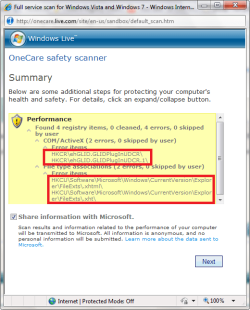
I use the MS Onecare registry cleaner too and I never had any problems. And it also makes you a restore point. But whenever, I do a scan, it always skips 4 items and I don't know why. These 4 items look strange and they get skipped everytime I try to clean them with the scanner. Does anybody know why???
 

Attachments

  • regscan.png
    regscan.png
    28.3 KB · Views: 25

My Computer My Computer

At a glance

Windows 7 Ultimate 32 Bit, Windows Developer ...Intel Pentium Dual CPU E2180@2GHzNVIDIA GeForce 7200 GS
Computer Manufacturer/Model Number
Custom Built
OS
Windows 7 Ultimate 32 Bit, Windows Developer Preview, Linux Mint 9 Gnome 32 Bit
CPU
Intel Pentium Dual CPU E2180@2GHz
Motherboard
Elitegroup 671T-M3
Graphics Card(s)
NVIDIA GeForce 7200 GS
Monitor(s) Displays
AOC TFT1560 15" LCD Monitor
Screen Resolution
1024x768
Keyboard
Logitech USB Keyboard
MS Onecare registry cleaner
This is the only blind registry cleaner I would use.

IF you know what you are doing, then CCleaners Reg Cleaner can come in handy at times, but you should not run it blind. Make your selections knowing what you are selecting and have it make back ups just in case.

Every Single Reg Cleaner on the market that advertises itself as a benefit to speed and clutter should be considered SCAMWare and avoided. Especially those that run a Blind Clean. (you can't see what it is cleaning or doing. Or give you so many lines to go through that it is virtually impossible to know what it is really doing and most people give up and run it on all lines.

No, ALL Reg Cleaners are bad in the wrong hands. And the wrong Hands are the hands of those who have no idea what they are even looking at.

If you don't know and you have to ask if it is going to damage your system? You are better off not using it.
 

My Computer My Computer

At a glance

Win 7 Ultimate 32bitC2D E6600 2.4Ghz4G Kingston KHX5400D2EVGA GTX 570 HD SC (012-P3-1573-KR)
Computer Manufacturer/Model Number
Self Built
OS
Win 7 Ultimate 32bit
CPU
C2D E6600 2.4Ghz
Motherboard
Intel D965WH
Memory
4G Kingston KHX5400D2
Graphics Card(s)
EVGA GTX 570 HD SC (012-P3-1573-KR)
Sound Card
On-Board
Monitor(s) Displays
Samsung 226BW
Screen Resolution
1680 x 1050
Hard Drives
2 x 250 Seagate Barracuda
2 x 500 Seagate Barracuda (Raid1)
PSU
Corsair TX750W
Case
In-Win C589
Cooling
Stock Intel Cooling
I took a moment to look at Ace Utilities and I have to tell you straight.

You got took.

Everything they charge for and put in a pretty little package can be accomplished with a few well known, well established free tools.

CCleaner
ATF-Cleaner
MRU-Blaster
Defraggler

These 4 programs alone will do more for you in the long run and are far far far more safe than some
$30 dollar piece of Eye Candy Wrapper Ware.

Another $30 piece of garbage that is touted as "Recommended by Industry Experts"?
Registry Mechanic.

Who exactly are these experts, and what exactly are they experts of?

"I'm an expert in clicking on desktop icons that appear out of nowhere when I visit risqué sites" WOO HOO.

Last Edit... The only other point I wanted to make was that you have to realize that almost all of these sites that advertise these kinds of tools are actually getting paid for their reviews. Not all, but the largest majority of the big commercial sites like Cnet do get paid for their recommendations. Again, maybe not all, but I bet it's a large majority.
 
Last edited:

My Computer My Computer

At a glance

Win 7 Ultimate 32bitC2D E6600 2.4Ghz4G Kingston KHX5400D2EVGA GTX 570 HD SC (012-P3-1573-KR)
Computer Manufacturer/Model Number
Self Built
OS
Win 7 Ultimate 32bit
CPU
C2D E6600 2.4Ghz
Motherboard
Intel D965WH
Memory
4G Kingston KHX5400D2
Graphics Card(s)
EVGA GTX 570 HD SC (012-P3-1573-KR)
Sound Card
On-Board
Monitor(s) Displays
Samsung 226BW
Screen Resolution
1680 x 1050
Hard Drives
2 x 250 Seagate Barracuda
2 x 500 Seagate Barracuda (Raid1)
PSU
Corsair TX750W
Case
In-Win C589
Cooling
Stock Intel Cooling
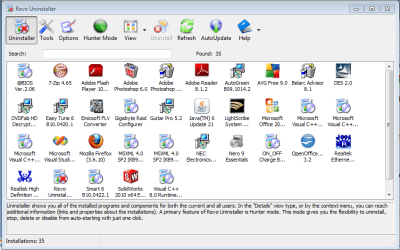
I have tried a strategy for a while now that seems to work. I don't mess with the registry unless it is absolutely needed and I am pretty certain I know what I am doing. Then whenever I uninstall software I don't want, I use the free version of revo uninstaller. It seems to do a really great job of uninstalling cleanly and it shows you all the leftover files and gives you the option of deleting all of them. Seems to work way better than the standard windows utility.

So far I don't use any registry cleaners. Time will tell though.
 

Attachments

  • Capture1.PNG
    Capture1.PNG
    40.7 KB · Views: 10

My Computer My Computer

At a glance

Windows 7 Pro 64i7-96012GB Corsair DDR3ATI V5800
Computer Manufacturer/Model Number
Custom Built
OS
Windows 7 Pro 64
CPU
i7-960
Motherboard
Gigabyte X58
Memory
12GB Corsair DDR3
Graphics Card(s)
ATI V5800
Sound Card
On Board
Monitor(s) Displays
27" Samsung, 22" Asus
Hard Drives
160GB Intel SSD X 2
1TB 7200 RPM bulk storage
1TB 7200 RPM Back Up drive
PSU
Corsair 850W modular
Case
Cooler Master HAF 932
Cooling
Air cooled, Cooler Master Htper 212
Why not leave all that's well alone. I stopped using these "Cleaners" back in Windows XP.
 

My Computers My Computers

  • At a glance

    WIN10AMD Ryzen 5 3600 6-Core Processor 3.59 GHz16.0 GB
    Computer type
    PC/Desktop
    Computer Manufacturer/Model Number
    PowerSpec G164
    OS
    WIN10
    CPU
    AMD Ryzen 5 3600 6-Core Processor 3.59 GHz
    Memory
    16.0 GB
    Internet Speed
    VERY FAST>>>!!!
  • Antivirus
    ESET Security Premium
  • Like
Reactions: JMH
Thanks Tepid.....But I use Ace Utilities for more than just it's Registry Cleaner. It has other functionality. I wasn't aware of these other utilities, so I may have shelled out $30 for nothing.

Just for the record, I have never had a problem using CCleaner, and have used it since it's inception. As was posted above, and what's true for me, I have a backup of everything, so if things get real messed up from Ace Utilities' Registry Cleaner, I'll just re-format. By this time, I think I could do that in my sleep.

But seriously, I have experienced no problems so for using Ace Utilities.:) But I respect everyones opinions on the subject.
 

My Computer My Computer

At a glance

Windows 7 Home Premium 64 bitCore 178 gigs
Computer Manufacturer/Model Number
ASUS G73JH-X1
OS
Windows 7 Home Premium 64 bit
CPU
Core 17
Memory
8 gigs
Screen Resolution
1920 x 1080
Hard Drives
500GB
Mouse
External Verbatim Nano
Internet Speed
40/20
  • Like
Reactions: JMH
Back
Top