I WANT a duplicate Icon...How?

SheriM

New member
Local time
5:57 AM
Messages
8
Can someone please tell me how to duplicate the Internet Explorer icon on teh task bar so that I have two.

The reason I want to do this is that I listen to the radio at work which creates a window that I minimize all day. BUT then the problem/frustration is that when I want to go onto the internet I have to right click and select Internet Explorer. I would much rather just click on a separate Internet Explorer shortcut button and have it open.

Is this possible?
 

My Computer My Computer

OS
Windows 7

My Computer My Computer

Computer type
PC/Desktop
Computer Manufacturer/Model Number
Custom Build
OS
Windows 7 Ultimate x64 SP1
CPU
QuadCore Intel Core i5-4440, 3100 MHz
Motherboard
ASRock B85 Pro4
Memory
Kingston HyperX Black 8GB DDR3 1600MHz CL9 Dual Channel
Graphics Card(s)
Gigabyte GeForce GTX 770 OC WindForce 3X 2GB DDR5 256-bit
Sound Card
On Board
Monitor(s) Displays
BenQ +VA GW2460HM 24 inch 4 ms GTG
Screen Resolution
1920x1080
Hard Drives
Samsung SSD 840 EVO 120GB
WD Black 500GB SATA III 64MB - 7200 RPM
PSU
Super Flower Golden Green SF-600P14XE(HX) 600W
Case
Zalman Z3 Plus
Browser
Palemoon
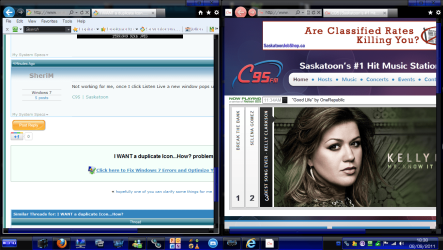
If this is what you mean it is not working....If I click on the Icon the 3 windows I am currently viewing show up I can't click and drag any of those ones anywhere.
 

My Computer My Computer

OS
Windows 7
I think I see my problem, the window that the "listen live" radio station leaves up is not one with a webpage and a logo that I can drag it is just a plain window that says I am listening live and I can close it or minimize it. Maybe I can't make it a shortcut with that.
 

My Computer My Computer

OS
Windows 7
Also if I try to Pin the Website from the radio station it just pin's it into the Internet Explorer list not as a button
 

My Computer My Computer

OS
Windows 7
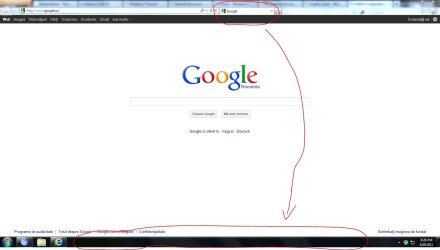
I made a small sketch. See if you can drag the tab from the browser into the windows taskbar (in a free space). If you can't do it, please post the link of the radio, to exactly test it myself.
 

Attachments

  • Capture.JPG
    Capture.JPG
    63.2 KB · Views: 4

My Computer My Computer

Computer type
PC/Desktop
Computer Manufacturer/Model Number
Custom Build
OS
Windows 7 Ultimate x64 SP1
CPU
QuadCore Intel Core i5-4440, 3100 MHz
Motherboard
ASRock B85 Pro4
Memory
Kingston HyperX Black 8GB DDR3 1600MHz CL9 Dual Channel
Graphics Card(s)
Gigabyte GeForce GTX 770 OC WindForce 3X 2GB DDR5 256-bit
Sound Card
On Board
Monitor(s) Displays
BenQ +VA GW2460HM 24 inch 4 ms GTG
Screen Resolution
1920x1080
Hard Drives
Samsung SSD 840 EVO 120GB
WD Black 500GB SATA III 64MB - 7200 RPM
PSU
Super Flower Golden Green SF-600P14XE(HX) 600W
Case
Zalman Z3 Plus
Browser
Palemoon
On the popup, click and drag the small icon on the left of the link. The small C95. Drag it on the taskbar. It should work now.
 

My Computer My Computer

Computer type
PC/Desktop
Computer Manufacturer/Model Number
Custom Build
OS
Windows 7 Ultimate x64 SP1
CPU
QuadCore Intel Core i5-4440, 3100 MHz
Motherboard
ASRock B85 Pro4
Memory
Kingston HyperX Black 8GB DDR3 1600MHz CL9 Dual Channel
Graphics Card(s)
Gigabyte GeForce GTX 770 OC WindForce 3X 2GB DDR5 256-bit
Sound Card
On Board
Monitor(s) Displays
BenQ +VA GW2460HM 24 inch 4 ms GTG
Screen Resolution
1920x1080
Hard Drives
Samsung SSD 840 EVO 120GB
WD Black 500GB SATA III 64MB - 7200 RPM
PSU
Super Flower Golden Green SF-600P14XE(HX) 600W
Case
Zalman Z3 Plus
Browser
Palemoon
Well I can drag them to the task bar ut they don't appear as a button a menu pops up saying Pin to Internet Explorer and then goes onto the list within the IE menu
 

My Computer My Computer

OS
Windows 7
What version of IE do you have?
 

My Computer My Computer

Computer type
PC/Desktop
Computer Manufacturer/Model Number
Custom Build
OS
Windows 7 Ultimate x64 SP1
CPU
QuadCore Intel Core i5-4440, 3100 MHz
Motherboard
ASRock B85 Pro4
Memory
Kingston HyperX Black 8GB DDR3 1600MHz CL9 Dual Channel
Graphics Card(s)
Gigabyte GeForce GTX 770 OC WindForce 3X 2GB DDR5 256-bit
Sound Card
On Board
Monitor(s) Displays
BenQ +VA GW2460HM 24 inch 4 ms GTG
Screen Resolution
1920x1080
Hard Drives
Samsung SSD 840 EVO 120GB
WD Black 500GB SATA III 64MB - 7200 RPM
PSU
Super Flower Golden Green SF-600P14XE(HX) 600W
Case
Zalman Z3 Plus
Browser
Palemoon
it worked ok for me , do you have the radio station open in a new window when you open the site, if so change your settings so it wont open in a new window then drag the tab to the taskbar.
2011-09-08_1838.png
 

My Computer My Computer

Computer Manufacturer/Model Number
Hewlett packard/p6512uk
OS
Microsoft Windows 7 Home Premium 64-bit 7600
CPU
IIx4 amd athelon 635 processor
Motherboard
FOXCONN 2AA9
Memory
2x2gb
Graphics Card(s)
ati radeon HD 5450
Sound Card
(1) Realtek High Definition Audio (2) AMD High Definition
Monitor(s) Displays
samsung lcd tv 32"
Screen Resolution
1360x 768
Hard Drives
(1) WDC WD10 01FAES-60Z2A0 SATA Disk Device (2) Maxtor OneTouch USB Device (3) ST310003 33AS USB Device (4) WD My Book 1111 USB Device
PSU
?
Cooling
air!
Keyboard
wireless hp
Mouse
wireless Hp,optical
Internet Speed
1.10mb/s
Antivirus
MSE
Browser
Firefox
Internet Explorer 8
 

My Computer My Computer

OS
Windows 7
Get IE 9 and try again. IE 8 doesn't support this feature I believe.
 

My Computer My Computer

Computer type
PC/Desktop
Computer Manufacturer/Model Number
Custom Build
OS
Windows 7 Ultimate x64 SP1
CPU
QuadCore Intel Core i5-4440, 3100 MHz
Motherboard
ASRock B85 Pro4
Memory
Kingston HyperX Black 8GB DDR3 1600MHz CL9 Dual Channel
Graphics Card(s)
Gigabyte GeForce GTX 770 OC WindForce 3X 2GB DDR5 256-bit
Sound Card
On Board
Monitor(s) Displays
BenQ +VA GW2460HM 24 inch 4 ms GTG
Screen Resolution
1920x1080
Hard Drives
Samsung SSD 840 EVO 120GB
WD Black 500GB SATA III 64MB - 7200 RPM
PSU
Super Flower Golden Green SF-600P14XE(HX) 600W
Case
Zalman Z3 Plus
Browser
Palemoon
It worked! Thank you so much!!!
 

My Computer My Computer

OS
Windows 7
Back
Top