I want to format a system disk

Odd Job

New member
Member
Local time
8:27 PM
Messages
93
I want to format a disk on my PC but it is a system disk. Can I change attributes on this disk to allow me to format it. It has an old installation of windows 7 which is no longer used and I want to use it for storage and backups, and get rid of the win 7 installation on it.

Can I change my current C: drive with my current version of Win 7 to a system disk, to enable me to format the old windows 7 disk (D:).

Thanks for your help.
 

Attachments

  • Disks.JPG
    Disks.JPG
    89 KB · Views: 147

My Computer My Computer

At a glance

Windows 7 professional X 64Phenom 11 X 6 1090t 3.2 GHz8 gb Corsair 1600MHz C9 DDR32 X Saphire HD5770 Vapour X in crossfire
Computer type
PC/Desktop
Computer Manufacturer/Model Number
Self build
OS
Windows 7 professional X 64
CPU
Phenom 11 X 6 1090t 3.2 GHz
Motherboard
Asus Crosshair III Formula 790FX
Memory
8 gb Corsair 1600MHz C9 DDR3
Graphics Card(s)
2 X Saphire HD5770 Vapour X in crossfire
Sound Card
SupremeFX X-Fi
Monitor(s) Displays
Samsung 24" full HD
Screen Resolution
1920 X 1080
Hard Drives
1 X 1Tb Sata HHD
PSU
Corsair TX 650 watt
Case
Antec 902 ultimate gamer case
Cooling
Zalman CNPS 9900
What appears to be happening is boot files are being used on disk0 (old D)
to boot C:
I would unplug sata connector to old D (disk 0) and plug it into c:. Leave old D disconnected for the moment.
Run
Startup Repair
up to 3 times
to C: boots in its own right on the disk 0 port.
Replace old D to the sata port C: was connected to and see if you can format old D now. It may require the disk to be cleaned. But try to get c: booting on its own first.
Strongly recommend you have an image of C: & F: (disk 2) first for security.
 

My Computer My Computer

At a glance

Windows 7x64 Home Premium SP1Intel i7 2600kG.Skill Ripjaws (DDR3-1600) 2x4GBNvidia GeForce GTS 450; Intel HD Graphics 300...
Computer type
PC/Desktop
Computer Manufacturer/Model Number
Own build
OS
Windows 7x64 Home Premium SP1
CPU
Intel i7 2600k
Motherboard
ASUS P8Z68 Deluxe
Memory
G.Skill Ripjaws (DDR3-1600) 2x4GB
Graphics Card(s)
Nvidia GeForce GTS 450; Intel HD Graphics 3000(GT2+)
Monitor(s) Displays
Dell Ultrasharp IPS panel U2311H, Samsung SyncMaster P2350
Screen Resolution
1920x1080
Hard Drives
Samsung 850 Pro SSD 256GB, Samsung SSD 840 120GB, Seagates 1TB Barracuda ST31000528AS x2
PSU
Seasonic M12II 520W
Case
Lian Li Lancool PC-K60
Cooling
Case: 1x120mm, 3x140mm CPU: Hyper 212+
Keyboard
Logitech MK520 (wireless)
Mouse
Logitech MK520
Internet Speed
6-7 Mbps
Antivirus
Norton Security Premium, Malwarebytes on 2 (MSE on 3rd PC)
Browser
FireFox
Other Info
Audio: Logitech Z523 2.1
I've just thought of a possible cheat.

What if I booted from my windows 7 cd. Go for an install on drive D: (the one I want to format), and when I get to the section where you choose which disk to install on (and allows you to format said disk before installation), cancel the install after the format.

Would that work ?
 

My Computer My Computer

At a glance

Windows 7 professional X 64Phenom 11 X 6 1090t 3.2 GHz8 gb Corsair 1600MHz C9 DDR32 X Saphire HD5770 Vapour X in crossfire
Computer type
PC/Desktop
Computer Manufacturer/Model Number
Self build
OS
Windows 7 professional X 64
CPU
Phenom 11 X 6 1090t 3.2 GHz
Motherboard
Asus Crosshair III Formula 790FX
Memory
8 gb Corsair 1600MHz C9 DDR3
Graphics Card(s)
2 X Saphire HD5770 Vapour X in crossfire
Sound Card
SupremeFX X-Fi
Monitor(s) Displays
Samsung 24" full HD
Screen Resolution
1920 X 1080
Hard Drives
1 X 1Tb Sata HHD
PSU
Corsair TX 650 watt
Case
Antec 902 ultimate gamer case
Cooling
Zalman CNPS 9900
If that did work you may end up not being able to boot off of C at all then if what MJF says is true. I'd follow his advice first.,

But secondly, I bet of you tried you'd find that the "FDISK" options during install are not usable in that scenario. I've run into that myself :(
 

My Computer My Computer

At a glance

Windows 7 x64 Ultimatei7 96012 Gig Corsair DominatorNvidia 480
Computer Manufacturer/Model Number
Scratch built
OS
Windows 7 x64 Ultimate
CPU
i7 960
Motherboard
Asus P6X58D
Memory
12 Gig Corsair Dominator
Graphics Card(s)
Nvidia 480
Sound Card
Maudio Delta 44 + breakout box
Monitor(s) Displays
Dell UltraSharp U2410 24in and Samsung 21 dual monitors
Screen Resolution
1920x1200 and 1280x1024
Hard Drives
Primary: Intel X-25M G2 160G SSD
Secondary: Segate baracuda 1.0 TB
HDs in AHCI mode.
PSU
Corasair TX850
Case
Cooler Master HAF
Cooling
Corsair H50
Keyboard
Logitech G15 + N52 game pad
Mouse
Logitech MX518
Internet Speed
15kbs down 4.5kbps up
Other Info
WEI 7.6
CPU & RAM 7.6
Graphics 7.9
Hard disk 7.7
I've just thought of a possible cheat.

What if I booted from my windows 7 cd. Go for an install on drive D: (the one I want to format), and when I get to the section where you choose which disk to install on (and allows you to format said disk before installation), cancel the install after the format.

Would that work ?

Well yes it would probably, but you would still have the issue that the poster above you pointed out.

The reason Windows won't let you format it at the moment is because "Windows Old" contains your BCD (Windows Bootloader). because you (for whatever reason) didn't allow Windows to create the 100MB System Reserved partition, your new install of Windows has just tacked itself onto the existing BCD on D:\

Basically, if you did what you just said, then your system won't boot. Which means you will have to follow the poster above you's advice and run Startup Repair 3 times anyway. You may as well just unplug C, run startup repair until the system boots, and then format it afterwards. At least that way you wont accidentally break your system and leave it unbootable.
 

My Computer My Computer

At a glance

Windows 10 Pro x64Intel Core i5 7400 @ 3.00GHz8GB 2133Mhz DDR4 (OEM supplied)Gygabyte Windforce GTX 1050Ti (Factory Overcl...
Computer type
PC/Desktop
Computer Manufacturer/Model Number
Medion Erazer (note to self: insert model number) - with custom additions
OS
Windows 10 Pro x64
CPU
Intel Core i5 7400 @ 3.00GHz
Motherboard
OEM supllied with PC
Memory
8GB 2133Mhz DDR4 (OEM supplied)
Graphics Card(s)
Gygabyte Windforce GTX 1050Ti (Factory Overclocked)
Sound Card
Realtek
Monitor(s) Displays
Acer Al1980 + HKC
Screen Resolution
1360*768(HKC) / 1280*1024(Acer)
Hard Drives
1TB Toshiba
1TB WD Caviar Green
120GB Samsung Evo 840
PSU
OEM supplied (no power rating on case)
Case
OEM Supplied
Cooling
Stock
Keyboard
Logitech Wireless
Mouse
Logitect Wireless
Internet Speed
40Mb/s Down 10Mb/s Up
Antivirus
Defender
Browser
Firefox
I would use the bootable CD of Partition Wizard for the operation. Then you need not jump thru the 10 hops when you are using the system. It makes you independent of the system. And you can recreate the MBR too with it.
 

My Computer My Computer

At a glance

Vista, Windows7, Mint Mate, Zorin, Windows 8from 1.6GHz Duo to i7
Computer Manufacturer/Model Number
HP, Dell, Gateway, Toshiba - 4 laptops and 2 desktops
OS
Vista, Windows7, Mint Mate, Zorin, Windows 8
CPU
from 1.6GHz Duo to i7
Monitor(s) Displays
2x HP w2207
Hard Drives
5x HDD, 7x SSD, 12x Externals
Keyboard
with trackball - no mices
Mouse
Trackball mice
Internet Speed
DSL 6000
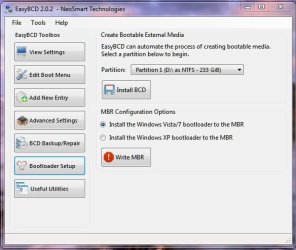
Or how about this ?
 

Attachments

  • EasyBCD.JPG
    EasyBCD.JPG
    44.6 KB · Views: 111

My Computer My Computer

At a glance

Windows 7 professional X 64Phenom 11 X 6 1090t 3.2 GHz8 gb Corsair 1600MHz C9 DDR32 X Saphire HD5770 Vapour X in crossfire
Computer type
PC/Desktop
Computer Manufacturer/Model Number
Self build
OS
Windows 7 professional X 64
CPU
Phenom 11 X 6 1090t 3.2 GHz
Motherboard
Asus Crosshair III Formula 790FX
Memory
8 gb Corsair 1600MHz C9 DDR3
Graphics Card(s)
2 X Saphire HD5770 Vapour X in crossfire
Sound Card
SupremeFX X-Fi
Monitor(s) Displays
Samsung 24" full HD
Screen Resolution
1920 X 1080
Hard Drives
1 X 1Tb Sata HHD
PSU
Corsair TX 650 watt
Case
Antec 902 ultimate gamer case
Cooling
Zalman CNPS 9900
I would have to say that one sata lead swap and startup repair 3 times sounds about as easy as you can get it. C: is already marked active.
It couldn't be easier. I must be missing something.
 

My Computer My Computer

At a glance

Windows 7x64 Home Premium SP1Intel i7 2600kG.Skill Ripjaws (DDR3-1600) 2x4GBNvidia GeForce GTS 450; Intel HD Graphics 300...
Computer type
PC/Desktop
Computer Manufacturer/Model Number
Own build
OS
Windows 7x64 Home Premium SP1
CPU
Intel i7 2600k
Motherboard
ASUS P8Z68 Deluxe
Memory
G.Skill Ripjaws (DDR3-1600) 2x4GB
Graphics Card(s)
Nvidia GeForce GTS 450; Intel HD Graphics 3000(GT2+)
Monitor(s) Displays
Dell Ultrasharp IPS panel U2311H, Samsung SyncMaster P2350
Screen Resolution
1920x1080
Hard Drives
Samsung 850 Pro SSD 256GB, Samsung SSD 840 120GB, Seagates 1TB Barracuda ST31000528AS x2
PSU
Seasonic M12II 520W
Case
Lian Li Lancool PC-K60
Cooling
Case: 1x120mm, 3x140mm CPU: Hyper 212+
Keyboard
Logitech MK520 (wireless)
Mouse
Logitech MK520
Internet Speed
6-7 Mbps
Antivirus
Norton Security Premium, Malwarebytes on 2 (MSE on 3rd PC)
Browser
FireFox
Other Info
Audio: Logitech Z523 2.1
Either mjf or whs solutions will work:

Swap DISK0 cable to Disk2. Leave DISK0 unplugged, boot the Win7 DVD Repair console or Repair CD to run Startup Repair up to 3 separate times with reboots to write the System boot files to C. http://www.sevenforums.com/tutorials/105541-startup-repair-run-3-separate-times.html

When you plug back in D, wipe it with Diskpart then repartition in Disk mgmt. http://www.sevenforums.com/tutorials/52129-disk-clean-clean-all-diskpart-command.html

Or you can use free Partition Wizard bootable CD so you have a picture of what you're doing. Swap Disk0 and disk2 cables, or set Disk2 as first HD to boot in BIOS setup. Rightclick D to Wipe the disk, Apply steps then run Win7 DVD Startup Repair x3. Win7 should start on its own.
 
Last edited:
Odd Job,
If you followed my steps in post 2 you would have the job finished in under 30 minutes.

The repair function in windows 7 takes care of all the rebuilding steps. You basically have to "press go" 3 times. I actually think Partition Wizard may confuse you more for what should be a very simple task.

The only step of the process I would recommend Partition Wizard for (for this task) is to safely clean up your old drive D:. Diskpart is fine to clean but you need to make sure you have selected the correct disk before applying clean. Also "Clean all" will take quite some time and gives no feedback. Partition wizard will give you more visual feedback for the Clean component.
 

My Computer My Computer

At a glance

Windows 7x64 Home Premium SP1Intel i7 2600kG.Skill Ripjaws (DDR3-1600) 2x4GBNvidia GeForce GTS 450; Intel HD Graphics 300...
Computer type
PC/Desktop
Computer Manufacturer/Model Number
Own build
OS
Windows 7x64 Home Premium SP1
CPU
Intel i7 2600k
Motherboard
ASUS P8Z68 Deluxe
Memory
G.Skill Ripjaws (DDR3-1600) 2x4GB
Graphics Card(s)
Nvidia GeForce GTS 450; Intel HD Graphics 3000(GT2+)
Monitor(s) Displays
Dell Ultrasharp IPS panel U2311H, Samsung SyncMaster P2350
Screen Resolution
1920x1080
Hard Drives
Samsung 850 Pro SSD 256GB, Samsung SSD 840 120GB, Seagates 1TB Barracuda ST31000528AS x2
PSU
Seasonic M12II 520W
Case
Lian Li Lancool PC-K60
Cooling
Case: 1x120mm, 3x140mm CPU: Hyper 212+
Keyboard
Logitech MK520 (wireless)
Mouse
Logitech MK520
Internet Speed
6-7 Mbps
Antivirus
Norton Security Premium, Malwarebytes on 2 (MSE on 3rd PC)
Browser
FireFox
Other Info
Audio: Logitech Z523 2.1
OK guys thanks for the solutions. I guess I was apprehensive about swapping disk cables about as I have 3 identical disks and am not too sure which is which on the MBoard. And the reason I suggested Easy BCD was because I thought it might repair disk C in one step instead of 3.

I'll attempt your solution mjf. Thanks.
 

My Computer My Computer

At a glance

Windows 7 professional X 64Phenom 11 X 6 1090t 3.2 GHz8 gb Corsair 1600MHz C9 DDR32 X Saphire HD5770 Vapour X in crossfire
Computer type
PC/Desktop
Computer Manufacturer/Model Number
Self build
OS
Windows 7 professional X 64
CPU
Phenom 11 X 6 1090t 3.2 GHz
Motherboard
Asus Crosshair III Formula 790FX
Memory
8 gb Corsair 1600MHz C9 DDR3
Graphics Card(s)
2 X Saphire HD5770 Vapour X in crossfire
Sound Card
SupremeFX X-Fi
Monitor(s) Displays
Samsung 24" full HD
Screen Resolution
1920 X 1080
Hard Drives
1 X 1Tb Sata HHD
PSU
Corsair TX 650 watt
Case
Antec 902 ultimate gamer case
Cooling
Zalman CNPS 9900
Of the hundreds of times we have helped here with this very same operation - both using Diskpart and PW CD - there are times when OP doesn't feel comfortable changing the cables or cannot for another reason (e.g. laptop).

In this case, use free PW CD to wipe the old Win7 partition first so that there is no System drive to interfere when you mark the new Win7 partition Active (as it already is here) then run Startup Repair up to 3 separate times with reboots.

The reason to favor swapping cables in this case is because your old Win7 System partition HD is in DISK0 slot, which would be better suited for the new OS System HD. The reason for this is because if a data partition on DISK0 later becomes marked Active, it can derail the repair of Win7 which looks for the first Active partition to write the System MBR to. So it's best overall to have your current Win7 System HD in DISK0 slot.
 
Last edited:
The reason to favor swapping cables in this case is because your old Win7 System partition HD is in DISK0 slot, which would be better suited for the new OS System HD. The reason for this is because if a data partition on DISK0 later becomes marked Active, it can derail the repair of Win7 which looks for the first Active partition to write the System MBR to. So it's best overall to have your current Win7 System HD in DISK0 slot.

The principle here is certainly one of the reasons I suggested swapping cables. However, the MBR resides at the front of the HDD (First 512 bytes) and other critical boot information resides on the active partition. Also clearly this wasn't a laptop and swapping sata cables is not an onerous task on a desktop. Most people will need to do it at some stage.

As I stated earlier, the Partition Wizard could be useful for disk cleanup of the "old D:" disk. The documentation for Partition Wizard does not suggest it could replace all the roles, if any, of the Windows System Repair functions in this situation.
 
Last edited:

My Computer My Computer

At a glance

Windows 7x64 Home Premium SP1Intel i7 2600kG.Skill Ripjaws (DDR3-1600) 2x4GBNvidia GeForce GTS 450; Intel HD Graphics 300...
Computer type
PC/Desktop
Computer Manufacturer/Model Number
Own build
OS
Windows 7x64 Home Premium SP1
CPU
Intel i7 2600k
Motherboard
ASUS P8Z68 Deluxe
Memory
G.Skill Ripjaws (DDR3-1600) 2x4GB
Graphics Card(s)
Nvidia GeForce GTS 450; Intel HD Graphics 3000(GT2+)
Monitor(s) Displays
Dell Ultrasharp IPS panel U2311H, Samsung SyncMaster P2350
Screen Resolution
1920x1080
Hard Drives
Samsung 850 Pro SSD 256GB, Samsung SSD 840 120GB, Seagates 1TB Barracuda ST31000528AS x2
PSU
Seasonic M12II 520W
Case
Lian Li Lancool PC-K60
Cooling
Case: 1x120mm, 3x140mm CPU: Hyper 212+
Keyboard
Logitech MK520 (wireless)
Mouse
Logitech MK520
Internet Speed
6-7 Mbps
Antivirus
Norton Security Premium, Malwarebytes on 2 (MSE on 3rd PC)
Browser
FireFox
Other Info
Audio: Logitech Z523 2.1
Marking a partition Inactive does not always work to redirect the boot files to new Active partition using Startup Repair x3. But it will work if you unplug the old System partition.

I am not sure about Partition Wizard MBR rebuild function working for a situation like this, Michael, since there is no System MBR on the target disk to be rebuilt. It is a fairly new feature which needs to be tested.
 
Well I managed to complete the task without disconnecting anything, and I learned a bit more along the way.

How I did it: I used EasyBCD (the program I referenced in an earlier post) and created a new MBR on the C: drive. I went into BIOS and changed the disk boot priority (after I sussed which disk had the right windows installation on as I have 3 identical disks, all with the same ID number), and rebooted. I booted straight into windows. When I checked in disk manager, C: was showing as the system disk and I was able to format the windows 7 old disk.

I tried the System repair option, well would have if it was an option. For some reason, every time I booted from the windows 7 disk it went straight into install and I never got the system repair option.

Also, after the repair, I had to re activate windows (twice, after reordering the boot drive sequence in BIOS). Is this normal ? was it due to changing the boot sequence ? or something else ?
 

My Computer My Computer

At a glance

Windows 7 professional X 64Phenom 11 X 6 1090t 3.2 GHz8 gb Corsair 1600MHz C9 DDR32 X Saphire HD5770 Vapour X in crossfire
Computer type
PC/Desktop
Computer Manufacturer/Model Number
Self build
OS
Windows 7 professional X 64
CPU
Phenom 11 X 6 1090t 3.2 GHz
Motherboard
Asus Crosshair III Formula 790FX
Memory
8 gb Corsair 1600MHz C9 DDR3
Graphics Card(s)
2 X Saphire HD5770 Vapour X in crossfire
Sound Card
SupremeFX X-Fi
Monitor(s) Displays
Samsung 24" full HD
Screen Resolution
1920 X 1080
Hard Drives
1 X 1Tb Sata HHD
PSU
Corsair TX 650 watt
Case
Antec 902 ultimate gamer case
Cooling
Zalman CNPS 9900
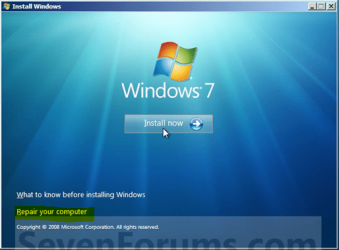
Do you have a retail WIn7 installation DVD? The Repair console should be on the second screen.
Capture.PNG


A Repair CD should boot directly into WinRE: http://www.sevenforums.com/performance-maintenance/51100-repair-cd-system-repair-disk.html
http://www.sevenforums.com/tutorials/2083-system-repair-disc-create.html

If you left C as DISK2 make sure no partitions on DISK 0 or 1 are incorrectly marked Active or it will derail the System MBR to them during any future repairs.

Thanks for reporting back about EasyBCD 2.0. I believe it has the same Rebuild MBR feature as on new version PW CD.
 
I don't think it's desirable to have disk 2 as C: but if you're happy who cares.
The MBR fixes in EasyBCD & PW are by product capabilities which again is fine.
Your Install DVD should have done it but I suggest you go to "Backup & Restore" and make a System Repair DVD (or two). It would have done the same job automatically with "Repair" or manually with Bootrec under a command prompt.

Glad it worked out for you. Any more re-activations required though, would be a worry.
 

My Computer My Computer

At a glance

Windows 7x64 Home Premium SP1Intel i7 2600kG.Skill Ripjaws (DDR3-1600) 2x4GBNvidia GeForce GTS 450; Intel HD Graphics 300...
Computer type
PC/Desktop
Computer Manufacturer/Model Number
Own build
OS
Windows 7x64 Home Premium SP1
CPU
Intel i7 2600k
Motherboard
ASUS P8Z68 Deluxe
Memory
G.Skill Ripjaws (DDR3-1600) 2x4GB
Graphics Card(s)
Nvidia GeForce GTS 450; Intel HD Graphics 3000(GT2+)
Monitor(s) Displays
Dell Ultrasharp IPS panel U2311H, Samsung SyncMaster P2350
Screen Resolution
1920x1080
Hard Drives
Samsung 850 Pro SSD 256GB, Samsung SSD 840 120GB, Seagates 1TB Barracuda ST31000528AS x2
PSU
Seasonic M12II 520W
Case
Lian Li Lancool PC-K60
Cooling
Case: 1x120mm, 3x140mm CPU: Hyper 212+
Keyboard
Logitech MK520 (wireless)
Mouse
Logitech MK520
Internet Speed
6-7 Mbps
Antivirus
Norton Security Premium, Malwarebytes on 2 (MSE on 3rd PC)
Browser
FireFox
Other Info
Audio: Logitech Z523 2.1
If you left C as DISK2 make sure no partitions on DISK 0 or 1 are incorrectly marked Active or it will derail the System MBR to them during any future repairs.

Thanks for reporting back about EasyBCD 2.0. I believe it has the same Rebuild MBR feature as on new version PW CD.

So how do I change disk attributes for D: and E: so that they are no longer marked active ?
 

Attachments

  • Disks.JPG
    Disks.JPG
    91.1 KB · Views: 21

My Computer My Computer

At a glance

Windows 7 professional X 64Phenom 11 X 6 1090t 3.2 GHz8 gb Corsair 1600MHz C9 DDR32 X Saphire HD5770 Vapour X in crossfire
Computer type
PC/Desktop
Computer Manufacturer/Model Number
Self build
OS
Windows 7 professional X 64
CPU
Phenom 11 X 6 1090t 3.2 GHz
Motherboard
Asus Crosshair III Formula 790FX
Memory
8 gb Corsair 1600MHz C9 DDR3
Graphics Card(s)
2 X Saphire HD5770 Vapour X in crossfire
Sound Card
SupremeFX X-Fi
Monitor(s) Displays
Samsung 24" full HD
Screen Resolution
1920 X 1080
Hard Drives
1 X 1Tb Sata HHD
PSU
Corsair TX 650 watt
Case
Antec 902 ultimate gamer case
Cooling
Zalman CNPS 9900
Thank you. Disks all now sorted.
 

My Computer My Computer

At a glance

Windows 7 professional X 64Phenom 11 X 6 1090t 3.2 GHz8 gb Corsair 1600MHz C9 DDR32 X Saphire HD5770 Vapour X in crossfire
Computer type
PC/Desktop
Computer Manufacturer/Model Number
Self build
OS
Windows 7 professional X 64
CPU
Phenom 11 X 6 1090t 3.2 GHz
Motherboard
Asus Crosshair III Formula 790FX
Memory
8 gb Corsair 1600MHz C9 DDR3
Graphics Card(s)
2 X Saphire HD5770 Vapour X in crossfire
Sound Card
SupremeFX X-Fi
Monitor(s) Displays
Samsung 24" full HD
Screen Resolution
1920 X 1080
Hard Drives
1 X 1Tb Sata HHD
PSU
Corsair TX 650 watt
Case
Antec 902 ultimate gamer case
Cooling
Zalman CNPS 9900
Back
Top