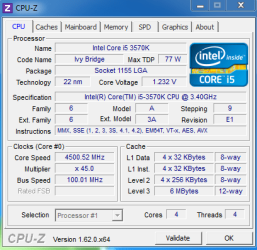
I5 3570K @4.5GHZ - is this ok?

rico798321

New member
Local time
9:39 PM
Messages
17
Hi,
Recently rebuilt into an intel system from my old AMD 1100T. I've overclocked the I5 3570K to 4.5GHZ using the Asrock AXTU tuner. I was expecting (and dreading) increasing the voltage however I have not needed to do this? Also my temps using the Nocura DH-14 I installed are only about 40 (28-30 when Idle) when playing Battlefield 3, Crysis etc.

Is this normal or should I increase the voltage? Am I getting the benefit of the overclock? I did try to push it 4.7 but it wouldn't boot. Vcore voltage shows as 1.000V in AXTU and clock speed as 4500MHZ in CPUZ. Specs Below

Asrock Z77 Extreme 4
Intel I5 3570K
HD7970 at 1000/1425.
Ripsaw 1600DDR3 RAM
Samsung F something 1TB HDD
Noctura DH14 Fan.

Im new to Intel chips as i've always had AMD so help and advice is appreciated.

Many thanks
 

My Computer My Computer

At a glance

Windows 7 Premium 64 bitPhenom II x 6 1100T8GB Kingston HyperX DDR3 1333mhz Overclocked ...Gigabyte HD7970 2GB
Computer Manufacturer/Model Number
Self Build
OS
Windows 7 Premium 64 bit
CPU
Phenom II x 6 1100T
Motherboard
Asus Crossair IV Formula (I think)
Memory
8GB Kingston HyperX DDR3 1333mhz Overclocked to 1600mhz
Graphics Card(s)
Gigabyte HD7970 2GB
Sound Card
Soundblaster Audigy
Monitor(s) Displays
Samsung 32" LED 1080P Active 3D
Screen Resolution
1080P
Hard Drives
Samsung F3 1TB
PSU
Corsair TX 850W
Case
Coolermaster Nice one dont know what :)
Cooling
Corsair H50
I wouldnt OC using any auto tool. They tend to overvolt everything.
You better off just OCing through the bios, and stress testing/watching temps.

A 4.5-4.6ghz OC should not be too hard to accomplish without much tweaking to voltage.
All CPUs are different so its hard to say how much,if any, extra voltage youll need, but I can pretty much guarantee its less than any Auto OC tool will apply.


For example, with my 2700K, I just turned Vdroop control ON, and set my voltage at 1.25v, as this the ballpark voltage I wanted for 24/7 use.
Then started turning up the CPU multiplier untill it started failing stress tests. I then adjusted Multipliers and/or voltage from there to get the desired OC.

As mentioned all CPUs are different, but doing similar you should find a 4.3 - 4.6OC in that range depending on the chips attidude.
 

My Computer My Computer

At a glance

Windows 7 Home Premium 64bitIntel Core i7 2700k8GB Mushkin Redline Ridgebacks @1866EVGA GTX570 SC
Computer Manufacturer/Model Number
Custom (Self Build)
OS
Windows 7 Home Premium 64bit
CPU
Intel Core i7 2700k
Motherboard
eVGA P67 SLI
Memory
8GB Mushkin Redline Ridgebacks @1866
Graphics Card(s)
EVGA GTX570 SC
Sound Card
XiFi Titanium HD
Monitor(s) Displays
LG W2453V
Screen Resolution
1920x1080
Hard Drives
Intel 320 80GB -- Intel X25-V 40GB --WD Black 1TB x2 -- WD Blue 640GB
PSU
Seasonic x750
Case
Corsair 600T SE White
Cooling
eVGA Superclocked CPU Cooler
Keyboard
Saitek Cyborg
Antivirus
Kaspersky
Browser
IE
Other Info
LG BD/DVD
some people say that the best way of overclocking an ivy is to undervolt first as some people think it is too high to start off with,follow his advice and overclock only in the bios, if something goes wrong all you need is to clear cmos but if it from software there is a possibilty of needing to reinstall widnows
 

My Computer My Computer

At a glance

Windows 7 Ultimate x86Intel Pentium D 925 @ 3.00GHz1GB DDR2 667MHzOverclocked Asus ATI Radeon X1600 Pro 512MB
Computer Manufacturer/Model Number
Packard Bell iMedia 2218 -- Has Been Running For Almost 7 Years!
OS
Windows 7 Ultimate x86
CPU
Intel Pentium D 925 @ 3.00GHz
Motherboard
Socket 775 MCP73VT-PM
Memory
1GB DDR2 667MHz
Graphics Card(s)
Overclocked Asus ATI Radeon X1600 Pro 512MB
Sound Card
Sound Blaster Audigy 570
Monitor(s) Displays
19" LCD Monitor; MW19E-AAA
Screen Resolution
1440 x 900
Hard Drives
500gb 7200rpm (Windows 7) ---
160gb 7200rpm (Backup) ---
1TB Iomega External Drive (7200rpm)
PSU
250w Packard Bell Standard
Case
Packard Bell standard
Cooling
Intel Socket 775 Air Cooler
Keyboard
Wired PS/2 Keyboard
Mouse
Dell Wireless USB Mouse
Internet Speed
Wireles --- Download - 6.63 Mbps Upload - 0.38 Mbps
Other Info
Currently Planning To Build New Computer --- Also Got A Samsung Galaxy Ace II (Plays All Games You Throw At It)
Run CPU-Z and post take a snippet of it for us
 

My Computer My Computer

At a glance

Windows 7 Professional 64bit SP1Intel Core i5-3570K @ 4.5GHzCorsair Vengeance 16GB (4x4) @1866MHz CL 9-9-...EVGA GTX 750 Ti FTW
Computer type
PC/Desktop
Computer Manufacturer/Model Number
Custom Built
OS
Windows 7 Professional 64bit SP1
CPU
Intel Core i5-3570K @ 4.5GHz
Motherboard
Asus Sabertooth Z77
Memory
Corsair Vengeance 16GB (4x4) @1866MHz CL 9-9-9-24 1T
Graphics Card(s)
EVGA GTX 750 Ti FTW
Sound Card
Onboard Audio
Monitor(s) Displays
Dell S2309W
Screen Resolution
1920x1080
Hard Drives
Samsung 830 128GB SSD - OS
(4) Seagate 5TB HDD
(1) Seagate 2TB HDD
PSU
Seasonic X750 80+ Gold Full Modular
Case
Antec Eleven Hundred Super Mid Tower
Cooling
Intel Liquid Cooler
Keyboard
Max Nighthawk X8 Mechanical keyboard
Mouse
Mionix Naos 7000
Internet Speed
50 Mbps Down / 10 Mbps Up
Antivirus
Microsoft Security Essentials/Malwarebytes Anti-Malware
Browser
Chrome/Firefox
Other Info
Klipsch ProMedia 2.1's
Asus RT-N66R Wireless Router
Hi sorry about delay - been busy!!!

Idle (only windows running)
cpuz nON gAMING.PNG

When Playing BF3
cpugAMING.PNG

Cheers
 

My Computer My Computer

At a glance

Windows 7 Premium 64 bitPhenom II x 6 1100T8GB Kingston HyperX DDR3 1333mhz Overclocked ...Gigabyte HD7970 2GB
Computer Manufacturer/Model Number
Self Build
OS
Windows 7 Premium 64 bit
CPU
Phenom II x 6 1100T
Motherboard
Asus Crossair IV Formula (I think)
Memory
8GB Kingston HyperX DDR3 1333mhz Overclocked to 1600mhz
Graphics Card(s)
Gigabyte HD7970 2GB
Sound Card
Soundblaster Audigy
Monitor(s) Displays
Samsung 32" LED 1080P Active 3D
Screen Resolution
1080P
Hard Drives
Samsung F3 1TB
PSU
Corsair TX 850W
Case
Coolermaster Nice one dont know what :)
Cooling
Corsair H50
At idle on the desktop, Intel Speedstep downclocks the CPU to 1.6Ghz. CPUz is not showing the frequency correctly but is showing the voltage correctly. Your CPU will not run 4.5 at .984V. If it does, I'll buy it from you. I agree with everyone else here. Never use software to overclock. Do it manually in BIOS. But first read up on overclocking so you know what the bios settings do.
 

My Computers My Computers

  • At a glance

    Windows 11 ProRyzen 9 5900X32GB G Skill DDR4-3600EVGA RTX 3080 FTW 3 Ultra
    Computer type
    PC/Desktop
    Computer Manufacturer/Model Number
    ALWAYS UNDER CONSTRUCTION
    OS
    Windows 11 Pro
    CPU
    Ryzen 9 5900X
    Motherboard
    Asus X570 Crosshair Viii Hero
    Memory
    32GB G Skill DDR4-3600
    Graphics Card(s)
    EVGA RTX 3080 FTW 3 Ultra
    Sound Card
    On Board/Sennheiser PC37X Headset
    Monitor(s) Displays
    3 X Asus 27"
    Screen Resolution
    2560x1440
    Hard Drives
    2 X 1 TB NVME drives
    PSU
    EVGA 850
    Case
    Phanteks Eclipse P400A
    Cooling
    EVGA 280 AIO
    Keyboard
    Logitech G510s/ Logitech G13
    Mouse
    Logitech G502
    Internet Speed
    24/1
    Antivirus
    ESET/MBAM Pro/SAS Pro
    Browser
    Chrome/ Firefox/ Edge
  • At a glance

    Windows 11 ProIntel Ultra 9 288V32 GB LPDDR5X 8533
    Computer type
    Laptop
    System Manufacturer/Model Number
    Dell 16 Plus
    OS
    Windows 11 Pro
    CPU
    Intel Ultra 9 288V
    Memory
    32 GB LPDDR5X 8533
    Monitor(s) Displays
    16" Mini-LED HDR600 Touch 90 Hz
    Screen Resolution
    2560X1600
    Hard Drives
    1 TB NVME
Ah I see. What voltage should I increase to in bios?

Thanks for the help - These intel chips are new to me!!!
 

My Computer My Computer

At a glance

Windows 7 Premium 64 bitPhenom II x 6 1100T8GB Kingston HyperX DDR3 1333mhz Overclocked ...Gigabyte HD7970 2GB
Computer Manufacturer/Model Number
Self Build
OS
Windows 7 Premium 64 bit
CPU
Phenom II x 6 1100T
Motherboard
Asus Crossair IV Formula (I think)
Memory
8GB Kingston HyperX DDR3 1333mhz Overclocked to 1600mhz
Graphics Card(s)
Gigabyte HD7970 2GB
Sound Card
Soundblaster Audigy
Monitor(s) Displays
Samsung 32" LED 1080P Active 3D
Screen Resolution
1080P
Hard Drives
Samsung F3 1TB
PSU
Corsair TX 850W
Case
Coolermaster Nice one dont know what :)
Cooling
Corsair H50
No one can tell you. All CPUs are different and the other board settings affect it too. There are a lot of overclocking guides on the net. and most boards handle settings different.
 

My Computers My Computers

  • At a glance

    Windows 11 ProRyzen 9 5900X32GB G Skill DDR4-3600EVGA RTX 3080 FTW 3 Ultra
    Computer type
    PC/Desktop
    Computer Manufacturer/Model Number
    ALWAYS UNDER CONSTRUCTION
    OS
    Windows 11 Pro
    CPU
    Ryzen 9 5900X
    Motherboard
    Asus X570 Crosshair Viii Hero
    Memory
    32GB G Skill DDR4-3600
    Graphics Card(s)
    EVGA RTX 3080 FTW 3 Ultra
    Sound Card
    On Board/Sennheiser PC37X Headset
    Monitor(s) Displays
    3 X Asus 27"
    Screen Resolution
    2560x1440
    Hard Drives
    2 X 1 TB NVME drives
    PSU
    EVGA 850
    Case
    Phanteks Eclipse P400A
    Cooling
    EVGA 280 AIO
    Keyboard
    Logitech G510s/ Logitech G13
    Mouse
    Logitech G502
    Internet Speed
    24/1
    Antivirus
    ESET/MBAM Pro/SAS Pro
    Browser
    Chrome/ Firefox/ Edge
  • At a glance

    Windows 11 ProIntel Ultra 9 288V32 GB LPDDR5X 8533
    Computer type
    Laptop
    System Manufacturer/Model Number
    Dell 16 Plus
    OS
    Windows 11 Pro
    CPU
    Intel Ultra 9 288V
    Memory
    32 GB LPDDR5X 8533
    Monitor(s) Displays
    16" Mini-LED HDR600 Touch 90 Hz
    Screen Resolution
    2560X1600
    Hard Drives
    1 TB NVME
What essenbe said. I agree 100%

But in general, theres really only 3 things you need to do.

Set RAM speed. Usually for its advertised speeds/timings.
You should only need to adjust the CPu multiplier which will be your OC speed. CPU Multi * 100 = CPu speed. I/E if you set it at x45 45x100-4500 or 4.5gz.
And the 3rd setting, should you need it will be CPU Vcore.

Many do things slightly different, but for me I like to leave EIST/Speed step enabled and look for stability with it on, as I believe it to be a very good thing. This way your OC is only active when needed. Others like it turned off. Theres really no right or wrong answer, but more of a preference. But also depends on the OC your trying to achieve.
For example, if you just going for 4.0-4.5Ghz, you can leave it on and get the benefits from it. However, if you want to go fro high OCs, say 4.8 or higher, you may be forced to turn it off to get stability.
But, as mentioned, all CPUs are different so generic advice is really all that can be given. You'll need to test yourself if your CPU/MOBO/RAM combo is happy or not.

theres also another setting, called different things. Essentially, its a Vdroop control. I always set mine to WITHOUT VDroop. It may also be called Load Line Calibration On or OFF. Depends on the motherboard bios.


Please keep in mind, this is just "general" direction. Please, do reasearch and do not randomly start changing things as you can easily destroy your hardware.
Know voltage limits, heat ranges as well as what the settings in your bios do. If you are serious about learning it, theres a wealth of information suited to your exact hardware that will explain each setting in detail.
This will be a good starting point, and by knowing this information you will know what safe ranges are as well as what to and where to look if a problem comes up. It will be worth its wieght in gold later, trust me :)

Every CPU, RAM kit, and motherboard have thier own little quirks and personalities. I had a older Intel Quad one time that was stable up to 3.6ghz. At 3.7 it would crash and burn. But by bumping the FSB a bit more beyong that "spot", it would run at 4.0Ghz happily.
Some CPUS may just hit a wall at a certain point at thats all they will do, period. Others, will hit a thermal limit before hitting a speed wall and the solution is much better cooling to go further. And then theres some golden (or rare) chips out there that can just pull off remarkable things without blinking an eye. And thats just possibilities from identical chips, just from different batches. Anyway, you get the idea. :)


But your main 3 for a I/B setup will be: 1) CPU Multi 2) RAM Speed 3) CPU Vcore (slight adjuments - should still be somewhere close to stock)
For a 4.5 or so OC these shopuld be all that need adjusted.

Generally speaking (again each CPU is different) after 4.5, adjustments and setting start becoming more critical for stability.
 

My Computer My Computer

At a glance

Windows 7 Home Premium 64bitIntel Core i7 2700k8GB Mushkin Redline Ridgebacks @1866EVGA GTX570 SC
Computer Manufacturer/Model Number
Custom (Self Build)
OS
Windows 7 Home Premium 64bit
CPU
Intel Core i7 2700k
Motherboard
eVGA P67 SLI
Memory
8GB Mushkin Redline Ridgebacks @1866
Graphics Card(s)
EVGA GTX570 SC
Sound Card
XiFi Titanium HD
Monitor(s) Displays
LG W2453V
Screen Resolution
1920x1080
Hard Drives
Intel 320 80GB -- Intel X25-V 40GB --WD Black 1TB x2 -- WD Blue 640GB
PSU
Seasonic x750
Case
Corsair 600T SE White
Cooling
eVGA Superclocked CPU Cooler
Keyboard
Saitek Cyborg
Antivirus
Kaspersky
Browser
IE
Other Info
LG BD/DVD
Thanks guys - I'll give this a go.

Cheers for the info!
 

My Computer My Computer

At a glance

Windows 7 Premium 64 bitPhenom II x 6 1100T8GB Kingston HyperX DDR3 1333mhz Overclocked ...Gigabyte HD7970 2GB
Computer Manufacturer/Model Number
Self Build
OS
Windows 7 Premium 64 bit
CPU
Phenom II x 6 1100T
Motherboard
Asus Crossair IV Formula (I think)
Memory
8GB Kingston HyperX DDR3 1333mhz Overclocked to 1600mhz
Graphics Card(s)
Gigabyte HD7970 2GB
Sound Card
Soundblaster Audigy
Monitor(s) Displays
Samsung 32" LED 1080P Active 3D
Screen Resolution
1080P
Hard Drives
Samsung F3 1TB
PSU
Corsair TX 850W
Case
Coolermaster Nice one dont know what :)
Cooling
Corsair H50
Just take your time and have fun. No need to be out to break records just yet. Overclocking can be a load of fun once you understand everything and know your hardwares little sweet spots.
 

My Computer My Computer

At a glance

Windows 7 Home Premium 64bitIntel Core i7 2700k8GB Mushkin Redline Ridgebacks @1866EVGA GTX570 SC
Computer Manufacturer/Model Number
Custom (Self Build)
OS
Windows 7 Home Premium 64bit
CPU
Intel Core i7 2700k
Motherboard
eVGA P67 SLI
Memory
8GB Mushkin Redline Ridgebacks @1866
Graphics Card(s)
EVGA GTX570 SC
Sound Card
XiFi Titanium HD
Monitor(s) Displays
LG W2453V
Screen Resolution
1920x1080
Hard Drives
Intel 320 80GB -- Intel X25-V 40GB --WD Black 1TB x2 -- WD Blue 640GB
PSU
Seasonic x750
Case
Corsair 600T SE White
Cooling
eVGA Superclocked CPU Cooler
Keyboard
Saitek Cyborg
Antivirus
Kaspersky
Browser
IE
Other Info
LG BD/DVD
Back
Top