Solved Intel core i5 3570k bottleneck ?

willworrior

New member
Member
Local time
10:08 PM
Messages
38
Location
Sweden
Hey i bought a new computer rig for about a month ago. And i seem some wierd cpu usage on my cpu. I have around 70, 80 % when im playing bf3. I used to could record it with dxtory, But my cpu usage gets to high and it starts to lag. My idle usage is about 1-2 %. I tryed to open up about 5 youtube sites vid 1080p's videos and my cpu usage reached 50 60 % that isnt normal with my cpu ?. Something had to be wrong. I would be really glad if someone could help me out. So i can start recording again.

PC SPECS
Intel core i5 3570k
XFX 7870
8gb ram
120gb corsair ssd
500 gb hdd
 
Last edited:

My Computer

OS
x64
CPU
AMD Phenom II X4 955 Black Edition 3.2
Motherboard
Gigabyte-GA-890GPA-UD3H
Memory
4GB Corsair
Graphics Card(s)
Geforce GTX 550TI
Screen Resolution
1440-900
Hard Drives
150GB
120GB Corsair
Keyboard
Logitech G15
Mouse
Zowie EC1 Pro
Internet Speed
100/100 Mbit's

My Computer

Computer type
PC/Desktop
Computer Manufacturer/Model Number
Skylake Special #666
OS
Windows 10 Pro x64
CPU
Intel Core i7 6700K
Motherboard
Asus Sabertooth Z170 Mark 1
Memory
GSkill TridentZ RGB 16GB 3600 16-16-16-36
Graphics Card(s)
EVGA GTX 980 Ti SC x2
Sound Card
Realtek High Definition
Monitor(s) Displays
AOC G2460PG
Screen Resolution
1920 x 1080 144Hz
Hard Drives
Samsung 860 Pro 256GB, Seagate Barracuda 4TB x2
PSU
EVGA 1000 P2, EVGA White Custom Braided Cables
Case
Corsair Vengeance C70 Gunmetal Black
Cooling
Corsair H100i v2, Corsair ML120 x2, Thermal Grizzly Kryonaut
Keyboard
Logitech G910 Orion Spectrum
Mouse
Logitech G700s
Internet Speed
Verizon Fios Quantum Gateway 75/75
Antivirus
Windows Defender, Malwarebytes Free 3.8.3
Browser
Chrome
Other Info
Corsair SP120 x4, LG Blu-ray Drive, Durabrand HT-395 100 Watt Dolby Digital Amp, Corsair H2100 Wireless 7.1 Headset
Can you check your CPUs frequency while gaming? It maybe getting hot and thus downclocking and making the game lag. The 3570K shouldn't even be a bottleneck especially at 1080p resolutions.
 

My Computer

Computer type
Laptop
Computer Manufacturer/Model Number
Dell Optiplex SX270, Lenovo Z470
OS
Windows 7 Professional x64 SP1
CPU
Intel® Pentium® 4 @ 2.26 GHz, Intel Core i7-2670QM @ 2.20 GH
Motherboard
Dell, Lenovo
Memory
512MB Dual channel DDR SDRAM @ 400MHz 2.5-3-3-7, 8 GB DDR3
Graphics Card(s)
Intel 82865G, Nvidia GeForce 520M Graphics
Sound Card
SoundMax Integrated Audio, Integrated HD Audio
Monitor(s) Displays
LG W1952
Screen Resolution
1440x900, 1366 x 768
Hard Drives
40 GB 2.5" IDE 4200 RPM HDD, 500 GB 5400 RPM Sata 1.5 + 32 GB SSD
PSU
Dell 145 Watt, Lenovo 120 Watt Power Adapter
Case
Optiplex SX270 Small Form Factor, Laptop
Cooling
Dell Proprietary Air Cooling, Stock laptop cooling
Keyboard
Dell SK-8125 USB Keyboard
Mouse
Dell PS/2 2 button ball mouse with wheel scroll
Internet Speed
300 Mbit down / 20 Mbps up Time Warner Cable
Antivirus
MSE, Malwarebytes Scanner
Browser
Internet (Aizawa) Explorer 11
Other Info
Running Windows Server 2012 Datacenter on a virtual machine to run Metro Apps.
See if the following helps, just copy-pasted from a previous post of mine (again):

Most of the heat is generated by your i5 CPU as compared to GPU and HDD/SSD. Lots of heat is generated when you run a CPU/GPU intensive application like a game, for instance. To prevent this overheating follow this:

1. Go to control panel -- Power options
2. Click 'Change plan settings' link present against the selected power plan.
3. Now click on 'Advanced power settings'.
4. Now expand 'Processor power management' and select 'Maximum processor state'.
5. Now select a lower-than-100 value such as 95.
6. Click OK. Done.

Doing the above underclocks the CPU depending upon the value chosen.

In my case, I chose the value as 99 on Core i5 480M. This just disabled turbo boost and the cpu ran at a maximum of stock clock speed.

The performance difference is NOT noticeable at all (for lower than 80 value, it might be noticeable).

Choosing the value as 99 reduced my cpu's temperature by around 20 deg C (that's a big big difference) and totally cured overheating.

If you're still wondering about the performance dip (which you shouldn't at all), then create a seperate power plan and apply the above settings to that plan. Now you can switch between normal power plan and this newly created optimized plan when you want. Just select the optimized plan from the taskbar before starting a cpu intensive application such as a game.
 
Yeah cpu seems to not having overheat issues at all. I run heavy games like bf3 on 55 c with standard stock cooler
 

My Computer

OS
x64
CPU
AMD Phenom II X4 955 Black Edition 3.2
Motherboard
Gigabyte-GA-890GPA-UD3H
Memory
4GB Corsair
Graphics Card(s)
Geforce GTX 550TI
Screen Resolution
1440-900
Hard Drives
150GB
120GB Corsair
Keyboard
Logitech G15
Mouse
Zowie EC1 Pro
Internet Speed
100/100 Mbit's
pQHZWLu.jpg


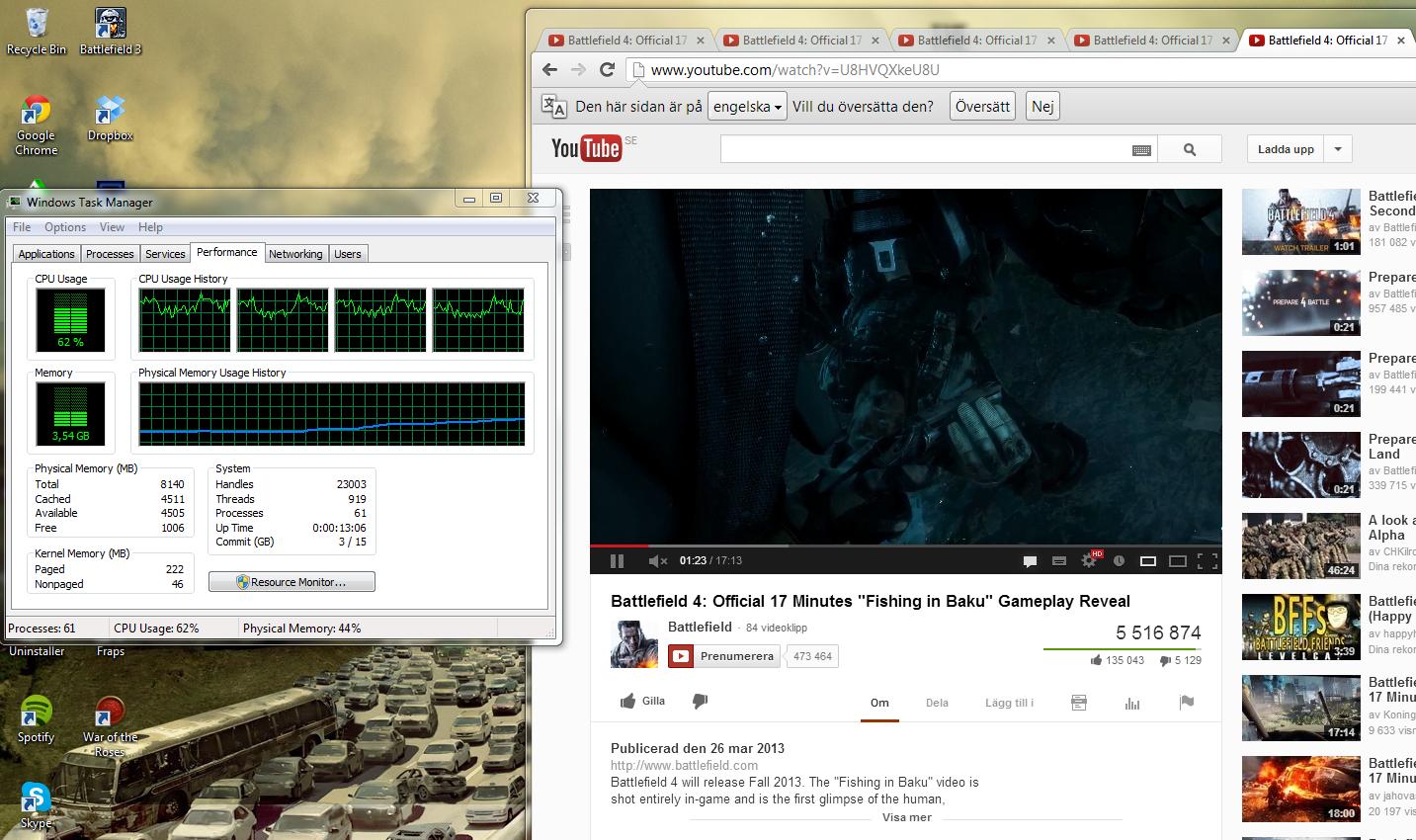
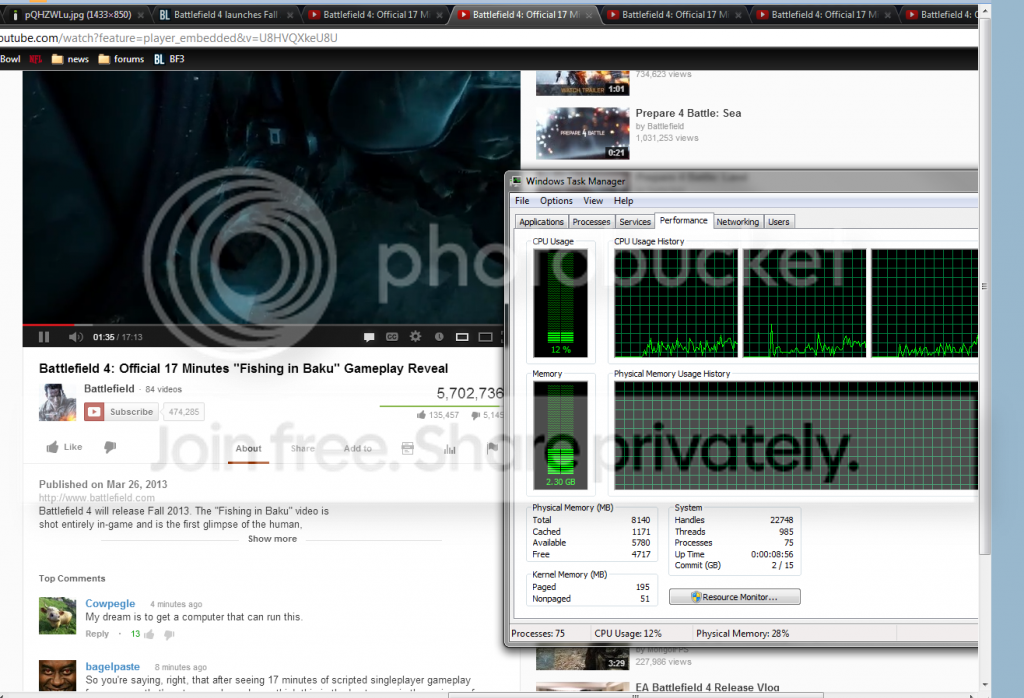
Here is a picture of my cpu usage with five youtube videos on 1080p
 

My Computer

OS
x64
CPU
AMD Phenom II X4 955 Black Edition 3.2
Motherboard
Gigabyte-GA-890GPA-UD3H
Memory
4GB Corsair
Graphics Card(s)
Geforce GTX 550TI
Screen Resolution
1440-900
Hard Drives
150GB
120GB Corsair
Keyboard
Logitech G15
Mouse
Zowie EC1 Pro
Internet Speed
100/100 Mbit's
wilworrior, what else to you have running? 55c under load is not bad at all. I'm running the same thing as you(5 youtubes) but not getting so much usage on the cpu. I have an I5 but not the 3570K.

I reccomend you run a scan and run malware too.

with5yout_zpsc5a6963b.png
 

My Computer

Computer type
PC/Desktop
Computer Manufacturer/Model Number
Dude Build
OS
Windows 10 Pro X64
CPU
Intel(R) Core(TM) i5-3570K CPU OC@ 4.5GHZ Turbo
Motherboard
MSI Z77A-G45 Gaming
Memory
8.00 GB DDR3 1600Mhz
Graphics Card(s)
MSI Gaming X GTX 1070
Sound Card
Realtek High Definition
Monitor(s) Displays
Dell S23O9W, HP L1710
Screen Resolution
DELL-1920 x 1080 HP-1280 x1024
Hard Drives
Crucial m4 256 SSD, WD 7200RPM 500GB WD 1TB
PSU
Seasonic X650 GOLD
Case
Zalman Z12
Cooling
Antec Kuhler 920
Keyboard
Logitech
Mouse
MSI DS100 Interceptor
Internet Speed
50 down and 5 up
Antivirus
MSE
Browser
Chrome, IE 11
Other Info
Logitech X-620 Speakers
wilworrior, what else to you have running? 55c under load is not bad at all. I'm running the same thing as you(5 youtubes) but not getting so much usage on the cpu. I have an I5 but not the 3570K.

I reccomend you run a scan and run malware too.

with5yout_zpsc5a6963b.png
[/

I just have like torrent mumble. Nothing special that should take that much cpu usage.
 

My Computer

OS
x64
CPU
AMD Phenom II X4 955 Black Edition 3.2
Motherboard
Gigabyte-GA-890GPA-UD3H
Memory
4GB Corsair
Graphics Card(s)
Geforce GTX 550TI
Screen Resolution
1440-900
Hard Drives
150GB
120GB Corsair
Keyboard
Logitech G15
Mouse
Zowie EC1 Pro
Internet Speed
100/100 Mbit's
Open resource monitor and post a screen of the cpu tab
 

My Computer

Computer type
PC/Desktop
Computer Manufacturer/Model Number
Dude Build
OS
Windows 10 Pro X64
CPU
Intel(R) Core(TM) i5-3570K CPU OC@ 4.5GHZ Turbo
Motherboard
MSI Z77A-G45 Gaming
Memory
8.00 GB DDR3 1600Mhz
Graphics Card(s)
MSI Gaming X GTX 1070
Sound Card
Realtek High Definition
Monitor(s) Displays
Dell S23O9W, HP L1710
Screen Resolution
DELL-1920 x 1080 HP-1280 x1024
Hard Drives
Crucial m4 256 SSD, WD 7200RPM 500GB WD 1TB
PSU
Seasonic X650 GOLD
Case
Zalman Z12
Cooling
Antec Kuhler 920
Keyboard
Logitech
Mouse
MSI DS100 Interceptor
Internet Speed
50 down and 5 up
Antivirus
MSE
Browser
Chrome, IE 11
Other Info
Logitech X-620 Speakers

My Computer

OS
x64
CPU
AMD Phenom II X4 955 Black Edition 3.2
Motherboard
Gigabyte-GA-890GPA-UD3H
Memory
4GB Corsair
Graphics Card(s)
Geforce GTX 550TI
Screen Resolution
1440-900
Hard Drives
150GB
120GB Corsair
Keyboard
Logitech G15
Mouse
Zowie EC1 Pro
Internet Speed
100/100 Mbit's
Not showing high usage there, I still reccomend you scan for malware. Your CPU is very good and not a bottleneck.
 

My Computer

Computer type
PC/Desktop
Computer Manufacturer/Model Number
Dude Build
OS
Windows 10 Pro X64
CPU
Intel(R) Core(TM) i5-3570K CPU OC@ 4.5GHZ Turbo
Motherboard
MSI Z77A-G45 Gaming
Memory
8.00 GB DDR3 1600Mhz
Graphics Card(s)
MSI Gaming X GTX 1070
Sound Card
Realtek High Definition
Monitor(s) Displays
Dell S23O9W, HP L1710
Screen Resolution
DELL-1920 x 1080 HP-1280 x1024
Hard Drives
Crucial m4 256 SSD, WD 7200RPM 500GB WD 1TB
PSU
Seasonic X650 GOLD
Case
Zalman Z12
Cooling
Antec Kuhler 920
Keyboard
Logitech
Mouse
MSI DS100 Interceptor
Internet Speed
50 down and 5 up
Antivirus
MSE
Browser
Chrome, IE 11
Other Info
Logitech X-620 Speakers
pQHZWLu.jpg


Here is a picture of my cpu usage with five youtube videos on 1080p

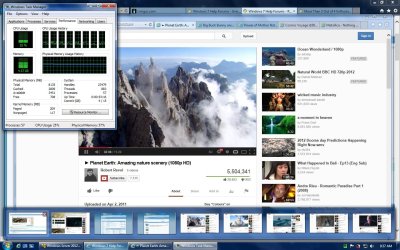
That doesn't seem normal at all. My 2nd Gen i7-2670QM mobile CPU @ 2.2 GHz only uses 25% CPU on average with 5 1080p videos, 9 browser tabs and Windows 8/Server 2012 2 GB RAM Virtual Machine running all at the same time.

Can you check your power plan setting? Maybe Windows is running in Power Saver mode thus making your CPU run at minimum frequency and having a very high CPU usage while doing CPU intensive tasks.

Untitled.jpg
 

My Computer

Computer type
Laptop
Computer Manufacturer/Model Number
Dell Optiplex SX270, Lenovo Z470
OS
Windows 7 Professional x64 SP1
CPU
Intel® Pentium® 4 @ 2.26 GHz, Intel Core i7-2670QM @ 2.20 GH
Motherboard
Dell, Lenovo
Memory
512MB Dual channel DDR SDRAM @ 400MHz 2.5-3-3-7, 8 GB DDR3
Graphics Card(s)
Intel 82865G, Nvidia GeForce 520M Graphics
Sound Card
SoundMax Integrated Audio, Integrated HD Audio
Monitor(s) Displays
LG W1952
Screen Resolution
1440x900, 1366 x 768
Hard Drives
40 GB 2.5" IDE 4200 RPM HDD, 500 GB 5400 RPM Sata 1.5 + 32 GB SSD
PSU
Dell 145 Watt, Lenovo 120 Watt Power Adapter
Case
Optiplex SX270 Small Form Factor, Laptop
Cooling
Dell Proprietary Air Cooling, Stock laptop cooling
Keyboard
Dell SK-8125 USB Keyboard
Mouse
Dell PS/2 2 button ball mouse with wheel scroll
Internet Speed
300 Mbit down / 20 Mbps up Time Warner Cable
Antivirus
MSE, Malwarebytes Scanner
Browser
Internet (Aizawa) Explorer 11
Other Info
Running Windows Server 2012 Datacenter on a virtual machine to run Metro Apps.
wilworrior, what else to you have running? 55c under load is not bad at all. I'm running the same thing as you(5 youtubes) but not getting so much usage on the cpu. I have an I5 but not the 3570K.

I reccomend you run a scan and run malware too.

(screenshot omitted)

Dude, from the screenshot you posted, your 5 YouTube videos are not running in 1080p. That's why your CPU usage is at minimum. You have to switch all your 5 videos to 1080p using the gear button then look at your CPU usage.
 

My Computer

Computer type
Laptop
Computer Manufacturer/Model Number
Dell Optiplex SX270, Lenovo Z470
OS
Windows 7 Professional x64 SP1
CPU
Intel® Pentium® 4 @ 2.26 GHz, Intel Core i7-2670QM @ 2.20 GH
Motherboard
Dell, Lenovo
Memory
512MB Dual channel DDR SDRAM @ 400MHz 2.5-3-3-7, 8 GB DDR3
Graphics Card(s)
Intel 82865G, Nvidia GeForce 520M Graphics
Sound Card
SoundMax Integrated Audio, Integrated HD Audio
Monitor(s) Displays
LG W1952
Screen Resolution
1440x900, 1366 x 768
Hard Drives
40 GB 2.5" IDE 4200 RPM HDD, 500 GB 5400 RPM Sata 1.5 + 32 GB SSD
PSU
Dell 145 Watt, Lenovo 120 Watt Power Adapter
Case
Optiplex SX270 Small Form Factor, Laptop
Cooling
Dell Proprietary Air Cooling, Stock laptop cooling
Keyboard
Dell SK-8125 USB Keyboard
Mouse
Dell PS/2 2 button ball mouse with wheel scroll
Internet Speed
300 Mbit down / 20 Mbps up Time Warner Cable
Antivirus
MSE, Malwarebytes Scanner
Browser
Internet (Aizawa) Explorer 11
Other Info
Running Windows Server 2012 Datacenter on a virtual machine to run Metro Apps.
wilworrior, what else to you have running? 55c under load is not bad at all. I'm running the same thing as you(5 youtubes) but not getting so much usage on the cpu. I have an I5 but not the 3570K.

I reccomend you run a scan and run malware too.

(screenshot omitted)

Dude, from the screenshot you posted, your 5 YouTube videos are not running in 1080p. That's why your CPU usage is at minimum. You have to switch all your 5 videos to 1080p using the gear button then look at your CPU usage.

Okay, thanks for the info
 

My Computer

Computer type
PC/Desktop
Computer Manufacturer/Model Number
Dude Build
OS
Windows 10 Pro X64
CPU
Intel(R) Core(TM) i5-3570K CPU OC@ 4.5GHZ Turbo
Motherboard
MSI Z77A-G45 Gaming
Memory
8.00 GB DDR3 1600Mhz
Graphics Card(s)
MSI Gaming X GTX 1070
Sound Card
Realtek High Definition
Monitor(s) Displays
Dell S23O9W, HP L1710
Screen Resolution
DELL-1920 x 1080 HP-1280 x1024
Hard Drives
Crucial m4 256 SSD, WD 7200RPM 500GB WD 1TB
PSU
Seasonic X650 GOLD
Case
Zalman Z12
Cooling
Antec Kuhler 920
Keyboard
Logitech
Mouse
MSI DS100 Interceptor
Internet Speed
50 down and 5 up
Antivirus
MSE
Browser
Chrome, IE 11
Other Info
Logitech X-620 Speakers
I have installed Windows 8 now. Going to se if there is any diffrents.
 

My Computer

OS
x64
CPU
AMD Phenom II X4 955 Black Edition 3.2
Motherboard
Gigabyte-GA-890GPA-UD3H
Memory
4GB Corsair
Graphics Card(s)
Geforce GTX 550TI
Screen Resolution
1440-900
Hard Drives
150GB
120GB Corsair
Keyboard
Logitech G15
Mouse
Zowie EC1 Pro
Internet Speed
100/100 Mbit's
Wow this is really getting embrassing.
82z6Gb2.png
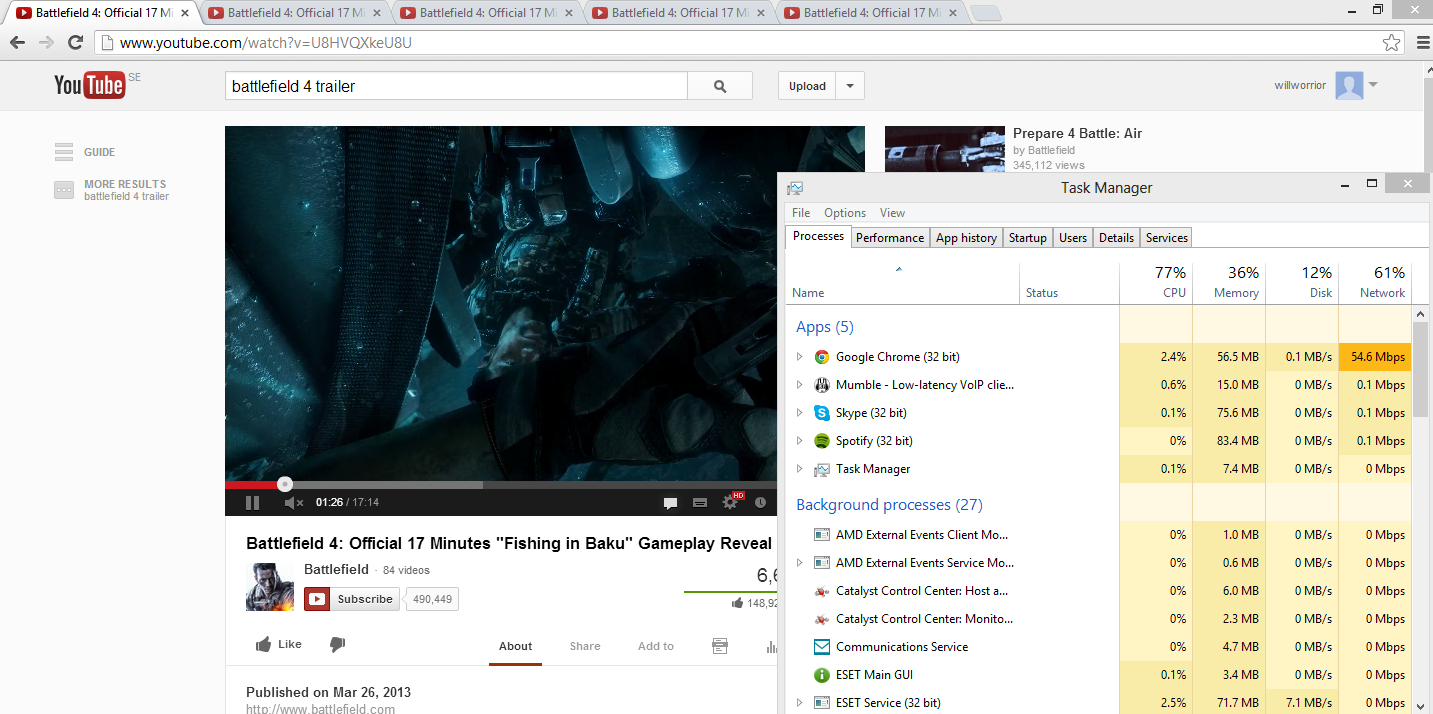
i still having same problems after a fresh install to W8.
 

My Computer

OS
x64
CPU
AMD Phenom II X4 955 Black Edition 3.2
Motherboard
Gigabyte-GA-890GPA-UD3H
Memory
4GB Corsair
Graphics Card(s)
Geforce GTX 550TI
Screen Resolution
1440-900
Hard Drives
150GB
120GB Corsair
Keyboard
Logitech G15
Mouse
Zowie EC1 Pro
Internet Speed
100/100 Mbit's
I need some more coffee but I'm researching an method to try and help you.(d) scroll down on the task manager and take a screen with whatever is using the most cpu

And did you check the powerplan like listed earlier by theveterans?
 

My Computer

Computer type
PC/Desktop
Computer Manufacturer/Model Number
Dude Build
OS
Windows 10 Pro X64
CPU
Intel(R) Core(TM) i5-3570K CPU OC@ 4.5GHZ Turbo
Motherboard
MSI Z77A-G45 Gaming
Memory
8.00 GB DDR3 1600Mhz
Graphics Card(s)
MSI Gaming X GTX 1070
Sound Card
Realtek High Definition
Monitor(s) Displays
Dell S23O9W, HP L1710
Screen Resolution
DELL-1920 x 1080 HP-1280 x1024
Hard Drives
Crucial m4 256 SSD, WD 7200RPM 500GB WD 1TB
PSU
Seasonic X650 GOLD
Case
Zalman Z12
Cooling
Antec Kuhler 920
Keyboard
Logitech
Mouse
MSI DS100 Interceptor
Internet Speed
50 down and 5 up
Antivirus
MSE
Browser
Chrome, IE 11
Other Info
Logitech X-620 Speakers
wilworrior If you are using the stock Intel CPU cooler I will bet money it is overheating playing intensive games. What else do you have running?
 

My Computer

Computer type
PC/Desktop
Computer Manufacturer/Model Number
Home Built Desktop By DataTech
OS
Windows 7 Ultimate X64 SP1
CPU
Intel i5-2550K, Differing ~4.4-4.8GHz No built in GPU
Motherboard
ASUS P8Z68-V PRO/GEN3
Memory
16GB G.Skill Sniper 1866MHz @ 2133MHz 2x8GB
Graphics Card(s)
ASUS GTX650TIB-DC2OC-2GD5, (650TI Boost)
Sound Card
Onboard Realtek 5-1
Monitor(s) Displays
Samsung P2570HD
Screen Resolution
1920x1080
Hard Drives
Samsung 840 Pro 256GB SSD for OS, 500GB Seagate Constellation (Enterprise drive) for Data
PSU
Corsair HX650W
Case
Inwin Dragon Rider
Cooling
Hyper 212 EVO w/two Noctua fans, push-pull, @1300 RPM
Keyboard
E-Z Eyes, bright yellow keys with large characters
Mouse
steelseries SENSEI Laser Pro Gaming
Internet Speed
48-51Mbs Mbs down, 11 Mbs up Xfinity Cable
Antivirus
Norton Internet Security 2013
Browser
IE 10, Opera, Pale Moon if needed
Other Info
4 case fans, LG BluRay-RE, ASUS DVD-RW, Mr. Fusion power supply, 1.21 gigawatts.
wilworrior If you are using the stock Intel CPU cooler I will bet money it is overheating playing intensive games. What else do you have running?


Britton30, I thought that too, but he said it only goes to about 55C while gaming. Could it be antivirus running a scan maybe? Thats why I hope he shows the screen with what is taking the cpu usage so high.
 

My Computer

Computer type
PC/Desktop
Computer Manufacturer/Model Number
Dude Build
OS
Windows 10 Pro X64
CPU
Intel(R) Core(TM) i5-3570K CPU OC@ 4.5GHZ Turbo
Motherboard
MSI Z77A-G45 Gaming
Memory
8.00 GB DDR3 1600Mhz
Graphics Card(s)
MSI Gaming X GTX 1070
Sound Card
Realtek High Definition
Monitor(s) Displays
Dell S23O9W, HP L1710
Screen Resolution
DELL-1920 x 1080 HP-1280 x1024
Hard Drives
Crucial m4 256 SSD, WD 7200RPM 500GB WD 1TB
PSU
Seasonic X650 GOLD
Case
Zalman Z12
Cooling
Antec Kuhler 920
Keyboard
Logitech
Mouse
MSI DS100 Interceptor
Internet Speed
50 down and 5 up
Antivirus
MSE
Browser
Chrome, IE 11
Other Info
Logitech X-620 Speakers
Typing resmon in the start search, hit enter, and going to the CPU tab will get a clearer idea of what is running, also how the RAM is being used in Memory tab.
 

My Computer

Computer type
PC/Desktop
Computer Manufacturer/Model Number
Home Built Desktop By DataTech
OS
Windows 7 Ultimate X64 SP1
CPU
Intel i5-2550K, Differing ~4.4-4.8GHz No built in GPU
Motherboard
ASUS P8Z68-V PRO/GEN3
Memory
16GB G.Skill Sniper 1866MHz @ 2133MHz 2x8GB
Graphics Card(s)
ASUS GTX650TIB-DC2OC-2GD5, (650TI Boost)
Sound Card
Onboard Realtek 5-1
Monitor(s) Displays
Samsung P2570HD
Screen Resolution
1920x1080
Hard Drives
Samsung 840 Pro 256GB SSD for OS, 500GB Seagate Constellation (Enterprise drive) for Data
PSU
Corsair HX650W
Case
Inwin Dragon Rider
Cooling
Hyper 212 EVO w/two Noctua fans, push-pull, @1300 RPM
Keyboard
E-Z Eyes, bright yellow keys with large characters
Mouse
steelseries SENSEI Laser Pro Gaming
Internet Speed
48-51Mbs Mbs down, 11 Mbs up Xfinity Cable
Antivirus
Norton Internet Security 2013
Browser
IE 10, Opera, Pale Moon if needed
Other Info
4 case fans, LG BluRay-RE, ASUS DVD-RW, Mr. Fusion power supply, 1.21 gigawatts.
Back
Top