Solved Intel core i5 3570k bottleneck ?

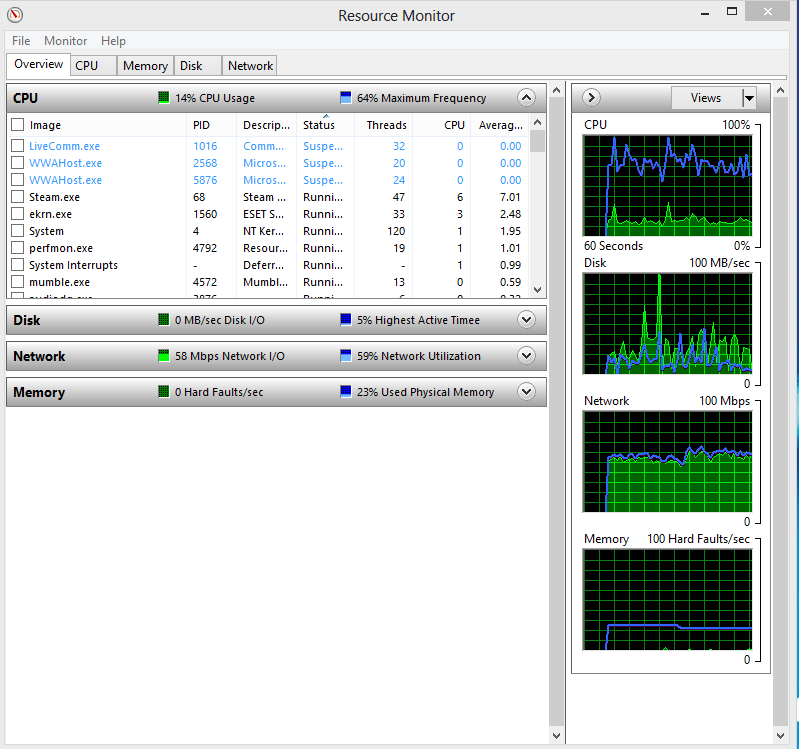
Typing resmon in the start search, hit enter, and going to the CPU tab will get a clearer idea of what is running, also how the RAM is being used in Memory tab.

LzZ1Wvw.png

Here we go. Im just downloading arma 3 from steam when i took this pic. And backround programs where spotify Mumble and steam. Btw should i go ahead and install new bios driver ?. Im so glad you guys want to help me, Huge thanks to everyone ! :)
 

My Computer My Computer

OS
x64
CPU
AMD Phenom II X4 955 Black Edition 3.2
Motherboard
Gigabyte-GA-890GPA-UD3H
Memory
4GB Corsair
Graphics Card(s)
Geforce GTX 550TI
Screen Resolution
1440-900
Hard Drives
150GB
120GB Corsair
Keyboard
Logitech G15
Mouse
Zowie EC1 Pro
Internet Speed
100/100 Mbit's

My Computer My Computer

Computer type
PC/Desktop
Computer Manufacturer/Model Number
Dude Build
OS
Windows 10 Pro X64
CPU
Intel(R) Core(TM) i5-3570K CPU OC@ 4.5GHZ Turbo
Motherboard
MSI Z77A-G45 Gaming
Memory
8.00 GB DDR3 1600Mhz
Graphics Card(s)
MSI Gaming X GTX 1070
Sound Card
Realtek High Definition
Monitor(s) Displays
Dell S23O9W, HP L1710
Screen Resolution
DELL-1920 x 1080 HP-1280 x1024
Hard Drives
Crucial m4 256 SSD, WD 7200RPM 500GB WD 1TB
PSU
Seasonic X650 GOLD
Case
Zalman Z12
Cooling
Antec Kuhler 920
Keyboard
Logitech
Mouse
MSI DS100 Interceptor
Internet Speed
50 down and 5 up
Antivirus
MSE
Browser
Chrome, IE 11
Other Info
Logitech X-620 Speakers
Okay guys. I have tested out arma 3 now. And i have kinda low cpu usage on it. I get about 46 50% from what i can se when i tabbed the game down fast. So there is got be something else when i have high cpu usage on the youtube and web browser. But when im watching a clip that i recorded while i played arma my cpu usage goes to 60%. Is that normal ?

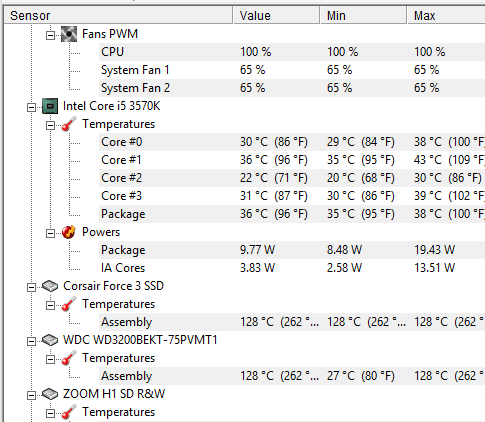
Btw here is my idle temp if someone wanna know.
r4evDNe.png
 

My Computer My Computer

OS
x64
CPU
AMD Phenom II X4 955 Black Edition 3.2
Motherboard
Gigabyte-GA-890GPA-UD3H
Memory
4GB Corsair
Graphics Card(s)
Geforce GTX 550TI
Screen Resolution
1440-900
Hard Drives
150GB
120GB Corsair
Keyboard
Logitech G15
Mouse
Zowie EC1 Pro
Internet Speed
100/100 Mbit's
Have you updated flash, and have you tried with a different browser?
 

My Computer My Computer

Computer type
PC/Desktop
Computer Manufacturer/Model Number
Dude Build
OS
Windows 10 Pro X64
CPU
Intel(R) Core(TM) i5-3570K CPU OC@ 4.5GHZ Turbo
Motherboard
MSI Z77A-G45 Gaming
Memory
8.00 GB DDR3 1600Mhz
Graphics Card(s)
MSI Gaming X GTX 1070
Sound Card
Realtek High Definition
Monitor(s) Displays
Dell S23O9W, HP L1710
Screen Resolution
DELL-1920 x 1080 HP-1280 x1024
Hard Drives
Crucial m4 256 SSD, WD 7200RPM 500GB WD 1TB
PSU
Seasonic X650 GOLD
Case
Zalman Z12
Cooling
Antec Kuhler 920
Keyboard
Logitech
Mouse
MSI DS100 Interceptor
Internet Speed
50 down and 5 up
Antivirus
MSE
Browser
Chrome, IE 11
Other Info
Logitech X-620 Speakers
Have you updated flash, and have you tried with a different browser?

Going to try that. But isnt flash installed in chrome and will update by itself. And no i havent tryed a another browser. Going to do that :)
 

My Computer My Computer

OS
x64
CPU
AMD Phenom II X4 955 Black Edition 3.2
Motherboard
Gigabyte-GA-890GPA-UD3H
Memory
4GB Corsair
Graphics Card(s)
Geforce GTX 550TI
Screen Resolution
1440-900
Hard Drives
150GB
120GB Corsair
Keyboard
Logitech G15
Mouse
Zowie EC1 Pro
Internet Speed
100/100 Mbit's
Okay, let us know how it goes. Flash can be tricky with chrome sometimes. A quick google shows many suggestion, disable the chrome flash, re-install chrome, etc.. My advice would be to try what works for you, can be a long process going through all suggestions or just use another browser while youtubing. Next chrome update it might work fine or may be the same.

Other than the times you get high usage with youtube, you seem to have a good system. Your I5 is not a bottleneck for sure.

Just wanted to add, if you stick with windows eight they have a forum too

http://www.eightforums.com/
 
Last edited:

My Computer My Computer

Computer type
PC/Desktop
Computer Manufacturer/Model Number
Dude Build
OS
Windows 10 Pro X64
CPU
Intel(R) Core(TM) i5-3570K CPU OC@ 4.5GHZ Turbo
Motherboard
MSI Z77A-G45 Gaming
Memory
8.00 GB DDR3 1600Mhz
Graphics Card(s)
MSI Gaming X GTX 1070
Sound Card
Realtek High Definition
Monitor(s) Displays
Dell S23O9W, HP L1710
Screen Resolution
DELL-1920 x 1080 HP-1280 x1024
Hard Drives
Crucial m4 256 SSD, WD 7200RPM 500GB WD 1TB
PSU
Seasonic X650 GOLD
Case
Zalman Z12
Cooling
Antec Kuhler 920
Keyboard
Logitech
Mouse
MSI DS100 Interceptor
Internet Speed
50 down and 5 up
Antivirus
MSE
Browser
Chrome, IE 11
Other Info
Logitech X-620 Speakers
Okay, let us know how it goes. Flash can be tricky with chrome sometimes. A quick google shows many suggestion, disable the chrome flash, re-install chrome, etc.. My advice would be to try what works for you, can be a long process going through all suggestions or just use another browser while youtubing. Next chrome update it might work fine or may be the same.

Other than the times you get high usage with youtube, you seem to have a good system. Your I5 is not a bottleneck for sure.

Just wanted to add, if you stick with windows eight they have a forum too

Windows 8 Forums

Yeah i will move over there as soon my problem got fixed
 

My Computer My Computer

OS
x64
CPU
AMD Phenom II X4 955 Black Edition 3.2
Motherboard
Gigabyte-GA-890GPA-UD3H
Memory
4GB Corsair
Graphics Card(s)
Geforce GTX 550TI
Screen Resolution
1440-900
Hard Drives
150GB
120GB Corsair
Keyboard
Logitech G15
Mouse
Zowie EC1 Pro
Internet Speed
100/100 Mbit's
Okay i tryed to install the latest flash and disable hardware acceleration but nothing of them seems to work. I notice i litte diffrent if i disabled hardware acceleration. i get about 5% less. But i found a kinda intresting thing my chrome seems to be running on 32bit when i have 64bit. Could it be that my cpu needs to work more because it is 32 bit and it only allows 3 gb Ram ?. I dont know
 

My Computer My Computer

OS
x64
CPU
AMD Phenom II X4 955 Black Edition 3.2
Motherboard
Gigabyte-GA-890GPA-UD3H
Memory
4GB Corsair
Graphics Card(s)
Geforce GTX 550TI
Screen Resolution
1440-900
Hard Drives
150GB
120GB Corsair
Keyboard
Logitech G15
Mouse
Zowie EC1 Pro
Internet Speed
100/100 Mbit's
Okay i tryed to install the latest flash and disable hardware acceleration but nothing of them seems to work. I notice i litte diffrent if i disabled hardware acceleration. i get about 5% less. But i found a kinda intresting thing my chrome seems to be running on 32bit when i have 64bit. Could it be that my cpu needs to work more because it is 32 bit and it only allows 3 gb Ram ?. I dont know

willwarrior we are trying to help resolve this but as we went through some steps were not followed through. Go back through the thread please and post all the info


theveterans asked

Can you check your power plan setting? Maybe Windows is running in Power Saver mode thus making your CPU run at minimum frequency and having a very high CPU usage while doing CPU intensive tasks.


Britton30 asked

Typing resmon in the start search, hit enter, and going to the CPU tab will get a clearer idea of what is running, also how the RAM is being used in Memory tab.

You have done these ss but they all showed low usage, do it while you have the 5 youtube vids running. Show us the cpu and the memory tab.

I ask again that you fill in the specs of your new sysytem, use this tool

http://www.sevenforums.com/tutorials/180324-system-info-see-your-system-specs.html


Chrome doesn't have a 64 bit yet. Try this link, disable the chrome plugings, then install the flash for other browsers.

Adobe Flash Player plug-in - Google Chrome Help

http://helpx.adobe.com/flash-player/kb/flash-player-google-chrome.html#How_can_I_run_debugger_or_alternate_versions_of_Flash_Player_in_Google_Chrome
 
Last edited:

My Computer My Computer

Computer type
PC/Desktop
Computer Manufacturer/Model Number
Dude Build
OS
Windows 10 Pro X64
CPU
Intel(R) Core(TM) i5-3570K CPU OC@ 4.5GHZ Turbo
Motherboard
MSI Z77A-G45 Gaming
Memory
8.00 GB DDR3 1600Mhz
Graphics Card(s)
MSI Gaming X GTX 1070
Sound Card
Realtek High Definition
Monitor(s) Displays
Dell S23O9W, HP L1710
Screen Resolution
DELL-1920 x 1080 HP-1280 x1024
Hard Drives
Crucial m4 256 SSD, WD 7200RPM 500GB WD 1TB
PSU
Seasonic X650 GOLD
Case
Zalman Z12
Cooling
Antec Kuhler 920
Keyboard
Logitech
Mouse
MSI DS100 Interceptor
Internet Speed
50 down and 5 up
Antivirus
MSE
Browser
Chrome, IE 11
Other Info
Logitech X-620 Speakers
Okay i tryed to install the latest flash and disable hardware acceleration but nothing of them seems to work. I notice i litte diffrent if i disabled hardware acceleration. i get about 5% less. But i found a kinda intresting thing my chrome seems to be running on 32bit when i have 64bit. Could it be that my cpu needs to work more because it is 32 bit and it only allows 3 gb Ram ?. I dont know

willwarrior we are trying to help resolve this but as we went through some steps were not followed through. Go back through the thread please and post all the info


theveterans asked

Can you check your power plan setting? Maybe Windows is running in Power Saver mode thus making your CPU run at minimum frequency and having a very high CPU usage while doing CPU intensive tasks.


Britton30 asked

Typing resmon in the start search, hit enter, and going to the CPU tab will get a clearer idea of what is running, also how the RAM is being used in Memory tab.

You have done these ss but they all showed low usage, do it while you have the 5 youtube vids running. Show us the cpu and the memory tab.

I ask again that you fill in the specs of your new sysytem, use this tool

http://www.sevenforums.com/tutorials/180324-system-info-see-your-system-specs.html


Chrome doesn't have a 64 bit yet. Try this link, disable the chrome plugings, then install the flash for other browsers.

Adobe Flash Player plug-in - Google Chrome Help

Flash Player with Google Chrome

I tryed to change browser. And result BOOM! there is the fix i think. But i think there is some bug with the flash it is jumping down from 30% to 7 in about 2 mins. But well i think i still going to use google chrome. It feels much faster. Just wanted a explaination why i got so much cpu usage.
2VJqddG.png
 

My Computer My Computer

OS
x64
CPU
AMD Phenom II X4 955 Black Edition 3.2
Motherboard
Gigabyte-GA-890GPA-UD3H
Memory
4GB Corsair
Graphics Card(s)
Geforce GTX 550TI
Screen Resolution
1440-900
Hard Drives
150GB
120GB Corsair
Keyboard
Logitech G15
Mouse
Zowie EC1 Pro
Internet Speed
100/100 Mbit's
:thumbsup:Yeah some users have problems with Chrome, it's a software thing. I would continue to use the other browser then try chrome again after the next update.
 

My Computer My Computer

Computer type
PC/Desktop
Computer Manufacturer/Model Number
Dude Build
OS
Windows 10 Pro X64
CPU
Intel(R) Core(TM) i5-3570K CPU OC@ 4.5GHZ Turbo
Motherboard
MSI Z77A-G45 Gaming
Memory
8.00 GB DDR3 1600Mhz
Graphics Card(s)
MSI Gaming X GTX 1070
Sound Card
Realtek High Definition
Monitor(s) Displays
Dell S23O9W, HP L1710
Screen Resolution
DELL-1920 x 1080 HP-1280 x1024
Hard Drives
Crucial m4 256 SSD, WD 7200RPM 500GB WD 1TB
PSU
Seasonic X650 GOLD
Case
Zalman Z12
Cooling
Antec Kuhler 920
Keyboard
Logitech
Mouse
MSI DS100 Interceptor
Internet Speed
50 down and 5 up
Antivirus
MSE
Browser
Chrome, IE 11
Other Info
Logitech X-620 Speakers
Well thanks everyone. Problem Solved !
 

My Computer My Computer

OS
x64
CPU
AMD Phenom II X4 955 Black Edition 3.2
Motherboard
Gigabyte-GA-890GPA-UD3H
Memory
4GB Corsair
Graphics Card(s)
Geforce GTX 550TI
Screen Resolution
1440-900
Hard Drives
150GB
120GB Corsair
Keyboard
Logitech G15
Mouse
Zowie EC1 Pro
Internet Speed
100/100 Mbit's
I'm glad you worked it out!
 

My Computer My Computer

Computer type
PC/Desktop
Computer Manufacturer/Model Number
Dude Build
OS
Windows 10 Pro X64
CPU
Intel(R) Core(TM) i5-3570K CPU OC@ 4.5GHZ Turbo
Motherboard
MSI Z77A-G45 Gaming
Memory
8.00 GB DDR3 1600Mhz
Graphics Card(s)
MSI Gaming X GTX 1070
Sound Card
Realtek High Definition
Monitor(s) Displays
Dell S23O9W, HP L1710
Screen Resolution
DELL-1920 x 1080 HP-1280 x1024
Hard Drives
Crucial m4 256 SSD, WD 7200RPM 500GB WD 1TB
PSU
Seasonic X650 GOLD
Case
Zalman Z12
Cooling
Antec Kuhler 920
Keyboard
Logitech
Mouse
MSI DS100 Interceptor
Internet Speed
50 down and 5 up
Antivirus
MSE
Browser
Chrome, IE 11
Other Info
Logitech X-620 Speakers
I'm also glad it isn't a hardware issue.
 

My Computer My Computer

Computer type
Laptop
Computer Manufacturer/Model Number
Dell Optiplex SX270, Lenovo Z470
OS
Windows 7 Professional x64 SP1
CPU
Intel® Pentium® 4 @ 2.26 GHz, Intel Core i7-2670QM @ 2.20 GH
Motherboard
Dell, Lenovo
Memory
512MB Dual channel DDR SDRAM @ 400MHz 2.5-3-3-7, 8 GB DDR3
Graphics Card(s)
Intel 82865G, Nvidia GeForce 520M Graphics
Sound Card
SoundMax Integrated Audio, Integrated HD Audio
Monitor(s) Displays
LG W1952
Screen Resolution
1440x900, 1366 x 768
Hard Drives
40 GB 2.5" IDE 4200 RPM HDD, 500 GB 5400 RPM Sata 1.5 + 32 GB SSD
PSU
Dell 145 Watt, Lenovo 120 Watt Power Adapter
Case
Optiplex SX270 Small Form Factor, Laptop
Cooling
Dell Proprietary Air Cooling, Stock laptop cooling
Keyboard
Dell SK-8125 USB Keyboard
Mouse
Dell PS/2 2 button ball mouse with wheel scroll
Internet Speed
300 Mbit down / 20 Mbps up Time Warner Cable
Antivirus
MSE, Malwarebytes Scanner
Browser
Internet (Aizawa) Explorer 11
Other Info
Running Windows Server 2012 Datacenter on a virtual machine to run Metro Apps.
Glad you worked it out. ;)
 

My Computer My Computer

Computer type
PC/Desktop
Computer Manufacturer/Model Number
Skylake Special #666
OS
Windows 10 Pro x64
CPU
Intel Core i7 6700K
Motherboard
Asus Sabertooth Z170 Mark 1
Memory
GSkill TridentZ RGB 16GB 3600 16-16-16-36
Graphics Card(s)
EVGA GTX 980 Ti SC x2
Sound Card
Realtek High Definition
Monitor(s) Displays
AOC G2460PG
Screen Resolution
1920 x 1080 144Hz
Hard Drives
Samsung 860 Pro 256GB, Seagate Barracuda 4TB x2
PSU
EVGA 1000 P2, EVGA White Custom Braided Cables
Case
Corsair Vengeance C70 Gunmetal Black
Cooling
Corsair H100i v2, Corsair ML120 x2, Thermal Grizzly Kryonaut
Keyboard
Logitech G910 Orion Spectrum
Mouse
Logitech G700s
Internet Speed
Verizon Fios Quantum Gateway 75/75
Antivirus
Windows Defender, Malwarebytes Free 3.8.3
Browser
Chrome
Other Info
Corsair SP120 x4, LG Blu-ray Drive, Durabrand HT-395 100 Watt Dolby Digital Amp, Corsair H2100 Wireless 7.1 Headset

My Computer My Computer

Computer type
PC/Desktop
Computer Manufacturer/Model Number
Dude Build
OS
Windows 10 Pro X64
CPU
Intel(R) Core(TM) i5-3570K CPU OC@ 4.5GHZ Turbo
Motherboard
MSI Z77A-G45 Gaming
Memory
8.00 GB DDR3 1600Mhz
Graphics Card(s)
MSI Gaming X GTX 1070
Sound Card
Realtek High Definition
Monitor(s) Displays
Dell S23O9W, HP L1710
Screen Resolution
DELL-1920 x 1080 HP-1280 x1024
Hard Drives
Crucial m4 256 SSD, WD 7200RPM 500GB WD 1TB
PSU
Seasonic X650 GOLD
Case
Zalman Z12
Cooling
Antec Kuhler 920
Keyboard
Logitech
Mouse
MSI DS100 Interceptor
Internet Speed
50 down and 5 up
Antivirus
MSE
Browser
Chrome, IE 11
Other Info
Logitech X-620 Speakers
A note, all Sandy and Ivy Bridge CPUs with a "K" are unlocked.
 

My Computer My Computer

Computer type
PC/Desktop
Computer Manufacturer/Model Number
Home Built Desktop By DataTech
OS
Windows 7 Ultimate X64 SP1
CPU
Intel i5-2550K, Differing ~4.4-4.8GHz No built in GPU
Motherboard
ASUS P8Z68-V PRO/GEN3
Memory
16GB G.Skill Sniper 1866MHz @ 2133MHz 2x8GB
Graphics Card(s)
ASUS GTX650TIB-DC2OC-2GD5, (650TI Boost)
Sound Card
Onboard Realtek 5-1
Monitor(s) Displays
Samsung P2570HD
Screen Resolution
1920x1080
Hard Drives
Samsung 840 Pro 256GB SSD for OS, 500GB Seagate Constellation (Enterprise drive) for Data
PSU
Corsair HX650W
Case
Inwin Dragon Rider
Cooling
Hyper 212 EVO w/two Noctua fans, push-pull, @1300 RPM
Keyboard
E-Z Eyes, bright yellow keys with large characters
Mouse
steelseries SENSEI Laser Pro Gaming
Internet Speed
48-51Mbs Mbs down, 11 Mbs up Xfinity Cable
Antivirus
Norton Internet Security 2013
Browser
IE 10, Opera, Pale Moon if needed
Other Info
4 case fans, LG BluRay-RE, ASUS DVD-RW, Mr. Fusion power supply, 1.21 gigawatts.
Back
Top