
Icon Cache - Rebuild

How to Rebuild the Icon Cache in Windows

   Information
If one or more of your icons are not displaying correctly, or that your icon cache is corrupted, then you might consider rebuilding the icon cache to reset and reload the icon images into the icon cache in Vista, Windows 7, and Windows 8.

   Note
This will not help with any of the following icon issues:
  • A shortcut's icon that is not displayed properly due to the source of the shortcut being moved or deleted. You may need to recreate a new shortcut directly from the source (ex: program's exe) file to replace it instead.
  • All icons for a specific file extension display the wrong icon. This may be due to setting the wrong association for what program to open the file extension instead. You can restore the default file extension's associations to fix this icon instead.


OPTION ONE

Automatically Rebuild the Icon Cache


1. Click/tap on the download button below to download the file below.
Rebuild_Icon_Cache.bat

Download


2. Save the file to your desktop, and run it.

3. Click/tap on Run when prompted.

4. Follow the instructions in the command prompt to rebuild the Icon Cache. (see screenshot below)
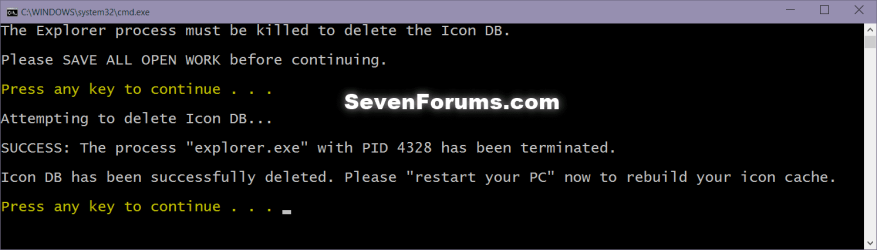
Icon_cache_command.png
5. Restart your computer to generate a new IconCache.db file.

6. If the icons are still not displaying properly, then download and merge the ICO option in this tutorial for Windows 7 or Windows 8 to restore the default associations of .ico (icon) files.


OPTION TWO

To Manually Rebuild the Icon Cache using the Command Prompt


1. Close and save anything that you are working on. This command will kill explorer and restart the computer when completed.

2. Open a command prompt in Windows 7 or Windows 8.

3. In the command prompt, Copy and paste each command line below exactly as is one at a time and press enter after each command.
:warn:WARNING: The last command will restart the computer, so be sure to close and save anything that you are working on first.
  • ie4uinit.exe -ClearIconCache
  • taskkill /IM explorer.exe /F
  • DEL "%localappdata%\IconCache.db" /A
  • DEL "%localappdata%\Microsoft\Windows\Explorer\iconcache*" /A
  • shutdown /r /f /t 00
4. The IconCache.db file has now been rebuilt.

5. If the icons are still not displaying properly, then download and merge the ICO option in this tutorial for Windows 7 or Windows 8 to restore the default associations of .ico (icon) files.

That's it,
Shawn


Attachments

Last edited:

My Computer

Computer Manufacturer/Model Number
Custom Built
OS
Windows 7 Ultimate 32-Bit & Windows 7 Ultimate 64-Bit
CPU
Intel Core i7 CPU 950 @ 3.07GHz
Motherboard
ASUS P6T DELUXE V2
Memory
OCZ 6GB (3 x 2GB) 240-Pin DDR3 SDRAM DDR3 1600 OCZ3X1600R2
Graphics Card(s)
ATI Radeon HD 5700 Series
Sound Card
OnBoard
Hard Drives
WD6400AACS-00M3B0 (640GB SATA )
PSU
CORSAIR 850w
Case
NZXT LEXA
Cooling
Intel Stock Heatsink Fan
Keyboard
Microsoft Wireless Laser Keyboard 7000
Mouse
Microsoft Wireless Laser Mouse 7000
I've just noticed that excel icons are blank too. The problem happens only with MS OFFICE icons

So, I have to find the DVD of the OFFICE 2007 ENTERPRISE in order to repair Office icons
 

My Computer

Computer type
Laptop
Computer Manufacturer/Model Number
MSI
OS
Microsoft Windows 7 Home Premium 64-bit SP1
CPU
Intel Core i3 330M @ 2.13GHz Arrandale 32nm Technology
Motherboard
Micro-Star International MS-1688 (CPU 1)
Memory
4.00 GB Dual-Channel DDR3 @ 531MHz (7-7-7-20)
Graphics Card(s)
Generic PnP Monitor (1366x768@60Hz) and Intel Graphics Media
Sound Card
Realtek High Definition Audio
Monitor(s) Displays
Generic PnP Monitor on Intel Graphics Media Accelerator HD
Screen Resolution
1366x768 pixels
Hard Drives
466GB Western Digital WDC WD5000BEVT-22ZAT0 ATA Device (SATA)
Antivirus
Microsoft security essentials
Browser
Firefox
Yes the link above has a legit Office 2007 Enterprise iso that you could use to do a repair . If you need to do a reinstall use the Product Key you have .

But knowing the Enterprise version that version isn't sold in stores so where Key would be a Question of where did you receive that .
 

My Computer

Computer Manufacturer/Model Number
Custom Built
OS
Windows 7 Ultimate 32-Bit & Windows 7 Ultimate 64-Bit
CPU
Intel Core i7 CPU 950 @ 3.07GHz
Motherboard
ASUS P6T DELUXE V2
Memory
OCZ 6GB (3 x 2GB) 240-Pin DDR3 SDRAM DDR3 1600 OCZ3X1600R2
Graphics Card(s)
ATI Radeon HD 5700 Series
Sound Card
OnBoard
Hard Drives
WD6400AACS-00M3B0 (640GB SATA )
PSU
CORSAIR 850w
Case
NZXT LEXA
Cooling
Intel Stock Heatsink Fan
Keyboard
Microsoft Wireless Laser Keyboard 7000
Mouse
Microsoft Wireless Laser Mouse 7000
Since I took my laptop to my dealer, my dealer reinstalled everything. My dealer did that due to a hard disk problem. Actually my dealer, replaced my laptop's hard disk.

So, do you know the steps how to find out my Product Key? Also, can you advice me the steps how to use the legit Office 2007 Enterprise iso in order to do a repair?

Thanks a lot!

P.S. I have done a RECOVERY DISK since I took my computer to my dealer. When the dealer replace my computer's hard disk and delivered it to me, I prepared the RECOVERY DISK (consists three DVD disks which have been saved to DVD.iso format!) IF I RUN THE RECOVERY DISK THEN I WILL LOSE MY FILES, DOCS, NEW PROGRAMS, LIBRARIES, DESKTOP, ETC?
 
Last edited:

My Computer

Computer type
Laptop
Computer Manufacturer/Model Number
MSI
OS
Microsoft Windows 7 Home Premium 64-bit SP1
CPU
Intel Core i3 330M @ 2.13GHz Arrandale 32nm Technology
Motherboard
Micro-Star International MS-1688 (CPU 1)
Memory
4.00 GB Dual-Channel DDR3 @ 531MHz (7-7-7-20)
Graphics Card(s)
Generic PnP Monitor (1366x768@60Hz) and Intel Graphics Media
Sound Card
Realtek High Definition Audio
Monitor(s) Displays
Generic PnP Monitor on Intel Graphics Media Accelerator HD
Screen Resolution
1366x768 pixels
Hard Drives
466GB Western Digital WDC WD5000BEVT-22ZAT0 ATA Device (SATA)
Antivirus
Microsoft security essentials
Browser
Firefox
Anton,

You can download a trial version of Office 2007 Enterprise at the Microsoft link below. You would just need to activate it with your product key before the trial period runs out.
Microsoft Office Enterprise 2007
Usually you will have an option to back up your current files during a factory recovery. To be safe, I would recommend that you manually back up anything that you do not want to lose.
 

My Computer

Computer type
PC/Desktop
Computer Manufacturer/Model Number
Self built custom
OS
64-bit Windows 11 Pro for Workstations
CPU
Intel i7-8700K OC'd to 5 GHz
Motherboard
ASUS ROG Maximus XI Formula Z390
Memory
64 GB (4x16GB) G.SKILL TridentZ RGB DDR4 3600 MHz
Graphics Card(s)
ASUS ROG-STRIX-GTX1080TI-O11G-GAMING
Sound Card
Integrated
Monitor(s) Displays
2 x Samsung Odyssey G7 27"
Screen Resolution
2560x1440
Hard Drives
1TB Samsung 990 PRO M.2,
4TB Samsung 990 PRO PRO M.2,
TerraMaster F8 SSD Plus NAS
PSU
Seasonic Prime Titanium 850W
Case
Thermaltake Core P3
Cooling
Corsair Hydro H115i
Keyboard
Logitech wireless K800
Mouse
Logitech MX Master 4
Internet Speed
2 Gb/s Download and 100 Mb/s Upload
Antivirus
Malwarebyte Anti-Malware Premium
Browser
Google Chrome
Other Info
Logitech Z625 speaker system,
Logitech BRIO 4K Pro webcam,
HP Color LaserJet Pro MFP M477fdn,
APC SMART-UPS RT 1000 XL - SURT1000XLI,
Galaxy S23 Plus phone
Anton,

You can download a trial version of Office 2007 Enterprise at the Microsoft link below. You would just need to activate it with your product key before the trial period runs out.Microsoft Office Enterprise 2007
Usually you will have an option to back up your current files during a factory recovery. To be safe, I would recommend that you manually back up anything that you do not want to lose.


Τhanks for the update! Do you know how to search my computer and find out the product key of Office 2007 Enterprise?

and which is the proper trial Microsoft Office Enterprise 2007 to Choose and download from that link: http://www.microsoftstore.com/store/msusa/en_US/cat/categoryID.62684700

Thank you in advance!
 

My Computer

Computer type
Laptop
Computer Manufacturer/Model Number
MSI
OS
Microsoft Windows 7 Home Premium 64-bit SP1
CPU
Intel Core i3 330M @ 2.13GHz Arrandale 32nm Technology
Motherboard
Micro-Star International MS-1688 (CPU 1)
Memory
4.00 GB Dual-Channel DDR3 @ 531MHz (7-7-7-20)
Graphics Card(s)
Generic PnP Monitor (1366x768@60Hz) and Intel Graphics Media
Sound Card
Realtek High Definition Audio
Monitor(s) Displays
Generic PnP Monitor on Intel Graphics Media Accelerator HD
Screen Resolution
1366x768 pixels
Hard Drives
466GB Western Digital WDC WD5000BEVT-22ZAT0 ATA Device (SATA)
Antivirus
Microsoft security essentials
Browser
Firefox
You might see if the free program Magic Jelly Bean may be able to let you see what it is.
 

My Computer

Computer type
PC/Desktop
Computer Manufacturer/Model Number
Self built custom
OS
64-bit Windows 11 Pro for Workstations
CPU
Intel i7-8700K OC'd to 5 GHz
Motherboard
ASUS ROG Maximus XI Formula Z390
Memory
64 GB (4x16GB) G.SKILL TridentZ RGB DDR4 3600 MHz
Graphics Card(s)
ASUS ROG-STRIX-GTX1080TI-O11G-GAMING
Sound Card
Integrated
Monitor(s) Displays
2 x Samsung Odyssey G7 27"
Screen Resolution
2560x1440
Hard Drives
1TB Samsung 990 PRO M.2,
4TB Samsung 990 PRO PRO M.2,
TerraMaster F8 SSD Plus NAS
PSU
Seasonic Prime Titanium 850W
Case
Thermaltake Core P3
Cooling
Corsair Hydro H115i
Keyboard
Logitech wireless K800
Mouse
Logitech MX Master 4
Internet Speed
2 Gb/s Download and 100 Mb/s Upload
Antivirus
Malwarebyte Anti-Malware Premium
Browser
Google Chrome
Other Info
Logitech Z625 speaker system,
Logitech BRIO 4K Pro webcam,
HP Color LaserJet Pro MFP M477fdn,
APC SMART-UPS RT 1000 XL - SURT1000XLI,
Galaxy S23 Plus phone

My Computer

Computer type
Laptop
Computer Manufacturer/Model Number
MSI
OS
Microsoft Windows 7 Home Premium 64-bit SP1
CPU
Intel Core i3 330M @ 2.13GHz Arrandale 32nm Technology
Motherboard
Micro-Star International MS-1688 (CPU 1)
Memory
4.00 GB Dual-Channel DDR3 @ 531MHz (7-7-7-20)
Graphics Card(s)
Generic PnP Monitor (1366x768@60Hz) and Intel Graphics Media
Sound Card
Realtek High Definition Audio
Monitor(s) Displays
Generic PnP Monitor on Intel Graphics Media Accelerator HD
Screen Resolution
1366x768 pixels
Hard Drives
466GB Western Digital WDC WD5000BEVT-22ZAT0 ATA Device (SATA)
Antivirus
Microsoft security essentials
Browser
Firefox

My Computer

Computer type
PC/Desktop
Computer Manufacturer/Model Number
Self built custom
OS
64-bit Windows 11 Pro for Workstations
CPU
Intel i7-8700K OC'd to 5 GHz
Motherboard
ASUS ROG Maximus XI Formula Z390
Memory
64 GB (4x16GB) G.SKILL TridentZ RGB DDR4 3600 MHz
Graphics Card(s)
ASUS ROG-STRIX-GTX1080TI-O11G-GAMING
Sound Card
Integrated
Monitor(s) Displays
2 x Samsung Odyssey G7 27"
Screen Resolution
2560x1440
Hard Drives
1TB Samsung 990 PRO M.2,
4TB Samsung 990 PRO PRO M.2,
TerraMaster F8 SSD Plus NAS
PSU
Seasonic Prime Titanium 850W
Case
Thermaltake Core P3
Cooling
Corsair Hydro H115i
Keyboard
Logitech wireless K800
Mouse
Logitech MX Master 4
Internet Speed
2 Gb/s Download and 100 Mb/s Upload
Antivirus
Malwarebyte Anti-Malware Premium
Browser
Google Chrome
Other Info
Logitech Z625 speaker system,
Logitech BRIO 4K Pro webcam,
HP Color LaserJet Pro MFP M477fdn,
APC SMART-UPS RT 1000 XL - SURT1000XLI,
Galaxy S23 Plus phone

My Computer

Computer type
Laptop
Computer Manufacturer/Model Number
MSI
OS
Microsoft Windows 7 Home Premium 64-bit SP1
CPU
Intel Core i3 330M @ 2.13GHz Arrandale 32nm Technology
Motherboard
Micro-Star International MS-1688 (CPU 1)
Memory
4.00 GB Dual-Channel DDR3 @ 531MHz (7-7-7-20)
Graphics Card(s)
Generic PnP Monitor (1366x768@60Hz) and Intel Graphics Media
Sound Card
Realtek High Definition Audio
Monitor(s) Displays
Generic PnP Monitor on Intel Graphics Media Accelerator HD
Screen Resolution
1366x768 pixels
Hard Drives
466GB Western Digital WDC WD5000BEVT-22ZAT0 ATA Device (SATA)
Antivirus
Microsoft security essentials
Browser
Firefox
You're welcome. :)
 

My Computer

Computer type
PC/Desktop
Computer Manufacturer/Model Number
Self built custom
OS
64-bit Windows 11 Pro for Workstations
CPU
Intel i7-8700K OC'd to 5 GHz
Motherboard
ASUS ROG Maximus XI Formula Z390
Memory
64 GB (4x16GB) G.SKILL TridentZ RGB DDR4 3600 MHz
Graphics Card(s)
ASUS ROG-STRIX-GTX1080TI-O11G-GAMING
Sound Card
Integrated
Monitor(s) Displays
2 x Samsung Odyssey G7 27"
Screen Resolution
2560x1440
Hard Drives
1TB Samsung 990 PRO M.2,
4TB Samsung 990 PRO PRO M.2,
TerraMaster F8 SSD Plus NAS
PSU
Seasonic Prime Titanium 850W
Case
Thermaltake Core P3
Cooling
Corsair Hydro H115i
Keyboard
Logitech wireless K800
Mouse
Logitech MX Master 4
Internet Speed
2 Gb/s Download and 100 Mb/s Upload
Antivirus
Malwarebyte Anti-Malware Premium
Browser
Google Chrome
Other Info
Logitech Z625 speaker system,
Logitech BRIO 4K Pro webcam,
HP Color LaserJet Pro MFP M477fdn,
APC SMART-UPS RT 1000 XL - SURT1000XLI,
Galaxy S23 Plus phone

My Computer

Computer type
Laptop
Computer Manufacturer/Model Number
MSI
OS
Microsoft Windows 7 Home Premium 64-bit SP1
CPU
Intel Core i3 330M @ 2.13GHz Arrandale 32nm Technology
Motherboard
Micro-Star International MS-1688 (CPU 1)
Memory
4.00 GB Dual-Channel DDR3 @ 531MHz (7-7-7-20)
Graphics Card(s)
Generic PnP Monitor (1366x768@60Hz) and Intel Graphics Media
Sound Card
Realtek High Definition Audio
Monitor(s) Displays
Generic PnP Monitor on Intel Graphics Media Accelerator HD
Screen Resolution
1366x768 pixels
Hard Drives
466GB Western Digital WDC WD5000BEVT-22ZAT0 ATA Device (SATA)
Antivirus
Microsoft security essentials
Browser
Firefox
Option 2 worked like a charm, Thanks :D
 

My Computer

Computer Manufacturer/Model Number
Microsoft Corporation/Virtual Machine
OS
Windows server 2008 R2 Standard 64-bit (6.1, Build 7600)
CPU
Intel(R) Xeno(R) CPU E7450 @2.4GHZ
Motherboard
BIOS DATE: 03/19/09 Ver : 09.00.04
Memory
8192MB RAM
awesome. this worked and the missing program icons in the taskbar re-appeared even without a restart
 

My Computer

OS
Win 7
Motherboard
Gigabyte GA-P35C DS3R
Graphics Card(s)
Radeon 3850
Sound Card
Terratec DMX 6fire LT
I restored icons by simply renaming the IconCache.db to include the word old and restarted my laptop.
 

My Computer

Computer type
Laptop
Computer Manufacturer/Model Number
Toshiba
OS
windows 8
CPU
-
Motherboard
-
Memory
-
Graphics Card(s)
-
Hard Drives
-
Antivirus
Norton Internet Security
Browser
Several
Hello netmouse, and welcome to Seven Forums.

That would work as well, but now you have an unneeded backup copy of your old corrupted icon cache taking up space on the HDD.
 

My Computer

Computer type
PC/Desktop
Computer Manufacturer/Model Number
Self built custom
OS
64-bit Windows 11 Pro for Workstations
CPU
Intel i7-8700K OC'd to 5 GHz
Motherboard
ASUS ROG Maximus XI Formula Z390
Memory
64 GB (4x16GB) G.SKILL TridentZ RGB DDR4 3600 MHz
Graphics Card(s)
ASUS ROG-STRIX-GTX1080TI-O11G-GAMING
Sound Card
Integrated
Monitor(s) Displays
2 x Samsung Odyssey G7 27"
Screen Resolution
2560x1440
Hard Drives
1TB Samsung 990 PRO M.2,
4TB Samsung 990 PRO PRO M.2,
TerraMaster F8 SSD Plus NAS
PSU
Seasonic Prime Titanium 850W
Case
Thermaltake Core P3
Cooling
Corsair Hydro H115i
Keyboard
Logitech wireless K800
Mouse
Logitech MX Master 4
Internet Speed
2 Gb/s Download and 100 Mb/s Upload
Antivirus
Malwarebyte Anti-Malware Premium
Browser
Google Chrome
Other Info
Logitech Z625 speaker system,
Logitech BRIO 4K Pro webcam,
HP Color LaserJet Pro MFP M477fdn,
APC SMART-UPS RT 1000 XL - SURT1000XLI,
Galaxy S23 Plus phone
That would work as well, but now you have an unneeded backup copy of your old corrupted icon cache taking up space on the HDD.

Not a problem at all. The file is only 167 kb (so tiny) and you can delete it. Right?
 

My Computer

Computer type
Laptop
Computer Manufacturer/Model Number
Toshiba
OS
windows 8
CPU
-
Motherboard
-
Memory
-
Graphics Card(s)
-
Hard Drives
-
Antivirus
Norton Internet Security
Browser
Several
Correct, or use Option One in the tutorial to have it all done for you automatically. :)
 

My Computer

Computer type
PC/Desktop
Computer Manufacturer/Model Number
Self built custom
OS
64-bit Windows 11 Pro for Workstations
CPU
Intel i7-8700K OC'd to 5 GHz
Motherboard
ASUS ROG Maximus XI Formula Z390
Memory
64 GB (4x16GB) G.SKILL TridentZ RGB DDR4 3600 MHz
Graphics Card(s)
ASUS ROG-STRIX-GTX1080TI-O11G-GAMING
Sound Card
Integrated
Monitor(s) Displays
2 x Samsung Odyssey G7 27"
Screen Resolution
2560x1440
Hard Drives
1TB Samsung 990 PRO M.2,
4TB Samsung 990 PRO PRO M.2,
TerraMaster F8 SSD Plus NAS
PSU
Seasonic Prime Titanium 850W
Case
Thermaltake Core P3
Cooling
Corsair Hydro H115i
Keyboard
Logitech wireless K800
Mouse
Logitech MX Master 4
Internet Speed
2 Gb/s Download and 100 Mb/s Upload
Antivirus
Malwarebyte Anti-Malware Premium
Browser
Google Chrome
Other Info
Logitech Z625 speaker system,
Logitech BRIO 4K Pro webcam,
HP Color LaserJet Pro MFP M477fdn,
APC SMART-UPS RT 1000 XL - SURT1000XLI,
Galaxy S23 Plus phone
This was what I needed. However, there's no need to reboot the entire system. Running explorer.exe as the last step is all that's needed to reload the user shell.
 

My Computer

OS
Window 7 Starter
Hello Semicharm,

Yeah, sometimes that's all that may be needed if you just needed to have the cache cleared instead of rebuilt. I just include restarting the PC to be safe since it is needed to have the new hidden IconCache.db file recreated. :)
 

My Computer

Computer type
PC/Desktop
Computer Manufacturer/Model Number
Self built custom
OS
64-bit Windows 11 Pro for Workstations
CPU
Intel i7-8700K OC'd to 5 GHz
Motherboard
ASUS ROG Maximus XI Formula Z390
Memory
64 GB (4x16GB) G.SKILL TridentZ RGB DDR4 3600 MHz
Graphics Card(s)
ASUS ROG-STRIX-GTX1080TI-O11G-GAMING
Sound Card
Integrated
Monitor(s) Displays
2 x Samsung Odyssey G7 27"
Screen Resolution
2560x1440
Hard Drives
1TB Samsung 990 PRO M.2,
4TB Samsung 990 PRO PRO M.2,
TerraMaster F8 SSD Plus NAS
PSU
Seasonic Prime Titanium 850W
Case
Thermaltake Core P3
Cooling
Corsair Hydro H115i
Keyboard
Logitech wireless K800
Mouse
Logitech MX Master 4
Internet Speed
2 Gb/s Download and 100 Mb/s Upload
Antivirus
Malwarebyte Anti-Malware Premium
Browser
Google Chrome
Other Info
Logitech Z625 speaker system,
Logitech BRIO 4K Pro webcam,
HP Color LaserJet Pro MFP M477fdn,
APC SMART-UPS RT 1000 XL - SURT1000XLI,
Galaxy S23 Plus phone
Back
Top