Icon Cache - Rebuild

How to Rebuild the Icon Cache in Windows

   Information
If one or more of your icons are not displaying correctly, or that your icon cache is corrupted, then you might consider rebuilding the icon cache to reset and reload the icon images into the icon cache in Vista, Windows 7, and Windows 8.

   Note
This will not help with any of the following icon issues:
  • A shortcut's icon that is not displayed properly due to the source of the shortcut being moved or deleted. You may need to recreate a new shortcut directly from the source (ex: program's exe) file to replace it instead.
  • All icons for a specific file extension display the wrong icon. This may be due to setting the wrong association for what program to open the file extension instead. You can restore the default file extension's associations to fix this icon instead.


OPTION ONE

Automatically Rebuild the Icon Cache


1. Click/tap on the download button below to download the file below.
Rebuild_Icon_Cache.bat

Download


2. Save the file to your desktop, and run it.

3. Click/tap on Run when prompted.

4. Follow the instructions in the command prompt to rebuild the Icon Cache. (see screenshot below)
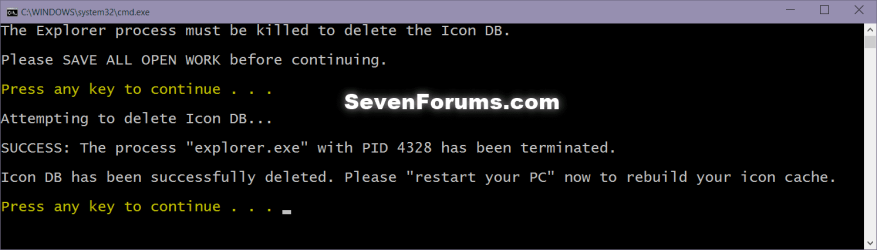
Icon_cache_command.png
5. Restart your computer to generate a new IconCache.db file.

6. If the icons are still not displaying properly, then download and merge the ICO option in this tutorial for Windows 7 or Windows 8 to restore the default associations of .ico (icon) files.


OPTION TWO

To Manually Rebuild the Icon Cache using the Command Prompt


1. Close and save anything that you are working on. This command will kill explorer and restart the computer when completed.

2. Open a command prompt in Windows 7 or Windows 8.

3. In the command prompt, Copy and paste each command line below exactly as is one at a time and press enter after each command.
:warn:WARNING: The last command will restart the computer, so be sure to close and save anything that you are working on first.
  • ie4uinit.exe -ClearIconCache
  • taskkill /IM explorer.exe /F
  • DEL "%localappdata%\IconCache.db" /A
  • DEL "%localappdata%\Microsoft\Windows\Explorer\iconcache*" /A
  • shutdown /r /f /t 00
4. The IconCache.db file has now been rebuilt.

5. If the icons are still not displaying properly, then download and merge the ICO option in this tutorial for Windows 7 or Windows 8 to restore the default associations of .ico (icon) files.

That's it,
Shawn


Attachments

Last edited:
reset icons without restart?

I'm not sure if this belongs here, but this is the closest thread I've found.

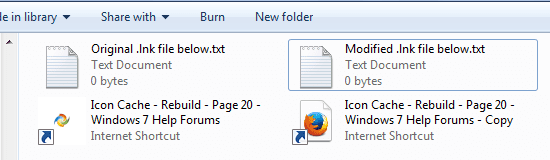
I frequently create Internet Shortcuts (.lnk files) and move them to a server on my network to make them available from any of the computers on my network - but Firefox (which is what I use for most of my Internet browsing) insists on making the shortcut's icon specific to both the Web site it refers to (by saving a copy of each site's favicon) and to the computer that created the shortcut (by pointing the shortcut to a randomly-named file on the local computer). Obviously, this breaks when you're viewing the shortcut from a different computer than the one that created it, so I edit the shortcut files to remove this unnecessary information. The problem is, after editing, the file still looks the same on the Windows 7 desktop. If I move or rename the file, the icon changes to reflect my editing, but if I move it back, the old icon comes back. Windows 8 doesn't have this problem; apparently it knows to re-initialize the icon information when the file is edited, but Windows 7 doesn't. I don't have to do anything other than restart the computer to clear this up, but it's awfully inconvenient to restart the computer every time I create a shortcut. Is there any way (short of restarting) to force Windows 7 to reread the innards to the .lnk file?

Example:
icons.png
Internal text of .lnk file:
Code:
[InternetShortcut]
URL=http://www.sevenforums.com/tutorials/49819-icon-cache-rebuild-20.html
IDList=
HotKey=0
[DEL]IconFile=C:\Users\[I]{me}[/I]\AppData\Local\Mozilla\Firefox\Profiles\[I]{my}[/I]\shortcutCache\[I]{random}[/I]==.ico
IconIndex=0[/DEL]
 

My Computer

OS
Windows 7 Home Premium (64bit)
Hello TBugReporter,

You might see if using the command below to only clear the icon cache may be able to do this for you without having to restart the PC. If it works, then you could create a .bat file with it to make it easy to use as needed.

ie4uinit.exe -ClearIconCache
 

My Computer

Computer type
PC/Desktop
Computer Manufacturer/Model Number
Self built custom
OS
64-bit Windows 11 Pro for Workstations
CPU
Intel i7-8700K OC'd to 5 GHz
Motherboard
ASUS ROG Maximus XI Formula Z390
Memory
64 GB (4x16GB) G.SKILL TridentZ RGB DDR4 3600 MHz
Graphics Card(s)
ASUS ROG-STRIX-GTX1080TI-O11G-GAMING
Sound Card
Integrated
Monitor(s) Displays
2 x Samsung Odyssey G7 27"
Screen Resolution
2560x1440
Hard Drives
1TB Samsung 990 PRO M.2,
4TB Samsung 990 PRO PRO M.2,
TerraMaster F8 SSD Plus NAS
PSU
Seasonic Prime Titanium 850W
Case
Thermaltake Core P3
Cooling
Corsair Hydro H115i
Keyboard
Logitech wireless K800
Mouse
Logitech MX Master 4
Internet Speed
2 Gb/s Download and 100 Mb/s Upload
Antivirus
Malwarebyte Anti-Malware Premium
Browser
Google Chrome
Other Info
Logitech Z625 speaker system,
Logitech BRIO 4K Pro webcam,
HP Color LaserJet Pro MFP M477fdn,
APC SMART-UPS RT 1000 XL - SURT1000XLI,
Galaxy S23 Plus phone
You might see if using the command below to only clear the icon cache may be able to do this for you without having to restart the PC. If it works, then you could create a .bat file with it to make it easy to use as needed.

ie4uinit.exe -ClearIconCache

For the record, that works. Thanks.
 

My Computer

OS
Windows 7 Home Premium (64bit)
You're most welcome TBugReporter. Thank you for posting back with your results. :)
 

My Computer

Computer type
PC/Desktop
Computer Manufacturer/Model Number
Self built custom
OS
64-bit Windows 11 Pro for Workstations
CPU
Intel i7-8700K OC'd to 5 GHz
Motherboard
ASUS ROG Maximus XI Formula Z390
Memory
64 GB (4x16GB) G.SKILL TridentZ RGB DDR4 3600 MHz
Graphics Card(s)
ASUS ROG-STRIX-GTX1080TI-O11G-GAMING
Sound Card
Integrated
Monitor(s) Displays
2 x Samsung Odyssey G7 27"
Screen Resolution
2560x1440
Hard Drives
1TB Samsung 990 PRO M.2,
4TB Samsung 990 PRO PRO M.2,
TerraMaster F8 SSD Plus NAS
PSU
Seasonic Prime Titanium 850W
Case
Thermaltake Core P3
Cooling
Corsair Hydro H115i
Keyboard
Logitech wireless K800
Mouse
Logitech MX Master 4
Internet Speed
2 Gb/s Download and 100 Mb/s Upload
Antivirus
Malwarebyte Anti-Malware Premium
Browser
Google Chrome
Other Info
Logitech Z625 speaker system,
Logitech BRIO 4K Pro webcam,
HP Color LaserJet Pro MFP M477fdn,
APC SMART-UPS RT 1000 XL - SURT1000XLI,
Galaxy S23 Plus phone
Reposting for results.

I just want to confirm the script (.bat) from Option One of the tutorial worked like a charm. Nice! :)

I came across undefined icons just moments back for two programs (i.e. LINE and Wise Registry Cleaner) and now they're back to normal after running the script.

line_wrc.png
 

My Computer

Computer type
Laptop
Computer Manufacturer/Model Number
ASUS N45SF
OS
Windows 7 Professional SP1 x64 (OEM)
CPU
Intel® Core™ i5 2430M/2410M Processor
Motherboard
Intel® HM65 Express Chipset
Memory
DDR3 1333 SODIMM (8GB)
Graphics Card(s)
NVIDIA® GeForce® GT 555M (2GB)
Sound Card
Realtek High Definition Audio
Monitor(s) Displays
14.0" LED Backlight
Screen Resolution
16:9 HD (1366x768)
Hard Drives
640GB Seagate (internal), 1TB Toshiba Canvio Portable, 2TB x 2 WD My Book Essential (external)
Antivirus
Malwarebytes Anti-Malware Home (Premium)
Browser
Waterfox
Other Info
Optical Drive: Slimtype DVD A DS8A5SH (Super-Multi DVD);
Audio: Bang & Olufsen ICEpower®, SonicMaster
I had to join to say THANKS! This works great! I have been struggling with missing icons for about a year now. Awesome!
 

My Computer

Computer type
PC/Desktop
OS
Windows 7 x64
I'm happy to hear that it was able to help professorman, and welcome to Seven Forums. :)
 

My Computer

Computer type
PC/Desktop
Computer Manufacturer/Model Number
Self built custom
OS
64-bit Windows 11 Pro for Workstations
CPU
Intel i7-8700K OC'd to 5 GHz
Motherboard
ASUS ROG Maximus XI Formula Z390
Memory
64 GB (4x16GB) G.SKILL TridentZ RGB DDR4 3600 MHz
Graphics Card(s)
ASUS ROG-STRIX-GTX1080TI-O11G-GAMING
Sound Card
Integrated
Monitor(s) Displays
2 x Samsung Odyssey G7 27"
Screen Resolution
2560x1440
Hard Drives
1TB Samsung 990 PRO M.2,
4TB Samsung 990 PRO PRO M.2,
TerraMaster F8 SSD Plus NAS
PSU
Seasonic Prime Titanium 850W
Case
Thermaltake Core P3
Cooling
Corsair Hydro H115i
Keyboard
Logitech wireless K800
Mouse
Logitech MX Master 4
Internet Speed
2 Gb/s Download and 100 Mb/s Upload
Antivirus
Malwarebyte Anti-Malware Premium
Browser
Google Chrome
Other Info
Logitech Z625 speaker system,
Logitech BRIO 4K Pro webcam,
HP Color LaserJet Pro MFP M477fdn,
APC SMART-UPS RT 1000 XL - SURT1000XLI,
Galaxy S23 Plus phone
Does anyone know if rebuilding the cache would fix excel/powerpoint icons?

Here is what mine look like Along with word, and access files for comparison.

7LkbIme.png
 
Last edited by a moderator:

My Computer

Computer type
PC/Desktop
OS
Windows 7 ultimate x64 on Boot Camp
Hello Erick, and welcome to Seven Forums.

It could be an association issue instead. As a test, right click on the .pptx file, click on Open with, and select Power Point to be the default program.

http://www.sevenforums.com/tutorials/12196-open-change-default-program.html

If the icon still doesn't show with Power Point set as it's default program, then see if rebuilding the icon cache may help.

Hope this helps, :)
Shawn
 

My Computer

Computer type
PC/Desktop
Computer Manufacturer/Model Number
Self built custom
OS
64-bit Windows 11 Pro for Workstations
CPU
Intel i7-8700K OC'd to 5 GHz
Motherboard
ASUS ROG Maximus XI Formula Z390
Memory
64 GB (4x16GB) G.SKILL TridentZ RGB DDR4 3600 MHz
Graphics Card(s)
ASUS ROG-STRIX-GTX1080TI-O11G-GAMING
Sound Card
Integrated
Monitor(s) Displays
2 x Samsung Odyssey G7 27"
Screen Resolution
2560x1440
Hard Drives
1TB Samsung 990 PRO M.2,
4TB Samsung 990 PRO PRO M.2,
TerraMaster F8 SSD Plus NAS
PSU
Seasonic Prime Titanium 850W
Case
Thermaltake Core P3
Cooling
Corsair Hydro H115i
Keyboard
Logitech wireless K800
Mouse
Logitech MX Master 4
Internet Speed
2 Gb/s Download and 100 Mb/s Upload
Antivirus
Malwarebyte Anti-Malware Premium
Browser
Google Chrome
Other Info
Logitech Z625 speaker system,
Logitech BRIO 4K Pro webcam,
HP Color LaserJet Pro MFP M477fdn,
APC SMART-UPS RT 1000 XL - SURT1000XLI,
Galaxy S23 Plus phone
Much appreciated

I elected to perform the manual procedure - worked like a charm!

Thanks!
 

My Computer

Computer Manufacturer/Model Number
HP 8730w (laptop)
OS
Dual-Boot WinXPP (x32), Win 7 Ent (x64)
CPU
Intel Core2Duo (T9400 @ 2.53GHz)
Memory
4GB
Some icons display large and some small

Hi Shawn,
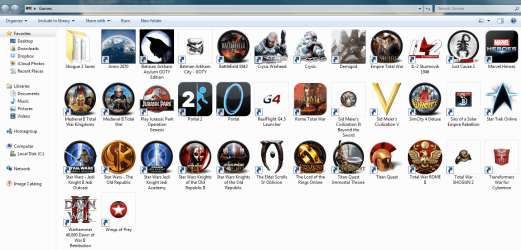
Thanks for this tutorial. It solved many of my issues for a time. Now I'm having a slightly different issue that is driving me nuts. Some of the icons will display correctly while others are displaying micro versions of what they should look like. I have created a games folder for all of my installed games and I have gone to great lengths to find attractive looking icons for some of these games. At one point these all displayed large-sized icons and everything looked great. Now today, some of them have shrunk. I've recreated the icon cache, gone through disk cleanup to delete thumbnail cache and even increased the size of my icon cache but I'm still having the problem. Any help you can provide would be much appreciated. See screenshot below of what I'm currently seeing.

Icons Snagit.PNG
 

My Computer

Computer type
PC/Desktop
Computer Manufacturer/Model Number
Custom Build
OS
Windows 7 Ultimate X64
CPU
Intel i5-3570K
Motherboard
Asus P8Z68-V Pro/Gen3
Memory
Kingston Hyper-X 8GB DDR3
Graphics Card(s)
Nvidia GTX460 SLI
Hard Drives
Western Digital 1 TB
Antivirus
Avast
Browser
Internet Explorer 11
Hello gspegal, and welcome to Seven Forums.

You would see smaller icons like this when you view the folder with Large or Extra Large icons and the program only used say a 96x96 pixel icon instead of a 256x256 icon. The icon is not large enough to fit the size selected.

If you change to viewing the folder with Medium icons, the icons should all look the same size again.

http://www.sevenforums.com/tutorials/3916-icon-size-change-windows-explorer-window.html

Hope this helps, :)
Shawn
 

My Computer

Computer type
PC/Desktop
Computer Manufacturer/Model Number
Self built custom
OS
64-bit Windows 11 Pro for Workstations
CPU
Intel i7-8700K OC'd to 5 GHz
Motherboard
ASUS ROG Maximus XI Formula Z390
Memory
64 GB (4x16GB) G.SKILL TridentZ RGB DDR4 3600 MHz
Graphics Card(s)
ASUS ROG-STRIX-GTX1080TI-O11G-GAMING
Sound Card
Integrated
Monitor(s) Displays
2 x Samsung Odyssey G7 27"
Screen Resolution
2560x1440
Hard Drives
1TB Samsung 990 PRO M.2,
4TB Samsung 990 PRO PRO M.2,
TerraMaster F8 SSD Plus NAS
PSU
Seasonic Prime Titanium 850W
Case
Thermaltake Core P3
Cooling
Corsair Hydro H115i
Keyboard
Logitech wireless K800
Mouse
Logitech MX Master 4
Internet Speed
2 Gb/s Download and 100 Mb/s Upload
Antivirus
Malwarebyte Anti-Malware Premium
Browser
Google Chrome
Other Info
Logitech Z625 speaker system,
Logitech BRIO 4K Pro webcam,
HP Color LaserJet Pro MFP M477fdn,
APC SMART-UPS RT 1000 XL - SURT1000XLI,
Galaxy S23 Plus phone
Hi Shawn,Thanks for the lightning fast reply. Sorry for not specifying in my previous post but I actually am using a 256x256 source file for each of the icons that are displaying smaller when I select view icons large size. What's odd is that yesterday all were displaying in large size just fine. Wish I would have taken a screen shot then for comparison. Any other ideas? Btw I really appreciate your help because I'm somewhat OCD with this stuff. :)
 

My Computer

Computer type
PC/Desktop
Computer Manufacturer/Model Number
Custom Build
OS
Windows 7 Ultimate X64
CPU
Intel i5-3570K
Motherboard
Asus P8Z68-V Pro/Gen3
Memory
Kingston Hyper-X 8GB DDR3
Graphics Card(s)
Nvidia GTX460 SLI
Hard Drives
Western Digital 1 TB
Antivirus
Avast
Browser
Internet Explorer 11
In that case, see if renaming one of the affected shortcuts to anything different (ex: add a dash in the name) may return it's icon back to normal.
 

My Computer

Computer type
PC/Desktop
Computer Manufacturer/Model Number
Self built custom
OS
64-bit Windows 11 Pro for Workstations
CPU
Intel i7-8700K OC'd to 5 GHz
Motherboard
ASUS ROG Maximus XI Formula Z390
Memory
64 GB (4x16GB) G.SKILL TridentZ RGB DDR4 3600 MHz
Graphics Card(s)
ASUS ROG-STRIX-GTX1080TI-O11G-GAMING
Sound Card
Integrated
Monitor(s) Displays
2 x Samsung Odyssey G7 27"
Screen Resolution
2560x1440
Hard Drives
1TB Samsung 990 PRO M.2,
4TB Samsung 990 PRO PRO M.2,
TerraMaster F8 SSD Plus NAS
PSU
Seasonic Prime Titanium 850W
Case
Thermaltake Core P3
Cooling
Corsair Hydro H115i
Keyboard
Logitech wireless K800
Mouse
Logitech MX Master 4
Internet Speed
2 Gb/s Download and 100 Mb/s Upload
Antivirus
Malwarebyte Anti-Malware Premium
Browser
Google Chrome
Other Info
Logitech Z625 speaker system,
Logitech BRIO 4K Pro webcam,
HP Color LaserJet Pro MFP M477fdn,
APC SMART-UPS RT 1000 XL - SURT1000XLI,
Galaxy S23 Plus phone
Changing the file name does not change the size of the picture. I tried file names that I know have never been used before like "Work Darnit" and "Please work" but to no avail. I'm debating whether or not to just reformat. :(
 

My Computer

Computer type
PC/Desktop
Computer Manufacturer/Model Number
Custom Build
OS
Windows 7 Ultimate X64
CPU
Intel i5-3570K
Motherboard
Asus P8Z68-V Pro/Gen3
Memory
Kingston Hyper-X 8GB DDR3
Graphics Card(s)
Nvidia GTX460 SLI
Hard Drives
Western Digital 1 TB
Antivirus
Avast
Browser
Internet Explorer 11
As another test, if you copy one of the affected shortcuts to another location, does it's icon display properly there?

In addition, try creating a new shortcut directly from the .exe file of the game to see if the icon will display properly for the new one.
 

My Computer

Computer type
PC/Desktop
Computer Manufacturer/Model Number
Self built custom
OS
64-bit Windows 11 Pro for Workstations
CPU
Intel i7-8700K OC'd to 5 GHz
Motherboard
ASUS ROG Maximus XI Formula Z390
Memory
64 GB (4x16GB) G.SKILL TridentZ RGB DDR4 3600 MHz
Graphics Card(s)
ASUS ROG-STRIX-GTX1080TI-O11G-GAMING
Sound Card
Integrated
Monitor(s) Displays
2 x Samsung Odyssey G7 27"
Screen Resolution
2560x1440
Hard Drives
1TB Samsung 990 PRO M.2,
4TB Samsung 990 PRO PRO M.2,
TerraMaster F8 SSD Plus NAS
PSU
Seasonic Prime Titanium 850W
Case
Thermaltake Core P3
Cooling
Corsair Hydro H115i
Keyboard
Logitech wireless K800
Mouse
Logitech MX Master 4
Internet Speed
2 Gb/s Download and 100 Mb/s Upload
Antivirus
Malwarebyte Anti-Malware Premium
Browser
Google Chrome
Other Info
Logitech Z625 speaker system,
Logitech BRIO 4K Pro webcam,
HP Color LaserJet Pro MFP M477fdn,
APC SMART-UPS RT 1000 XL - SURT1000XLI,
Galaxy S23 Plus phone
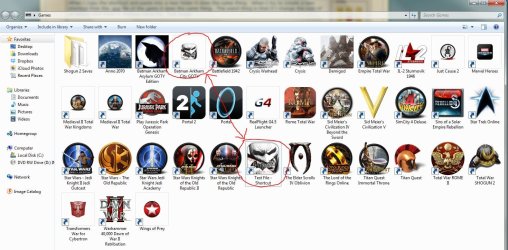
When I copy the shortcut and paste into a new folder it does the same thing. The games are actually downloaded from Steam client but when I try to create a new shortcut from Steam and change the icon, it does the same thing. The weird thing is that if I change the icon of an empty test folder it displays correctly. See attached image. I'm wondering if it has something to do with Steam.
 

Attachments

  • Games Folder2.JPG
    Games Folder2.JPG
    210.5 KB · Views: 545

My Computer

Computer type
PC/Desktop
Computer Manufacturer/Model Number
Custom Build
OS
Windows 7 Ultimate X64
CPU
Intel i5-3570K
Motherboard
Asus P8Z68-V Pro/Gen3
Memory
Kingston Hyper-X 8GB DDR3
Graphics Card(s)
Nvidia GTX460 SLI
Hard Drives
Western Digital 1 TB
Antivirus
Avast
Browser
Internet Explorer 11

My Computer

Computer type
PC/Desktop
Computer Manufacturer/Model Number
Self built custom
OS
64-bit Windows 11 Pro for Workstations
CPU
Intel i7-8700K OC'd to 5 GHz
Motherboard
ASUS ROG Maximus XI Formula Z390
Memory
64 GB (4x16GB) G.SKILL TridentZ RGB DDR4 3600 MHz
Graphics Card(s)
ASUS ROG-STRIX-GTX1080TI-O11G-GAMING
Sound Card
Integrated
Monitor(s) Displays
2 x Samsung Odyssey G7 27"
Screen Resolution
2560x1440
Hard Drives
1TB Samsung 990 PRO M.2,
4TB Samsung 990 PRO PRO M.2,
TerraMaster F8 SSD Plus NAS
PSU
Seasonic Prime Titanium 850W
Case
Thermaltake Core P3
Cooling
Corsair Hydro H115i
Keyboard
Logitech wireless K800
Mouse
Logitech MX Master 4
Internet Speed
2 Gb/s Download and 100 Mb/s Upload
Antivirus
Malwarebyte Anti-Malware Premium
Browser
Google Chrome
Other Info
Logitech Z625 speaker system,
Logitech BRIO 4K Pro webcam,
HP Color LaserJet Pro MFP M477fdn,
APC SMART-UPS RT 1000 XL - SURT1000XLI,
Galaxy S23 Plus phone
I love this website. This is the first place I come for support on Windows 7 issues. Problem solved. Again, thanks. Pat
 

My Computer

Computer type
PC/Desktop
Computer Manufacturer/Model Number
Dell
OS
Windows 7 Ultimate, 64-bit Operating System
CPU
Intel(R) Pentium(R) D CPU 2.80GHz 2.79GHz
Memory
2.00 GB
Antivirus
Malwarebytes Anti-Malware Premium
Browser
Internet Explorer 11
Other Info
An old friend put this machine together for me almost 2 yrs ago.
I've been experiencing the same issue as gspegal28 on Windows Vista, 7 and 8 for years, it's driving me nuts! I have made custom 256x256 icons for my games in Photoshop. Some display fine full size, while others are reduced to small. Sometimes they correct themselves but most times, I have at least 3 that are showing small versions. I have renamed the shortcuts but it didn't help.

Any ideas?
 

My Computer

OS
Windows 7 x64 Home Premium
CPU
Intel Core 2 Quad 9450 @ 3.2GHz
Motherboard
Abit IP35 Pro XE
Memory
2x2GB Corsair XMS2 DDR2 (PC2-6400) 4-4-4-12
Graphics Card(s)
XFX Radeon HD 4890 XXX 1GB
Sound Card
Creative Sound Blaster X-fi XtremeMusic
Monitor(s) Displays
Hyundai W240D-PVA 24" LCD Monitor
Hard Drives
Hitachi Deskstar 7K1000 750GB
PSU
Corsair HX Series 620W
Case
Antec Plus 1080AMG Metallic Gray Case
Back
Top