Icon Cache - Rebuild

How to Rebuild the Icon Cache in Windows

   Information
If one or more of your icons are not displaying correctly, or that your icon cache is corrupted, then you might consider rebuilding the icon cache to reset and reload the icon images into the icon cache in Vista, Windows 7, and Windows 8.

   Note
This will not help with any of the following icon issues:
  • A shortcut's icon that is not displayed properly due to the source of the shortcut being moved or deleted. You may need to recreate a new shortcut directly from the source (ex: program's exe) file to replace it instead.
  • All icons for a specific file extension display the wrong icon. This may be due to setting the wrong association for what program to open the file extension instead. You can restore the default file extension's associations to fix this icon instead.


OPTION ONE

Automatically Rebuild the Icon Cache


1. Click/tap on the download button below to download the file below.
Rebuild_Icon_Cache.bat

Download


2. Save the file to your desktop, and run it.

3. Click/tap on Run when prompted.

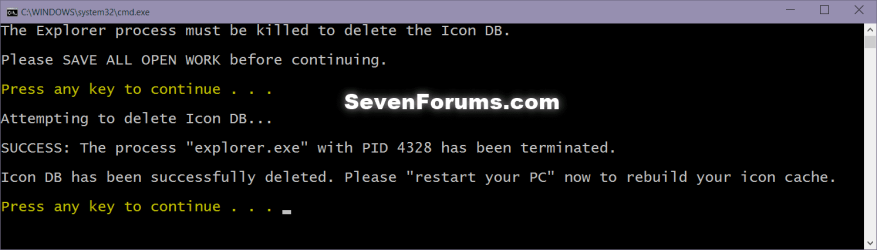
4. Follow the instructions in the command prompt to rebuild the Icon Cache. (see screenshot below)
Icon_cache_command.png
5. Restart your computer to generate a new IconCache.db file.

6. If the icons are still not displaying properly, then download and merge the ICO option in this tutorial for Windows 7 or Windows 8 to restore the default associations of .ico (icon) files.


OPTION TWO

To Manually Rebuild the Icon Cache using the Command Prompt


1. Close and save anything that you are working on. This command will kill explorer and restart the computer when completed.

2. Open a command prompt in Windows 7 or Windows 8.

3. In the command prompt, Copy and paste each command line below exactly as is one at a time and press enter after each command.
:warn:WARNING: The last command will restart the computer, so be sure to close and save anything that you are working on first.
  • ie4uinit.exe -ClearIconCache
  • taskkill /IM explorer.exe /F
  • DEL "%localappdata%\IconCache.db" /A
  • DEL "%localappdata%\Microsoft\Windows\Explorer\iconcache*" /A
  • shutdown /r /f /t 00
4. The IconCache.db file has now been rebuilt.

5. If the icons are still not displaying properly, then download and merge the ICO option in this tutorial for Windows 7 or Windows 8 to restore the default associations of .ico (icon) files.

That's it,
Shawn


Attachments

Last edited:
I rebuilt my Icons Cache(per instructions here) and increased the Icon Cache size to 8192(per your link) and that worked until there was an update to Visual Studio 2012. Windows Icons(Calculator, etc.) were blown out again and I received an error message when trying open it that the program could not be found.
Rebuilding the Icon Cache again and increasing the size 16384.
If you can think of another solution I'm all ears.
 

My Computer

Computer type
Laptop
Computer Manufacturer/Model Number
Dell
OS
Windows7 x64
Max,

Since you are getting a "program could not be found" error message for the shortcuts, it may be an association issue instead. If the shortcuts are no longer associated with their target program, then that would also cause the program's icon to no longer be associated with the shortcut leaving you with a blank default icon.

Do the shortcuts work again after rebuilding the icon cache? I wouldn't think so.

As a test, download and merge the .reg file for the listed .lnk (LNK) option in the tutorial below to restore the default associations of shortcuts (.lnk files) to see if that may help.

http://www.sevenforums.com/tutorials/19449-default-file-type-associations-restore.html
 

My Computer

Computer type
PC/Desktop
Computer Manufacturer/Model Number
Self built custom
OS
64-bit Windows 11 Pro for Workstations
CPU
Intel i7-8700K OC'd to 5 GHz
Motherboard
ASUS ROG Maximus XI Formula Z390
Memory
64 GB (4x16GB) G.SKILL TridentZ RGB DDR4 3600 MHz
Graphics Card(s)
ASUS ROG-STRIX-GTX1080TI-O11G-GAMING
Sound Card
Integrated
Monitor(s) Displays
2 x Samsung Odyssey G7 27"
Screen Resolution
2560x1440
Hard Drives
1TB Samsung 990 PRO M.2,
4TB Samsung 990 PRO PRO M.2,
TerraMaster F8 SSD Plus NAS
PSU
Seasonic Prime Titanium 850W
Case
Thermaltake Core P3
Cooling
Corsair Hydro H115i
Keyboard
Logitech wireless K800
Mouse
Logitech MX Master 4
Internet Speed
2 Gb/s Download and 100 Mb/s Upload
Antivirus
Malwarebyte Anti-Malware Premium
Browser
Google Chrome
Other Info
Logitech Z625 speaker system,
Logitech BRIO 4K Pro webcam,
HP Color LaserJet Pro MFP M477fdn,
APC SMART-UPS RT 1000 XL - SURT1000XLI,
Galaxy S23 Plus phone
After a restart(no cache rebuild, just size increase) the programs are found but the Icons were still missing.
Will try the file Associations fix now.
Thanks again.
 

My Computer

Computer type
Laptop
Computer Manufacturer/Model Number
Dell
OS
Windows7 x64
To overcome the need to rebuild the icon cache i have two files in my group policy, first is in the shutdown and the second one is in the logoff. First unzip the zip file and copy to system32 folder (if you don't have access take ownership of the group policy folder) once done open the Group Policy Editor (gpedit.msc) click on Computer Configuration then Windows Settings then Scripts, righthand pane double click Shutdown, click add then browse, the Shutdown1.bat should be there select it then OK and apply. Do the same for the logoff but select User Configuration then Windows Settings then Scripts, righthand pane double click logoff, click add then browse, the Restart.bat should be there select it then OK and apply. This work behind the scenes so once you have configured it thats it, works every time
 

Attachments

My Computer

Computer type
PC/Desktop
Computer Manufacturer/Model Number
Own Custom Built
OS
Windows 7 Ultimate x64 SP1
CPU
Intel X9770 3.2Ghz
Motherboard
Gigabyte GA-EP45T-EXTREME
Memory
Corsair 8GB
Graphics Card(s)
XFX ATI HD 5850
Sound Card
Onboard
Monitor(s) Displays
Dell 2408WFP
Screen Resolution
1920 x 1200
Hard Drives
OCZ SSD 240GB x 2
PSU
Corsair TX750
Case
Custom
Cooling
Water
Mouse
Cyber R.A.T 7
Internet Speed
60MB
Other Info
Intel SATA 3 RAID Controller RT3WB080 Runnnig in Raid 0
I tried the automatic solution and it very noticeably slowed down my start-up
 

My Computer

OS
Windows 7 Home Premium 64-bit

My Computer

Computer type
PC/Desktop
Computer Manufacturer/Model Number
Self built custom
OS
64-bit Windows 11 Pro for Workstations
CPU
Intel i7-8700K OC'd to 5 GHz
Motherboard
ASUS ROG Maximus XI Formula Z390
Memory
64 GB (4x16GB) G.SKILL TridentZ RGB DDR4 3600 MHz
Graphics Card(s)
ASUS ROG-STRIX-GTX1080TI-O11G-GAMING
Sound Card
Integrated
Monitor(s) Displays
2 x Samsung Odyssey G7 27"
Screen Resolution
2560x1440
Hard Drives
1TB Samsung 990 PRO M.2,
4TB Samsung 990 PRO PRO M.2,
TerraMaster F8 SSD Plus NAS
PSU
Seasonic Prime Titanium 850W
Case
Thermaltake Core P3
Cooling
Corsair Hydro H115i
Keyboard
Logitech wireless K800
Mouse
Logitech MX Master 4
Internet Speed
2 Gb/s Download and 100 Mb/s Upload
Antivirus
Malwarebyte Anti-Malware Premium
Browser
Google Chrome
Other Info
Logitech Z625 speaker system,
Logitech BRIO 4K Pro webcam,
HP Color LaserJet Pro MFP M477fdn,
APC SMART-UPS RT 1000 XL - SURT1000XLI,
Galaxy S23 Plus phone
Last edited by a moderator:

My Computer

Computer type
Laptop
Computer Manufacturer/Model Number
MSI
OS
Microsoft Windows 7 Home Premium 64-bit SP1
CPU
Intel Core i3 330M @ 2.13GHz Arrandale 32nm Technology
Motherboard
Micro-Star International MS-1688 (CPU 1)
Memory
4.00 GB Dual-Channel DDR3 @ 531MHz (7-7-7-20)
Graphics Card(s)
Generic PnP Monitor (1366x768@60Hz) and Intel Graphics Media
Sound Card
Realtek High Definition Audio
Monitor(s) Displays
Generic PnP Monitor on Intel Graphics Media Accelerator HD
Screen Resolution
1366x768 pixels
Hard Drives
466GB Western Digital WDC WD5000BEVT-22ZAT0 ATA Device (SATA)
Antivirus
Microsoft security essentials
Browser
Firefox
Hello Anton, and welcome to Seven Forums.

Do you have the correct programs set as the default to open these file types with?
 

My Computer

Computer type
PC/Desktop
Computer Manufacturer/Model Number
Self built custom
OS
64-bit Windows 11 Pro for Workstations
CPU
Intel i7-8700K OC'd to 5 GHz
Motherboard
ASUS ROG Maximus XI Formula Z390
Memory
64 GB (4x16GB) G.SKILL TridentZ RGB DDR4 3600 MHz
Graphics Card(s)
ASUS ROG-STRIX-GTX1080TI-O11G-GAMING
Sound Card
Integrated
Monitor(s) Displays
2 x Samsung Odyssey G7 27"
Screen Resolution
2560x1440
Hard Drives
1TB Samsung 990 PRO M.2,
4TB Samsung 990 PRO PRO M.2,
TerraMaster F8 SSD Plus NAS
PSU
Seasonic Prime Titanium 850W
Case
Thermaltake Core P3
Cooling
Corsair Hydro H115i
Keyboard
Logitech wireless K800
Mouse
Logitech MX Master 4
Internet Speed
2 Gb/s Download and 100 Mb/s Upload
Antivirus
Malwarebyte Anti-Malware Premium
Browser
Google Chrome
Other Info
Logitech Z625 speaker system,
Logitech BRIO 4K Pro webcam,
HP Color LaserJet Pro MFP M477fdn,
APC SMART-UPS RT 1000 XL - SURT1000XLI,
Galaxy S23 Plus phone
Hi Brink,

I think yes, but you can advice me how to find out if I have the correct programs set as the defaultin order to to open these file types with.
 

My Computer

Computer type
Laptop
Computer Manufacturer/Model Number
MSI
OS
Microsoft Windows 7 Home Premium 64-bit SP1
CPU
Intel Core i3 330M @ 2.13GHz Arrandale 32nm Technology
Motherboard
Micro-Star International MS-1688 (CPU 1)
Memory
4.00 GB Dual-Channel DDR3 @ 531MHz (7-7-7-20)
Graphics Card(s)
Generic PnP Monitor (1366x768@60Hz) and Intel Graphics Media
Sound Card
Realtek High Definition Audio
Monitor(s) Displays
Generic PnP Monitor on Intel Graphics Media Accelerator HD
Screen Resolution
1366x768 pixels
Hard Drives
466GB Western Digital WDC WD5000BEVT-22ZAT0 ATA Device (SATA)
Antivirus
Microsoft security essentials
Browser
Firefox
When you click on the file, does it open with the correct program?

For example, does a .doc file open in Office Word, and does a .pdf file open in say Adobe Reader?
 

My Computer

Computer type
PC/Desktop
Computer Manufacturer/Model Number
Self built custom
OS
64-bit Windows 11 Pro for Workstations
CPU
Intel i7-8700K OC'd to 5 GHz
Motherboard
ASUS ROG Maximus XI Formula Z390
Memory
64 GB (4x16GB) G.SKILL TridentZ RGB DDR4 3600 MHz
Graphics Card(s)
ASUS ROG-STRIX-GTX1080TI-O11G-GAMING
Sound Card
Integrated
Monitor(s) Displays
2 x Samsung Odyssey G7 27"
Screen Resolution
2560x1440
Hard Drives
1TB Samsung 990 PRO M.2,
4TB Samsung 990 PRO PRO M.2,
TerraMaster F8 SSD Plus NAS
PSU
Seasonic Prime Titanium 850W
Case
Thermaltake Core P3
Cooling
Corsair Hydro H115i
Keyboard
Logitech wireless K800
Mouse
Logitech MX Master 4
Internet Speed
2 Gb/s Download and 100 Mb/s Upload
Antivirus
Malwarebyte Anti-Malware Premium
Browser
Google Chrome
Other Info
Logitech Z625 speaker system,
Logitech BRIO 4K Pro webcam,
HP Color LaserJet Pro MFP M477fdn,
APC SMART-UPS RT 1000 XL - SURT1000XLI,
Galaxy S23 Plus phone
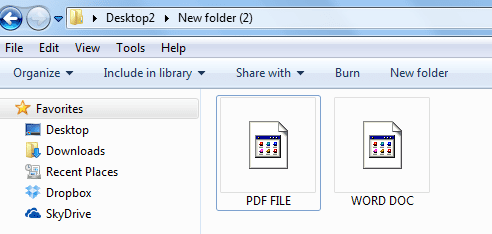
YEP!!!! THAT'S OK! The problem is just the icons only for word and pdf files
 

My Computer

Computer type
Laptop
Computer Manufacturer/Model Number
MSI
OS
Microsoft Windows 7 Home Premium 64-bit SP1
CPU
Intel Core i3 330M @ 2.13GHz Arrandale 32nm Technology
Motherboard
Micro-Star International MS-1688 (CPU 1)
Memory
4.00 GB Dual-Channel DDR3 @ 531MHz (7-7-7-20)
Graphics Card(s)
Generic PnP Monitor (1366x768@60Hz) and Intel Graphics Media
Sound Card
Realtek High Definition Audio
Monitor(s) Displays
Generic PnP Monitor on Intel Graphics Media Accelerator HD
Screen Resolution
1366x768 pixels
Hard Drives
466GB Western Digital WDC WD5000BEVT-22ZAT0 ATA Device (SATA)
Antivirus
Microsoft security essentials
Browser
Firefox

My Computer

Computer type
PC/Desktop
Computer Manufacturer/Model Number
Self built custom
OS
64-bit Windows 11 Pro for Workstations
CPU
Intel i7-8700K OC'd to 5 GHz
Motherboard
ASUS ROG Maximus XI Formula Z390
Memory
64 GB (4x16GB) G.SKILL TridentZ RGB DDR4 3600 MHz
Graphics Card(s)
ASUS ROG-STRIX-GTX1080TI-O11G-GAMING
Sound Card
Integrated
Monitor(s) Displays
2 x Samsung Odyssey G7 27"
Screen Resolution
2560x1440
Hard Drives
1TB Samsung 990 PRO M.2,
4TB Samsung 990 PRO PRO M.2,
TerraMaster F8 SSD Plus NAS
PSU
Seasonic Prime Titanium 850W
Case
Thermaltake Core P3
Cooling
Corsair Hydro H115i
Keyboard
Logitech wireless K800
Mouse
Logitech MX Master 4
Internet Speed
2 Gb/s Download and 100 Mb/s Upload
Antivirus
Malwarebyte Anti-Malware Premium
Browser
Google Chrome
Other Info
Logitech Z625 speaker system,
Logitech BRIO 4K Pro webcam,
HP Color LaserJet Pro MFP M477fdn,
APC SMART-UPS RT 1000 XL - SURT1000XLI,
Galaxy S23 Plus phone
Screenshot-icons.png
 

My Computer

Computer type
Laptop
Computer Manufacturer/Model Number
MSI
OS
Microsoft Windows 7 Home Premium 64-bit SP1
CPU
Intel Core i3 330M @ 2.13GHz Arrandale 32nm Technology
Motherboard
Micro-Star International MS-1688 (CPU 1)
Memory
4.00 GB Dual-Channel DDR3 @ 531MHz (7-7-7-20)
Graphics Card(s)
Generic PnP Monitor (1366x768@60Hz) and Intel Graphics Media
Sound Card
Realtek High Definition Audio
Monitor(s) Displays
Generic PnP Monitor on Intel Graphics Media Accelerator HD
Screen Resolution
1366x768 pixels
Hard Drives
466GB Western Digital WDC WD5000BEVT-22ZAT0 ATA Device (SATA)
Antivirus
Microsoft security essentials
Browser
Firefox
As a test, reinstall the programs that you have installed to open these files to see if it may be able to repair it and the icon.
 

My Computer

Computer type
PC/Desktop
Computer Manufacturer/Model Number
Self built custom
OS
64-bit Windows 11 Pro for Workstations
CPU
Intel i7-8700K OC'd to 5 GHz
Motherboard
ASUS ROG Maximus XI Formula Z390
Memory
64 GB (4x16GB) G.SKILL TridentZ RGB DDR4 3600 MHz
Graphics Card(s)
ASUS ROG-STRIX-GTX1080TI-O11G-GAMING
Sound Card
Integrated
Monitor(s) Displays
2 x Samsung Odyssey G7 27"
Screen Resolution
2560x1440
Hard Drives
1TB Samsung 990 PRO M.2,
4TB Samsung 990 PRO PRO M.2,
TerraMaster F8 SSD Plus NAS
PSU
Seasonic Prime Titanium 850W
Case
Thermaltake Core P3
Cooling
Corsair Hydro H115i
Keyboard
Logitech wireless K800
Mouse
Logitech MX Master 4
Internet Speed
2 Gb/s Download and 100 Mb/s Upload
Antivirus
Malwarebyte Anti-Malware Premium
Browser
Google Chrome
Other Info
Logitech Z625 speaker system,
Logitech BRIO 4K Pro webcam,
HP Color LaserJet Pro MFP M477fdn,
APC SMART-UPS RT 1000 XL - SURT1000XLI,
Galaxy S23 Plus phone
As a test, reinstall the programs that you have installed to open these files to see if it may be able to repair it and the icon.

Thanks! I will try:)
 

My Computer

Computer type
Laptop
Computer Manufacturer/Model Number
MSI
OS
Microsoft Windows 7 Home Premium 64-bit SP1
CPU
Intel Core i3 330M @ 2.13GHz Arrandale 32nm Technology
Motherboard
Micro-Star International MS-1688 (CPU 1)
Memory
4.00 GB Dual-Channel DDR3 @ 531MHz (7-7-7-20)
Graphics Card(s)
Generic PnP Monitor (1366x768@60Hz) and Intel Graphics Media
Sound Card
Realtek High Definition Audio
Monitor(s) Displays
Generic PnP Monitor on Intel Graphics Media Accelerator HD
Screen Resolution
1366x768 pixels
Hard Drives
466GB Western Digital WDC WD5000BEVT-22ZAT0 ATA Device (SATA)
Antivirus
Microsoft security essentials
Browser
Firefox
As a test, reinstall the programs that you have installed to open these files to see if it may be able to repair it and the icon.

Hi, I reinstalled Acrobat Reader and the problem with PDF Icons has been fixed !

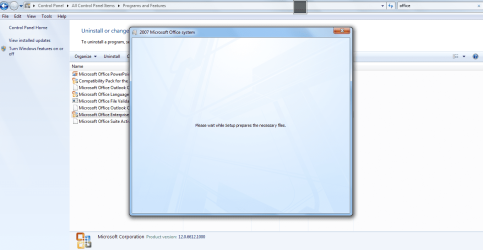
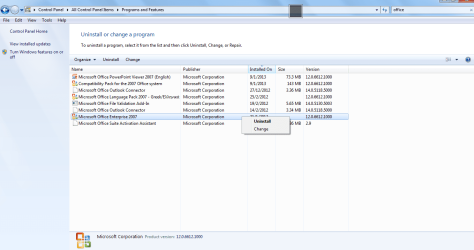
The problem persists with Word .doc files. Here is a couple of screenshots according to Microfot Office Enterprises:

ms office.png

ms office2.png

The problem is that I cannot proceed with any change or repair because I got this message:

I wait for many hours till set up prepares the necessary files but nothing happens and set up does not start!

I have also tried Microsoft Office Diagnostics and the TEST was successfully completed except this error:

error3.png
 
Last edited by a moderator:

My Computer

Computer type
Laptop
Computer Manufacturer/Model Number
MSI
OS
Microsoft Windows 7 Home Premium 64-bit SP1
CPU
Intel Core i3 330M @ 2.13GHz Arrandale 32nm Technology
Motherboard
Micro-Star International MS-1688 (CPU 1)
Memory
4.00 GB Dual-Channel DDR3 @ 531MHz (7-7-7-20)
Graphics Card(s)
Generic PnP Monitor (1366x768@60Hz) and Intel Graphics Media
Sound Card
Realtek High Definition Audio
Monitor(s) Displays
Generic PnP Monitor on Intel Graphics Media Accelerator HD
Screen Resolution
1366x768 pixels
Hard Drives
466GB Western Digital WDC WD5000BEVT-22ZAT0 ATA Device (SATA)
Antivirus
Microsoft security essentials
Browser
Firefox

My Computer

Computer type
PC/Desktop
Computer Manufacturer/Model Number
Self built custom
OS
64-bit Windows 11 Pro for Workstations
CPU
Intel i7-8700K OC'd to 5 GHz
Motherboard
ASUS ROG Maximus XI Formula Z390
Memory
64 GB (4x16GB) G.SKILL TridentZ RGB DDR4 3600 MHz
Graphics Card(s)
ASUS ROG-STRIX-GTX1080TI-O11G-GAMING
Sound Card
Integrated
Monitor(s) Displays
2 x Samsung Odyssey G7 27"
Screen Resolution
2560x1440
Hard Drives
1TB Samsung 990 PRO M.2,
4TB Samsung 990 PRO PRO M.2,
TerraMaster F8 SSD Plus NAS
PSU
Seasonic Prime Titanium 850W
Case
Thermaltake Core P3
Cooling
Corsair Hydro H115i
Keyboard
Logitech wireless K800
Mouse
Logitech MX Master 4
Internet Speed
2 Gb/s Download and 100 Mb/s Upload
Antivirus
Malwarebyte Anti-Malware Premium
Browser
Google Chrome
Other Info
Logitech Z625 speaker system,
Logitech BRIO 4K Pro webcam,
HP Color LaserJet Pro MFP M477fdn,
APC SMART-UPS RT 1000 XL - SURT1000XLI,
Galaxy S23 Plus phone
In that case for now, check in Default Programs to make sure that Word is set as the default program with all of it's associations to see if that may help.
http://www.sevenforums.com/tutorials/2630-default-programs-set-programs-default-associations.html
If not, are you able to run the Office installer from it's installation DVD to do a repair install instead?


Hi,

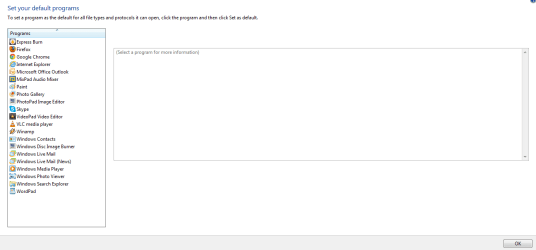
I do not see word under Default Programs:

DEFAULT PROGRAMS.png

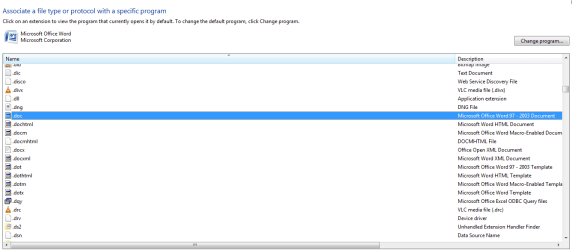
but I see all associated files without icons under Microsoft Word extensions:

DEFAULT PROGRAMS-2.png


DEFAULT PROGRAMS-3.png
 
Last edited by a moderator:

My Computer

Computer type
Laptop
Computer Manufacturer/Model Number
MSI
OS
Microsoft Windows 7 Home Premium 64-bit SP1
CPU
Intel Core i3 330M @ 2.13GHz Arrandale 32nm Technology
Motherboard
Micro-Star International MS-1688 (CPU 1)
Memory
4.00 GB Dual-Channel DDR3 @ 531MHz (7-7-7-20)
Graphics Card(s)
Generic PnP Monitor (1366x768@60Hz) and Intel Graphics Media
Sound Card
Realtek High Definition Audio
Monitor(s) Displays
Generic PnP Monitor on Intel Graphics Media Accelerator HD
Screen Resolution
1366x768 pixels
Hard Drives
466GB Western Digital WDC WD5000BEVT-22ZAT0 ATA Device (SATA)
Antivirus
Microsoft security essentials
Browser
Firefox
Are you able to run the Office installer from it's installation DVD to do a repair install of Office and Word instead?
 

My Computer

Computer type
PC/Desktop
Computer Manufacturer/Model Number
Self built custom
OS
64-bit Windows 11 Pro for Workstations
CPU
Intel i7-8700K OC'd to 5 GHz
Motherboard
ASUS ROG Maximus XI Formula Z390
Memory
64 GB (4x16GB) G.SKILL TridentZ RGB DDR4 3600 MHz
Graphics Card(s)
ASUS ROG-STRIX-GTX1080TI-O11G-GAMING
Sound Card
Integrated
Monitor(s) Displays
2 x Samsung Odyssey G7 27"
Screen Resolution
2560x1440
Hard Drives
1TB Samsung 990 PRO M.2,
4TB Samsung 990 PRO PRO M.2,
TerraMaster F8 SSD Plus NAS
PSU
Seasonic Prime Titanium 850W
Case
Thermaltake Core P3
Cooling
Corsair Hydro H115i
Keyboard
Logitech wireless K800
Mouse
Logitech MX Master 4
Internet Speed
2 Gb/s Download and 100 Mb/s Upload
Antivirus
Malwarebyte Anti-Malware Premium
Browser
Google Chrome
Other Info
Logitech Z625 speaker system,
Logitech BRIO 4K Pro webcam,
HP Color LaserJet Pro MFP M477fdn,
APC SMART-UPS RT 1000 XL - SURT1000XLI,
Galaxy S23 Plus phone
Are you able to run the Office installer from it's installation DVD to do a repair install of Office and Word instead?

Unfortunately No , because I do not have the DVD:(
 

My Computer

Computer type
Laptop
Computer Manufacturer/Model Number
MSI
OS
Microsoft Windows 7 Home Premium 64-bit SP1
CPU
Intel Core i3 330M @ 2.13GHz Arrandale 32nm Technology
Motherboard
Micro-Star International MS-1688 (CPU 1)
Memory
4.00 GB Dual-Channel DDR3 @ 531MHz (7-7-7-20)
Graphics Card(s)
Generic PnP Monitor (1366x768@60Hz) and Intel Graphics Media
Sound Card
Realtek High Definition Audio
Monitor(s) Displays
Generic PnP Monitor on Intel Graphics Media Accelerator HD
Screen Resolution
1366x768 pixels
Hard Drives
466GB Western Digital WDC WD5000BEVT-22ZAT0 ATA Device (SATA)
Antivirus
Microsoft security essentials
Browser
Firefox
Back
Top