
Icon Cache - Rebuild

How to Rebuild the Icon Cache in Windows

   Information
If one or more of your icons are not displaying correctly, or that your icon cache is corrupted, then you might consider rebuilding the icon cache to reset and reload the icon images into the icon cache in Vista, Windows 7, and Windows 8.

   Note
This will not help with any of the following icon issues:
  • A shortcut's icon that is not displayed properly due to the source of the shortcut being moved or deleted. You may need to recreate a new shortcut directly from the source (ex: program's exe) file to replace it instead.
  • All icons for a specific file extension display the wrong icon. This may be due to setting the wrong association for what program to open the file extension instead. You can restore the default file extension's associations to fix this icon instead.


OPTION ONE

Automatically Rebuild the Icon Cache


1. Click/tap on the download button below to download the file below.
Rebuild_Icon_Cache.bat

Download


2. Save the file to your desktop, and run it.

3. Click/tap on Run when prompted.

4. Follow the instructions in the command prompt to rebuild the Icon Cache. (see screenshot below)
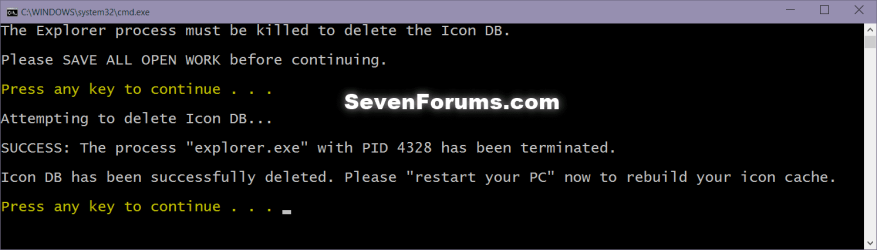
Icon_cache_command.png
5. Restart your computer to generate a new IconCache.db file.

6. If the icons are still not displaying properly, then download and merge the ICO option in this tutorial for Windows 7 or Windows 8 to restore the default associations of .ico (icon) files.


OPTION TWO

To Manually Rebuild the Icon Cache using the Command Prompt


1. Close and save anything that you are working on. This command will kill explorer and restart the computer when completed.

2. Open a command prompt in Windows 7 or Windows 8.

3. In the command prompt, Copy and paste each command line below exactly as is one at a time and press enter after each command.
:warn:WARNING: The last command will restart the computer, so be sure to close and save anything that you are working on first.
  • ie4uinit.exe -ClearIconCache
  • taskkill /IM explorer.exe /F
  • DEL "%localappdata%\IconCache.db" /A
  • DEL "%localappdata%\Microsoft\Windows\Explorer\iconcache*" /A
  • shutdown /r /f /t 00
4. The IconCache.db file has now been rebuilt.

5. If the icons are still not displaying properly, then download and merge the ICO option in this tutorial for Windows 7 or Windows 8 to restore the default associations of .ico (icon) files.

That's it,
Shawn


Attachments

Last edited:
If I made new account just to check that, and when I delete it will it leave some trash files or trace of that account that I delete becouse I don't want that to left on PC or any trace of that "test" account that I made.

P.S
Now I asked my 2 friends to check out that folder cursors two and they said they have same problem so it's not my PC it's some win. bug or something...wonder if there is fix for that.
 

My Computer

Computer type
PC/Desktop
OS
Win 7 Ultimate 64bit SP1
CPU
i3 2120
Motherboard
ASUS p8h67
Memory
2x4 DDR3 CORSAIR XMS3
Graphics Card(s)
GTX470 POV
Sound Card
RME HDSP Multiface I
Monitor(s) Displays
Samsung T220
Screen Resolution
1680x1050
Hard Drives
1. WD Black 1TB SATA3 6Gb/s
2. WD Black 640GB SATA2
3. Seagate 160GB SATA2
PSU
Seasonic 520W
Case
CM 692 II Advanced X2
Cooling
Scythe Katana 3000
Keyboard
Logitech UltraX Premium
Mouse
Logitech g500
Antivirus
Kaspersky 2013
Browser
FF
Other than rebuilding the icon cache, I'm not sure what else will work. Something is causing it to keep getting corrupted.

You might run a sfc /scannow command to see if it may help if some other system file may be corrupted causing this.
 

My Computer

Computer type
PC/Desktop
Computer Manufacturer/Model Number
Self built custom
OS
64-bit Windows 11 Pro for Workstations
CPU
Intel i7-8700K OC'd to 5 GHz
Motherboard
ASUS ROG Maximus XI Formula Z390
Memory
64 GB (4x16GB) G.SKILL TridentZ RGB DDR4 3600 MHz
Graphics Card(s)
ASUS ROG-STRIX-GTX1080TI-O11G-GAMING
Sound Card
Integrated
Monitor(s) Displays
2 x Samsung Odyssey G7 27"
Screen Resolution
2560x1440
Hard Drives
1TB Samsung 990 PRO M.2,
4TB Samsung 990 PRO PRO M.2,
TerraMaster F8 SSD Plus NAS
PSU
Seasonic Prime Titanium 850W
Case
Thermaltake Core P3
Cooling
Corsair Hydro H115i
Keyboard
Logitech wireless K800
Mouse
Logitech MX Master 4
Internet Speed
2 Gb/s Download and 100 Mb/s Upload
Antivirus
Malwarebyte Anti-Malware Premium
Browser
Google Chrome
Other Info
Logitech Z625 speaker system,
Logitech BRIO 4K Pro webcam,
HP Color LaserJet Pro MFP M477fdn,
APC SMART-UPS RT 1000 XL - SURT1000XLI,
Galaxy S23 Plus phone
that scan will unmodified some dll's that I modified I remove that question mark (help button) from almost every windows, ease access from logon, and I think that will replace all my modified dll's with originals, don't wan't that. And just to be clear that modifications don't have to do anything with my problem becouse on my laptop I didn't do any modifications and my friends didn't do it two, and they have same problem like me.
 

My Computer

Computer type
PC/Desktop
OS
Win 7 Ultimate 64bit SP1
CPU
i3 2120
Motherboard
ASUS p8h67
Memory
2x4 DDR3 CORSAIR XMS3
Graphics Card(s)
GTX470 POV
Sound Card
RME HDSP Multiface I
Monitor(s) Displays
Samsung T220
Screen Resolution
1680x1050
Hard Drives
1. WD Black 1TB SATA3 6Gb/s
2. WD Black 640GB SATA2
3. Seagate 160GB SATA2
PSU
Seasonic 520W
Case
CM 692 II Advanced X2
Cooling
Scythe Katana 3000
Keyboard
Logitech UltraX Premium
Mouse
Logitech g500
Antivirus
Kaspersky 2013
Browser
FF
I'm not sure what else you can do other than keep rebuilding the icon index since any other option will restore your modified files back to default. :(
 

My Computer

Computer type
PC/Desktop
Computer Manufacturer/Model Number
Self built custom
OS
64-bit Windows 11 Pro for Workstations
CPU
Intel i7-8700K OC'd to 5 GHz
Motherboard
ASUS ROG Maximus XI Formula Z390
Memory
64 GB (4x16GB) G.SKILL TridentZ RGB DDR4 3600 MHz
Graphics Card(s)
ASUS ROG-STRIX-GTX1080TI-O11G-GAMING
Sound Card
Integrated
Monitor(s) Displays
2 x Samsung Odyssey G7 27"
Screen Resolution
2560x1440
Hard Drives
1TB Samsung 990 PRO M.2,
4TB Samsung 990 PRO PRO M.2,
TerraMaster F8 SSD Plus NAS
PSU
Seasonic Prime Titanium 850W
Case
Thermaltake Core P3
Cooling
Corsair Hydro H115i
Keyboard
Logitech wireless K800
Mouse
Logitech MX Master 4
Internet Speed
2 Gb/s Download and 100 Mb/s Upload
Antivirus
Malwarebyte Anti-Malware Premium
Browser
Google Chrome
Other Info
Logitech Z625 speaker system,
Logitech BRIO 4K Pro webcam,
HP Color LaserJet Pro MFP M477fdn,
APC SMART-UPS RT 1000 XL - SURT1000XLI,
Galaxy S23 Plus phone
ah, I will try to ignore it...at least I can't say I didn't try :) thank you for helping.
 

My Computer

Computer type
PC/Desktop
OS
Win 7 Ultimate 64bit SP1
CPU
i3 2120
Motherboard
ASUS p8h67
Memory
2x4 DDR3 CORSAIR XMS3
Graphics Card(s)
GTX470 POV
Sound Card
RME HDSP Multiface I
Monitor(s) Displays
Samsung T220
Screen Resolution
1680x1050
Hard Drives
1. WD Black 1TB SATA3 6Gb/s
2. WD Black 640GB SATA2
3. Seagate 160GB SATA2
PSU
Seasonic 520W
Case
CM 692 II Advanced X2
Cooling
Scythe Katana 3000
Keyboard
Logitech UltraX Premium
Mouse
Logitech g500
Antivirus
Kaspersky 2013
Browser
FF
Not functional on Windows 8 RTM x64 bit. Thanks anyway.
 

My Computer

OS
Windows 8 Pro with MC x64
CPU
i5 3450
Motherboard
Asrock Z77 Pro4
Memory
16 GiB
Graphics Card(s)
GTX 560 Ti
Sound Card
X-fi extreme gamer
Monitor(s) Displays
Acer GD245HQ
Screen Resolution
1920x1080
Hard Drives
OCZ Vertex 3 60 GiB
WD Blue 1TiB
ST 512 GiB
PSU
Fortron Epsilon 550W
Case
Monster
Cooling
Air
Keyboard
Logitech G510
Mouse
Zalman ZM-M300
Internet Speed
10 Mbit
Hello Mirecek, :)

I just tested this again, and it still works in both Windows 8 and Windows 7.

What do you mean by "not functional?

What issue are you having?
 

My Computer

Computer type
PC/Desktop
Computer Manufacturer/Model Number
Self built custom
OS
64-bit Windows 11 Pro for Workstations
CPU
Intel i7-8700K OC'd to 5 GHz
Motherboard
ASUS ROG Maximus XI Formula Z390
Memory
64 GB (4x16GB) G.SKILL TridentZ RGB DDR4 3600 MHz
Graphics Card(s)
ASUS ROG-STRIX-GTX1080TI-O11G-GAMING
Sound Card
Integrated
Monitor(s) Displays
2 x Samsung Odyssey G7 27"
Screen Resolution
2560x1440
Hard Drives
1TB Samsung 990 PRO M.2,
4TB Samsung 990 PRO PRO M.2,
TerraMaster F8 SSD Plus NAS
PSU
Seasonic Prime Titanium 850W
Case
Thermaltake Core P3
Cooling
Corsair Hydro H115i
Keyboard
Logitech wireless K800
Mouse
Logitech MX Master 4
Internet Speed
2 Gb/s Download and 100 Mb/s Upload
Antivirus
Malwarebyte Anti-Malware Premium
Browser
Google Chrome
Other Info
Logitech Z625 speaker system,
Logitech BRIO 4K Pro webcam,
HP Color LaserJet Pro MFP M477fdn,
APC SMART-UPS RT 1000 XL - SURT1000XLI,
Galaxy S23 Plus phone
Just a note that may save some people a reboot. I found that it wasn't necessary in my case. If you change the last line of the batch file to:

Code:
start %windir%\Explorer.exe

Everything works fine without a reboot (at least for me).

It might be worth trying first, for those who don't want to reboot.
 

My Computer

OS
Windows 7 x32 & x64
Hello Thomas, and welcome to Seven Forums.

Sorry, but the computer must be restarted for the IconCache.db file to be recreated after it has been deleted. :(
 

My Computer

Computer type
PC/Desktop
Computer Manufacturer/Model Number
Self built custom
OS
64-bit Windows 11 Pro for Workstations
CPU
Intel i7-8700K OC'd to 5 GHz
Motherboard
ASUS ROG Maximus XI Formula Z390
Memory
64 GB (4x16GB) G.SKILL TridentZ RGB DDR4 3600 MHz
Graphics Card(s)
ASUS ROG-STRIX-GTX1080TI-O11G-GAMING
Sound Card
Integrated
Monitor(s) Displays
2 x Samsung Odyssey G7 27"
Screen Resolution
2560x1440
Hard Drives
1TB Samsung 990 PRO M.2,
4TB Samsung 990 PRO PRO M.2,
TerraMaster F8 SSD Plus NAS
PSU
Seasonic Prime Titanium 850W
Case
Thermaltake Core P3
Cooling
Corsair Hydro H115i
Keyboard
Logitech wireless K800
Mouse
Logitech MX Master 4
Internet Speed
2 Gb/s Download and 100 Mb/s Upload
Antivirus
Malwarebyte Anti-Malware Premium
Browser
Google Chrome
Other Info
Logitech Z625 speaker system,
Logitech BRIO 4K Pro webcam,
HP Color LaserJet Pro MFP M477fdn,
APC SMART-UPS RT 1000 XL - SURT1000XLI,
Galaxy S23 Plus phone
THANKS A LOT!
 

My Computer

OS
Windows 7 VL (64-bit)
Internet Speed
PCCW Global IMS Ultraline@500Mbps (FTTH)
You're welcome tkrojam. :)
 

My Computer

Computer type
PC/Desktop
Computer Manufacturer/Model Number
Self built custom
OS
64-bit Windows 11 Pro for Workstations
CPU
Intel i7-8700K OC'd to 5 GHz
Motherboard
ASUS ROG Maximus XI Formula Z390
Memory
64 GB (4x16GB) G.SKILL TridentZ RGB DDR4 3600 MHz
Graphics Card(s)
ASUS ROG-STRIX-GTX1080TI-O11G-GAMING
Sound Card
Integrated
Monitor(s) Displays
2 x Samsung Odyssey G7 27"
Screen Resolution
2560x1440
Hard Drives
1TB Samsung 990 PRO M.2,
4TB Samsung 990 PRO PRO M.2,
TerraMaster F8 SSD Plus NAS
PSU
Seasonic Prime Titanium 850W
Case
Thermaltake Core P3
Cooling
Corsair Hydro H115i
Keyboard
Logitech wireless K800
Mouse
Logitech MX Master 4
Internet Speed
2 Gb/s Download and 100 Mb/s Upload
Antivirus
Malwarebyte Anti-Malware Premium
Browser
Google Chrome
Other Info
Logitech Z625 speaker system,
Logitech BRIO 4K Pro webcam,
HP Color LaserJet Pro MFP M477fdn,
APC SMART-UPS RT 1000 XL - SURT1000XLI,
Galaxy S23 Plus phone
Hi, first time poster here :-)
I've benefited from this site quite often, and have again today with this thread. I thought I'd give something back and suggest improvements for this handy guide.

I've amended the batch file and uploaded to: http://www.proactiveservices.co.uk/Rebuild_Icon_Cache.zip

Used the %localappdata% variable and a filename variable to provide greater accuracy and flexibility.
Enclosed references to the IconCache file with quotes to ensure paths with spaces are handled correctly.
Batch no longer does anything if the IconCache file does not exist - explorer kill / system shutdown not necessary in this case.
Removed shutdown code as a shell restart is all that's needed. Confirmed on Vista x64 SP2 and Win 7 x64 SP1.
Amended shell restart line so that the batch file is not "held up" after launching explorer.

The manual steps can be similarly amended to:

  • taskkill /IM explorer.exe /F
  • DEL "%localappdata%\IconCache.db" /A
  • start explorer.exe
Also you can mark this is working on Vista too - it works just fine on my Vista x64 SP2 system.
 

My Computer

OS
Various
Hello ProactiveSvcs, and welcome to Seven Forums.

Thank you for the touchup. :)
 

My Computer

Computer type
PC/Desktop
Computer Manufacturer/Model Number
Self built custom
OS
64-bit Windows 11 Pro for Workstations
CPU
Intel i7-8700K OC'd to 5 GHz
Motherboard
ASUS ROG Maximus XI Formula Z390
Memory
64 GB (4x16GB) G.SKILL TridentZ RGB DDR4 3600 MHz
Graphics Card(s)
ASUS ROG-STRIX-GTX1080TI-O11G-GAMING
Sound Card
Integrated
Monitor(s) Displays
2 x Samsung Odyssey G7 27"
Screen Resolution
2560x1440
Hard Drives
1TB Samsung 990 PRO M.2,
4TB Samsung 990 PRO PRO M.2,
TerraMaster F8 SSD Plus NAS
PSU
Seasonic Prime Titanium 850W
Case
Thermaltake Core P3
Cooling
Corsair Hydro H115i
Keyboard
Logitech wireless K800
Mouse
Logitech MX Master 4
Internet Speed
2 Gb/s Download and 100 Mb/s Upload
Antivirus
Malwarebyte Anti-Malware Premium
Browser
Google Chrome
Other Info
Logitech Z625 speaker system,
Logitech BRIO 4K Pro webcam,
HP Color LaserJet Pro MFP M477fdn,
APC SMART-UPS RT 1000 XL - SURT1000XLI,
Galaxy S23 Plus phone
co-works icon's were all jacked up today. This fixed there issues with ease. Thanks.
 

My Computer

OS
Windows 7 Ultimate x64
Bunch of Thanks!

The command-line did it for me. My admin. acct. displayed well, but my stand. acct. did not. Reseting the iconcache did the job thanks a bunch!!

When it comes to icon shortcuts on desktop or start-menu or other folders, you must pay attention to the "Target' and "start" field. Even if you have to navigate manually (by opening my computer, select c:, etc...). This clue tells 2 things: the proper Path, and the Appl. name with a colorful icon (if it has one). Correct the path to both fields solves common pointer (shortcut), then click "change icons" and navigate to that folder (cllick Browse...) and select the Appl. name (*.exe) and that becomes your icon (or you can navigate the folders, seeking other icon images or an image folder may contain something to your liking).

thanks for the tips!
 

My Computer

OS
Win7Pro 32-bit
Glad it could help Suny, and welcome to Seven Forums. :)
 

My Computer

Computer type
PC/Desktop
Computer Manufacturer/Model Number
Self built custom
OS
64-bit Windows 11 Pro for Workstations
CPU
Intel i7-8700K OC'd to 5 GHz
Motherboard
ASUS ROG Maximus XI Formula Z390
Memory
64 GB (4x16GB) G.SKILL TridentZ RGB DDR4 3600 MHz
Graphics Card(s)
ASUS ROG-STRIX-GTX1080TI-O11G-GAMING
Sound Card
Integrated
Monitor(s) Displays
2 x Samsung Odyssey G7 27"
Screen Resolution
2560x1440
Hard Drives
1TB Samsung 990 PRO M.2,
4TB Samsung 990 PRO PRO M.2,
TerraMaster F8 SSD Plus NAS
PSU
Seasonic Prime Titanium 850W
Case
Thermaltake Core P3
Cooling
Corsair Hydro H115i
Keyboard
Logitech wireless K800
Mouse
Logitech MX Master 4
Internet Speed
2 Gb/s Download and 100 Mb/s Upload
Antivirus
Malwarebyte Anti-Malware Premium
Browser
Google Chrome
Other Info
Logitech Z625 speaker system,
Logitech BRIO 4K Pro webcam,
HP Color LaserJet Pro MFP M477fdn,
APC SMART-UPS RT 1000 XL - SURT1000XLI,
Galaxy S23 Plus phone
Oh Shawn, you made something awesome man, that BAT solved my problem instantly! I have been suffering with corrupt icons in Windows 7 for years, I usually waited for them to repair themselves, but you made it!!
 
Hello Nilanko,

I'm happy to hear it was able to help. :)
 

My Computer

Computer type
PC/Desktop
Computer Manufacturer/Model Number
Self built custom
OS
64-bit Windows 11 Pro for Workstations
CPU
Intel i7-8700K OC'd to 5 GHz
Motherboard
ASUS ROG Maximus XI Formula Z390
Memory
64 GB (4x16GB) G.SKILL TridentZ RGB DDR4 3600 MHz
Graphics Card(s)
ASUS ROG-STRIX-GTX1080TI-O11G-GAMING
Sound Card
Integrated
Monitor(s) Displays
2 x Samsung Odyssey G7 27"
Screen Resolution
2560x1440
Hard Drives
1TB Samsung 990 PRO M.2,
4TB Samsung 990 PRO PRO M.2,
TerraMaster F8 SSD Plus NAS
PSU
Seasonic Prime Titanium 850W
Case
Thermaltake Core P3
Cooling
Corsair Hydro H115i
Keyboard
Logitech wireless K800
Mouse
Logitech MX Master 4
Internet Speed
2 Gb/s Download and 100 Mb/s Upload
Antivirus
Malwarebyte Anti-Malware Premium
Browser
Google Chrome
Other Info
Logitech Z625 speaker system,
Logitech BRIO 4K Pro webcam,
HP Color LaserJet Pro MFP M477fdn,
APC SMART-UPS RT 1000 XL - SURT1000XLI,
Galaxy S23 Plus phone
Both Methods 1 and 2 solve this problem, albeit temporarily, for my system. However, every time I install a new application/program, the icon cache needs to be reset. Is this going to be the norm for as long as I have this system?
I just bought three identically spec'd laptops and this is the only one with this issue.
 

My Computer

Computer type
Laptop
Computer Manufacturer/Model Number
Dell
OS
Windows7 x64

My Computer

Computer type
PC/Desktop
Computer Manufacturer/Model Number
Self built custom
OS
64-bit Windows 11 Pro for Workstations
CPU
Intel i7-8700K OC'd to 5 GHz
Motherboard
ASUS ROG Maximus XI Formula Z390
Memory
64 GB (4x16GB) G.SKILL TridentZ RGB DDR4 3600 MHz
Graphics Card(s)
ASUS ROG-STRIX-GTX1080TI-O11G-GAMING
Sound Card
Integrated
Monitor(s) Displays
2 x Samsung Odyssey G7 27"
Screen Resolution
2560x1440
Hard Drives
1TB Samsung 990 PRO M.2,
4TB Samsung 990 PRO PRO M.2,
TerraMaster F8 SSD Plus NAS
PSU
Seasonic Prime Titanium 850W
Case
Thermaltake Core P3
Cooling
Corsair Hydro H115i
Keyboard
Logitech wireless K800
Mouse
Logitech MX Master 4
Internet Speed
2 Gb/s Download and 100 Mb/s Upload
Antivirus
Malwarebyte Anti-Malware Premium
Browser
Google Chrome
Other Info
Logitech Z625 speaker system,
Logitech BRIO 4K Pro webcam,
HP Color LaserJet Pro MFP M477fdn,
APC SMART-UPS RT 1000 XL - SURT1000XLI,
Galaxy S23 Plus phone
Back
Top