
Icon Cache - Rebuild

How to Rebuild the Icon Cache in Windows

   Information
If one or more of your icons are not displaying correctly, or that your icon cache is corrupted, then you might consider rebuilding the icon cache to reset and reload the icon images into the icon cache in Vista, Windows 7, and Windows 8.

   Note
This will not help with any of the following icon issues:
  • A shortcut's icon that is not displayed properly due to the source of the shortcut being moved or deleted. You may need to recreate a new shortcut directly from the source (ex: program's exe) file to replace it instead.
  • All icons for a specific file extension display the wrong icon. This may be due to setting the wrong association for what program to open the file extension instead. You can restore the default file extension's associations to fix this icon instead.


OPTION ONE

Automatically Rebuild the Icon Cache


1. Click/tap on the download button below to download the file below.
Rebuild_Icon_Cache.bat

Download


2. Save the file to your desktop, and run it.

3. Click/tap on Run when prompted.

4. Follow the instructions in the command prompt to rebuild the Icon Cache. (see screenshot below)
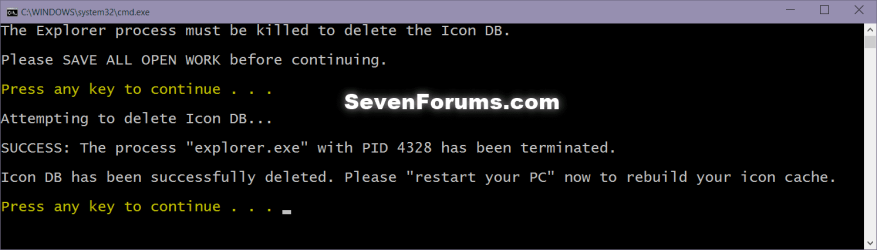
Icon_cache_command.png
5. Restart your computer to generate a new IconCache.db file.

6. If the icons are still not displaying properly, then download and merge the ICO option in this tutorial for Windows 7 or Windows 8 to restore the default associations of .ico (icon) files.


OPTION TWO

To Manually Rebuild the Icon Cache using the Command Prompt


1. Close and save anything that you are working on. This command will kill explorer and restart the computer when completed.

2. Open a command prompt in Windows 7 or Windows 8.

3. In the command prompt, Copy and paste each command line below exactly as is one at a time and press enter after each command.
:warn:WARNING: The last command will restart the computer, so be sure to close and save anything that you are working on first.
  • ie4uinit.exe -ClearIconCache
  • taskkill /IM explorer.exe /F
  • DEL "%localappdata%\IconCache.db" /A
  • DEL "%localappdata%\Microsoft\Windows\Explorer\iconcache*" /A
  • shutdown /r /f /t 00
4. The IconCache.db file has now been rebuilt.

5. If the icons are still not displaying properly, then download and merge the ICO option in this tutorial for Windows 7 or Windows 8 to restore the default associations of .ico (icon) files.

That's it,
Shawn


Attachments

Last edited:
Can't load language file

I downloaded from one of the links in your tutorial and it seems to have "infected" ( is that the right word? I dunno? I'm relatively new to 'computing') Bandzip, which I'd intended to use to open the file. Is this making any sense? Obviously I was trying to fix my desktop icons suddenly disappearing on me, now I get a nasty feeling I've picked up another "bug?", "gremlin?", you know what I mean, don't you?
I'd appreciate some advice on this, like I said, I'm seriously bereft of computer skills/knowledge and it feels like I'm sliding deeper into a hole with each step I take trying to re3medy the situation. I look forward to hearing from someone who knows his onions, cheers.
 

My Computer

Computer type
Laptop
Computer Manufacturer/Model Number
Toshiba L-640
OS
Windows 7 Home Basic 64bit
Antivirus
KIS 2014
Browser
Firefox
Hello SiCo, and welcome to Seven Forums. :)

What issue are you having that makes you think that you have been infected?

The only download available in the tutorial is for the Rebuild_Icon_Cache.bat file in OPTION ONE, and it's 100% clean and safe to use on any Windows computer.

What did you click on? Please post a screenshot to show it if it's not the above?

http://www.sevenforums.com/tutorials/9733-screenshots-files-upload-post-seven-forums.html
 

My Computer

Computer type
PC/Desktop
Computer Manufacturer/Model Number
Self built custom
OS
64-bit Windows 11 Pro for Workstations
CPU
Intel i7-8700K OC'd to 5 GHz
Motherboard
ASUS ROG Maximus XI Formula Z390
Memory
64 GB (4x16GB) G.SKILL TridentZ RGB DDR4 3600 MHz
Graphics Card(s)
ASUS ROG-STRIX-GTX1080TI-O11G-GAMING
Sound Card
Integrated
Monitor(s) Displays
2 x Samsung Odyssey G7 27"
Screen Resolution
2560x1440
Hard Drives
1TB Samsung 990 PRO M.2,
4TB Samsung 990 PRO PRO M.2,
TerraMaster F8 SSD Plus NAS
PSU
Seasonic Prime Titanium 850W
Case
Thermaltake Core P3
Cooling
Corsair Hydro H115i
Keyboard
Logitech wireless K800
Mouse
Logitech MX Master 4
Internet Speed
2 Gb/s Download and 100 Mb/s Upload
Antivirus
Malwarebyte Anti-Malware Premium
Browser
Google Chrome
Other Info
Logitech Z625 speaker system,
Logitech BRIO 4K Pro webcam,
HP Color LaserJet Pro MFP M477fdn,
APC SMART-UPS RT 1000 XL - SURT1000XLI,
Galaxy S23 Plus phone
Can't load language file Issue

Hi Brink, I wasn't surprised to hear that I got it horribly wrong and despite there only being 1 download I managed to download 2 files, neither of which were the one you mention. Default_ICO.reg and all_default_file_extensions.zip were the 2 I somehow decided were the way forward, and this all came about after taking Option 2 to manually rebuild the Icon cache which proved unsuccessful. I then tried to follow step 5, but unfortunately I found it to be a bit vague, the ICO option ( where would that be?) and the merge (with what?) were what got me lost, but this is by no means unusual for me when I try to follow tutorials. This is obviously my problem, and certainly not a reflection on the quality of the tutorials and the multitude of satisfied users who post their thank yous prove this beyond doubt. There is an assumed knowledge with these things and sometimes I don't have it, but no-one ever said it was going to be easy!! As for Bandzip, I'm not 100% sure that the zip file I downloaded here is what's giving me all this weird Language file stuff, so as I often have to do I'm going to put it down to experience and trust that I'll learn from it, and hopefully if it doesn't kill me it will make me stronger. My icons are still all over the place so I plan to just start again, and downloading the .bat file might go someway to a more favourable outcome. I don't want to take too much of you guys' time so I'll crack on with that and see what happens. As always I greatly appreciate your input and I do intend to keep my contact to an absolute minimum, working stuff out myself is how I'll learn - that's the theory, anyway....
 

My Computer

Computer type
Laptop
Computer Manufacturer/Model Number
Toshiba L-640
OS
Windows 7 Home Basic 64bit
Antivirus
KIS 2014
Browser
Firefox
SiCo,

You might see if doing a system restore using a restore point dated before your issue started may be able to undo and fix it.
 

My Computer

Computer type
PC/Desktop
Computer Manufacturer/Model Number
Self built custom
OS
64-bit Windows 11 Pro for Workstations
CPU
Intel i7-8700K OC'd to 5 GHz
Motherboard
ASUS ROG Maximus XI Formula Z390
Memory
64 GB (4x16GB) G.SKILL TridentZ RGB DDR4 3600 MHz
Graphics Card(s)
ASUS ROG-STRIX-GTX1080TI-O11G-GAMING
Sound Card
Integrated
Monitor(s) Displays
2 x Samsung Odyssey G7 27"
Screen Resolution
2560x1440
Hard Drives
1TB Samsung 990 PRO M.2,
4TB Samsung 990 PRO PRO M.2,
TerraMaster F8 SSD Plus NAS
PSU
Seasonic Prime Titanium 850W
Case
Thermaltake Core P3
Cooling
Corsair Hydro H115i
Keyboard
Logitech wireless K800
Mouse
Logitech MX Master 4
Internet Speed
2 Gb/s Download and 100 Mb/s Upload
Antivirus
Malwarebyte Anti-Malware Premium
Browser
Google Chrome
Other Info
Logitech Z625 speaker system,
Logitech BRIO 4K Pro webcam,
HP Color LaserJet Pro MFP M477fdn,
APC SMART-UPS RT 1000 XL - SURT1000XLI,
Galaxy S23 Plus phone
windows 7 icon problem

I found that Adobe Reader was the cause of the icon problem and after applying the cache cleanup ALL icons launched Adobe Reader even though the links were pointing to the correct applications. I uninstalled Reader and the icons immediately were restored.

thanks to all for help
 

My Computer

Computer type
Laptop
OS
windows 7 64 bit
Hello,

I tried the manual steps and the missing icon is fixed. However, now the systems takes over 5min to show the logon screen after the Windows Welcome screen. Please advise on how to resolve this issue. Thanks.
 

My Computer

Computer type
PC/Desktop
Computer Manufacturer/Model Number
Dell
OS
Windows 7 Pro
Hello htnca, and welcome to Seven Forums.

Rebuilding the icon cache would have no effect on the log on screen or how long it takes to load. This would instead be more likely some startup program or item hanging at startup.

If you like, you could use the method in the tutorial below to troubleshoot with a clean startup to see if it may help to ID the culprit. :)

http://www.sevenforums.com/tutorial...ation-conflicts-performing-clean-startup.html
 

My Computer

Computer type
PC/Desktop
Computer Manufacturer/Model Number
Self built custom
OS
64-bit Windows 11 Pro for Workstations
CPU
Intel i7-8700K OC'd to 5 GHz
Motherboard
ASUS ROG Maximus XI Formula Z390
Memory
64 GB (4x16GB) G.SKILL TridentZ RGB DDR4 3600 MHz
Graphics Card(s)
ASUS ROG-STRIX-GTX1080TI-O11G-GAMING
Sound Card
Integrated
Monitor(s) Displays
2 x Samsung Odyssey G7 27"
Screen Resolution
2560x1440
Hard Drives
1TB Samsung 990 PRO M.2,
4TB Samsung 990 PRO PRO M.2,
TerraMaster F8 SSD Plus NAS
PSU
Seasonic Prime Titanium 850W
Case
Thermaltake Core P3
Cooling
Corsair Hydro H115i
Keyboard
Logitech wireless K800
Mouse
Logitech MX Master 4
Internet Speed
2 Gb/s Download and 100 Mb/s Upload
Antivirus
Malwarebyte Anti-Malware Premium
Browser
Google Chrome
Other Info
Logitech Z625 speaker system,
Logitech BRIO 4K Pro webcam,
HP Color LaserJet Pro MFP M477fdn,
APC SMART-UPS RT 1000 XL - SURT1000XLI,
Galaxy S23 Plus phone
thanks for guide :)

I chose manual bat command method but change the last line as u only need to restart explorer.exe to start a new cache file

"start explorer.exe"
 

My Computer

OS
Windows 7
Ghosts

on my desktop I have 2 icons "greyed out" desktop.ini can I safely delete there icons:confused:
 

My Computer

Computer Manufacturer/Model Number
Mesh Computers
OS
Windows 7 Home Premium 32bit.
thanks for guide :)

I chose manual bat command method but change the last line as u only need to restart explorer.exe to start a new cache file

"start explorer.exe"

Hello Andy,

It's been my experience that a restart is needed for Windows to recreate the cache file instead.
 

My Computer

Computer type
PC/Desktop
Computer Manufacturer/Model Number
Self built custom
OS
64-bit Windows 11 Pro for Workstations
CPU
Intel i7-8700K OC'd to 5 GHz
Motherboard
ASUS ROG Maximus XI Formula Z390
Memory
64 GB (4x16GB) G.SKILL TridentZ RGB DDR4 3600 MHz
Graphics Card(s)
ASUS ROG-STRIX-GTX1080TI-O11G-GAMING
Sound Card
Integrated
Monitor(s) Displays
2 x Samsung Odyssey G7 27"
Screen Resolution
2560x1440
Hard Drives
1TB Samsung 990 PRO M.2,
4TB Samsung 990 PRO PRO M.2,
TerraMaster F8 SSD Plus NAS
PSU
Seasonic Prime Titanium 850W
Case
Thermaltake Core P3
Cooling
Corsair Hydro H115i
Keyboard
Logitech wireless K800
Mouse
Logitech MX Master 4
Internet Speed
2 Gb/s Download and 100 Mb/s Upload
Antivirus
Malwarebyte Anti-Malware Premium
Browser
Google Chrome
Other Info
Logitech Z625 speaker system,
Logitech BRIO 4K Pro webcam,
HP Color LaserJet Pro MFP M477fdn,
APC SMART-UPS RT 1000 XL - SURT1000XLI,
Galaxy S23 Plus phone

My Computer

Computer type
PC/Desktop
Computer Manufacturer/Model Number
Self built custom
OS
64-bit Windows 11 Pro for Workstations
CPU
Intel i7-8700K OC'd to 5 GHz
Motherboard
ASUS ROG Maximus XI Formula Z390
Memory
64 GB (4x16GB) G.SKILL TridentZ RGB DDR4 3600 MHz
Graphics Card(s)
ASUS ROG-STRIX-GTX1080TI-O11G-GAMING
Sound Card
Integrated
Monitor(s) Displays
2 x Samsung Odyssey G7 27"
Screen Resolution
2560x1440
Hard Drives
1TB Samsung 990 PRO M.2,
4TB Samsung 990 PRO PRO M.2,
TerraMaster F8 SSD Plus NAS
PSU
Seasonic Prime Titanium 850W
Case
Thermaltake Core P3
Cooling
Corsair Hydro H115i
Keyboard
Logitech wireless K800
Mouse
Logitech MX Master 4
Internet Speed
2 Gb/s Download and 100 Mb/s Upload
Antivirus
Malwarebyte Anti-Malware Premium
Browser
Google Chrome
Other Info
Logitech Z625 speaker system,
Logitech BRIO 4K Pro webcam,
HP Color LaserJet Pro MFP M477fdn,
APC SMART-UPS RT 1000 XL - SURT1000XLI,
Galaxy S23 Plus phone
Thanks Brink took them out of the recycle bin and put them into the user folder as instructed. Thanks again for your help.
 

My Computer

Computer Manufacturer/Model Number
Mesh Computers
OS
Windows 7 Home Premium 32bit.
You're most welcome. :)
 

My Computer

Computer type
PC/Desktop
Computer Manufacturer/Model Number
Self built custom
OS
64-bit Windows 11 Pro for Workstations
CPU
Intel i7-8700K OC'd to 5 GHz
Motherboard
ASUS ROG Maximus XI Formula Z390
Memory
64 GB (4x16GB) G.SKILL TridentZ RGB DDR4 3600 MHz
Graphics Card(s)
ASUS ROG-STRIX-GTX1080TI-O11G-GAMING
Sound Card
Integrated
Monitor(s) Displays
2 x Samsung Odyssey G7 27"
Screen Resolution
2560x1440
Hard Drives
1TB Samsung 990 PRO M.2,
4TB Samsung 990 PRO PRO M.2,
TerraMaster F8 SSD Plus NAS
PSU
Seasonic Prime Titanium 850W
Case
Thermaltake Core P3
Cooling
Corsair Hydro H115i
Keyboard
Logitech wireless K800
Mouse
Logitech MX Master 4
Internet Speed
2 Gb/s Download and 100 Mb/s Upload
Antivirus
Malwarebyte Anti-Malware Premium
Browser
Google Chrome
Other Info
Logitech Z625 speaker system,
Logitech BRIO 4K Pro webcam,
HP Color LaserJet Pro MFP M477fdn,
APC SMART-UPS RT 1000 XL - SURT1000XLI,
Galaxy S23 Plus phone
Help?

Okay, I've tried the icon cache rebuild (both manual and physical), I've tried downloading and merging the ico files, I've run Malwarebytes anti-rootkit, I've gone from true color to high color display and back again, I've done a few system restores, I've prayed, I've made the appropriate sacrifices... No luck. Ever since my computer was wiped and recovered by Alienware support to clear up problems, I haven't even had a IconCache.db file at all, and (at the least) all html and text files on my desktop have appeared as blank pages. I don't know what else to do aside from wipe my system and start again (though that may help speed things up, too)
 

Attachments

  • Untitled.png
    Untitled.png
    19.2 KB · Views: 827

My Computer

Computer type
Laptop
Computer Manufacturer/Model Number
Alienware
OS
Windows 7 Home Premium 64bit
CPU
Intel Core i7-2630QM 2ghz
Motherboard
M17xR3
Memory
16 gb
Graphics Card(s)
Nvidia GeForce GTX 580M
Browser
Mozilla Firefox

My Computer

Computer type
PC/Desktop
Computer Manufacturer/Model Number
Self built custom
OS
64-bit Windows 11 Pro for Workstations
CPU
Intel i7-8700K OC'd to 5 GHz
Motherboard
ASUS ROG Maximus XI Formula Z390
Memory
64 GB (4x16GB) G.SKILL TridentZ RGB DDR4 3600 MHz
Graphics Card(s)
ASUS ROG-STRIX-GTX1080TI-O11G-GAMING
Sound Card
Integrated
Monitor(s) Displays
2 x Samsung Odyssey G7 27"
Screen Resolution
2560x1440
Hard Drives
1TB Samsung 990 PRO M.2,
4TB Samsung 990 PRO PRO M.2,
TerraMaster F8 SSD Plus NAS
PSU
Seasonic Prime Titanium 850W
Case
Thermaltake Core P3
Cooling
Corsair Hydro H115i
Keyboard
Logitech wireless K800
Mouse
Logitech MX Master 4
Internet Speed
2 Gb/s Download and 100 Mb/s Upload
Antivirus
Malwarebyte Anti-Malware Premium
Browser
Google Chrome
Other Info
Logitech Z625 speaker system,
Logitech BRIO 4K Pro webcam,
HP Color LaserJet Pro MFP M477fdn,
APC SMART-UPS RT 1000 XL - SURT1000XLI,
Galaxy S23 Plus phone
Oh, right. For some reason I expected the text file to look like the old spiral notebook. Anyway, I've cleared the history from IE and Firefox, opened them, and performed a restart, all with no luck
 

My Computer

Computer type
Laptop
Computer Manufacturer/Model Number
Alienware
OS
Windows 7 Home Premium 64bit
CPU
Intel Core i7-2630QM 2ghz
Motherboard
M17xR3
Memory
16 gb
Graphics Card(s)
Nvidia GeForce GTX 580M
Browser
Mozilla Firefox
Try creating a new shortcut for one to see if it may show the favicon.
 

My Computer

Computer type
PC/Desktop
Computer Manufacturer/Model Number
Self built custom
OS
64-bit Windows 11 Pro for Workstations
CPU
Intel i7-8700K OC'd to 5 GHz
Motherboard
ASUS ROG Maximus XI Formula Z390
Memory
64 GB (4x16GB) G.SKILL TridentZ RGB DDR4 3600 MHz
Graphics Card(s)
ASUS ROG-STRIX-GTX1080TI-O11G-GAMING
Sound Card
Integrated
Monitor(s) Displays
2 x Samsung Odyssey G7 27"
Screen Resolution
2560x1440
Hard Drives
1TB Samsung 990 PRO M.2,
4TB Samsung 990 PRO PRO M.2,
TerraMaster F8 SSD Plus NAS
PSU
Seasonic Prime Titanium 850W
Case
Thermaltake Core P3
Cooling
Corsair Hydro H115i
Keyboard
Logitech wireless K800
Mouse
Logitech MX Master 4
Internet Speed
2 Gb/s Download and 100 Mb/s Upload
Antivirus
Malwarebyte Anti-Malware Premium
Browser
Google Chrome
Other Info
Logitech Z625 speaker system,
Logitech BRIO 4K Pro webcam,
HP Color LaserJet Pro MFP M477fdn,
APC SMART-UPS RT 1000 XL - SURT1000XLI,
Galaxy S23 Plus phone
I gave up and just did a full system restore. Things seem to be working and my computer has much less clutter, so I guess I am happy? Thanks for the help.
 

My Computer

Computer type
Laptop
Computer Manufacturer/Model Number
Alienware
OS
Windows 7 Home Premium 64bit
CPU
Intel Core i7-2630QM 2ghz
Motherboard
M17xR3
Memory
16 gb
Graphics Card(s)
Nvidia GeForce GTX 580M
Browser
Mozilla Firefox
Glad to hear that you got it sorted. :)
 

My Computer

Computer type
PC/Desktop
Computer Manufacturer/Model Number
Self built custom
OS
64-bit Windows 11 Pro for Workstations
CPU
Intel i7-8700K OC'd to 5 GHz
Motherboard
ASUS ROG Maximus XI Formula Z390
Memory
64 GB (4x16GB) G.SKILL TridentZ RGB DDR4 3600 MHz
Graphics Card(s)
ASUS ROG-STRIX-GTX1080TI-O11G-GAMING
Sound Card
Integrated
Monitor(s) Displays
2 x Samsung Odyssey G7 27"
Screen Resolution
2560x1440
Hard Drives
1TB Samsung 990 PRO M.2,
4TB Samsung 990 PRO PRO M.2,
TerraMaster F8 SSD Plus NAS
PSU
Seasonic Prime Titanium 850W
Case
Thermaltake Core P3
Cooling
Corsair Hydro H115i
Keyboard
Logitech wireless K800
Mouse
Logitech MX Master 4
Internet Speed
2 Gb/s Download and 100 Mb/s Upload
Antivirus
Malwarebyte Anti-Malware Premium
Browser
Google Chrome
Other Info
Logitech Z625 speaker system,
Logitech BRIO 4K Pro webcam,
HP Color LaserJet Pro MFP M477fdn,
APC SMART-UPS RT 1000 XL - SURT1000XLI,
Galaxy S23 Plus phone
Hi guys
My problem started a few weeks ago when I (unfortunately) "tweaked" some registry entries (which I CANT'T recall right now). Ever since the following problems appears in this order: After initial boot, everything seems normal concerning file icons. Then, first, file icons (in windows explorer only, not in desktop*) start to become blank, but file associations work fine. Second, after some time, "right click->properties" on any file in windows explore stops working. Third "My computer" folder on the desktop can't show its content (it's blank trying to load, but my hard drives, cdroms and external USB disks don't show up, BUT their desktop shortcuts work fine). I have tried everything I found on internet, even your solution in the first page of this thread. When I rebulidh icon cache and reboot, everything seems to be correct but after a short time the same problems start to appear again with the order mentioned above. I had not restore points to retrieve some old registry setting

PLEASE HELP, this is going to drive me crazy
Nick

* The problem appears from time to time and in desktop icons too but it's fixed by simply refreshing it. Refresh has no effect in windows explorer except MS Office and zip files. Also note that another file manager I use, the "Total Commander" DOESN'T have this problem
My configuration: CPU Intel i7-3770 3.4 GHz, RAM 8 GB, Win 7 Pro 64, main HD: OCZ SSD 240 GB Vertex 4
 

My Computer

Computer type
PC/Desktop
OS
Windows 7 Pro 64
CPU
Intel i7-3770 3.4 GHz
Motherboard
Gigabyte GA-Z77X-UD3H
Memory
Corsair RAM DDR3 8GB (2x4)Kit 2000MHz XMS3
Graphics Card(s)
MSI Nvidia GTX 770
Monitor(s) Displays
Samsung PX2370
Screen Resolution
1920 x 1080
Hard Drives
OCZ SSD Vertex 4 240 Gb
PSU
Corsair 1000 W
Case
Coolermaster
Keyboard
Microsoft Multimedia Keyboard
Mouse
Microsoft Wireless mouse 2.0
Internet Speed
1.2 Mbs
Antivirus
Norton Internet Security 2014
Browser
Chrome
Back
Top