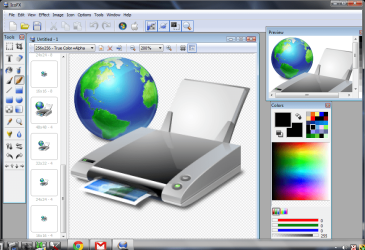
Icon - Make from Image

How to Make a Icon with a Image

   Note
IconViewer Download IconViewer Is very handy for looking at icons in .dll, .exe, etc.


You will need to download
IcoX portable it is portable no need for installation
IcoFX Portable | PortableApps.com - Portable software for USB, portable and cloud drives
Gimp needs installed
GIMP - Windows installers

The icon I am going to make has 13 layers those layers are 48 x 48, 32 x 32, 24 x 24, 16 x 16, 48 x 48, 32 x 32, 24 x 24, 16 x 16, 256 x 256, 48 x 48, 32 x 32, 24 x 24, 16 x 16,
The biggest image is 256 x 256 so that will be the size of the starting image.
I am working with a 256x256 pixel image in .png format.
OK lets make a eye.icon :D
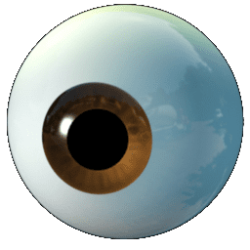
eye.png

#1
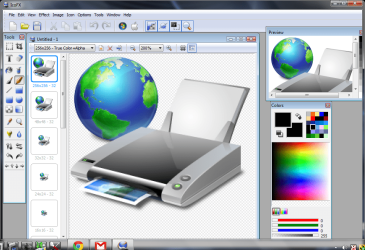
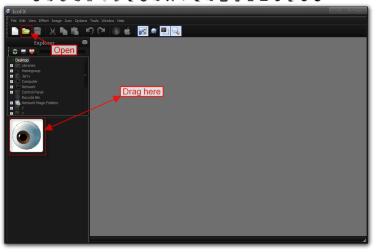
Open IcoFX
Either drag your image to the workspace or click Open and navigate to your image.
1.png

#2
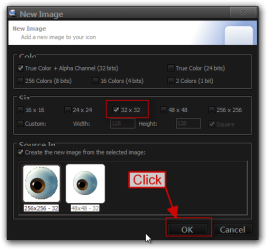
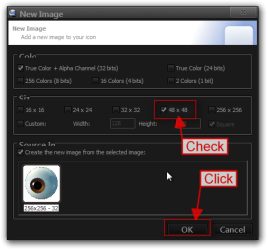
The New Image box will open make sure True Color + Alpha Channel is checked then check 256x256 and then Click OK.
2.png

#3
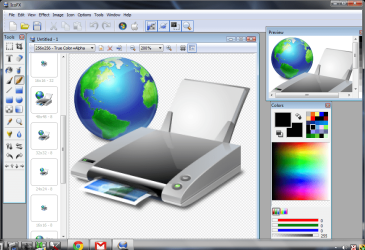
Your first image should be loaded Right Click on the 256x256 at the top and then Click on New Image.
3.png

#4
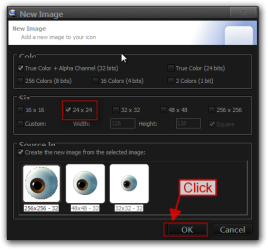
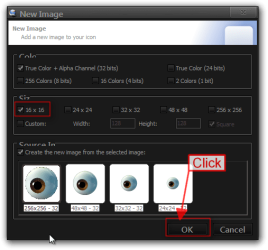
Repeat step #3 above for each of the different sizes in this case I am doing 48 x 48, 32 x 32, 24 x 24, 16 x 16.
4.png

6.png

7.png

8.png

#5
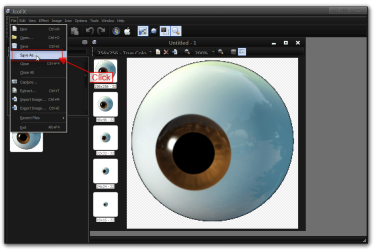
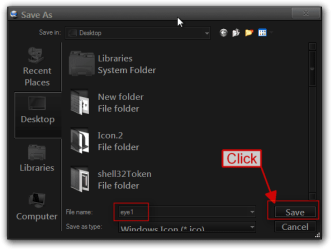
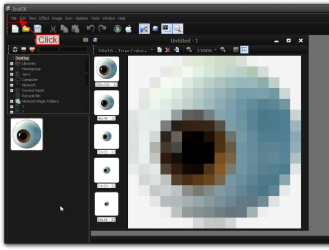
You should have five images ranging from 256 x 256 down to 16 x 16 now Click on File. Click on Save As. Give it a name and Click on Save.
9.png

10.png

11.png

#6
Now we to make a four image ranging from 48 x 48 to 16 x 16 Right click on the top 256 x 256 image and Click on Delete Image. The Confirm box will open Click on Yes.
12.png

13.png

#7
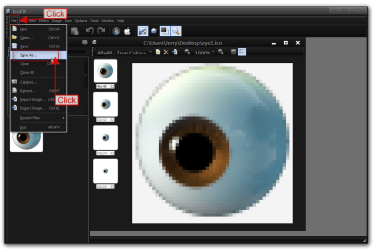
Now we want to save the four images Click on File then
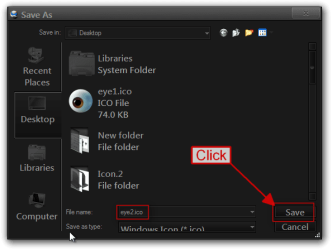
Click on Save As. Give it a name different than the first one then Click on Save.
14.png

15.png

#8
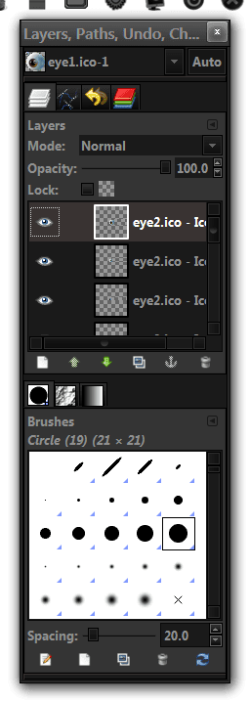
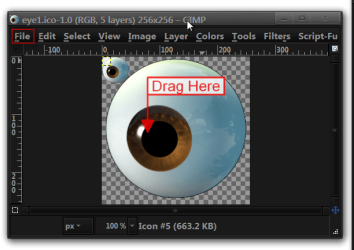
Open up Gimp either drag the first set of five images that you saved into the workspace or Click on File and click on open and navigate to your image.
16.png

#9
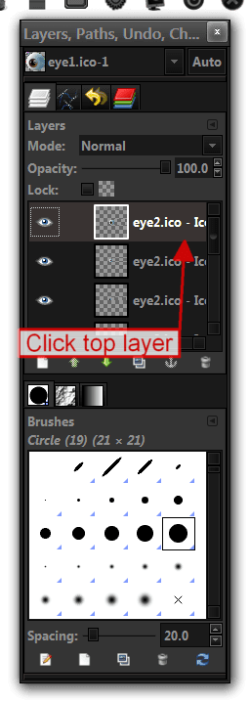
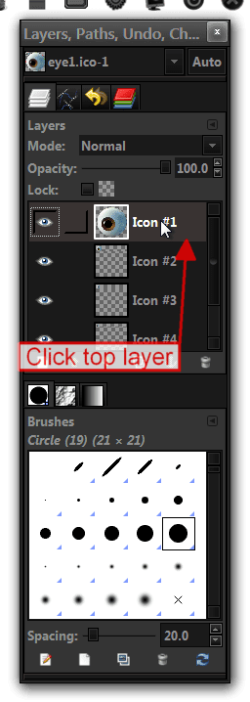
You will see the five images in the layers box Click on the top layer and then dragged the second image with four layers onto the workspace it should be on top of the five images Click on the top layer again and drag that second in the with four layers into the workspace again you should have 13 layers.
17.png

18.png

19.2.png

#10
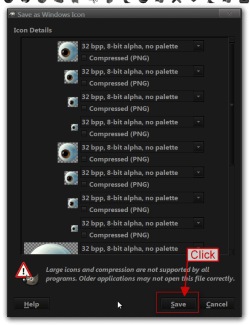
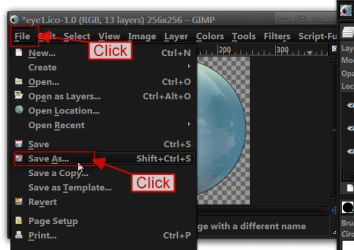
Now we are going to save the icon Click on File then Click on Save As. Give it a name with the .ico then Click on Save. The Save as Windows Icon box will open

you should see 13 different layers when Click on Save.
19.png

20.png

21.png


You should have a 13 layer icon, not all icons are built the same I have seen icons with as little as one layer and as many as 24 layers so you will have to study how the icon was built.

Jerry

 
Last edited by a moderator:
Doesn't a png to icon converter do the same thing, but this is manual?
 

My Computer

Computer type
PC/Desktop
Computer Manufacturer/Model Number
Novatech iRush Pro
OS
Windows 7 Ultimate SP1 - 64 Bit
CPU
Intel Core i5 2500k
Motherboard
Foxconn H67M-S/H67M-V/H67
Memory
2x4GB DDR3 1333Hz
Graphics Card(s)
Ati Radeon 6770
Sound Card
None
Monitor(s) Displays
Samsung S22B150
Screen Resolution
1920x1080
Hard Drives
2x500GB
PSU
500W
Cooling
Fan
Keyboard
HP KU0316
Mouse
Wireless Logitech M185
Internet Speed
20MB/s
Antivirus
Avast Free
Browser
Google Chrome
Other Info
Logitech M185 Mouse
KU-M316 Keyboard
I just tried a online converter in only made a 6 layers 1 this give you more control.
Jerry
 

My Computer

Computer type
Laptop
Computer Manufacturer/Model Number
Sager NP9170
OS
Win 7 Pro x64 / Win 10 Pro
CPU
Intel(R) Core(TM) i7-3630QM CPU @ 2.40GHz
Motherboard
CLEVO P170EM
Memory
12 GB
Graphics Card(s)
(1) Intel(R) HD Graphics 4000 (2) NVIDIA GeForce GTX 675M
Sound Card
(1) Realtek High Definition Audio (2) Intel(R) Display Aud
Monitor(s) Displays
17.3
Screen Resolution
1920x1080
Hard Drives
(1) Samsung 860 EVO 500GB(OS) (1) Samsung 860 EVO 500GB(Data)
Keyboard
Backlite
Antivirus
MSE, Malwarebytes Pro
Browser
Firefox
Other Info
DESKTOP: Custom-built.
OS: Win 10 Pro x64.
CASE: Rosewill R5.
CPU: Intel I5 4670K CPU @ 3.40GHz.
CPU COOLER: Cool Master Hyper 212 EVO.
MOTHERBOARD: Asus Z87-A.
MEMORY: Kingston HyperX 2x4 GB.
GPU: Nvidia Geforce 650 TI.
PSU: Corsair TX750.
DRIVES: (1) Samsung 840 120 GB SSD (2) Western Digital blue 500 GB 7200 RPM.
very good tutorial jerry, i have used icofx in the past but didnt really know how to use it correctly.
i too use an online converter but as you say it gives you more control
 

My Computer

Computer Manufacturer/Model Number
Hewlett packard/p6512uk
OS
Microsoft Windows 7 Home Premium 64-bit 7600
CPU
IIx4 amd athelon 635 processor
Motherboard
FOXCONN 2AA9
Memory
2x2gb
Graphics Card(s)
ati radeon HD 5450
Sound Card
(1) Realtek High Definition Audio (2) AMD High Definition
Monitor(s) Displays
samsung lcd tv 32"
Screen Resolution
1360x 768
Hard Drives
(1) WDC WD10 01FAES-60Z2A0 SATA Disk Device (2) Maxtor OneTouch USB Device (3) ST310003 33AS USB Device (4) WD My Book 1111 USB Device
PSU
?
Cooling
air!
Keyboard
wireless hp
Mouse
wireless Hp,optical
Internet Speed
1.10mb/s
Antivirus
MSE
Browser
Firefox
Thank you Julian
 

My Computer

Computer type
Laptop
Computer Manufacturer/Model Number
Sager NP9170
OS
Win 7 Pro x64 / Win 10 Pro
CPU
Intel(R) Core(TM) i7-3630QM CPU @ 2.40GHz
Motherboard
CLEVO P170EM
Memory
12 GB
Graphics Card(s)
(1) Intel(R) HD Graphics 4000 (2) NVIDIA GeForce GTX 675M
Sound Card
(1) Realtek High Definition Audio (2) Intel(R) Display Aud
Monitor(s) Displays
17.3
Screen Resolution
1920x1080
Hard Drives
(1) Samsung 860 EVO 500GB(OS) (1) Samsung 860 EVO 500GB(Data)
Keyboard
Backlite
Antivirus
MSE, Malwarebytes Pro
Browser
Firefox
Other Info
DESKTOP: Custom-built.
OS: Win 10 Pro x64.
CASE: Rosewill R5.
CPU: Intel I5 4670K CPU @ 3.40GHz.
CPU COOLER: Cool Master Hyper 212 EVO.
MOTHERBOARD: Asus Z87-A.
MEMORY: Kingston HyperX 2x4 GB.
GPU: Nvidia Geforce 650 TI.
PSU: Corsair TX750.
DRIVES: (1) Samsung 840 120 GB SSD (2) Western Digital blue 500 GB 7200 RPM.
A question. Why don't you just save the file as an ICO in IcoFx?
 

My Computer

Computer type
Laptop
Computer Manufacturer/Model Number
Hewlett-Packard/G62-107SA Notebook
OS
Microsoft Windows 7 Home Premium 64-bit Service Pack 1
CPU
Intel(R) Core(TM) i3 CPU M 330 @ 2.13GHz
Motherboard
Hewlett-Packard 1425
Memory
8 GB DDR3
Graphics Card(s)
Intel(R) HD Graphics
Sound Card
Realtek High Definition Audio
Monitor(s) Displays
Builtin
Screen Resolution
1366 x 768 x 32 bits (4294967296 colors) @ 60 Hz
Hard Drives
250 GB SATA Hard Disk Drive 7200 rpm
2TB Seagate GoFlex USB 2 Drive
1TB Iomega Prestige USB 2 Drive
1.5TB Iomega Prestige USB 2 Drive (Samsung)
2TB WD MyBook Live NAS.
Mouse
Logitech Anywhere MX
Internet Speed
152 Mbs download 10 Mbs upload
Antivirus
Norton 360
Browser
Chrome
A question. Why don't you just save the file as an ICO in IcoFx?
In step #5 and 7 they are being saved as .ico the only reason I'm using gimp is to put them together I could not find a way to do it with IcoFx. The way icons are built as an example from the above tutorial starts out with a 48 x 48, 32x32, 24 x 24, 16 x 16, 48 x 48, 32x32, 24 x 24, 16 x 16, 256 x 256, 48 x 48, 32x32, 24 x 24, 16 x 16,
Once I had the first five images in IcoFx I could not repeat that. So I made one set of five images in one set of four images IcoFx can't put it together as you can see from above there is a repeat in the image sizes and the 256 x 256 is at the top of the third repeated images IcoFx would not let me build it that way.
Jerry
 

My Computer

Computer type
Laptop
Computer Manufacturer/Model Number
Sager NP9170
OS
Win 7 Pro x64 / Win 10 Pro
CPU
Intel(R) Core(TM) i7-3630QM CPU @ 2.40GHz
Motherboard
CLEVO P170EM
Memory
12 GB
Graphics Card(s)
(1) Intel(R) HD Graphics 4000 (2) NVIDIA GeForce GTX 675M
Sound Card
(1) Realtek High Definition Audio (2) Intel(R) Display Aud
Monitor(s) Displays
17.3
Screen Resolution
1920x1080
Hard Drives
(1) Samsung 860 EVO 500GB(OS) (1) Samsung 860 EVO 500GB(Data)
Keyboard
Backlite
Antivirus
MSE, Malwarebytes Pro
Browser
Firefox
Other Info
DESKTOP: Custom-built.
OS: Win 10 Pro x64.
CASE: Rosewill R5.
CPU: Intel I5 4670K CPU @ 3.40GHz.
CPU COOLER: Cool Master Hyper 212 EVO.
MOTHERBOARD: Asus Z87-A.
MEMORY: Kingston HyperX 2x4 GB.
GPU: Nvidia Geforce 650 TI.
PSU: Corsair TX750.
DRIVES: (1) Samsung 840 120 GB SSD (2) Western Digital blue 500 GB 7200 RPM.
I see. The question then is why you would put more than one image of the same size and color depth in the same icon?
 

My Computer

Computer type
Laptop
Computer Manufacturer/Model Number
Hewlett-Packard/G62-107SA Notebook
OS
Microsoft Windows 7 Home Premium 64-bit Service Pack 1
CPU
Intel(R) Core(TM) i3 CPU M 330 @ 2.13GHz
Motherboard
Hewlett-Packard 1425
Memory
8 GB DDR3
Graphics Card(s)
Intel(R) HD Graphics
Sound Card
Realtek High Definition Audio
Monitor(s) Displays
Builtin
Screen Resolution
1366 x 768 x 32 bits (4294967296 colors) @ 60 Hz
Hard Drives
250 GB SATA Hard Disk Drive 7200 rpm
2TB Seagate GoFlex USB 2 Drive
1TB Iomega Prestige USB 2 Drive
1.5TB Iomega Prestige USB 2 Drive (Samsung)
2TB WD MyBook Live NAS.
Mouse
Logitech Anywhere MX
Internet Speed
152 Mbs download 10 Mbs upload
Antivirus
Norton 360
Browser
Chrome
I see. The question then is why you would put more than one image of the same size and color depth in the same icon?
I guess because that's the way Microsoft built them when I replaced an icon I built them the same way that Microsoft did so it will display correctly.
Jerry
 

My Computer

Computer type
Laptop
Computer Manufacturer/Model Number
Sager NP9170
OS
Win 7 Pro x64 / Win 10 Pro
CPU
Intel(R) Core(TM) i7-3630QM CPU @ 2.40GHz
Motherboard
CLEVO P170EM
Memory
12 GB
Graphics Card(s)
(1) Intel(R) HD Graphics 4000 (2) NVIDIA GeForce GTX 675M
Sound Card
(1) Realtek High Definition Audio (2) Intel(R) Display Aud
Monitor(s) Displays
17.3
Screen Resolution
1920x1080
Hard Drives
(1) Samsung 860 EVO 500GB(OS) (1) Samsung 860 EVO 500GB(Data)
Keyboard
Backlite
Antivirus
MSE, Malwarebytes Pro
Browser
Firefox
Other Info
DESKTOP: Custom-built.
OS: Win 10 Pro x64.
CASE: Rosewill R5.
CPU: Intel I5 4670K CPU @ 3.40GHz.
CPU COOLER: Cool Master Hyper 212 EVO.
MOTHERBOARD: Asus Z87-A.
MEMORY: Kingston HyperX 2x4 GB.
GPU: Nvidia Geforce 650 TI.
PSU: Corsair TX750.
DRIVES: (1) Samsung 840 120 GB SSD (2) Western Digital blue 500 GB 7200 RPM.
A 13 layer icon from imageres displayed in IcoFx. You will notice the first 5 are 32bit, the next 4 8bit and the last 4 are 4bit.

screenshot95_2012-01-06.png

screenshot96_2012-01-06.png

screenshot97_2012-01-06.png
 

My Computer

Computer type
Laptop
Computer Manufacturer/Model Number
Hewlett-Packard/G62-107SA Notebook
OS
Microsoft Windows 7 Home Premium 64-bit Service Pack 1
CPU
Intel(R) Core(TM) i3 CPU M 330 @ 2.13GHz
Motherboard
Hewlett-Packard 1425
Memory
8 GB DDR3
Graphics Card(s)
Intel(R) HD Graphics
Sound Card
Realtek High Definition Audio
Monitor(s) Displays
Builtin
Screen Resolution
1366 x 768 x 32 bits (4294967296 colors) @ 60 Hz
Hard Drives
250 GB SATA Hard Disk Drive 7200 rpm
2TB Seagate GoFlex USB 2 Drive
1TB Iomega Prestige USB 2 Drive
1.5TB Iomega Prestige USB 2 Drive (Samsung)
2TB WD MyBook Live NAS.
Mouse
Logitech Anywhere MX
Internet Speed
152 Mbs download 10 Mbs upload
Antivirus
Norton 360
Browser
Chrome
Yes it will display in IcoFx But it will not let you build it the correct way.
Jerry
 

My Computer

Computer type
Laptop
Computer Manufacturer/Model Number
Sager NP9170
OS
Win 7 Pro x64 / Win 10 Pro
CPU
Intel(R) Core(TM) i7-3630QM CPU @ 2.40GHz
Motherboard
CLEVO P170EM
Memory
12 GB
Graphics Card(s)
(1) Intel(R) HD Graphics 4000 (2) NVIDIA GeForce GTX 675M
Sound Card
(1) Realtek High Definition Audio (2) Intel(R) Display Aud
Monitor(s) Displays
17.3
Screen Resolution
1920x1080
Hard Drives
(1) Samsung 860 EVO 500GB(OS) (1) Samsung 860 EVO 500GB(Data)
Keyboard
Backlite
Antivirus
MSE, Malwarebytes Pro
Browser
Firefox
Other Info
DESKTOP: Custom-built.
OS: Win 10 Pro x64.
CASE: Rosewill R5.
CPU: Intel I5 4670K CPU @ 3.40GHz.
CPU COOLER: Cool Master Hyper 212 EVO.
MOTHERBOARD: Asus Z87-A.
MEMORY: Kingston HyperX 2x4 GB.
GPU: Nvidia Geforce 650 TI.
PSU: Corsair TX750.
DRIVES: (1) Samsung 840 120 GB SSD (2) Western Digital blue 500 GB 7200 RPM.
I must correct myself I can build it with IcoFx using the different color bit.
Thank you kado897 for pointing that out.
Jerry
 

My Computer

Computer type
Laptop
Computer Manufacturer/Model Number
Sager NP9170
OS
Win 7 Pro x64 / Win 10 Pro
CPU
Intel(R) Core(TM) i7-3630QM CPU @ 2.40GHz
Motherboard
CLEVO P170EM
Memory
12 GB
Graphics Card(s)
(1) Intel(R) HD Graphics 4000 (2) NVIDIA GeForce GTX 675M
Sound Card
(1) Realtek High Definition Audio (2) Intel(R) Display Aud
Monitor(s) Displays
17.3
Screen Resolution
1920x1080
Hard Drives
(1) Samsung 860 EVO 500GB(OS) (1) Samsung 860 EVO 500GB(Data)
Keyboard
Backlite
Antivirus
MSE, Malwarebytes Pro
Browser
Firefox
Other Info
DESKTOP: Custom-built.
OS: Win 10 Pro x64.
CASE: Rosewill R5.
CPU: Intel I5 4670K CPU @ 3.40GHz.
CPU COOLER: Cool Master Hyper 212 EVO.
MOTHERBOARD: Asus Z87-A.
MEMORY: Kingston HyperX 2x4 GB.
GPU: Nvidia Geforce 650 TI.
PSU: Corsair TX750.
DRIVES: (1) Samsung 840 120 GB SSD (2) Western Digital blue 500 GB 7200 RPM.
No problem Jerry. I was just about to post this.
 

Attachments

My Computer

Computer type
Laptop
Computer Manufacturer/Model Number
Hewlett-Packard/G62-107SA Notebook
OS
Microsoft Windows 7 Home Premium 64-bit Service Pack 1
CPU
Intel(R) Core(TM) i3 CPU M 330 @ 2.13GHz
Motherboard
Hewlett-Packard 1425
Memory
8 GB DDR3
Graphics Card(s)
Intel(R) HD Graphics
Sound Card
Realtek High Definition Audio
Monitor(s) Displays
Builtin
Screen Resolution
1366 x 768 x 32 bits (4294967296 colors) @ 60 Hz
Hard Drives
250 GB SATA Hard Disk Drive 7200 rpm
2TB Seagate GoFlex USB 2 Drive
1TB Iomega Prestige USB 2 Drive
1.5TB Iomega Prestige USB 2 Drive (Samsung)
2TB WD MyBook Live NAS.
Mouse
Logitech Anywhere MX
Internet Speed
152 Mbs download 10 Mbs upload
Antivirus
Norton 360
Browser
Chrome
This is an interesting article on Vista icons. I think Win 7 is much the same.Icons
 

My Computer

Computer type
Laptop
Computer Manufacturer/Model Number
Hewlett-Packard/G62-107SA Notebook
OS
Microsoft Windows 7 Home Premium 64-bit Service Pack 1
CPU
Intel(R) Core(TM) i3 CPU M 330 @ 2.13GHz
Motherboard
Hewlett-Packard 1425
Memory
8 GB DDR3
Graphics Card(s)
Intel(R) HD Graphics
Sound Card
Realtek High Definition Audio
Monitor(s) Displays
Builtin
Screen Resolution
1366 x 768 x 32 bits (4294967296 colors) @ 60 Hz
Hard Drives
250 GB SATA Hard Disk Drive 7200 rpm
2TB Seagate GoFlex USB 2 Drive
1TB Iomega Prestige USB 2 Drive
1.5TB Iomega Prestige USB 2 Drive (Samsung)
2TB WD MyBook Live NAS.
Mouse
Logitech Anywhere MX
Internet Speed
152 Mbs download 10 Mbs upload
Antivirus
Norton 360
Browser
Chrome
Excuse me, everyone, I still don't understand how to make an icon. I've tried it but my icon doesn't have a transparent background. Can someone help me please? Thank you very much.


Never mind, figure it out, thanks.
 
Last edited:

My Computer

OS
Windows 7 Ultimate 32bit
Step 9 isn't clear.

Hello,
This is a very nice tutorial and I just start doing those steps.
Currently I'm stuck at step 9, I'm confused with "dragged the second image with four layers onto the workspace " Part. Will yo help me to do it?

Thanks before.
 

My Computer

Computer type
Laptop
Computer Manufacturer/Model Number
Acer Aspire 5745G
OS
Genuine Windows® 7 Ultimate x64
CPU
Intel® Core™ i7-640M
Motherboard
Acer ZR7
Memory
2GB X 2 Samsung DDR3-SDRAM(s)
Graphics Card(s)
NVIDIA® GeForce® GT 420M
Sound Card
Realtek High Definition Audio
Monitor(s) Displays
Generic PnP Monitor
Screen Resolution
1366x768, HD, 16:9
Hard Drives
Hitachi HTS545050B9A300 (500GB)
Keyboard
Standard PS/2 Keyboard
Mouse
Synaptics PS/2 Port TouchPad
Internet Speed
3.6 Mbps
Antivirus
Kaspersky Internet Security 2012
Browser
Google Chrome
Video ?

im stumped on step 9, im not sure what you mean by add your 4 layer images is there a way you can make a video or something ?
 

My Computer

Computer type
PC/Desktop
Computer Manufacturer/Model Number
Emachines
OS
Windows 7 64 bit Pro
CPU
2.70 gigahertz AMD Athlon II X2 235e 256 kilobyte Pri Memory
Motherboard
Board: eMachines MCP61PM-GM
Memory
5888 Megabytes Usable Installed Memory
Graphics Card(s)
GeForce 6150SE nForce 430
Hard Drives
Backup B:\\ ST350031 2CS SCSI Disk Device (500.11 GB) -- drive 0, s/n 6VV1V14G, SMART Status: Healthy

OS C:\\ ST375052 8AS SCSI Disk Device (750.15 GB) -- drive 1, s/n 5VP1YPDS, SMART Status: Healthy
Antivirus
AVG Free
Browser
Firefox
Suggested Edits to Tutorial

Registered solely for those who are trying to follow this tutorial and are as frustrated as I am... here are some minor corrections/additions that may help them.

Follow the tutorial steps #2 thru #7 but change your file saves to reflect the following formats. (This is alluded to later on but the reference doesn't make sense to those who have not done this before.):

Save these in the first group with a unique filename (ex: 'Save As 5_32b_alpha'):

256x256 32bit + Alpha
48x48: 32bit + Alpha
32x32: 32bit + Alpha
24x24: 32bit + Alpha
16x16: 32bit + Alpha

Delete the first image as mentioned in step #6) then save these in the second group using a unique filename (ex 'Save as 4_8b_256'):

48x48: 8bit 256
32x32: 8bit 256
24x24: 8bit 256
16x16: 8bit 256

Save these in the final group again saving as a unique filename (ex 'Save as 4_4b_16'):

48x48: 4bit 16
32x32: 4bit 16
24x24: 4bit 16
16x16: 4bit 16

I had quite a bit of difficulty figuring out just WTH was being said in some of the steps (missing punctuation & words) so here are 'de-frustrated' instructions for the following steps:

-----------------------------------------------------------------------------------

Step #9) - You will see the five images in the GIMP layers box.

Click on the top layer in IcoFX and then drag the second image containing the four 256-bit layers onto the GIMP workspace. It should be on top of the first five images. (A small outline box will appear.)

Click on the top layer in IcoFX again and then drag the image with four 8-bit layers into the GIMP work space. You should now have 13 layers total. (Take a look up top where it should mention (RGB color, 13 layers) after your file image name.)

Step #10) - The newest version of GIMP (currently v2.8.22) no longer functions this way. You will have to use 'EXPORT AS...' to export the 13 layer image as an .ico manually. There was no direct 'Windows Icon' function found in the latest version (v2.8.22).


It also helps to get the Devices and Printers Metadata Authoring Wizard from MicroSoft after you finally muddle together a custom icon. It will let you know immediately if your custom icon is not suitable and show what is in (and not in) the package. It also lets you set the MetaData so that your fancy custom icon will impress hot chicks and attract all the cool electrons from neighboring networks.

Once I deciphered the 'plain language' way to do this it wasn't hard but was absolutely tearing my hair out trying to figure out what was 'unsaid & implied'. Hope this helps anyone else who stumbles this way.


Last edited:

My Computer

Computer type
PC/Desktop
Computer Manufacturer/Model Number
custom
OS
Win7 Ultimate x64
Memory
16gb
If all you need is an icon, there is a really simple way to do it. You won't have hardly any control over how it looks, but if it comes out ok, you can't get any simpler than this.

Open Paint. Paste your image into Paint. Save in format .BMP, but make sure that the file extension is .ICO.

That's all there is to it!
 

My Computer

Computer type
PC/Desktop
Computer Manufacturer/Model Number
Dell
OS
Linux Mint 18.2 xfce 64-bit (VMWare host) / Windows 8.1 Pro 32-bit (VMWare guest)
CPU
Haswell
Memory
4 GB
Monitor(s) Displays
Acer 23"
Screen Resolution
1920 x 1080
Hard Drives
Two hard drives, 1TB each: One for Linux, one for my data.
Keyboard
IBM Model M
Antivirus
Sophos (Linux), Trend Micro (Windows)
Browser
Firefox, Opera
Other Info
I use Samba to share my data drive with the other computers at my house and with my guest session in VMWare Workstation Player.
For a device / printer icon?

Hey, I'll certainly give your idea a try but the device manager doesn't use standard icons, only those 'super-special Microsoft approved' multi-layer icons. I posted here mainly to clear up the confusing tutorial once I figured out what the person posting the tutorial was trying to say but if we can skip all that... heck yeah!

I'll try it & post back later but I'm reasonably sure I tried standard .ico file saves along the way.
 

My Computer

Computer type
PC/Desktop
Computer Manufacturer/Model Number
custom
OS
Win7 Ultimate x64
Memory
16gb
Back
Top