
Icon not showing

cclloyd9785

Master of Technology
Power User
Local time
2:13 AM
Messages
662
Location
Boston, MA
Im using the registry to change the drive icons in my computer.

Attached is a screenshot of My Computer. all the icons are fine except for the C Drive. I double checked the path to the icon and its correct.

Using the key

HKEY_LOCAL_MACHINE\SOFTWARE\Microsoft\Windows\CurrentVersion\Explorer\DriveIcons\C\DefaultIcon

to change the icon

So why isnt it showing up?
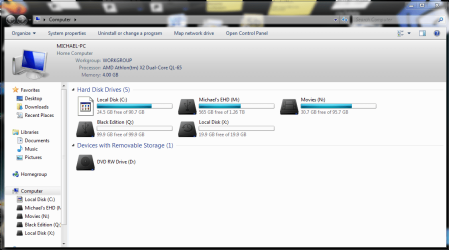
Capture.PNG
 

My Computer

Computer Manufacturer/Model Number
Toshiba Satellite L505D-S9565
OS
Windows 7 Home Premium x64, Mac OS X 10.6.2 x64
CPU
AMD Athlon X2 Dual-Core 2.1 GHz
Motherboard
Toshiba Built-In with Insyde H20 BIOS 1.40
Memory
4 GB DDR2 800 MHz
Graphics Card(s)
ATI Radeon HD Mobility 3100 Graphics 256MB to 1468 MB Shared
Sound Card
Realtek Mobile ALC272 HD Audio
Monitor(s) Displays
15.6" TFT LCD with TruBrite, Samsung 1080p HDTV
Screen Resolution
1366x768, 1920x1080
Hard Drives
❶:Main: Toshiba 250 GB SATA 5400 RPM
PSU
N/A
Case
N/A
Cooling
Built-in/Open window in winter :P
Keyboard
Built-in
Mouse
Build-in Symantics SmartTouch Pad
Internet Speed
55 MB/sec Down, 9 MB/sec Up
Other Info
❷:Backup: Seagate FreeAgent Desk USB 2.0 5400 RPM
❸:Media: Toshiba 640 GB USB 2.0 5400 RPM Portable Edition
Hello Lloyd,

Double check with the yellow TIP box in the tutorial below to see if it may be a issue with a "Desktop.ini" file on the C: drive.

Drive Icon Change - Vista Forums

Hope this helps,
Shawn
 

My Computer

Computer type
PC/Desktop
Computer Manufacturer/Model Number
Self built custom
OS
64-bit Windows 11 Pro for Workstations
CPU
Intel i7-8700K OC'd to 5 GHz
Motherboard
ASUS ROG Maximus XI Formula Z390
Memory
64 GB (4x16GB) G.SKILL TridentZ RGB DDR4 3600 MHz
Graphics Card(s)
ASUS ROG-STRIX-GTX1080TI-O11G-GAMING
Sound Card
Integrated
Monitor(s) Displays
2 x Samsung Odyssey G7 27"
Screen Resolution
2560x1440
Hard Drives
1TB Samsung 990 PRO M.2,
4TB Samsung 990 PRO PRO M.2,
TerraMaster F8 SSD Plus NAS
PSU
Seasonic Prime Titanium 850W
Case
Thermaltake Core P3
Cooling
Corsair Hydro H115i
Keyboard
Logitech wireless K800
Mouse
Logitech MX Master 4
Internet Speed
2 Gb/s Download and 100 Mb/s Upload
Antivirus
Malwarebyte Anti-Malware Premium
Browser
Google Chrome
Other Info
Logitech Z625 speaker system,
Logitech BRIO 4K Pro webcam,
HP Color LaserJet Pro MFP M477fdn,
APC SMART-UPS RT 1000 XL - SURT1000XLI,
Galaxy S23 Plus phone
Nevermind, I found the problem. It was me just having to restart explorer.

But the desktop.ini reminded me. I have like 3 of them on my desktop, named with desktop (2)(3).ini. Can i delete those?
 

My Computer

Computer Manufacturer/Model Number
Toshiba Satellite L505D-S9565
OS
Windows 7 Home Premium x64, Mac OS X 10.6.2 x64
CPU
AMD Athlon X2 Dual-Core 2.1 GHz
Motherboard
Toshiba Built-In with Insyde H20 BIOS 1.40
Memory
4 GB DDR2 800 MHz
Graphics Card(s)
ATI Radeon HD Mobility 3100 Graphics 256MB to 1468 MB Shared
Sound Card
Realtek Mobile ALC272 HD Audio
Monitor(s) Displays
15.6" TFT LCD with TruBrite, Samsung 1080p HDTV
Screen Resolution
1366x768, 1920x1080
Hard Drives
❶:Main: Toshiba 250 GB SATA 5400 RPM
PSU
N/A
Case
N/A
Cooling
Built-in/Open window in winter :P
Keyboard
Built-in
Mouse
Build-in Symantics SmartTouch Pad
Internet Speed
55 MB/sec Down, 9 MB/sec Up
Other Info
❷:Backup: Seagate FreeAgent Desk USB 2.0 5400 RPM
❸:Media: Toshiba 640 GB USB 2.0 5400 RPM Portable Edition
That's good news.

Sorry, but no you shouldn't delete them. You can only check the Hide protected operating system files box in Folder Options to hide them. :(
 

My Computer

Computer type
PC/Desktop
Computer Manufacturer/Model Number
Self built custom
OS
64-bit Windows 11 Pro for Workstations
CPU
Intel i7-8700K OC'd to 5 GHz
Motherboard
ASUS ROG Maximus XI Formula Z390
Memory
64 GB (4x16GB) G.SKILL TridentZ RGB DDR4 3600 MHz
Graphics Card(s)
ASUS ROG-STRIX-GTX1080TI-O11G-GAMING
Sound Card
Integrated
Monitor(s) Displays
2 x Samsung Odyssey G7 27"
Screen Resolution
2560x1440
Hard Drives
1TB Samsung 990 PRO M.2,
4TB Samsung 990 PRO PRO M.2,
TerraMaster F8 SSD Plus NAS
PSU
Seasonic Prime Titanium 850W
Case
Thermaltake Core P3
Cooling
Corsair Hydro H115i
Keyboard
Logitech wireless K800
Mouse
Logitech MX Master 4
Internet Speed
2 Gb/s Download and 100 Mb/s Upload
Antivirus
Malwarebyte Anti-Malware Premium
Browser
Google Chrome
Other Info
Logitech Z625 speaker system,
Logitech BRIO 4K Pro webcam,
HP Color LaserJet Pro MFP M477fdn,
APC SMART-UPS RT 1000 XL - SURT1000XLI,
Galaxy S23 Plus phone
Well i think most of them got there because...

On my old computer, i had the folder background app, which creates a desktop.ini file in EVERY folder. So when i used Windows Easy Transfer to transfer to my new computer, i think it copied that file too. so are you sure it isnt safe to delete?
 

My Computer

Computer Manufacturer/Model Number
Toshiba Satellite L505D-S9565
OS
Windows 7 Home Premium x64, Mac OS X 10.6.2 x64
CPU
AMD Athlon X2 Dual-Core 2.1 GHz
Motherboard
Toshiba Built-In with Insyde H20 BIOS 1.40
Memory
4 GB DDR2 800 MHz
Graphics Card(s)
ATI Radeon HD Mobility 3100 Graphics 256MB to 1468 MB Shared
Sound Card
Realtek Mobile ALC272 HD Audio
Monitor(s) Displays
15.6" TFT LCD with TruBrite, Samsung 1080p HDTV
Screen Resolution
1366x768, 1920x1080
Hard Drives
❶:Main: Toshiba 250 GB SATA 5400 RPM
PSU
N/A
Case
N/A
Cooling
Built-in/Open window in winter :P
Keyboard
Built-in
Mouse
Build-in Symantics SmartTouch Pad
Internet Speed
55 MB/sec Down, 9 MB/sec Up
Other Info
❷:Backup: Seagate FreeAgent Desk USB 2.0 5400 RPM
❸:Media: Toshiba 640 GB USB 2.0 5400 RPM Portable Edition
You can delete them safely, but the ones that Windows 7 uses will just be recreated again.
 

My Computer

Computer type
PC/Desktop
Computer Manufacturer/Model Number
Self built custom
OS
64-bit Windows 11 Pro for Workstations
CPU
Intel i7-8700K OC'd to 5 GHz
Motherboard
ASUS ROG Maximus XI Formula Z390
Memory
64 GB (4x16GB) G.SKILL TridentZ RGB DDR4 3600 MHz
Graphics Card(s)
ASUS ROG-STRIX-GTX1080TI-O11G-GAMING
Sound Card
Integrated
Monitor(s) Displays
2 x Samsung Odyssey G7 27"
Screen Resolution
2560x1440
Hard Drives
1TB Samsung 990 PRO M.2,
4TB Samsung 990 PRO PRO M.2,
TerraMaster F8 SSD Plus NAS
PSU
Seasonic Prime Titanium 850W
Case
Thermaltake Core P3
Cooling
Corsair Hydro H115i
Keyboard
Logitech wireless K800
Mouse
Logitech MX Master 4
Internet Speed
2 Gb/s Download and 100 Mb/s Upload
Antivirus
Malwarebyte Anti-Malware Premium
Browser
Google Chrome
Other Info
Logitech Z625 speaker system,
Logitech BRIO 4K Pro webcam,
HP Color LaserJet Pro MFP M477fdn,
APC SMART-UPS RT 1000 XL - SURT1000XLI,
Galaxy S23 Plus phone
Back
Top