Icons appear slowly -- Is it disk space or memory?

juanantoniod

Antonio
Power User
Local time
4:50 AM
Messages
300
Location
Los Angeles, CA
Hello everyone,

My system seems a tad slow. Here are the issues I am experiencing:

1. Most of the time, while the system is rebooting, the desktop icons will disappear and be left with "blank placeholder" icons momentarily, then it will "refresh" from the top down and they will appear from the top down. Most of the time, when I go into Control Panel, the CP Icons do the same thing, they load from the top down. Also, sometimes when I open the Start Menu, the icons at the bottom take a moment to appear, and have "placeholders" in their place. After reboot, all of these do this when viewed the first time, then after viewing them the first time, they seem to load up fine the next.

2. Sometimes, when I am typing in Webforms, such as this post, especially because I type at around 100 words per minute, it will either a) lose keystrokes or b) buffer some keystrokes. The latter I do not mind, the the former is terribly frustrating. I have done everything I can to troubleshoot IE, and have not found a "culprit". The only issue I can think of is system performance.

3. Sometimes, especially after system reboots, the icons in folders do not appear immediately, they either fill up as they are "loaded" or are shown as blank icons, then change to the correct icon in a few seconds.

I know it's not a HUGE issue, but I am wondering what I can do to best increase my performance and alleviate this issue? I am considering either a memory upgrade from 2GB to 4GB, my system max, or possibly installing a bigger HDD.

Here are my System Specs, as produced by sysspec, a program recommended by a poster here: I have a Toshiba U300 Notebook (which I LOVE!)

Windows: Microsoft Windows 7 6.1.7600
Internet Explorer: 8.0.7600.16385
Memory (RAM): 2039 MB
CPU Info: Intel(R) Core(TM)2 CPU T7200 @ 2.00GHz
CPU Speed: 713.7 MHz
Sound card: Speakers (High Definition Audio
Display Adapters: Mobile Intel(R) 945 Express Chipset Family | Mobile Intel(R) 945 Express Chipset Family | RDPDD Chained DD | RDP Encoder Mirror Driver | RDP Reflector Display Driver
Monitors: 1
Screen Resolution: 1280 X 800 - 32 bit
Network: Network Present
Network Adapters: Realtek PCIe FE Family Controller | Intel(R) PRO/Wireless 3945ABG Network Connection
CD / DVD Drives: E: HL-DT-STDVDRAM GSA-U10N
COM Ports: NOT Present >> I do have COM ports; I do not know why it did not find them...
LPT Ports: NOT Present
Mouse: 5 Button Wheel Mouse Present >> I actually have a built-in Touchpad Mouse
Hard Disks: C: 51.1GB | D: 30.0GB | J: 30.6GB >> C: is System, D: is Macrium system images, J: is Data
Hard Disks - Free: C: 36.7GB | D: 965.3MB | J: 26.3GB
USB Controllers: 5 host controllers.
Firewire (1394): Not Detected
PCMCIA (Laptops): Not Installed
Manufacturer: TOSHIBA
Product Make: Satellite U300
AC Power Status: OnLine
BIOS Info:
Time Zone: Pacific Standard Time
Battery: High
Motherboard: TOSHIBA Satellite U300
Modem: Not detected >> I do have a modem, don't know why it wasn't detected...

I am running from a fresh "clean" intall image of Win 7 Home Premium, plus what I consider a few basic apps: Adobe Acrobat Reader, Epson Printer Driver, Mozy Home Backup, McAfee, Google Toolbar, Weatherbug, reQall for Outlook, and, of course, Office 2010.

So, is there a better option between increasing memory to 4GB for $100, or buying say a hard drive for just a little less? I kind of don't want to put more HD storage into my computer, because I have plenty for my needs already. The question is whether the system has enough?

Please let me know what you think. I appreciate all of your good inputs and information!

Thanks!
 

My Computer My Computer

Computer Manufacturer/Model Number
HP Pavilion Media Center PC m7350n
OS
Microsoft Windows 7 Home Premium 32-bit 7601 Multiprocessor Free Service Pack 1
CPU
Intel(R) Pentium(R) D CPU 2.80GHz
Motherboard
ASUSTek Computer INC. EMERY
Memory
2.00 GB
Graphics Card(s)
NVIDIA GeForce 6200SE TurboCache(TM)
Sound Card
Realtek High Definition Audio
Monitor(s) Displays
HP L1710 LCD Display
Screen Resolution
1280 x 1024 x 32 bits (4294967296 colors) @ 60 Hz
Hard Drives
(1) SAMSUNG SP2504C (2) EPSON Stylus Storage USB Device (3) Generic USB CF Reader USB Device (4) Generic USB MS Reader USB Device (5) Generic USB SD Reader USB Device (6) Generic USB SM Reader USB Device (7) Seagate FA GoFlex Desk USB Dev
Internet Speed
20+mbps
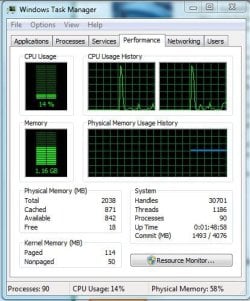
Your system should have enough muscle to proceed more smoothly. But before we draw any conclusions, we should do some data collection. Maybe we can identify the bottleneck. Let's look at the RAM, the CPU and to a lesser degree at the disk - always when the problem occurs.

1. RAM - go to Resource Monitor > Memory tab (easiest via Task Manager > Performance tab) and make a snip of the whole page.
The colored bar will show us the RAM usage and on top of the page where it say "Hard faults", we will see the paging activity (click on Hard Faults so that the processes with the most faults will show on the top). Then past that snip.

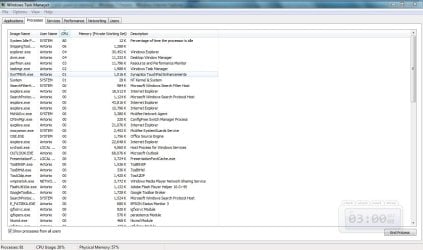
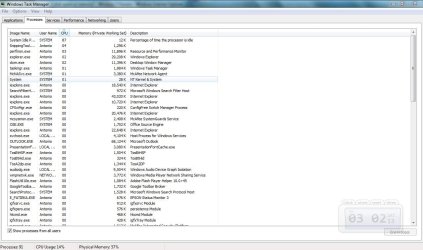
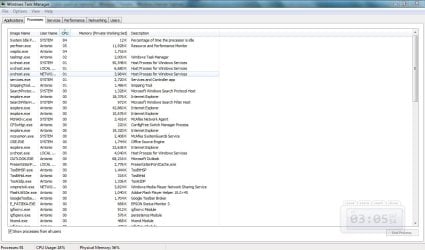
2. CPU - go to Task Manager > Processes tab. Click the button on the bottom "Show processes from all users", also click on CPU above so that the processes that use the CPU time show on top. Then take a snip and post it.

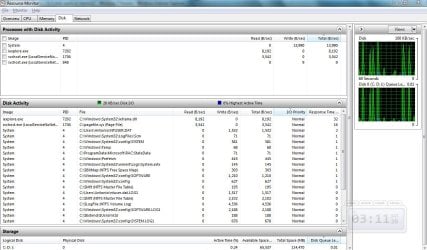
3. Disk - back to Resource Monitor > disk tab. Take a snip of the graph once it is all filled so that we can see how busy your disk is.

Once we have all that data, maybe we can make a more intelligent guess where to look further.
 

My Computer My Computer

Computer Manufacturer/Model Number
HP, Dell, Gateway, Toshiba - 4 laptops and 2 desktops
OS
Vista, Windows7, Mint Mate, Zorin, Windows 8
CPU
from 1.6GHz Duo to i7
Monitor(s) Displays
2x HP w2207
Hard Drives
5x HDD, 7x SSD, 12x Externals
Keyboard
with trackball - no mices
Mouse
Trackball mice
Internet Speed
DSL 6000
Wow! WHS, what a lot of information...

whs,

It is good to hear from you again. Hope you are doing well. Thank you for again, helping me.

As instructed, I am including the snips you wanted. I did 3 of the CPU, because it kept changing as I was watching it, so I thought that 3 would give you a better idea.

I don't know how much to tell you how grateful I am for this. I knew these monitors were there, but I have no idea how to read them or what to look for. A BIG thanks!

P.S. Outlook and IE8 are the only "apps" running on my system, at least in the foreground.
 

Attachments

  • RAM Capture.jpg
    RAM Capture.jpg
    49.1 KB · Views: 21
  • Hard Faults Capture.jpg
    Hard Faults Capture.jpg
    147.9 KB · Views: 29
  • CPU Capture.jpg
    CPU Capture.jpg
    109.8 KB · Views: 25
  • CPU Capture 2.jpg
    CPU Capture 2.jpg
    110.4 KB · Views: 17
  • CPU Capture 3.jpg
    CPU Capture 3.jpg
    109.8 KB · Views: 11
  • Disk Activity Capture.jpg
    Disk Activity Capture.jpg
    131.4 KB · Views: 18

My Computer My Computer

Computer Manufacturer/Model Number
HP Pavilion Media Center PC m7350n
OS
Microsoft Windows 7 Home Premium 32-bit 7601 Multiprocessor Free Service Pack 1
CPU
Intel(R) Pentium(R) D CPU 2.80GHz
Motherboard
ASUSTek Computer INC. EMERY
Memory
2.00 GB
Graphics Card(s)
NVIDIA GeForce 6200SE TurboCache(TM)
Sound Card
Realtek High Definition Audio
Monitor(s) Displays
HP L1710 LCD Display
Screen Resolution
1280 x 1024 x 32 bits (4294967296 colors) @ 60 Hz
Hard Drives
(1) SAMSUNG SP2504C (2) EPSON Stylus Storage USB Device (3) Generic USB CF Reader USB Device (4) Generic USB MS Reader USB Device (5) Generic USB SD Reader USB Device (6) Generic USB SM Reader USB Device (7) Seagate FA GoFlex Desk USB Dev
Internet Speed
20+mbps
Very good. Unfortunately not very conclusive.

CPU - in all 3 instances the idle process is 80% or better. That means the CPU is loafing and not at all stressed.

RAM - there are zero page faults which means you have RAM to spare. If you have a chance, post the color bar of Resource Monitor > Memory tab. But I think it will be clean.

Disk - the disk activity is busy but not dramatic.

Processes - you have 91 processes running. That is far too many. Around 50 is about normal. Have a look at your startups and see what you can weed out.

Bottom line - apart from the high number of processes I do not see anything out of the ordinary. But keep looking at the monitors from time to time (especially when the system does not run as you like). Maybe something turns up. And for a test, disable all startup programs (except your AV which seems to be McAfee). See whether that changes the situation.
 

My Computer My Computer

Computer Manufacturer/Model Number
HP, Dell, Gateway, Toshiba - 4 laptops and 2 desktops
OS
Vista, Windows7, Mint Mate, Zorin, Windows 8
CPU
from 1.6GHz Duo to i7
Monitor(s) Displays
2x HP w2207
Hard Drives
5x HDD, 7x SSD, 12x Externals
Keyboard
with trackball - no mices
Mouse
Trackball mice
Internet Speed
DSL 6000
Thanks, whs...

whs,

Thanks so much! As you requested, I have added my memory color image for your review. Please tell me what you think. I am concerned that if I wait too long that, either memory prices will go up, or memory for my computer will become unavailable. I would much rather put the $100 (what it costs now for 4GB of my notebook memory) toward the new iPhone I am saving for. But, if you think I should buy memory now, or that my system needs more memory to help it, then so be it. :)

I will be working on my processes for the next while so I will post in a few hours on what I find. After I have done as much as I can thru msconfig, process explorer, and such, would you be so kind as to review my new Processes image to tell me what else I can/should "kill"?

Take good care, I see that it is about 6 a.m. there, so have a great day!
 

Attachments

  • Memory Monitor Color.png
    Memory Monitor Color.png
    47.7 KB · Views: 19

My Computer My Computer

Computer Manufacturer/Model Number
HP Pavilion Media Center PC m7350n
OS
Microsoft Windows 7 Home Premium 32-bit 7601 Multiprocessor Free Service Pack 1
CPU
Intel(R) Pentium(R) D CPU 2.80GHz
Motherboard
ASUSTek Computer INC. EMERY
Memory
2.00 GB
Graphics Card(s)
NVIDIA GeForce 6200SE TurboCache(TM)
Sound Card
Realtek High Definition Audio
Monitor(s) Displays
HP L1710 LCD Display
Screen Resolution
1280 x 1024 x 32 bits (4294967296 colors) @ 60 Hz
Hard Drives
(1) SAMSUNG SP2504C (2) EPSON Stylus Storage USB Device (3) Generic USB CF Reader USB Device (4) Generic USB MS Reader USB Device (5) Generic USB SD Reader USB Device (6) Generic USB SM Reader USB Device (7) Seagate FA GoFlex Desk USB Dev
Internet Speed
20+mbps
Cannot identify unnecessary processes...

whs, and whoever else is reading,

I ran Process Explorer and saved the file, so I could take a good look at what was happening. Because, when Process Explorer is running, I do not know how to "freeze" it so that I can see what is going on; it keeps jumping around as the processes change.

The file I viewed is attached. I could not identify many obvious processes that could be killed and not re-run. I find that they either fall into 2 categories, "optional" or "system". The 3 or so that are "optional", I wish to keep, and the "system" processes, I do not know which ones can be stopped, or how to keep them from running in the first place.

I see the following 2 categories of processes:

1. Optional - These include reQall, Weatherbug, and Google Toolbar.

2. System, or non Optional, including Microsoft, Toshiba, McAfee, Mozy, Macrium, Intel, and Epson printer processes.

It does not seem that there is a way to not have all of these running. The "optional" ones are minimal, and the "system" ones are mostly comprised of Microsoft and Toshiba processes, which it would seem that the system wants or needs. What do you think?

Your commentary is both welcome and appreciated!

P.S. I did not even have Outlook, Word, and OneNote running when I ran this, so I am sure they create even more processes! What to do, what to do...
 

Attachments

My Computer My Computer

Computer Manufacturer/Model Number
HP Pavilion Media Center PC m7350n
OS
Microsoft Windows 7 Home Premium 32-bit 7601 Multiprocessor Free Service Pack 1
CPU
Intel(R) Pentium(R) D CPU 2.80GHz
Motherboard
ASUSTek Computer INC. EMERY
Memory
2.00 GB
Graphics Card(s)
NVIDIA GeForce 6200SE TurboCache(TM)
Sound Card
Realtek High Definition Audio
Monitor(s) Displays
HP L1710 LCD Display
Screen Resolution
1280 x 1024 x 32 bits (4294967296 colors) @ 60 Hz
Hard Drives
(1) SAMSUNG SP2504C (2) EPSON Stylus Storage USB Device (3) Generic USB CF Reader USB Device (4) Generic USB MS Reader USB Device (5) Generic USB SD Reader USB Device (6) Generic USB SM Reader USB Device (7) Seagate FA GoFlex Desk USB Dev
Internet Speed
20+mbps
1, Your memory looks real good. There is no need to upgrade the RAM - at least not for the situation we are trying to solve.

2. As I already said, you have a lot of processes running. I am pretty certain that we are dealing with a process interference problem. You should not venture to kill them in PE or Task Manager. I would stop them in the startups. You can do that either in msconfig or even better with Winpatrol > Startup tab. Disable all processes (including WinPatrol itself but excluding McAfee) and see whether that helps. You can also disable McAfee, but then you should stay off the web. If the error does not occur, you reenable the processes one by one to find the culprit. That is a little cumbersome, but given that all your system resources (RAM, CPU, Disk) look completely normal, the startups have to be our next front of research.
 

My Computer My Computer

Computer Manufacturer/Model Number
HP, Dell, Gateway, Toshiba - 4 laptops and 2 desktops
OS
Vista, Windows7, Mint Mate, Zorin, Windows 8
CPU
from 1.6GHz Duo to i7
Monitor(s) Displays
2x HP w2207
Hard Drives
5x HDD, 7x SSD, 12x Externals
Keyboard
with trackball - no mices
Mouse
Trackball mice
Internet Speed
DSL 6000
whs,

Thank you for taking a look at my processes. LOL That sounds kind of "off". ;)

I appreciate the link to Winpatrol. I will check it out, see what I can figure out, and report back here in a few days.

Have an awesome Monday!
 

My Computer My Computer

Computer Manufacturer/Model Number
HP Pavilion Media Center PC m7350n
OS
Microsoft Windows 7 Home Premium 32-bit 7601 Multiprocessor Free Service Pack 1
CPU
Intel(R) Pentium(R) D CPU 2.80GHz
Motherboard
ASUSTek Computer INC. EMERY
Memory
2.00 GB
Graphics Card(s)
NVIDIA GeForce 6200SE TurboCache(TM)
Sound Card
Realtek High Definition Audio
Monitor(s) Displays
HP L1710 LCD Display
Screen Resolution
1280 x 1024 x 32 bits (4294967296 colors) @ 60 Hz
Hard Drives
(1) SAMSUNG SP2504C (2) EPSON Stylus Storage USB Device (3) Generic USB CF Reader USB Device (4) Generic USB MS Reader USB Device (5) Generic USB SD Reader USB Device (6) Generic USB SM Reader USB Device (7) Seagate FA GoFlex Desk USB Dev
Internet Speed
20+mbps
Winpatrol/Startups & Toshiba Stuffware?

1, Your memory looks real good. There is no need to upgrade the RAM - at least not for the situation we are trying to solve.

2. As I already said, you have a lot of processes running. I am pretty certain that we are dealing with a process interference problem. You should not venture to kill them in PE or Task Manager. I would stop them in the startups. You can do that either in msconfig or even better with Winpatrol > Startup tab. Disable all processes (including WinPatrol itself but excluding McAfee) and see whether that helps. You can also disable McAfee, but then you should stay off the web. If the error does not occur, you reenable the processes one by one to find the culprit. That is a little cumbersome, but given that all your system resources (RAM, CPU, Disk) look completely normal, the startups have to be our next front of research.

whs,

I defragmented my hard drive partitions, which Windows said were not fragmented, yet it spent a lot of time defragmenting after I told it to defrag anyway. My system is now running a little faster. Whether or not it is because of the defrag, I don't know...

I ran Winpatrol, and it is most helpful. I am going to review the startups, diligently as you suggested before.

In the meantime I would like your comments on the following:

I was searching on this site for information on 2 particulars identified by Winpatrol that I needed info about: Toshiba Configfree, and Toshiba Flash Cards. In doing so, I found this quote from a former member of these forums. I would ask him directly, but he was expelled for some reason. The reason I am asking now, here, is because I purchased my Toshiba system with Vista on it, and Toshiba may have included some things that were either a) unnecessary with Windows 7, or b) Vista "bloatware", or c) both!

Here is what he said,
"Install new drivers - chipset, BIOS, gpu, sound, wireless, and you can use a bit of my tutorial in my sig if you are unsure. Then delete all of Toshiba's crapware and post a shot of your installed programs and the startup tab of msconfig."

His signture was not included in the post, and I am also reluctant to follow his advice anyway, since he was expelled. Do you think that I have too many unnecessary Toshiba proesses running?

For example, Configfree, I guess is a program that automatically detects where you are, and configures the network settings appropriately (I think.) But, I thought that Windows 7 included this in the OS. Then I saw a post on one of the forums from someone who apparently, would not want to live without Configfree.

Please let me know what you think about all the Toshiba processes. I do not know if these should be considered necessary or "bloatware".

Thanks a lot for your help! :)
 

My Computer My Computer

Computer Manufacturer/Model Number
HP Pavilion Media Center PC m7350n
OS
Microsoft Windows 7 Home Premium 32-bit 7601 Multiprocessor Free Service Pack 1
CPU
Intel(R) Pentium(R) D CPU 2.80GHz
Motherboard
ASUSTek Computer INC. EMERY
Memory
2.00 GB
Graphics Card(s)
NVIDIA GeForce 6200SE TurboCache(TM)
Sound Card
Realtek High Definition Audio
Monitor(s) Displays
HP L1710 LCD Display
Screen Resolution
1280 x 1024 x 32 bits (4294967296 colors) @ 60 Hz
Hard Drives
(1) SAMSUNG SP2504C (2) EPSON Stylus Storage USB Device (3) Generic USB CF Reader USB Device (4) Generic USB MS Reader USB Device (5) Generic USB SD Reader USB Device (6) Generic USB SM Reader USB Device (7) Seagate FA GoFlex Desk USB Dev
Internet Speed
20+mbps
Toshiba Configfree, and Toshiba Flash Cards.
Are those in your startups? If yes, you can disable them. Disabling a program in the startups does not mean that it will not run when needed. It will only take a few milliseconds more to get it started rather than it being started (and unneccesarily running) all the time.
 

My Computer My Computer

Computer Manufacturer/Model Number
HP, Dell, Gateway, Toshiba - 4 laptops and 2 desktops
OS
Vista, Windows7, Mint Mate, Zorin, Windows 8
CPU
from 1.6GHz Duo to i7
Monitor(s) Displays
2x HP w2207
Hard Drives
5x HDD, 7x SSD, 12x Externals
Keyboard
with trackball - no mices
Mouse
Trackball mice
Internet Speed
DSL 6000
Back
Top