IE 11 error message, could use some help!!

trickrk

New member
Local time
8:35 AM
Messages
5
Keep getting this error message on most but not all webpages.

" A PROBLEM WITH THIS WEBPAGE CAUSED INTERNET EXPLORER TO CLOSE AND REOPEN THE TAB"

Also seems as if internet is running a bit slow, lag during page loading.
Back button intermittently does not cooperate

Any and all help is appreciated

Thanks, Rick
 

My Computer My Computer

Computer type
PC/Desktop
Computer Manufacturer/Model Number
dell
OS
wndows7 64bit
CPU
intel i7 2.67ghz
Memory
12 gb
Graphics Card(s)
ati radeon hd 5800
Hard Drives
10 gb
Antivirus
McAfee
Browser
ie 11
Hi and welcome to SevenForums,
After opening ie11,
Use Gear symbol on the top right and Manage add-ons,
Click on Toolbars and extensions on the left column,
Then on the bottom of the left column click on Show and switch to Show all add-ons,
take screen shots of this list,
See the link above my signature for how to take and upload screen shots here,

First test would be to Disable shockwave object and Java if installed and see if the issue remains,
Cheers.
 

My Computer My Computer

Computer type
PC/Desktop
Computer Manufacturer/Model Number
Custom assembled by me :}
OS
Win-7-Pro64bit 7-H-Prem-64bit
CPU
i7-5930K 2nd i9-9940x both water blocked VRM's too
Motherboard
ASUS SABERTOOTH X99 2nd ASUS x299 Apex
Memory
Trident-z 3200C14 2nd Trident-z 3600C16
Graphics Card(s)
EVGA 1080ti ftw3 2nd Titan Xp both water blocked
Sound Card
Built-in Realtek
Monitor(s) Displays
1-AOC G2460PG 24"G-Sync 144Hz/ 2nd 1-ASUS VG248QE 24" 144Hz
Screen Resolution
1920 x 1080 144Hz
Hard Drives
2-Samsung M.2 Evo & Evo Plus
2-Samsung 850 EVO 500GB SSD's/ 3-2.5 W.D. Black 1tb-&3-1tb/3-3.5 WD Black 1tb hdd's
PSU
EVGA SuperNOVA 1000-P2 2nd 1200-P2
Case
2-Corsair Obsidian Series 450D Black ATX Mid Tower
Cooling
Custom water loops
Keyboard
Logitech G710+/ 2nd Logitech G910
Mouse
2-RedDragon M901 Perdition 16400 dpi Gaming mouse = wired
Internet Speed
Comcast Ping 19ms 89.31mbps download speed 6.12mbps upload
Antivirus
Malwarebytes Pro/ Superantispyware Pro
Browser
FireFox & Pale moon
Other Info
2nd ASUS X299 Apex/Intel i9-9940x with Custom water loop/7H-Prem-x64/Corsair 450D case/Ram Trident-z 3600C16 4x8gb / Samsung970Evo plus 500gb SSD/Dual ssd EZ swap evo/PSU EVGA SuperNova 1200w-P2 80+Platinum/GPU Titan Xp /8-ML-140 on push-pull on 2-280GTX rads
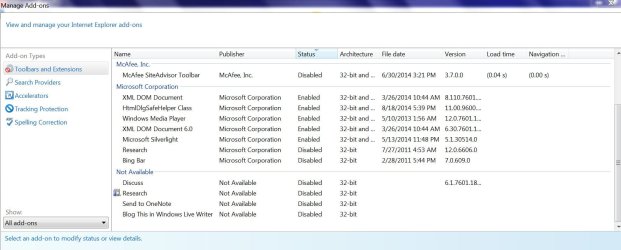
ok thanks for the quick reply. Here is the screen shot.
I will try running with Shockwave and Java disabled and get back with you once I have some results.
Should I try one then the other?
Also on occasion if I have multiple tabs open while surfing and close one, the close time for that tab will lag for an extended time,

BTW the DRI avatar sure brings back some memories, probably why my hearing is so bad today LOL!!!

Thanks, Rick
 

Attachments

  • screen Capture.JPG
    screen Capture.JPG
    140.5 KB · Views: 2
Last edited:

My Computer My Computer

Computer type
PC/Desktop
Computer Manufacturer/Model Number
dell
OS
wndows7 64bit
CPU
intel i7 2.67ghz
Memory
12 gb
Graphics Card(s)
ati radeon hd 5800
Hard Drives
10 gb
Antivirus
McAfee
Browser
ie 11
Hi thanks for the update,
What are the bottom entries not shown on the screen shot ?

Seems you've had Mcafee for about 3 months now or has it been longer ?
How long have you been using ie11 ?

Try this for a little while to see if the error repeats,
Add the Run box to the Start menu list,
http://www.sevenforums.com/tutorials/559-start-menu-add-run-button.html
Open the Run command and Paste this into it and Okay,
"C:\Program Files\Internet Explorer\iexplore.exe" -extoff
 

My Computer My Computer

Computer type
PC/Desktop
Computer Manufacturer/Model Number
Custom assembled by me :}
OS
Win-7-Pro64bit 7-H-Prem-64bit
CPU
i7-5930K 2nd i9-9940x both water blocked VRM's too
Motherboard
ASUS SABERTOOTH X99 2nd ASUS x299 Apex
Memory
Trident-z 3200C14 2nd Trident-z 3600C16
Graphics Card(s)
EVGA 1080ti ftw3 2nd Titan Xp both water blocked
Sound Card
Built-in Realtek
Monitor(s) Displays
1-AOC G2460PG 24"G-Sync 144Hz/ 2nd 1-ASUS VG248QE 24" 144Hz
Screen Resolution
1920 x 1080 144Hz
Hard Drives
2-Samsung M.2 Evo & Evo Plus
2-Samsung 850 EVO 500GB SSD's/ 3-2.5 W.D. Black 1tb-&3-1tb/3-3.5 WD Black 1tb hdd's
PSU
EVGA SuperNOVA 1000-P2 2nd 1200-P2
Case
2-Corsair Obsidian Series 450D Black ATX Mid Tower
Cooling
Custom water loops
Keyboard
Logitech G710+/ 2nd Logitech G910
Mouse
2-RedDragon M901 Perdition 16400 dpi Gaming mouse = wired
Internet Speed
Comcast Ping 19ms 89.31mbps download speed 6.12mbps upload
Antivirus
Malwarebytes Pro/ Superantispyware Pro
Browser
FireFox & Pale moon
Other Info
2nd ASUS X299 Apex/Intel i9-9940x with Custom water loop/7H-Prem-x64/Corsair 450D case/Ram Trident-z 3600C16 4x8gb / Samsung970Evo plus 500gb SSD/Dual ssd EZ swap evo/PSU EVGA SuperNova 1200w-P2 80+Platinum/GPU Titan Xp /8-ML-140 on push-pull on 2-280GTX rads
Sorry here is the remainder , I could not snip the whole list at once.
I have had McAfee running since I bought the box new 2010
Been running IE 11 since the beginning also.
Will try your suggestions and keep you updated
 

Attachments

  • Capture 2.JPG
    Capture 2.JPG
    122.9 KB · Views: 1

My Computer My Computer

Computer type
PC/Desktop
Computer Manufacturer/Model Number
dell
OS
wndows7 64bit
CPU
intel i7 2.67ghz
Memory
12 gb
Graphics Card(s)
ati radeon hd 5800
Hard Drives
10 gb
Antivirus
McAfee
Browser
ie 11
Here is an update.
I have been running IE without any add-ons per your instructions.
I am still getting the error message, It seems to be running slow and the hanging/delayed closing tab issue remains as well.
There does not seem to be any improvement.
Any other suggestions would be welcome.

Thanks, Rick
 

My Computer My Computer

Computer type
PC/Desktop
Computer Manufacturer/Model Number
dell
OS
wndows7 64bit
CPU
intel i7 2.67ghz
Memory
12 gb
Graphics Card(s)
ati radeon hd 5800
Hard Drives
10 gb
Antivirus
McAfee
Browser
ie 11

My Computer My Computer

Computer type
PC/Desktop
Computer Manufacturer/Model Number
Custom assembled by me :}
OS
Win-7-Pro64bit 7-H-Prem-64bit
CPU
i7-5930K 2nd i9-9940x both water blocked VRM's too
Motherboard
ASUS SABERTOOTH X99 2nd ASUS x299 Apex
Memory
Trident-z 3200C14 2nd Trident-z 3600C16
Graphics Card(s)
EVGA 1080ti ftw3 2nd Titan Xp both water blocked
Sound Card
Built-in Realtek
Monitor(s) Displays
1-AOC G2460PG 24"G-Sync 144Hz/ 2nd 1-ASUS VG248QE 24" 144Hz
Screen Resolution
1920 x 1080 144Hz
Hard Drives
2-Samsung M.2 Evo & Evo Plus
2-Samsung 850 EVO 500GB SSD's/ 3-2.5 W.D. Black 1tb-&3-1tb/3-3.5 WD Black 1tb hdd's
PSU
EVGA SuperNOVA 1000-P2 2nd 1200-P2
Case
2-Corsair Obsidian Series 450D Black ATX Mid Tower
Cooling
Custom water loops
Keyboard
Logitech G710+/ 2nd Logitech G910
Mouse
2-RedDragon M901 Perdition 16400 dpi Gaming mouse = wired
Internet Speed
Comcast Ping 19ms 89.31mbps download speed 6.12mbps upload
Antivirus
Malwarebytes Pro/ Superantispyware Pro
Browser
FireFox & Pale moon
Other Info
2nd ASUS X299 Apex/Intel i9-9940x with Custom water loop/7H-Prem-x64/Corsair 450D case/Ram Trident-z 3600C16 4x8gb / Samsung970Evo plus 500gb SSD/Dual ssd EZ swap evo/PSU EVGA SuperNova 1200w-P2 80+Platinum/GPU Titan Xp /8-ML-140 on push-pull on 2-280GTX rads
I will take your advice and try that.
I thought I was doing good by running McAfee, but I have heard other say it is an anchor weight also.
 

My Computer My Computer

Computer type
PC/Desktop
Computer Manufacturer/Model Number
dell
OS
wndows7 64bit
CPU
intel i7 2.67ghz
Memory
12 gb
Graphics Card(s)
ati radeon hd 5800
Hard Drives
10 gb
Antivirus
McAfee
Browser
ie 11
Back
Top