Solved IE 11 Windows Update installation failed code 9c59

Hi Riley,
still falling over in the same place.
Can you post the details of your graphics card, it might be as your system is quite old that the newer D3.dll is incompatible.(latest Asus driver 301.42 june 2012 if still 9600gt)
also the Bios upgrades check to see what changes Would have been made if you updated.

please update your ethernet driver, and are there any others showing problems.

Roy

Let me try to clear up a few things that might make this easier.

I recently did a Win 7 clean install using all the same drivers downloaded from about 30 months prior, except for the graphic card which was using windows drivers. IE 11 and d3d11.dll version 6.2.9200.16570 was installed. A week or so later, win update quit working. I could not repair it.
So, I did a repair install. All windows updates installed, except IE 11, and I currently have the older version of d3d11.dll. I do not remember if I reinstalled the mobo drivers or figured they were kept with the repair.

I did install the latest Nvidea driver from Nvidea, AFTER the IE 11 problem started.

Also, I have not been offered any Windows defender updates since the repair on 2006-09-15.

The card is an Asus EN9600GT SILENT/HTDI/512M

Should I reinstall the mobo drivers from ASUS? Windows update is offering two new mobo drivers, but I was told not to trust they will be correct.

Thanks
 

My Computer My Computer

Computer type
PC/Desktop
Computer Manufacturer/Model Number
custom build
OS
Windows 7 Ultimate x64
CPU
Core 2 Duo Desktop Processor E8400
Motherboard
Asus P5Q-E
Memory
8 GB DDR2
Graphics Card(s)
Asus EN9600GT SILENT/HTDI/512M
Hard Drives
Boot drive: Seagate 1TB Desktop HDD
Antivirus
Avast Free
Browser
Chrome, Firefox

My Computer My Computer

Computer type
PC/Desktop
Computer Manufacturer/Model Number
medionl/Aspire 6930G/acer x55a
OS
W7 home premium 32bit/W7HP 64bit/w10 tp insider ring
CPU
E5300 dual core
Motherboard
medion MS7366
Memory
3gb
Graphics Card(s)
Nvidia Geforce 7100 Nforce 630i
Monitor(s) Displays
avixc
Internet Speed
n (isp resticted to 72)
Antivirus
mse/pands
Browser
palemoon
Other Info
Belkin Fd7050 n USB using Railink RT2870 drivers, more upto date

My Computer My Computer

Computer type
PC/Desktop
Computer Manufacturer/Model Number
custom build
OS
Windows 7 Ultimate x64
CPU
Core 2 Duo Desktop Processor E8400
Motherboard
Asus P5Q-E
Memory
8 GB DDR2
Graphics Card(s)
Asus EN9600GT SILENT/HTDI/512M
Hard Drives
Boot drive: Seagate 1TB Desktop HDD
Antivirus
Avast Free
Browser
Chrome, Firefox
I'm unsure of what you want me to do. Please elaborate.

Thanks
 

My Computer My Computer

Computer type
PC/Desktop
Computer Manufacturer/Model Number
custom build
OS
Windows 7 Ultimate x64
CPU
Core 2 Duo Desktop Processor E8400
Motherboard
Asus P5Q-E
Memory
8 GB DDR2
Graphics Card(s)
Asus EN9600GT SILENT/HTDI/512M
Hard Drives
Boot drive: Seagate 1TB Desktop HDD
Antivirus
Avast Free
Browser
Chrome, Firefox
Hi Riley,
lets try and install the updated KB2834140 another way, using DISM.
read this article first for some background info.
https://blogs.technet.microsoft.com...dism-to-install-a-hotfix-from-within-windows/

now AFTER reading the above, use the following commands, copy and paste them into the command mode window.
The results should be the same as those in the article, if
NOT successfull screenshot the reply.

Create a folder titled
c:\temp\2834140

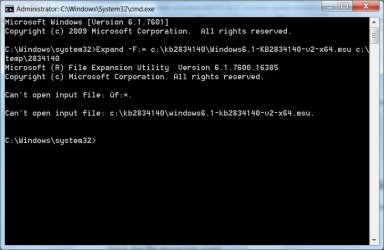
Expand –F:* c:\kb2834140\Windows6.1-KB2834140-v2-x64.msu c:\temp\2834140

DISM.exe /Online /Add-Package /PackagePath:c:\temp\2834140\Windows6.1-KB2834140-v2-x64.cab /quiet /NoRestart

reboot
check the file properties again
IT should read the same as mine, post 13.
if it is try the standalone installer.

Roy
Roy
 

My Computer My Computer

Computer type
PC/Desktop
Computer Manufacturer/Model Number
medionl/Aspire 6930G/acer x55a
OS
W7 home premium 32bit/W7HP 64bit/w10 tp insider ring
CPU
E5300 dual core
Motherboard
medion MS7366
Memory
3gb
Graphics Card(s)
Nvidia Geforce 7100 Nforce 630i
Monitor(s) Displays
avixc
Internet Speed
n (isp resticted to 72)
Antivirus
mse/pands
Browser
palemoon
Other Info
Belkin Fd7050 n USB using Railink RT2870 drivers, more upto date
Hi,

I think I may have the input file in the wrong place, I have tried several. I have had at C:\ , C:\KB2834140 , and C:\temp.
I did create this: C:\temp\2834140

Thanks.
 

Attachments

  • Clipboard05.jpg
    Clipboard05.jpg
    43.9 KB · Views: 0

My Computer My Computer

Computer type
PC/Desktop
Computer Manufacturer/Model Number
custom build
OS
Windows 7 Ultimate x64
CPU
Core 2 Duo Desktop Processor E8400
Motherboard
Asus P5Q-E
Memory
8 GB DDR2
Graphics Card(s)
Asus EN9600GT SILENT/HTDI/512M
Hard Drives
Boot drive: Seagate 1TB Desktop HDD
Antivirus
Avast Free
Browser
Chrome, Firefox
Continuing on ....
Tried again first using cd c:\
target is C:\kb2834140\Windows6.1-KB2834140-v2-x86.msu

Same error as last post.

Viewed this article: Error Message:

Checked target attributes:
C:\kb2834140>attrib
A C:\kb2834140\Windows6.1-KB2834140-v2-x86.msu
 
Last edited:

My Computer My Computer

Computer type
PC/Desktop
Computer Manufacturer/Model Number
custom build
OS
Windows 7 Ultimate x64
CPU
Core 2 Duo Desktop Processor E8400
Motherboard
Asus P5Q-E
Memory
8 GB DDR2
Graphics Card(s)
Asus EN9600GT SILENT/HTDI/512M
Hard Drives
Boot drive: Seagate 1TB Desktop HDD
Antivirus
Avast Free
Browser
Chrome, Firefox
Hi Riley,
Took me a while to spot the typo in the command you ran
its not an x its *.
-F:*

Roy
 

My Computer My Computer

Computer type
PC/Desktop
Computer Manufacturer/Model Number
medionl/Aspire 6930G/acer x55a
OS
W7 home premium 32bit/W7HP 64bit/w10 tp insider ring
CPU
E5300 dual core
Motherboard
medion MS7366
Memory
3gb
Graphics Card(s)
Nvidia Geforce 7100 Nforce 630i
Monitor(s) Displays
avixc
Internet Speed
n (isp resticted to 72)
Antivirus
mse/pands
Browser
palemoon
Other Info
Belkin Fd7050 n USB using Railink RT2870 drivers, more upto date
Hi Roy,

I think I got the commands to work. I altered the second command (because it didn't seem to work). See the screen. After reboot, the d3d11.dll properties was not changed.

Thanks
 

Attachments

  • Clipboard06.jpg
    Clipboard06.jpg
    48.8 KB · Views: 4
Last edited:

My Computer My Computer

Computer type
PC/Desktop
Computer Manufacturer/Model Number
custom build
OS
Windows 7 Ultimate x64
CPU
Core 2 Duo Desktop Processor E8400
Motherboard
Asus P5Q-E
Memory
8 GB DDR2
Graphics Card(s)
Asus EN9600GT SILENT/HTDI/512M
Hard Drives
Boot drive: Seagate 1TB Desktop HDD
Antivirus
Avast Free
Browser
Chrome, Firefox
I finally got IE 11 Installed.

I found https://support.microsoft.com/en-us/kb/2847882 , Prerequisite updates for Internet Explorer 11 and downloaded the offline installers. I tried them all. Two were missing, and after installing another from the list, Windows6.1-KB2834140-v2-x64.msu installed properly. Then IE Installed.

Thanks Roy for pointing me in the right direction.
 

My Computer My Computer

Computer type
PC/Desktop
Computer Manufacturer/Model Number
custom build
OS
Windows 7 Ultimate x64
CPU
Core 2 Duo Desktop Processor E8400
Motherboard
Asus P5Q-E
Memory
8 GB DDR2
Graphics Card(s)
Asus EN9600GT SILENT/HTDI/512M
Hard Drives
Boot drive: Seagate 1TB Desktop HDD
Antivirus
Avast Free
Browser
Chrome, Firefox
Back
Top