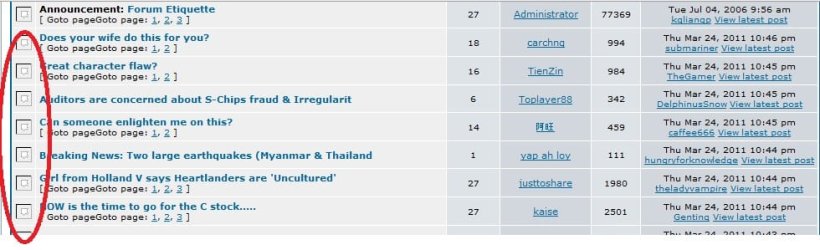
IE & Firefox does not display gif

Slacker2011

New member
Local time
7:27 AM
Messages
5
Dear all....this is my first post in the forum. Hope the kind souls here can assist.

I am on Win7 Starter, 32 bit.

When I browse using IE or firefox, the gif images do not display at all. What appears is a box with a dot in the centre.

I had downloaded gifview, tried to run, but there was no further movement to the program.

Appreciate any assistance.

Thanx alot.
 

My Computer My Computer

OS
Windows 7
Hi....anyone encounter this problem as well? Tried reloading the page, but still doesnt work.

Appreciate any help....thanx...
 

My Computer My Computer

OS
Windows 7
Do you use ZoneAlarm?
 

My Computer My Computer

Computer type
PC/Desktop
Computer Manufacturer/Model Number
HP
OS
Windows Seven Ultimate x64 SP1
CPU
Intel Core i7 x980 @ 3.33GHz
Memory
12.0 GB
Graphics Card(s)
Nvidia GeForce GTX 260

My Computer My Computer

Computer type
PC/Desktop
Computer Manufacturer/Model Number
Intel(R) Core(TM) i5-2320 CPU @ 3.00GHz (Gateway computer)
OS
Microsoft Windows 7 Home Premium 64-bit 7601 Multiprocessor Free Service Pack 1
CPU
Intel(R) Core(TM) i5-2320 CPU @ 3.00GHz
Motherboard
Gateway IPISB-VR
Memory
8.00 GB
Graphics Card(s)
Intel(R) HD Graphics
Sound Card
(1) Realtek High Definition Audio (2) Intel(R) Display Aud
Monitor(s) Displays
ViewSonic 2250 Series
Screen Resolution
1920 x 1080 x 32 bits (4294967296 colors) @ 60 Hz
Hard Drives
(1) WDC WD10EADX-22TDHB0 (2) Generic Mini SD Reader USB Device (3) Generic USB CF Reader USB Device (4) Generic USB MS Reader USB Device (5) Generic USB SD Reader USB Device (6) Generic USB xD/SM Reader USB Device (7) Seagate FreeAgent Go
Keyboard
Gateway
Mouse
Logitech
Internet Speed
20 Mbps (Theoretical.)
Antivirus
Avast
Browser
Firefox
I am using the 60 days Norton trial, and even after holding the "Shift" and reload, still doesnt work and display the i believe is gif images....using another laptop and surfing it, seems that it works on the other laptop on vista....
 

My Computer My Computer

OS
Windows 7
Be sure to have an antivirus maybe its a virus affected a file in the firefox, you can:
1) Try reinstalling.
2) Tools > Content > Load images automatically (be sure that it is checked).
3) Go to exceptions at the content tab, be sure no site is blocked.
4) Clearing cache

If any of these didn't help you, you may want to check this:
Images or animations do not show | Troubleshooting | Firefox Help
 

My Computer My Computer

OS
Windows 7 Home Premium 64bit
I am using the 60 days Norton trial, and even after holding the "Shift" and reload, still doesnt work and display the i believe is gif images....using another laptop and surfing it, seems that it works on the other laptop on vista....
Norton is known to cause problems with Firefox, although I don't know if that is applicable to the present situation:

Firewalls - MozillaZine Knowledge Base

Diagnostic steps for Firefox problems:

Standard diagnostic - Firefox - MozillaZine Knowledge Base
 

My Computer My Computer

Computer type
PC/Desktop
Computer Manufacturer/Model Number
Intel(R) Core(TM) i5-2320 CPU @ 3.00GHz (Gateway computer)
OS
Microsoft Windows 7 Home Premium 64-bit 7601 Multiprocessor Free Service Pack 1
CPU
Intel(R) Core(TM) i5-2320 CPU @ 3.00GHz
Motherboard
Gateway IPISB-VR
Memory
8.00 GB
Graphics Card(s)
Intel(R) HD Graphics
Sound Card
(1) Realtek High Definition Audio (2) Intel(R) Display Aud
Monitor(s) Displays
ViewSonic 2250 Series
Screen Resolution
1920 x 1080 x 32 bits (4294967296 colors) @ 60 Hz
Hard Drives
(1) WDC WD10EADX-22TDHB0 (2) Generic Mini SD Reader USB Device (3) Generic USB CF Reader USB Device (4) Generic USB MS Reader USB Device (5) Generic USB SD Reader USB Device (6) Generic USB xD/SM Reader USB Device (7) Seagate FreeAgent Go
Keyboard
Gateway
Mouse
Logitech
Internet Speed
20 Mbps (Theoretical.)
Antivirus
Avast
Browser
Firefox
Check in Norton for any settings having to deal with Internet/browser settings. Sometime AV programs block certain things from your browser, like animated gifs etc. Zone Alarm does it if you can try to disable norton or any other malware program you have running temporarily and check if it solves the problem.
 

My Computer My Computer

Computer type
PC/Desktop
Computer Manufacturer/Model Number
HP
OS
Windows Seven Ultimate x64 SP1
CPU
Intel Core i7 x980 @ 3.33GHz
Memory
12.0 GB
Graphics Card(s)
Nvidia GeForce GTX 260
Thanx for the advice....will most probably uninstall norton after the free period, that is in about 1 mth time, as I have a mcafee 3 user which is active until Nov..... will update again.....
 

My Computer My Computer

OS
Windows 7
Thanx for the advice....will most probably uninstall norton after the free period, that is in about 1 mth time, as I have a mcafee 3 user which is active until Nov..... will update again.....

I suggest Microsoft Security Essentials as your Antivirus program. Not only is it free but it uses less memory, and it does a better job protecting computers than the paying ones.

I have used it and have never had a virus problem.
 

My Computer My Computer

Computer type
PC/Desktop
Computer Manufacturer/Model Number
HP
OS
Windows Seven Ultimate x64 SP1
CPU
Intel Core i7 x980 @ 3.33GHz
Memory
12.0 GB
Graphics Card(s)
Nvidia GeForce GTX 260
Back
Top