
IE Stopped opening MHT files; now downloads them; How can I fix?

soho1

New member
Power User
Local time
11:31 AM
Messages
458
Location
Earth, Mostly Chicago and London
I have been downloading trial software today and have uninstalled it all, but I have a problem now. An MHT file that I was using as my default home page no longer opens. Instead, IE wants to download the file (from my desktop to my downloads folder).
  • Until very recently the file(or any .mht file) opened in IE10 just fine.
  • Now, IE10 will only download .mht files of any kind (not open them).
  • Chrome and Firefox do NOT exhibit the problem, they open the .mht files just fine.
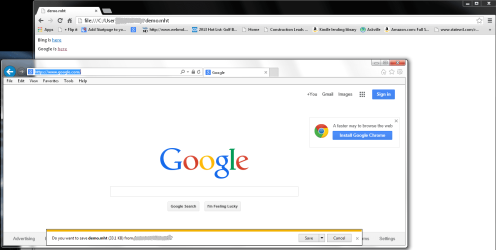
I have a very simple example .mht attached, which will NOT open in IE10 for me, but opens in my other browsers just fine. A screen snapshot demonstrates the file is open in chrome (in the background) while in the foreground, IE is trying to download the file, prompting me to save it.

Environment: Windows 7 Pro (v 6.1 build 7601: SP1) with IE 10.0.9200.16721CO
Note: I have tried resetting IE back to all default settings. I have NOT tried to reinstall it.
I have a growing collection of .mht related forum posts across the web in a file folder now, none of which has produced an answer that works for me yet.

Steps to reproduce:
1. Download the .mht to your desktop
2. Open IE (my home page is current www.google.com, as shown in the picture)
3. Type in the location of the saved .mht file, example: file:///c:/users/yourname/desktop/demo.mht
4. Observe that the .mht file did not open; instead it tried to download to downloads directory.
 

Attachments
  • demo_mht_downloads_in_IE_not_chrome_or_firefox.png
    demo_mht_downloads_in_IE_not_chrome_or_firefox.png
    39.4 KB · Views: 1

My Computer My Computer

At a glance

Win 7 Pro 64-bitIntel Core i516 GB Dell, 6 GB ToshibaIntel crap on both but Dell also has nVidia G...
Computer type
Laptop
Computer Manufacturer/Model Number
Dell Insprion 7559 next to a Toshiba Portege
OS
Win 7 Pro 64-bit
CPU
Intel Core i5
Motherboard
Intel
Memory
16 GB Dell, 6 GB Toshiba
Graphics Card(s)
Intel crap on both but Dell also has nVidia GeForce GTX960M
Sound Card
RealTek
Monitor(s) Displays
internal and external ACER KA270H 27"
Screen Resolution
1920x1080
Hard Drives
SSD 256 GB plus numerous WD Red or Purple on USB3 docks. Used to buy a lot of Seagate but tossed them the second time I got unrecoverable disc corruption in the midst of use.
Keyboard
Garage Mouse SW and some cheap Amazon China made USB device
Mouse
Garage Mouse and some cheap Amazon China made USB device
Internet Speed
50 Mbps (allegedly, depends on server)
Antivirus
Defender, Malwarebytes Premium and Kaspersky
Browser
IE 11, and Chrome something
And as it's late in Chicago, I'm going to catch some zzz's. I'll check for your ingenuity in the morning. Thanks!
 

My Computer My Computer

At a glance

Win 7 Pro 64-bitIntel Core i516 GB Dell, 6 GB ToshibaIntel crap on both but Dell also has nVidia G...
Computer type
Laptop
Computer Manufacturer/Model Number
Dell Insprion 7559 next to a Toshiba Portege
OS
Win 7 Pro 64-bit
CPU
Intel Core i5
Motherboard
Intel
Memory
16 GB Dell, 6 GB Toshiba
Graphics Card(s)
Intel crap on both but Dell also has nVidia GeForce GTX960M
Sound Card
RealTek
Monitor(s) Displays
internal and external ACER KA270H 27"
Screen Resolution
1920x1080
Hard Drives
SSD 256 GB plus numerous WD Red or Purple on USB3 docks. Used to buy a lot of Seagate but tossed them the second time I got unrecoverable disc corruption in the midst of use.
Keyboard
Garage Mouse SW and some cheap Amazon China made USB device
Mouse
Garage Mouse and some cheap Amazon China made USB device
Internet Speed
50 Mbps (allegedly, depends on server)
Antivirus
Defender, Malwarebytes Premium and Kaspersky
Browser
IE 11, and Chrome something
You could do the most recent restore point.

Otherwise something must have changed within this registry key, here's an export of mine, you can look at it within regedit and manually change, or copy and merge it:

Windows Registry Editor Version 5.00

[HKEY_LOCAL_MACHINE\SOFTWARE\Classes\IE.AssocFile.MHT]
@="MHTML Document"
"AppUserModelID"="Microsoft.InternetExplorer.Default"
"FriendlyTypeName"="@C:\\Windows\\System32\\ieframe.dll,-913"
[HKEY_LOCAL_MACHINE\SOFTWARE\Classes\IE.AssocFile.MHT\DefaultIcon]
@="C:\\Program Files\\Internet Explorer\\iexplore.exe,-32554"
[HKEY_LOCAL_MACHINE\SOFTWARE\Classes\IE.AssocFile.MHT\shell]
@="opennew"
[HKEY_LOCAL_MACHINE\SOFTWARE\Classes\IE.AssocFile.MHT\shell\open]
@="Open in S&ame Window"
"MUIVerb"="@C:\\Windows\\System32\\ieframe.dll,-5732"
[HKEY_LOCAL_MACHINE\SOFTWARE\Classes\IE.AssocFile.MHT\shell\open\command]
@="\"C:\\Program Files\\Internet Explorer\\iexplore.exe\" -nohome"
[HKEY_LOCAL_MACHINE\SOFTWARE\Classes\IE.AssocFile.MHT\shell\open\ddeexec]
@=hex(2):22,00,66,00,69,00,6c,00,65,00,3a,00,2f,00,2f,00,25,00,31,00,22,00,2c,\
00,2d,00,31,00,2c,00,2c,00,2c,00,2c,00,2c,00,00,00
"NoActivateHandler"=""
[HKEY_LOCAL_MACHINE\SOFTWARE\Classes\IE.AssocFile.MHT\shell\open\ddeexec\Application]
@="IExplore"
[HKEY_LOCAL_MACHINE\SOFTWARE\Classes\IE.AssocFile.MHT\shell\open\ddeexec\Topic]
@="WWW_OpenURL"
[HKEY_LOCAL_MACHINE\SOFTWARE\Classes\IE.AssocFile.MHT\shell\opennew]
@="&Open"
"MUIVerb"="@C:\\Windows\\System32\\ieframe.dll,-5731"
[HKEY_LOCAL_MACHINE\SOFTWARE\Classes\IE.AssocFile.MHT\shell\opennew\command]
@="\"C:\\Program Files\\Internet Explorer\\iexplore.exe\" %1"
[HKEY_LOCAL_MACHINE\SOFTWARE\Classes\IE.AssocFile.MHT\shell\opennew\ddeexec]
@=hex(2):22,00,66,00,69,00,6c,00,65,00,3a,00,2f,00,2f,00,25,00,31,00,22,00,2c,\
00,2d,00,31,00,2c,00,2c,00,2c,00,2c,00,2c,00,00,00
"NoActivateHandler"=""
[HKEY_LOCAL_MACHINE\SOFTWARE\Classes\IE.AssocFile.MHT\shell\opennew\ddeexec\Application]
@="IExplore"
[HKEY_LOCAL_MACHINE\SOFTWARE\Classes\IE.AssocFile.MHT\shell\opennew\ddeexec\IfExec]
@="*"
[HKEY_LOCAL_MACHINE\SOFTWARE\Classes\IE.AssocFile.MHT\shell\opennew\ddeexec\Topic]
@="WWW_OpenURLNewWindow"


; And


[HKEY_LOCAL_MACHINE\SOFTWARE\Microsoft\Internet Explorer\Capabilities\FileAssociations]
".mht"="IE.AssocFile.MHT"
 

My Computer My Computer

At a glance

Vista/Win7/8/10/11 (x86/x64)i7
Computer type
PC/Desktop
Computer Manufacturer/Model Number
..all towers built from scratch
OS
Vista/Win7/8/10/11 (x86/x64)
CPU
i7
Thanks Endeavor,

So I noticed a few things. First, I had this CommandId entry:
[HKEY_LOCAL_MACHINE\SOFTWARE\Classes\IE.AssocFile.MHT\shell\open]
@="Open in S&ame Window"
"MUIVerb"="@C:\\Windows\\System32\\ieframe.dll,-5732"
"CommandId"="IE.File

After backing up the registry, I deleted those values and did not see any change in behavior.

Next, I have none of the DDEexec entries you have. I'll have to look at how to create a reg script to enter them.

Other than that, I am not sure what do to with this next. AFK a while.
 

My Computer My Computer

At a glance

Win 7 Pro 64-bitIntel Core i516 GB Dell, 6 GB ToshibaIntel crap on both but Dell also has nVidia G...
Computer type
Laptop
Computer Manufacturer/Model Number
Dell Insprion 7559 next to a Toshiba Portege
OS
Win 7 Pro 64-bit
CPU
Intel Core i5
Motherboard
Intel
Memory
16 GB Dell, 6 GB Toshiba
Graphics Card(s)
Intel crap on both but Dell also has nVidia GeForce GTX960M
Sound Card
RealTek
Monitor(s) Displays
internal and external ACER KA270H 27"
Screen Resolution
1920x1080
Hard Drives
SSD 256 GB plus numerous WD Red or Purple on USB3 docks. Used to buy a lot of Seagate but tossed them the second time I got unrecoverable disc corruption in the midst of use.
Keyboard
Garage Mouse SW and some cheap Amazon China made USB device
Mouse
Garage Mouse and some cheap Amazon China made USB device
Internet Speed
50 Mbps (allegedly, depends on server)
Antivirus
Defender, Malwarebytes Premium and Kaspersky
Browser
IE 11, and Chrome something
Don't delete those values.
If you not sure what to do now, then just starting from in my post (and including it) where it says:
Windows Registry Editor Version 5.00
and copy/paste everything till the very end, into notepad and save it (any name), and then rename the .txt extension it has to .reg, and then double click that reg file to merge, is what I had meant.

That will just make sure that .mht portion is at default values and is what mine is.

If that doesn't fix it then it's just some other simple registry value elsewhere that your uninstall of those softwares made; but without seeing it I can't tell you what it is, but wishing you had did your Registry backup Before you installed those softwares. You still always have a System Restore Point if enabled, but too bad all that for just a simple registry change of currently an unknown value.

Also you can just try right clicking on any one of your .mht files and click "Open With" ...and make sure that Internet Explorer is the listing, if it's not then click it and check the box to always have IE open it.
 

My Computer My Computer

At a glance

Vista/Win7/8/10/11 (x86/x64)i7
Computer type
PC/Desktop
Computer Manufacturer/Model Number
..all towers built from scratch
OS
Vista/Win7/8/10/11 (x86/x64)
CPU
i7
Back
Top