How Do I Edit .MHT Files From the PSR

dcsteve24

New member
Local time
4:08 PM
Messages
2
I too have recently discovered the awesome tool called Problem Steps Recorder (PSR) in Windows 7. The amount of possibilities it could have here at work are tremendous; easy training documents the big thing I thought of. The biggest problem i have with it is i cannot seem to figure out how to edit it. Some purposes behind the editing would be to: add information, take out sensitive information, delete the header/footer section applied to every PSR.


Steps Taken:
  • I have tried converting it to HTML and editing it in Notepad and then converting back.
  • I have tried editing in Word through both HTML and MHTML.
  • I do not have any HTML editors and if this fixes the issue(s) let me know.
Problem:
  • The MHTML file is not editable by default
  • When i convert it from anything to anything it looses the amazing user-friendly picture sizes when converted back to MHTML; as they are in the unedited version. They come out large and clunky feeling which would not work for the training purposes at all. I need it to stay the nice/compressed style picture that you click to enlarge if so desired.
Any ideas I can try or actions you know will fix it will help greatly.
 

My Computer My Computer

OS
Windows 7 64 bit Home
Actually You can open and change the generated *.mht file with MS Word.

Right click it and you should see the edit option if you have MS Office installed.

For instance if you want to remove some screen captures
Copy image and Edit it in Paint Or any image editor and then Paste it in .

Hope this helps.
 

My Computer My Computer

Computer type
Laptop
Computer Manufacturer/Model Number
Dell Insperon N5010
OS
Windows 7 Ultimate x64
CPU
i3 M380 2.53GHz
Motherboard
TOSHIBA MK5076GSX
Memory
4 Gb
Graphics Card(s)
intel HD
Sound Card
IDT
Screen Resolution
1366x768
Keyboard
Standerd PS2
Antivirus
ESET Smart Security 7
Browser
Google Chrome
I forgot i actually tried that too with the same issues.

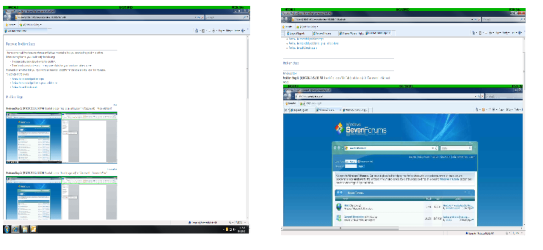
I attached a picture of what it does. the left side is the original PSR. The right side is the same PSR, opened under word, and instantly resaved as a different name but still a MHT. I changed nothing in this process. Look at the difference.

Anytime i edit it in anything, it enlarges the pictures to real size. How do i keep the same picture coding/formating for the small size and keep it where i can click on the picture to enlarge only. Just like the original PSR.
 

Attachments

  • help.png
    help.png
    84.6 KB · Views: 47

My Computer My Computer

OS
Windows 7 64 bit Home
Back
Top