Solved IE update Error 9C48

JohnF1938

New member
Local time
11:17 PM
Messages
15
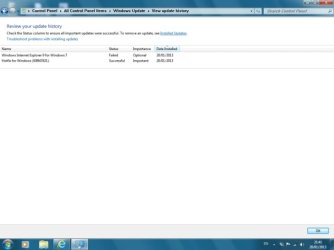
I have an update "Windows Explorer 9 for Windows 7" update which terminates with the error code 9C48.
I have looked at a lot of fixes on the Web & this Forum and none seem to work.

I have tried the Command line prompt -:FORFILES /P %WINDIR%\servicing\Packages /M Microsoft-Windows-InternetExplorer-*9.*.mum /c "cmd /c echo Uninstalling package @fname && start /w pkgmgr /up:@fname /norestart"

Also
"Control Panel/Programs/Progs & Features/Installed Update " but get a msg "Error Occured"

I have also tried the "Fix it" but get "Access Denied" although I have Administrator Status


IE 9 seems to be working ok but I am concerned I may not be getting security updates.

Any Help would be appreciated

Regards John
 

My Computer

OS
win 7 Home Premium 32bit

My Computer

Computer type
Laptop
Computer Manufacturer/Model Number
Asus K52F or Lenovo B51-80
OS
Win 7 x64 Home Premium (and x86 VirtualBox VM)/Win10
CPU
i3 370M/i7 6500U
Motherboard
Asus/Lenovo
Memory
8GB - finally :)/8GB
Graphics Card(s)
it's an i3, dude!/dual Intel&nVidia
Sound Card
onboard
Monitor(s) Displays
15.6" built-in
Screen Resolution
1366x768/1920x1080
Hard Drives
750GB Seagate internal
Sundry external drives attached to other computers on the local network
1TB SSD on the Lenovo
PSU
n/a
Internet Speed
as much as I can get - usually on a dongle/phone, so <1MB/s
Antivirus
MSE/Defender
Browser
IE11/12/Edge/Chrome/FF(if I must)
In Case I have made things worse I have recovered to an earlier system image.
The error code I got again was 9C48.

The tool I came to following the link was System Update Readyness tool KB947821. Hope this is correct.
I have had to split the CBS folder & trim The CBS txt file to reduce the sizes to under 2MB

Regards John
 

Attachments

  • Image 1.jpg
    Image 1.jpg
    16 KB · Views: 55

My Computer

OS
win 7 Home Premium 32bit
Some interesting results, there!
From the CBS.log....
Code:
 Line 2894: 2013-01-20 20:51:07, Info                  CSI    0000021a [SR] Cannot repair member file [l:24{12}]"jpn_boot.ttf" of Microsoft-Windows-BootEnvironment-Core-Fonts-JPN-Boot, Version = 6.1.7600.16385, pA = PROCESSOR_ARCHITECTURE_INTEL (0), Culture neutral, VersionScope = 1 nonSxS, PublicKeyToken = {l:8 b:31bf3856ad364e35}, Type neutral, TypeName neutral, PublicKey neutral in the store, hash mismatch

 Line 2897: 2013-01-20 20:51:07, Info                  CSI    0000021c [SR] Cannot repair member file [l:30{15}]"xpsservices.dll" of Microsoft-Windows-Component-XpsOMAndStreaming, Version = 6.1.7601.17514, pA = PROCESSOR_ARCHITECTURE_INTEL (0), Culture neutral, VersionScope = 1 nonSxS, PublicKeyToken = {l:8 b:31bf3856ad364e35}, Type neutral, TypeName neutral, PublicKey neutral in the store, hash mismatch
 Line 2900: 2013-01-20 20:51:07, Info                  CSI    0000021e [SR] Cannot repair member file [l:20{10}]"IMJPGN.GRM" of Microsoft-Windows-Desktop_Technologies-Text_Input_Services-IME-Japanese-Core, Version = 6.1.7600.16385, pA = PROCESSOR_ARCHITECTURE_INTEL (0), Culture neutral, VersionScope = 1 nonSxS, PublicKeyToken = {l:8 b:31bf3856ad364e35}, Type neutral, TypeName neutral, PublicKey neutral in the store, hash mismatch
 Line 2903: 2013-01-20 20:51:07, Info                  CSI    00000220 [SR] Cannot repair member file [l:22{11}]"moolbor.ttf" of Microsoft-Windows-Font-TrueType-MoolBoran, Version = 6.1.7600.16385, pA = PROCESSOR_ARCHITECTURE_INTEL (0), Culture neutral, VersionScope = 1 nonSxS, PublicKeyToken = {l:8 b:31bf3856ad364e35}, Type neutral, TypeName neutral, PublicKey neutral in the store, hash mismatch
 Line 2906: 2013-01-20 20:51:07, Info                  CSI    00000222 [SR] Cannot repair member file [l:18{9}]"ehres.dll" of Microsoft-Windows-ehome-ehres, Version = 6.1.7600.16385, pA = PROCESSOR_ARCHITECTURE_INTEL (0), Culture neutral, VersionScope = 1 nonSxS, PublicKeyToken = {l:8 b:31bf3856ad364e35}, Type neutral, TypeName neutral, PublicKey neutral in the store, hash mismatch
 Line 2909: 2013-01-20 20:51:07, Info                  CSI    00000224 [SR] Cannot repair member file [l:30{15}]"WTVGOTHIC-S.ttc" of Microsoft-Windows-ehome-font, Version = 6.1.7600.16385, pA = PROCESSOR_ARCHITECTURE_INTEL (0), Culture neutral, VersionScope = 1 nonSxS, PublicKeyToken = {l:8 b:31bf3856ad364e35}, Type neutral, TypeName neutral, PublicKey neutral in the store, hash mismatch
 Line 2912: 2013-01-20 20:51:07, Info                  CSI    00000226 [SR] Cannot repair member file [l:24{12}]"constanz.ttf" of Microsoft-Windows-Font-TrueType-Constantia, Version = 6.1.7600.16385, pA = PROCESSOR_ARCHITECTURE_INTEL (0), Culture neutral, VersionScope = 1 nonSxS, PublicKeyToken = {l:8 b:31bf3856ad364e35}, Type neutral, TypeName neutral, PublicKey neutral in the store, hash mismatch
 Line 2915: 2013-01-20 20:51:07, Info                  CSI    00000228 [SR] Cannot repair member file [l:24{12}]"consolab.ttf" of Microsoft-Windows-Font-TrueType-Consolas, Version = 6.1.7600.16385, pA = PROCESSOR_ARCHITECTURE_INTEL (0), Culture neutral, VersionScope = 1 nonSxS, PublicKeyToken = {l:8 b:31bf3856ad364e35}, Type neutral, TypeName neutral, PublicKey neutral in the store, hash mismatch
 Line 2918: 2013-01-20 20:51:07, Info                  CSI    0000022a [SR] Cannot repair member file [l:14{7}]"VGX.dll" of Microsoft-Windows-IE-VGX, Version = 9.4.8112.16421, pA = PROCESSOR_ARCHITECTURE_INTEL (0), Culture neutral, VersionScope = 1 nonSxS, PublicKeyToken = {l:8 b:31bf3856ad364e35}, Type neutral, TypeName neutral, PublicKey neutral in the store, hash mismatch
 Line 2921: 2013-01-20 20:51:08, Info                  CSI    0000022c [SR] Cannot repair member file [l:20{10}]"msadox.dll" of Microsoft-Windows-Microsoft-Data-Access-Components-(MDAC)-ADO-DDL-Security, Version = 6.1.7601.17857, pA = PROCESSOR_ARCHITECTURE_INTEL (0), Culture neutral, VersionScope = 1 nonSxS, PublicKeyToken = {l:8 b:31bf3856ad364e35}, Type neutral, TypeName neutral, PublicKey neutral in the store, hash mismatch
 Line 2924: 2013-01-20 20:51:08, Info                  CSI    0000022e [SR] Cannot repair member file [l:30{15}]"NlsData0416.dll" of Microsoft-Windows-NaturalLanguage6, Version = 6.1.7601.17514, pA = PROCESSOR_ARCHITECTURE_INTEL (0), Culture neutral, VersionScope = 1 nonSxS, PublicKeyToken = {l:8 b:31bf3856ad364e35}, Type neutral, TypeName neutral, PublicKey neutral in the store, hash mismatch
 Line 2927: 2013-01-20 20:51:12, Info                  CSI    00000230 [SR] Cannot repair member file [l:24{12}]"W32UIImg.dll" of Microsoft-Windows-Setup-Component, Version = 6.1.7601.17514, pA = PROCESSOR_ARCHITECTURE_INTEL (0), Culture neutral, VersionScope = 1 nonSxS, PublicKeyToken = {l:8 b:31bf3856ad364e35}, Type neutral, TypeName neutral, PublicKey neutral in the store, hash mismatch
 Line 2930: 2013-01-20 20:51:12, Info                  CSI    00000232 [SR] Cannot repair member file [l:22{11}]"TpmInit.exe" of Microsoft-Windows-TPM-AdminSnapin, Version = 6.1.7600.16385, pA = PROCESSOR_ARCHITECTURE_INTEL (0), Culture neutral, VersionScope = 1 nonSxS, PublicKeyToken = {l:8 b:31bf3856ad364e35}, Type neutral, TypeName neutral, PublicKey neutral in the store, hash mismatch
 Line 2933: 2013-01-20 20:51:13, Info                  CSI    00000234 [SR] Cannot repair member file [l:16{8}]"athr.sys" of netathr.inf, Version = 6.1.7600.16385, pA = PROCESSOR_ARCHITECTURE_INTEL (0), Culture neutral, VersionScope = 1 nonSxS, PublicKeyToken = {l:8 b:31bf3856ad364e35}, Type = [l:24{12}]"driverUpdate", TypeName neutral, PublicKey neutral in the store, hash mismatch
 Line 2936: 2013-01-20 20:51:13, Info                  CSI    00000236 [SR] Cannot repair member file [l:52{26}]"Microsoft.Build.Engine.dll" of NetFx35Linq-Microsoft.Build.Engine, Version = 3.5.7601.17514, pA = PROCESSOR_ARCHITECTURE_INTEL (0), Culture neutral, VersionScope = 1 nonSxS, PublicKeyToken = {l:8 b:31bf3856ad364e35}, Type neutral, TypeName neutral, PublicKey neutral in the store, hash mismatch
 Line 2939: 2013-01-20 20:51:13, Info                  CSI    00000238 [SR] Cannot repair member file [l:34{17}]"I386\CNBJ2810.TBL" of prnca00g.inf, Version = 6.1.7600.16385, pA = PROCESSOR_ARCHITECTURE_INTEL (0), Culture neutral, VersionScope = 1 nonSxS, PublicKeyToken = {l:8 b:31bf3856ad364e35}, Type = [l:24{12}]"driverUpdate", TypeName neutral, PublicKey neutral in the store, hash mismatch
 Line 2942: 2013-01-20 20:51:13, Info                  CSI    0000023a [SR] Cannot repair member file [l:22{11}]"mssphtb.dll" of WindowsSearchEngine, Version = 7.0.7601.17610, pA = PROCESSOR_ARCHITECTURE_INTEL (0), Culture neutral, VersionScope = 1 nonSxS, PublicKeyToken = {l:8 b:31bf3856ad364e35}, Type neutral, TypeName neutral, PublicKey neutral in the store, hash mismatch

From the CheckSUR log

Code:
Unavailable repair files:
 winsxs\manifests\x86_42e52633bc51b2c8f394453900c27831_31bf3856ad364e35_9.4.8112.20565_none_ece4eb3fea6907df.manifest
 servicing\packages\Package_1_for_KB2761465~31bf3856ad364e35~x86~~9.4.1.0.mum
 servicing\packages\Package_1_for_KB2761465~31bf3856ad364e35~x86~~9.4.1.0.mum
 servicing\packages\Package_for_KB2761465_RTM~31bf3856ad364e35~x86~~9.4.1.0.mum
 servicing\packages\Package_1_for_KB2761465~31bf3856ad364e35~x86~~9.4.1.0.cat
 servicing\packages\Package_1_for_KB2761465~31bf3856ad364e35~x86~~9.4.1.0.cat
 servicing\packages\Package_for_KB2761465_RTM~31bf3856ad364e35~x86~~9.4.1.0.cat

The CheckSUR results shouldn't present a problem to fix -the SFC problems are a bit more complex, so we'll do them in two parts,

I'll post back in a bit with the protocol for the CheckSUR results.
 

My Computer

Computer type
Laptop
Computer Manufacturer/Model Number
Asus K52F or Lenovo B51-80
OS
Win 7 x64 Home Premium (and x86 VirtualBox VM)/Win10
CPU
i3 370M/i7 6500U
Motherboard
Asus/Lenovo
Memory
8GB - finally :)/8GB
Graphics Card(s)
it's an i3, dude!/dual Intel&nVidia
Sound Card
onboard
Monitor(s) Displays
15.6" built-in
Screen Resolution
1366x768/1920x1080
Hard Drives
750GB Seagate internal
Sundry external drives attached to other computers on the local network
1TB SSD on the Lenovo
PSU
n/a
Internet Speed
as much as I can get - usually on a dongle/phone, so <1MB/s
Antivirus
MSE/Defender
Browser
IE11/12/Edge/Chrome/FF(if I must)
I've uploaded a file - jofaa.zip - to my SkyDrive at https://skydrive.live.com/#cid=936736BB8FCEB92F&id=936736BB8FCEB92F%21526
Please download and save it.
Right-click on the downloaded file, and select Extract all…
Extract to the default location - which will create a new folder jofaa in the same place.
Open this folder - there should be two folders inside it (Manifests, and Packages)

Copy the content of the Packages folder to the

C:\Windows\Temp\CheckSur\Servicing\Packages

And the content of the manifests folder (.manifest files) into this folder:

C:\Windows\Temp\CheckSur\Winsxs\Manifests

Now run the CheckSUR tool again (it may take a while)

Post the new CheckSUR.log file, and the CheckSUR.persist.log file.

Reboot.

Then please run a new SFC /SCANNOW, and post the new CBS.log file

(I'll hopefully be snoring by then - I'll deal with the results tomorrow.)
 

My Computer

Computer type
Laptop
Computer Manufacturer/Model Number
Asus K52F or Lenovo B51-80
OS
Win 7 x64 Home Premium (and x86 VirtualBox VM)/Win10
CPU
i3 370M/i7 6500U
Motherboard
Asus/Lenovo
Memory
8GB - finally :)/8GB
Graphics Card(s)
it's an i3, dude!/dual Intel&nVidia
Sound Card
onboard
Monitor(s) Displays
15.6" built-in
Screen Resolution
1366x768/1920x1080
Hard Drives
750GB Seagate internal
Sundry external drives attached to other computers on the local network
1TB SSD on the Lenovo
PSU
n/a
Internet Speed
as much as I can get - usually on a dongle/phone, so <1MB/s
Antivirus
MSE/Defender
Browser
IE11/12/Edge/Chrome/FF(if I must)
Noel, Thanks for all this help. I ran the SFC /Scannow twice as I missed the reboot out first time.
Regards John
 

Attachments

My Computer

OS
win 7 Home Premium 32bit
Good - that's got the CheckSUR results cleared, now we only have to worry about the SFC results.

Here's the new list of problems from the latest run....
Code:
Line 5487: 2013-01-21 14:40:20, Info                  CSI    0000021d [SR] Beginning Verify and Repair transaction
 Line 5490: 2013-01-21 14:40:21, Info                  CSI    0000021f [SR] Cannot repair member file [l:22{11}]"sysmain.sdb" of Microsoft-Windows-Application-Experience-Mitigations-C1, Version = 6.1.7601.17974, pA = PROCESSOR_ARCHITECTURE_INTEL (0), Culture neutral, VersionScope = 1 nonSxS, PublicKeyToken = {l:8 b:31bf3856ad364e35}, Type neutral, TypeName neutral, PublicKey neutral in the store, hash mismatch
 Line 5493: 2013-01-21 14:40:21, Info                  CSI    00000221 [SR] Cannot repair member file [l:24{12}]"jpn_boot.ttf" of Microsoft-Windows-BootEnvironment-Core-Fonts-JPN-Boot, Version = 6.1.7600.16385, pA = PROCESSOR_ARCHITECTURE_INTEL (0), Culture neutral, VersionScope = 1 nonSxS, PublicKeyToken = {l:8 b:31bf3856ad364e35}, Type neutral, TypeName neutral, PublicKey neutral in the store, hash mismatch
 Line 5496: 2013-01-21 14:40:21, Info                  CSI    00000223 [SR] Cannot repair member file [l:30{15}]"xpsservices.dll" of Microsoft-Windows-Component-XpsOMAndStreaming, Version = 6.1.7601.17514, pA = PROCESSOR_ARCHITECTURE_INTEL (0), Culture neutral, VersionScope = 1 nonSxS, PublicKeyToken = {l:8 b:31bf3856ad364e35}, Type neutral, TypeName neutral, PublicKey neutral in the store, hash mismatch
 Line 5499: 2013-01-21 14:40:21, Info                  CSI    00000225 [SR] Cannot repair member file [l:20{10}]"IMJPGN.GRM" of Microsoft-Windows-Desktop_Technologies-Text_Input_Services-IME-Japanese-Core, Version = 6.1.7600.16385, pA = PROCESSOR_ARCHITECTURE_INTEL (0), Culture neutral, VersionScope = 1 nonSxS, PublicKeyToken = {l:8 b:31bf3856ad364e35}, Type neutral, TypeName neutral, PublicKey neutral in the store, hash mismatch
 Line 5502: 2013-01-21 14:40:21, Info                  CSI    00000227 [SR] Cannot repair member file [l:18{9}]"ehres.dll" of Microsoft-Windows-ehome-ehres, Version = 6.1.7600.16385, pA = PROCESSOR_ARCHITECTURE_INTEL (0), Culture neutral, VersionScope = 1 nonSxS, PublicKeyToken = {l:8 b:31bf3856ad364e35}, Type neutral, TypeName neutral, PublicKey neutral in the store, hash mismatch
 Line 5505: 2013-01-21 14:40:21, Info                  CSI    00000229 [SR] Cannot repair member file [l:30{15}]"WTVGOTHIC-S.ttc" of Microsoft-Windows-ehome-font, Version = 6.1.7600.16385, pA = PROCESSOR_ARCHITECTURE_INTEL (0), Culture neutral, VersionScope = 1 nonSxS, PublicKeyToken = {l:8 b:31bf3856ad364e35}, Type neutral, TypeName neutral, PublicKey neutral in the store, hash mismatch
 Line 5508: 2013-01-21 14:40:21, Info                  CSI    0000022b [SR] Cannot repair member file [l:24{12}]"constanz.ttf" of Microsoft-Windows-Font-TrueType-Constantia, Version = 6.1.7600.16385, pA = PROCESSOR_ARCHITECTURE_INTEL (0), Culture neutral, VersionScope = 1 nonSxS, PublicKeyToken = {l:8 b:31bf3856ad364e35}, Type neutral, TypeName neutral, PublicKey neutral in the store, hash mismatch
 Line 5511: 2013-01-21 14:40:21, Info                  CSI    0000022d [SR] Cannot repair member file [l:24{12}]"consolab.ttf" of Microsoft-Windows-Font-TrueType-Consolas, Version = 6.1.7600.16385, pA = PROCESSOR_ARCHITECTURE_INTEL (0), Culture neutral, VersionScope = 1 nonSxS, PublicKeyToken = {l:8 b:31bf3856ad364e35}, Type neutral, TypeName neutral, PublicKey neutral in the store, hash mismatch
 Line 5514: 2013-01-21 14:40:21, Info                  CSI    0000022f [SR] Cannot repair member file [l:14{7}]"VGX.dll" of Microsoft-Windows-IE-VGX, Version = 9.4.8112.16421, pA = PROCESSOR_ARCHITECTURE_INTEL (0), Culture neutral, VersionScope = 1 nonSxS, PublicKeyToken = {l:8 b:31bf3856ad364e35}, Type neutral, TypeName neutral, PublicKey neutral in the store, hash mismatch
 Line 5517: 2013-01-21 14:40:21, Info                  CSI    00000231 [SR] Cannot repair member file [l:20{10}]"msadox.dll" of Microsoft-Windows-Microsoft-Data-Access-Components-(MDAC)-ADO-DDL-Security, Version = 6.1.7601.17857, pA = PROCESSOR_ARCHITECTURE_INTEL (0), Culture neutral, VersionScope = 1 nonSxS, PublicKeyToken = {l:8 b:31bf3856ad364e35}, Type neutral, TypeName neutral, PublicKey neutral in the store, hash mismatch
 Line 5520: 2013-01-21 14:40:22, Info                  CSI    00000233 [SR] Cannot repair member file [l:30{15}]"NlsData0416.dll" of Microsoft-Windows-NaturalLanguage6, Version = 6.1.7601.17514, pA = PROCESSOR_ARCHITECTURE_INTEL (0), Culture neutral, VersionScope = 1 nonSxS, PublicKeyToken = {l:8 b:31bf3856ad364e35}, Type neutral, TypeName neutral, PublicKey neutral in the store, hash mismatch
 Line 5523: 2013-01-21 14:40:26, Info                  CSI    00000235 [SR] Cannot repair member file [l:24{12}]"W32UIImg.dll" of Microsoft-Windows-Setup-Component, Version = 6.1.7601.17514, pA = PROCESSOR_ARCHITECTURE_INTEL (0), Culture neutral, VersionScope = 1 nonSxS, PublicKeyToken = {l:8 b:31bf3856ad364e35}, Type neutral, TypeName neutral, PublicKey neutral in the store, hash mismatch
 Line 5526: 2013-01-21 14:40:26, Info                  CSI    00000237 [SR] Cannot repair member file [l:22{11}]"TpmInit.exe" of Microsoft-Windows-TPM-AdminSnapin, Version = 6.1.7600.16385, pA = PROCESSOR_ARCHITECTURE_INTEL (0), Culture neutral, VersionScope = 1 nonSxS, PublicKeyToken = {l:8 b:31bf3856ad364e35}, Type neutral, TypeName neutral, PublicKey neutral in the store, hash mismatch
 Line 5529: 2013-01-21 14:40:26, Info                  CSI    00000239 [SR] Cannot repair member file [l:16{8}]"athr.sys" of netathr.inf, Version = 6.1.7600.16385, pA = PROCESSOR_ARCHITECTURE_INTEL (0), Culture neutral, VersionScope = 1 nonSxS, PublicKeyToken = {l:8 b:31bf3856ad364e35}, Type = [l:24{12}]"driverUpdate", TypeName neutral, PublicKey neutral in the store, hash mismatch
 Line 5532: 2013-01-21 14:40:26, Info                  CSI    0000023b [SR] Cannot repair member file [l:52{26}]"Microsoft.Build.Engine.dll" of NetFx35Linq-Microsoft.Build.Engine, Version = 3.5.7601.17514, pA = PROCESSOR_ARCHITECTURE_INTEL (0), Culture neutral, VersionScope = 1 nonSxS, PublicKeyToken = {l:8 b:31bf3856ad364e35}, Type neutral, TypeName neutral, PublicKey neutral in the store, hash mismatch
 Line 5535: 2013-01-21 14:40:26, Info                  CSI    0000023d [SR] Cannot repair member file [l:34{17}]"I386\CNBJ2810.TBL" of prnca00g.inf, Version = 6.1.7600.16385, pA = PROCESSOR_ARCHITECTURE_INTEL (0), Culture neutral, VersionScope = 1 nonSxS, PublicKeyToken = {l:8 b:31bf3856ad364e35}, Type = [l:24{12}]"driverUpdate", TypeName neutral, PublicKey neutral in the store, hash mismatch
 Line 5538: 2013-01-21 14:40:27, Info                  CSI    0000023f [SR] Cannot repair member file [l:22{11}]"mssphtb.dll" of WindowsSearchEngine, Version = 7.0.7601.17610, pA = PROCESSOR_ARCHITECTURE_INTEL (0), Culture neutral, VersionScope = 1 nonSxS, PublicKeyToken = {l:8 b:31bf3856ad364e35}, Type neutral, TypeName neutral, PublicKey neutral in the store, hash mismatch

I'll work on those and get back to you in a bit.
 

My Computer

Computer type
Laptop
Computer Manufacturer/Model Number
Asus K52F or Lenovo B51-80
OS
Win 7 x64 Home Premium (and x86 VirtualBox VM)/Win10
CPU
i3 370M/i7 6500U
Motherboard
Asus/Lenovo
Memory
8GB - finally :)/8GB
Graphics Card(s)
it's an i3, dude!/dual Intel&nVidia
Sound Card
onboard
Monitor(s) Displays
15.6" built-in
Screen Resolution
1366x768/1920x1080
Hard Drives
750GB Seagate internal
Sundry external drives attached to other computers on the local network
1TB SSD on the Lenovo
PSU
n/a
Internet Speed
as much as I can get - usually on a dongle/phone, so <1MB/s
Antivirus
MSE/Defender
Browser
IE11/12/Edge/Chrome/FF(if I must)
I've uploaded a file - jofab.zip - to my SkyDrive at https://skydrive.live.com/#cid=936736BB8FCEB92F&id=936736BB8FCEB92F%21526
Please download and save it.
Right-click on the saved file and select Extract all...
Change the target to C:\ and click on Extract
This should create a folder C:\jofab
Close all windows (it would be a good idea to print these instructions!)
Now reboot to the Repair Environment - as soon as the machine restarts, start tapping F8 - this should bring up the Advanced Boot Menu, at the top of which should be the option 'Repair my Computer'
Pick that
You'll have to log in with your username and password.
Pick the option to use a Command Prompt
At the prompt type
DIR C:\jofab
hit the enter key - if you get a 'Not Found' error try
DIR D:\jofab
or
DIR E:\jofab

The drive letter in use when you find the folder will need to be substituted (for<drive>) into the following command...

XCOPY <drive>:\jofab <drive>:\windows\winsxs /y /i /s /v /h

run the command (it should take almost no time)and when the prompt returns, type
EXIT
and hit the Enter key to exit Command Prompt - reboot to Normal Mode Windows.
Now run SFC /SCANNOW in an Elevated Command Prompt
then reboot and upload the new CBS.log file to a reply

While your doing that, I'll do a search for the two files that I couldn't source :)
 
Last edited:

My Computer

Computer type
Laptop
Computer Manufacturer/Model Number
Asus K52F or Lenovo B51-80
OS
Win 7 x64 Home Premium (and x86 VirtualBox VM)/Win10
CPU
i3 370M/i7 6500U
Motherboard
Asus/Lenovo
Memory
8GB - finally :)/8GB
Graphics Card(s)
it's an i3, dude!/dual Intel&nVidia
Sound Card
onboard
Monitor(s) Displays
15.6" built-in
Screen Resolution
1366x768/1920x1080
Hard Drives
750GB Seagate internal
Sundry external drives attached to other computers on the local network
1TB SSD on the Lenovo
PSU
n/a
Internet Speed
as much as I can get - usually on a dongle/phone, so <1MB/s
Antivirus
MSE/Defender
Browser
IE11/12/Edge/Chrome/FF(if I must)
Noel. Log attached

Regards John
 

Attachments

My Computer

OS
win 7 Home Premium 32bit
Better than I expected!
Just the two remaining now
Code:
 Line 7878: 2013-01-21 17:12:13, Info                  CSI    000001b3 [SR] Cannot repair member file [l:22{11}]"sysmain.sdb" of Microsoft-Windows-Application-Experience-Mitigations-C1, Version = 6.1.7601.17974, pA = PROCESSOR_ARCHITECTURE_INTEL (0), Culture neutral, VersionScope = 1 nonSxS, PublicKeyToken = {l:8 b:31bf3856ad364e35}, Type neutral, TypeName neutral, PublicKey neutral in the store, hash mismatch
 Line 7881: 2013-01-21 17:12:13, Info                  CSI    000001b5 [SR] Cannot repair member file [l:22{11}]"mssphtb.dll" of WindowsSearchEngine, Version = 7.0.7601.17610, pA = PROCESSOR_ARCHITECTURE_INTEL (0), Culture neutral, VersionScope = 1 nonSxS, PublicKeyToken = {l:8 b:31bf3856ad364e35}, Type neutral, TypeName neutral, PublicKey neutral in the store, hash mismatch

I've uploaded a file - jofac.zip - to my SkyDrive at https://skydrive.live.com/#cid=936736BB8FCEB92F&id=936736BB8FCEB92F%21526
Please download and save it.
Right-click on the saved file and select Extract all...
Change the target to C:\ and click on Extract
This should create a folder C:\jofac
Close all windows (it would be a good idea to print these instructions!)
Now reboot to the Repair Environment - as soon as the machine restarts, start tapping F8 - this should bring up the Advanced Boot Menu, at the top of which should be the option 'Repair my Computer'
Pick that
You'll have to log in with your username and password.
Pick the option to use a Command Prompt
At the prompt type
DIR C:\jofac
hit the enter key - if you get a 'Not Found' error try
DIR D:\jofac
or
DIR E:\jofac

The drive letter in use when you find the folder will need to be substituted (for<drive>) into the following command...

XCOPY <drive>:\jofac <drive>:\windows\winsxs /y /i /s /v /h

run the command (it should take almost no time)and when the prompt returns, type
EXIT
and hit the Enter key to exit Command Prompt - reboot to Normal Mode Windows.
Now run SFC /SCANNOW in an Elevated Command Prompt
then reboot and upload the new CBS.log file to a reply


...if SFC says 'no problem' - then try your updates again while waiting for me to reply :)
 

My Computer

Computer type
Laptop
Computer Manufacturer/Model Number
Asus K52F or Lenovo B51-80
OS
Win 7 x64 Home Premium (and x86 VirtualBox VM)/Win10
CPU
i3 370M/i7 6500U
Motherboard
Asus/Lenovo
Memory
8GB - finally :)/8GB
Graphics Card(s)
it's an i3, dude!/dual Intel&nVidia
Sound Card
onboard
Monitor(s) Displays
15.6" built-in
Screen Resolution
1366x768/1920x1080
Hard Drives
750GB Seagate internal
Sundry external drives attached to other computers on the local network
1TB SSD on the Lenovo
PSU
n/a
Internet Speed
as much as I can get - usually on a dongle/phone, so <1MB/s
Antivirus
MSE/Defender
Browser
IE11/12/Edge/Chrome/FF(if I must)
Noel, Log attached. SFC seemed to be successfull. The update "Windows Internet Explorer for Windows 7" has gone from the update list. It is still in the History as Failed. Was it tring to re-install IE9. I did try to un-install IE9 but could not.

Regards John
 

Attachments

My Computer

OS
win 7 Home Premium 32bit
I can't see any significant errors in the log now

The corrections we've made should have fixed most problems you had with IE, I think?
the History doesn't change, whatever happens with 'new' updates. Effectively we just completed the install of IE9, so it should appear in the list of installed Updates, even if not in the History - but check that it doesn't also appear in the History as 'successful' at some point.

If IE9 was installed before Service Pack 1, then it cannot be uninstalled.
 

My Computer

Computer type
Laptop
Computer Manufacturer/Model Number
Asus K52F or Lenovo B51-80
OS
Win 7 x64 Home Premium (and x86 VirtualBox VM)/Win10
CPU
i3 370M/i7 6500U
Motherboard
Asus/Lenovo
Memory
8GB - finally :)/8GB
Graphics Card(s)
it's an i3, dude!/dual Intel&nVidia
Sound Card
onboard
Monitor(s) Displays
15.6" built-in
Screen Resolution
1366x768/1920x1080
Hard Drives
750GB Seagate internal
Sundry external drives attached to other computers on the local network
1TB SSD on the Lenovo
PSU
n/a
Internet Speed
as much as I can get - usually on a dongle/phone, so <1MB/s
Antivirus
MSE/Defender
Browser
IE11/12/Edge/Chrome/FF(if I must)
Noel, The history still shows IE as Unsuccessfull & IE 9 shows in Installed Updates.
All seems well. I have taken a an Image of the drive as it is now.

Thanks again for your help.
Regards
John
 

My Computer

OS
win 7 Home Premium 32bit
The History won't change - an unsuccessful attempt isn't erased by a later successful one.
If you open Internet Explorer, and click on the 'cog', then 'About Internet Explorer' - what does it show as the version and update ??

Glad everything seems to be working now!

Good luck.
 

My Computer

Computer type
Laptop
Computer Manufacturer/Model Number
Asus K52F or Lenovo B51-80
OS
Win 7 x64 Home Premium (and x86 VirtualBox VM)/Win10
CPU
i3 370M/i7 6500U
Motherboard
Asus/Lenovo
Memory
8GB - finally :)/8GB
Graphics Card(s)
it's an i3, dude!/dual Intel&nVidia
Sound Card
onboard
Monitor(s) Displays
15.6" built-in
Screen Resolution
1366x768/1920x1080
Hard Drives
750GB Seagate internal
Sundry external drives attached to other computers on the local network
1TB SSD on the Lenovo
PSU
n/a
Internet Speed
as much as I can get - usually on a dongle/phone, so <1MB/s
Antivirus
MSE/Defender
Browser
IE11/12/Edge/Chrome/FF(if I must)
Noel, Version 9.0.8112 (KB2761465)
Update Version 9.0.12

Regards John
 

My Computer

OS
win 7 Home Premium 32bit
Heh! - that's more up to date than the one in my VM's :)
(I use IE10 in my live machine)

Looks like you're all set.
 

My Computer

Computer type
Laptop
Computer Manufacturer/Model Number
Asus K52F or Lenovo B51-80
OS
Win 7 x64 Home Premium (and x86 VirtualBox VM)/Win10
CPU
i3 370M/i7 6500U
Motherboard
Asus/Lenovo
Memory
8GB - finally :)/8GB
Graphics Card(s)
it's an i3, dude!/dual Intel&nVidia
Sound Card
onboard
Monitor(s) Displays
15.6" built-in
Screen Resolution
1366x768/1920x1080
Hard Drives
750GB Seagate internal
Sundry external drives attached to other computers on the local network
1TB SSD on the Lenovo
PSU
n/a
Internet Speed
as much as I can get - usually on a dongle/phone, so <1MB/s
Antivirus
MSE/Defender
Browser
IE11/12/Edge/Chrome/FF(if I must)
Noel, is there any chance of a re-up of jofaa.zip please, the link to the skydrive is invalid, regards,
 

My Computer

Computer type
PC/Desktop
OS
Windows 7 Home Premium x64
Please post your own logs in your own NEW thread - then we can check that you get the right files.
 

My Computer

Computer type
Laptop
Computer Manufacturer/Model Number
Asus K52F or Lenovo B51-80
OS
Win 7 x64 Home Premium (and x86 VirtualBox VM)/Win10
CPU
i3 370M/i7 6500U
Motherboard
Asus/Lenovo
Memory
8GB - finally :)/8GB
Graphics Card(s)
it's an i3, dude!/dual Intel&nVidia
Sound Card
onboard
Monitor(s) Displays
15.6" built-in
Screen Resolution
1366x768/1920x1080
Hard Drives
750GB Seagate internal
Sundry external drives attached to other computers on the local network
1TB SSD on the Lenovo
PSU
n/a
Internet Speed
as much as I can get - usually on a dongle/phone, so <1MB/s
Antivirus
MSE/Defender
Browser
IE11/12/Edge/Chrome/FF(if I must)
Back
Top