I'm confused by this situation. When visiting LIVE with Kelly and Michael | LIVE with Kelly and Michael, a message is displayed that you need to update your Adobe Flash Player with a link to the adobe site. I've followed that and also done the update via IE in the manage addons section. I have the latest version of Flash installed, but the web page continues to say the addon needs updating. I have searched this site and found nothing recent for IE11 and Flash Player. This above web site runs fine on FF v41. I've played around with the compatability settiings to no avail. I'm not sure where to look, but SWMBO (She Who Must Be Obayed) really wants to use IE11 to access this site. Here's information I think may be relevant.
IE11 v11.0.9600.18015, update version 11.0.23 (KB3087038)
What browser am I using?
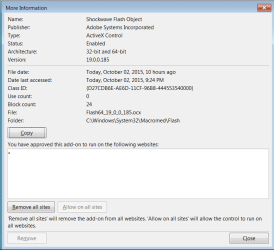
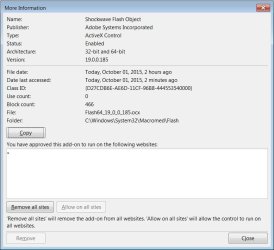
The addon:
IE11 v11.0.9600.18015, update version 11.0.23 (KB3087038)
What browser am I using?
The addon:
My Computer
At a glance
Windows 7 Home Premium 64 bit SP1i5-2320 @3.00 GHz6GBNVIDIA GeForce 7300 LE
- Computer type
- PC/Desktop
- Computer Manufacturer/Model Number
- ASUS
- OS
- Windows 7 Home Premium 64 bit SP1
- CPU
- i5-2320 @3.00 GHz
- Memory
- 6GB
- Graphics Card(s)
- NVIDIA GeForce 7300 LE
- Monitor(s) Displays
- Acer S200HQL 19.5 LED
- Screen Resolution
- 1280 x 800 (1900 x 900 max)
- Hard Drives
- Drive 1: 1 TB SATA internal: C drive
Drive 2: 250 GB SATA internal: User Data Backup
Drive 3: 500 GB SATA USB: Full System Backup 1, Father
Drive 4: 500 GB SATA USB: Full System Backup 2, Son
Drive 5: 40 GB IDE USB: Kindle, ASUS Tabl
- Keyboard
- ASUS KB34211
- Mouse
- Logitech m325 cordless
- Internet Speed
- 27Mb down, 3 Mb up cable modem w/Netgear R6400 WiFi
- Antivirus
- NIS, Spybot S&D, CCleaner, Malwarebytes, MSERT, MRT
- Browser
- FF v44.0.2;IE11 v11.0.9600.18015,uv11.0.23;Chrome v44.0.2403
- Other Info
- FF has AdBlockPlus and Ghostery plugins,