Solved IE11 crashes continuously

SJesMe

New member
Member
Local time
9:55 AM
Messages
53
I've had this pc about a week and fighting with it right out of the box ... numerous errors: display adapter, install errors, uninstall errors, IE10, Firefox and IE 11 crashes. I've tried everything I know and while I'm no guru, things seem to just get worse. I installed IE11 because IE10 and Firefox were crashing ... now IE11 is crashing as well. Tried to uninstall it and it didn't complete resulting in BSOD (had about 4 of those so far). Ran repair a couple of times. Seems to be back to a semi-functional state after refusing to boot at all.

I've run sfc /scannow (no errors) and checkdisk (no errors). I've tried running with no add-ons and it seemed stable (the only add-on I have is Adobe FlashPlayer (15.0.0.167) but when I tried to uninstall it as a potential offender, it did not complete resulting in yet another BSOD.

I prefer to stay with IE11 and deal with Flash separately (read: later); hence this post. I have this report concerning IE error:
Files that help describe the problem:
C:\Users\***\AppData\Local\Temp\WER4C41.tmp.WERInternalMetadata.xml
C:\Users\***\AppData\Local\Temp\WER6290.tmp.appcompat.txt
C:\Users\***\AppData\Local\Temp\WER62BF.tmp.mdmp
but really have no idea what that means.

In light of all the install/uninstall errors and BSODs, is this an exercise in futility? I fear this is a faulty Windows 7 (premium) install but only have the recovery disks. Since sfc /scannow found no errors, I'm really frustrated and confused at this point.

Sorry for all the different problems clumped into one thread but they do all seem integral. Any wisdom out there as to (at least) try and stabilize IE11?


My Computer

Computer type
PC/Desktop
Computer Manufacturer/Model Number
Cyberpower
OS
Windows 7 Premium x64 SP1
CPU
3.8 ghz AMD FX-4300 Quad-Core
Motherboard
760GM-P23(FX) (MS-7641) 3.0
Memory
8 MB
Graphics Card(s)
XFX Radeon R7-250e
Hard Drives
TOSHIBA DT01ACA100 1 TB
PSU
Thermaltake SMART 650W
Case
Thermaltake Commander MS-I
Antivirus
Avast 2015 and MalwareBytes AM Pro
Browser
IE10
Hi and welcome to SevenForums,
Which security suite was pre-installed on this machine ?
Was it uninstalled properly before downloading Avast ?
Manage add-ons is the same in all versions,
http://windows.microsoft.com/en-us/internet-explorer/manage-add-ons#ie=ie-10-win-7
http://windows.microsoft.com/en-IN/windows7/How-to-manage-add-ons-in-Internet-Explorer-9


Use No Add-ons mode/ Click the Start button :orb: and type in the search box,
Internet explorer
Click on the No Add-ons suggestion,
Start-no%20add-ons-7.jpg

It’s located at, Start/ All programs/ Accessories folder/ System tools folder/ No add-ons.
Use Safe mode with networking to see if Internet explorer still crashes,
http://www.sevenforums.com/tutorials/69585-safe-mode.html
Clean boot to remove unnecessary items from the Startup section,
http://www.sevenforums.com/tutorials/179159-troubleshoot-application-conflicts-performing-clean-startup.html
Troubleshooting for win-7,
http://www.sevenforums.com/tutorials/220165-troubleshooting-steps-windows-7-a.html
 

My Computer

Computer type
PC/Desktop
Computer Manufacturer/Model Number
Custom assembled by me :}
OS
Win-7-Pro64bit 7-H-Prem-64bit
CPU
i7-5930K 2nd i9-9940x both water blocked VRM's too
Motherboard
ASUS SABERTOOTH X99 2nd ASUS x299 Apex
Memory
Trident-z 3200C14 2nd Trident-z 3600C16
Graphics Card(s)
EVGA 1080ti ftw3 2nd Titan Xp both water blocked
Sound Card
Built-in Realtek
Monitor(s) Displays
1-AOC G2460PG 24"G-Sync 144Hz/ 2nd 1-ASUS VG248QE 24" 144Hz
Screen Resolution
1920 x 1080 144Hz
Hard Drives
2-Samsung M.2 Evo & Evo Plus
2-Samsung 850 EVO 500GB SSD's/ 3-2.5 W.D. Black 1tb-&3-1tb/3-3.5 WD Black 1tb hdd's
PSU
EVGA SuperNOVA 1000-P2 2nd 1200-P2
Case
2-Corsair Obsidian Series 450D Black ATX Mid Tower
Cooling
Custom water loops
Keyboard
Logitech G710+/ 2nd Logitech G910
Mouse
2-RedDragon M901 Perdition 16400 dpi Gaming mouse = wired
Internet Speed
Comcast Ping 19ms 89.31mbps download speed 6.12mbps upload
Antivirus
Malwarebytes Pro/ Superantispyware Pro
Browser
FireFox & Pale moon
Other Info
2nd ASUS X299 Apex/Intel i9-9940x with Custom water loop/7H-Prem-x64/Corsair 450D case/Ram Trident-z 3600C16 4x8gb / Samsung970Evo plus 500gb SSD/Dual ssd EZ swap evo/PSU EVGA SuperNova 1200w-P2 80+Platinum/GPU Titan Xp /8-ML-140 on push-pull on 2-280GTX rads
Only Windows Defender which has been disabled; no security suite came pre-installed. I, however, installed Avira to give it a try but then decided to stick with Avast! I believe I have removed all traces of Avira with a combination of Control Panel, it's own uninstaller, CCleaner, and Iobit Uninstaller.

I will try using IE11 with no add-ons in safe mode as I haven't tried that yet. Thanks for the links ... a little light reading for the weekend. I'll let you know how it goes and thanks for your suggestions.
 

My Computer

Computer type
PC/Desktop
Computer Manufacturer/Model Number
Cyberpower
OS
Windows 7 Premium x64 SP1
CPU
3.8 ghz AMD FX-4300 Quad-Core
Motherboard
760GM-P23(FX) (MS-7641) 3.0
Memory
8 MB
Graphics Card(s)
XFX Radeon R7-250e
Hard Drives
TOSHIBA DT01ACA100 1 TB
PSU
Thermaltake SMART 650W
Case
Thermaltake Commander MS-I
Antivirus
Avast 2015 and MalwareBytes AM Pro
Browser
IE10
Hi look forward to an update,
Post your start up list,
Click Start and type in the search box
msconfig
Start up section and take a screen shot/ s for a complete list,
Repeat for the services section
Remember to check the box on the bottom left to Hide All Microsoft services first ;)
See the links above my signature image if you need help on instructions on how to take and upload screen shots here
Cheers.

You can also activate Enhanced protection mode on a 64 bit machine to see if it makes a difference,
http://www.sevenforums.com/tutorial...10-enable-32-bit-64-bit-ie10-windows-7-a.html
 

My Computer

Computer type
PC/Desktop
Computer Manufacturer/Model Number
Custom assembled by me :}
OS
Win-7-Pro64bit 7-H-Prem-64bit
CPU
i7-5930K 2nd i9-9940x both water blocked VRM's too
Motherboard
ASUS SABERTOOTH X99 2nd ASUS x299 Apex
Memory
Trident-z 3200C14 2nd Trident-z 3600C16
Graphics Card(s)
EVGA 1080ti ftw3 2nd Titan Xp both water blocked
Sound Card
Built-in Realtek
Monitor(s) Displays
1-AOC G2460PG 24"G-Sync 144Hz/ 2nd 1-ASUS VG248QE 24" 144Hz
Screen Resolution
1920 x 1080 144Hz
Hard Drives
2-Samsung M.2 Evo & Evo Plus
2-Samsung 850 EVO 500GB SSD's/ 3-2.5 W.D. Black 1tb-&3-1tb/3-3.5 WD Black 1tb hdd's
PSU
EVGA SuperNOVA 1000-P2 2nd 1200-P2
Case
2-Corsair Obsidian Series 450D Black ATX Mid Tower
Cooling
Custom water loops
Keyboard
Logitech G710+/ 2nd Logitech G910
Mouse
2-RedDragon M901 Perdition 16400 dpi Gaming mouse = wired
Internet Speed
Comcast Ping 19ms 89.31mbps download speed 6.12mbps upload
Antivirus
Malwarebytes Pro/ Superantispyware Pro
Browser
FireFox & Pale moon
Other Info
2nd ASUS X299 Apex/Intel i9-9940x with Custom water loop/7H-Prem-x64/Corsair 450D case/Ram Trident-z 3600C16 4x8gb / Samsung970Evo plus 500gb SSD/Dual ssd EZ swap evo/PSU EVGA SuperNova 1200w-P2 80+Platinum/GPU Titan Xp /8-ML-140 on push-pull on 2-280GTX rads
Ok, I ran IE11 with no add-ons in safe mode with networking for a couple of hours. No errors or crashes. I then added the Shockwave (FlashPlayer) add-on, still in safe mode w/networking specifically to play Zuma's Revenge on the zone.msn.com site ... only because that game is the one nearly guaranteed to cause IE crash (others are weirdly random). I was able to play it to completion with no errors.

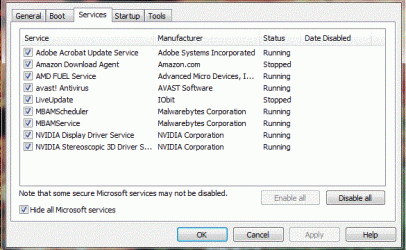
I am attaching the msconfig and services files fyi as requested. Services file reflects what's running in normal windows startup; I checked it when running in safe mode with networking and all the same processes showed "stopped."

I hope this will help narrow down the culprit(s). And btw, as soon as I booted back up into normal windows operation, I got a display adapter error ... good old NVidia TDR strikes again.

msconfig102514.gif
Services102514.gif

Oh and I'm already running Protected Mode (enabled) on IE11 although I've tried it unticked with no discernible difference in crashing. Also, I should probably mention that I've enabled software rendering instead of gpu rendering in Internet Options>Advanced.

I'll be around and thank you for your time and effort on my behalf. *bow*
 
Last edited:

My Computer

Computer type
PC/Desktop
Computer Manufacturer/Model Number
Cyberpower
OS
Windows 7 Premium x64 SP1
CPU
3.8 ghz AMD FX-4300 Quad-Core
Motherboard
760GM-P23(FX) (MS-7641) 3.0
Memory
8 MB
Graphics Card(s)
XFX Radeon R7-250e
Hard Drives
TOSHIBA DT01ACA100 1 TB
PSU
Thermaltake SMART 650W
Case
Thermaltake Commander MS-I
Antivirus
Avast 2015 and MalwareBytes AM Pro
Browser
IE10
Hi thanks for the additional info :)
Lets see what browser add-ons you have installed
Do you have any tracking protection installed ?

Safe mode with networking would stop all third party security,
So between IOBit and Avast is own new concerns :/
Lets see the add-ons first but I would go ahead and start with uninstalling IOBit and test after another boot and reset ie,
Then Avast,
Cheers.
 

My Computer

Computer type
PC/Desktop
Computer Manufacturer/Model Number
Custom assembled by me :}
OS
Win-7-Pro64bit 7-H-Prem-64bit
CPU
i7-5930K 2nd i9-9940x both water blocked VRM's too
Motherboard
ASUS SABERTOOTH X99 2nd ASUS x299 Apex
Memory
Trident-z 3200C14 2nd Trident-z 3600C16
Graphics Card(s)
EVGA 1080ti ftw3 2nd Titan Xp both water blocked
Sound Card
Built-in Realtek
Monitor(s) Displays
1-AOC G2460PG 24"G-Sync 144Hz/ 2nd 1-ASUS VG248QE 24" 144Hz
Screen Resolution
1920 x 1080 144Hz
Hard Drives
2-Samsung M.2 Evo & Evo Plus
2-Samsung 850 EVO 500GB SSD's/ 3-2.5 W.D. Black 1tb-&3-1tb/3-3.5 WD Black 1tb hdd's
PSU
EVGA SuperNOVA 1000-P2 2nd 1200-P2
Case
2-Corsair Obsidian Series 450D Black ATX Mid Tower
Cooling
Custom water loops
Keyboard
Logitech G710+/ 2nd Logitech G910
Mouse
2-RedDragon M901 Perdition 16400 dpi Gaming mouse = wired
Internet Speed
Comcast Ping 19ms 89.31mbps download speed 6.12mbps upload
Antivirus
Malwarebytes Pro/ Superantispyware Pro
Browser
FireFox & Pale moon
Other Info
2nd ASUS X299 Apex/Intel i9-9940x with Custom water loop/7H-Prem-x64/Corsair 450D case/Ram Trident-z 3600C16 4x8gb / Samsung970Evo plus 500gb SSD/Dual ssd EZ swap evo/PSU EVGA SuperNova 1200w-P2 80+Platinum/GPU Titan Xp /8-ML-140 on push-pull on 2-280GTX rads
I have no tracking protection installed other than what I presume is a default "personal list" which is enabled but with only 2 entries blocked. I do have an extensive block list via Internet Options>Security. Avast WebRep is disabled in the program settings but also rendered incompatible (I believe) due to enabling IE's Protected Mode.

I wondered about conflicts between MBAM's Real Time Protection and IE's Protected Mode but have both enabled now. I did try disabling first one, then the other, to allow only one to run at a time but I was still getting IE crashes. I've not tried disabling both ^.^

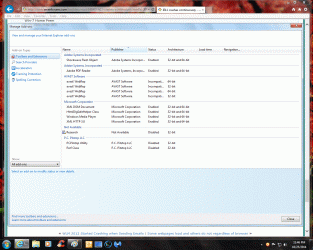
I'm attaching the add-ons screenshot and will uninstall Iobit's Uninstaller although I'm not sure what issues it might be causing?

AddOns.gif
 

My Computer

Computer type
PC/Desktop
Computer Manufacturer/Model Number
Cyberpower
OS
Windows 7 Premium x64 SP1
CPU
3.8 ghz AMD FX-4300 Quad-Core
Motherboard
760GM-P23(FX) (MS-7641) 3.0
Memory
8 MB
Graphics Card(s)
XFX Radeon R7-250e
Hard Drives
TOSHIBA DT01ACA100 1 TB
PSU
Thermaltake SMART 650W
Case
Thermaltake Commander MS-I
Antivirus
Avast 2015 and MalwareBytes AM Pro
Browser
IE10
Well I guess I'll try and bump this thread back to life as it appears ThrashZone disappeared. I uninstalled Iobit Uninstaller and had no IE crashes for about 24 hours ... but they started up again today. I have not downloaded anything (including MS updates) nor ran CCleaner in an effort to keep things status quo for whomever can help me diagnose the problems I'm having. I hesitate to uninstall Avast! as I (obviously) have to access the net in order to see whether IE11 continues to "experience a problem."

Any other suggestions?
 

My Computer

Computer type
PC/Desktop
Computer Manufacturer/Model Number
Cyberpower
OS
Windows 7 Premium x64 SP1
CPU
3.8 ghz AMD FX-4300 Quad-Core
Motherboard
760GM-P23(FX) (MS-7641) 3.0
Memory
8 MB
Graphics Card(s)
XFX Radeon R7-250e
Hard Drives
TOSHIBA DT01ACA100 1 TB
PSU
Thermaltake SMART 650W
Case
Thermaltake Commander MS-I
Antivirus
Avast 2015 and MalwareBytes AM Pro
Browser
IE10
Hi,
All of Avast add-ons are show Incompatible 32 and 64 bit which I would say there's your problem in a nut shell,
Possibly roll back to ie10 and re-install Avast without all the browser add-ons of which you do not need any of them to be protected ;)
Cheers.
 

My Computer

Computer type
PC/Desktop
Computer Manufacturer/Model Number
Custom assembled by me :}
OS
Win-7-Pro64bit 7-H-Prem-64bit
CPU
i7-5930K 2nd i9-9940x both water blocked VRM's too
Motherboard
ASUS SABERTOOTH X99 2nd ASUS x299 Apex
Memory
Trident-z 3200C14 2nd Trident-z 3600C16
Graphics Card(s)
EVGA 1080ti ftw3 2nd Titan Xp both water blocked
Sound Card
Built-in Realtek
Monitor(s) Displays
1-AOC G2460PG 24"G-Sync 144Hz/ 2nd 1-ASUS VG248QE 24" 144Hz
Screen Resolution
1920 x 1080 144Hz
Hard Drives
2-Samsung M.2 Evo & Evo Plus
2-Samsung 850 EVO 500GB SSD's/ 3-2.5 W.D. Black 1tb-&3-1tb/3-3.5 WD Black 1tb hdd's
PSU
EVGA SuperNOVA 1000-P2 2nd 1200-P2
Case
2-Corsair Obsidian Series 450D Black ATX Mid Tower
Cooling
Custom water loops
Keyboard
Logitech G710+/ 2nd Logitech G910
Mouse
2-RedDragon M901 Perdition 16400 dpi Gaming mouse = wired
Internet Speed
Comcast Ping 19ms 89.31mbps download speed 6.12mbps upload
Antivirus
Malwarebytes Pro/ Superantispyware Pro
Browser
FireFox & Pale moon
Other Info
2nd ASUS X299 Apex/Intel i9-9940x with Custom water loop/7H-Prem-x64/Corsair 450D case/Ram Trident-z 3600C16 4x8gb / Samsung970Evo plus 500gb SSD/Dual ssd EZ swap evo/PSU EVGA SuperNova 1200w-P2 80+Platinum/GPU Titan Xp /8-ML-140 on push-pull on 2-280GTX rads
If the app you got from iObit was the Uninstaller, use that to rid yourself of Avast, restart and see if the crashes continue. Most likely, they won't.

Then install a better A/V (360 Internet Security is my warm recommendation).
 

My Computer

Computer type
Laptop
Computer Manufacturer/Model Number
Custom
OS
Windows 7 Home Premium x64
CPU
Intel Core i5 2500K
Motherboard
MSI MS-7750
Memory
8GB DDR3
Graphics Card(s)
nVidia GeForce GTX650 Ti BOOST
Sound Card
Realtek
Monitor(s) Displays
21' Philips
Screen Resolution
Full HD
Hard Drives
1TB
PSU
500W
A total shot in the dark: You haven't installed EMET and forgot about it? Microsofts Anti-exploit tool(EMET) can sometimes cause programs to crash without displaying an EMET message, so it looks like a "normal" crash, which makes you forget about EMET. Even with default EMET settings for popular programs like browsers I've seen this happen.

But that's probably not what happened here, it was only a wild guess. Better with too much info than too little right?! ;)
 

My Computer

Computer type
Laptop
Computer Manufacturer/Model Number
HP Elitebook 8540p
OS
Windows 7 Pro 32
CPU
Intel(R) Core(TM) i5 CPU M 540 @ 2.53GHz
Motherboard
Hewlett-Packard 1521
Memory
4,00 GB (Usable 2,98)
Graphics Card(s)
NVIDIA NVS 5100M
Sound Card
NVIDIA High Definition Audio
Screen Resolution
1600x900
Hard Drives
INTEL SSDSA2CW120G3
Antivirus
F-Secure Internet Security
Browser
IE, Firefox, Opera
Other Info
Sandboxie,
SRP (Software Restriction Policy),
EMET (Enhanced Mitigation Experience Toolkit),
WFC (Windows Firewall Control by BiniSoft),
Malwarebytes Premium
I uninstalled Avast! and the Iobit Uninstaller. IE11 still crashing. :(

Hi Tookeri ... unless it was downloaded/bundled into some MS update, I did not knowingly install EMET.
 
Last edited:

My Computer

Computer type
PC/Desktop
Computer Manufacturer/Model Number
Cyberpower
OS
Windows 7 Premium x64 SP1
CPU
3.8 ghz AMD FX-4300 Quad-Core
Motherboard
760GM-P23(FX) (MS-7641) 3.0
Memory
8 MB
Graphics Card(s)
XFX Radeon R7-250e
Hard Drives
TOSHIBA DT01ACA100 1 TB
PSU
Thermaltake SMART 650W
Case
Thermaltake Commander MS-I
Antivirus
Avast 2015 and MalwareBytes AM Pro
Browser
IE10
EMET isn't bundled with anything, so then you don't have it.
 

My Computer

Computer type
Laptop
Computer Manufacturer/Model Number
HP Elitebook 8540p
OS
Windows 7 Pro 32
CPU
Intel(R) Core(TM) i5 CPU M 540 @ 2.53GHz
Motherboard
Hewlett-Packard 1521
Memory
4,00 GB (Usable 2,98)
Graphics Card(s)
NVIDIA NVS 5100M
Sound Card
NVIDIA High Definition Audio
Screen Resolution
1600x900
Hard Drives
INTEL SSDSA2CW120G3
Antivirus
F-Secure Internet Security
Browser
IE, Firefox, Opera
Other Info
Sandboxie,
SRP (Software Restriction Policy),
EMET (Enhanced Mitigation Experience Toolkit),
WFC (Windows Firewall Control by BiniSoft),
Malwarebytes Premium
Ok, latest move is a rollback to IE10. Tried Firefox and it wouldn't stop crashing either. IE10 has been stable for about an hour. Will report back after a longer test period. Thanks for your continued suggestions/attention to this vexing situation.
 

My Computer

Computer type
PC/Desktop
Computer Manufacturer/Model Number
Cyberpower
OS
Windows 7 Premium x64 SP1
CPU
3.8 ghz AMD FX-4300 Quad-Core
Motherboard
760GM-P23(FX) (MS-7641) 3.0
Memory
8 MB
Graphics Card(s)
XFX Radeon R7-250e
Hard Drives
TOSHIBA DT01ACA100 1 TB
PSU
Thermaltake SMART 650W
Case
Thermaltake Commander MS-I
Antivirus
Avast 2015 and MalwareBytes AM Pro
Browser
IE10

My Computer

Computer type
PC/Desktop
Computer Manufacturer/Model Number
Custom assembled by me :}
OS
Win-7-Pro64bit 7-H-Prem-64bit
CPU
i7-5930K 2nd i9-9940x both water blocked VRM's too
Motherboard
ASUS SABERTOOTH X99 2nd ASUS x299 Apex
Memory
Trident-z 3200C14 2nd Trident-z 3600C16
Graphics Card(s)
EVGA 1080ti ftw3 2nd Titan Xp both water blocked
Sound Card
Built-in Realtek
Monitor(s) Displays
1-AOC G2460PG 24"G-Sync 144Hz/ 2nd 1-ASUS VG248QE 24" 144Hz
Screen Resolution
1920 x 1080 144Hz
Hard Drives
2-Samsung M.2 Evo & Evo Plus
2-Samsung 850 EVO 500GB SSD's/ 3-2.5 W.D. Black 1tb-&3-1tb/3-3.5 WD Black 1tb hdd's
PSU
EVGA SuperNOVA 1000-P2 2nd 1200-P2
Case
2-Corsair Obsidian Series 450D Black ATX Mid Tower
Cooling
Custom water loops
Keyboard
Logitech G710+/ 2nd Logitech G910
Mouse
2-RedDragon M901 Perdition 16400 dpi Gaming mouse = wired
Internet Speed
Comcast Ping 19ms 89.31mbps download speed 6.12mbps upload
Antivirus
Malwarebytes Pro/ Superantispyware Pro
Browser
FireFox & Pale moon
Other Info
2nd ASUS X299 Apex/Intel i9-9940x with Custom water loop/7H-Prem-x64/Corsair 450D case/Ram Trident-z 3600C16 4x8gb / Samsung970Evo plus 500gb SSD/Dual ssd EZ swap evo/PSU EVGA SuperNova 1200w-P2 80+Platinum/GPU Titan Xp /8-ML-140 on push-pull on 2-280GTX rads
I have the Iobit Smart Defrag 3 as well ... I get the distinct feeling Iobit anything is not ideally stuff I want on my computer? I'm asking ... :confused:

I had used the Avast Uninstaller along with RezJor's Tool. In the interest of not fussing with the latest Avast! bloatware-2015 ... (too bad, it was such a good product for such a long time) ... I have installed Panda AV Free which seems extremely minimalist compared to Avast 2014. I did NOT install the Panda Toolbar.

I'll be back with status update and thanks again for the continued help.
 

My Computer

Computer type
PC/Desktop
Computer Manufacturer/Model Number
Cyberpower
OS
Windows 7 Premium x64 SP1
CPU
3.8 ghz AMD FX-4300 Quad-Core
Motherboard
760GM-P23(FX) (MS-7641) 3.0
Memory
8 MB
Graphics Card(s)
XFX Radeon R7-250e
Hard Drives
TOSHIBA DT01ACA100 1 TB
PSU
Thermaltake SMART 650W
Case
Thermaltake Commander MS-I
Antivirus
Avast 2015 and MalwareBytes AM Pro
Browser
IE10
Allot of people agree with you on Avast bloating up
IOBit seems like such a common trouble maker that I read,
I wonder who in the hello is recommending it's use :mad:

I did have a wonderful experience with windows 10 and Panda :)
After uninstalling Panda I couldn't get windows defender to turn back on :D
I wouldn't worry about that in win-7 though ;)

Panda MBAM premium will go a long way to protect yourself on the net without all of the other junkware,
And if you want a bad cookie monster use superantispyware it's free version is great ;)
Cheers.
 

My Computer

Computer type
PC/Desktop
Computer Manufacturer/Model Number
Custom assembled by me :}
OS
Win-7-Pro64bit 7-H-Prem-64bit
CPU
i7-5930K 2nd i9-9940x both water blocked VRM's too
Motherboard
ASUS SABERTOOTH X99 2nd ASUS x299 Apex
Memory
Trident-z 3200C14 2nd Trident-z 3600C16
Graphics Card(s)
EVGA 1080ti ftw3 2nd Titan Xp both water blocked
Sound Card
Built-in Realtek
Monitor(s) Displays
1-AOC G2460PG 24"G-Sync 144Hz/ 2nd 1-ASUS VG248QE 24" 144Hz
Screen Resolution
1920 x 1080 144Hz
Hard Drives
2-Samsung M.2 Evo & Evo Plus
2-Samsung 850 EVO 500GB SSD's/ 3-2.5 W.D. Black 1tb-&3-1tb/3-3.5 WD Black 1tb hdd's
PSU
EVGA SuperNOVA 1000-P2 2nd 1200-P2
Case
2-Corsair Obsidian Series 450D Black ATX Mid Tower
Cooling
Custom water loops
Keyboard
Logitech G710+/ 2nd Logitech G910
Mouse
2-RedDragon M901 Perdition 16400 dpi Gaming mouse = wired
Internet Speed
Comcast Ping 19ms 89.31mbps download speed 6.12mbps upload
Antivirus
Malwarebytes Pro/ Superantispyware Pro
Browser
FireFox & Pale moon
Other Info
2nd ASUS X299 Apex/Intel i9-9940x with Custom water loop/7H-Prem-x64/Corsair 450D case/Ram Trident-z 3600C16 4x8gb / Samsung970Evo plus 500gb SSD/Dual ssd EZ swap evo/PSU EVGA SuperNova 1200w-P2 80+Platinum/GPU Titan Xp /8-ML-140 on push-pull on 2-280GTX rads
Ugh ... so this time IE10 crashed immediately followed by BSOD. *tears hair out*
This is the report I got upon (normal) reboot:

Problem signature:
Problem Event Name: BlueScreen
OS Version: 6.1.7601.2.1.0.768.3
Locale ID: 1033
Additional information about the problem:
BCCode: 4e
BCP1: 0000000000000099
BCP2: 000000000010DA97
BCP3: 0000000000000000
BCP4: 00000000001E3D97
OS Version: 6_1_7601
Service Pack: 1_0
Product: 768_1
Files that help describe the problem:
C:\Windows\Minidump\103014-21138-01.dmp
C:\Users\***\AppData\Local\Temp\WER-52681-0.sysdata.xml

Mean anything helpful to anyone?
 

My Computer

Computer type
PC/Desktop
Computer Manufacturer/Model Number
Cyberpower
OS
Windows 7 Premium x64 SP1
CPU
3.8 ghz AMD FX-4300 Quad-Core
Motherboard
760GM-P23(FX) (MS-7641) 3.0
Memory
8 MB
Graphics Card(s)
XFX Radeon R7-250e
Hard Drives
TOSHIBA DT01ACA100 1 TB
PSU
Thermaltake SMART 650W
Case
Thermaltake Commander MS-I
Antivirus
Avast 2015 and MalwareBytes AM Pro
Browser
IE10

My Computer

Computer type
PC/Desktop
Computer Manufacturer/Model Number
Custom assembled by me :}
OS
Win-7-Pro64bit 7-H-Prem-64bit
CPU
i7-5930K 2nd i9-9940x both water blocked VRM's too
Motherboard
ASUS SABERTOOTH X99 2nd ASUS x299 Apex
Memory
Trident-z 3200C14 2nd Trident-z 3600C16
Graphics Card(s)
EVGA 1080ti ftw3 2nd Titan Xp both water blocked
Sound Card
Built-in Realtek
Monitor(s) Displays
1-AOC G2460PG 24"G-Sync 144Hz/ 2nd 1-ASUS VG248QE 24" 144Hz
Screen Resolution
1920 x 1080 144Hz
Hard Drives
2-Samsung M.2 Evo & Evo Plus
2-Samsung 850 EVO 500GB SSD's/ 3-2.5 W.D. Black 1tb-&3-1tb/3-3.5 WD Black 1tb hdd's
PSU
EVGA SuperNOVA 1000-P2 2nd 1200-P2
Case
2-Corsair Obsidian Series 450D Black ATX Mid Tower
Cooling
Custom water loops
Keyboard
Logitech G710+/ 2nd Logitech G910
Mouse
2-RedDragon M901 Perdition 16400 dpi Gaming mouse = wired
Internet Speed
Comcast Ping 19ms 89.31mbps download speed 6.12mbps upload
Antivirus
Malwarebytes Pro/ Superantispyware Pro
Browser
FireFox & Pale moon
Other Info
2nd ASUS X299 Apex/Intel i9-9940x with Custom water loop/7H-Prem-x64/Corsair 450D case/Ram Trident-z 3600C16 4x8gb / Samsung970Evo plus 500gb SSD/Dual ssd EZ swap evo/PSU EVGA SuperNova 1200w-P2 80+Platinum/GPU Titan Xp /8-ML-140 on push-pull on 2-280GTX rads

My Computer

Computer type
PC/Desktop
Computer Manufacturer/Model Number
Cyberpower
OS
Windows 7 Premium x64 SP1
CPU
3.8 ghz AMD FX-4300 Quad-Core
Motherboard
760GM-P23(FX) (MS-7641) 3.0
Memory
8 MB
Graphics Card(s)
XFX Radeon R7-250e
Hard Drives
TOSHIBA DT01ACA100 1 TB
PSU
Thermaltake SMART 650W
Case
Thermaltake Commander MS-I
Antivirus
Avast 2015 and MalwareBytes AM Pro
Browser
IE10
Back
Top