IE8 doesn't load

total confusion

New member
Member
VIP
Local time
7:15 PM
Messages
188
Location
NY
I got my new Windows 7 in and am trying to get things back to normal.
I installed IE8 from a backup disk. It's there, but the only way I can open it is to go through; menu, and right click and run as administrator. It should open when I log onto the internet, but it doesn't??

I see there is a new version in the sticky, but which one is the latest for the 32 bit version? The "leaked version", or one of the ones above it?:confused:
 

My Computer

Computer type
PC/Desktop
Computer Manufacturer/Model Number
Acer Aspire E700 dsktop
OS
Windows 7 Pro
CPU
Intel 2 quad Q6600
Motherboard
Acer fg965M
Memory
4 GB
Graphics Card(s)
Nvidia GeForce GTS 450 1TB
Sound Card
RealTek
Monitor(s) Displays
Acer 22" X223w
Hard Drives
1TB WD Caviar Black (internal)
1TB WD My Book Essential
PSU
500W coolmaster Extreme Power Plus
Case
Acer
Cooling
case fan
Keyboard
acer
Mouse
acer
Internet Speed
56k
Antivirus
Microsoft Security Essentials
Browser
IE 8
Other Info
I hate IE 9 10 & 11
IE8 should be built into Win7. If it's not there it can be added from Programs and Features/"Windows Features" by checking it off. Don't know what you mean by "sticky" or "leaked version". After you install Windows 7, go to "Windows Update" to bring the system up to date which should also include the latest IE8 Cumulative Security Update.
 

My Computer

Computer type
PC/Desktop
Computer Manufacturer/Model Number
OQO 2+
OS
Windows 8 Pro w/MC 32-bit
CPU
Intel Atom 1.86 GHz
Motherboard
OQO 2+
Memory
2 GB
Graphics Card(s)
Intel GMA 500
Sound Card
IDT
Monitor(s) Displays
LCD
Screen Resolution
800 x 480 (portable) 1280 x 1024 (docked)
Hard Drives
64 GB SSD
PSU
9 Ah Battery (portable) or OQO Brick (docked)
Case
Shirt Pocket Sized
Cooling
Tiny Fan
Keyboard
Slide out (portable) DiNovo Edge (docked)
Mouse
Eraser head (portable) Logitech Bluetooth (docked)
Internet Speed
WWAN or 802.11G (portable) T1 (docked)
Browser
IE 10
Other Info
DVD-RW OQO Docking Station
I didn't know it came as part of Windows 7. Did I screw things up by loading it by CD?
I'm still trying to find where I find about all of these new features. What is cloud, and where is it?? I don't see anyplace that shows me the new stuff like Vista did.

As to the IE8 I don't see it listed in programs in the control panel. It's on the start menu though.
When I try to open it just by clicking on it, the screens flashes a window, it doesn't open it. 1 quick flash and it's gone. I can't get into my mail or do anything unless I load it using administrative privilege.

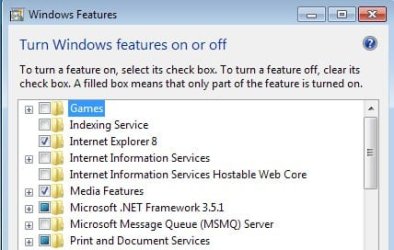
I did go into features I don't know what should or shouldn't be checked so I put an attached picture of it.
 

Attachments

  • Features.jpg
    Features.jpg
    22.8 KB · Views: 4

My Computer

Computer type
PC/Desktop
Computer Manufacturer/Model Number
Acer Aspire E700 dsktop
OS
Windows 7 Pro
CPU
Intel 2 quad Q6600
Motherboard
Acer fg965M
Memory
4 GB
Graphics Card(s)
Nvidia GeForce GTS 450 1TB
Sound Card
RealTek
Monitor(s) Displays
Acer 22" X223w
Hard Drives
1TB WD Caviar Black (internal)
1TB WD My Book Essential
PSU
500W coolmaster Extreme Power Plus
Case
Acer
Cooling
case fan
Keyboard
acer
Mouse
acer
Internet Speed
56k
Antivirus
Microsoft Security Essentials
Browser
IE 8
Other Info
I hate IE 9 10 & 11
You need to delete that Vista IE 8 you installed and maybe you will be okay.

Until you get rid of it anything else you want to do is useless.

Mike
 

My Computer

Computer Manufacturer/Model Number
Hopalong/ Godzilla
OS
Windows7 Pro 64bit SP-1; Windows XP Pro 32bit
CPU
Intel Core i7-870 Lynnfield 2.93GHz LGA 1156 95W Quad-Core
Motherboard
ASUS P7P55D-E PRO
Memory
8GB@1400MHz Crucial Ballistix DDR3-1600 4x2GB
Graphics Card(s)
ASUS ENGTX460 DirectCU/2DI/1GD5 1GB 256-bit GDDR5
Sound Card
VIA Onboard
Monitor(s) Displays
Asus VS248H-P 24"; Samsung SyncMaster 941BW 19"ws
Screen Resolution
1920x1080; 1440x900
Hard Drives
Samsung 830 120GB SSD
Intel 320 120GB SSD
Western Digital Caviar Black WD7501AALS 750GB 7200 RPM SATA 3.0Gb/s
Western Digital Caviar Black WD6401AALS 640GB 7200 RPM SATA 3.0Gb/s
PSU
COOLER MASTER Silent Pro RS850-AMBAJ3-US 850W Modular
Case
COOLER MASTER HAF 932 RC-932-KKN5-GP Black
Cooling
Scythe "Mugen-2 Rev.B" (2 ScytheKaze-Jyuni PWM fans)
Keyboard
Logitech K-320
Mouse
Kensington
Antivirus
Avast Inernet Suite
Browser
IE 9 ; Chrome
Hi Mike
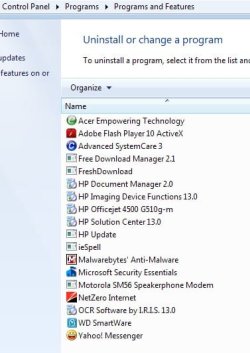
I didn't know it came packaged with windows 7, but now I can't find the one I loaded (see attachment) That is a shot of the control panal. It should be there shouldn't it??
I'm downloading IE9 Beta, How do I install that if I can't find IE8, or does it go over top of it??? First time I've dealt with this kind of problem. IE was something you had to load once you got your internet connection setup on earlier versions of Windows..
 

Attachments

  • not there.jpg
    not there.jpg
    30.4 KB · Views: 3

My Computer

Computer type
PC/Desktop
Computer Manufacturer/Model Number
Acer Aspire E700 dsktop
OS
Windows 7 Pro
CPU
Intel 2 quad Q6600
Motherboard
Acer fg965M
Memory
4 GB
Graphics Card(s)
Nvidia GeForce GTS 450 1TB
Sound Card
RealTek
Monitor(s) Displays
Acer 22" X223w
Hard Drives
1TB WD Caviar Black (internal)
1TB WD My Book Essential
PSU
500W coolmaster Extreme Power Plus
Case
Acer
Cooling
case fan
Keyboard
acer
Mouse
acer
Internet Speed
56k
Antivirus
Microsoft Security Essentials
Browser
IE 8
Other Info
I hate IE 9 10 & 11
Don't install IE 9 yet. One thing at a time.

It may not have installed the Vista IE8 or wrote over the original installed.

The picture you posted above Click "View installed updates" In the new window if there is an IE 8 in the list that will be the Vista copy you added.
There is a button to delete it if it was put here. Probably not but???


See if you have a Restore point.
The only other thing I can think of is a System Restore BEFORE you put the Vista IE8 on but it may not have a restore point made before you put the Vista IE8 on the system. It may not have had time to make one after install of Win 7.
This would be the easiest.
When you get to this window in the process check mark "Show more restore points" Might find a hidden one.

You want a Restore point before Vista IE8 was installed.

If you need the tutrial.
http://www.sevenforums.com/tutorials/700-system-restore.html


Mike
 

My Computer

Computer Manufacturer/Model Number
Hopalong/ Godzilla
OS
Windows7 Pro 64bit SP-1; Windows XP Pro 32bit
CPU
Intel Core i7-870 Lynnfield 2.93GHz LGA 1156 95W Quad-Core
Motherboard
ASUS P7P55D-E PRO
Memory
8GB@1400MHz Crucial Ballistix DDR3-1600 4x2GB
Graphics Card(s)
ASUS ENGTX460 DirectCU/2DI/1GD5 1GB 256-bit GDDR5
Sound Card
VIA Onboard
Monitor(s) Displays
Asus VS248H-P 24"; Samsung SyncMaster 941BW 19"ws
Screen Resolution
1920x1080; 1440x900
Hard Drives
Samsung 830 120GB SSD
Intel 320 120GB SSD
Western Digital Caviar Black WD7501AALS 750GB 7200 RPM SATA 3.0Gb/s
Western Digital Caviar Black WD6401AALS 640GB 7200 RPM SATA 3.0Gb/s
PSU
COOLER MASTER Silent Pro RS850-AMBAJ3-US 850W Modular
Case
COOLER MASTER HAF 932 RC-932-KKN5-GP Black
Cooling
Scythe "Mugen-2 Rev.B" (2 ScytheKaze-Jyuni PWM fans)
Keyboard
Logitech K-320
Mouse
Kensington
Antivirus
Avast Inernet Suite
Browser
IE 9 ; Chrome
Don't install IE 9 yet. One thing at a time.

It may not have installed the Vista IE8 or wrote over the original installed.

The picture you posted above Click "View installed updates" In the new window if there is an IE 8 in the list that will be the Vista copy you added.
There is a button to delete it if it was put here. Probably not but???


See if you have a Restore point.
The only other thing I can think of is a System Restore BEFORE you put the Vista IE8 on but it may not have a restore point made before you put the Vista IE8 on the system. It may not have had time to make one after install of Win 7.
This would be the easiest.
When you get to this window in the process check mark "Show more restore points" Might find a hidden one.

You want a Restore point before Vista IE8 was installed.

If you need the tutrial.
http://www.sevenforums.com/tutorials/700-system-restore.html


Mike

I agree with Mike here, try a system restore from before you put that other IE8 on there, Have you tried windows update yet?

Another possibility would be to try http://www.sevenforums.com/tutorials/1538-sfc-scannow-command-system-file-checker.html to see if it fixes anything.
 

My Computer

Computer type
PC/Desktop
Computer Manufacturer/Model Number
Self Built
OS
Win 10 Pro x64
CPU
Intel I5-2500K @3.3GHz
Motherboard
Asrock P67 Extreme4
Memory
16GB G.Skill Ripjaws X (4x4GB)
Graphics Card(s)
EVGA GeForce 750 Ti SC 2GB
Sound Card
ASUS Xonar DG 5.1 Channels 24-bit 96KHz PCI Interface Sound
Monitor(s) Displays
auria eq2367
Screen Resolution
1920 x 1080
Hard Drives
250GB Samsung 850 EVO SSD
1TB WD Blue
1TB Hitachi
PSU
SeaSonic X 650W 80 Plus Gold
Case
Corsair Obsidian 750D
Cooling
Corsair H60, Three 140mm case fans
Keyboard
Logitech Wireless Keyboard K520
Mouse
Logitech Wireless Mouse M310
Internet Speed
Wave Broadband ~ 100 dn 5 up
Antivirus
Windows Defender, Malwarebytes Premium
Browser
Edge, IE11, Chrome
Other Info
Laptop specs: HP g7-1365dx /
CPU: AMD A6-3420M APU with Radeon(tm) HD Graphics /
RAM: Crucial 8Gb (2x4Gb) /
SSD: Crucial M4-CT128M4SSD2 ATA Device/ FW 000F /
GFX: AMD Radeon HD 6520G /
OS: Windows 10 Pro x64
Unfortunately you were right, no restore points go back that far. It was one of the first things I put in after loading windows 7. At the time I was thinking I needed it to do the updates. How dumb was that, I know better. Lesson: Never do stuff when you are tired.

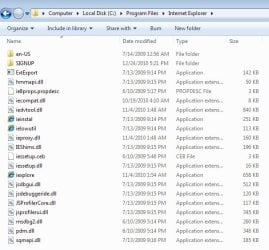
Can I go into programs and extract the IE folder? See 2 attachments. Given the dates on some of the files that should be the old copy????
 

Attachments

  • IE folder.jpg
    IE folder.jpg
    14.5 KB · Views: 4
  • Inside folder.jpg
    Inside folder.jpg
    50.7 KB · Views: 2

My Computer

Computer type
PC/Desktop
Computer Manufacturer/Model Number
Acer Aspire E700 dsktop
OS
Windows 7 Pro
CPU
Intel 2 quad Q6600
Motherboard
Acer fg965M
Memory
4 GB
Graphics Card(s)
Nvidia GeForce GTS 450 1TB
Sound Card
RealTek
Monitor(s) Displays
Acer 22" X223w
Hard Drives
1TB WD Caviar Black (internal)
1TB WD My Book Essential
PSU
500W coolmaster Extreme Power Plus
Case
Acer
Cooling
case fan
Keyboard
acer
Mouse
acer
Internet Speed
56k
Antivirus
Microsoft Security Essentials
Browser
IE 8
Other Info
I hate IE 9 10 & 11

My Computer

Computer type
PC/Desktop
Computer Manufacturer/Model Number
Acer Aspire E700 dsktop
OS
Windows 7 Pro
CPU
Intel 2 quad Q6600
Motherboard
Acer fg965M
Memory
4 GB
Graphics Card(s)
Nvidia GeForce GTS 450 1TB
Sound Card
RealTek
Monitor(s) Displays
Acer 22" X223w
Hard Drives
1TB WD Caviar Black (internal)
1TB WD My Book Essential
PSU
500W coolmaster Extreme Power Plus
Case
Acer
Cooling
case fan
Keyboard
acer
Mouse
acer
Internet Speed
56k
Antivirus
Microsoft Security Essentials
Browser
IE 8
Other Info
I hate IE 9 10 & 11
You might want to try the SFC /scannow Derek posted. It might straighten out the registry so IE8 works properly.

In Win 7 IE9 is installed on top of IE8. So if IE8 is messed up IE9 MIGHT be also. Not definitely but maybe.

So SFC /scannow then install IE9 would be my choice.


You can also do a Repair install. This will put the Windows registry back to original which should rid you of the second IE8.
http://www.sevenforums.com/tutorials/3413-repair-install.html


Mike
 

My Computer

Computer Manufacturer/Model Number
Hopalong/ Godzilla
OS
Windows7 Pro 64bit SP-1; Windows XP Pro 32bit
CPU
Intel Core i7-870 Lynnfield 2.93GHz LGA 1156 95W Quad-Core
Motherboard
ASUS P7P55D-E PRO
Memory
8GB@1400MHz Crucial Ballistix DDR3-1600 4x2GB
Graphics Card(s)
ASUS ENGTX460 DirectCU/2DI/1GD5 1GB 256-bit GDDR5
Sound Card
VIA Onboard
Monitor(s) Displays
Asus VS248H-P 24"; Samsung SyncMaster 941BW 19"ws
Screen Resolution
1920x1080; 1440x900
Hard Drives
Samsung 830 120GB SSD
Intel 320 120GB SSD
Western Digital Caviar Black WD7501AALS 750GB 7200 RPM SATA 3.0Gb/s
Western Digital Caviar Black WD6401AALS 640GB 7200 RPM SATA 3.0Gb/s
PSU
COOLER MASTER Silent Pro RS850-AMBAJ3-US 850W Modular
Case
COOLER MASTER HAF 932 RC-932-KKN5-GP Black
Cooling
Scythe "Mugen-2 Rev.B" (2 ScytheKaze-Jyuni PWM fans)
Keyboard
Logitech K-320
Mouse
Kensington
Antivirus
Avast Inernet Suite
Browser
IE 9 ; Chrome
Unfortunately you were right, no restore points go back that far. It was one of the first things I put in after loading windows 7. At the time I was thinking I needed it to do the updates. How dumb was that, I know better. Lesson: Never do stuff when you are tired.

Can I go into programs and extract the IE folder? See 2 attachments. Given the dates on some of the files that should be the old copy????

Have you validated your install yet?

How about running windows update?

In system restore did you check the box at the bottom to show more restore points?

If you want to try installing IE9 it may work, but it may just add another problem.

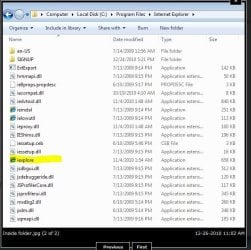
What happens if you try to launch IE from this I highlighted from your screenshot?
 

Attachments

  • Capture.JPG
    Capture.JPG
    66.7 KB · Views: 2

My Computer

Computer type
PC/Desktop
Computer Manufacturer/Model Number
Self Built
OS
Win 10 Pro x64
CPU
Intel I5-2500K @3.3GHz
Motherboard
Asrock P67 Extreme4
Memory
16GB G.Skill Ripjaws X (4x4GB)
Graphics Card(s)
EVGA GeForce 750 Ti SC 2GB
Sound Card
ASUS Xonar DG 5.1 Channels 24-bit 96KHz PCI Interface Sound
Monitor(s) Displays
auria eq2367
Screen Resolution
1920 x 1080
Hard Drives
250GB Samsung 850 EVO SSD
1TB WD Blue
1TB Hitachi
PSU
SeaSonic X 650W 80 Plus Gold
Case
Corsair Obsidian 750D
Cooling
Corsair H60, Three 140mm case fans
Keyboard
Logitech Wireless Keyboard K520
Mouse
Logitech Wireless Mouse M310
Internet Speed
Wave Broadband ~ 100 dn 5 up
Antivirus
Windows Defender, Malwarebytes Premium
Browser
Edge, IE11, Chrome
Other Info
Laptop specs: HP g7-1365dx /
CPU: AMD A6-3420M APU with Radeon(tm) HD Graphics /
RAM: Crucial 8Gb (2x4Gb) /
SSD: Crucial M4-CT128M4SSD2 ATA Device/ FW 000F /
GFX: AMD Radeon HD 6520G /
OS: Windows 10 Pro x64
1: No I haven't validated the install yet, but it took me all day to do the updates to everything so I really don't want to have to do a clean install.

2:Checked for extra restore points, it didn't go back far enough.

3:I tried launching from the highlighted line. It does the same quick screen flash as when I try to launch it without admin privilege.

Won't install 9 until I figure a way out of this mess. On the first page of this thread "roncerr" suggested something about the cumulative updates for IE8. Would uninstalling those updates do anything positive?
 

My Computer

Computer type
PC/Desktop
Computer Manufacturer/Model Number
Acer Aspire E700 dsktop
OS
Windows 7 Pro
CPU
Intel 2 quad Q6600
Motherboard
Acer fg965M
Memory
4 GB
Graphics Card(s)
Nvidia GeForce GTS 450 1TB
Sound Card
RealTek
Monitor(s) Displays
Acer 22" X223w
Hard Drives
1TB WD Caviar Black (internal)
1TB WD My Book Essential
PSU
500W coolmaster Extreme Power Plus
Case
Acer
Cooling
case fan
Keyboard
acer
Mouse
acer
Internet Speed
56k
Antivirus
Microsoft Security Essentials
Browser
IE 8
Other Info
I hate IE 9 10 & 11
1: No I haven't validated the install yet, but it took me all day to do the updates to everything so I really don't want to have to do a clean install.

2:Checked for extra restore points, it didn't go back far enough.

3:I tried launching from the highlighted line. It does the same quick screen flash as when I try to launch it without admin privilege.

Won't install 9 until I figure a way out of this mess. On the first page of this thread "roncerr" suggested something about the cumulative updates for IE8. Would uninstalling those updates do anything positive?

If I were you I would do a http://www.sevenforums.com/tutorials/3413-repair-install.html It will keep all your programs and data but give you a fresh start with your OS.
 

My Computer

Computer type
PC/Desktop
Computer Manufacturer/Model Number
Self Built
OS
Win 10 Pro x64
CPU
Intel I5-2500K @3.3GHz
Motherboard
Asrock P67 Extreme4
Memory
16GB G.Skill Ripjaws X (4x4GB)
Graphics Card(s)
EVGA GeForce 750 Ti SC 2GB
Sound Card
ASUS Xonar DG 5.1 Channels 24-bit 96KHz PCI Interface Sound
Monitor(s) Displays
auria eq2367
Screen Resolution
1920 x 1080
Hard Drives
250GB Samsung 850 EVO SSD
1TB WD Blue
1TB Hitachi
PSU
SeaSonic X 650W 80 Plus Gold
Case
Corsair Obsidian 750D
Cooling
Corsair H60, Three 140mm case fans
Keyboard
Logitech Wireless Keyboard K520
Mouse
Logitech Wireless Mouse M310
Internet Speed
Wave Broadband ~ 100 dn 5 up
Antivirus
Windows Defender, Malwarebytes Premium
Browser
Edge, IE11, Chrome
Other Info
Laptop specs: HP g7-1365dx /
CPU: AMD A6-3420M APU with Radeon(tm) HD Graphics /
RAM: Crucial 8Gb (2x4Gb) /
SSD: Crucial M4-CT128M4SSD2 ATA Device/ FW 000F /
GFX: AMD Radeon HD 6520G /
OS: Windows 10 Pro x64
would I have to do all of the updates over?
 

My Computer

Computer type
PC/Desktop
Computer Manufacturer/Model Number
Acer Aspire E700 dsktop
OS
Windows 7 Pro
CPU
Intel 2 quad Q6600
Motherboard
Acer fg965M
Memory
4 GB
Graphics Card(s)
Nvidia GeForce GTS 450 1TB
Sound Card
RealTek
Monitor(s) Displays
Acer 22" X223w
Hard Drives
1TB WD Caviar Black (internal)
1TB WD My Book Essential
PSU
500W coolmaster Extreme Power Plus
Case
Acer
Cooling
case fan
Keyboard
acer
Mouse
acer
Internet Speed
56k
Antivirus
Microsoft Security Essentials
Browser
IE 8
Other Info
I hate IE 9 10 & 11

My Computer

Computer type
PC/Desktop
Computer Manufacturer/Model Number
Self Built
OS
Win 10 Pro x64
CPU
Intel I5-2500K @3.3GHz
Motherboard
Asrock P67 Extreme4
Memory
16GB G.Skill Ripjaws X (4x4GB)
Graphics Card(s)
EVGA GeForce 750 Ti SC 2GB
Sound Card
ASUS Xonar DG 5.1 Channels 24-bit 96KHz PCI Interface Sound
Monitor(s) Displays
auria eq2367
Screen Resolution
1920 x 1080
Hard Drives
250GB Samsung 850 EVO SSD
1TB WD Blue
1TB Hitachi
PSU
SeaSonic X 650W 80 Plus Gold
Case
Corsair Obsidian 750D
Cooling
Corsair H60, Three 140mm case fans
Keyboard
Logitech Wireless Keyboard K520
Mouse
Logitech Wireless Mouse M310
Internet Speed
Wave Broadband ~ 100 dn 5 up
Antivirus
Windows Defender, Malwarebytes Premium
Browser
Edge, IE11, Chrome
Other Info
Laptop specs: HP g7-1365dx /
CPU: AMD A6-3420M APU with Radeon(tm) HD Graphics /
RAM: Crucial 8Gb (2x4Gb) /
SSD: Crucial M4-CT128M4SSD2 ATA Device/ FW 000F /
GFX: AMD Radeon HD 6520G /
OS: Windows 10 Pro x64
I used the upgrade package, but had to do a clean install because I had to change out my hard drive. Vista croaked on me.
 

My Computer

Computer type
PC/Desktop
Computer Manufacturer/Model Number
Acer Aspire E700 dsktop
OS
Windows 7 Pro
CPU
Intel 2 quad Q6600
Motherboard
Acer fg965M
Memory
4 GB
Graphics Card(s)
Nvidia GeForce GTS 450 1TB
Sound Card
RealTek
Monitor(s) Displays
Acer 22" X223w
Hard Drives
1TB WD Caviar Black (internal)
1TB WD My Book Essential
PSU
500W coolmaster Extreme Power Plus
Case
Acer
Cooling
case fan
Keyboard
acer
Mouse
acer
Internet Speed
56k
Antivirus
Microsoft Security Essentials
Browser
IE 8
Other Info
I hate IE 9 10 & 11
I used the upgrade package, but had to do a clean install because I had to change out my hard drive. Vista croaked on me.

Good, I was hoping that you did. Is there some reason you're worried about the updates?
 

My Computer

Computer type
PC/Desktop
Computer Manufacturer/Model Number
Self Built
OS
Win 10 Pro x64
CPU
Intel I5-2500K @3.3GHz
Motherboard
Asrock P67 Extreme4
Memory
16GB G.Skill Ripjaws X (4x4GB)
Graphics Card(s)
EVGA GeForce 750 Ti SC 2GB
Sound Card
ASUS Xonar DG 5.1 Channels 24-bit 96KHz PCI Interface Sound
Monitor(s) Displays
auria eq2367
Screen Resolution
1920 x 1080
Hard Drives
250GB Samsung 850 EVO SSD
1TB WD Blue
1TB Hitachi
PSU
SeaSonic X 650W 80 Plus Gold
Case
Corsair Obsidian 750D
Cooling
Corsair H60, Three 140mm case fans
Keyboard
Logitech Wireless Keyboard K520
Mouse
Logitech Wireless Mouse M310
Internet Speed
Wave Broadband ~ 100 dn 5 up
Antivirus
Windows Defender, Malwarebytes Premium
Browser
Edge, IE11, Chrome
Other Info
Laptop specs: HP g7-1365dx /
CPU: AMD A6-3420M APU with Radeon(tm) HD Graphics /
RAM: Crucial 8Gb (2x4Gb) /
SSD: Crucial M4-CT128M4SSD2 ATA Device/ FW 000F /
GFX: AMD Radeon HD 6520G /
OS: Windows 10 Pro x64
Correction, the hard drive coaked, Vista just assisted in the process
 

My Computer

Computer type
PC/Desktop
Computer Manufacturer/Model Number
Acer Aspire E700 dsktop
OS
Windows 7 Pro
CPU
Intel 2 quad Q6600
Motherboard
Acer fg965M
Memory
4 GB
Graphics Card(s)
Nvidia GeForce GTS 450 1TB
Sound Card
RealTek
Monitor(s) Displays
Acer 22" X223w
Hard Drives
1TB WD Caviar Black (internal)
1TB WD My Book Essential
PSU
500W coolmaster Extreme Power Plus
Case
Acer
Cooling
case fan
Keyboard
acer
Mouse
acer
Internet Speed
56k
Antivirus
Microsoft Security Essentials
Browser
IE 8
Other Info
I hate IE 9 10 & 11
The updates were for drivers as well as Windows 7 updates. The driver file for my video card is 102MB and I have a dial-up connection. Care to guess how long that sucker took:banghead:
 

My Computer

Computer type
PC/Desktop
Computer Manufacturer/Model Number
Acer Aspire E700 dsktop
OS
Windows 7 Pro
CPU
Intel 2 quad Q6600
Motherboard
Acer fg965M
Memory
4 GB
Graphics Card(s)
Nvidia GeForce GTS 450 1TB
Sound Card
RealTek
Monitor(s) Displays
Acer 22" X223w
Hard Drives
1TB WD Caviar Black (internal)
1TB WD My Book Essential
PSU
500W coolmaster Extreme Power Plus
Case
Acer
Cooling
case fan
Keyboard
acer
Mouse
acer
Internet Speed
56k
Antivirus
Microsoft Security Essentials
Browser
IE 8
Other Info
I hate IE 9 10 & 11
If you still have the original file or the zip file put it on a USB Flash drive. Copy it both ways. Take a few minutes both ways with 100MB.

Mike
 

My Computer

Computer Manufacturer/Model Number
Hopalong/ Godzilla
OS
Windows7 Pro 64bit SP-1; Windows XP Pro 32bit
CPU
Intel Core i7-870 Lynnfield 2.93GHz LGA 1156 95W Quad-Core
Motherboard
ASUS P7P55D-E PRO
Memory
8GB@1400MHz Crucial Ballistix DDR3-1600 4x2GB
Graphics Card(s)
ASUS ENGTX460 DirectCU/2DI/1GD5 1GB 256-bit GDDR5
Sound Card
VIA Onboard
Monitor(s) Displays
Asus VS248H-P 24"; Samsung SyncMaster 941BW 19"ws
Screen Resolution
1920x1080; 1440x900
Hard Drives
Samsung 830 120GB SSD
Intel 320 120GB SSD
Western Digital Caviar Black WD7501AALS 750GB 7200 RPM SATA 3.0Gb/s
Western Digital Caviar Black WD6401AALS 640GB 7200 RPM SATA 3.0Gb/s
PSU
COOLER MASTER Silent Pro RS850-AMBAJ3-US 850W Modular
Case
COOLER MASTER HAF 932 RC-932-KKN5-GP Black
Cooling
Scythe "Mugen-2 Rev.B" (2 ScytheKaze-Jyuni PWM fans)
Keyboard
Logitech K-320
Mouse
Kensington
Antivirus
Avast Inernet Suite
Browser
IE 9 ; Chrome
Back
Top