Didn't work, Gave me a LOT of trouble
Well, in a word, NO.
DO NOT DO THIS!
It worked up to "Turn Windows features on or off" then it went WAY south. I have a brand-new 64-bit Win7 laptop, and it DOES NOT HAVE IE8 ON IT. When I uninstalled IE9, I HAD NO BROWSER AT ALL. Fortunately I had a stand-alone Firefox from another computer (XP/SP3, thank you) and ran that, to get back on the net. I downloaded every version of IE8 from several sites, always the same, NOT COMPATIBLE WITH THIS OPERATING SYSTEM. So, I went crawling back to M$, downloaded IE9, and installed it, then I had to manually set up my icons, startup, menu, taskbar etc. Large PITA.
Thanks for the tip, but it turned out to be misinformation.
Hell with it. Firefox it is.
:banghead:
_________________________
IE8 is the default for Windows 7 and is included as a Feature. Open Control Panel/Program and Features and on the left side click on "Turn Windows Features on of off" and if you have IE9 installed it will show up. To remove IE9 go to Control Panel/Program and Features and click on View Installed Updates. Look for Windows Internet Explorer 9 and uninstall it. After the uninstall IE8 will show up in the Features window instead of IE9.


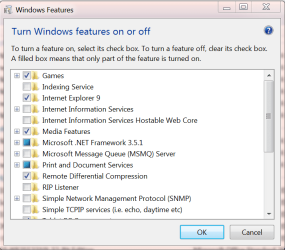


 , and you will have to pick the Vista 32-bit version to match your OS, but it should work. I couldn't find one specifically for 7

