IE8 on Windows 7?

GordP

New member
Local time
5:57 AM
Messages
7
Is it possible to run Internet Explorer 8 under Windows 7?
Please let it be so. Among other things, my webmail does not support IE9.
If so, any tips? Thanks in advance. :banghead:
 

My Computer My Computer

At a glance

Windows 7 Home Premium 32bit.AMD
Computer Manufacturer/Model Number
Acer 5250BZ479
OS
Windows 7 Home Premium 32bit.
CPU
AMD
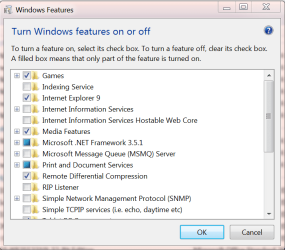
IE8 is the default for Windows 7 and is included as a Feature. Open Control Panel/Program and Features and on the left side click on "Turn Windows Features on of off" and if you have IE9 installed it will show up. To remove IE9 go to Control Panel/Program and Features and click on View Installed Updates. Look for Windows Internet Explorer 9 and uninstall it. After the uninstall IE8 will show up in the Features window instead of IE9.

Features.PNG

Jim :geek:
 

My Computer My Computer

At a glance

Windows 8.1 Pro w/Media Center 64bit, Windows...Phenom II X6 1100TCrucial Balistic 8gb DDR3-1866 CL9MSI R6850 Cyclone IGD5 PE
Computer type
PC/Desktop
Computer Manufacturer/Model Number
Home Built
OS
Windows 8.1 Pro w/Media Center 64bit, Windows 7 HP 64bit
CPU
Phenom II X6 1100T
Motherboard
ASUS M5A99X EVO
Memory
Crucial Balistic 8gb DDR3-1866 CL9
Graphics Card(s)
MSI R6850 Cyclone IGD5 PE
Sound Card
On Board
Monitor(s) Displays
ASUS VE258Q 25" LED with DVI-HDMI-DisplayPort
Screen Resolution
1920 x 1080
Hard Drives
Two WD Cavier Black 2TB Sata III, WD My Book Essential 2TB USB 3.0
PSU
Seasonic X650 80 Plus GOLD Modular
Case
Corsair 400R
Cooling
Antec Kuhler H2O 620, Two 120mm and four 140mm
Keyboard
Logitech K120
Mouse
Logitech Marble Mouse USB, Logitech Precision Game Pad
Internet Speed
15MB
Antivirus
Norton IS 2013, Malwarebytes Pro Beta 2
Browser
IE-11, FF-27
Other Info
APC UPS ES 750, Netgear WNR3500L Gigabit & Wireless N Router with SamKnows Test Program, Motorola SB6120 Gigabit Cable Modem. Brother HL-2170W Laser Printer, Epson V300 Scanner
Didn't work, Gave me a LOT of trouble

Well, in a word, NO.
DO NOT DO THIS!
It worked up to "Turn Windows features on or off" then it went WAY south. I have a brand-new 64-bit Win7 laptop, and it DOES NOT HAVE IE8 ON IT. When I uninstalled IE9, I HAD NO BROWSER AT ALL. Fortunately I had a stand-alone Firefox from another computer (XP/SP3, thank you) and ran that, to get back on the net. I downloaded every version of IE8 from several sites, always the same, NOT COMPATIBLE WITH THIS OPERATING SYSTEM. So, I went crawling back to M$, downloaded IE9, and installed it, then I had to manually set up my icons, startup, menu, taskbar etc. Large PITA.

Thanks for the tip, but it turned out to be misinformation.
Hell with it. Firefox it is.

:banghead:

_________________________
IE8 is the default for Windows 7 and is included as a Feature. Open Control Panel/Program and Features and on the left side click on "Turn Windows Features on of off" and if you have IE9 installed it will show up. To remove IE9 go to Control Panel/Program and Features and click on View Installed Updates. Look for Windows Internet Explorer 9 and uninstall it. After the uninstall IE8 will show up in the Features window instead of IE9.
 

My Computer My Computer

At a glance

Windows 7 Home Premium 32bit.AMD
Computer Manufacturer/Model Number
Acer 5250BZ479
OS
Windows 7 Home Premium 32bit.
CPU
AMD
When you went to the Features window what did it show? It should show IE9 if it is installed and when removed it should then show IE8 and for IE8 to work it needs a check mark. IE8 is part of Windows 7 and can not be removed. It can be disabled by unchecking it in Features and then the browser will not show up.

Jim :geek:
 

My Computer My Computer

At a glance

Windows 8.1 Pro w/Media Center 64bit, Windows...Phenom II X6 1100TCrucial Balistic 8gb DDR3-1866 CL9MSI R6850 Cyclone IGD5 PE
Computer type
PC/Desktop
Computer Manufacturer/Model Number
Home Built
OS
Windows 8.1 Pro w/Media Center 64bit, Windows 7 HP 64bit
CPU
Phenom II X6 1100T
Motherboard
ASUS M5A99X EVO
Memory
Crucial Balistic 8gb DDR3-1866 CL9
Graphics Card(s)
MSI R6850 Cyclone IGD5 PE
Sound Card
On Board
Monitor(s) Displays
ASUS VE258Q 25" LED with DVI-HDMI-DisplayPort
Screen Resolution
1920 x 1080
Hard Drives
Two WD Cavier Black 2TB Sata III, WD My Book Essential 2TB USB 3.0
PSU
Seasonic X650 80 Plus GOLD Modular
Case
Corsair 400R
Cooling
Antec Kuhler H2O 620, Two 120mm and four 140mm
Keyboard
Logitech K120
Mouse
Logitech Marble Mouse USB, Logitech Precision Game Pad
Internet Speed
15MB
Antivirus
Norton IS 2013, Malwarebytes Pro Beta 2
Browser
IE-11, FF-27
Other Info
APC UPS ES 750, Netgear WNR3500L Gigabit & Wireless N Router with SamKnows Test Program, Motorola SB6120 Gigabit Cable Modem. Brother HL-2170W Laser Printer, Epson V300 Scanner
Sounds like after turning IE9 off you forgot to make sure IE8 was turned on in Programs & Features.
You can also remove IE9 from Windows update.
Phone Man provided you with good info so give it another try.
 

My Computer My Computer

At a glance

Windows 7 Ultimate 64 bitIntel Core i7 4770K overclocked to 4.7GHz Qua...16GB Team Group Vulcan Gold 2133MHzATI Radeon HD 7880 Series Display adapter
Computer type
PC/Desktop
Computer Manufacturer/Model Number
self build
OS
Windows 7 Ultimate 64 bit
CPU
Intel Core i7 4770K overclocked to 4.7GHz Quad Core Haswell
Motherboard
Asus Z87 Pro (Socket 1150) ATX Motherboard
Memory
16GB Team Group Vulcan Gold 2133MHz
Graphics Card(s)
ATI Radeon HD 7880 Series Display adapter
Monitor(s) Displays
NEC LCD2690WUXi2
Screen Resolution
26" 1920 x 1200
Hard Drives
Samsung 500GB SSD 840 EVO SATA 6Gb/s
Samsung 250GB SSD 840 EVO SATA 6Gb/s
PSU
Corsair AX760 Platinum
Case
Cooler Master HAF X Gaming Tower
Cooling
XSPC RayStorm 750 RS360 Water cooling
Mouse
Razer Death Adder left handed
Internet Speed
126Mb download 11.5Mb up
Antivirus
Avast free
Browser
Opera
Other Info
Main Browser is Opera
Favorite software Adobe Lightroom & Photoshop
best plugins Nik software
Firewall : Private firewall 7
When you went to the Features window what did it show? It should show IE9 if it is installed and when removed it should then show IE8 and for IE8 to work it needs a check mark. IE8 is part of Windows 7 and can not be removed. It can be disabled by unchecking it in Features and then the browser will not show up.
_______________________________________________________________
After unchecking IE9 in Programs & features, there was no IE8 offered.
After uninstalling IE9 I looked again. It was not there to check either time
I will look again, mostly for curiosity, as I do think Firefox is easier to live with.
Thanks for the help.
Gord.
 

My Computer My Computer

At a glance

Windows 7 Home Premium 32bit.AMD
Computer Manufacturer/Model Number
Acer 5250BZ479
OS
Windows 7 Home Premium 32bit.
CPU
AMD
Same result, no IE8

Tried again. Same result. Unchecked IE9, waited until prompt, re-booted
This is the screenshot AFTER IE9 turned off, and re-booted. Note there is no IE8 option, IE9 remains as the only browser choice. IE9 NOT uninstalled this time.. Too much hassle to try again, as the reinstall is not complete, tedious.
Windows Home Premium, SP1.
Thanks anyway.

BTW, how to check Win7 version in more detail?
 

My Computer My Computer

At a glance

Windows 7 Home Premium 32bit.AMD
Computer Manufacturer/Model Number
Acer 5250BZ479
OS
Windows 7 Home Premium 32bit.
CPU
AMD
BTW, how to check Windows 7 version in more detail?
Type " winver " in start menu.


And if you want to uninstall ie9 go to: Control Panel\Programs\Programs and Features-View installed updates
260zk94.jpg
 

My Computer My Computer

At a glance

The 8.1 OS made by Billy Microsoft
Computer type
PC/Desktop
OS
The 8.1 OS made by Billy Microsoft
This is the screenshot AFTER IE9 turned off, and re-booted. Note there is no IE8 option, IE9 remains as the only browser choice. IE9 NOT uninstalled this time...
unCHECKING IE (whether 8 or 9) hides it from view as a browser. If IE9 has been installed as a replacement for IE8, it must be unINSTALLED not unCHECHED to revert back to IE8. After IE9 is uninstalled the Windows IE feature becomes IE8, which must be checked if you want to see it as an available browser. Same for IE9, when IE9 is the version of IE that is part of Windows, then it must be checked to see it as a browser and unchecked to hide it as a browser. They will never both be available to be checked at the same time since one replaces the other during the install or uninstall of IE9.
 

My Computer My Computer

At a glance

Windows 8 Pro w/MC 32-bitIntel Atom 1.86 GHz2 GBIntel GMA 500
Computer type
PC/Desktop
Computer Manufacturer/Model Number
OQO 2+
OS
Windows 8 Pro w/MC 32-bit
CPU
Intel Atom 1.86 GHz
Motherboard
OQO 2+
Memory
2 GB
Graphics Card(s)
Intel GMA 500
Sound Card
IDT
Monitor(s) Displays
LCD
Screen Resolution
800 x 480 (portable) 1280 x 1024 (docked)
Hard Drives
64 GB SSD
PSU
9 Ah Battery (portable) or OQO Brick (docked)
Case
Shirt Pocket Sized
Cooling
Tiny Fan
Keyboard
Slide out (portable) DiNovo Edge (docked)
Mouse
Eraser head (portable) Logitech Bluetooth (docked)
Internet Speed
WWAN or 802.11G (portable) T1 (docked)
Browser
IE 10
Other Info
DVD-RW OQO Docking Station
I already uninstalled IE9, which left me with NO browser. IE8 did NOT come up, before or after boot. Had to install Firefox from USB. It was NOT installed as a replacement for IE8, came already installed on the new computer. So all evidence says there is no IE8 on this $%^& thing, and it willo not install from a download. Thanks for help, right and wrong.
____________________

unCHECKING IE (whether 8 or 9) hides it from view as a browser. If IE9 has been installed as a replacement for IE8, it must be unINSTALLED not unCHECHED to revert back to IE8. After IE9 is uninstalled the Windows IE feature becomes IE8, which must be checked if you want to see it as an available browser. Same for IE9, when IE9 is the version of IE that is part of Windows, then it must be checked to see it as a browser and unchecked to hide it as a browser. They will never both be available to be checked at the same time since one replaces the other during the install or uninstall of IE9.
 

My Computer My Computer

At a glance

Windows 7 Home Premium 32bit.AMD
Computer Manufacturer/Model Number
Acer 5250BZ479
OS
Windows 7 Home Premium 32bit.
CPU
AMD
Did you download IE9 somewhere? it should be installed by using Windows update. How did you uninstall IE9 ? it should be removed from installed updates.
control panel> program features> installed updates.
 

My Computer My Computer

At a glance

Windows 7 Ultimate 64 bitIntel Core i7 4770K overclocked to 4.7GHz Qua...16GB Team Group Vulcan Gold 2133MHzATI Radeon HD 7880 Series Display adapter
Computer type
PC/Desktop
Computer Manufacturer/Model Number
self build
OS
Windows 7 Ultimate 64 bit
CPU
Intel Core i7 4770K overclocked to 4.7GHz Quad Core Haswell
Motherboard
Asus Z87 Pro (Socket 1150) ATX Motherboard
Memory
16GB Team Group Vulcan Gold 2133MHz
Graphics Card(s)
ATI Radeon HD 7880 Series Display adapter
Monitor(s) Displays
NEC LCD2690WUXi2
Screen Resolution
26" 1920 x 1200
Hard Drives
Samsung 500GB SSD 840 EVO SATA 6Gb/s
Samsung 250GB SSD 840 EVO SATA 6Gb/s
PSU
Corsair AX760 Platinum
Case
Cooler Master HAF X Gaming Tower
Cooling
XSPC RayStorm 750 RS360 Water cooling
Mouse
Razer Death Adder left handed
Internet Speed
126Mb download 11.5Mb up
Antivirus
Avast free
Browser
Opera
Other Info
Main Browser is Opera
Favorite software Adobe Lightroom & Photoshop
best plugins Nik software
Firewall : Private firewall 7
Programs and Features>>>Windows Features>>>put a check mark in IE8. (Since you said IE9 has been uninstalled, the box would now be called IE8.) There will be no listing for IE (any version) in the main Programs and Features window. After fixing the check box, reboot.
 

My Computer My Computer

At a glance

Windows 8 Pro w/MC 32-bitIntel Atom 1.86 GHz2 GBIntel GMA 500
Computer type
PC/Desktop
Computer Manufacturer/Model Number
OQO 2+
OS
Windows 8 Pro w/MC 32-bit
CPU
Intel Atom 1.86 GHz
Motherboard
OQO 2+
Memory
2 GB
Graphics Card(s)
Intel GMA 500
Sound Card
IDT
Monitor(s) Displays
LCD
Screen Resolution
800 x 480 (portable) 1280 x 1024 (docked)
Hard Drives
64 GB SSD
PSU
9 Ah Battery (portable) or OQO Brick (docked)
Case
Shirt Pocket Sized
Cooling
Tiny Fan
Keyboard
Slide out (portable) DiNovo Edge (docked)
Mouse
Eraser head (portable) Logitech Bluetooth (docked)
Internet Speed
WWAN or 802.11G (portable) T1 (docked)
Browser
IE 10
Other Info
DVD-RW OQO Docking Station
Hi, Steve, NO! IE9 came with the computer, pre-installed. There is NO IE8 anywhere on it, and the downloaded one willo not install, after IE9 uninstalled, thru Control Panel/Softwware/uninstall. Gave up, using Firefox, but now I keep looking just becuz I hate to be defeated... Thanks.
 

My Computer My Computer

At a glance

Windows 7 Home Premium 32bit.AMD
Computer Manufacturer/Model Number
Acer 5250BZ479
OS
Windows 7 Home Premium 32bit.
CPU
AMD

My Computer My Computer

At a glance

Windows 7 Ultimate 64 bitIntel Core i7 4770K overclocked to 4.7GHz Qua...16GB Team Group Vulcan Gold 2133MHzATI Radeon HD 7880 Series Display adapter
Computer type
PC/Desktop
Computer Manufacturer/Model Number
self build
OS
Windows 7 Ultimate 64 bit
CPU
Intel Core i7 4770K overclocked to 4.7GHz Quad Core Haswell
Motherboard
Asus Z87 Pro (Socket 1150) ATX Motherboard
Memory
16GB Team Group Vulcan Gold 2133MHz
Graphics Card(s)
ATI Radeon HD 7880 Series Display adapter
Monitor(s) Displays
NEC LCD2690WUXi2
Screen Resolution
26" 1920 x 1200
Hard Drives
Samsung 500GB SSD 840 EVO SATA 6Gb/s
Samsung 250GB SSD 840 EVO SATA 6Gb/s
PSU
Corsair AX760 Platinum
Case
Cooler Master HAF X Gaming Tower
Cooling
XSPC RayStorm 750 RS360 Water cooling
Mouse
Razer Death Adder left handed
Internet Speed
126Mb download 11.5Mb up
Antivirus
Avast free
Browser
Opera
Other Info
Main Browser is Opera
Favorite software Adobe Lightroom & Photoshop
best plugins Nik software
Firewall : Private firewall 7
Thanks, Stve, but none of the above. ACER laptop, OS preinstalled, no install disk. You have to burn your own System Recovery DVD from a special partition, accessible through the Acer menu. There just plain "Ain't no IE8 on this thang"
Pity, because, among other things like the ghosts of VISTA which I have mostly excorcised, IE9 is the last and biggest reason I loathe Win7. I think I will just give up and install XP Pro which I still have new in shinkwrap. And Microsoft continues to wonder why we sometimes hate their product. For instance Office 2010.
 

My Computer My Computer

At a glance

Windows 7 Home Premium 32bit.AMD
Computer Manufacturer/Model Number
Acer 5250BZ479
OS
Windows 7 Home Premium 32bit.
CPU
AMD
Hi GordP, welcome to 7F! :)

Did you check to see what version of Windows 7 you have?
http://www.sevenforums.com/tutorials/298-about-windows-open.html

This could be a long shot, but two years ago, remember Microsoft (MS) had to ship its win 7 version to the European Union (EU) with IE8 unbundled.
This post is what jogged my memory:
http://www.sevenforums.com/browsers...ernet-explorer-8-windows-7-a.html#post1623449

Windows 7 will be offered in Europe in all of the versions that will be available here in the United States, both 32- and 64-bit, with an “E” at the end of the product name (for instance, Windows 7 Home Premium E). The E versions of Windows 7 will ship at the same time as Windows 7 ships in the rest of the world, and they will be available in 23 European languages.

Source: https://blogs.technet.com/b/microso...-in-europe-for-windows-7.aspx?Redirected=true
That is why I asked if you checked the version yet. If it says the way I have underlined, Then somehow you have an "E" version that someone installed IE9 onto.

The "E" versions have been seen in Canada:
Unbundled BlackBerrys on store shelves soon
October 14, 2008 | Rashmi Pratap , ET Bureau
MUMBAI: Canada-based Research In Motion (RIM), the maker of BlackBerry devices, is planning to sell unbundled handsets through retail chains and some exclusive stores in India,

Source: Featured Articles about Unbundling - Page 5 - Economic Times
Like I said, "This could be a long shot," with you being in B.C. Canada, but stranger things have happened.

You could try a fresh version of Download Internet Explorer 8 - Microsoft Windows
Scroll down to the language version, sorry MS doesn't have a "Kings English" version :p, and you will have to pick the Vista 32-bit version to match your OS, but it should work. I couldn't find one specifically for 7 :confused:

If you have problems installing: How to solve Internet Explorer 8 installation problems

Once you have it installed don't forget to run Windows Updates. You should see some that will apply to IE8.
 

My Computer My Computer

At a glance

Originally Win 7 Hm Prem x64 Ver 6.1.7600 Bui...Intel i3 530 2.93GHz, 2933MHz 2 Cores 4 Logic...6GB of 1,333MHz DDR3 SDRAM32MB Intel Graphics Media Accelerator HD IGChip
Computer type
PC/Desktop
Computer Manufacturer/Model Number
Gateway DX4831-01e (Mid-Tower Desktop)
OS
Originally Win 7 Hm Prem x64 Ver 6.1.7600 Build 7601-SP1 | Upgraded to Windows 10 December 14, 2019
CPU
Intel i3 530 2.93GHz, 2933MHz 2 Cores 4 Logical Processors
Motherboard
Gateway H57M01 133 megahertz
Memory
6GB of 1,333MHz DDR3 SDRAM
Graphics Card(s)
32MB Intel Graphics Media Accelerator HD IGChip
Sound Card
Realtek High Definition Audio
Monitor(s) Displays
Gateway HX2000 20inch TFT active matrix TN
Screen Resolution
1600 x 900 x 59 hertz
Hard Drives
WDC WD10EADS-00M2B0 [HDD] (1000.20 GB) -- drive 0,
HL-DT-ST DVDRAM GH41N [CD-ROM dr]
Four card readers, and Four USB 2.0
PSU
300watts.
Case
Mid-Tower Desktop
Cooling
Stock from Gateway
Keyboard
Natural Ergonomic Keyboard 4000, see Other Info
Mouse
Orig. Gateway wore out now using Insignia USB wired optical
Internet Speed
Vz FIOS 10ms png 57.64Mbps down 65.53Mbps up Speedtest.org
Antivirus
Zamana Anti-logger with Anti-malware, MSE, Windows Firewall,
Browser
IE11.0.9600.19399-Upd ver11.0.135, Firefox 68.0.1 x64
Other Info
System Specs by Belarc.

BIOS: American Megatrends Inc. P01-A0 11/17/2009

Replaced the MS 'Natural' Standard PS/2 Enhanced 101-102 Keyboard with a new Natural Ergonomic Keyboard 4000 on August 1st 2014.

Canon Pixma MG3222 Printer.

Updated to IE11 on 12102015 | Fios Quantum Router g1100

Additional AV: SpywareBlaster, manual Mbam, SAS
Back
Top