IE8 Window Size

Edsaid

New member
Power User
Local time
6:55 AM
Messages
63
Location
Gloucestershire, UK
Here we go again.... Sorry to introduce this old chestnut but everywhere I search all input is like 500 days ago. And still no use to me.

I have a couple of IE8 shortcuts on my taskbar for often used websites. Clicking either of them launches IE8 in a tiny, useless window which I have to manually resize using the arrows.

The problem is IE8 does not remember the last size and just keeps on opening very small. I can't get it to open any larger or full screen. I have tried all the tricks with Ctrl, Alt and the mouse wheel.

I hope by now an answer is out there.

Can anybody help? :( :cry:
 

My Computer

Computer Manufacturer/Model Number
Dell - Dimension 9200
OS
Windows 7
CPU
Intel
Memory
4GB
Graphics Card(s)
GForce 8600 GTX
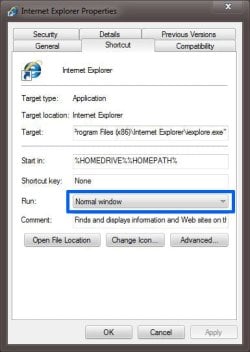
If you right click the short cut it should give you an option to change the window size under 'Run'
 

Attachments

  • IE Window.JPG
    IE Window.JPG
    49.6 KB · Views: 9

My Computer

Computer type
PC/Desktop
Computer Manufacturer/Model Number
Self Build
OS
MS Windows 7 Professional 64-bit SP1
CPU
AMD FX(tm)-6100 Six-Core Processor Socket AM3+ (942)
Motherboard
ASUSTeK COMPUTER INC. SABERTOOTH 990FX (AM3r2)
Memory
8.00 GB Dual-Channel DDR3 @ 802MHz (11-11-11-36) 1.5Volts
Graphics Card(s)
NVIDIA GeForce GTX 560 Ti
Sound Card
Onboard Realtek HD
Monitor(s) Displays
shimian (1920x1080@60Hz)
Screen Resolution
1920*1080
Hard Drives
OCZ-AGIL ITY3 SATA Disk Device 120GB
PSU
Corsair TX 750
Case
Corsair
Cooling
WaterCooled
Keyboard
Microsoft Wired
Mouse
Logitech USB Optical TiltWheel Mouse
Internet Speed
Realtek PCIe GBE Family Controller 20MB*1MB
Antivirus
Avast
Browser
Firefox
Other Info
150GB Internal Hard Drive for Backing Up Important Files -
Hauppauge Nova-DT Dual DVB-T Tuner Device (+IR) -
USB PC Camera with Mic (SN9C105)
Have you tried this method?

Open a webpage with links on it. Drag the corners until the page is maximized. (Don't use the maximize in upper right corner).
Choose a link on that webpage you opened, and right-click that link, and choose: Open in a new window.
Drag the corners on that 2nd window until the page is maximized. (Don't use the Maximize Icon in upper-right corner).
Close the 1st window using the X in upper-right corner. Now close the 2nd window.
If that doesn't work, repeat the above, but instead, when closing both windows, hold Ctrl and Shift keys while clicking the X.
 

My Computer

Computer Manufacturer/Model Number
HP Pavillion dv5t (generation 1)
OS
Vista 64 bit and 32 bit (SP2)
CPU
Intel(R) Core(TM)2 Duo Processor T9400 (2.53 GHz
Memory
4GB DDR2 System Memory (2 Dimm)
Graphics Card(s)
512 MB NVIDIA GeForce 9600M GT
Monitor(s) Displays
15.4" diagonal WSXGA+ High-Definition HP BrightView Widescre
Screen Resolution
1680 x 1050
Hard Drives
320GB 5400RPM SATA Hard Drive with HP ProtectSmart Hard Drive Protection
Keyboard
Built-in HP
Mouse
Built in - Synaptics TouchPad V6.5 on PS/2 Port
Internet Speed
Max
Other Info
~ Intel Next-Gen Wireless-N Mini-card w/Bluetooth ~ Blu-Ray ROM DVD+/-R/RW ~ Integ. HDTV Hybrid Tuner ~ 12 Cell Battery ~ MS Office (Home Premium) 2007 ~
Thank you, Imperfect1. That worked first time. It strikes me as amazing that Microsoft, being fully aware of this glitch - which has been around for years - has still done nothing about it. Nice to know we can get people like you to help.

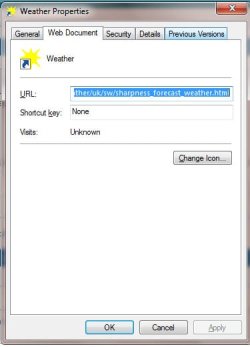
BTW thanks, Anthony, but Properties only give me the shortcut info (attached).
 

Attachments

  • Sc-Properties.jpg
    Sc-Properties.jpg
    36.3 KB · Views: 11

My Computer

Computer Manufacturer/Model Number
Dell - Dimension 9200
OS
Windows 7
CPU
Intel
Memory
4GB
Graphics Card(s)
GForce 8600 GTX
You're welcome. My pleasure. :)
 

My Computer

Computer Manufacturer/Model Number
HP Pavillion dv5t (generation 1)
OS
Vista 64 bit and 32 bit (SP2)
CPU
Intel(R) Core(TM)2 Duo Processor T9400 (2.53 GHz
Memory
4GB DDR2 System Memory (2 Dimm)
Graphics Card(s)
512 MB NVIDIA GeForce 9600M GT
Monitor(s) Displays
15.4" diagonal WSXGA+ High-Definition HP BrightView Widescre
Screen Resolution
1680 x 1050
Hard Drives
320GB 5400RPM SATA Hard Drive with HP ProtectSmart Hard Drive Protection
Keyboard
Built-in HP
Mouse
Built in - Synaptics TouchPad V6.5 on PS/2 Port
Internet Speed
Max
Other Info
~ Intel Next-Gen Wireless-N Mini-card w/Bluetooth ~ Blu-Ray ROM DVD+/-R/RW ~ Integ. HDTV Hybrid Tuner ~ 12 Cell Battery ~ MS Office (Home Premium) 2007 ~
Back
Top