IE9 Stops Working

eduede

New member
Power User
VIP
Local time
10:47 PM
Messages
141
Location
Chicago
Hi guys,

I'm experiencing an interesting problem. When I launch IE9 using the ie icon, the browser launches and then "stops working". The page doesn't even start to load. This problem happens with desktop icon, start menu icon, taskbar icon, ALL ie9 icon.

Here's the really strange thing, though. When I launch the browser by typing a web address into windows explorer, it works fine! The browser launches and does it's thing. So, the problem is clearly located in the icon.

Thoughts?

Best,
Eamon
 

My Computer

OS
Windows 7 Home Ultimate 64-Bit, Ubuntu 10.04 Lucid Lynx, Windows XP
CPU
Pentium i7 @fast
Memory
6GB DDR3 @fast
Graphics Card(s)
ATI Radeon HD 4600 Series (512mb) / ATI TV Wonder 650PCIe
Sound Card
Integrated
Monitor(s) Displays
32" VIZIO HDTV
Screen Resolution
1080p @super sharp
Hard Drives
Internal 500GB @7200rpm and not big enough cache
External 500GB @7200rpm and not big enough cache
Cooling
My apartment's AC / Chicago Winters
Keyboard
LG Bluetooth
Mouse
LG Bluetooth
Internet Speed
~21.50Mb/S Down, ~3.5Mb/S Up
It is still in beta, maybe it has a bug that affects it when loaded via a shortcut?
Hi guys,

I'm experiencing an interesting problem. When I launch IE9 using the ie icon, the browser launches and then "stops working". The page doesn't even start to load. This problem happens with desktop icon, start menu icon, taskbar icon, ALL ie9 icon.

Here's the really strange thing, though. When I launch the browser by typing a web address into windows explorer, it works fine! The browser launches and does it's thing. So, the problem is clearly located in the icon.

Thoughts?

Best,
Eamon
 

My Computer

Computer Manufacturer/Model Number
HP DV6 1330sa
OS
Windows 7 Professional 64 Bit SP1
CPU
INTEL DUAL CORE 2.1Ghz
Motherboard
N/A
Memory
4GB DDR3
Graphics Card(s)
INTEL
Sound Card
LAPTOP
Monitor(s) Displays
2
Screen Resolution
3200x1080
Hard Drives
250GB
PSU
LAPTOP
Case
LAPTOP
Cooling
LAPTOP
Keyboard
SOLID YEAR 260U
Mouse
USB
Internet Speed
20 MB/S
Just to be sure, have you tired typing something into the address bar? IE might be using a blank page as the homepage. I've been using it for sometime now with such problem.
 

My Computer

Computer type
Laptop
Computer Manufacturer/Model Number
Toshiba P775-S7100
OS
Windows 7 Professional SP1 64-bit
CPU
Intel Core i5-2450M @2.5 GHz
Memory
6 GB DDR3 1333MHz
Graphics Card(s)
Intel HD 3000
Monitor(s) Displays
Built-in 17.3" LED; 22" Insignia NS-L22Q-10A
Screen Resolution
1600x900; 1360x768
Hard Drives
750 GB Hitachi
1TB Seagate FreeAgent External
Internet Speed
Verizon DSL Speed(Down/Up): 3360 Kbps / 800 Kbps
Antivirus
MSE and MBAM Pro
Browser
IE10
Just to be sure, have you tired typing something into the address bar? IE might be using a blank page as the homepage. I've been using it for sometime now with such problem.

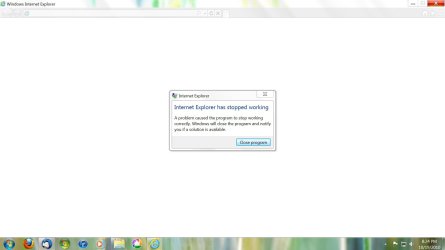
The program itself completely stops working.

See screenshot
 

Attachments

  • Capture.JPG
    Capture.JPG
    60.3 KB · Views: 109

My Computer

OS
Windows 7 Home Ultimate 64-Bit, Ubuntu 10.04 Lucid Lynx, Windows XP
CPU
Pentium i7 @fast
Memory
6GB DDR3 @fast
Graphics Card(s)
ATI Radeon HD 4600 Series (512mb) / ATI TV Wonder 650PCIe
Sound Card
Integrated
Monitor(s) Displays
32" VIZIO HDTV
Screen Resolution
1080p @super sharp
Hard Drives
Internal 500GB @7200rpm and not big enough cache
External 500GB @7200rpm and not big enough cache
Cooling
My apartment's AC / Chicago Winters
Keyboard
LG Bluetooth
Mouse
LG Bluetooth
Internet Speed
~21.50Mb/S Down, ~3.5Mb/S Up
Just to be sure, have you tired typing something into the address bar? IE might be using a blank page as the homepage. I've been using it for sometime now with such problem.

The program itself completely stops working.

See screenshot

Reinstall it
 

My Computer

Computer type
PC/Desktop
Computer Manufacturer/Model Number
Custom Build
OS
Windows 10 Pro x64, Arch Linux
CPU
Intel Core 2 Quad Q8200 OC'd 3.08GHz
Motherboard
Asus Rampage formula LGA775
Memory
8GB DDR2 900Mhz
Graphics Card(s)
MSI GT730 2GB GDDR5 (Kepler)
Sound Card
Supreme FX2
Monitor(s) Displays
Samsung LS22F350 LED
Screen Resolution
1080P
Hard Drives
Kingston SSDNow UV400 120GB, 500GB Hitachi, 2TB Samsung, 500GB Seagate FreeAgent, 640GB Samsung, 160GB Toshiba (Arch)
PSU
AeroCool 500W Bronze
Cooling
Cooler Master V6 + 3X fans
Keyboard
Prolink keyboard
Mouse
Logitech M705
Internet Speed
1MiB/s
Browser
Chrome Beta
This problem started as soon as IE9b came out of the gate. Try these three suggestions in order.

1.) Whether or not you have add-ons go to:

  • Start
  • All Programs
  • Accessories
  • System Tools
  • Internet Explorer (No add-ons)
  • The Zynga Toolbar seems to be the biggest offender.
2.) You can also try the Advance Tab in IE Options, and turn off third party browser extensions.

3.) Also on the Advanced tab:

  • Check the Use software rendering instead of GPU rendering box
  • Click OK
  • Open Internet Explorer
 

My Computer

Computer type
PC/Desktop
Computer Manufacturer/Model Number
Gateway DX4831-01e (Mid-Tower Desktop)
OS
Originally Win 7 Hm Prem x64 Ver 6.1.7600 Build 7601-SP1 | Upgraded to Windows 10 December 14, 2019
CPU
Intel i3 530 2.93GHz, 2933MHz 2 Cores 4 Logical Processors
Motherboard
Gateway H57M01 133 megahertz
Memory
6GB of 1,333MHz DDR3 SDRAM
Graphics Card(s)
32MB Intel Graphics Media Accelerator HD IGChip
Sound Card
Realtek High Definition Audio
Monitor(s) Displays
Gateway HX2000 20inch TFT active matrix TN
Screen Resolution
1600 x 900 x 59 hertz
Hard Drives
WDC WD10EADS-00M2B0 [HDD] (1000.20 GB) -- drive 0,
HL-DT-ST DVDRAM GH41N [CD-ROM dr]
Four card readers, and Four USB 2.0
PSU
300watts.
Case
Mid-Tower Desktop
Cooling
Stock from Gateway
Keyboard
Natural Ergonomic Keyboard 4000, see Other Info
Mouse
Orig. Gateway wore out now using Insignia USB wired optical
Internet Speed
Vz FIOS 10ms png 57.64Mbps down 65.53Mbps up Speedtest.org
Antivirus
Zamana Anti-logger with Anti-malware, MSE, Windows Firewall,
Browser
IE11.0.9600.19399-Upd ver11.0.135, Firefox 68.0.1 x64
Other Info
System Specs by Belarc.

BIOS: American Megatrends Inc. P01-A0 11/17/2009

Replaced the MS 'Natural' Standard PS/2 Enhanced 101-102 Keyboard with a new Natural Ergonomic Keyboard 4000 on August 1st 2014.

Canon Pixma MG3222 Printer.

Updated to IE11 on 12102015 | Fios Quantum Router g1100

Additional AV: SpywareBlaster, manual Mbam, SAS
Anak: I tried your options but I'm still experiencing the same problem. In fact, when I tried to launch IE9(no addons) it did the same thing... When I tried to use software graphics rendering, IE stopped running...

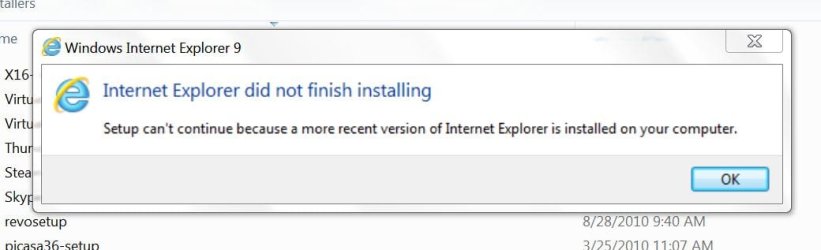
yowanvista: I went to uninstall IE9 (with the goal of reinstalling it later) but IE9 does not even appear in my list of installed programs in control pannel! I also looked to uninstall it with Revo and it wasn't in there either... So, I tried just running the installer (hoping it had a repair function) and I got a message saying that setup could not continue because a newer version of internet explorer is already installed :huh:

see screenshot
 

Attachments

  • Capture.JPG
    Capture.JPG
    36.5 KB · Views: 20
Last edited:

My Computer

OS
Windows 7 Home Ultimate 64-Bit, Ubuntu 10.04 Lucid Lynx, Windows XP
CPU
Pentium i7 @fast
Memory
6GB DDR3 @fast
Graphics Card(s)
ATI Radeon HD 4600 Series (512mb) / ATI TV Wonder 650PCIe
Sound Card
Integrated
Monitor(s) Displays
32" VIZIO HDTV
Screen Resolution
1080p @super sharp
Hard Drives
Internal 500GB @7200rpm and not big enough cache
External 500GB @7200rpm and not big enough cache
Cooling
My apartment's AC / Chicago Winters
Keyboard
LG Bluetooth
Mouse
LG Bluetooth
Internet Speed
~21.50Mb/S Down, ~3.5Mb/S Up
Anak: I tried your options but I'm still experiencing the same problem. In fact, when I tried to launch IE9(no addons) it did the same thing... When I tried to use software graphics rendering, IE stopped running...

yowanvista: I went to uninstall IE9 (with the goal of reinstalling it later) but IE9 does not even appear in my list of installed programs in control pannel! I also looked to uninstall it with Revo and it wasn't in there either... So, I tried just running the installer (hoping it had a repair function) and I got a message saying that setup could not continue because a newer version of internet explorer is already installed :huh:

see screenshot

Uninstall it

Control Panel>Programs>Program and features>Installed Updates
 

My Computer

Computer type
PC/Desktop
Computer Manufacturer/Model Number
Custom Build
OS
Windows 10 Pro x64, Arch Linux
CPU
Intel Core 2 Quad Q8200 OC'd 3.08GHz
Motherboard
Asus Rampage formula LGA775
Memory
8GB DDR2 900Mhz
Graphics Card(s)
MSI GT730 2GB GDDR5 (Kepler)
Sound Card
Supreme FX2
Monitor(s) Displays
Samsung LS22F350 LED
Screen Resolution
1080P
Hard Drives
Kingston SSDNow UV400 120GB, 500GB Hitachi, 2TB Samsung, 500GB Seagate FreeAgent, 640GB Samsung, 160GB Toshiba (Arch)
PSU
AeroCool 500W Bronze
Cooling
Cooler Master V6 + 3X fans
Keyboard
Prolink keyboard
Mouse
Logitech M705
Internet Speed
1MiB/s
Browser
Chrome Beta

My Computer

Computer type
PC/Desktop
Computer Manufacturer/Model Number
Gateway DX4831-01e (Mid-Tower Desktop)
OS
Originally Win 7 Hm Prem x64 Ver 6.1.7600 Build 7601-SP1 | Upgraded to Windows 10 December 14, 2019
CPU
Intel i3 530 2.93GHz, 2933MHz 2 Cores 4 Logical Processors
Motherboard
Gateway H57M01 133 megahertz
Memory
6GB of 1,333MHz DDR3 SDRAM
Graphics Card(s)
32MB Intel Graphics Media Accelerator HD IGChip
Sound Card
Realtek High Definition Audio
Monitor(s) Displays
Gateway HX2000 20inch TFT active matrix TN
Screen Resolution
1600 x 900 x 59 hertz
Hard Drives
WDC WD10EADS-00M2B0 [HDD] (1000.20 GB) -- drive 0,
HL-DT-ST DVDRAM GH41N [CD-ROM dr]
Four card readers, and Four USB 2.0
PSU
300watts.
Case
Mid-Tower Desktop
Cooling
Stock from Gateway
Keyboard
Natural Ergonomic Keyboard 4000, see Other Info
Mouse
Orig. Gateway wore out now using Insignia USB wired optical
Internet Speed
Vz FIOS 10ms png 57.64Mbps down 65.53Mbps up Speedtest.org
Antivirus
Zamana Anti-logger with Anti-malware, MSE, Windows Firewall,
Browser
IE11.0.9600.19399-Upd ver11.0.135, Firefox 68.0.1 x64
Other Info
System Specs by Belarc.

BIOS: American Megatrends Inc. P01-A0 11/17/2009

Replaced the MS 'Natural' Standard PS/2 Enhanced 101-102 Keyboard with a new Natural Ergonomic Keyboard 4000 on August 1st 2014.

Canon Pixma MG3222 Printer.

Updated to IE11 on 12102015 | Fios Quantum Router g1100

Additional AV: SpywareBlaster, manual Mbam, SAS
Hi guys,

I'm experiencing an interesting problem. When I launch IE9 using the ie icon, the browser launches and then "stops working". The page doesn't even start to load. This problem happens with desktop icon, start menu icon, taskbar icon, ALL ie9 icon.

Here's the really strange thing, though. When I launch the browser by typing a web address into windows explorer, it works fine! The browser launches and does it's thing. So, the problem is clearly located in the icon.

Thoughts?

Best,
Eamon

This has happened to me when IE9 closed due to a problem on a web page, when restarting it tries to open the same web page and you get an error saying IE has stopped working. Try opening IE by typing a web address like you said, then go to options and clear browser history, cookies, and cache. Them restart IE and all should be well again. Worked for me - Good luck
 

My Computer

Computer Manufacturer/Model Number
HP Pavilion e9107c
OS
Windows 7 Home Premium 64 bit
CPU
Intel Core 2 Quad Q8200 @ 2.33 GHz
Memory
8 GB DDR3
Graphics Card(s)
ATI Radeon HD 4350
Monitor(s) Displays
HP 23 in. High Definition (w2338h)
Screen Resolution
1920 x 1080
Hard Drives
750 GB
Keyboard
Logitech Illuminated keyboard
Mouse
Logitech Laser mouse
This has happened to me when IE9 closed due to a problem on a web page, when restarting it tries to open the same web page and you get an error saying IE has stopped working. Try opening IE by typing a web address like you said, then go to options and clear browser history, cookies, and cache. Them restart IE and all should be well again. Worked for me - Good luck

That's the fix. Problem solved. from your description, I was even able to pinpoint what caused the problem in the first place (tried to open a .ppt in a new tab).

Thanks!

SOLVED
 

My Computer

OS
Windows 7 Home Ultimate 64-Bit, Ubuntu 10.04 Lucid Lynx, Windows XP
CPU
Pentium i7 @fast
Memory
6GB DDR3 @fast
Graphics Card(s)
ATI Radeon HD 4600 Series (512mb) / ATI TV Wonder 650PCIe
Sound Card
Integrated
Monitor(s) Displays
32" VIZIO HDTV
Screen Resolution
1080p @super sharp
Hard Drives
Internal 500GB @7200rpm and not big enough cache
External 500GB @7200rpm and not big enough cache
Cooling
My apartment's AC / Chicago Winters
Keyboard
LG Bluetooth
Mouse
LG Bluetooth
Internet Speed
~21.50Mb/S Down, ~3.5Mb/S Up
Back
Top