My Computer
- Computer Manufacturer/Model Number
- Dell 17-1750 Laptop
- OS
- Windows 7 Home Premium 64
- CPU
- Pentium Duo 2.54
- Memory
- 4GB
- Screen Resolution
- 1920 x 1080
- Hard Drives
- 1 500GB
- Mouse
- Dell Optical
- Internet Speed
- 768KB
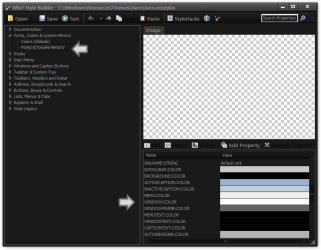
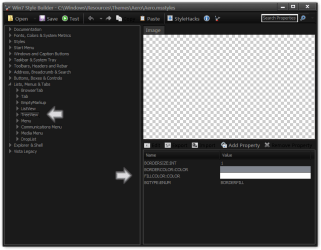
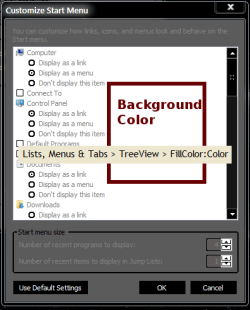
In Windows Style Builder it's a fill color if you are using a resource hacker I do not know how to get to it.What is the image # for the "All Programs" background. This is not the "Recent List" (809, 811, 812, 815) which opens first when you press the "Start Menu" button. I exported all the images and have tried several and none have worked. thanks...
Looks like I can't get there from here. Thanks Jerry...In Windows Style Builder it's a fill color if you are using a resource hacker I do not know how to get to it.What is the image # for the "All Programs" background. This is not the "Recent List" (809, 811, 812, 815) which opens first when you press the "Start Menu" button. I exported all the images and have tried several and none have worked. thanks...
Jerry
I could change a aero.msstyles to your color & post it then you could go from there.Looks like I can't get there from here. Thanks Jerry...In Windows Style Builder it's a fill color if you are using a resource hacker I do not know how to get to it.What is the image # for the "All Programs" background. This is not the "Recent List" (809, 811, 812, 815) which opens first when you press the "Start Menu" button. I exported all the images and have tried several and none have worked. thanks...
Jerry
If you are going to change it with WSB, would it change the original image numbers?I could change a aero.msstyles to your color & post it then you could go from there.
Jerry
Yes I just checkIf you are going to change it with WSB, would it change the original image numbers?I could change a aero.msstyles to your color & post it then you could go from there.
Jerry
I was afraid of that. I guess I will have to live with it unless I can find the address of the hex code - I want to try and maintain the original MS layout. thanks JerryYes I just checkIf you are going to change it with WSB, would it change the original image numbers?I could change a aero.msstyles to your color & post it then you could go from there.
Jerry
Jerry
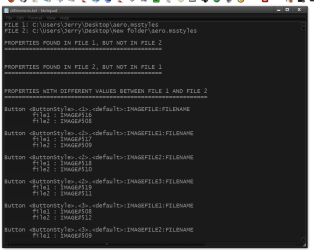
WSB comes with a Differences Tool & give a text file that shows the different #s if that would help.I was afraid of that. I guess I will have to live with it unless I can find the address of the hex code - I want to try and maintain the original MS layout. thanks JerryYes I just checkIf you are going to change it with WSB, would it change the original image numbers?
Jerry
It looks like a good idea, but let me think it over and I will get back with you either way. I do have a question about WSB; why does it change the image numbers?WSB comes with a Differences Tool & give a text file that shows the different #s if that would help.
Jerry
I do not know.It looks like a good idea, but let me think it over and I will get back with you either way. I do have a question about WSB; why does it change the image numbers?
Jerry I am still looking and it appears there are several background areas that are not images like the start menu All Programs background.I do not know.It looks like a good idea, but let me think it over and I will get back with you either way. I do have a question about WSB; why does it change the image numbers?
Let me know.
Jerry
Yes there is a few, there are some shadows and some lines also. You can change most all text colors and fonts except some black text in the property Windows there is one or two more areas also.Jerry I am still looking and it appears there are several background areas that are not images like the start menu All Programs background.


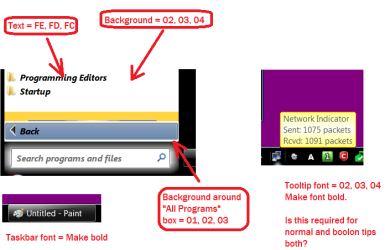
Jerry, here is a image of what changes I would like (5 in all) and the styles files. If you do not want to do this, I fully understand and thanks for everything.
Edit: The reason for the odd numbers is to be able to find them in the UIFile. thanks
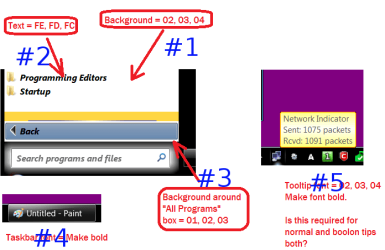
I can do that. I took your screenshot and the number them so it will be easier for us understand.
#1 what color would you like?
#2 do you want a different font? That font will change some other fonts to.
#3 what would you like to their.
#4 I can make that bold.
#5 that can be made bold to, the tool tips for the network meter on the taskbar if you have a laptop can not be changed and the same goes for the tooltips in Windows Explorer but them 2 the color can be changed but that changes color in all tooltips.
Jerry
The colors I was looking for is the hex values I have beside the item. They are converted to decimal below:
1. "All Programs List" text: Red=254, Green=253, Blue=252
2. "All Programs List" background: Red=02, Green=03, Blue=04
3. Around "All Programs Box": Red=01, Green=02, Blue=04
4. Text style is ok.
5. Ok, go ahead and just bold it and I will have deal with what happens. thanks
Roger

I can do that. I took your screenshot and the number them so it will be easier for us understand.
#1 what color would you like?
#2 do you want a different font? That font will change some other fonts to.
#3 what would you like to their.
#4 I can make that bold.
#5 that can be made bold to, the tool tips for the network meter on the taskbar if you have a laptop can not be changed and the same goes for the tooltips in Windows Explorer but them 2 the color can be changed but that changes color in all tooltips.
Jerry
The colors I was looking for is the hex values I have beside the item. They are converted to decimal below:
1. "All Programs List" text: Red=254, Green=253, Blue=252
2. "All Programs List" background: Red=02, Green=03, Blue=04
3. Around "All Programs Box": Red=01, Green=02, Blue=04
4. Text style is ok.
5. Ok, go ahead and just bold it and I will have deal with what happens. thanks
Roger
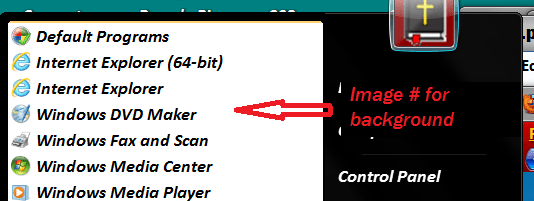
Jerry I missed the text color for the tooltip in decimal. Make it the same as #3. thanks
The colors I was looking for is the hex values I have beside the item. They are converted to decimal below:
1. "All Programs List" text: Red=254, Green=253, Blue=252
2. "All Programs List" background: Red=02, Green=03, Blue=04
3. Around "All Programs Box": Red=01, Green=02, Blue=04
4. Text style is ok.
5. Ok, go ahead and just bold it and I will have deal with what happens. thanks
Roger
Jerry I missed the text color for the tooltip in decimal. Make it the same as #3. thanks
You did miss the background around the "All Programs" box (#3), but I can live with it. thanksI thing I got it.
Let me know.
Jerry
Can yo post a screenshot of the bleed over so I can see it.You did miss the background around the "All Programs" box (#3), but I can live with it. thanksI thing I got it.
Let me know.
Jerry
Roger
Edit: Why does the "Recent List" background color bleed over into the "All Programs List"?