Image # for Start Menu "All Programs" background

rdwray

New member
Member
VIP
Local time
2:19 PM
Messages
170
What is the image # for the "All Programs" background. This is not the "Recent List" (809, 811, 812, 815) which opens first when you press the "Start Menu" button. I exported all the images and have tried several and none have worked. thanks...
 

Attachments

  • All Programs.png
    All Programs.png
    31.2 KB · Views: 7

My Computer

Computer Manufacturer/Model Number
Dell 17-1750 Laptop
OS
Windows 7 Home Premium 64
CPU
Pentium Duo 2.54
Memory
4GB
Screen Resolution
1920 x 1080
Hard Drives
1 500GB
Mouse
Dell Optical
Internet Speed
768KB
What is the image # for the "All Programs" background. This is not the "Recent List" (809, 811, 812, 815) which opens first when you press the "Start Menu" button. I exported all the images and have tried several and none have worked. thanks...
In Windows Style Builder it's a fill color if you are using a resource hacker I do not know how to get to it.
Jerry
 

My Computer

Computer type
Laptop
Computer Manufacturer/Model Number
Sager NP9170
OS
Win 7 Pro x64 / Win 10 Pro
CPU
Intel(R) Core(TM) i7-3630QM CPU @ 2.40GHz
Motherboard
CLEVO P170EM
Memory
12 GB
Graphics Card(s)
(1) Intel(R) HD Graphics 4000 (2) NVIDIA GeForce GTX 675M
Sound Card
(1) Realtek High Definition Audio (2) Intel(R) Display Aud
Monitor(s) Displays
17.3
Screen Resolution
1920x1080
Hard Drives
(1) Samsung 860 EVO 500GB(OS) (1) Samsung 860 EVO 500GB(Data)
Keyboard
Backlite
Antivirus
MSE, Malwarebytes Pro
Browser
Firefox
Other Info
DESKTOP: Custom-built.
OS: Win 10 Pro x64.
CASE: Rosewill R5.
CPU: Intel I5 4670K CPU @ 3.40GHz.
CPU COOLER: Cool Master Hyper 212 EVO.
MOTHERBOARD: Asus Z87-A.
MEMORY: Kingston HyperX 2x4 GB.
GPU: Nvidia Geforce 650 TI.
PSU: Corsair TX750.
DRIVES: (1) Samsung 840 120 GB SSD (2) Western Digital blue 500 GB 7200 RPM.
What is the image # for the "All Programs" background. This is not the "Recent List" (809, 811, 812, 815) which opens first when you press the "Start Menu" button. I exported all the images and have tried several and none have worked. thanks...
In Windows Style Builder it's a fill color if you are using a resource hacker I do not know how to get to it.
Jerry
Looks like I can't get there from here. Thanks Jerry...
 

My Computer

Computer Manufacturer/Model Number
Dell 17-1750 Laptop
OS
Windows 7 Home Premium 64
CPU
Pentium Duo 2.54
Memory
4GB
Screen Resolution
1920 x 1080
Hard Drives
1 500GB
Mouse
Dell Optical
Internet Speed
768KB
What is the image # for the "All Programs" background. This is not the "Recent List" (809, 811, 812, 815) which opens first when you press the "Start Menu" button. I exported all the images and have tried several and none have worked. thanks...
In Windows Style Builder it's a fill color if you are using a resource hacker I do not know how to get to it.
Jerry
Looks like I can't get there from here. Thanks Jerry...
I could change a aero.msstyles to your color & post it then you could go from there.
Jerry
 

My Computer

Computer type
Laptop
Computer Manufacturer/Model Number
Sager NP9170
OS
Win 7 Pro x64 / Win 10 Pro
CPU
Intel(R) Core(TM) i7-3630QM CPU @ 2.40GHz
Motherboard
CLEVO P170EM
Memory
12 GB
Graphics Card(s)
(1) Intel(R) HD Graphics 4000 (2) NVIDIA GeForce GTX 675M
Sound Card
(1) Realtek High Definition Audio (2) Intel(R) Display Aud
Monitor(s) Displays
17.3
Screen Resolution
1920x1080
Hard Drives
(1) Samsung 860 EVO 500GB(OS) (1) Samsung 860 EVO 500GB(Data)
Keyboard
Backlite
Antivirus
MSE, Malwarebytes Pro
Browser
Firefox
Other Info
DESKTOP: Custom-built.
OS: Win 10 Pro x64.
CASE: Rosewill R5.
CPU: Intel I5 4670K CPU @ 3.40GHz.
CPU COOLER: Cool Master Hyper 212 EVO.
MOTHERBOARD: Asus Z87-A.
MEMORY: Kingston HyperX 2x4 GB.
GPU: Nvidia Geforce 650 TI.
PSU: Corsair TX750.
DRIVES: (1) Samsung 840 120 GB SSD (2) Western Digital blue 500 GB 7200 RPM.

My Computer

Computer Manufacturer/Model Number
Dell 17-1750 Laptop
OS
Windows 7 Home Premium 64
CPU
Pentium Duo 2.54
Memory
4GB
Screen Resolution
1920 x 1080
Hard Drives
1 500GB
Mouse
Dell Optical
Internet Speed
768KB

My Computer

Computer type
Laptop
Computer Manufacturer/Model Number
Sager NP9170
OS
Win 7 Pro x64 / Win 10 Pro
CPU
Intel(R) Core(TM) i7-3630QM CPU @ 2.40GHz
Motherboard
CLEVO P170EM
Memory
12 GB
Graphics Card(s)
(1) Intel(R) HD Graphics 4000 (2) NVIDIA GeForce GTX 675M
Sound Card
(1) Realtek High Definition Audio (2) Intel(R) Display Aud
Monitor(s) Displays
17.3
Screen Resolution
1920x1080
Hard Drives
(1) Samsung 860 EVO 500GB(OS) (1) Samsung 860 EVO 500GB(Data)
Keyboard
Backlite
Antivirus
MSE, Malwarebytes Pro
Browser
Firefox
Other Info
DESKTOP: Custom-built.
OS: Win 10 Pro x64.
CASE: Rosewill R5.
CPU: Intel I5 4670K CPU @ 3.40GHz.
CPU COOLER: Cool Master Hyper 212 EVO.
MOTHERBOARD: Asus Z87-A.
MEMORY: Kingston HyperX 2x4 GB.
GPU: Nvidia Geforce 650 TI.
PSU: Corsair TX750.
DRIVES: (1) Samsung 840 120 GB SSD (2) Western Digital blue 500 GB 7200 RPM.
I could change a aero.msstyles to your color & post it then you could go from there.
Jerry
If you are going to change it with WSB, would it change the original image numbers?
Yes I just check
Jerry
I was afraid of that. I guess I will have to live with it unless I can find the address of the hex code - I want to try and maintain the original MS layout. thanks Jerry
 

My Computer

Computer Manufacturer/Model Number
Dell 17-1750 Laptop
OS
Windows 7 Home Premium 64
CPU
Pentium Duo 2.54
Memory
4GB
Screen Resolution
1920 x 1080
Hard Drives
1 500GB
Mouse
Dell Optical
Internet Speed
768KB
If you are going to change it with WSB, would it change the original image numbers?
Yes I just check
Jerry
I was afraid of that. I guess I will have to live with it unless I can find the address of the hex code - I want to try and maintain the original MS layout. thanks Jerry
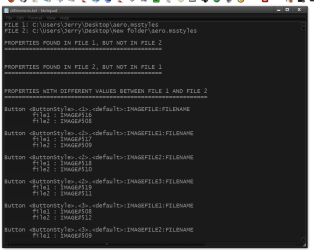
WSB comes with a Differences Tool & give a text file that shows the different #s if that would help.
Jerry
 

Attachments

  • differences.txt - Notepad.png
    differences.txt - Notepad.png
    49.7 KB · Views: 29

My Computer

Computer type
Laptop
Computer Manufacturer/Model Number
Sager NP9170
OS
Win 7 Pro x64 / Win 10 Pro
CPU
Intel(R) Core(TM) i7-3630QM CPU @ 2.40GHz
Motherboard
CLEVO P170EM
Memory
12 GB
Graphics Card(s)
(1) Intel(R) HD Graphics 4000 (2) NVIDIA GeForce GTX 675M
Sound Card
(1) Realtek High Definition Audio (2) Intel(R) Display Aud
Monitor(s) Displays
17.3
Screen Resolution
1920x1080
Hard Drives
(1) Samsung 860 EVO 500GB(OS) (1) Samsung 860 EVO 500GB(Data)
Keyboard
Backlite
Antivirus
MSE, Malwarebytes Pro
Browser
Firefox
Other Info
DESKTOP: Custom-built.
OS: Win 10 Pro x64.
CASE: Rosewill R5.
CPU: Intel I5 4670K CPU @ 3.40GHz.
CPU COOLER: Cool Master Hyper 212 EVO.
MOTHERBOARD: Asus Z87-A.
MEMORY: Kingston HyperX 2x4 GB.
GPU: Nvidia Geforce 650 TI.
PSU: Corsair TX750.
DRIVES: (1) Samsung 840 120 GB SSD (2) Western Digital blue 500 GB 7200 RPM.
WSB comes with a Differences Tool & give a text file that shows the different #s if that would help.
Jerry
It looks like a good idea, but let me think it over and I will get back with you either way. I do have a question about WSB; why does it change the image numbers?
 

My Computer

Computer Manufacturer/Model Number
Dell 17-1750 Laptop
OS
Windows 7 Home Premium 64
CPU
Pentium Duo 2.54
Memory
4GB
Screen Resolution
1920 x 1080
Hard Drives
1 500GB
Mouse
Dell Optical
Internet Speed
768KB
It looks like a good idea, but let me think it over and I will get back with you either way. I do have a question about WSB; why does it change the image numbers?
I do not know.
Let me know.
Jerry
 

My Computer

Computer type
Laptop
Computer Manufacturer/Model Number
Sager NP9170
OS
Win 7 Pro x64 / Win 10 Pro
CPU
Intel(R) Core(TM) i7-3630QM CPU @ 2.40GHz
Motherboard
CLEVO P170EM
Memory
12 GB
Graphics Card(s)
(1) Intel(R) HD Graphics 4000 (2) NVIDIA GeForce GTX 675M
Sound Card
(1) Realtek High Definition Audio (2) Intel(R) Display Aud
Monitor(s) Displays
17.3
Screen Resolution
1920x1080
Hard Drives
(1) Samsung 860 EVO 500GB(OS) (1) Samsung 860 EVO 500GB(Data)
Keyboard
Backlite
Antivirus
MSE, Malwarebytes Pro
Browser
Firefox
Other Info
DESKTOP: Custom-built.
OS: Win 10 Pro x64.
CASE: Rosewill R5.
CPU: Intel I5 4670K CPU @ 3.40GHz.
CPU COOLER: Cool Master Hyper 212 EVO.
MOTHERBOARD: Asus Z87-A.
MEMORY: Kingston HyperX 2x4 GB.
GPU: Nvidia Geforce 650 TI.
PSU: Corsair TX750.
DRIVES: (1) Samsung 840 120 GB SSD (2) Western Digital blue 500 GB 7200 RPM.
It looks like a good idea, but let me think it over and I will get back with you either way. I do have a question about WSB; why does it change the image numbers?
I do not know.
Let me know.
Jerry
Jerry I am still looking and it appears there are several background areas that are not images like the start menu All Programs background.
 

My Computer

Computer Manufacturer/Model Number
Dell 17-1750 Laptop
OS
Windows 7 Home Premium 64
CPU
Pentium Duo 2.54
Memory
4GB
Screen Resolution
1920 x 1080
Hard Drives
1 500GB
Mouse
Dell Optical
Internet Speed
768KB
Jerry I am still looking and it appears there are several background areas that are not images like the start menu All Programs background.
Yes there is a few, there are some shadows and some lines also. You can change most all text colors and fonts except some black text in the property Windows there is one or two more areas also.

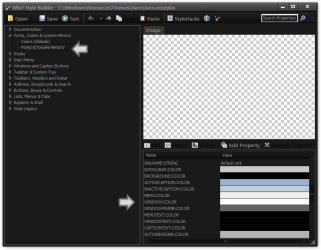
This screenshot shows where to change the all programs start menu color.
Win7 Style Builder - CWindowsResourcesThemesAeroAero.msstyles2.png
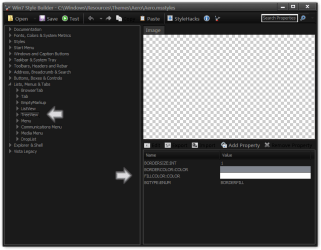
Here shows where to change some window color this one changes like the notepad background.
Win7 Style Builder - CWindowsResourcesThemesAeroAero.msstyles.png
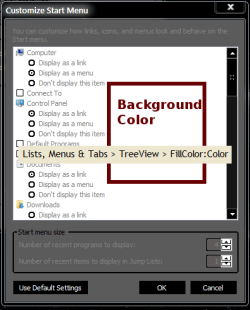
This one shows where to change the Customize Start Menu background color.
Win7 Style Builder - CWindowsResourcesThemesAeroAero.msstyles3.pngCustomizieStartMenuWindow.PNG

This one shows the location of the right side of the start menu and it shows the image number so no matter what theme you open up that's where that image will be even if the number changes.
Win7 Style Builder - CWindowsResourcesThemesAeroAero.msstyles5.png
If you need more information on this I'll be glad to give it to you if I can.
Jerry
 

My Computer

Computer type
Laptop
Computer Manufacturer/Model Number
Sager NP9170
OS
Win 7 Pro x64 / Win 10 Pro
CPU
Intel(R) Core(TM) i7-3630QM CPU @ 2.40GHz
Motherboard
CLEVO P170EM
Memory
12 GB
Graphics Card(s)
(1) Intel(R) HD Graphics 4000 (2) NVIDIA GeForce GTX 675M
Sound Card
(1) Realtek High Definition Audio (2) Intel(R) Display Aud
Monitor(s) Displays
17.3
Screen Resolution
1920x1080
Hard Drives
(1) Samsung 860 EVO 500GB(OS) (1) Samsung 860 EVO 500GB(Data)
Keyboard
Backlite
Antivirus
MSE, Malwarebytes Pro
Browser
Firefox
Other Info
DESKTOP: Custom-built.
OS: Win 10 Pro x64.
CASE: Rosewill R5.
CPU: Intel I5 4670K CPU @ 3.40GHz.
CPU COOLER: Cool Master Hyper 212 EVO.
MOTHERBOARD: Asus Z87-A.
MEMORY: Kingston HyperX 2x4 GB.
GPU: Nvidia Geforce 650 TI.
PSU: Corsair TX750.
DRIVES: (1) Samsung 840 120 GB SSD (2) Western Digital blue 500 GB 7200 RPM.
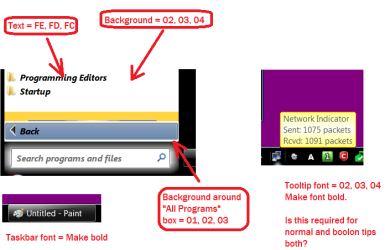
Jerry, here is a image of what changes I would like (5 in all) and the styles files. If you do not want to do this, I fully understand and thanks for everything.

Edit: The reason for the odd numbers is to be able to find them in the UIFile. thanks
 

Attachments

  • MsStyles Changes.png
    MsStyles Changes.png
    37.2 KB · Views: 15
  • aero.zip
    aero.zip
    816 KB · Views: 18

My Computer

Computer Manufacturer/Model Number
Dell 17-1750 Laptop
OS
Windows 7 Home Premium 64
CPU
Pentium Duo 2.54
Memory
4GB
Screen Resolution
1920 x 1080
Hard Drives
1 500GB
Mouse
Dell Optical
Internet Speed
768KB
Jerry, here is a image of what changes I would like (5 in all) and the styles files. If you do not want to do this, I fully understand and thanks for everything.

Edit: The reason for the odd numbers is to be able to find them in the UIFile. thanks

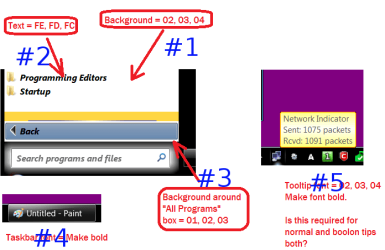
I can do that. I took your screenshot and the number them so it will be easier for us understand.
#1 what color would you like?
#2 do you want a different font? That font will change some other fonts to.
#3 what would you like to their.
#4 I can make that bold.
#5 that can be made bold to, the tool tips for the network meter on the taskbar if you have a laptop can not be changed and the same goes for the tooltips in Windows Explorer but them 2 the color can be changed but that changes color in all tooltips.
Jerry
 

Attachments

  • MsStyles Changes.png
    MsStyles Changes.png
    42 KB · Views: 5

My Computer

Computer type
Laptop
Computer Manufacturer/Model Number
Sager NP9170
OS
Win 7 Pro x64 / Win 10 Pro
CPU
Intel(R) Core(TM) i7-3630QM CPU @ 2.40GHz
Motherboard
CLEVO P170EM
Memory
12 GB
Graphics Card(s)
(1) Intel(R) HD Graphics 4000 (2) NVIDIA GeForce GTX 675M
Sound Card
(1) Realtek High Definition Audio (2) Intel(R) Display Aud
Monitor(s) Displays
17.3
Screen Resolution
1920x1080
Hard Drives
(1) Samsung 860 EVO 500GB(OS) (1) Samsung 860 EVO 500GB(Data)
Keyboard
Backlite
Antivirus
MSE, Malwarebytes Pro
Browser
Firefox
Other Info
DESKTOP: Custom-built.
OS: Win 10 Pro x64.
CASE: Rosewill R5.
CPU: Intel I5 4670K CPU @ 3.40GHz.
CPU COOLER: Cool Master Hyper 212 EVO.
MOTHERBOARD: Asus Z87-A.
MEMORY: Kingston HyperX 2x4 GB.
GPU: Nvidia Geforce 650 TI.
PSU: Corsair TX750.
DRIVES: (1) Samsung 840 120 GB SSD (2) Western Digital blue 500 GB 7200 RPM.
I can do that. I took your screenshot and the number them so it will be easier for us understand.
#1 what color would you like?
#2 do you want a different font? That font will change some other fonts to.
#3 what would you like to their.
#4 I can make that bold.
#5 that can be made bold to, the tool tips for the network meter on the taskbar if you have a laptop can not be changed and the same goes for the tooltips in Windows Explorer but them 2 the color can be changed but that changes color in all tooltips.
Jerry

The colors I was looking for is the hex values I have beside the item. They are converted to decimal below:

1. "All Programs List" text: Red=254, Green=253, Blue=252
2. "All Programs List" background: Red=02, Green=03, Blue=04
3. Around "All Programs Box": Red=01, Green=02, Blue=04
4. Text style is ok.
5. Ok, go ahead and just bold it and I will have deal with what happens. thanks
Roger

 

My Computer

Computer Manufacturer/Model Number
Dell 17-1750 Laptop
OS
Windows 7 Home Premium 64
CPU
Pentium Duo 2.54
Memory
4GB
Screen Resolution
1920 x 1080
Hard Drives
1 500GB
Mouse
Dell Optical
Internet Speed
768KB
I can do that. I took your screenshot and the number them so it will be easier for us understand.
#1 what color would you like?
#2 do you want a different font? That font will change some other fonts to.
#3 what would you like to their.
#4 I can make that bold.
#5 that can be made bold to, the tool tips for the network meter on the taskbar if you have a laptop can not be changed and the same goes for the tooltips in Windows Explorer but them 2 the color can be changed but that changes color in all tooltips.
Jerry

The colors I was looking for is the hex values I have beside the item. They are converted to decimal below:

1. "All Programs List" text: Red=254, Green=253, Blue=252
2. "All Programs List" background: Red=02, Green=03, Blue=04
3. Around "All Programs Box": Red=01, Green=02, Blue=04
4. Text style is ok.
5. Ok, go ahead and just bold it and I will have deal with what happens. thanks
Roger

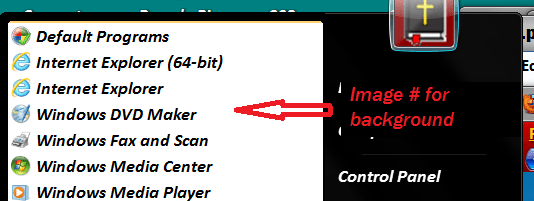
Jerry I missed the text color for the tooltip in decimal. Make it the same as #3. thanks
 

My Computer

Computer Manufacturer/Model Number
Dell 17-1750 Laptop
OS
Windows 7 Home Premium 64
CPU
Pentium Duo 2.54
Memory
4GB
Screen Resolution
1920 x 1080
Hard Drives
1 500GB
Mouse
Dell Optical
Internet Speed
768KB
The colors I was looking for is the hex values I have beside the item. They are converted to decimal below:

1. "All Programs List" text: Red=254, Green=253, Blue=252
2. "All Programs List" background: Red=02, Green=03, Blue=04
3. Around "All Programs Box": Red=01, Green=02, Blue=04
4. Text style is ok.
5. Ok, go ahead and just bold it and I will have deal with what happens. thanks
Roger

Jerry I missed the text color for the tooltip in decimal. Make it the same as #3. thanks

OK give me give me a couple of hours.
Jerry
 

My Computer

Computer type
Laptop
Computer Manufacturer/Model Number
Sager NP9170
OS
Win 7 Pro x64 / Win 10 Pro
CPU
Intel(R) Core(TM) i7-3630QM CPU @ 2.40GHz
Motherboard
CLEVO P170EM
Memory
12 GB
Graphics Card(s)
(1) Intel(R) HD Graphics 4000 (2) NVIDIA GeForce GTX 675M
Sound Card
(1) Realtek High Definition Audio (2) Intel(R) Display Aud
Monitor(s) Displays
17.3
Screen Resolution
1920x1080
Hard Drives
(1) Samsung 860 EVO 500GB(OS) (1) Samsung 860 EVO 500GB(Data)
Keyboard
Backlite
Antivirus
MSE, Malwarebytes Pro
Browser
Firefox
Other Info
DESKTOP: Custom-built.
OS: Win 10 Pro x64.
CASE: Rosewill R5.
CPU: Intel I5 4670K CPU @ 3.40GHz.
CPU COOLER: Cool Master Hyper 212 EVO.
MOTHERBOARD: Asus Z87-A.
MEMORY: Kingston HyperX 2x4 GB.
GPU: Nvidia Geforce 650 TI.
PSU: Corsair TX750.
DRIVES: (1) Samsung 840 120 GB SSD (2) Western Digital blue 500 GB 7200 RPM.
I thing I got it.
Let me know.
Jerry
 

Attachments

My Computer

Computer type
Laptop
Computer Manufacturer/Model Number
Sager NP9170
OS
Win 7 Pro x64 / Win 10 Pro
CPU
Intel(R) Core(TM) i7-3630QM CPU @ 2.40GHz
Motherboard
CLEVO P170EM
Memory
12 GB
Graphics Card(s)
(1) Intel(R) HD Graphics 4000 (2) NVIDIA GeForce GTX 675M
Sound Card
(1) Realtek High Definition Audio (2) Intel(R) Display Aud
Monitor(s) Displays
17.3
Screen Resolution
1920x1080
Hard Drives
(1) Samsung 860 EVO 500GB(OS) (1) Samsung 860 EVO 500GB(Data)
Keyboard
Backlite
Antivirus
MSE, Malwarebytes Pro
Browser
Firefox
Other Info
DESKTOP: Custom-built.
OS: Win 10 Pro x64.
CASE: Rosewill R5.
CPU: Intel I5 4670K CPU @ 3.40GHz.
CPU COOLER: Cool Master Hyper 212 EVO.
MOTHERBOARD: Asus Z87-A.
MEMORY: Kingston HyperX 2x4 GB.
GPU: Nvidia Geforce 650 TI.
PSU: Corsair TX750.
DRIVES: (1) Samsung 840 120 GB SSD (2) Western Digital blue 500 GB 7200 RPM.
I thing I got it.
Let me know.
Jerry
You did miss the background around the "All Programs" box (#3), but I can live with it. thanks
Roger

Edit: Why does the "Recent List" background color bleed over into the "All Programs List"?
 

My Computer

Computer Manufacturer/Model Number
Dell 17-1750 Laptop
OS
Windows 7 Home Premium 64
CPU
Pentium Duo 2.54
Memory
4GB
Screen Resolution
1920 x 1080
Hard Drives
1 500GB
Mouse
Dell Optical
Internet Speed
768KB
I thing I got it.
Let me know.
Jerry
You did miss the background around the "All Programs" box (#3), but I can live with it. thanks
Roger

Edit: Why does the "Recent List" background color bleed over into the "All Programs List"?
Can yo post a screenshot of the bleed over so I can see it.
Here is 1 with #3 done.
Jerry
 

Attachments

My Computer

Computer type
Laptop
Computer Manufacturer/Model Number
Sager NP9170
OS
Win 7 Pro x64 / Win 10 Pro
CPU
Intel(R) Core(TM) i7-3630QM CPU @ 2.40GHz
Motherboard
CLEVO P170EM
Memory
12 GB
Graphics Card(s)
(1) Intel(R) HD Graphics 4000 (2) NVIDIA GeForce GTX 675M
Sound Card
(1) Realtek High Definition Audio (2) Intel(R) Display Aud
Monitor(s) Displays
17.3
Screen Resolution
1920x1080
Hard Drives
(1) Samsung 860 EVO 500GB(OS) (1) Samsung 860 EVO 500GB(Data)
Keyboard
Backlite
Antivirus
MSE, Malwarebytes Pro
Browser
Firefox
Other Info
DESKTOP: Custom-built.
OS: Win 10 Pro x64.
CASE: Rosewill R5.
CPU: Intel I5 4670K CPU @ 3.40GHz.
CPU COOLER: Cool Master Hyper 212 EVO.
MOTHERBOARD: Asus Z87-A.
MEMORY: Kingston HyperX 2x4 GB.
GPU: Nvidia Geforce 650 TI.
PSU: Corsair TX750.
DRIVES: (1) Samsung 840 120 GB SSD (2) Western Digital blue 500 GB 7200 RPM.
Back
Top