Images are more important than ever

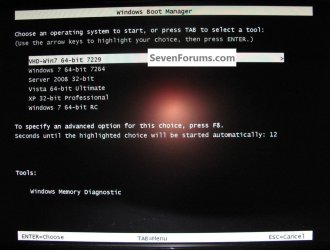
To return to the original theme of the thread, the use of disk images to make sure that you have a working system, the very neat feature of native boot from VHD has not had much of an airing here.

With only a few percent drop in performance it is possible to use a Virtual Hard Disk copy of your system that boots directly from the Windows 7 bootloader. Now we are talking files, not partitions.

The disk2vhd utility from the Sysinternals Suite of tools can create the VHD from your Windows 7 system, and EasyBCD can load the .vhd file as a bootable image that is accessed as an entry in the boot menu. Of course, this file can readily be cloned, and run on real hardware, unlike a .vhd in Virtual PC, VirtualBox or VMWare hypervisors.

Is anybody here doing this?
 

My Computer My Computer

At a glance

Win 7 Ult + Starter, XP Pro +Home, 2kAS, Linu...AMD 64 Athlon X2 , Intel Atom N450, Intel Cel...2.5GB ; 1GB; 2GBNvidia GeForce7000m; Intel; Intel
Computer Manufacturer/Model Number
Acer 7520, Packard Bell dot se, Acer travelmate 2423
OS
Win 7 Ult + Starter, XP Pro +Home, 2kAS, Linux Mint 8, SuperOS
CPU
AMD 64 Athlon X2 , Intel Atom N450, Intel Celeron M 1.50 Ghz
Motherboard
Acer Fuquene
Memory
2.5GB ; 1GB; 2GB
Graphics Card(s)
Nvidia GeForce7000m; Intel; Intel
Sound Card
Realtek AC57
Monitor(s) Displays
17" ;10.1"; 19"
Screen Resolution
1440x900;1024x600;1440x900;
Hard Drives
WD 80, WD 320;
PSU
19v
Case
Laptop
Cooling
Air
Internet Speed
9.7Mb/s down 0.99Mb/s up
Other Info
ISP VIRGINMEDIA 10M cable broadband - D-Link DIR615 wireless router, 3Com OfficeConnect ASDL router used as wireless extender switch

My Computer My Computer

At a glance

W 7 64-bit UltimateIntel Q9550 Yorkfield8GB Dominator 8500C5DATI : XFX 5870
Computer Manufacturer/Model Number
* BFK Customs *
OS
W 7 64-bit Ultimate
CPU
Intel Q9550 Yorkfield
Motherboard
ASUS P5Q Pro
Memory
8GB Dominator 8500C5D
Graphics Card(s)
ATI : XFX 5870
Sound Card
Realtek HD Audio 7-1
Monitor(s) Displays
1x 47" LCD HDMI & 3x 26" LCD HDMI
Screen Resolution
1920x1080P & 1920x1200
Hard Drives
1x 80GB Intel X25-M G2 SSD : 1x 500GB & 1x 640GB WD Caviar Black(s)
PSU
Corsair 620HX
Case
Cooler Master RC-690
Cooling
Tuniq Tower 120, 2x 140mm and 3x 120mm case fans
Keyboard
Microsoft 500
Mouse
Razer Diamondback 3G
Internet Speed
14 Mb/s
Other Info
1x Koutech 3Gb/s SATA HDD Hot Swap Rack
I will make a decision in the next few days.

As promised decision made.

I have decided not to do it at this time as I don't think the risks outweigh the benefits.

Plan B.

I have been thinking for a while that a Desktop would be a good idea. The laptop can then revert to being a test machine for any "experimentation" I might want to do. I guess it will be a few months before I can get the necessary cash together for that but planning is starting now.

I will open a new thread when the time comes.
 

My Computer My Computer

At a glance

Microsoft Windows 7 Home Premium 64-bit Servi...Intel(R) Core(TM) i3 CPU M 330 @ 2.13GHz8 GB DDR3Intel(R) HD Graphics
Computer type
Laptop
Computer Manufacturer/Model Number
Hewlett-Packard/G62-107SA Notebook
OS
Microsoft Windows 7 Home Premium 64-bit Service Pack 1
CPU
Intel(R) Core(TM) i3 CPU M 330 @ 2.13GHz
Motherboard
Hewlett-Packard 1425
Memory
8 GB DDR3
Graphics Card(s)
Intel(R) HD Graphics
Sound Card
Realtek High Definition Audio
Monitor(s) Displays
Builtin
Screen Resolution
1366 x 768 x 32 bits (4294967296 colors) @ 60 Hz
Hard Drives
250 GB SATA Hard Disk Drive 7200 rpm
2TB Seagate GoFlex USB 2 Drive
1TB Iomega Prestige USB 2 Drive
1.5TB Iomega Prestige USB 2 Drive (Samsung)
2TB WD MyBook Live NAS.
Mouse
Logitech Anywhere MX
Internet Speed
152 Mbs download 10 Mbs upload
Antivirus
Norton 360
Browser
Chrome
Hello Keith.


I hope our long-winded discourse didn't dissuade you from having a go. :confused:


You would be better served with a thread of your own in the Installation sub-forum.

My apologies and if you need further assistance you can PM me and I will do what I can.
 

My Computer My Computer

At a glance

W 7 64-bit UltimateIntel Q9550 Yorkfield8GB Dominator 8500C5DATI : XFX 5870
Computer Manufacturer/Model Number
* BFK Customs *
OS
W 7 64-bit Ultimate
CPU
Intel Q9550 Yorkfield
Motherboard
ASUS P5Q Pro
Memory
8GB Dominator 8500C5D
Graphics Card(s)
ATI : XFX 5870
Sound Card
Realtek HD Audio 7-1
Monitor(s) Displays
1x 47" LCD HDMI & 3x 26" LCD HDMI
Screen Resolution
1920x1080P & 1920x1200
Hard Drives
1x 80GB Intel X25-M G2 SSD : 1x 500GB & 1x 640GB WD Caviar Black(s)
PSU
Corsair 620HX
Case
Cooler Master RC-690
Cooling
Tuniq Tower 120, 2x 140mm and 3x 120mm case fans
Keyboard
Microsoft 500
Mouse
Razer Diamondback 3G
Internet Speed
14 Mb/s
Other Info
1x Koutech 3Gb/s SATA HDD Hot Swap Rack
You figure on building the desktop yourself or buy one?

Btw: did you have a look at my post #48. This was a follow-up on what SIW had suggested. That method would be very risk free and simple to do.
 

My Computer My Computer

At a glance

Vista, Windows7, Mint Mate, Zorin, Windows 8from 1.6GHz Duo to i7
Computer Manufacturer/Model Number
HP, Dell, Gateway, Toshiba - 4 laptops and 2 desktops
OS
Vista, Windows7, Mint Mate, Zorin, Windows 8
CPU
from 1.6GHz Duo to i7
Monitor(s) Displays
2x HP w2207
Hard Drives
5x HDD, 7x SSD, 12x Externals
Keyboard
with trackball - no mices
Mouse
Trackball mice
Internet Speed
DSL 6000
Hello Keith.


I hope our long-winded discourse didn't dissuade you from having a go. :confused:


You would be better served with a thread of your own in the Installation sub-forum.

My apologies and if you need further assistance you can PM me and I will do what I can.

Not at all. I very much appreciate the advice given. It is better to understand the views and concerns of of everyone up front.
 

My Computer My Computer

At a glance

Microsoft Windows 7 Home Premium 64-bit Servi...Intel(R) Core(TM) i3 CPU M 330 @ 2.13GHz8 GB DDR3Intel(R) HD Graphics
Computer type
Laptop
Computer Manufacturer/Model Number
Hewlett-Packard/G62-107SA Notebook
OS
Microsoft Windows 7 Home Premium 64-bit Service Pack 1
CPU
Intel(R) Core(TM) i3 CPU M 330 @ 2.13GHz
Motherboard
Hewlett-Packard 1425
Memory
8 GB DDR3
Graphics Card(s)
Intel(R) HD Graphics
Sound Card
Realtek High Definition Audio
Monitor(s) Displays
Builtin
Screen Resolution
1366 x 768 x 32 bits (4294967296 colors) @ 60 Hz
Hard Drives
250 GB SATA Hard Disk Drive 7200 rpm
2TB Seagate GoFlex USB 2 Drive
1TB Iomega Prestige USB 2 Drive
1.5TB Iomega Prestige USB 2 Drive (Samsung)
2TB WD MyBook Live NAS.
Mouse
Logitech Anywhere MX
Internet Speed
152 Mbs download 10 Mbs upload
Antivirus
Norton 360
Browser
Chrome
You figure on building the desktop yourself or buy one?

Btw: did you have a look at my post #48. This was a follow-up on what SIW had suggested. That method would be very risk free and simple to do.

I had sort of missed those in the general mix. I wasn't aware that the recovery partition couldn't be used for a repair install since SP1. It doesn't change my decision though. I now have my heart set on a desktop.

BTW does SP1 affect anything else like recovery disks etc?
 

My Computer My Computer

At a glance

Microsoft Windows 7 Home Premium 64-bit Servi...Intel(R) Core(TM) i3 CPU M 330 @ 2.13GHz8 GB DDR3Intel(R) HD Graphics
Computer type
Laptop
Computer Manufacturer/Model Number
Hewlett-Packard/G62-107SA Notebook
OS
Microsoft Windows 7 Home Premium 64-bit Service Pack 1
CPU
Intel(R) Core(TM) i3 CPU M 330 @ 2.13GHz
Motherboard
Hewlett-Packard 1425
Memory
8 GB DDR3
Graphics Card(s)
Intel(R) HD Graphics
Sound Card
Realtek High Definition Audio
Monitor(s) Displays
Builtin
Screen Resolution
1366 x 768 x 32 bits (4294967296 colors) @ 60 Hz
Hard Drives
250 GB SATA Hard Disk Drive 7200 rpm
2TB Seagate GoFlex USB 2 Drive
1TB Iomega Prestige USB 2 Drive
1.5TB Iomega Prestige USB 2 Drive (Samsung)
2TB WD MyBook Live NAS.
Mouse
Logitech Anywhere MX
Internet Speed
152 Mbs download 10 Mbs upload
Antivirus
Norton 360
Browser
Chrome
Yeah, desktops are a lot nicer than laptops. I only use the laptop when I have no other option. But some people prefer laptops - e.g. my wife. Just make sure you get a nice big screen (22" minimum). If you install an SSD or a Revo drive for the OS, then you really only need a midrange processor. This one is the best beat for the buck ( Newegg.com - AMD Phenom II X6 1100T Black Edition Thuban 3.3GHz, 3.7GHz Turbo 6 x 512KB L2 Cache 6MB L3 Cache Socket AM3 125W Six-Core Desktop Processor HDE00ZFBGRBOX ). I am not a gamer, so I use midrange graphics which come a lot cheaper. But if you do modern games, you can spend a fortune on a graphics card. The rest is pretty stock - a nice big box with good ventilation, a reliable PSU (I like Antec) and a mobo that matches the CPU. I would not look for USB3, but an eSata port is nice.
 

My Computer My Computer

At a glance

Vista, Windows7, Mint Mate, Zorin, Windows 8from 1.6GHz Duo to i7
Computer Manufacturer/Model Number
HP, Dell, Gateway, Toshiba - 4 laptops and 2 desktops
OS
Vista, Windows7, Mint Mate, Zorin, Windows 8
CPU
from 1.6GHz Duo to i7
Monitor(s) Displays
2x HP w2207
Hard Drives
5x HDD, 7x SSD, 12x Externals
Keyboard
with trackball - no mices
Mouse
Trackball mice
Internet Speed
DSL 6000
I had sort of missed those in the general mix. I wasn't aware that the recovery partition couldn't be used for a repair install since SP1. It doesn't change my decision though. I now have my heart set on a desktop.

BTW does SP1 affect anything else like recovery disks etc?
Kado897,
I don't believe SP1 has any affect on the recovery partition (how could it). I thought the issue was with system restores hence the title of the thread.

I had a vested interest in changing my Acer Boot/system partition to logical and it simply didn't work. My intention was to present a fact not promote "long-winded discourse".

I'll be buying a second desktop soon and I will look out for your new thread on the topic. I'm having a computer shop assemble it (cheaper for me) based on my specs which are yet to be determined.
 

My Computer My Computer

At a glance

Windows 7x64 Home Premium SP1Intel i7 2600kG.Skill Ripjaws (DDR3-1600) 2x4GBNvidia GeForce GTS 450; Intel HD Graphics 300...
Computer type
PC/Desktop
Computer Manufacturer/Model Number
Own build
OS
Windows 7x64 Home Premium SP1
CPU
Intel i7 2600k
Motherboard
ASUS P8Z68 Deluxe
Memory
G.Skill Ripjaws (DDR3-1600) 2x4GB
Graphics Card(s)
Nvidia GeForce GTS 450; Intel HD Graphics 3000(GT2+)
Monitor(s) Displays
Dell Ultrasharp IPS panel U2311H, Samsung SyncMaster P2350
Screen Resolution
1920x1080
Hard Drives
Samsung 850 Pro SSD 256GB, Samsung SSD 840 120GB, Seagates 1TB Barracuda ST31000528AS x2
PSU
Seasonic M12II 520W
Case
Lian Li Lancool PC-K60
Cooling
Case: 1x120mm, 3x140mm CPU: Hyper 212+
Keyboard
Logitech MK520 (wireless)
Mouse
Logitech MK520
Internet Speed
6-7 Mbps
Antivirus
Norton Security Premium, Malwarebytes on 2 (MSE on 3rd PC)
Browser
FireFox
Other Info
Audio: Logitech Z523 2.1
I had sort of missed those in the general mix. I wasn't aware that the recovery partition couldn't be used for a repair install since SP1. It doesn't change my decision though. I now have my heart set on a desktop.

BTW does SP1 affect anything else like recovery disks etc?
Kado897,
I don't believe SP1 has any affect on the recovery partition (how could it). I thought the issue was with system restores hence the title of the thread.

I had a vested interest in changing my Acer Boot/system partition to logical and it simply didn't work. My intention was to present a fact not promote "long-winded discourse".

I'll be buying a second desktop soon and I will look out for your new thread on the topic. I'm having a computer shop assemble it (cheaper for me) based on my specs which are yet to be determined.

I don't know but SIW2 is pretty knowledgeable in this area. I havn't yet finalized my thoughts on the new desktop yet.
 

My Computer My Computer

At a glance

Microsoft Windows 7 Home Premium 64-bit Servi...Intel(R) Core(TM) i3 CPU M 330 @ 2.13GHz8 GB DDR3Intel(R) HD Graphics
Computer type
Laptop
Computer Manufacturer/Model Number
Hewlett-Packard/G62-107SA Notebook
OS
Microsoft Windows 7 Home Premium 64-bit Service Pack 1
CPU
Intel(R) Core(TM) i3 CPU M 330 @ 2.13GHz
Motherboard
Hewlett-Packard 1425
Memory
8 GB DDR3
Graphics Card(s)
Intel(R) HD Graphics
Sound Card
Realtek High Definition Audio
Monitor(s) Displays
Builtin
Screen Resolution
1366 x 768 x 32 bits (4294967296 colors) @ 60 Hz
Hard Drives
250 GB SATA Hard Disk Drive 7200 rpm
2TB Seagate GoFlex USB 2 Drive
1TB Iomega Prestige USB 2 Drive
1.5TB Iomega Prestige USB 2 Drive (Samsung)
2TB WD MyBook Live NAS.
Mouse
Logitech Anywhere MX
Internet Speed
152 Mbs download 10 Mbs upload
Antivirus
Norton 360
Browser
Chrome
Kado897,
I don't believe SP1 has any affect on the recovery partition (how could it). I thought the issue was with system restores hence the title of the thread.

Some OEM's give the option to just restore system files, leaving user files intact (My samsung laptop does), if the system had been upgraded with a service pack then that option would most likely screw it up rather than fix.
 

My Computer My Computer

At a glance

Windows 11
Computer type
PC/Desktop
OS
Windows 11
Kado897,
I don't believe SP1 has any affect on the recovery partition (how could it). I thought the issue was with system restores hence the title of the thread.

Some OEM's give the option to just restore system files, leaving user files intact (My samsung laptop does), if the system had been upgraded with a service pack then that option would most likely screw it up rather than fix.
I agree. Acer has something similar.
I was talking about the (complete) factory restore option. That is, the condition when you first turned the PC on.
Thanks for clarifying the point.
--------------------------------------------
For my ACER at least the factory restore/recovery partition rebuilds the whole system based on the files on that partition alone. These files know nothing about SP1 or anything else on the disk as far as I am aware.
The DVD factory restore disks are basically a copy of that partition and can be used for a new HDD as can an image of the recover partition.
 

My Computer My Computer

At a glance

Windows 7x64 Home Premium SP1Intel i7 2600kG.Skill Ripjaws (DDR3-1600) 2x4GBNvidia GeForce GTS 450; Intel HD Graphics 300...
Computer type
PC/Desktop
Computer Manufacturer/Model Number
Own build
OS
Windows 7x64 Home Premium SP1
CPU
Intel i7 2600k
Motherboard
ASUS P8Z68 Deluxe
Memory
G.Skill Ripjaws (DDR3-1600) 2x4GB
Graphics Card(s)
Nvidia GeForce GTS 450; Intel HD Graphics 3000(GT2+)
Monitor(s) Displays
Dell Ultrasharp IPS panel U2311H, Samsung SyncMaster P2350
Screen Resolution
1920x1080
Hard Drives
Samsung 850 Pro SSD 256GB, Samsung SSD 840 120GB, Seagates 1TB Barracuda ST31000528AS x2
PSU
Seasonic M12II 520W
Case
Lian Li Lancool PC-K60
Cooling
Case: 1x120mm, 3x140mm CPU: Hyper 212+
Keyboard
Logitech MK520 (wireless)
Mouse
Logitech MK520
Internet Speed
6-7 Mbps
Antivirus
Norton Security Premium, Malwarebytes on 2 (MSE on 3rd PC)
Browser
FireFox
Other Info
Audio: Logitech Z523 2.1
I believe mine (HP) is a complete restore.
 

My Computer My Computer

At a glance

Microsoft Windows 7 Home Premium 64-bit Servi...Intel(R) Core(TM) i3 CPU M 330 @ 2.13GHz8 GB DDR3Intel(R) HD Graphics
Computer type
Laptop
Computer Manufacturer/Model Number
Hewlett-Packard/G62-107SA Notebook
OS
Microsoft Windows 7 Home Premium 64-bit Service Pack 1
CPU
Intel(R) Core(TM) i3 CPU M 330 @ 2.13GHz
Motherboard
Hewlett-Packard 1425
Memory
8 GB DDR3
Graphics Card(s)
Intel(R) HD Graphics
Sound Card
Realtek High Definition Audio
Monitor(s) Displays
Builtin
Screen Resolution
1366 x 768 x 32 bits (4294967296 colors) @ 60 Hz
Hard Drives
250 GB SATA Hard Disk Drive 7200 rpm
2TB Seagate GoFlex USB 2 Drive
1TB Iomega Prestige USB 2 Drive
1.5TB Iomega Prestige USB 2 Drive (Samsung)
2TB WD MyBook Live NAS.
Mouse
Logitech Anywhere MX
Internet Speed
152 Mbs download 10 Mbs upload
Antivirus
Norton 360
Browser
Chrome
I believe mine (HP) is a complete restore.


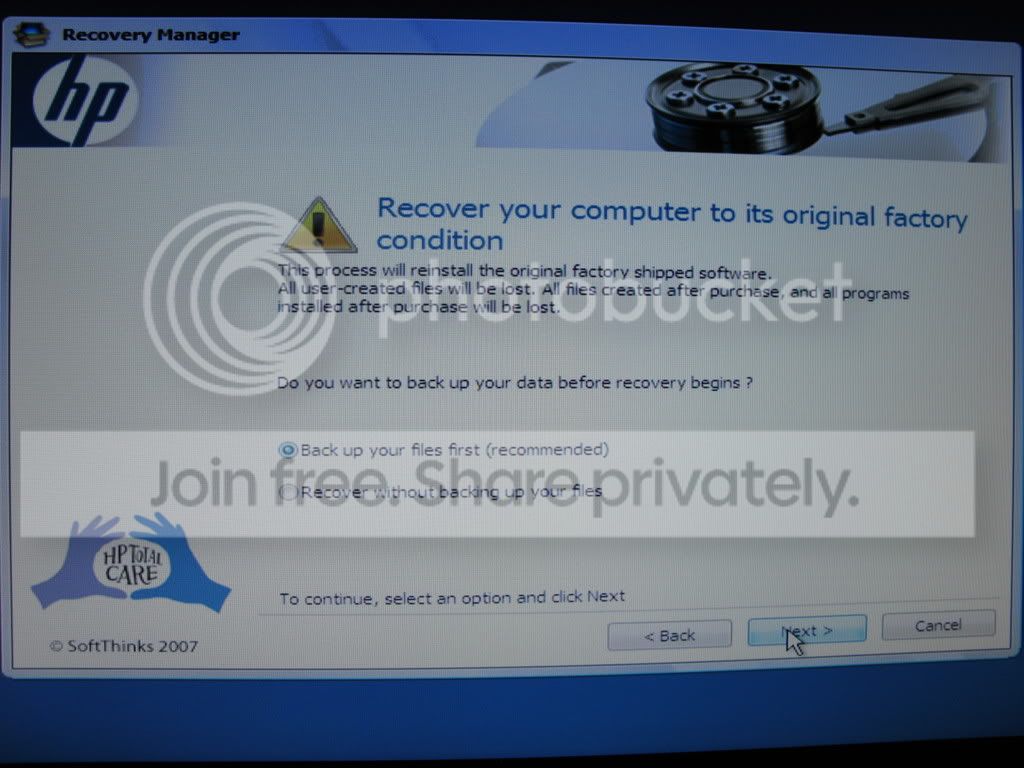
You should get a back-up option during the process using the recovery partition, I did, this is from my old HP machine.

IMG_0019.jpg


My Computer My Computer

At a glance

W 7 64-bit UltimateIntel Q9550 Yorkfield8GB Dominator 8500C5DATI : XFX 5870
Computer Manufacturer/Model Number
* BFK Customs *
OS
W 7 64-bit Ultimate
CPU
Intel Q9550 Yorkfield
Motherboard
ASUS P5Q Pro
Memory
8GB Dominator 8500C5D
Graphics Card(s)
ATI : XFX 5870
Sound Card
Realtek HD Audio 7-1
Monitor(s) Displays
1x 47" LCD HDMI & 3x 26" LCD HDMI
Screen Resolution
1920x1080P & 1920x1200
Hard Drives
1x 80GB Intel X25-M G2 SSD : 1x 500GB & 1x 640GB WD Caviar Black(s)
PSU
Corsair 620HX
Case
Cooler Master RC-690
Cooling
Tuniq Tower 120, 2x 140mm and 3x 120mm case fans
Keyboard
Microsoft 500
Mouse
Razer Diamondback 3G
Internet Speed
14 Mb/s
Other Info
1x Koutech 3Gb/s SATA HDD Hot Swap Rack
That's good to know, although I am paranoid about backing up files frequently.
 

My Computer My Computer

At a glance

Microsoft Windows 7 Home Premium 64-bit Servi...Intel(R) Core(TM) i3 CPU M 330 @ 2.13GHz8 GB DDR3Intel(R) HD Graphics
Computer type
Laptop
Computer Manufacturer/Model Number
Hewlett-Packard/G62-107SA Notebook
OS
Microsoft Windows 7 Home Premium 64-bit Service Pack 1
CPU
Intel(R) Core(TM) i3 CPU M 330 @ 2.13GHz
Motherboard
Hewlett-Packard 1425
Memory
8 GB DDR3
Graphics Card(s)
Intel(R) HD Graphics
Sound Card
Realtek High Definition Audio
Monitor(s) Displays
Builtin
Screen Resolution
1366 x 768 x 32 bits (4294967296 colors) @ 60 Hz
Hard Drives
250 GB SATA Hard Disk Drive 7200 rpm
2TB Seagate GoFlex USB 2 Drive
1TB Iomega Prestige USB 2 Drive
1.5TB Iomega Prestige USB 2 Drive (Samsung)
2TB WD MyBook Live NAS.
Mouse
Logitech Anywhere MX
Internet Speed
152 Mbs download 10 Mbs upload
Antivirus
Norton 360
Browser
Chrome
Moreover, by placing my files on a separate partition/drive allows me to create whatever folder structure I want. With this in mind, I am not sure what is the problem of "integrating a data partition into the Windows data environment". I think the advice whs is giving referrs to the actual standard folders from the C:\Users\YouUsername.

Personally I don't use those folders at all. I put my files into whatever folder I want on my data partition. The standard user folders created by Windows I keep where they were created, or, in case of a SSD, move them to some separate partition. Thi sis because some programs insist on writing their temporary files into this structure and I prefer to avoid extra writing to my SSD. Other than that, I forget them.

As a result, I just need to organise my data in the data partition, but there is nothing special about moving data there, just cut and paste.

Exactly so.

I have NEVER used the C:\Users structure and have NEVER saved anything on C willfully.

Nor do I use libraries.

All personal data is on D. Windows slings some stuff into subfolders of C:\users of its own accord, but I never have to refer to it or deal with it.

I can drag and drop at will without any concern for properties or permissions.
Hmm, sounds like you prefer to do things the old way. But the Windows7 library and folder structure is much more advanced. Why not take advantage of it. And using drag and drop for moving data is really working without a net. There are better and safer ways to copy/move data. I would not want to go 10 years back.


Interesting.

I know two ways of moving/copying data - either through the command prompt or through the GUI. When you are in the command prompt you have to type a command, most usually with the full path of the destination. When you are using the GUI you can either cut and paste, or drag and drop.

Now, am I missing something? Are there any other (new) ways to move a file between folder A and folder B?
 

My Computer My Computer

At a glance

Windows 7 Ultimate (x64)Q66008 GBATI Radeon HD 2600 XT
Computer Manufacturer/Model Number
Dell Inspiron 530
OS
Windows 7 Ultimate (x64)
CPU
Q6600
Memory
8 GB
Graphics Card(s)
ATI Radeon HD 2600 XT
Monitor(s) Displays
Samsung Syncmaster P2450
Screen Resolution
1920x1080
Hard Drives
Samsung HD103UJ
Samsung HD501LJ
Internet Speed
25 Mb/s

My Computer My Computer

At a glance

Vista, Windows7, Mint Mate, Zorin, Windows 8from 1.6GHz Duo to i7
Computer Manufacturer/Model Number
HP, Dell, Gateway, Toshiba - 4 laptops and 2 desktops
OS
Vista, Windows7, Mint Mate, Zorin, Windows 8
CPU
from 1.6GHz Duo to i7
Monitor(s) Displays
2x HP w2207
Hard Drives
5x HDD, 7x SSD, 12x Externals
Keyboard
with trackball - no mices
Mouse
Trackball mice
Internet Speed
DSL 6000
Hi there
The whole" Recovery Partition" is just a CON.
You've paid for WINDOWS when you bought you computer so IMO you should get a FULL RETAIL copy of a WINDOWS install disk or at the VERY LEAST the OEM copy.

Then buy something like ACRONIS -- you can restore to your heart's content even if your whole HDD has got trashed.

Typical W7 installations only take at the most around 20 mins to recover the whole partition.

Incidentally ALWAYS split your OS away from the data -- say have around 50 GB for the OS and partition the rest of your HDD into Data etc -- one or more partitions depending on the size of the HDD.

Cheers
jimbo
 

My Computer My Computer

At a glance

Linux CENTOS 7 / various Windows OS'es and se...Intel i7 Intel i58GB, 16GBOn Motherboard
Computer type
PC/Desktop
Computer Manufacturer/Model Number
Custom built, several laptops HP/ASUS
OS
Linux CENTOS 7 / various Windows OS'es and servers
CPU
Intel i7 Intel i5
Memory
8GB, 16GB
Graphics Card(s)
On Motherboard
Sound Card
Realtek HD audio
Monitor(s) Displays
Apple Cinema display, Samsung LCD
Screen Resolution
1920 X 1080
Hard Drives
4 X 1TB SATA
Mouse
Toshiba wireless laser
Internet Speed
> 20MB up
The whole" Recovery Partition" is just a CON.
You've paid for WINDOWS when you bought you computer so IMO you should get a FULL RETAIL copy of a WINDOWS install disk or at the VERY LEAST the OEM copy.
The question is how much you would be willing to pay for that. The OEMs pay MS about $40 for a Windows Home Premium that costs aroud $ 200 retail. Making DVDs for each shipped system is a lot of additional cost and a logistics nightmare. And most people will probably never use this DVD because either they have no need or they have lost it by the time they need it. Besides, reinstalling from the recovery partition is a lot more convenient.

But if you call your PC manufacturer, they will ship you a DVD. I got those from Gateway and from HP - both charged $20.
 

My Computer My Computer

At a glance

Vista, Windows7, Mint Mate, Zorin, Windows 8from 1.6GHz Duo to i7
Computer Manufacturer/Model Number
HP, Dell, Gateway, Toshiba - 4 laptops and 2 desktops
OS
Vista, Windows7, Mint Mate, Zorin, Windows 8
CPU
from 1.6GHz Duo to i7
Monitor(s) Displays
2x HP w2207
Hard Drives
5x HDD, 7x SSD, 12x Externals
Keyboard
with trackball - no mices
Mouse
Trackball mice
Internet Speed
DSL 6000

Yes, you can do that as well. But I don't see how's that better (or really different) than copy and paste. And in any case, that has nothing to do with the new user folder structure in Windows 7 being "much more advanced" than simply putting data on a separate partition and organizing it there to ones personal taste.

Libraries on the other hand are not limited to C:\User\ folders. You can use any folders in Libraries. I just don't find it useful to have thousands and thousands of files on one single Explorer page. If I had 15 files scattered over different hard drives, a Library would be useful. But that's me.
 

My Computer My Computer

At a glance

Windows 7 Ultimate (x64)Q66008 GBATI Radeon HD 2600 XT
Computer Manufacturer/Model Number
Dell Inspiron 530
OS
Windows 7 Ultimate (x64)
CPU
Q6600
Memory
8 GB
Graphics Card(s)
ATI Radeon HD 2600 XT
Monitor(s) Displays
Samsung Syncmaster P2450
Screen Resolution
1920x1080
Hard Drives
Samsung HD103UJ
Samsung HD501LJ
Internet Speed
25 Mb/s
Back
Top