Solved Imaging Partitions

Montmorency

New member
Local time
4:39 AM
Messages
24
Hello.

Some days ago I deleted my HP laptop's recovery (D) partition in order to create a larger one to place files and folders.
I had to do it because I already had 4 primary partitions.
The idea was to be able to imaging C: partition (Windows and programs) and restoring it without having to back up to an external HDD the (many) GBs of videos I keep on the machine and then put them back.
But now I have a doubt: if I use Windows own imaging tool to back up the C: partition and the System partition, when I restore from that image will it not erase my newly created H: (the letter I gave it)?
Will it simply restore C: and System or will it format the whole disk before?

Thanks in advance.
 

My Computer

OS
Windows 7 Home Premium 64bit
My guess is that when you do the restore, you will end up with exactly what you had before you created the image. But there are other members here who know more about it than I do. So it would be best to wait till you hear from some of the others.
 

My Computer

Computer type
Laptop
Computer Manufacturer/Model Number
HP Pavilion g7-1260us Notebook
OS
Desk Top with Win 7 Home Premium 64 bit and Lap Top with Windows 8.1 Pro 64 bit
Memory
8Gig
Screen Resolution
1600x900
C and "system reserved" restore fine and keep H as it is. But only if has EXACTLY the same partition layout as before!

Post screenshot of disk management and tell me what you are trying to accomplish
 

My Computer

Computer type
Laptop
Computer Manufacturer/Model Number
ACER ASPIRE 5742G
OS
Microsoft Windows 7 Home Premium 64-bits 7601 Multiprocessor Free Service Pack 1
CPU
Intel(R) Core(TM) i3 CPU M 370 @ 2.40GHz
Motherboard
Acer Aspire 5742G
Memory
4,00 GB
Graphics Card(s)
ATI Mobility Radeon HD 5400 Series
Sound Card
(1) AMD High Definition Audio Device (2) Realtek High Defi
Screen Resolution
1366 x 768 x 32 bits (4294967296 colors) @ 60 Hz
Hard Drives
WDC WD5000BEVT-22ZAT0
Hello.

Some days ago I deleted my HP laptop's recovery (D) partition in order to create a larger one to place files and folders.
I had to do it because I already had 4 primary partitions.
The idea was to be able to imaging C: partition (Windows and programs) and restoring it without having to back up to an external HDD the (many) GBs of videos I keep on the machine and then put them back.
But now I have a doubt: if I use Windows own imaging tool to back up the C: partition and the System partition, when I restore from that image will it not erase my newly created H: (the letter I gave it)?
Will it simply restore C: and System or will it format the whole disk before?

Thanks in advance.
"system reserved" is your boot partition I assume. It should be primary and active. C-drive itself doesn't need to be primary but it's better for recovery purposes... so you can boot from that partition. RECOVERY partition should be primary as well... but that's deleted. What other primary partitions do you have...and why primary?

You can make as many partitions as you wish. Create 3 primary and the remaining logical partitions. logical partitions should be adjacent to each other
 

My Computer

Computer type
Laptop
Computer Manufacturer/Model Number
ACER ASPIRE 5742G
OS
Microsoft Windows 7 Home Premium 64-bits 7601 Multiprocessor Free Service Pack 1
CPU
Intel(R) Core(TM) i3 CPU M 370 @ 2.40GHz
Motherboard
Acer Aspire 5742G
Memory
4,00 GB
Graphics Card(s)
ATI Mobility Radeon HD 5400 Series
Sound Card
(1) AMD High Definition Audio Device (2) Realtek High Defi
Screen Resolution
1366 x 768 x 32 bits (4294967296 colors) @ 60 Hz
Hard Drives
WDC WD5000BEVT-22ZAT0
Hello.

Some days ago I deleted my HP laptop's recovery (D) partition in order to create a larger one to place files and folders.
:( I wouldn't have done this.
HP have a poor partition structure and only leave the user one partition.
One solution, not good for you now, is to convert C: to an extended/logical partition then you can create additional logical drive partitions.
For others - Method 2 here:
http://www.sevenforums.com/tutorials/146694-partition-extended-logical-drives.html

In your current situation as long as you don't change the partition structure AND do not tick the format box when performing an image restore then your "data" partition will remain intact. If the format box is ticked and grayed out then a format will occur and you will lose your data.

You shouldn't rely on an image solely on another partition of your HDD. You really need to use an external HDD.
 

My Computer

Computer type
PC/Desktop
Computer Manufacturer/Model Number
Own build
OS
Windows 7x64 Home Premium SP1
CPU
Intel i7 2600k
Motherboard
ASUS P8Z68 Deluxe
Memory
G.Skill Ripjaws (DDR3-1600) 2x4GB
Graphics Card(s)
Nvidia GeForce GTS 450; Intel HD Graphics 3000(GT2+)
Monitor(s) Displays
Dell Ultrasharp IPS panel U2311H, Samsung SyncMaster P2350
Screen Resolution
1920x1080
Hard Drives
Samsung 850 Pro SSD 256GB, Samsung SSD 840 120GB, Seagates 1TB Barracuda ST31000528AS x2
PSU
Seasonic M12II 520W
Case
Lian Li Lancool PC-K60
Cooling
Case: 1x120mm, 3x140mm CPU: Hyper 212+
Keyboard
Logitech MK520 (wireless)
Mouse
Logitech MK520
Internet Speed
6-7 Mbps
Antivirus
Norton Security Premium, Malwarebytes on 2 (MSE on 3rd PC)
Browser
FireFox
Other Info
Audio: Logitech Z523 2.1
You might want to go to HP's website. I have an HP notebook. It's a Pavilion g7-1260us. I can go to their website and download the recovery files. I know I can with the computer that I have and I would think that you could, too. It wouldn't hurt to give it a try.
 

My Computer

Computer type
Laptop
Computer Manufacturer/Model Number
HP Pavilion g7-1260us Notebook
OS
Desk Top with Win 7 Home Premium 64 bit and Lap Top with Windows 8.1 Pro 64 bit
Memory
8Gig
Screen Resolution
1600x900
Right now I'm having serious issues (maybe HP related). I'll come back to this...
 

My Computer

OS
Windows 7 Home Premium 64bit
ufff... what a mess!
this delete/create partition totally screwed the machine up. I had to use the repair disk to go back to a previous image.
No more partitioning for me.

Thanks to all for your answers.
 

My Computer

OS
Windows 7 Home Premium 64bit
ufff... what a mess!
this delete/create partition totally screwed the machine up. I had to use the repair disk to go back to a previous image.
No more partitioning for me.

Thanks to all for your answers.
You should have posted a screenshot of your current situation. And what you wish. Then I had given you advise about what to do and how! Quite easy with partition wizard
 

My Computer

Computer type
Laptop
Computer Manufacturer/Model Number
ACER ASPIRE 5742G
OS
Microsoft Windows 7 Home Premium 64-bits 7601 Multiprocessor Free Service Pack 1
CPU
Intel(R) Core(TM) i3 CPU M 370 @ 2.40GHz
Motherboard
Acer Aspire 5742G
Memory
4,00 GB
Graphics Card(s)
ATI Mobility Radeon HD 5400 Series
Sound Card
(1) AMD High Definition Audio Device (2) Realtek High Defi
Screen Resolution
1366 x 768 x 32 bits (4294967296 colors) @ 60 Hz
Hard Drives
WDC WD5000BEVT-22ZAT0
You should have posted a screenshot of your current situation. And what you wish. Then I had given you advise about what to do and how! Quite easy with partition wizard
You're right, my apologies.
I wanted to create a fifth partition (HP already gave 4 primary ones).
I started to have problems with Window 7 imaging tool (it wouldn't recognise the new set up "a recent hardware or software change etc....").
Yesterday everything went crazy (even the BIOS settings wouldn't work properly).
So, I'll post a screenshot and listen to your advice, but I don't think I'll try again with partitions.

Regards.
 

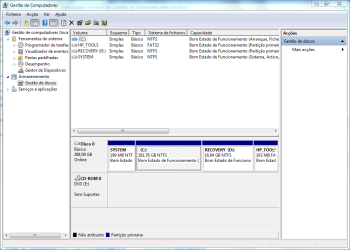
Attachments

  • Image.PNG
    Image.PNG
    32.4 KB · Views: 34

My Computer

OS
Windows 7 Home Premium 64bit

My Computer

Computer type
PC/Desktop
Computer Manufacturer/Model Number
Own build
OS
Windows 7x64 Home Premium SP1
CPU
Intel i7 2600k
Motherboard
ASUS P8Z68 Deluxe
Memory
G.Skill Ripjaws (DDR3-1600) 2x4GB
Graphics Card(s)
Nvidia GeForce GTS 450; Intel HD Graphics 3000(GT2+)
Monitor(s) Displays
Dell Ultrasharp IPS panel U2311H, Samsung SyncMaster P2350
Screen Resolution
1920x1080
Hard Drives
Samsung 850 Pro SSD 256GB, Samsung SSD 840 120GB, Seagates 1TB Barracuda ST31000528AS x2
PSU
Seasonic M12II 520W
Case
Lian Li Lancool PC-K60
Cooling
Case: 1x120mm, 3x140mm CPU: Hyper 212+
Keyboard
Logitech MK520 (wireless)
Mouse
Logitech MK520
Internet Speed
6-7 Mbps
Antivirus
Norton Security Premium, Malwarebytes on 2 (MSE on 3rd PC)
Browser
FireFox
Other Info
Audio: Logitech Z523 2.1
You should have posted a screenshot of your current situation. And what you wish. Then I had given you advise about what to do and how! Quite easy with partition wizard
You're right, my apologies.
I wanted to create a fifth partition (HP already gave 4 primary ones).
I started to have problems with Window 7 imaging tool (it wouldn't recognise the new set up "a recent hardware or software change etc....").
Yesterday everything went crazy (even the BIOS settings wouldn't work properly).
So, I'll post a screenshot and listen to your advice, but I don't think I'll try again with partitions.

Regards.
I don't know how you did it, but can be done in win7 itself and is 100% save!
In disk management rightclick on RECOVERY partition and click "delete volume".
do the same for HP_TOOLS partition. They aren't involved in the boot process at all! And system reserved and C stay in exact same position. Reboot and post screenshot of diskmanagement again
 

My Computer

Computer type
Laptop
Computer Manufacturer/Model Number
ACER ASPIRE 5742G
OS
Microsoft Windows 7 Home Premium 64-bits 7601 Multiprocessor Free Service Pack 1
CPU
Intel(R) Core(TM) i3 CPU M 370 @ 2.40GHz
Motherboard
Acer Aspire 5742G
Memory
4,00 GB
Graphics Card(s)
ATI Mobility Radeon HD 5400 Series
Sound Card
(1) AMD High Definition Audio Device (2) Realtek High Defi
Screen Resolution
1366 x 768 x 32 bits (4294967296 colors) @ 60 Hz
Hard Drives
WDC WD5000BEVT-22ZAT0
You should have posted a screenshot of your current situation. And what you wish. Then I had given you advise about what to do and how! Quite easy with partition wizard
You're right, my apologies.
I wanted to create a fifth partition (HP already gave 4 primary ones).
I started to have problems with Window 7 imaging tool (it wouldn't recognise the new set up "a recent hardware or software change etc....").
Yesterday everything went crazy (even the BIOS settings wouldn't work properly).
So, I'll post a screenshot and listen to your advice, but I don't think I'll try again with partitions.

Regards.
I don't know how you did it, but can be done in win7 itself and is 100% save!
In disk management rightclick on RECOVERY partition and click "delete volume".
do the same for HP_TOOLS partition. They aren't involved in the boot process at all! And system reserved and C stay in exact same position. Reboot and post screenshot of diskmanagement again
Why suggest to the OP that deleting his recovery partition is a good idea when a better alternative exists???
 

My Computer

Computer type
PC/Desktop
Computer Manufacturer/Model Number
Own build
OS
Windows 7x64 Home Premium SP1
CPU
Intel i7 2600k
Motherboard
ASUS P8Z68 Deluxe
Memory
G.Skill Ripjaws (DDR3-1600) 2x4GB
Graphics Card(s)
Nvidia GeForce GTS 450; Intel HD Graphics 3000(GT2+)
Monitor(s) Displays
Dell Ultrasharp IPS panel U2311H, Samsung SyncMaster P2350
Screen Resolution
1920x1080
Hard Drives
Samsung 850 Pro SSD 256GB, Samsung SSD 840 120GB, Seagates 1TB Barracuda ST31000528AS x2
PSU
Seasonic M12II 520W
Case
Lian Li Lancool PC-K60
Cooling
Case: 1x120mm, 3x140mm CPU: Hyper 212+
Keyboard
Logitech MK520 (wireless)
Mouse
Logitech MK520
Internet Speed
6-7 Mbps
Antivirus
Norton Security Premium, Malwarebytes on 2 (MSE on 3rd PC)
Browser
FireFox
Other Info
Audio: Logitech Z523 2.1
You're right, my apologies.
I wanted to create a fifth partition (HP already gave 4 primary ones).
I started to have problems with Window 7 imaging tool (it wouldn't recognise the new set up "a recent hardware or software change etc....").
Yesterday everything went crazy (even the BIOS settings wouldn't work properly).
So, I'll post a screenshot and listen to your advice, but I don't think I'll try again with partitions.

Regards.
I don't know how you did it, but can be done in win7 itself and is 100% save!
In disk management rightclick on RECOVERY partition and click "delete volume".
do the same for HP_TOOLS partition. They aren't involved in the boot process at all! And system reserved and C stay in exact same position. Reboot and post screenshot of diskmanagement again
Why suggest to the OP that deleting his recovery partition is a good idea when a better alternative exists???
I thought he wants the extra space(?)
 

My Computer

Computer type
Laptop
Computer Manufacturer/Model Number
ACER ASPIRE 5742G
OS
Microsoft Windows 7 Home Premium 64-bits 7601 Multiprocessor Free Service Pack 1
CPU
Intel(R) Core(TM) i3 CPU M 370 @ 2.40GHz
Motherboard
Acer Aspire 5742G
Memory
4,00 GB
Graphics Card(s)
ATI Mobility Radeon HD 5400 Series
Sound Card
(1) AMD High Definition Audio Device (2) Realtek High Defi
Screen Resolution
1366 x 768 x 32 bits (4294967296 colors) @ 60 Hz
Hard Drives
WDC WD5000BEVT-22ZAT0
The recovery partition is only 16 GB and is important, of course, for recovery. His C: is 282 GB. This could be made an extended partition rather than primary containing say 2 logical drives. For example one 100GB logical drive for OS & programs and 182 GB logical for data.
 

My Computer

Computer type
PC/Desktop
Computer Manufacturer/Model Number
Own build
OS
Windows 7x64 Home Premium SP1
CPU
Intel i7 2600k
Motherboard
ASUS P8Z68 Deluxe
Memory
G.Skill Ripjaws (DDR3-1600) 2x4GB
Graphics Card(s)
Nvidia GeForce GTS 450; Intel HD Graphics 3000(GT2+)
Monitor(s) Displays
Dell Ultrasharp IPS panel U2311H, Samsung SyncMaster P2350
Screen Resolution
1920x1080
Hard Drives
Samsung 850 Pro SSD 256GB, Samsung SSD 840 120GB, Seagates 1TB Barracuda ST31000528AS x2
PSU
Seasonic M12II 520W
Case
Lian Li Lancool PC-K60
Cooling
Case: 1x120mm, 3x140mm CPU: Hyper 212+
Keyboard
Logitech MK520 (wireless)
Mouse
Logitech MK520
Internet Speed
6-7 Mbps
Antivirus
Norton Security Premium, Malwarebytes on 2 (MSE on 3rd PC)
Browser
FireFox
Other Info
Audio: Logitech Z523 2.1
Hi mjf and Kaktussoft.

The conclusion I take from the issues I described is that my machine (or this particular HP range) reacts badly to having the HDD layout modified.
Trying to use Windows contol panel/recovery or HP's recovery simply wouldn't work (either with an image previous to the partitioning and another made after the partitioning).
Being without recovery tools is not an option, so I'll leave things as they are.

Many thanks for your help, it is kindly appreciated.
 

My Computer

OS
Windows 7 Home Premium 64bit
The conclusion I take from the issues I described is that my machine (or this particular HP range) reacts badly to having the HDD layout modified.
I think it would be very useful for others who have specifically undertaken the change of the HP OS partition to logical to comment. I don't own an HP PC.

@Montmorency
As to general imaging and restore without any changes to the original partition structure this should definitely work.

One Brand of PC boots through the Recovery partition but the HP boots through a system reserved so even if you wanted to delete the Recovery partition, I can't see the problem.

Finally, I'm a bit confused in that I thought you said you had deleted the Recovery partition? It is possible you did something inadvertently.
 
Last edited:

My Computer

Computer type
PC/Desktop
Computer Manufacturer/Model Number
Own build
OS
Windows 7x64 Home Premium SP1
CPU
Intel i7 2600k
Motherboard
ASUS P8Z68 Deluxe
Memory
G.Skill Ripjaws (DDR3-1600) 2x4GB
Graphics Card(s)
Nvidia GeForce GTS 450; Intel HD Graphics 3000(GT2+)
Monitor(s) Displays
Dell Ultrasharp IPS panel U2311H, Samsung SyncMaster P2350
Screen Resolution
1920x1080
Hard Drives
Samsung 850 Pro SSD 256GB, Samsung SSD 840 120GB, Seagates 1TB Barracuda ST31000528AS x2
PSU
Seasonic M12II 520W
Case
Lian Li Lancool PC-K60
Cooling
Case: 1x120mm, 3x140mm CPU: Hyper 212+
Keyboard
Logitech MK520 (wireless)
Mouse
Logitech MK520
Internet Speed
6-7 Mbps
Antivirus
Norton Security Premium, Malwarebytes on 2 (MSE on 3rd PC)
Browser
FireFox
Other Info
Audio: Logitech Z523 2.1
The conclusion I take from the issues I described is that my machine (or this particular HP range) reacts badly to having the HDD layout modified.
Finally, I'm a bit confused in that I thought you said you had deleted the Recovery partition? It is possible you did something inadvertently.
Yes, I deleted the Recovery partition and extended C: to find myself with a fourth Logical partition.
I don't think I did anything wrong because I went through this process twice (second time was to make sure that I hadn't mess up the first one) and both times I followed the tutorials and threads here at SevenForums very carefuly.
I believe that the method you showed
http://www.sevenforums.com/tutorials/146694-partition-extended-logical-drives.html could do the trick, but now I'm a bit affraid of seriously screwing the PC.
Anyway, I can live with my current layout, no big deal.

Thanks again mfj.
 

My Computer

OS
Windows 7 Home Premium 64bit
If you have already deleted the Recovery partition then Method 2 of the tutorial I referred isn't going to help you. The purpose of Method 2 was to safely have more than 4 partitions and retain the Recovery partition.

Did you make recovery DVDs?
It would be best to send in a Disk Management Screenshot of your current system before you do anything else.
(I'll be offline for awhile)
 

My Computer

Computer type
PC/Desktop
Computer Manufacturer/Model Number
Own build
OS
Windows 7x64 Home Premium SP1
CPU
Intel i7 2600k
Motherboard
ASUS P8Z68 Deluxe
Memory
G.Skill Ripjaws (DDR3-1600) 2x4GB
Graphics Card(s)
Nvidia GeForce GTS 450; Intel HD Graphics 3000(GT2+)
Monitor(s) Displays
Dell Ultrasharp IPS panel U2311H, Samsung SyncMaster P2350
Screen Resolution
1920x1080
Hard Drives
Samsung 850 Pro SSD 256GB, Samsung SSD 840 120GB, Seagates 1TB Barracuda ST31000528AS x2
PSU
Seasonic M12II 520W
Case
Lian Li Lancool PC-K60
Cooling
Case: 1x120mm, 3x140mm CPU: Hyper 212+
Keyboard
Logitech MK520 (wireless)
Mouse
Logitech MK520
Internet Speed
6-7 Mbps
Antivirus
Norton Security Premium, Malwarebytes on 2 (MSE on 3rd PC)
Browser
FireFox
Other Info
Audio: Logitech Z523 2.1
Let me post everything I did (remember my machine already had 4 primary partitions).

1 Delete recovery partition
2 Expand C
3 Shrink C
4 Create new simple volume

By now I had System/C/H (the new partition, Logical)/HP tools.
Reboot.
Then I created an image of the whole disk using Windows imaging tool. I had as well an image created before the partition process. Both images were on an external HDD.
Reboot twice.

Then I decided to restore the new image just to make sure everything was working properly. Here things started to go wrong.

Control Panel/Recovery didn't work, it showed a message saying "a recent hardware or software change prevented Windows form start" (not the exact words).
HP's Recovery Manager didn't work as well and gave me the same message.
Trying to recover from the other image (the one I made before partitioning) produced the same results.

Now I was worried and tried the Recovery DVDs I had made right after buying the machine. Bad surprise: they were corrupted.

Last option: the repair DVD (fortunately I made it right after the recovery ones).
Success! I was finally able to recover from my first image and the machine went back to the original state.

All this took me the best part of 20 hours over several days.

Now is too late to check exactly what went wrong, but as you surely understand, I don't want to go through all that mess again.
 

My Computer

OS
Windows 7 Home Premium 64bit
Back
Top