Solved Imaging Partitions

Working with partitions is very easy - if you understand what you are doing. But if the OP does not feel comfortable doing that, I think we should not push him. He seems to be happy with what he got now.
 

My Computer

Computer Manufacturer/Model Number
HP, Dell, Gateway, Toshiba - 4 laptops and 2 desktops
OS
Vista, Windows7, Mint Mate, Zorin, Windows 8
CPU
from 1.6GHz Duo to i7
Monitor(s) Displays
2x HP w2207
Hard Drives
5x HDD, 7x SSD, 12x Externals
Keyboard
with trackball - no mices
Mouse
Trackball mice
Internet Speed
DSL 6000
Working with partitions is very easy - if you understand what you are doing. But if the OP does not feel comfortable doing that, I think we should not push him. He seems to be happy with what he got now.

I would agree with that. From reading the last few posts, I think he has very politely been saying how very much he appreciates all the response, but has gone as far as he wishes. That's the way I have been reading it.
 

My Computer

Computer type
Laptop
Computer Manufacturer/Model Number
HP Pavilion g7-1260us Notebook
OS
Desk Top with Win 7 Home Premium 64 bit and Lap Top with Windows 8.1 Pro 64 bit
Memory
8Gig
Screen Resolution
1600x900
Hi whs and Frank1.
Thanks for your posts, any feedback is welcome.

Yes, I decided not to try partitioning again for three reasons:
1 The convenience it would give me is not really important.
2 Without Recovery DVDs I don't feel like being adventurous.
3 I had a few scares this last days (I forgot to mention a couple of BSODs).

I hope someone with similar experiences can shed some light, but probably it has something to do with this particular machine.

Regards.
 

My Computer

OS
Windows 7 Home Premium 64bit
You're welcome--I hope thing go well for you.
 

My Computer

Computer type
Laptop
Computer Manufacturer/Model Number
HP Pavilion g7-1260us Notebook
OS
Desk Top with Win 7 Home Premium 64 bit and Lap Top with Windows 8.1 Pro 64 bit
Memory
8Gig
Screen Resolution
1600x900
Hi whs and Frank1.
Thanks for your posts, any feedback is welcome.

Yes, I decided not to try partitioning again for three reasons:
1 The convenience it would give me is not really important.
2 Without Recovery DVDs I don't feel like being adventurous.
3 I had a few scares this last days (I forgot to mention a couple of BSODs).

I hope someone with similar experiences can shed some light, but probably it has something to do with this particular machine.

Regards.
In order to be safe, I suggest you make frequent images. But do not use Windows imaging - that sucks. Use this: http://www.sevenforums.com/tutorials/73828-imaging-free-macrium.html?ltr=I

In many years of operation I never had any problems with Macrium. Study the tutorial carefully and download (and burn) the WinPE recover disc .iso from my link in the tutorial. It saves you a lot of time.
 

My Computer

Computer Manufacturer/Model Number
HP, Dell, Gateway, Toshiba - 4 laptops and 2 desktops
OS
Vista, Windows7, Mint Mate, Zorin, Windows 8
CPU
from 1.6GHz Duo to i7
Monitor(s) Displays
2x HP w2207
Hard Drives
5x HDD, 7x SSD, 12x Externals
Keyboard
with trackball - no mices
Mouse
Trackball mice
Internet Speed
DSL 6000
Good deal. Wish you lots of luck.
 

My Computer

Computer Manufacturer/Model Number
HP, Dell, Gateway, Toshiba - 4 laptops and 2 desktops
OS
Vista, Windows7, Mint Mate, Zorin, Windows 8
CPU
from 1.6GHz Duo to i7
Monitor(s) Displays
2x HP w2207
Hard Drives
5x HDD, 7x SSD, 12x Externals
Keyboard
with trackball - no mices
Mouse
Trackball mice
Internet Speed
DSL 6000
Correct me if I`m wrong but... you did this to gain 16 GBs ? That`s not even close to what you need to start storing images on. If you needed more space you could have just bought an external drive.
 

My Computer

Computer type
PC/Desktop
Computer Manufacturer/Model Number
Skylake Special #666
OS
Windows 10 Pro x64
CPU
Intel Core i7 6700K
Motherboard
Asus Sabertooth Z170 Mark 1
Memory
GSkill TridentZ RGB 16GB 3600 16-16-16-36
Graphics Card(s)
EVGA GTX 980 Ti SC x2
Sound Card
Realtek High Definition
Monitor(s) Displays
AOC G2460PG
Screen Resolution
1920 x 1080 144Hz
Hard Drives
Samsung 860 Pro 256GB, Seagate Barracuda 4TB x2
PSU
EVGA 1000 P2, EVGA White Custom Braided Cables
Case
Corsair Vengeance C70 Gunmetal Black
Cooling
Corsair H100i v2, Corsair ML120 x2, Thermal Grizzly Kryonaut
Keyboard
Logitech G910 Orion Spectrum
Mouse
Logitech G700s
Internet Speed
Verizon Fios Quantum Gateway 75/75
Antivirus
Windows Defender, Malwarebytes Free 3.8.3
Browser
Chrome
Other Info
Corsair SP120 x4, LG Blu-ray Drive, Durabrand HT-395 100 Watt Dolby Digital Amp, Corsair H2100 Wireless 7.1 Headset
If you are not comfortable with partitioning operations then the best way to become comfortable is to buy an external HDD and play with it using say Partition Wizard. Don't learn using your main OS HDD. You can then put the ext HDD to practical use such as storing images.

As I keep saying you will never get Recovery to work because you deleted the Recovery Partition. This is were the Recovery software was stored.
 

My Computer

Computer type
PC/Desktop
Computer Manufacturer/Model Number
Own build
OS
Windows 7x64 Home Premium SP1
CPU
Intel i7 2600k
Motherboard
ASUS P8Z68 Deluxe
Memory
G.Skill Ripjaws (DDR3-1600) 2x4GB
Graphics Card(s)
Nvidia GeForce GTS 450; Intel HD Graphics 3000(GT2+)
Monitor(s) Displays
Dell Ultrasharp IPS panel U2311H, Samsung SyncMaster P2350
Screen Resolution
1920x1080
Hard Drives
Samsung 850 Pro SSD 256GB, Samsung SSD 840 120GB, Seagates 1TB Barracuda ST31000528AS x2
PSU
Seasonic M12II 520W
Case
Lian Li Lancool PC-K60
Cooling
Case: 1x120mm, 3x140mm CPU: Hyper 212+
Keyboard
Logitech MK520 (wireless)
Mouse
Logitech MK520
Internet Speed
6-7 Mbps
Antivirus
Norton Security Premium, Malwarebytes on 2 (MSE on 3rd PC)
Browser
FireFox
Other Info
Audio: Logitech Z523 2.1
Correct me if I`m wrong but... you did this to gain 16 GBs ?
Not to gain 16 GB but to gain a new partition.
I explained everything in the first post of this thread.
 

My Computer

OS
Windows 7 Home Premium 64bit
If you are not comfortable with partitioning operations then the best way to become comfortable is to buy an external HDD
I alredy have a couple of them, that's where my backup images are stored.

As I keep saying you will never get Recovery to work because you deleted the Recovery Partition. This is were the Recovery software was stored.
hummm... let me see if I get it.
You mean that if I delete the Recovery Partition I can't recover images stored in external HDDs?
Because that's what happened: both Windows Recovery and HP Recovery Manager couldn't access images outside the machine.
Check post #20, I tried to make it clear there.
 

My Computer

OS
Windows 7 Home Premium 64bit
hummm... let me see if I get it.
You mean that if I delete the Recovery Partition I can't recover images stored in external HDDs?
Because that's what happened: both Windows Recovery and HP Recovery Manager couldn't access images outside the machine.
Check post #20, I tried to make it clear there.
Now I'm getting confused.
I interpret the HP Recovery Manager enabling you to perform a Factory Restore. The information for this used to be on your HP Recovery partition. This puts the PC in the condition it was when you first bought it and turning it on. All your data and personal programs will be lost.

An image restore will restore your C: partition to the condition it was in when you made the image. It restores everything including your data and programs. To restore the image you need to boot from a restore CD/DVD which will vary with the imaging program you are using. For Windows inbuilt imaging you use the System Repair boot CD. For Programs like Macrium Reflect you use their boot CD.
Have a look at these tutorials and see if that helps:
http://www.sevenforums.com/tutorials/663-backup-complete-computer-create-image-backup.html

http://www.sevenforums.com/tutorials/675-system-image-recovery.html
 

My Computer

Computer type
PC/Desktop
Computer Manufacturer/Model Number
Own build
OS
Windows 7x64 Home Premium SP1
CPU
Intel i7 2600k
Motherboard
ASUS P8Z68 Deluxe
Memory
G.Skill Ripjaws (DDR3-1600) 2x4GB
Graphics Card(s)
Nvidia GeForce GTS 450; Intel HD Graphics 3000(GT2+)
Monitor(s) Displays
Dell Ultrasharp IPS panel U2311H, Samsung SyncMaster P2350
Screen Resolution
1920x1080
Hard Drives
Samsung 850 Pro SSD 256GB, Samsung SSD 840 120GB, Seagates 1TB Barracuda ST31000528AS x2
PSU
Seasonic M12II 520W
Case
Lian Li Lancool PC-K60
Cooling
Case: 1x120mm, 3x140mm CPU: Hyper 212+
Keyboard
Logitech MK520 (wireless)
Mouse
Logitech MK520
Internet Speed
6-7 Mbps
Antivirus
Norton Security Premium, Malwarebytes on 2 (MSE on 3rd PC)
Browser
FireFox
Other Info
Audio: Logitech Z523 2.1
Hi mjf.

Scenario 1: Before Partitioning

I have a system image (the whole disk) on an external HDD made with Windows 7 own imaging toll.
I would restore it either through Control Panel/Recovery either through HP Recovery Manager (HP tool will give you several options: restore from the Recovery Partition or from a previously created image). No CD/DVD needed, just choose the correct option and it reboots automaticaly and starts the process.
I restored images on this machine 6 or 7 times and never had an issue.

Scenario 2: After Partitioning
Both Windows and HP would give me an error message and I was left with the Repair Disk as my only option to access the image.

That was it.
 

My Computer

OS
Windows 7 Home Premium 64bit
It looks like your problems stem from the deletion of the Recovery partition. Just use the System Repair disk. I use the System Repair disk (stored as an ISO on a multiboot USB) all the time.
I also strongly suggest you give free Macrium Reflect a go as well.

At some stage if you feel comfortable you may want to consider a Clean install especially since you have already deleted the recovery partition.
http://www.sevenforums.com/tutorials/219487-clean-reinstall-factory-oem-windows-7-a.html#post1839164
I'm sure the author (Gregrocker) will help you out if you go down this path.
 

My Computer

Computer type
PC/Desktop
Computer Manufacturer/Model Number
Own build
OS
Windows 7x64 Home Premium SP1
CPU
Intel i7 2600k
Motherboard
ASUS P8Z68 Deluxe
Memory
G.Skill Ripjaws (DDR3-1600) 2x4GB
Graphics Card(s)
Nvidia GeForce GTS 450; Intel HD Graphics 3000(GT2+)
Monitor(s) Displays
Dell Ultrasharp IPS panel U2311H, Samsung SyncMaster P2350
Screen Resolution
1920x1080
Hard Drives
Samsung 850 Pro SSD 256GB, Samsung SSD 840 120GB, Seagates 1TB Barracuda ST31000528AS x2
PSU
Seasonic M12II 520W
Case
Lian Li Lancool PC-K60
Cooling
Case: 1x120mm, 3x140mm CPU: Hyper 212+
Keyboard
Logitech MK520 (wireless)
Mouse
Logitech MK520
Internet Speed
6-7 Mbps
Antivirus
Norton Security Premium, Malwarebytes on 2 (MSE on 3rd PC)
Browser
FireFox
Other Info
Audio: Logitech Z523 2.1
mjf... you haven't been reading my posts. I already managed to get things back to normal (at least I hope so).

Many thanks to all who helped me. I've learned more than a couple of things.
I hope this thread will be useful to someone else.

Oh... I was forgeting... with all this I found a wonderful forum (I mean SevenForums, not PeachyForum).

Regards and see you (all) soon.
 

My Computer

OS
Windows 7 Home Premium 64bit
mjf... you haven't been reading my posts. I already managed to get things back to normal (at least I hope so).

Many thanks to all who helped me. I've learned more than a couple of things.
I hope this thread will be useful to someone else.

Oh... I was forgeting... with all this I found a wonderful forum (I mean SevenForums, not PeachyForum).

Regards and see you (all) soon.
I have been reading your posts and taking patience in responding. If you think things are normal and you are happy that's the main thing. I hope the thread helps others who read it carefully.
 

My Computer

Computer type
PC/Desktop
Computer Manufacturer/Model Number
Own build
OS
Windows 7x64 Home Premium SP1
CPU
Intel i7 2600k
Motherboard
ASUS P8Z68 Deluxe
Memory
G.Skill Ripjaws (DDR3-1600) 2x4GB
Graphics Card(s)
Nvidia GeForce GTS 450; Intel HD Graphics 3000(GT2+)
Monitor(s) Displays
Dell Ultrasharp IPS panel U2311H, Samsung SyncMaster P2350
Screen Resolution
1920x1080
Hard Drives
Samsung 850 Pro SSD 256GB, Samsung SSD 840 120GB, Seagates 1TB Barracuda ST31000528AS x2
PSU
Seasonic M12II 520W
Case
Lian Li Lancool PC-K60
Cooling
Case: 1x120mm, 3x140mm CPU: Hyper 212+
Keyboard
Logitech MK520 (wireless)
Mouse
Logitech MK520
Internet Speed
6-7 Mbps
Antivirus
Norton Security Premium, Malwarebytes on 2 (MSE on 3rd PC)
Browser
FireFox
Other Info
Audio: Logitech Z523 2.1
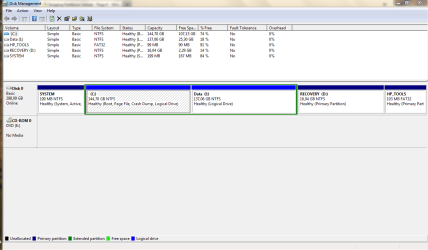
I know this is an old thread but I needed to thank everybody again

close to two years after the first try I decided to go for it again and this time it went smoothly
I still have no idea what went wrong with the previous attempts, but anyway...

thanks to all :)
 

Attachments

  • Capture.PNG
    Capture.PNG
    25 KB · Views: 2
Last edited:

My Computer

OS
Windows 7 Home Premium 64bit
Back
Top