Imaging strategies

I think I will relax in my hottub in the courtyard. It is supposed to get as high as 81F (about 26C) today. It's a nice day.
 

My Computer

Computer Manufacturer/Model Number
HP, Dell, Gateway, Toshiba - 4 laptops and 2 desktops
OS
Vista, Windows7, Mint Mate, Zorin, Windows 8
CPU
from 1.6GHz Duo to i7
Monitor(s) Displays
2x HP w2207
Hard Drives
5x HDD, 7x SSD, 12x Externals
Keyboard
with trackball - no mices
Mouse
Trackball mice
Internet Speed
DSL 6000
:cool:
 

My Computer

Computer type
Laptop
Computer Manufacturer/Model Number
Hewlett-Packard/G62-107SA Notebook
OS
Microsoft Windows 7 Home Premium 64-bit Service Pack 1
CPU
Intel(R) Core(TM) i3 CPU M 330 @ 2.13GHz
Motherboard
Hewlett-Packard 1425
Memory
8 GB DDR3
Graphics Card(s)
Intel(R) HD Graphics
Sound Card
Realtek High Definition Audio
Monitor(s) Displays
Builtin
Screen Resolution
1366 x 768 x 32 bits (4294967296 colors) @ 60 Hz
Hard Drives
250 GB SATA Hard Disk Drive 7200 rpm
2TB Seagate GoFlex USB 2 Drive
1TB Iomega Prestige USB 2 Drive
1.5TB Iomega Prestige USB 2 Drive (Samsung)
2TB WD MyBook Live NAS.
Mouse
Logitech Anywhere MX
Internet Speed
152 Mbs download 10 Mbs upload
Antivirus
Norton 360
Browser
Chrome
I think I will relax in my hottub in the courtyard. It is supposed to get as high as 81F (about 26C) today. It's a nice day.

Sounds wonderful! Especially since it is suppose to drop down to -5 F tonight, with wind chills of -20 to -30F as well.
 

My Computer

Computer Manufacturer/Model Number
Customized build from CyberPower
OS
Windows 7 Home Premium 64bit SP 1
CPU
Intel i5 2500k
Motherboard
Asus P8P67 Deluxe
Memory
8 gigabytes Corsair PC3-12800 DDR3
Graphics Card(s)
EVGA GeForce GTX 460 superclocked
Sound Card
Integrated
Monitor(s) Displays
ViewSonic 23" LCD
Screen Resolution
1980 x 1080
Hard Drives
120 Gb Samsung 840 Pro SSD
120 Gb Kingston Hyper X SSD
1 Tb WD Caviar Black HDD
PSU
Coolermaster 1000 watt modular
Case
Coolermaster HAF X full tower
Cooling
Coolermaster Hyper 212 plus
Keyboard
Logitech USB
Mouse
Microsoft 3 button
Internet Speed
download 1.5 Mb/sec upload 300Kb/sec
I think I will relax in my hottub in the courtyard. It is supposed to get as high as 81F (about 26C) today. It's a nice day.

Sounds wonderful! Especially since it is suppose to drop down to -5 F tonight, with wind chills of -20 to -30F as well.
LOL, you live in the wrong part of the country.
 

My Computer

Computer Manufacturer/Model Number
HP, Dell, Gateway, Toshiba - 4 laptops and 2 desktops
OS
Vista, Windows7, Mint Mate, Zorin, Windows 8
CPU
from 1.6GHz Duo to i7
Monitor(s) Displays
2x HP w2207
Hard Drives
5x HDD, 7x SSD, 12x Externals
Keyboard
with trackball - no mices
Mouse
Trackball mice
Internet Speed
DSL 6000
I think I will relax in my hottub in the courtyard. It is supposed to get as high as 81F (about 26C) today. It's a nice day.

Sounds wonderful! Especially since it is suppose to drop down to -5 F tonight, with wind chills of -20 to -30F as well.
LOL, you live in the wrong part of the country.

I have got a little less than ten years to go before I can retire, and then I will be another one of those "snowbirds" who migrate to warmer climates for the winter months! :D
 

My Computer

Computer Manufacturer/Model Number
Customized build from CyberPower
OS
Windows 7 Home Premium 64bit SP 1
CPU
Intel i5 2500k
Motherboard
Asus P8P67 Deluxe
Memory
8 gigabytes Corsair PC3-12800 DDR3
Graphics Card(s)
EVGA GeForce GTX 460 superclocked
Sound Card
Integrated
Monitor(s) Displays
ViewSonic 23" LCD
Screen Resolution
1980 x 1080
Hard Drives
120 Gb Samsung 840 Pro SSD
120 Gb Kingston Hyper X SSD
1 Tb WD Caviar Black HDD
PSU
Coolermaster 1000 watt modular
Case
Coolermaster HAF X full tower
Cooling
Coolermaster Hyper 212 plus
Keyboard
Logitech USB
Mouse
Microsoft 3 button
Internet Speed
download 1.5 Mb/sec upload 300Kb/sec
Sounds wonderful! Especially since it is suppose to drop down to -5 F tonight, with wind chills of -20 to -30F as well.
LOL, you live in the wrong part of the country.

I have got a little less than ten years to go before I can retire, and then I will be another one of those "snowbirds" who migrate to warmer climates for the winter months! :D
Ten years seem like a lot time when they are ahead of you. But looking back, it is a very short period. I retired 20 years ago and that seems like yesterday.
In which state do you actually live.
 

My Computer

Computer Manufacturer/Model Number
HP, Dell, Gateway, Toshiba - 4 laptops and 2 desktops
OS
Vista, Windows7, Mint Mate, Zorin, Windows 8
CPU
from 1.6GHz Duo to i7
Monitor(s) Displays
2x HP w2207
Hard Drives
5x HDD, 7x SSD, 12x Externals
Keyboard
with trackball - no mices
Mouse
Trackball mice
Internet Speed
DSL 6000
LOL, you live in the wrong part of the country.

I have got a little less than ten years to go before I can retire, and then I will be another one of those "snowbirds" who migrate to warmer climates for the winter months! :D
Ten years seem like a lot time when they are ahead of you. But looking back, it is a very short period. I retired 20 years ago and that seems like yesterday.
In which state do you actually live.

I live in Minnesota, the "land of 10,000 lakes". :D Wow, 20 years into retirement already! That sounds awesome, congratulations on that!
 

My Computer

Computer Manufacturer/Model Number
Customized build from CyberPower
OS
Windows 7 Home Premium 64bit SP 1
CPU
Intel i5 2500k
Motherboard
Asus P8P67 Deluxe
Memory
8 gigabytes Corsair PC3-12800 DDR3
Graphics Card(s)
EVGA GeForce GTX 460 superclocked
Sound Card
Integrated
Monitor(s) Displays
ViewSonic 23" LCD
Screen Resolution
1980 x 1080
Hard Drives
120 Gb Samsung 840 Pro SSD
120 Gb Kingston Hyper X SSD
1 Tb WD Caviar Black HDD
PSU
Coolermaster 1000 watt modular
Case
Coolermaster HAF X full tower
Cooling
Coolermaster Hyper 212 plus
Keyboard
Logitech USB
Mouse
Microsoft 3 button
Internet Speed
download 1.5 Mb/sec upload 300Kb/sec
Yeah, Minnesota - the land of the 10.000 lakes and 10 trillion bugs. I tried to go canoeing once. Was nearly eaten alive by those buggers. And my car and trailer were a mess. For business I went a few times to Rochester.
 

My Computer

Computer Manufacturer/Model Number
HP, Dell, Gateway, Toshiba - 4 laptops and 2 desktops
OS
Vista, Windows7, Mint Mate, Zorin, Windows 8
CPU
from 1.6GHz Duo to i7
Monitor(s) Displays
2x HP w2207
Hard Drives
5x HDD, 7x SSD, 12x Externals
Keyboard
with trackball - no mices
Mouse
Trackball mice
Internet Speed
DSL 6000
What is retirement? WHS is active here and runs a computer club plus other things not shared. It's a state of mind.
 

My Computer

Computer type
PC/Desktop
Computer Manufacturer/Model Number
Own build
OS
Windows 7x64 Home Premium SP1
CPU
Intel i7 2600k
Motherboard
ASUS P8Z68 Deluxe
Memory
G.Skill Ripjaws (DDR3-1600) 2x4GB
Graphics Card(s)
Nvidia GeForce GTS 450; Intel HD Graphics 3000(GT2+)
Monitor(s) Displays
Dell Ultrasharp IPS panel U2311H, Samsung SyncMaster P2350
Screen Resolution
1920x1080
Hard Drives
Samsung 850 Pro SSD 256GB, Samsung SSD 840 120GB, Seagates 1TB Barracuda ST31000528AS x2
PSU
Seasonic M12II 520W
Case
Lian Li Lancool PC-K60
Cooling
Case: 1x120mm, 3x140mm CPU: Hyper 212+
Keyboard
Logitech MK520 (wireless)
Mouse
Logitech MK520
Internet Speed
6-7 Mbps
Antivirus
Norton Security Premium, Malwarebytes on 2 (MSE on 3rd PC)
Browser
FireFox
Other Info
Audio: Logitech Z523 2.1
Yeah, Minnesota - the land of the 10.000 lakes and 10 trillion bugs. I tried to go canoeing once. Was nearly eaten alive by those buggers. And my car and trailer were a mess. For business I went a few times to Rochester.


LOL Yeah, there are lots of bugs in the summer months, especially in the northern part of the state. Spring and fall are my favorite times. Up until now, winter has been pretty mild this year and I have actually been able to enjoy being outdoors.
 

My Computer

Computer Manufacturer/Model Number
Customized build from CyberPower
OS
Windows 7 Home Premium 64bit SP 1
CPU
Intel i5 2500k
Motherboard
Asus P8P67 Deluxe
Memory
8 gigabytes Corsair PC3-12800 DDR3
Graphics Card(s)
EVGA GeForce GTX 460 superclocked
Sound Card
Integrated
Monitor(s) Displays
ViewSonic 23" LCD
Screen Resolution
1980 x 1080
Hard Drives
120 Gb Samsung 840 Pro SSD
120 Gb Kingston Hyper X SSD
1 Tb WD Caviar Black HDD
PSU
Coolermaster 1000 watt modular
Case
Coolermaster HAF X full tower
Cooling
Coolermaster Hyper 212 plus
Keyboard
Logitech USB
Mouse
Microsoft 3 button
Internet Speed
download 1.5 Mb/sec upload 300Kb/sec
What is retirement? WHS is active here and runs a computer club plus other things not shared. It's a state of mind.
Right Michael. You never 'retire' as long as you do something useful. Just one little correction - I do not 'run' the computer club, I am an instructor at the club. Running a club with over 800 members is a big job. There are a lot of little ladies that have nothing else to do than shower you with a lot of BS. Plus all the logistics, etc. I leave that to the (relatively) younger people. Here is our website http://www.hernandocomputerclub.org/
 

My Computer

Computer Manufacturer/Model Number
HP, Dell, Gateway, Toshiba - 4 laptops and 2 desktops
OS
Vista, Windows7, Mint Mate, Zorin, Windows 8
CPU
from 1.6GHz Duo to i7
Monitor(s) Displays
2x HP w2207
Hard Drives
5x HDD, 7x SSD, 12x Externals
Keyboard
with trackball - no mices
Mouse
Trackball mice
Internet Speed
DSL 6000
What is retirement? WHS is active here and runs a computer club plus other things not shared. It's a state of mind.

I plan to stay as busy as physically possible during retirement. :D What will be nice is having the financial freedom to engage in activities I like doing.
 

My Computer

Computer Manufacturer/Model Number
Customized build from CyberPower
OS
Windows 7 Home Premium 64bit SP 1
CPU
Intel i5 2500k
Motherboard
Asus P8P67 Deluxe
Memory
8 gigabytes Corsair PC3-12800 DDR3
Graphics Card(s)
EVGA GeForce GTX 460 superclocked
Sound Card
Integrated
Monitor(s) Displays
ViewSonic 23" LCD
Screen Resolution
1980 x 1080
Hard Drives
120 Gb Samsung 840 Pro SSD
120 Gb Kingston Hyper X SSD
1 Tb WD Caviar Black HDD
PSU
Coolermaster 1000 watt modular
Case
Coolermaster HAF X full tower
Cooling
Coolermaster Hyper 212 plus
Keyboard
Logitech USB
Mouse
Microsoft 3 button
Internet Speed
download 1.5 Mb/sec upload 300Kb/sec
Does anyone know much about Easeus ToDo backup? I've been using Macrium Free but my space is limited so I can only keep 2 or 3 full backups. I've noticed Easeus free version does incremental and differential images. Wondering if anyone had tried it out?
 

My Computer

Computer type
PC/Desktop
Computer Manufacturer/Model Number
Custom Build
OS
Win 7 Ultimate, Win 8.1 Pro, Linux Mint 19 Cinnamon (All 64-Bit)
CPU
Intel i5 4690K
Motherboard
Gigabyte Z97X-UD3H
Memory
Corsair Vengeance LP 32GB DDR3
Graphics Card(s)
MSI GTX 1060 GAMING X 6GB
Sound Card
Onboard
Hard Drives
Samsung 850 EVO 250GB SSD (x2)
Samsung 860 EVO 1TB SSD (x2)
Crucial MX300 525GB SSD
WD Blue 2TB 5400rpm Intellipark Disabled (x2)
PSU
Corsair HX750i
Case
Phanteks Enthoo Pro
Cooling
CM Hyper 212 EVO on CPU, Noctua Redux NF-P14S 1500rpm (x6)
Keyboard
Corsair K70 RGB LUX
Mouse
Corsair Sabre RGB
Antivirus
Avast Free, MalwareBytes, SAS & CryptoPrevent
Browser
Chrome
Other Info
StarTech PEXESAT322I 2 Port PCI-E SATA Card
ASUS PCE-AC56 Dual-band AC1300 Wireless Card
Akasa FC.Six Manual Fan Controller
And a Partridge in a Pear Tree!
Haven't tried out Easeus. However if the back-up that it produces is a sector by sector copy of the drive like Acronis does, then there wont be much difference in size between the full, incremental and differential images particularly if the drive has been defragmented in between.


Does anyone know much about Easeus ToDo backup? I've been using Macrium Free but my space is limited so I can only keep 2 or 3 full backups. I've noticed Easeus free version does incremental and differential images. Wondering if anyone had tried it out?
 

My Computer

Computer Manufacturer/Model Number
Custom Built
OS
Windows 7 Pro with SP1 32bit
Motherboard
Intel D845GVS1 X86-based PC
Memory
2 gigs of RAM
Graphics Card(s)
Intel(R) 82845G/GL/GE/PE/GV Graphics Controller
Sound Card
Realtek AC'97 Audio
Monitor(s) Displays
Samsung SyncMaster 931BF Black 19" LCD Monitor
Screen Resolution
1280X960
Hard Drives
1. SAMSUNG SP0822N ATA Device ~ 80 GigaBytes

2. Seagate FreeAgent Go USB Device ~ 500 GigaBytes
Keyboard
COMPAQ Standard PS/2 Keyboard
Mouse
iBall Laser Precise Speedster
Internet Speed
4 mb/sec
Hi Wanchoo, I'm just trying it out now. It can do Sector by sector or without. I've backed up my 350mb SysReserved and 55GB windows drive, without Sector by sector and the backup image size is 20GB.
Does it make a lot of difference to the restore if it's sector by sector?
 

My Computer

Computer type
PC/Desktop
Computer Manufacturer/Model Number
Custom Build
OS
Win 7 Ultimate, Win 8.1 Pro, Linux Mint 19 Cinnamon (All 64-Bit)
CPU
Intel i5 4690K
Motherboard
Gigabyte Z97X-UD3H
Memory
Corsair Vengeance LP 32GB DDR3
Graphics Card(s)
MSI GTX 1060 GAMING X 6GB
Sound Card
Onboard
Hard Drives
Samsung 850 EVO 250GB SSD (x2)
Samsung 860 EVO 1TB SSD (x2)
Crucial MX300 525GB SSD
WD Blue 2TB 5400rpm Intellipark Disabled (x2)
PSU
Corsair HX750i
Case
Phanteks Enthoo Pro
Cooling
CM Hyper 212 EVO on CPU, Noctua Redux NF-P14S 1500rpm (x6)
Keyboard
Corsair K70 RGB LUX
Mouse
Corsair Sabre RGB
Antivirus
Avast Free, MalwareBytes, SAS & CryptoPrevent
Browser
Chrome
Other Info
StarTech PEXESAT322I 2 Port PCI-E SATA Card
ASUS PCE-AC56 Dual-band AC1300 Wireless Card
Akasa FC.Six Manual Fan Controller
And a Partridge in a Pear Tree!
If case you have an option to create a non-sector by sector differential image then it should be very much smaller as compared to a sector by sector differential image. Please advise me the results.

It is my guess that there should really be no difference in the restoration times between the two types of images.
 

My Computer

Computer Manufacturer/Model Number
Custom Built
OS
Windows 7 Pro with SP1 32bit
Motherboard
Intel D845GVS1 X86-based PC
Memory
2 gigs of RAM
Graphics Card(s)
Intel(R) 82845G/GL/GE/PE/GV Graphics Controller
Sound Card
Realtek AC'97 Audio
Monitor(s) Displays
Samsung SyncMaster 931BF Black 19" LCD Monitor
Screen Resolution
1280X960
Hard Drives
1. SAMSUNG SP0822N ATA Device ~ 80 GigaBytes

2. Seagate FreeAgent Go USB Device ~ 500 GigaBytes
Keyboard
COMPAQ Standard PS/2 Keyboard
Mouse
iBall Laser Precise Speedster
Internet Speed
4 mb/sec
Does anyone know if it's possible to assign a retention policy to Macrium image backups? They are quickly buidling up and chewing away at my internal HDD space. I think 2 weeks would be adequate on my internal HDD.

Then the next question is how to automatically transfer a weekly backup to my external HDD for long-term retention? Maybe there's a batch file (someone wants to share) that I can schedule via to copy / move the file?
 

My Computer

Computer Manufacturer/Model Number
HP HPE-210f
OS
Windows 7 64bit Home Premium
CPU
AMD Phenom II X4 945 3.0GHz
Memory
8GB
Hard Drives
Intel 320 Series SSD - 80GB
WD Green - 1TB
Does anyone know if it's possible to assign a retention policy to Macrium image backups? They are quickly buidling up and chewing away at my internal HDD space. I think 2 weeks would be adequate on my internal HDD.

Then the next question is how to automatically transfer a weekly backup to my external HDD for long-term retention? Maybe there's a batch file (someone wants to share) that I can schedule via to copy / move the file?
As far as I know, there is no way to schedule the retention time in free Macrium.

But in your case, why don't you image to the external disk in the first place - at least every other time. Wouldn't that be easier. If you are concerned about the time it takes, let it run in the background and do something else in the meantime.

Spreading the images regularily over 2 disks gives you added security too in case one of the disks fails.
 

My Computer

Computer Manufacturer/Model Number
HP, Dell, Gateway, Toshiba - 4 laptops and 2 desktops
OS
Vista, Windows7, Mint Mate, Zorin, Windows 8
CPU
from 1.6GHz Duo to i7
Monitor(s) Displays
2x HP w2207
Hard Drives
5x HDD, 7x SSD, 12x Externals
Keyboard
with trackball - no mices
Mouse
Trackball mice
Internet Speed
DSL 6000
I run my Macrium disk image at 4:00AM when I'm sleeping - no worries about time to run the job.
I like having backups on more than one HDD - just in case. The scheduling functionality of Macrium is somewhat limited. It would be better if you could schedule based on day of the week and do as you said, have backups alternate days between different physical HDD's. Lack of a retention policy is surprising. That's a critical feature for backup. Does Macrium utilize a FIFO strategy to delete images if the disk fills up? If that's the case I can set my partition to the max size I'd like to consume for backup and let HDD capacity dictate my retention.

Does the paid for version of Macrium offer more features in this area?

Thanks WHS. As always, very helpful.
 

My Computer

Computer Manufacturer/Model Number
HP HPE-210f
OS
Windows 7 64bit Home Premium
CPU
AMD Phenom II X4 945 3.0GHz
Memory
8GB
Hard Drives
Intel 320 Series SSD - 80GB
WD Green - 1TB
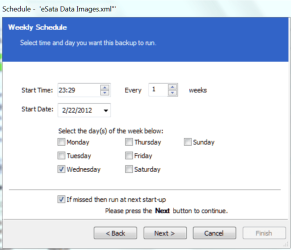
1. You can schedule it on any day of the week and any time. See picture. And it is nifty because you can also schedule the start date and you can skip weeks.

2. What you do is schedule each XML seperately.

3. There is no FiFo strategy - or any other space management. When the space is full, it refuses to make more images. The space you have to manage yourself.

4. To tell you the truth, I have never used the Pro version. Not sure what it offers in addition. See here whether there is anything you like: http://www.macrium.com/reflectfree.aspx
 

Attachments

  • 2012-02-22_2331.png
    2012-02-22_2331.png
    120.6 KB · Views: 9

My Computer

Computer Manufacturer/Model Number
HP, Dell, Gateway, Toshiba - 4 laptops and 2 desktops
OS
Vista, Windows7, Mint Mate, Zorin, Windows 8
CPU
from 1.6GHz Duo to i7
Monitor(s) Displays
2x HP w2207
Hard Drives
5x HDD, 7x SSD, 12x Externals
Keyboard
with trackball - no mices
Mouse
Trackball mice
Internet Speed
DSL 6000
Back
Top