Imaging strategies

My Computer

Computer Manufacturer/Model Number
HP, Dell, Gateway, Toshiba - 4 laptops and 2 desktops
OS
Vista, Windows7, Mint Mate, Zorin, Windows 8
CPU
from 1.6GHz Duo to i7
Monitor(s) Displays
2x HP w2207
Hard Drives
5x HDD, 7x SSD, 12x Externals
Keyboard
with trackball - no mices
Mouse
Trackball mice
Internet Speed
DSL 6000
I just saw this. May save your company some money.
 

Attachments

My Computer

Computer Manufacturer/Model Number
HP, Dell, Gateway, Toshiba - 4 laptops and 2 desktops
OS
Vista, Windows7, Mint Mate, Zorin, Windows 8
CPU
from 1.6GHz Duo to i7
Monitor(s) Displays
2x HP w2207
Hard Drives
5x HDD, 7x SSD, 12x Externals
Keyboard
with trackball - no mices
Mouse
Trackball mice
Internet Speed
DSL 6000
I just saw this. May save your company some money.

I received the same e-mail this afternoon ... 30% off! :thumbsup:
 

My Computer

Computer type
PC/Desktop
Computer Manufacturer/Model Number
LENOVO K450 @3.0GHZ
OS
64-bit Windows 8.1 Pro
CPU
Core(TM) i5 CPU 4330 Haswell @ 3.20GHz
Motherboard
LENOVO
Memory
12.00 GB
Graphics Card(s)
Intel(R) HD Graphics
Sound Card
Intel HD integtrated
Monitor(s) Displays
HP 25' ISP Monitor
Screen Resolution
1900/1020
Hard Drives
(1) ST1000DM003-1CH162 (2) Generic STORAGE DEVICE USB Device (3) Generic STORAGE DEVICE USB Device
Internet Speed
100mb down/10mb up
My computer is a laptop and I do my backups on an external drive. The external drive has free space of 296 GB. Drive C: on my laptop has 528 GB free of 557 GB. So you can see that my backups don't require that much space. My OS is Windows 8.1 and when I make an image I always use the one built in the OS from when I had 7 and now that I have 8.1. When I start the image it always warns me that the image currently on the disk will be overwritten. I of course click OK. My question is: Do I have to overwrite the previous image or can I leave it there and create a new one keeping in mind that I am using Win 8.1? Or would it be necessary for me to create another partition on the external drive.
 

My Computer

Computer type
Laptop
Computer Manufacturer/Model Number
HP Pavilion g7-1260us Notebook
OS
Desk Top with Win 7 Home Premium 64 bit and Lap Top with Windows 8.1 Pro 64 bit
Memory
8Gig
Screen Resolution
1600x900
Yeah, Windows imaging is not very user friendly - and not very reliable either. If you want to keep your old image, you'll have to move or rename it. But whether it will be useful for recovery, I don't know. I have given up on Windows imaging long time ago.

I use free Macrium and there you can keep as many images as you like and manage them as you please. And Macrium is reliable which is the most important aspect.
 

My Computer

Computer Manufacturer/Model Number
HP, Dell, Gateway, Toshiba - 4 laptops and 2 desktops
OS
Vista, Windows7, Mint Mate, Zorin, Windows 8
CPU
from 1.6GHz Duo to i7
Monitor(s) Displays
2x HP w2207
Hard Drives
5x HDD, 7x SSD, 12x Externals
Keyboard
with trackball - no mices
Mouse
Trackball mice
Internet Speed
DSL 6000
Yeah, Windows imaging is not very user friendly - and not very reliable either. If you want to keep your old image, you'll have to move or rename it. But whether it will be useful for recovery, I don't know. I have given up on Windows imaging long time ago.

I use free Macrium and there you can keep as many images as you like and manage them as you please. And Macrium is reliable which is the most important aspect.

Ok, Thanks. I'm going to get Macrium as I have heard some good reports about it.
 

My Computer

Computer type
Laptop
Computer Manufacturer/Model Number
HP Pavilion g7-1260us Notebook
OS
Desk Top with Win 7 Home Premium 64 bit and Lap Top with Windows 8.1 Pro 64 bit
Memory
8Gig
Screen Resolution
1600x900

My Computer

Computer Manufacturer/Model Number
HP, Dell, Gateway, Toshiba - 4 laptops and 2 desktops
OS
Vista, Windows7, Mint Mate, Zorin, Windows 8
CPU
from 1.6GHz Duo to i7
Monitor(s) Displays
2x HP w2207
Hard Drives
5x HDD, 7x SSD, 12x Externals
Keyboard
with trackball - no mices
Mouse
Trackball mice
Internet Speed
DSL 6000
Frank, download the Macrium recovery .iso from my skydrive and burn it to CD. That saves you 2 hours of download time for the WAIK.

https://skydrive.live.com/?cid=475a...cid=475A0A48CA6D4035&id=475A0A48CA6D4035!1812

And here is a little help to get you started.

http://www.sevenforums.com/tutorials/73828-imaging-free-macrium.html?ltr=I

Thanks I do appreciate it, but I have already downloaded and installed it. I then made a Rescue disk and created an image which I finished about 2 minutes ago. In my previous post I said I would install and learn how to use it, but I found out that there is little to learn. It's pretty simple to use and I do prefer it over the one built into windows.
 

My Computer

Computer type
Laptop
Computer Manufacturer/Model Number
HP Pavilion g7-1260us Notebook
OS
Desk Top with Win 7 Home Premium 64 bit and Lap Top with Windows 8.1 Pro 64 bit
Memory
8Gig
Screen Resolution
1600x900
Hmm, how did you create the WinPE rescue disc that fast. You must have a very fast line. I hope you did not make a Linux rescue disc - they are no good.
 

My Computer

Computer Manufacturer/Model Number
HP, Dell, Gateway, Toshiba - 4 laptops and 2 desktops
OS
Vista, Windows7, Mint Mate, Zorin, Windows 8
CPU
from 1.6GHz Duo to i7
Monitor(s) Displays
2x HP w2207
Hard Drives
5x HDD, 7x SSD, 12x Externals
Keyboard
with trackball - no mices
Mouse
Trackball mice
Internet Speed
DSL 6000
Hmm, how did you create the WinPE rescue disc that fast. You must have a very fast line. I hope you did not make a Linux rescue disc - they are no good.
My computer is quite fast. I have 8 gig of RAM installed and I have a good high speed connection. I don't remember how long it took to download and install, but it was a big file so it did take a fair amount of time to download and then install. When I ran it the first time a message came up telling me that I did not make a rescue medium so I put in a blank CD and created the disk. I had to options one of which was Windows which I, of course, chose. I then plugged in the USB to my external drive. I then made a folder and named it Nov 25 image. I started Reflect and created the image on that folder. I didn't time it but it took approx 30 minutes. I then decided to see how well the restore worked. So I made some changes and added some folder and emptied my recycle bin. I then restored the image which took less time than creating it. After the restore everything was as it was. The folders created were gone and the recycle bin was full as it was before. So everything is as it should be.
 

My Computer

Computer type
Laptop
Computer Manufacturer/Model Number
HP Pavilion g7-1260us Notebook
OS
Desk Top with Win 7 Home Premium 64 bit and Lap Top with Windows 8.1 Pro 64 bit
Memory
8Gig
Screen Resolution
1600x900
Good deal. Looks like you did everuthing right. I was just worried that you get stuck with that 1.7GB WAIK download. Last time I did it, it took 2 hours. But I have a slow ATT line.

Btw:
During the imaging process, you can 'hide' the window and go on doing other things. Macrium freezes the system status at the beginning and the imaging rolls on in the background.

Besides the rescue CD you can also create a rescue stick. Now that you have the WAIK, that will only take a couple of minutes. It takes 1.6MB on the stick so a small stick suffices.
 

My Computer

Computer Manufacturer/Model Number
HP, Dell, Gateway, Toshiba - 4 laptops and 2 desktops
OS
Vista, Windows7, Mint Mate, Zorin, Windows 8
CPU
from 1.6GHz Duo to i7
Monitor(s) Displays
2x HP w2207
Hard Drives
5x HDD, 7x SSD, 12x Externals
Keyboard
with trackball - no mices
Mouse
Trackball mice
Internet Speed
DSL 6000
Btw:
During the imaging process, you can 'hide' the window and go on doing other things. Macrium freezes the system status at the beginning and the imaging rolls on in the background.
I like that. At first I thought I misunderstood you as I wondered how you could make an image of something that you are in the process of currently changing. But am I now understanding it right that it takes a snap shot and regardless of what you are doing, the snap shot does not change? It's mind boggling how that works. Thanks again for your help.
 

My Computer

Computer type
Laptop
Computer Manufacturer/Model Number
HP Pavilion g7-1260us Notebook
OS
Desk Top with Win 7 Home Premium 64 bit and Lap Top with Windows 8.1 Pro 64 bit
Memory
8Gig
Screen Resolution
1600x900
Right, it is the snapshot technique. And I think they use the Volume Shadow Copy service for that. Remember how fast that is to create a restore point.

Another couple of tips:

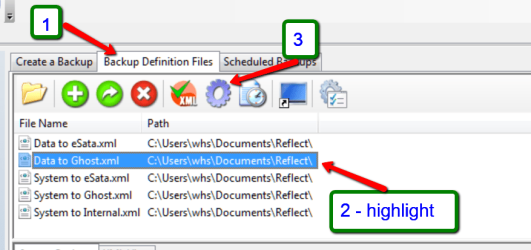
If you 1) click on Backup Definition File, 2) Highlight the kind of image you like to make and 3) click on the cogwheel, then it will exactly repeat the image with the definitions you made previously for that case. That's why it is good to give a name to the xml files - after you said 'Finish' at the definition phase.

The xml files are in a folder named 'Reflect' in your Documents folder. If you ever want to get rid of a definition, delete the xml there - not within Macrium. It's cleaner.

2013-11-25_2046.png

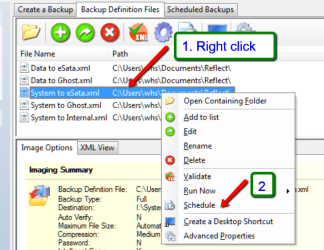
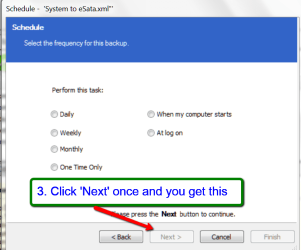
You can schedule your images. Of course the system has to be running at that time. See pics for details.

2013-11-25_2056.png

2013-11-25_2059.png
 

My Computer

Computer Manufacturer/Model Number
HP, Dell, Gateway, Toshiba - 4 laptops and 2 desktops
OS
Vista, Windows7, Mint Mate, Zorin, Windows 8
CPU
from 1.6GHz Duo to i7
Monitor(s) Displays
2x HP w2207
Hard Drives
5x HDD, 7x SSD, 12x Externals
Keyboard
with trackball - no mices
Mouse
Trackball mice
Internet Speed
DSL 6000
I'm trying to formulate a strategy to make a boot-able backup. I have a 128 GB SDD where my OS (win7 Ultimate) resides. I then have a 2 TB hard drive, D & E partitions. The D partition is where I store my applications, page files, logs, etc. (I do this to keep as much as possible off my SDD to extend it's life but still boots fast. The E partition is my data which I sync to another 1 TB drive.

I have a new 1 TB drive that I've partitioned to 128 GB and the second is the rest of the 1 TB. I migrated my OS from the SDD using Paragon Hard Drive Suite 14 with a shutdown on completion. My next step would be to copy the D (applications) partition to that second new partition with the thought I would end up with a boot-able backup drive by removing my SDD and 2TB drives and setting the first boot device to the backup drive.

But I'm getting the feeling I've missed something so I've stopped at this point and thought it best to run this by people that know a lot more than I do. :shock:
 

My Computer

Computer type
PC/Desktop
Computer Manufacturer/Model Number
custom
OS
Windows 7 Ultimate x64
CPU
AMD FX8350
Motherboard
Gigabyte GA-970A-DS3
Memory
16GB DUal Channel DDR3 805Mhz (9-9-9-24)
Graphics Card(s)
Geforce GTX 760 (EVGA)
Hard Drives
Samsung SSD 830 Series
1TB WD1002FAEX-00Z3A0 SATA
2TB Seagate ST2000DM001-1CH164 SATA
Antivirus
Windows Essentials
Browser
Chrome
I think the OS when on the 1TB drive will still be looking for the other OS files on the original drive where you placed them. Moving those files to another drive does not update the addresses inside the OS. So bottom line - it won't work.

What you can do is to bring all those displaced OS files inboard onto the SSD and then image that OS to the 1TB drive. Then you are transferring a closed whole system with no external references.
 

My Computer

Computer Manufacturer/Model Number
HP, Dell, Gateway, Toshiba - 4 laptops and 2 desktops
OS
Vista, Windows7, Mint Mate, Zorin, Windows 8
CPU
from 1.6GHz Duo to i7
Monitor(s) Displays
2x HP w2207
Hard Drives
5x HDD, 7x SSD, 12x Externals
Keyboard
with trackball - no mices
Mouse
Trackball mice
Internet Speed
DSL 6000
I think the OS when on the 1TB drive will still be looking for the other OS files on the original drive where you placed them. Moving those files to another drive does not update the addresses inside the OS. So bottom line - it won't work.

What you can do is to bring all those displaced OS files inboard onto the SSD and then image that OS to the 1TB drive. Then you are transferring a closed whole system with no external references.

Not sure I understand. You mean those displaced OS files are not referenced by file name? But I guess that makes sense too, now that I think about it. Probably why I stopped and asked the question.... I just felt something was wrong.

Thanks!
 

My Computer

Computer type
PC/Desktop
Computer Manufacturer/Model Number
custom
OS
Windows 7 Ultimate x64
CPU
AMD FX8350
Motherboard
Gigabyte GA-970A-DS3
Memory
16GB DUal Channel DDR3 805Mhz (9-9-9-24)
Graphics Card(s)
Geforce GTX 760 (EVGA)
Hard Drives
Samsung SSD 830 Series
1TB WD1002FAEX-00Z3A0 SATA
2TB Seagate ST2000DM001-1CH164 SATA
Antivirus
Windows Essentials
Browser
Chrome
Keep your apps with your OS. Image that partition. Data goes elsewhere, and is handled separately.
 

My Computer

Computer Manufacturer/Model Number
Home Built
OS
Windows 7 Ultimate x64
CPU
QuadCore Intel Core i7 920, 2666 MHz (20 x 133)
Motherboard
Asus P6T
Memory
6134 MB (DDR3-1333 DDR3 SDRAM)
Graphics Card(s)
(2 - SLI) NVIDIA GeForce GTS 250 (1024 MB)
Sound Card
Onboard Realtek ALC888/1200 @ Intel 82801JB IC
Monitor(s) Displays
HDMII
Screen Resolution
1280 x 800
Hard Drives
Crucial M4 (64 GB SSD)
WD Caviar Blacks
WD5001AALS-00J7B1 ATA Device (465 GB)
WD5001AALS-00L3B2 ATA Device (465 GB)
WD Elements USB External (250 GB)
PSU
Corsair 550
Case
iStarUSA S-10000BL Black
Keep your apps with your OS. Image that partition. Data goes elsewhere, and is handled separately.

Definitely the way to go.
 

My Computer

Computer type
Laptop
Computer Manufacturer/Model Number
Hewlett-Packard/G62-107SA Notebook
OS
Microsoft Windows 7 Home Premium 64-bit Service Pack 1
CPU
Intel(R) Core(TM) i3 CPU M 330 @ 2.13GHz
Motherboard
Hewlett-Packard 1425
Memory
8 GB DDR3
Graphics Card(s)
Intel(R) HD Graphics
Sound Card
Realtek High Definition Audio
Monitor(s) Displays
Builtin
Screen Resolution
1366 x 768 x 32 bits (4294967296 colors) @ 60 Hz
Hard Drives
250 GB SATA Hard Disk Drive 7200 rpm
2TB Seagate GoFlex USB 2 Drive
1TB Iomega Prestige USB 2 Drive
1.5TB Iomega Prestige USB 2 Drive (Samsung)
2TB WD MyBook Live NAS.
Mouse
Logitech Anywhere MX
Internet Speed
152 Mbs download 10 Mbs upload
Antivirus
Norton 360
Browser
Chrome
I'm a firm believer in KISS (Keep It Simple, Stupid). Due to the increasing amount of data I have (imaging and cloning take too long now) and the desire to be able to access data from a backup without having to use a program to mount an image, the only thing I image anymore now is my boot SSD, which only has the OS and System Reserved partitions on it. I prefer Macrium Reflect over Win 7's imaging since I've never had MR fail me and I've read far too many accounts of people having problem with Win 7's imaging program. In fact, I've found imaging with MR to be far, far more reliable than System Restore so I shut the latter off.

Since the only thing I image anymore is the entire boot drive (the System Reserved is only 100 MB—big deal—so it's not a problem to play it safe and include it with each image), I don't need to bother with setting MR up each time since it retains the previous settings. I also disable making an XML file when making an image since I have no need for it anymore.

I have a folder on my main data drive to park my images in (I used to use dated folders to keep them in until whs pointed out that one can just use Windows file system to identify the date of a file; duh!). I'm a firm believer in planned redundancy for backups but it takes between 9 and 10 minutes to make an image (I'm imaging 60GB; I have a huge hiberfil.sys file I have to keep for my UPS) so making multiple images or copying them to multiple drives was a bit time consuming (I also have MR set to automatically verify an image after it is made; it almost doubles the total time for making an image but it saved me from betting burned by a bad image once). Since I have the Pro version (four license family pack), I have Recovery from Windows boot menu available to me so having a copy on an internal drive in my computer is handy for quick restores. The folder I have the images in then gets automatically backed up when I back up the drive it's on so my image redundancy is taken of care of for me (by switching from cloning to using a file and folder syncing program, I've got my data backups refined to the point I can run two daily backups in just a few minutes—running my daily quick scans and backups can easily be done during the commercials of an hour long TV program—and I no longer need to do weekly data backups which took about six hours to do.).

I make a weekly image every week after running full scans on my antimalware programs (I'm also now doing quick scans daily). I also make an image before and after making any changes to my System, such as updating programs or the system, installing new programs, etc. I keep all my images for the current and previous calendar month, the only keep the first image of each month prior to that. I also keep the first image I made after installing Win 7 and running all the updates and another one I took after installing programs.

 

My Computer

Computer type
PC/Desktop
Computer Manufacturer/Model Number
Custom Build
OS
Win 7 Ultimate 64 bit
CPU
Intel i7-3930K
Motherboard
ASUS P9X79 WS
Memory
Kingston HyperX Genesis 32GB Kit (8x4GB Modules) 1600MHz DDR
Graphics Card(s)
MSI R7850 Twin Frozr 2GD5/OC Radeon HD 7850 2GB 256-bit GDDR
Sound Card
Asus Xonar Essence STX
Monitor(s) Displays
3x Asus VG248QE 24", Vizio 32" TV
Screen Resolution
1920 x 1080, ?
Hard Drives
Samsung 128GB 840 Pro SSD (1),
Samsung 4TB 850 EVO SSDs (4)
Samsung 4TB 850 EVO SSDs (16) external backup drives used in 2.5" hot swap bays in the computer.
PSU
Corsair HX750w
Case
Antec Two Hundred v2 (modified)
Cooling
Cooler Master GeminII S524 120mm (fan replaced with a 140mm)
Keyboard
Logitech G510s
Mouse
Logitech M525 (two in use)
Internet Speed
=< 32Mbps down, 8Mbps up
Antivirus
AVAST!, MBAM, SAS, Spybot S&D (all but MBAM free) Glary Util
Browser
IE11
Other Info
LSI 9211-8i HBA card (8 SATA III ports), 2.5" & 3.5" Hot Swap Bays, HooToo HT-CR001 PCI-E to USB 3.0 Internal Hub + 6 Slot Card Reader, and LG Model CH12LS28 BD-ROM Optical Drive. Also, ScanSnap S1500 ADF duplexing scanner, Canon 9000F flat bed scanner, Corsair SP2500 2.1 speakers, Samsung CLP 415nw laser color printer, Cyberpower PP2200SW UPS

My Computer

Computer type
PC/Desktop
Computer Manufacturer/Model Number
Custom Build
OS
Win 7 Ultimate 64 bit
CPU
Intel i7-3930K
Motherboard
ASUS P9X79 WS
Memory
Kingston HyperX Genesis 32GB Kit (8x4GB Modules) 1600MHz DDR
Graphics Card(s)
MSI R7850 Twin Frozr 2GD5/OC Radeon HD 7850 2GB 256-bit GDDR
Sound Card
Asus Xonar Essence STX
Monitor(s) Displays
3x Asus VG248QE 24", Vizio 32" TV
Screen Resolution
1920 x 1080, ?
Hard Drives
Samsung 128GB 840 Pro SSD (1),
Samsung 4TB 850 EVO SSDs (4)
Samsung 4TB 850 EVO SSDs (16) external backup drives used in 2.5" hot swap bays in the computer.
PSU
Corsair HX750w
Case
Antec Two Hundred v2 (modified)
Cooling
Cooler Master GeminII S524 120mm (fan replaced with a 140mm)
Keyboard
Logitech G510s
Mouse
Logitech M525 (two in use)
Internet Speed
=< 32Mbps down, 8Mbps up
Antivirus
AVAST!, MBAM, SAS, Spybot S&D (all but MBAM free) Glary Util
Browser
IE11
Other Info
LSI 9211-8i HBA card (8 SATA III ports), 2.5" & 3.5" Hot Swap Bays, HooToo HT-CR001 PCI-E to USB 3.0 Internal Hub + 6 Slot Card Reader, and LG Model CH12LS28 BD-ROM Optical Drive. Also, ScanSnap S1500 ADF duplexing scanner, Canon 9000F flat bed scanner, Corsair SP2500 2.1 speakers, Samsung CLP 415nw laser color printer, Cyberpower PP2200SW UPS
Back
Top