

Since there is always a lot of discussion regarding the time it takes to make an image and the size of images relativ to the size of the imaged data and partition, I like to document a few real live cases. All images were made with free Macrium on a Dell XPS 8300.
Case 1 - Windows 7 plus 1 virtual partition on SSD
Partition size = 59.4GB
Amount of populated space = 41.8GB
Size of resulting image on internal 7200 RPM HDD = 23.1GB
Time to complete the image =

Case 2 - Linux OS on 7200 RPM internal HDD
Partition size = 14.4GB
Amount of populated space = 11.40GB
Size of resulting image on external eSata 5400 RPM HDD = 7.5GB
Time to complete the image =
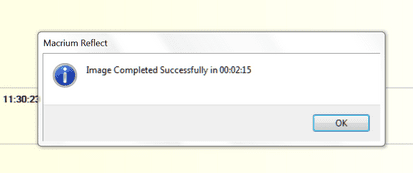
Case 3 - Data partition on 7200 RPM internal HDD
Partition size = 92GB
Amount of populated space = 44.6GB
Size of resulting image on external eSata 5400 RPM HDD = 42.1 GB
Time to complete the image =
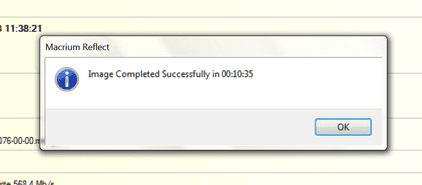
The compression of the data partition is minimal. It is bigger with the OS partitions. However, that depends also on the settings of the OS partition. In my case I have eliminated the hibernation file and set the pagefile to 2GB. Thus the resulting compression is less than if those files exist in full size.
Case 1 - Windows 7 plus 1 virtual partition on SSD
Partition size = 59.4GB
Amount of populated space = 41.8GB
Size of resulting image on internal 7200 RPM HDD = 23.1GB
Time to complete the image =
Case 2 - Linux OS on 7200 RPM internal HDD
Partition size = 14.4GB
Amount of populated space = 11.40GB
Size of resulting image on external eSata 5400 RPM HDD = 7.5GB
Time to complete the image =
Case 3 - Data partition on 7200 RPM internal HDD
Partition size = 92GB
Amount of populated space = 44.6GB
Size of resulting image on external eSata 5400 RPM HDD = 42.1 GB
Time to complete the image =
The compression of the data partition is minimal. It is bigger with the OS partitions. However, that depends also on the settings of the OS partition. In my case I have eliminated the hibernation file and set the pagefile to 2GB. Thus the resulting compression is less than if those files exist in full size.
Last edited:
My Computer
- Computer Manufacturer/Model Number
- HP, Dell, Gateway, Toshiba - 4 laptops and 2 desktops
- OS
- Vista, Windows7, Mint Mate, Zorin, Windows 8
- CPU
- from 1.6GHz Duo to i7
- Monitor(s) Displays
- 2x HP w2207
- Hard Drives
- 5x HDD, 7x SSD, 12x Externals
- Keyboard
- with trackball - no mices
- Mouse
- Trackball mice
- Internet Speed
- DSL 6000


