Imaging with free Macrium

   Information

This tutorial shows imaging with free Macrium Version 5.0. If you are still using Macrium Version 4.2, go to this Vimeo site where the tutorial of that version is stored.

The Video does not show the recovery part because I have no setup to screen capture it. But Keith (Kado) made this excellent recovery tutorial with text (but no sound) that he captured from a virtual partition.


   Warning


Note that the external disk to which you image must be formatted in NTFS. A disk that is formatted in Fat32 will accept an image, but the recovery programs cannot restore that image. You can, however, mount (open) a Fat32 image as VHD.


   Note
The production of the WinPE recovery CD (which is highly recommended) may take up to 3 hours because Macrium needs to download the 1.7GB WAIK (Windows Application Installation Kit). For your convenience I have uploaded a ready made .iso of the WinPE recovery disc. That can be downloaded in appr. 8 minutes which clearly beats the WAIK download. Once you downloaded and unzipped the folder, you can burn it directly to a CD with e.g. ImgBurn.

Here is the link to my Skydrive site.

Here is an alternate link from FileSwap (courtesy of Gary - Britton30)

I draw your attention to the fact that this WinPE CD can also be used to make images. That may be convenient in case you do not want to install Macrium on your PC.


This video tutorial explains the full cycle of the imaging process which is:

· Initial setups
· Image definition
· Image scheduling
· Image production

The imaging program that was used for this tutorial is free Macrium. But the basic principles are the same for other imaging programs although the user interface will be different.

This video runs for appr. 7 minutes.
There is a related thread on the Vista forum which gives a brief introduction to Macrium followed by a discussion.
You can download the free Macrium edition from here.

Note: If you have a problem with the loudness of the sound output of the video, check the "Loudness Equalization" box in your Playback device. It is under the 'Enhancements' tab.


Last edited by a moderator:
MR and PE components

When you download MR free it downloads the most suitable PE components for your installation..


Are you implying that when one downloads MR one must do so on the installation on which MR will run?:confused:

I'm going to image win 7; but all my downloads are done from a Linux OS.:cool:
 
Last edited:

My Computer

Computer type
PC/Desktop
Computer Manufacturer/Model Number
Self- 8th build in 40 years
OS
Windows 7 Professional 64bit, Linux-4versions; multiboot
CPU
i7-4790K or
Motherboard
ASRock Z97 Extreme6/ac; Biostar Hi-Fi H81s2
Memory
16 GB 1333 or 8GB 1333 depending on box in use
Graphics Card(s)
ATI HD4670
Sound Card
internal
Monitor(s) Displays
NEC P242W, ViewSonic low end stuff
Screen Resolution
1920-1200 60Hz on NEC; 1920-1040 on other screens
Hard Drives
2x-WD 2T black, Hitachi 500MB, Samsung 128 MB EVO SSD, et.al. as needed
PSU
not too bad
Case
tower
Cooling
blown ambient air
Internet Speed
Up to 50Mbs
Browser
FF 69.0.1
When you download MR free it downloads the most suitable PE components for your installation..


Are you implying that when one downloads MR one must do so on the installation on which MR will run?:confused:

I'm going to image win 7; but all my downloads are done from a Linux OS.:cool:

The download for Macrium is just a stub whick pulls the install from the web. I think there is an offline installer but ATM I don't have s link. I will have a look tomorrow.

I found this Macrium knowledgebase article which may help. It may work with the free version but not on Linux of course. Installing and updating Macrium Reflect offline - KnowledgeBase - Macrium Reflect Knowledgebase
 
Last edited:

My Computer

Computer type
Laptop
Computer Manufacturer/Model Number
Hewlett-Packard/G62-107SA Notebook
OS
Microsoft Windows 7 Home Premium 64-bit Service Pack 1
CPU
Intel(R) Core(TM) i3 CPU M 330 @ 2.13GHz
Motherboard
Hewlett-Packard 1425
Memory
8 GB DDR3
Graphics Card(s)
Intel(R) HD Graphics
Sound Card
Realtek High Definition Audio
Monitor(s) Displays
Builtin
Screen Resolution
1366 x 768 x 32 bits (4294967296 colors) @ 60 Hz
Hard Drives
250 GB SATA Hard Disk Drive 7200 rpm
2TB Seagate GoFlex USB 2 Drive
1TB Iomega Prestige USB 2 Drive
1.5TB Iomega Prestige USB 2 Drive (Samsung)
2TB WD MyBook Live NAS.
Mouse
Logitech Anywhere MX
Internet Speed
152 Mbs download 10 Mbs upload
Antivirus
Norton 360
Browser
Chrome
Thanks for the reply. Your link was only for a Windows box; it seems. I guess I'll just have to connect my main box to the internet and DL MR that way. Hate to connect my business box to the internet; but, perhaps it's required in this MS centric world. Thanks again for the info.
 

My Computer

Computer type
PC/Desktop
Computer Manufacturer/Model Number
Self- 8th build in 40 years
OS
Windows 7 Professional 64bit, Linux-4versions; multiboot
CPU
i7-4790K or
Motherboard
ASRock Z97 Extreme6/ac; Biostar Hi-Fi H81s2
Memory
16 GB 1333 or 8GB 1333 depending on box in use
Graphics Card(s)
ATI HD4670
Sound Card
internal
Monitor(s) Displays
NEC P242W, ViewSonic low end stuff
Screen Resolution
1920-1200 60Hz on NEC; 1920-1040 on other screens
Hard Drives
2x-WD 2T black, Hitachi 500MB, Samsung 128 MB EVO SSD, et.al. as needed
PSU
not too bad
Case
tower
Cooling
blown ambient air
Internet Speed
Up to 50Mbs
Browser
FF 69.0.1
That would be my take on it too unless you have another Windows box with internet.
 

My Computer

Computer type
Laptop
Computer Manufacturer/Model Number
Hewlett-Packard/G62-107SA Notebook
OS
Microsoft Windows 7 Home Premium 64-bit Service Pack 1
CPU
Intel(R) Core(TM) i3 CPU M 330 @ 2.13GHz
Motherboard
Hewlett-Packard 1425
Memory
8 GB DDR3
Graphics Card(s)
Intel(R) HD Graphics
Sound Card
Realtek High Definition Audio
Monitor(s) Displays
Builtin
Screen Resolution
1366 x 768 x 32 bits (4294967296 colors) @ 60 Hz
Hard Drives
250 GB SATA Hard Disk Drive 7200 rpm
2TB Seagate GoFlex USB 2 Drive
1TB Iomega Prestige USB 2 Drive
1.5TB Iomega Prestige USB 2 Drive (Samsung)
2TB WD MyBook Live NAS.
Mouse
Logitech Anywhere MX
Internet Speed
152 Mbs download 10 Mbs upload
Antivirus
Norton 360
Browser
Chrome
Ho72.... I downloaded the iso several times (using different PCs, Vista and Win7, Firefox and IE) and burned them to CDs with ImgBurn, but none of them booted correctly for me.

My solution was to install Macrium Reflect Free and create my own Rescue CD and Rescue USB stick. The rescue media that I created works fine on all of my PCs. Problem solved.

You may need to do the same. Good luck.

I have the exact same problem. I guess I'll follow your workaround.
 

My Computer

Computer type
PC/Desktop
Computer Manufacturer/Model Number
Dell OptiPlex 760 Mini Tower
OS
Windows 7 Home Premium 64 bit
CPU
3.16GHz Core 2 Duo (E8500)
Memory
4 GB
Graphics Card(s)
ATI Radeon HD2400
Hard Drives
250GB
Browser
Chrome
I'm not sure but I think those ISOs are for version 5. They would not work with a version 6 image anyway.
 

My Computer

Computer type
Laptop
Computer Manufacturer/Model Number
Hewlett-Packard/G62-107SA Notebook
OS
Microsoft Windows 7 Home Premium 64-bit Service Pack 1
CPU
Intel(R) Core(TM) i3 CPU M 330 @ 2.13GHz
Motherboard
Hewlett-Packard 1425
Memory
8 GB DDR3
Graphics Card(s)
Intel(R) HD Graphics
Sound Card
Realtek High Definition Audio
Monitor(s) Displays
Builtin
Screen Resolution
1366 x 768 x 32 bits (4294967296 colors) @ 60 Hz
Hard Drives
250 GB SATA Hard Disk Drive 7200 rpm
2TB Seagate GoFlex USB 2 Drive
1TB Iomega Prestige USB 2 Drive
1.5TB Iomega Prestige USB 2 Drive (Samsung)
2TB WD MyBook Live NAS.
Mouse
Logitech Anywhere MX
Internet Speed
152 Mbs download 10 Mbs upload
Antivirus
Norton 360
Browser
Chrome
I'm not sure but I think those ISOs are for version 5. They would not work with a version 6 image anyway.

My problem is that I get the message "A winpeshl.ini file is present, but no commands were successfully launched" when I boot my computer to the iso DVD. It's not launching Macrium. I've not yet created any images to be honest, because my plan was to use the CD to make an image for the new computer I just bought (before I install anything, so I'll have a good point to restore back to if needed). So, I don't think compatibility with version 5 vs 6 would be relevant to my situation.

Therefore, I guess I'll go ahead and install Macrium on it, make the rescue CD, and then make an image. So I guess Macrium itself will be on the image, which was not in my original plan, but I guess it's no big deal.
 

My Computer

Computer type
PC/Desktop
Computer Manufacturer/Model Number
Dell OptiPlex 760 Mini Tower
OS
Windows 7 Home Premium 64 bit
CPU
3.16GHz Core 2 Duo (E8500)
Memory
4 GB
Graphics Card(s)
ATI Radeon HD2400
Hard Drives
250GB
Browser
Chrome
That sounds like a good plan.
 

My Computer

Computer type
Laptop
Computer Manufacturer/Model Number
Hewlett-Packard/G62-107SA Notebook
OS
Microsoft Windows 7 Home Premium 64-bit Service Pack 1
CPU
Intel(R) Core(TM) i3 CPU M 330 @ 2.13GHz
Motherboard
Hewlett-Packard 1425
Memory
8 GB DDR3
Graphics Card(s)
Intel(R) HD Graphics
Sound Card
Realtek High Definition Audio
Monitor(s) Displays
Builtin
Screen Resolution
1366 x 768 x 32 bits (4294967296 colors) @ 60 Hz
Hard Drives
250 GB SATA Hard Disk Drive 7200 rpm
2TB Seagate GoFlex USB 2 Drive
1TB Iomega Prestige USB 2 Drive
1.5TB Iomega Prestige USB 2 Drive (Samsung)
2TB WD MyBook Live NAS.
Mouse
Logitech Anywhere MX
Internet Speed
152 Mbs download 10 Mbs upload
Antivirus
Norton 360
Browser
Chrome
Say, I'm following the instructions in post #33 to verify if my rescue disk works, and I notice when I boot to that disk, and then search for my image file, I can't see my T: drive. T: is one of my NAS devices, which is where I wanted to put my images. I can see it fine when I boot to Windows 7, and in fact, I did successfully put an image there while so booted. But from the rescue CD, it won't let me see that drive.

Is this a limitation of the rescue CD I'll have to live with? If so, I guess I have this other possible solution: I have an external hard drive that I keep plugged into one of the NAS USB ports. I have that assigned as yet a different letter, and I could probably put images there if I wanted. Then if I ever have to use the rescue disk to access the image, maybe I could plug the external hard drive directly into the computer (and not into the NAS). I'm guessing then I'd be able to see it, even from the rescue disk.

But I was curious if anybody offhand knows if there's a way for my rescue disk to see my NAS.
 

My Computer

Computer type
PC/Desktop
Computer Manufacturer/Model Number
Dell OptiPlex 760 Mini Tower
OS
Windows 7 Home Premium 64 bit
CPU
3.16GHz Core 2 Duo (E8500)
Memory
4 GB
Graphics Card(s)
ATI Radeon HD2400
Hard Drives
250GB
Browser
Chrome
I can see my NAS from the rescue environment. I'm using WinPE v5 and the network is hidden in "This PC". If your rescue disk was created on the same PC the necessary drivers should have been included.
 

My Computer

Computer type
Laptop
Computer Manufacturer/Model Number
Hewlett-Packard/G62-107SA Notebook
OS
Microsoft Windows 7 Home Premium 64-bit Service Pack 1
CPU
Intel(R) Core(TM) i3 CPU M 330 @ 2.13GHz
Motherboard
Hewlett-Packard 1425
Memory
8 GB DDR3
Graphics Card(s)
Intel(R) HD Graphics
Sound Card
Realtek High Definition Audio
Monitor(s) Displays
Builtin
Screen Resolution
1366 x 768 x 32 bits (4294967296 colors) @ 60 Hz
Hard Drives
250 GB SATA Hard Disk Drive 7200 rpm
2TB Seagate GoFlex USB 2 Drive
1TB Iomega Prestige USB 2 Drive
1.5TB Iomega Prestige USB 2 Drive (Samsung)
2TB WD MyBook Live NAS.
Mouse
Logitech Anywhere MX
Internet Speed
152 Mbs download 10 Mbs upload
Antivirus
Norton 360
Browser
Chrome
I can see my NAS from the rescue environment. I'm using WinPE v5 and the network is hidden in "This PC". If your rescue disk was created on the same PC the necessary drivers should have been included.

It was created on the same PC, but after googling, I see I'm not the only one with this problem.

I found this thread on my same problem: Can't Browse NAS from Rescue Media

In that thread, somebody suggests following the troubleshooting steps in this article:

Resolving network issues in Windows PE - KnowledgeBase - Macrium Reflect Knowledgebase


This evening when I get home, I plan on doing that, and hopefully I'll get the problems resolved.
 
Last edited:

My Computer

Computer type
PC/Desktop
Computer Manufacturer/Model Number
Dell OptiPlex 760 Mini Tower
OS
Windows 7 Home Premium 64 bit
CPU
3.16GHz Core 2 Duo (E8500)
Memory
4 GB
Graphics Card(s)
ATI Radeon HD2400
Hard Drives
250GB
Browser
Chrome
I have to admit I don't use my NAS for MR backups. I guess I was just lucky this morning that I was connected by ethernet when i checked this morning.
 

My Computer

Computer type
Laptop
Computer Manufacturer/Model Number
Hewlett-Packard/G62-107SA Notebook
OS
Microsoft Windows 7 Home Premium 64-bit Service Pack 1
CPU
Intel(R) Core(TM) i3 CPU M 330 @ 2.13GHz
Motherboard
Hewlett-Packard 1425
Memory
8 GB DDR3
Graphics Card(s)
Intel(R) HD Graphics
Sound Card
Realtek High Definition Audio
Monitor(s) Displays
Builtin
Screen Resolution
1366 x 768 x 32 bits (4294967296 colors) @ 60 Hz
Hard Drives
250 GB SATA Hard Disk Drive 7200 rpm
2TB Seagate GoFlex USB 2 Drive
1TB Iomega Prestige USB 2 Drive
1.5TB Iomega Prestige USB 2 Drive (Samsung)
2TB WD MyBook Live NAS.
Mouse
Logitech Anywhere MX
Internet Speed
152 Mbs download 10 Mbs upload
Antivirus
Norton 360
Browser
Chrome
By the way, I've been busy the last several days, but I just got around to the troubleshooting, and it turned out to be something simple. My NAS requires a user ID (different from my Windows user ID) to be logged on to. The credentials are supplied automatically by Windows because the first time I mapped a drive to it, I checked that box. But the rescue CD is a new instance of Windows that (I assume) can't access those credentials, so when I browse the network, it acts just like there is no NAS.

The solution is to go into Windows Explorer on the rescue CD and map a drive to the NAS. Once I did that (and supplied the credentials), Macrium can see that drive letter, and with it, my backup images. :cool:

I am now running the steps in post #33 of this thread, since I'm back in business, to confirm that all is working as it should. If so, I'll finally do a full image of my hard drive, and start setting up my new computer the way I want, and actually start using it. :D

Update: I just finished running the test from post #33:

10. Watch out when it asks whether to replace the Master Boot Record - in this case say "do not replace" because this is only a data partition. If that were your system partition, you would replace the MBR provided you do not have a separate boot partition.

It never asked me this question. So I forged forward and did the restore, and as described, the files restored successfully, so I think I've passed the test that proves my rescue CD performs as needed. Still I wonder why it never asked me about the Master Boot Record.
 
Last edited:

My Computer

Computer type
PC/Desktop
Computer Manufacturer/Model Number
Dell OptiPlex 760 Mini Tower
OS
Windows 7 Home Premium 64 bit
CPU
3.16GHz Core 2 Duo (E8500)
Memory
4 GB
Graphics Card(s)
ATI Radeon HD2400
Hard Drives
250GB
Browser
Chrome
Good news Zindar. I think the MBR is now an option that defaults to yes. It doesn't do any harm to replace it.
 

My Computer

Computer type
Laptop
Computer Manufacturer/Model Number
Hewlett-Packard/G62-107SA Notebook
OS
Microsoft Windows 7 Home Premium 64-bit Service Pack 1
CPU
Intel(R) Core(TM) i3 CPU M 330 @ 2.13GHz
Motherboard
Hewlett-Packard 1425
Memory
8 GB DDR3
Graphics Card(s)
Intel(R) HD Graphics
Sound Card
Realtek High Definition Audio
Monitor(s) Displays
Builtin
Screen Resolution
1366 x 768 x 32 bits (4294967296 colors) @ 60 Hz
Hard Drives
250 GB SATA Hard Disk Drive 7200 rpm
2TB Seagate GoFlex USB 2 Drive
1TB Iomega Prestige USB 2 Drive
1.5TB Iomega Prestige USB 2 Drive (Samsung)
2TB WD MyBook Live NAS.
Mouse
Logitech Anywhere MX
Internet Speed
152 Mbs download 10 Mbs upload
Antivirus
Norton 360
Browser
Chrome
How to proceed with Macrium Reflect

Hello,

currently experiencing a situation as outlined in the following post:
http://www.sevenforums.com/backup-r...g-need-clone-replacement-hdd-tips-needed.html

My situation:
Laptop HDD failing. WD replacing with exact model and size.
Error - Reallocated sectors.

Have created a Macrium Recovery Disk and was able to boot from it.
Now I need to either clone (using Jumanji's suggestion with SystemRescueCd) OR
Image with Macrium

Had read that Macrium might fail to image is disk is failing and hence was concerned but might do that to begin with. But how to begin?

My HDD structure:
System Preserved
C:\ - System Drive
D:\ - bunch of VMs that I can make a backup of, have older backups
E:\ - User Profile was moved to this folder, again can make a backup
F:\ - Important Data folder, have regular backups, can make a backup

So, should I make a image of the entire disk at once or should I image some partitions at a time. Have no problem deleting VMs from HDD (after making a back up) and Data from E:\ and F:\ if that would help.

Do I need to format and partition my new HDD in the same manner as the older failing HDD?

A bit confused on how to image with System Preserved and C:\-System Partition. Should I image just System Preserved first and then another image of C,D,E,F?

Thanks for your assistance.
 

My Computer

Computer type
PC/Desktop
OS
Win-7 Prof 64bit
Still I wonder why it never asked me about the Master Boot Record.

Good news Zindar. I think the MBR is now an option that defaults to yes. It doesn't do any harm to replace it.
Yes, restoring the MBR is an option set in the defaults in V6.

@Zindar
You should review the defaults and make sure they are set the way you want things to work.
i.e. The default settings will automatically delete "old images" based on free space, number of backups, etc.

I prefer to manually maintain and delete my backup images, check free space, etc., so i turned off all auto deletes.

In the Macrium menu click on Other Tasks / Edit Defaults.
 

My Computer

Computer type
PC/Desktop
Computer Manufacturer/Model Number
home built
OS
Multi-Boot W7_Pro_x64 W8.1_Pro_x64 W10_Pro_x64 +Linux_VMs +Chromium_VM
CPU
AMD Athlon II x4 620
Motherboard
Gigabyte GA-MA785G-UD3H
Memory
6GB GSkill DDR2 800
Graphics Card(s)
AMD 4670 GPU + AMD 4200 IGP
Sound Card
on board Realtek ALC889A
Monitor(s) Displays
RCA 40" LCD TV, Insignia 32" LCD TV, HP 15" LCD monitor
Screen Resolution
1680 x 1050
Hard Drives
OCZ Vertex 3 120GB,
Samsung F3 1TB (3),
Several others - WD, Seagate, Hitachi, ...
PSU
Corsair 500 W
Case
Rosewill mid tower
Cooling
CM 90mm rifle
Keyboard
Gyration wireless, Logitech wireless, Dell USB wired
Mouse
Gyration wireless, Logitech wireless, V7 USB wired
Internet Speed
Spectrum - 100Mbps D / 10Mbps U
Antivirus
Avast, MBAM3, EMET, WinPatrol
Browser
Pale Moon, Firefox, IE
Other Info
2 multi-boot PC's
Mainly HTPC/Office/Gen purpose (no gaming).
Trendnet USB KVM.
LG DVD burner/Blue Ray Player.
Tray system for removable SATA backup drives.

Not currently OCd, under-volted.
I use Hybrid sleep, rarely re-boot or shutdown.

Hauppauge HD-PVR, Avermedia PCIe TV Tuner, Hauppauge PCI TV Tuner.
Hi sir kado897!

im new to macrium reflect and hit a wall in creating a rescue media,

im using the latest version 6 on a windows 7 x64 machine, and im able to create full images, recently i bought a usb drive to create a rescue media but was stopped by the error "could not create a list of required files."

i used the ReflectDLfull.exe to download the macrium reflect exe and the pe3x64.zip , installed it and stopped by the "could not create a list of required files"

download the pe5x64.zip, again stopped by the same error.

also i checked the google for solutions and tried all without much success

and i also reinstalled the apps about 3 time now.

im planning to download the full WAIK, and install that, but before downloading the big file, i like to ask for your advice.

have you encounter the same problem? and should i install the full WAIK to solve this?

see the quote below, its the waiklog

Beginning Wim build - 9/20/2015 11:56 AM
========================================

Unmounting the Wim - 9/20/2015 11:56 AM
=======================================


ImageX Tool for Windows
Copyright (C) Microsoft Corp. All rights reserved.
Version: 6.3.9600.16384

Committing: [c:\boot\macrium\WA5KFiles\mount]...

Unmount Error: Did not find an image mounted to [c:\boot\macrium\WA5KFiles\mount].

Thank you for your time!
 

My Computer

Computer type
PC/Desktop
OS
Windows 7 x64
Hello studiostarstuff and Welcome to Seven Forums,

I never had your issue so I can't give you any first hand knowledge/experience to fix it.

What I would try
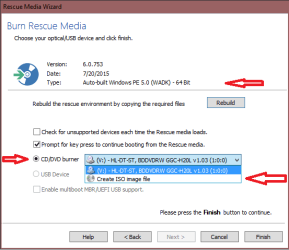
- Create an ISO Image file on the Create Rescue Media / Burn Rescue Media window.
(This is an option in the CD/DVD burner dropdown - see screen print below)
- In the MR menu / Other Tasks, click on Add Recovery Boot Menu Option

See if you get the same error with these methods.

Also, what do you see for Type on the Burn Rescue Media window ? (see my screen print)

fwiw, When I create rescue media I normally create an ISO image, and then burn it to CD with ImgBurn, or add it to a multi-boot USB flash stick with YUMI.

MRBurn.png
 

My Computer

Computer type
PC/Desktop
Computer Manufacturer/Model Number
home built
OS
Multi-Boot W7_Pro_x64 W8.1_Pro_x64 W10_Pro_x64 +Linux_VMs +Chromium_VM
CPU
AMD Athlon II x4 620
Motherboard
Gigabyte GA-MA785G-UD3H
Memory
6GB GSkill DDR2 800
Graphics Card(s)
AMD 4670 GPU + AMD 4200 IGP
Sound Card
on board Realtek ALC889A
Monitor(s) Displays
RCA 40" LCD TV, Insignia 32" LCD TV, HP 15" LCD monitor
Screen Resolution
1680 x 1050
Hard Drives
OCZ Vertex 3 120GB,
Samsung F3 1TB (3),
Several others - WD, Seagate, Hitachi, ...
PSU
Corsair 500 W
Case
Rosewill mid tower
Cooling
CM 90mm rifle
Keyboard
Gyration wireless, Logitech wireless, Dell USB wired
Mouse
Gyration wireless, Logitech wireless, V7 USB wired
Internet Speed
Spectrum - 100Mbps D / 10Mbps U
Antivirus
Avast, MBAM3, EMET, WinPatrol
Browser
Pale Moon, Firefox, IE
Other Info
2 multi-boot PC's
Mainly HTPC/Office/Gen purpose (no gaming).
Trendnet USB KVM.
LG DVD burner/Blue Ray Player.
Tray system for removable SATA backup drives.

Not currently OCd, under-volted.
I use Hybrid sleep, rarely re-boot or shutdown.

Hauppauge HD-PVR, Avermedia PCIe TV Tuner, Hauppauge PCI TV Tuner.
I've no idea about that issue either. Try what DavidE suggested. It also might be worth trying PE4 or PE5 which I use. PE5 is the latest version. You are given the opportunity to change the PE version when you start to build the recovery disk. I think it is another 500MB download.
 

My Computer

Computer type
Laptop
Computer Manufacturer/Model Number
Hewlett-Packard/G62-107SA Notebook
OS
Microsoft Windows 7 Home Premium 64-bit Service Pack 1
CPU
Intel(R) Core(TM) i3 CPU M 330 @ 2.13GHz
Motherboard
Hewlett-Packard 1425
Memory
8 GB DDR3
Graphics Card(s)
Intel(R) HD Graphics
Sound Card
Realtek High Definition Audio
Monitor(s) Displays
Builtin
Screen Resolution
1366 x 768 x 32 bits (4294967296 colors) @ 60 Hz
Hard Drives
250 GB SATA Hard Disk Drive 7200 rpm
2TB Seagate GoFlex USB 2 Drive
1TB Iomega Prestige USB 2 Drive
1.5TB Iomega Prestige USB 2 Drive (Samsung)
2TB WD MyBook Live NAS.
Mouse
Logitech Anywhere MX
Internet Speed
152 Mbs download 10 Mbs upload
Antivirus
Norton 360
Browser
Chrome
Also, studiostarstuff, you stated
i used the ReflectDLfull.exe to download the macrium reflect exe and the pe3x64.zip
I use the ReflectDL.exe to download Macrium.
Where did you download your installer from ?

The Macrium site redirects to CNET for the download, I don't use that.
One place to get the ReflectDL.exe from is MajorGeeks:
Download Macrium Reflect FREE Edition - MajorGeeks

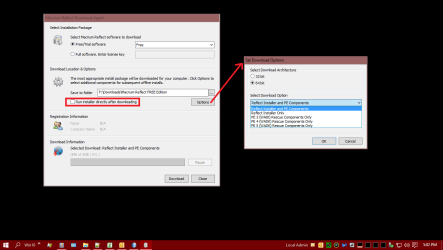
I always uncheck Run after installing, I save the download, then manually run it.

Here is a snip of what i see for options using the ReflectDL.exe

MRDownload.png
 

My Computer

Computer type
PC/Desktop
Computer Manufacturer/Model Number
home built
OS
Multi-Boot W7_Pro_x64 W8.1_Pro_x64 W10_Pro_x64 +Linux_VMs +Chromium_VM
CPU
AMD Athlon II x4 620
Motherboard
Gigabyte GA-MA785G-UD3H
Memory
6GB GSkill DDR2 800
Graphics Card(s)
AMD 4670 GPU + AMD 4200 IGP
Sound Card
on board Realtek ALC889A
Monitor(s) Displays
RCA 40" LCD TV, Insignia 32" LCD TV, HP 15" LCD monitor
Screen Resolution
1680 x 1050
Hard Drives
OCZ Vertex 3 120GB,
Samsung F3 1TB (3),
Several others - WD, Seagate, Hitachi, ...
PSU
Corsair 500 W
Case
Rosewill mid tower
Cooling
CM 90mm rifle
Keyboard
Gyration wireless, Logitech wireless, Dell USB wired
Mouse
Gyration wireless, Logitech wireless, V7 USB wired
Internet Speed
Spectrum - 100Mbps D / 10Mbps U
Antivirus
Avast, MBAM3, EMET, WinPatrol
Browser
Pale Moon, Firefox, IE
Other Info
2 multi-boot PC's
Mainly HTPC/Office/Gen purpose (no gaming).
Trendnet USB KVM.
LG DVD burner/Blue Ray Player.
Tray system for removable SATA backup drives.

Not currently OCd, under-volted.
I use Hybrid sleep, rarely re-boot or shutdown.

Hauppauge HD-PVR, Avermedia PCIe TV Tuner, Hauppauge PCI TV Tuner.
Back
Top