Imaging with free Macrium

   Information

This tutorial shows imaging with free Macrium Version 5.0. If you are still using Macrium Version 4.2, go to this Vimeo site where the tutorial of that version is stored.

The Video does not show the recovery part because I have no setup to screen capture it. But Keith (Kado) made this excellent recovery tutorial with text (but no sound) that he captured from a virtual partition.


   Warning


Note that the external disk to which you image must be formatted in NTFS. A disk that is formatted in Fat32 will accept an image, but the recovery programs cannot restore that image. You can, however, mount (open) a Fat32 image as VHD.


   Note
The production of the WinPE recovery CD (which is highly recommended) may take up to 3 hours because Macrium needs to download the 1.7GB WAIK (Windows Application Installation Kit). For your convenience I have uploaded a ready made .iso of the WinPE recovery disc. That can be downloaded in appr. 8 minutes which clearly beats the WAIK download. Once you downloaded and unzipped the folder, you can burn it directly to a CD with e.g. ImgBurn.

Here is the link to my Skydrive site.

Here is an alternate link from FileSwap (courtesy of Gary - Britton30)

I draw your attention to the fact that this WinPE CD can also be used to make images. That may be convenient in case you do not want to install Macrium on your PC.


This video tutorial explains the full cycle of the imaging process which is:

· Initial setups
· Image definition
· Image scheduling
· Image production

The imaging program that was used for this tutorial is free Macrium. But the basic principles are the same for other imaging programs although the user interface will be different.

This video runs for appr. 7 minutes.
There is a related thread on the Vista forum which gives a brief introduction to Macrium followed by a discussion.
You can download the free Macrium edition from here.

Note: If you have a problem with the loudness of the sound output of the video, check the "Loudness Equalization" box in your Playback device. It is under the 'Enhancements' tab.


Last edited by a moderator:
Iirc the macrium pe is in c:\boot\macrium.

You can add drivers with dism.

You need the drivers extracted to .inf format
 

My Computers My Computers

System One System Two

  • Computer type
    PC/Desktop
    OS
    7 X64
    CPU
    i5 8400
    Motherboard
    gigabyte b365m ds3h
    Memory
    2x8gb 3200mhz
    Hard Drives
    various
    PSU
    pure power 11 400w cm
    Case
    Coolermaster
    Cooling
    cryorig m9i
  • Computer type
    PC/Desktop
    OS
    7x64
    CPU
    g5400
    Motherboard
    ga b365m ds3h
    Memory
    8gb ddr4 2400
    PSU
    xfx pro 450w
Iirc the macrium pe is in c:\boot\macrium.

You can add drivers with dism.

You need the drivers extracted to .inf format
Sorry, that is all Greek to me Simon. I have a PE iso
 

My Computer My Computer

Computer type
PC/Desktop
Computer Manufacturer/Model Number
Home Built Desktop By DataTech
OS
Windows 7 Ultimate X64 SP1
CPU
Intel i5-2550K, Differing ~4.4-4.8GHz No built in GPU
Motherboard
ASUS P8Z68-V PRO/GEN3
Memory
16GB G.Skill Sniper 1866MHz @ 2133MHz 2x8GB
Graphics Card(s)
ASUS GTX650TIB-DC2OC-2GD5, (650TI Boost)
Sound Card
Onboard Realtek 5-1
Monitor(s) Displays
Samsung P2570HD
Screen Resolution
1920x1080
Hard Drives
Samsung 840 Pro 256GB SSD for OS, 500GB Seagate Constellation (Enterprise drive) for Data
PSU
Corsair HX650W
Case
Inwin Dragon Rider
Cooling
Hyper 212 EVO w/two Noctua fans, push-pull, @1300 RPM
Keyboard
E-Z Eyes, bright yellow keys with large characters
Mouse
steelseries SENSEI Laser Pro Gaming
Internet Speed
48-51Mbs Mbs down, 11 Mbs up Xfinity Cable
Antivirus
Norton Internet Security 2013
Browser
IE 10, Opera, Pale Moon if needed
Other Info
4 case fans, LG BluRay-RE, ASUS DVD-RW, Mr. Fusion power supply, 1.21 gigawatts.
There is a new update out. The biggest improvement seems to be to USB3 support in the Linux rescue disk.

What's new? 5.1.5828:

Linux CD major update.
Linux Rescue CD now includes additional support for USB 3.0, restoring to RAID volumes and is built using the latest Linux 3.7 kernel.
Windows Event log viewer
A Windows Event log viewer has been added to Macrium Reflect. VSS and other events can be viewed directly to assist in backup failure troubleshooting. To launch the viewer:
1. Right click on the Macrium Reflect log tree node and select 'View Windows Events'.
2. Take the 'Other Tasks' > 'View Windows Events' menu option.

Note: Windows Events are now also appended to the VSS log file.
Bug fixes:
Failed clone reported as success
If a disk read error occurred during a clone process then the clone could report success and terminate. This has been resolved and the appropriate error is now shown.
Support tool hot key error
Launching the Macrium support tool with 'Ctrl+Shift+S' is no longer a system wide hot key.
Scheduled task edit bug
Changing a task from 'Every Day' to 'n Number of Days' could cause the task to not reflect the change. This has been resolved.
Windows PE build error
If Reflect was installed in a folder using characters outside the current code page then this could cause the Windows PE build to fail. This has been resolved.
VSS Error with some DELL systems
Some DELL systems may assign the drive letter 'W' to the DELL system recovery partition. This could cause VSS snapshot VSS_E_INSUFFICIENT_STORAGE failures. This has been resolved.
Allow dots in XML def file names
The dot character is now permitted in the xml file name.
Windows PE UEFI media ignoring the prompt for key press option
The Windows PE rescue media for GPT/UEFI systems would always prompt for a key press on startup regardless of option selected when creating the media. This has been resolved.
Logical drive image problem.
Incremental/Differential images of logical drives could create images of the wrong partition if another logical drive existed with exactly the same length in the same extended partition. This has been resolved.
 

My Computer My Computer

Computer type
Laptop
Computer Manufacturer/Model Number
Hewlett-Packard/G62-107SA Notebook
OS
Microsoft Windows 7 Home Premium 64-bit Service Pack 1
CPU
Intel(R) Core(TM) i3 CPU M 330 @ 2.13GHz
Motherboard
Hewlett-Packard 1425
Memory
8 GB DDR3
Graphics Card(s)
Intel(R) HD Graphics
Sound Card
Realtek High Definition Audio
Monitor(s) Displays
Builtin
Screen Resolution
1366 x 768 x 32 bits (4294967296 colors) @ 60 Hz
Hard Drives
250 GB SATA Hard Disk Drive 7200 rpm
2TB Seagate GoFlex USB 2 Drive
1TB Iomega Prestige USB 2 Drive
1.5TB Iomega Prestige USB 2 Drive (Samsung)
2TB WD MyBook Live NAS.
Mouse
Logitech Anywhere MX
Internet Speed
152 Mbs download 10 Mbs upload
Antivirus
Norton 360
Browser
Chrome
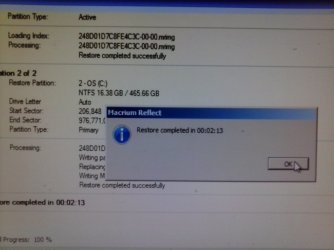
I finally got a chance to try the new recovery process with v5. I had a 5Gb image. After I booted from CD, found the image and ran the recovery process, from boot to restart the whole process took maybe 9 minutes.

Thank you Macrium!
 

Attachments

  • img20130407141600.jpg
    img20130407141600.jpg
    197.5 KB · Views: 143

My Computers My Computers

System One System Two

  • Computer type
    PC/Desktop
    Computer Manufacturer/Model Number
    PowerSpec G164
    OS
    WIN10
    CPU
    AMD Ryzen 5 3600 6-Core Processor 3.59 GHz
    Memory
    16.0 GB
    Internet Speed
    VERY FAST>>>!!!
  • Antivirus
    ESET Security Premium
If I read that correctly, the restore took only 2 minutes and 13 seconds. The boot time for the CD one would not normally count. But you had a very small image.
 

My Computer My Computer

Computer Manufacturer/Model Number
HP, Dell, Gateway, Toshiba - 4 laptops and 2 desktops
OS
Vista, Windows7, Mint Mate, Zorin, Windows 8
CPU
from 1.6GHz Duo to i7
Monitor(s) Displays
2x HP w2207
Hard Drives
5x HDD, 7x SSD, 12x Externals
Keyboard
with trackball - no mices
Mouse
Trackball mice
Internet Speed
DSL 6000
If I read that correctly, the restore took only 2 minutes and 13 seconds. The boot time for the CD one would not normally count. But you had a very small image.


Yea I included the restarts just so I didn't sound insane. :p And that image had what I needed, a clean install with all my DATA on my secondary drive.

I was just very impress with the new feel. I found it easier and faster than before. :party:

Big thanks to you whs and all the rest for their continual support in this thread.
 

My Computers My Computers

System One System Two

  • Computer type
    PC/Desktop
    Computer Manufacturer/Model Number
    PowerSpec G164
    OS
    WIN10
    CPU
    AMD Ryzen 5 3600 6-Core Processor 3.59 GHz
    Memory
    16.0 GB
    Internet Speed
    VERY FAST>>>!!!
  • Antivirus
    ESET Security Premium
You are really welcome. Imaging is one of my hobbies, LOL.
 

My Computer My Computer

Computer Manufacturer/Model Number
HP, Dell, Gateway, Toshiba - 4 laptops and 2 desktops
OS
Vista, Windows7, Mint Mate, Zorin, Windows 8
CPU
from 1.6GHz Duo to i7
Monitor(s) Displays
2x HP w2207
Hard Drives
5x HDD, 7x SSD, 12x Externals
Keyboard
with trackball - no mices
Mouse
Trackball mice
Internet Speed
DSL 6000
New Version 5.1.5856:

Another update to Macrium. Not much new this time.

What's new? 5.1.5856:

Compatibility with Tablet PCs using 32 Bit UEFI boot
Reflect now supports Windows PE restoring on 32 bit UEFI boot PCs such as the Lenovo Tablet 2 series.
Warning message in log for incomplete backup sets
When creating an Incremental backup a warning message is now written to the log file if the backup set doesn't have all files in the backup target folder.
Spin up delay
If the backup target folder cannot be located when running a backup then an automatic delay of 5 seconds is initiated before retrying to allow for disks spinning up from sleep.

Bug fixes:

UEFI CD boot problem
If the 'Prompt for key press option..' was enabled when creating a UEFI booting CD then this could cause the CD not to be loaded when booting. This is a generic problem with UEFI booting media and the option is no-longer available in the rescue wizard.
Clone failure when expanding an XP partition
A disk clone could fail to complete if an XP partition is resized larger. This has been resolved.
Failure email not sent
If an incremental or differential backup failed with the message 'Failed to load image file' then failure emails may not be sent. This has been resolved
File and Folder backup mounting issue
File and Folder backups could fail to mount in Windows Explorer if the backup file is located on a mapped network share. This has been resolved
Program error
Reflect could raise a program error if a scheduled incremental backup references an xml file that has been delete or renamed. This has been resolved.
Alternative locations issue
When using 'Alternative locations' for backup target rotations a Full backup may be created when a Differential or Incremental was expected. This has been resolved.
 
Last edited:

My Computer My Computer

Computer type
Laptop
Computer Manufacturer/Model Number
Hewlett-Packard/G62-107SA Notebook
OS
Microsoft Windows 7 Home Premium 64-bit Service Pack 1
CPU
Intel(R) Core(TM) i3 CPU M 330 @ 2.13GHz
Motherboard
Hewlett-Packard 1425
Memory
8 GB DDR3
Graphics Card(s)
Intel(R) HD Graphics
Sound Card
Realtek High Definition Audio
Monitor(s) Displays
Builtin
Screen Resolution
1366 x 768 x 32 bits (4294967296 colors) @ 60 Hz
Hard Drives
250 GB SATA Hard Disk Drive 7200 rpm
2TB Seagate GoFlex USB 2 Drive
1TB Iomega Prestige USB 2 Drive
1.5TB Iomega Prestige USB 2 Drive (Samsung)
2TB WD MyBook Live NAS.
Mouse
Logitech Anywhere MX
Internet Speed
152 Mbs download 10 Mbs upload
Antivirus
Norton 360
Browser
Chrome
Thanks Keith
 

My Computer My Computer

Computer Manufacturer/Model Number
HP, Dell, Gateway, Toshiba - 4 laptops and 2 desktops
OS
Vista, Windows7, Mint Mate, Zorin, Windows 8
CPU
from 1.6GHz Duo to i7
Monitor(s) Displays
2x HP w2207
Hard Drives
5x HDD, 7x SSD, 12x Externals
Keyboard
with trackball - no mices
Mouse
Trackball mice
Internet Speed
DSL 6000
Another new version 5.1.5870

What's new? 5.1.5870:

Windows PE Recovery boot menu now available on 32 bit UEFI boot systems
Reflect now supports Windows PE recovery boot menu on the latest 32 bit UEFI boot tablet PCs.

Bug fixes:

Cloning progress bar not updated
During a 'forensic' clone operation the progress bar was not correctly updated. This has been resolved
Read error during clone
Some systems could report a read eror during clone operations. This has been resolved

I guess this is primarily a bug fix.
 

My Computer My Computer

Computer type
Laptop
Computer Manufacturer/Model Number
Hewlett-Packard/G62-107SA Notebook
OS
Microsoft Windows 7 Home Premium 64-bit Service Pack 1
CPU
Intel(R) Core(TM) i3 CPU M 330 @ 2.13GHz
Motherboard
Hewlett-Packard 1425
Memory
8 GB DDR3
Graphics Card(s)
Intel(R) HD Graphics
Sound Card
Realtek High Definition Audio
Monitor(s) Displays
Builtin
Screen Resolution
1366 x 768 x 32 bits (4294967296 colors) @ 60 Hz
Hard Drives
250 GB SATA Hard Disk Drive 7200 rpm
2TB Seagate GoFlex USB 2 Drive
1TB Iomega Prestige USB 2 Drive
1.5TB Iomega Prestige USB 2 Drive (Samsung)
2TB WD MyBook Live NAS.
Mouse
Logitech Anywhere MX
Internet Speed
152 Mbs download 10 Mbs upload
Antivirus
Norton 360
Browser
Chrome
Cripes they are pushing them out fast. I think I'll just keep the PE disk I have already made.
 

My Computer My Computer

Computer type
PC/Desktop
Computer Manufacturer/Model Number
Home Built Desktop By DataTech
OS
Windows 7 Ultimate X64 SP1
CPU
Intel i5-2550K, Differing ~4.4-4.8GHz No built in GPU
Motherboard
ASUS P8Z68-V PRO/GEN3
Memory
16GB G.Skill Sniper 1866MHz @ 2133MHz 2x8GB
Graphics Card(s)
ASUS GTX650TIB-DC2OC-2GD5, (650TI Boost)
Sound Card
Onboard Realtek 5-1
Monitor(s) Displays
Samsung P2570HD
Screen Resolution
1920x1080
Hard Drives
Samsung 840 Pro 256GB SSD for OS, 500GB Seagate Constellation (Enterprise drive) for Data
PSU
Corsair HX650W
Case
Inwin Dragon Rider
Cooling
Hyper 212 EVO w/two Noctua fans, push-pull, @1300 RPM
Keyboard
E-Z Eyes, bright yellow keys with large characters
Mouse
steelseries SENSEI Laser Pro Gaming
Internet Speed
48-51Mbs Mbs down, 11 Mbs up Xfinity Cable
Antivirus
Norton Internet Security 2013
Browser
IE 10, Opera, Pale Moon if needed
Other Info
4 case fans, LG BluRay-RE, ASUS DVD-RW, Mr. Fusion power supply, 1.21 gigawatts.
Right Gary. There is no need to update the PE all the time - unless they tell us that the old one is no good any more.
 

My Computer My Computer

Computer Manufacturer/Model Number
HP, Dell, Gateway, Toshiba - 4 laptops and 2 desktops
OS
Vista, Windows7, Mint Mate, Zorin, Windows 8
CPU
from 1.6GHz Duo to i7
Monitor(s) Displays
2x HP w2207
Hard Drives
5x HDD, 7x SSD, 12x Externals
Keyboard
with trackball - no mices
Mouse
Trackball mice
Internet Speed
DSL 6000
I guess there was a problem with the previous one.
 

My Computer My Computer

Computer type
Laptop
Computer Manufacturer/Model Number
Hewlett-Packard/G62-107SA Notebook
OS
Microsoft Windows 7 Home Premium 64-bit Service Pack 1
CPU
Intel(R) Core(TM) i3 CPU M 330 @ 2.13GHz
Motherboard
Hewlett-Packard 1425
Memory
8 GB DDR3
Graphics Card(s)
Intel(R) HD Graphics
Sound Card
Realtek High Definition Audio
Monitor(s) Displays
Builtin
Screen Resolution
1366 x 768 x 32 bits (4294967296 colors) @ 60 Hz
Hard Drives
250 GB SATA Hard Disk Drive 7200 rpm
2TB Seagate GoFlex USB 2 Drive
1TB Iomega Prestige USB 2 Drive
1.5TB Iomega Prestige USB 2 Drive (Samsung)
2TB WD MyBook Live NAS.
Mouse
Logitech Anywhere MX
Internet Speed
152 Mbs download 10 Mbs upload
Antivirus
Norton 360
Browser
Chrome
Right Gary. There is no need to update the PE all the time - unless they tell us that the old one is no good any more.
I am working on that philosophy as well Wolfgang.
I'm assuming the patch upgrades are fixing specific minor bugs - if so then thumbs up to Macrium for being so proactive.
 

My Computer My Computer

Computer type
PC/Desktop
Computer Manufacturer/Model Number
Own build
OS
Windows 7x64 Home Premium SP1
CPU
Intel i7 2600k
Motherboard
ASUS P8Z68 Deluxe
Memory
G.Skill Ripjaws (DDR3-1600) 2x4GB
Graphics Card(s)
Nvidia GeForce GTS 450; Intel HD Graphics 3000(GT2+)
Monitor(s) Displays
Dell Ultrasharp IPS panel U2311H, Samsung SyncMaster P2350
Screen Resolution
1920x1080
Hard Drives
Samsung 850 Pro SSD 256GB, Samsung SSD 840 120GB, Seagates 1TB Barracuda ST31000528AS x2
PSU
Seasonic M12II 520W
Case
Lian Li Lancool PC-K60
Cooling
Case: 1x120mm, 3x140mm CPU: Hyper 212+
Keyboard
Logitech MK520 (wireless)
Mouse
Logitech MK520
Internet Speed
6-7 Mbps
Antivirus
Norton Security Premium, Malwarebytes on 2 (MSE on 3rd PC)
Browser
FireFox
Other Info
Audio: Logitech Z523 2.1
hello.. thank you for the tutorial!

i'd like to ask...

on my notebook i do a dual-drive recently,, i put SSD for my OS and HDD for the storage (i replaced the dvdbay and put hdd caddy into the place.)
The storage HDD i divide into 2 partition. I move the user folder (my music my pict and my docs) to the HDD, not on the SSD.
I have a question... can i just click "image this disk" on Drive C to backup my OS.. or do i have to move my docs my pict and my music back to its default location before doing the backup..?

ps:the APPDATA Contacts Desktop etc still on C:\ SSD drive though.
I used macrium free in the past, but always use notebook, so this is the 1st time i move user folder to a different drive, so im wondering what is the proper way to backup the OS...? should I move the user folder back to C first, or just "image this disk" on C would be enough?

here's the SS of my macrium free
UHm8xkG.png


thank you very much and have a great day...

KP
 

My Computer My Computer

Computer type
Laptop
Computer Manufacturer/Model Number
Asus K43S
OS
windows 7 home premium 64bit
CPU
Intel Core i3-2330m
Memory
6 Gib 10600 DDR3 RAM
Graphics Card(s)
Radeon 6730
Monitor(s) Displays
Generic PnP Monitor
Hard Drives
Intel SSD 330 Series 120 Gb
Seagate Momentus 750 Gb
Internet Speed
Slow, lol
Antivirus
KIS 2013
I have a question... can i just click "image this disk" on Drive C to backup my OS.. or do i have to move my docs my pict and my music back to its default location before doing the backup..?
Just image your C if you want to backup the OS. Make sure you image your 100MB system reserved partition at least once in case your disk ever fails. I would do that image seperately and stick it into a safe place. That partition never changes (unless one day you make a double boot setup).

But from time to time you should also backup your data which you can do with an image or a lot of other ways.
 

My Computer My Computer

Computer Manufacturer/Model Number
HP, Dell, Gateway, Toshiba - 4 laptops and 2 desktops
OS
Vista, Windows7, Mint Mate, Zorin, Windows 8
CPU
from 1.6GHz Duo to i7
Monitor(s) Displays
2x HP w2207
Hard Drives
5x HDD, 7x SSD, 12x Externals
Keyboard
with trackball - no mices
Mouse
Trackball mice
Internet Speed
DSL 6000
Do we have to burn a rescue disk each we create an updated image?
 

My Computer My Computer

Computer type
PC/Desktop
Computer Manufacturer/Model Number
HP
OS
Win 7 64
CPU
i5
Hi fourthofjuly and welcome to Seven Forums.

You only need to burn a rescue disk once. From time to time a new version of Macrium is released and the release notes will recommend the burning of a new disk.

The important thing is to check that the disk works. That you can boot from it and find your image.
 

My Computer My Computer

Computer type
Laptop
Computer Manufacturer/Model Number
Hewlett-Packard/G62-107SA Notebook
OS
Microsoft Windows 7 Home Premium 64-bit Service Pack 1
CPU
Intel(R) Core(TM) i3 CPU M 330 @ 2.13GHz
Motherboard
Hewlett-Packard 1425
Memory
8 GB DDR3
Graphics Card(s)
Intel(R) HD Graphics
Sound Card
Realtek High Definition Audio
Monitor(s) Displays
Builtin
Screen Resolution
1366 x 768 x 32 bits (4294967296 colors) @ 60 Hz
Hard Drives
250 GB SATA Hard Disk Drive 7200 rpm
2TB Seagate GoFlex USB 2 Drive
1TB Iomega Prestige USB 2 Drive
1.5TB Iomega Prestige USB 2 Drive (Samsung)
2TB WD MyBook Live NAS.
Mouse
Logitech Anywhere MX
Internet Speed
152 Mbs download 10 Mbs upload
Antivirus
Norton 360
Browser
Chrome
I have a question... can i just click "image this disk" on Drive C to backup my OS.. or do i have to move my docs my pict and my music back to its default location before doing the backup..?
Just image your C if you want to backup the OS. Make sure you image your 100MB system reserved partition at least once in case your disk ever fails. I would do that image seperately and stick it into a safe place. That partition never changes (unless one day you make a double boot setup).

But from time to time you should also backup your data which you can do with an image or a lot of other ways.

this is the 1st time i use dual-drive notebook, so i apologize i ask again.

I noticed that some software create folders on user folders. e.g. IDM created folder on Downloads folder, Calibre created folders on My Doc folders and iTunes created folders on My Music folders. All of which I move it from C (SSD) to the HDD (D,E, and F).

If I only backup the SSD (both the 100mbit system reserved and the C drive),, will those program still works when i restore it later in the future?

thanks!

KP7

=====
Also, the SSD has System Reserved and C partition. So... from your reply.. should i backup the system reserved and C together as 1 macrium file, or separately as 2 macrium file?

thanks a lot!! :D
 

My Computer My Computer

Computer type
Laptop
Computer Manufacturer/Model Number
Asus K43S
OS
windows 7 home premium 64bit
CPU
Intel Core i3-2330m
Memory
6 Gib 10600 DDR3 RAM
Graphics Card(s)
Radeon 6730
Monitor(s) Displays
Generic PnP Monitor
Hard Drives
Intel SSD 330 Series 120 Gb
Seagate Momentus 750 Gb
Internet Speed
Slow, lol
Antivirus
KIS 2013
If I only backup the SSD (both the 100mbit system reserved and the C drive),, will those program still works when i restore it later in the future?
It depends. Some programs will just create new folders, but if a program relies on the info that is contained in the folder, the program (or at least one of it's functions) will not work.

Example: Macrium places the folder with the XML files into Documents. Next time you want to make an image, you just chose an XML definition and ask Macrium to make an image as per this definition. That, of course, will not work when you moved the folder with the definitions.


Bottom line: Don't move folders that were created by the system or by programs.

Also, the SSD has System Reserved and C partition. So... from your reply.. should i backup the system reserved and C together as 1 macrium file, or separately as 2 macrium file?
Make one image (one and only one) of the system reserved partition and stow it away in a seperate folder. You will need that image only when your disk breaks and you have to pull in the images to a new disk.

Then make images of C only as often as you feel necessary.

And don't forget to backup your data from time to time.
 

My Computer My Computer

Computer Manufacturer/Model Number
HP, Dell, Gateway, Toshiba - 4 laptops and 2 desktops
OS
Vista, Windows7, Mint Mate, Zorin, Windows 8
CPU
from 1.6GHz Duo to i7
Monitor(s) Displays
2x HP w2207
Hard Drives
5x HDD, 7x SSD, 12x Externals
Keyboard
with trackball - no mices
Mouse
Trackball mice
Internet Speed
DSL 6000
Back
Top