
Imaging with free Macrium

   Information

This tutorial shows imaging with free Macrium Version 5.0. If you are still using Macrium Version 4.2, go to this Vimeo site where the tutorial of that version is stored.

The Video does not show the recovery part because I have no setup to screen capture it. But Keith (Kado) made this excellent recovery tutorial with text (but no sound) that he captured from a virtual partition.


   Warning


Note that the external disk to which you image must be formatted in NTFS. A disk that is formatted in Fat32 will accept an image, but the recovery programs cannot restore that image. You can, however, mount (open) a Fat32 image as VHD.


   Note
The production of the WinPE recovery CD (which is highly recommended) may take up to 3 hours because Macrium needs to download the 1.7GB WAIK (Windows Application Installation Kit). For your convenience I have uploaded a ready made .iso of the WinPE recovery disc. That can be downloaded in appr. 8 minutes which clearly beats the WAIK download. Once you downloaded and unzipped the folder, you can burn it directly to a CD with e.g. ImgBurn.

Here is the link to my Skydrive site.

Here is an alternate link from FileSwap (courtesy of Gary - Britton30)

I draw your attention to the fact that this WinPE CD can also be used to make images. That may be convenient in case you do not want to install Macrium on your PC.


This video tutorial explains the full cycle of the imaging process which is:

· Initial setups
· Image definition
· Image scheduling
· Image production

The imaging program that was used for this tutorial is free Macrium. But the basic principles are the same for other imaging programs although the user interface will be different.

This video runs for appr. 7 minutes.
There is a related thread on the Vista forum which gives a brief introduction to Macrium followed by a discussion.
You can download the free Macrium edition from here.

Note: If you have a problem with the loudness of the sound output of the video, check the "Loudness Equalization" box in your Playback device. It is under the 'Enhancements' tab.


Last edited by a moderator:
Aomei looks quite good. I have tested it on a small partition with no problems. I use it as my second backup program with the paid version of Macrium as my first. I have not yet had to do a full restore with it. One advantage over free Macrium is the ability to do incremental and differential images and file backups. These features are only available in the paid Macrium versions.
 

My Computer

Computer type
Laptop
Computer Manufacturer/Model Number
Hewlett-Packard/G62-107SA Notebook
OS
Microsoft Windows 7 Home Premium 64-bit Service Pack 1
CPU
Intel(R) Core(TM) i3 CPU M 330 @ 2.13GHz
Motherboard
Hewlett-Packard 1425
Memory
8 GB DDR3
Graphics Card(s)
Intel(R) HD Graphics
Sound Card
Realtek High Definition Audio
Monitor(s) Displays
Builtin
Screen Resolution
1366 x 768 x 32 bits (4294967296 colors) @ 60 Hz
Hard Drives
250 GB SATA Hard Disk Drive 7200 rpm
2TB Seagate GoFlex USB 2 Drive
1TB Iomega Prestige USB 2 Drive
1.5TB Iomega Prestige USB 2 Drive (Samsung)
2TB WD MyBook Live NAS.
Mouse
Logitech Anywhere MX
Internet Speed
152 Mbs download 10 Mbs upload
Antivirus
Norton 360
Browser
Chrome
There is a high compression setting, it takes a little longer to create the image of course.

aomei-compression.jpg
 

My Computers

System One System Two

  • Computer type
    PC/Desktop
    OS
    7 X64
    CPU
    i5 8400
    Motherboard
    gigabyte b365m ds3h
    Memory
    2x8gb 3200mhz
    Hard Drives
    various
    PSU
    pure power 11 400w cm
    Case
    Coolermaster
    Cooling
    cryorig m9i
  • Computer type
    PC/Desktop
    OS
    7x64
    CPU
    g5400
    Motherboard
    ga b365m ds3h
    Memory
    8gb ddr4 2400
    PSU
    xfx pro 450w
thank you guys is it safe and reliable to use high compression setting in aomei backupper for system image.what i mean if i used high compression do i have any problem while restoring.
 

My Computer

Computer type
Laptop
OS
windows 7 pro 32bit
It will restore fine.
 

My Computers

System One System Two

  • Computer type
    PC/Desktop
    OS
    7 X64
    CPU
    i5 8400
    Motherboard
    gigabyte b365m ds3h
    Memory
    2x8gb 3200mhz
    Hard Drives
    various
    PSU
    pure power 11 400w cm
    Case
    Coolermaster
    Cooling
    cryorig m9i
  • Computer type
    PC/Desktop
    OS
    7x64
    CPU
    g5400
    Motherboard
    ga b365m ds3h
    Memory
    8gb ddr4 2400
    PSU
    xfx pro 450w
thank you so much you guys are awesome. what do you think about aomei backupper standard free edition is it reliable ? which software makes high compression of system image because i have no external hdd right now so i have only option to save them in internal hdd later to move to external hdd.

I've never used Aomei, but it has a good reputation.

Macrium can make images with no, medium, or high compression. Medium is the default. An image with medium compression will normally take up about half as much space as is occupied by the partitions in the image. For instance, if you have a C partition of 500 GB and 200 GB are occupied, the image file of the C partition will be roughly 100 GB in size.

I've never tried high compression, so I can't tell you how much smaller those images might be.
 

My Computer

Computer type
PC/Desktop
Computer Manufacturer/Model Number
Ignatz Special; 4 speed manual gearbox; factory air conditioning; one of one
OS
Windows 7 Home Premium SP1, 64-bit
CPU
Intel Skylake i5-6600K, not overclocked
Motherboard
AsRock Z170M Extreme 4, micro ATX
Memory
8 GB HyperX DDR4-2666 (2 x 4 GB)
Graphics Card(s)
none; graphics are integrated on CPU
Sound Card
onboard: Realtek ALC1150; external: USB Behringer UF0-202
Monitor(s) Displays
Dell S2340M 23 inch IPS
Screen Resolution
1600 x 900
Hard Drives
System: Crucial MX100 series SSD, 128 GB;
Data: Samsung Spinpoint 103SJ, 1 TB;
Backup: WD Caviar Green WD30EZRX-00D8PB0, 3 TB
PSU
Rosewill SilentNight 500 watt fanless, semi-modular
Case
Antec Solo II
Cooling
Noctua NH-U12S; Noctua F12 intake, Noctua S12A exhaust
Keyboard
Microsoft 200 6JH-00001 USB
Mouse
Dell or Microsoft optical wired; USB
Antivirus
Microsoft Security Essentials and Malwarebytes Premium
Browser
Pale Moon
Other Info
All fans PWM; speeds at idle: CPU circa 500 rpm; intake circa 600 rpm; exhaust circa 600 rpm; CPU temps 27 idle and 47 C load in a warm room (27 C/81 F) when running Intel Extreme Tuning Utility stress test.
only one more question guys i wont disturb you if i am going to restore system image from external hdd having large systemimagebackup file and other stuffs(on relation to system image) are there any chance of getting erase of other stuffs during restoring image
 

My Computer

Computer type
Laptop
OS
windows 7 pro 32bit
only one more question guys i wont disturb you if i am going to restore system image from external hdd having large systemimagebackup file and other stuffs(on relation to system image) are there any chance of getting erase of other stuffs during restoring image

If the image file and "other stuff" is on an external HDD and you restore to an internal HDD, nothing on the external HDD should be erased. In fact, I don't think you can restore TO a partition containing the image file, even by mistake.
 

My Computer

Computer type
PC/Desktop
Computer Manufacturer/Model Number
Ignatz Special; 4 speed manual gearbox; factory air conditioning; one of one
OS
Windows 7 Home Premium SP1, 64-bit
CPU
Intel Skylake i5-6600K, not overclocked
Motherboard
AsRock Z170M Extreme 4, micro ATX
Memory
8 GB HyperX DDR4-2666 (2 x 4 GB)
Graphics Card(s)
none; graphics are integrated on CPU
Sound Card
onboard: Realtek ALC1150; external: USB Behringer UF0-202
Monitor(s) Displays
Dell S2340M 23 inch IPS
Screen Resolution
1600 x 900
Hard Drives
System: Crucial MX100 series SSD, 128 GB;
Data: Samsung Spinpoint 103SJ, 1 TB;
Backup: WD Caviar Green WD30EZRX-00D8PB0, 3 TB
PSU
Rosewill SilentNight 500 watt fanless, semi-modular
Case
Antec Solo II
Cooling
Noctua NH-U12S; Noctua F12 intake, Noctua S12A exhaust
Keyboard
Microsoft 200 6JH-00001 USB
Mouse
Dell or Microsoft optical wired; USB
Antivirus
Microsoft Security Essentials and Malwarebytes Premium
Browser
Pale Moon
Other Info
All fans PWM; speeds at idle: CPU circa 500 rpm; intake circa 600 rpm; exhaust circa 600 rpm; CPU temps 27 idle and 47 C load in a warm room (27 C/81 F) when running Intel Extreme Tuning Utility stress test.
Let me start by saying that I have followed this thread in its entirety over the past year and found it fascinating. I have imaged various test partitions as suggested and restored them with success. Last week my C drive failed to boot so I bit the bullet and restored my saved image - it was easy and worked perfectly! But as my main C partition was 336gb it took quite a while. My next project is to move most of the data onto another internal hdd, and resize my main C drive partition to reduce it in size. My question is: if I change the size of the C partition and it goes wrong can I restore the image I have made of my original partition even though it will be larger. Thank you for your help.
Ian
 

My Computer

OS
Windows 7 32
My question is: if I change the size of the C partition and it goes wrong can I restore the image I have made of my original partition even though it will be larger. Thank you for your help.
Ian

I think you'll be OK if---and only if---the new smaller partition is still at least as large as the occupied space was on the earlier, larger partition.

Example:

C is originally 500 GB, with 200 occupied. You make an image of it.

You then reduce C to 230 GB. You can still restore that original image. If you reduce C to 180, you couldn't.
 

My Computer

Computer type
PC/Desktop
Computer Manufacturer/Model Number
Ignatz Special; 4 speed manual gearbox; factory air conditioning; one of one
OS
Windows 7 Home Premium SP1, 64-bit
CPU
Intel Skylake i5-6600K, not overclocked
Motherboard
AsRock Z170M Extreme 4, micro ATX
Memory
8 GB HyperX DDR4-2666 (2 x 4 GB)
Graphics Card(s)
none; graphics are integrated on CPU
Sound Card
onboard: Realtek ALC1150; external: USB Behringer UF0-202
Monitor(s) Displays
Dell S2340M 23 inch IPS
Screen Resolution
1600 x 900
Hard Drives
System: Crucial MX100 series SSD, 128 GB;
Data: Samsung Spinpoint 103SJ, 1 TB;
Backup: WD Caviar Green WD30EZRX-00D8PB0, 3 TB
PSU
Rosewill SilentNight 500 watt fanless, semi-modular
Case
Antec Solo II
Cooling
Noctua NH-U12S; Noctua F12 intake, Noctua S12A exhaust
Keyboard
Microsoft 200 6JH-00001 USB
Mouse
Dell or Microsoft optical wired; USB
Antivirus
Microsoft Security Essentials and Malwarebytes Premium
Browser
Pale Moon
Other Info
All fans PWM; speeds at idle: CPU circa 500 rpm; intake circa 600 rpm; exhaust circa 600 rpm; CPU temps 27 idle and 47 C load in a warm room (27 C/81 F) when running Intel Extreme Tuning Utility stress test.
Forget the CPU usage thing. I never knew what that means. It seems to be a random number.

And don't get too held up with the read/write speeds. Good speeds are helpful but what really counts is the access time. And 3ms is too slow. It should be 1ms or less. SSDs are typically 0.1ms. Just to give you a perspective.
Great stuff Wolfgang that's why the Samsung flew when I ran the HD on it :) while the stick plodded along. You can see that in the pic what I am curious is that it throws those downward spikes each time I run it and am wondering if it just a changeover between the banks of chips within the SSD??
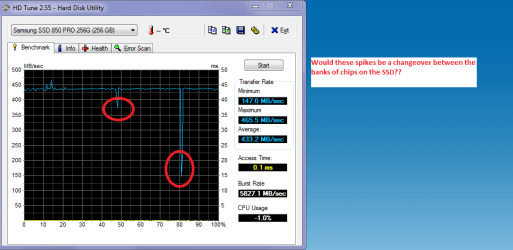
Sorry that is a bit OT but am curious.
 

Attachments

  • HD 2.PNG
    HD 2.PNG
    48.8 KB · Views: 75

My Computer

Computer type
PC/Desktop
Computer Manufacturer/Model Number
Own build (new) Desk1 / Asus ROG Win 7 / Desk2 1st build
OS
Desk1 7 Home Prem / Desk2 10 Pro / Main lap Asus ROG 10 Pro 2 laptop Toshiba 7 Pro Asus P2520 7 & 10
CPU
Desk1 i5 3750K / Laptop i7 GTX 860M / Desk2 i5 2500
Motherboard
Desk1 Asus P877-V / Desk2 Gigabyte H67 UD3H / Laptop ?
Memory
Desk1 8GB (1866) / Desk2 16GB (1333) / Laptop 8Gb DDR3
Graphics Card(s)
Desk 1& 2NVidia GTX 650 & Laptops on board Intel
Sound Card
Desk 1 & 2 -XONAR DG Realtek High Def audio Laptop
Monitor(s) Displays
Desk 1 Benq HD 2450 / Desk2 Philips 24" / Laptop 17.5"
Screen Resolution
1920x1080 D1 & D2 & Laptop 1
Hard Drives
Desk1 Samsung 120GB 830 SSD
Asus ROG 256GB 850 Pro SSD
Desk2 Samsung 840 256 SSD
Toshiba 120GB EVO
PSU
Desk 1 Corsair HX 1050/ Laptop ? / Desk 2 Corsair HX 650
Case
Desk 1 Cooler HAF XM ? Toshiba laptop / Desk2 Coolermaster
Cooling
Fans on all Desk1 -2 Desk2 - all Coolermasters 5 Laptop ?
Keyboard
Desk 1 MS Sidewinder X6 Desk 2 MS Sidewinder X 4
Mouse
Desk 1&2 - Gigabyte MS 900 gamer - laptop - Logitec wireless
Internet Speed
ADSL2+
Other Info
One other Desktop (tester) and spare Toshba laptop both with SSD's
Running Kaspersky 2016 ISS on all machines config'd identically
Logitec audio stereo systems on each machine (x3)
Canon MG5250MFC
Router/modem TP-Link running WPA2SK
thank you so much you guys are awesome. what do you think about aomei backupper standard free edition is it reliable ? which software makes high compression of system image because i have no external hdd right now so i have only option to save them in internal hdd later to move to external hdd.

I've never used Aomei, but it has a good reputation.

Macrium can make images with no, medium, or high compression. Medium is the default. An image with medium compression will normally take up about half as much space as is occupied by the partitions in the image. For instance, if you have a C partition of 500 GB and 200 GB are occupied, the image file of the C partition will be roughly 100 GB in size.

I've never tried high compression, so I can't tell you how much smaller those images might be.

The paid version of Macrium Reflect can increase or decrease the amount of compression used (I use the default setting though) and I believe you can do the same with the free version.
 

My Computer

Computer type
PC/Desktop
Computer Manufacturer/Model Number
Custom Build
OS
Win 7 Ultimate 64 bit
CPU
Intel i7-3930K
Motherboard
ASUS P9X79 WS
Memory
Kingston HyperX Genesis 32GB Kit (8x4GB Modules) 1600MHz DDR
Graphics Card(s)
MSI R7850 Twin Frozr 2GD5/OC Radeon HD 7850 2GB 256-bit GDDR
Sound Card
Asus Xonar Essence STX
Monitor(s) Displays
3x Asus VG248QE 24", Vizio 32" TV
Screen Resolution
1920 x 1080, ?
Hard Drives
Samsung 128GB 840 Pro SSD (1),
Samsung 4TB 850 EVO SSDs (4)
Samsung 4TB 850 EVO SSDs (16) external backup drives used in 2.5" hot swap bays in the computer.
PSU
Corsair HX750w
Case
Antec Two Hundred v2 (modified)
Cooling
Cooler Master GeminII S524 120mm (fan replaced with a 140mm)
Keyboard
Logitech G510s
Mouse
Logitech M525 (two in use)
Internet Speed
=< 32Mbps down, 8Mbps up
Antivirus
AVAST!, MBAM, SAS, Spybot S&D (all but MBAM free) Glary Util
Browser
IE11
Other Info
LSI 9211-8i HBA card (8 SATA III ports), 2.5" & 3.5" Hot Swap Bays, HooToo HT-CR001 PCI-E to USB 3.0 Internal Hub + 6 Slot Card Reader, and LG Model CH12LS28 BD-ROM Optical Drive. Also, ScanSnap S1500 ADF duplexing scanner, Canon 9000F flat bed scanner, Corsair SP2500 2.1 speakers, Samsung CLP 415nw laser color printer, Cyberpower PP2200SW UPS
thank you so much you guys are awesome. what do you think about aomei backupper standard free edition is it reliable ? which software makes high compression of system image because i have no external hdd right now so i have only option to save them in internal hdd later to move to external hdd.

I've never used Aomei, but it has a good reputation.

Macrium can make images with no, medium, or high compression. Medium is the default. An image with medium compression will normally take up about half as much space as is occupied by the partitions in the image. For instance, if you have a C partition of 500 GB and 200 GB are occupied, the image file of the C partition will be roughly 100 GB in size.

I've never tried high compression, so I can't tell you how much smaller those images might be.

The paid version of Macrium Reflect can increase or decrease the amount of compression used (I use the default setting though) and I believe you can do the same with the free version.

I found that setting the compression to high in Macrium slows it down a lot and doesn't make it much smaller so I leave it on the default too.
 

My Computer

Computer type
Laptop
Computer Manufacturer/Model Number
Hewlett-Packard/G62-107SA Notebook
OS
Microsoft Windows 7 Home Premium 64-bit Service Pack 1
CPU
Intel(R) Core(TM) i3 CPU M 330 @ 2.13GHz
Motherboard
Hewlett-Packard 1425
Memory
8 GB DDR3
Graphics Card(s)
Intel(R) HD Graphics
Sound Card
Realtek High Definition Audio
Monitor(s) Displays
Builtin
Screen Resolution
1366 x 768 x 32 bits (4294967296 colors) @ 60 Hz
Hard Drives
250 GB SATA Hard Disk Drive 7200 rpm
2TB Seagate GoFlex USB 2 Drive
1TB Iomega Prestige USB 2 Drive
1.5TB Iomega Prestige USB 2 Drive (Samsung)
2TB WD MyBook Live NAS.
Mouse
Logitech Anywhere MX
Internet Speed
152 Mbs download 10 Mbs upload
Antivirus
Norton 360
Browser
Chrome
Aomei looks quite good. I have tested it on a small partition with no problems. I use it as my second backup program with the paid version of Macrium as my first. I have not yet had to do a full restore with it. One advantage over free Macrium is the ability to do incremental and differential images and file backups. These features are only available in the paid Macrium versions.

I should point out that most people here, including me, do not recommend using incremental and differential imaging (although, of the two, differential backups are preferable). As long as one keeps only the OS and programs on the C: drive or partition and data on other drives or partitions, full backup images will be small enough to allow keeping several of them on hand. Also, one doesn't need to image just the OS and programs as often. I make my images only once a week and just before making a change, such as installing a new program or making major setting changes, then keep only the latest few (and the first image I made after setting up the computer). If one of the incremental or differential files gets lost or corrupted, recovery will fail.

Image compression of the C: drive is a bit confusing. While Macrium Reflect appears to compress the image quite a bit, it only appears to be that much because it doesn't image files that are automatically generated by the OS, such as the hyberfil.sys file. In my case, that file is huge (24GB since I have 32GB of RAM), so the compression appears to be far more than it really is.

Imaging is highly inefficient and much too slow for backing up all but the tiniest amount of data (the main reason one should keep the OS and programs separate from data). A folder/file syncing program, such as FreeFileSync or SyncToy, is (after the initial backup) much faster and takes up less room. It normally takes me only a few minutes to make a backup using FreeFileSync, depending how much data I've added or changed since the last backup, so I can easily make two backups my data once or more a day. A folder/file syncing program, when used in mirror mode, will compare the source drive or partition (the one being backed up) to the destination drive or partition (the backup), the copy files to the destination drive, or delete them, so that the destination drive is essentially a clone of the source drive.
 

My Computer

Computer type
PC/Desktop
Computer Manufacturer/Model Number
Custom Build
OS
Win 7 Ultimate 64 bit
CPU
Intel i7-3930K
Motherboard
ASUS P9X79 WS
Memory
Kingston HyperX Genesis 32GB Kit (8x4GB Modules) 1600MHz DDR
Graphics Card(s)
MSI R7850 Twin Frozr 2GD5/OC Radeon HD 7850 2GB 256-bit GDDR
Sound Card
Asus Xonar Essence STX
Monitor(s) Displays
3x Asus VG248QE 24", Vizio 32" TV
Screen Resolution
1920 x 1080, ?
Hard Drives
Samsung 128GB 840 Pro SSD (1),
Samsung 4TB 850 EVO SSDs (4)
Samsung 4TB 850 EVO SSDs (16) external backup drives used in 2.5" hot swap bays in the computer.
PSU
Corsair HX750w
Case
Antec Two Hundred v2 (modified)
Cooling
Cooler Master GeminII S524 120mm (fan replaced with a 140mm)
Keyboard
Logitech G510s
Mouse
Logitech M525 (two in use)
Internet Speed
=< 32Mbps down, 8Mbps up
Antivirus
AVAST!, MBAM, SAS, Spybot S&D (all but MBAM free) Glary Util
Browser
IE11
Other Info
LSI 9211-8i HBA card (8 SATA III ports), 2.5" & 3.5" Hot Swap Bays, HooToo HT-CR001 PCI-E to USB 3.0 Internal Hub + 6 Slot Card Reader, and LG Model CH12LS28 BD-ROM Optical Drive. Also, ScanSnap S1500 ADF duplexing scanner, Canon 9000F flat bed scanner, Corsair SP2500 2.1 speakers, Samsung CLP 415nw laser color printer, Cyberpower PP2200SW UPS
I think you'll be OK if---and only if---the new smaller partition is still at least as large as the occupied space was on the earlier, larger partition.

Example:

C is originally 500 GB, with 200 occupied. You make an image of it.

You then reduce C to 230 GB. You can still restore that original image. If you reduce C to 180, you couldn't.
Thanks ignatzatsonic. That sounds fairly straightforward, I will give it a go.
 

My Computer

OS
Windows 7 32
ya you are absolutly right .aomei in their website pointed out there is not much compressable effect on files like videos when compared to system files so there is no point to image all data which will consume lot of time.also our actual goal of imaging is to preserve and recover windows so as we no need to buy windows again.
 

My Computer

Computer type
Laptop
OS
windows 7 pro 32bit
Aomei looks quite good. I have tested it on a small partition with no problems. I use it as my second backup program with the paid version of Macrium as my first. I have not yet had to do a full restore with it. One advantage over free Macrium is the ability to do incremental and differential images and file backups. These features are only available in the paid Macrium versions.

I should point out that most people here, including me, do not recommend using incremental and differential imaging (although, of the two, differential backups are preferable). As long as one keeps only the OS and programs on the C: drive or partition and data on other drives or partitions, full backup images will be small enough to allow keeping several of them on hand. Also, one doesn't need to image just the OS and programs as often. I make my images only once a week and just before making a change, such as installing a new program or making major setting changes, then keep only the latest few (and the first image I made after setting up the computer). If one of the incremental or differential files gets lost or corrupted, recovery will fail.

Image compression of the C: drive is a bit confusing. While Macrium Reflect appears to compress the image quite a bit, it only appears to be that much because it doesn't image files that are automatically generated by the OS, such as the hyberfil.sys file. In my case, that file is huge (24GB since I have 32GB of RAM), so the compression appears to be far more than it really is.

Imaging is highly inefficient and much too slow for backing up all but the tiniest amount of data (the main reason one should keep the OS and programs separate from data). A folder/file syncing program, such as FreeFileSync or SyncToy, is (after the initial backup) much faster and takes up less room. It normally takes me only a few minutes to make a backup using FreeFileSync, depending how much data I've added or changed since the last backup, so I can easily make two backups my data once or more a day. A folder/file syncing program, when used in mirror mode, will compare the source drive or partition (the one being backed up) to the destination drive or partition (the backup), the copy files to the destination drive, or delete them, so that the destination drive is essentially a clone of the source drive.

Of the two differentials are preferred. I do weekly full and daily differentials so I'm never more than a day old if I need to restore. Even I can remember what changes I need to do to recover that period.:rolleyes:
 

My Computer

Computer type
Laptop
Computer Manufacturer/Model Number
Hewlett-Packard/G62-107SA Notebook
OS
Microsoft Windows 7 Home Premium 64-bit Service Pack 1
CPU
Intel(R) Core(TM) i3 CPU M 330 @ 2.13GHz
Motherboard
Hewlett-Packard 1425
Memory
8 GB DDR3
Graphics Card(s)
Intel(R) HD Graphics
Sound Card
Realtek High Definition Audio
Monitor(s) Displays
Builtin
Screen Resolution
1366 x 768 x 32 bits (4294967296 colors) @ 60 Hz
Hard Drives
250 GB SATA Hard Disk Drive 7200 rpm
2TB Seagate GoFlex USB 2 Drive
1TB Iomega Prestige USB 2 Drive
1.5TB Iomega Prestige USB 2 Drive (Samsung)
2TB WD MyBook Live NAS.
Mouse
Logitech Anywhere MX
Internet Speed
152 Mbs download 10 Mbs upload
Antivirus
Norton 360
Browser
Chrome
Forget the CPU usage thing. I never knew what that means. It seems to be a random number.

And don't get too held up with the read/write speeds. Good speeds are helpful but what really counts is the access time. And 3ms is too slow. It should be 1ms or less. SSDs are typically 0.1ms. Just to give you a perspective.
Great stuff Wolfgang that's why the Samsung flew when I ran the HD on it :) while the stick plodded along. You can see that in the pic what I am curious is that it throws those downward spikes each time I run it and am wondering if it just a changeover between the banks of chips within the SSD??

Sorry that is a bit OT but am curious.

I am not 100% certain, but I suspect the downward spikes occur when there is some system activity on the SSD thus disturbing the measurement. I would not worry about it. If you measure again, you might not see it or at different times.
 

My Computer

Computer Manufacturer/Model Number
HP, Dell, Gateway, Toshiba - 4 laptops and 2 desktops
OS
Vista, Windows7, Mint Mate, Zorin, Windows 8
CPU
from 1.6GHz Duo to i7
Monitor(s) Displays
2x HP w2207
Hard Drives
5x HDD, 7x SSD, 12x Externals
Keyboard
with trackball - no mices
Mouse
Trackball mice
Internet Speed
DSL 6000
Regarding AOMEI - I think that is work in progress.

For me the backupper worked well on a 64bit system but on a 32bit system I had all kinds of problems. Also with their other product - the One Key Recovery - that is a nice product which worked beautifully in W8.1 (see post #25 here) but not in W7. There it wrote the image but did not create the BCD entry. Probably because the bootmgr was on the C partition and not in an independent system partition. But that is not an uncommon configuration.

Plus my general complaint about AOMEI is their impossible user interface. A tiny window with black writing on dark blue background and messages with faint yellow writing on fair blue background is not acceptable.

I have written a letter to them about all those problems. We'll see what the answer is. The AOMEI products in their current stage I would not recommend.
 

My Computer

Computer Manufacturer/Model Number
HP, Dell, Gateway, Toshiba - 4 laptops and 2 desktops
OS
Vista, Windows7, Mint Mate, Zorin, Windows 8
CPU
from 1.6GHz Duo to i7
Monitor(s) Displays
2x HP w2207
Hard Drives
5x HDD, 7x SSD, 12x Externals
Keyboard
with trackball - no mices
Mouse
Trackball mice
Internet Speed
DSL 6000
Aomei looks quite good. I have tested it on a small partition with no problems. I use it as my second backup program with the paid version of Macrium as my first. I have not yet had to do a full restore with it. One advantage over free Macrium is the ability to do incremental and differential images and file backups. These features are only available in the paid Macrium versions.

I should point out that most people here, including me, do not recommend using incremental and differential imaging (although, of the two, differential backups are preferable). As long as one keeps only the OS and programs on the C: drive or partition and data on other drives or partitions, full backup images will be small enough to allow keeping several of them on hand. Also, one doesn't need to image just the OS and programs as often. I make my images only once a week and just before making a change, such as installing a new program or making major setting changes, then keep only the latest few (and the first image I made after setting up the computer). If one of the incremental or differential files gets lost or corrupted, recovery will fail.

Image compression of the C: drive is a bit confusing. While Macrium Reflect appears to compress the image quite a bit, it only appears to be that much because it doesn't image files that are automatically generated by the OS, such as the hyberfil.sys file. In my case, that file is huge (24GB since I have 32GB of RAM), so the compression appears to be far more than it really is.

Imaging is highly inefficient and much too slow for backing up all but the tiniest amount of data (the main reason one should keep the OS and programs separate from data). A folder/file syncing program, such as FreeFileSync or SyncToy, is (after the initial backup) much faster and takes up less room. It normally takes me only a few minutes to make a backup using FreeFileSync, depending how much data I've added or changed since the last backup, so I can easily make two backups my data once or more a day. A folder/file syncing program, when used in mirror mode, will compare the source drive or partition (the one being backed up) to the destination drive or partition (the backup), the copy files to the destination drive, or delete them, so that the destination drive is essentially a clone of the source drive.

Of the two differentials are preferred. I do weekly full and daily differentials so I'm never more than a day old if I need to restore. Even I can remember what changes I need to do to recover that period.:rolleyes:

I did mentions that differentials are preferred over incremental. I've found that weekly images are normally plenty for me; if anything, they are probably overkill and once a month would be enough but I need to have an established habit to ensure it does get done (stupid ADHD). My OS programs stay pretty stable unless I remove or add a program or make a major settings change, in which case I just make an image before making the changes. Even as "huge" as my C: drive is (64GB used out of 119GB available), it takes only ten minutes to make an image and verify it.

Ironically, I had to restore my latest image just a short while ago. One thing that is nice about Macrium Reflect Pro is I didn't have to dig out a restore USB stick or CD (I do have both just in case). I just opened up MR, set it to restore my latest image, and walked away. MR automatically shut down the computer, booted up Win PE, did the restore, shut down Win PE, then rebooted the computer. The entire process took no more than ten or fifteen minutes, if that (I didn't bother to time it; I just "busied myself elsewhere").
 

My Computer

Computer type
PC/Desktop
Computer Manufacturer/Model Number
Custom Build
OS
Win 7 Ultimate 64 bit
CPU
Intel i7-3930K
Motherboard
ASUS P9X79 WS
Memory
Kingston HyperX Genesis 32GB Kit (8x4GB Modules) 1600MHz DDR
Graphics Card(s)
MSI R7850 Twin Frozr 2GD5/OC Radeon HD 7850 2GB 256-bit GDDR
Sound Card
Asus Xonar Essence STX
Monitor(s) Displays
3x Asus VG248QE 24", Vizio 32" TV
Screen Resolution
1920 x 1080, ?
Hard Drives
Samsung 128GB 840 Pro SSD (1),
Samsung 4TB 850 EVO SSDs (4)
Samsung 4TB 850 EVO SSDs (16) external backup drives used in 2.5" hot swap bays in the computer.
PSU
Corsair HX750w
Case
Antec Two Hundred v2 (modified)
Cooling
Cooler Master GeminII S524 120mm (fan replaced with a 140mm)
Keyboard
Logitech G510s
Mouse
Logitech M525 (two in use)
Internet Speed
=< 32Mbps down, 8Mbps up
Antivirus
AVAST!, MBAM, SAS, Spybot S&D (all but MBAM free) Glary Util
Browser
IE11
Other Info
LSI 9211-8i HBA card (8 SATA III ports), 2.5" & 3.5" Hot Swap Bays, HooToo HT-CR001 PCI-E to USB 3.0 Internal Hub + 6 Slot Card Reader, and LG Model CH12LS28 BD-ROM Optical Drive. Also, ScanSnap S1500 ADF duplexing scanner, Canon 9000F flat bed scanner, Corsair SP2500 2.1 speakers, Samsung CLP 415nw laser color printer, Cyberpower PP2200SW UPS
I used aomei one key recovery it is very good just press "a" during bootup to recover. we can also make entry for recover along with windows.But one drawback is it takes lots of space for creating recovery partition within internal hdd.it takes about 14gigs for freshly installed windows home basic 32bit .But it is speed hussle free recovery.
 

My Computer

Computer type
Laptop
OS
windows 7 pro 32bit
Back
Top