Imaging with free Macrium

   Information

This tutorial shows imaging with free Macrium Version 5.0. If you are still using Macrium Version 4.2, go to this Vimeo site where the tutorial of that version is stored.

The Video does not show the recovery part because I have no setup to screen capture it. But Keith (Kado) made this excellent recovery tutorial with text (but no sound) that he captured from a virtual partition.


   Warning


Note that the external disk to which you image must be formatted in NTFS. A disk that is formatted in Fat32 will accept an image, but the recovery programs cannot restore that image. You can, however, mount (open) a Fat32 image as VHD.


   Note
The production of the WinPE recovery CD (which is highly recommended) may take up to 3 hours because Macrium needs to download the 1.7GB WAIK (Windows Application Installation Kit). For your convenience I have uploaded a ready made .iso of the WinPE recovery disc. That can be downloaded in appr. 8 minutes which clearly beats the WAIK download. Once you downloaded and unzipped the folder, you can burn it directly to a CD with e.g. ImgBurn.

Here is the link to my Skydrive site.

Here is an alternate link from FileSwap (courtesy of Gary - Britton30)

I draw your attention to the fact that this WinPE CD can also be used to make images. That may be convenient in case you do not want to install Macrium on your PC.


This video tutorial explains the full cycle of the imaging process which is:

· Initial setups
· Image definition
· Image scheduling
· Image production

The imaging program that was used for this tutorial is free Macrium. But the basic principles are the same for other imaging programs although the user interface will be different.

This video runs for appr. 7 minutes.
There is a related thread on the Vista forum which gives a brief introduction to Macrium followed by a discussion.
You can download the free Macrium edition from here.

Note: If you have a problem with the loudness of the sound output of the video, check the "Loudness Equalization" box in your Playback device. It is under the 'Enhancements' tab.


Last edited by a moderator:
I am sure Wolfgang has more experience in this and can answer more in-depth, here's what I know based on my own experience.

Is it possible to use Macrium Reflect to restore a single image to multiple destination drives? For instance, if I had three identical laptops and wanted to put the same image on each of them can I do this in one shot? I would be removing the destination drives and hooking them up to a desktop computer for the imaging process.

I create my hardware independent Windows images with Macrium and use the image resulted in deploying it instead of the clean install to all my computers, restoring the same image. It works well, without issues. In your example case when the hardware is identical on all machines it should be even easier because Windows don't have to be generalized.

To put it short, this is how I install Windows on one machine, capture the image and use it instead of a clean install on all other machines:
  • Install Windows, enter Audit Mode from the first OOBE dialog
  • Update Windows, install all software
  • Customize (theme, desktop, colors, folder view settings, icon settings and so on)
  • Run Sysprep with the GENERALIZE switch and my modified answer file
  • Shutdown the computer
  • Boot with Macrium boot disk
  • Create the image, store it on external drive
  • Reboot normally and let Windows finalize the installation
This gives me a clean installed Windows with all my software installed and personalization / customization done. Now I can take the external drive containing the Macrium image, connect it to the next PC, boot it with Macrium boot disk and simply restore the same image (deploy instead of clean install) which, because of the GENERALIZE switch I used when sysprepping is totally hardware independent and can be restored to any machine, real or virtual.

To do the same on an existing Windows system simply open an elevated command prompt and give this command:

Code:
%windir%\system32\sysprep\sysprep.exe /generalize /oobe /shutdown

Now boot with Macrium boot disk and make the image, it can be restored on any PC capable of running Windows.

In case of identical hardware this as I mentioned above is unnecessary; you should be able to use the image on any machine with identical hardware without sysprepping it.

Important to remember if generalizing a Windows image:

   Note
What does Sysprep generalizing do to my Windows 7 setup?
  • All system specific information is removed or uninstalled
  • Security ID (SID) of your hardware setup is reseted
  • All system restore points are deleted
  • All event logs are deleted
  • All personalization is removed (taskbar, toolbars, folder options, start orb etc.)
  • Built-in administrator account is disabled (if it was enabled) and needs to be re-enabled if needed

What happens when booting first time after sysprep generalizing?
  • First boot configuration is run
  • New SID is created
  • Re-arm counter is reseted if not already re-armed three times
  • Windows 7 is booted using first boot default drivers and settings


As a corollary, could I run multiple instances of Macrium simultaneously from the same computer, each dumping a single image to a different HD?

You don't need to do that. You can simply run Macrium as many times as you need to, each time creating the image to a different storage location, or even simpler, create one image and copy it.

Kari
 

My Computer

Computer type
Laptop
Computer Manufacturer/Model Number
HP ENVY 17-1150eg
OS
Windows 10 Pro x64 EN-GB
CPU
1.6 GHz Intel Core i7-720QM Processor
Memory
6 GB
Graphics Card(s)
ATI Mobility Radeon HD 5850 Graphics
Sound Card
Beats sound system with integrated subwoofer
Monitor(s) Displays
17" laptop display, 22" LED and 32" Full HD TV through HDMI
Screen Resolution
1600*900 (1), 1920*1080 (2&3)
Hard Drives
Internal: 2 x 500 GB SATA Hard Disk Drive 7200 rpm
External: 2TB for backups, 3TB USB3 network drive for media
Cooling
As Envy runs a bit warm, I have it on a Cooler Master pad
Keyboard
Logitech diNovo Media Desktop Laser (bluetooth)
Mouse
Logitech Performance Mouse MX
Internet Speed
50/10 Mbps VDSL
Antivirus
Windows Defender 4.3.9431.0
Browser
Maxthon 3.5.2., IE11
I am sure Wolfgang has more experience in this and can answer more in-depth, here's what I know based on my own experience.

Is it possible to use Macrium Reflect to restore a single image to multiple destination drives? For instance, if I had three identical laptops and wanted to put the same image on each of them can I do this in one shot? I would be removing the destination drives and hooking them up to a desktop computer for the imaging process.

The latter part of your question first: the HDD or SSD you are restoring an image to can as far as I know be connected on any machine when restoring. You can take the laptop HDD, put it in an external case and connect it to your desktop, restore the image to it, connect the HDD back to a laptop and it should boot and work just fine.

I create my hardware independent Windows images with Macrium and use the image resulted in deploying it instead of the clean install to all my computers, restoring the same image. It works well, without issues. In your example case when the hardware is identical on all machines it should be even easier because Windows does not have to be generalized.

To put it short, this is how I install Windows on one machine, capture the image and use it instead of a clean install on all other machines:
  • Install Windows, enter Audit Mode from the first OOBE dialog
  • Update Windows, Install all software
  • Customize (theme, desktop, colors, folder view settings, icon settings and so on)
  • Run Sysprep with the GENERALIZE switch and my modified answer file
  • Shutdown the computer
  • Boot with Macrium boot disk
  • Create the image, store it on external drive
  • Reboot normally and let Windows finalize the installation
This gives me a clean installed Windows with all my software installed and personalization / customization done. Now I can take the external drive containing the Macrium image, connect it to the next PC, boot it with Macrium boot disk and simply restore the image (deploy instead of clean install) which, because of the GENERALIZE switch I used when sysprepping is totally hardware independent and can be installed on any machine, real or virtual.

To do the same on an existing Windows system simply open an elevated command prompt and give this command:

Code:
%windir%\system32\sysprep\sysprep.exe /generalize /oobe /shutdown

Notice that before sysprepping the Windows Media Player Network Sharing Service must first be stopped with this command:

Code:
net stop wmpnetworksvc

Let the sysprep run and shut down your PC. Now boot with Macrium boot disk and make the image, it can be restored on any PC capable of running Windows.

In case of identical hardware this as I mentioned above is unnecessary; you should be able to use the image on any machine with identical hardware without sysprepping it.

Important to remember if generalizing a Windows image with sysprep:

   Note
What does Sysprep generalizing do to my Windows 7 setup?
  • All hardware and system specific information is removed or uninstalled
  • Security ID (SID) of your hardware setup is reseted
  • All system restore points are deleted
  • All event logs are deleted
  • All personalization is removed if the CopyProfile=TRUE is not used in answer file (taskbar, toolbars, folder options, start orb etc.). Because the CopyProfile setting only works when there are no existing user accounts, it can normally only be used when generalizing Windows in Audit Mode before any user accounts have been created. If generalizing is done on an existing Windows installation with existing user accounts, all customizations are lost and Windows reverts to default first run settings using default background, resolution, colors and so on
  • Built-in administrator account is disabled (if it was enabled)

What happens when booting first time after sysprep generalizing?
  • First boot configuration is run
  • New SID is created
  • Re-arm counter is reseted if not already re-armed three times
  • Windows 7 is booted using first boot default drivers and settings


As a corollary, could I run multiple instances of Macrium simultaneously from the same computer, each dumping a single image to a different HD?

You don't need to do that. You can simply run Macrium as many times as you need to, each time creating the image to a different storage location, or even simpler, create one image and copy it.

Kari
 
Last edited:

My Computer

Computer type
Laptop
Computer Manufacturer/Model Number
HP ENVY 17-1150eg
OS
Windows 10 Pro x64 EN-GB
CPU
1.6 GHz Intel Core i7-720QM Processor
Memory
6 GB
Graphics Card(s)
ATI Mobility Radeon HD 5850 Graphics
Sound Card
Beats sound system with integrated subwoofer
Monitor(s) Displays
17" laptop display, 22" LED and 32" Full HD TV through HDMI
Screen Resolution
1600*900 (1), 1920*1080 (2&3)
Hard Drives
Internal: 2 x 500 GB SATA Hard Disk Drive 7200 rpm
External: 2TB for backups, 3TB USB3 network drive for media
Cooling
As Envy runs a bit warm, I have it on a Cooler Master pad
Keyboard
Logitech diNovo Media Desktop Laser (bluetooth)
Mouse
Logitech Performance Mouse MX
Internet Speed
50/10 Mbps VDSL
Antivirus
Windows Defender 4.3.9431.0
Browser
Maxthon 3.5.2., IE11
Here's a question:

Is it possible to use Macrium Reflect to restore a single image to multiple destination drives? For instance, if I had three identical laptops and wanted to put the same image on each of them can I do this in one shot? I would be removing the destination drives and hooking them up to a desktop computer for the imaging process.

As a corollary, could I run multiple instances of Macrium simultaneously from the same computer, each dumping a single image to a different HD?

Best Macrium tutorial there is, by the way. :thumbsup:
Running multiple instances makes no sense because you would get a lot of disk contention which would make the process slower than if you ran one after the other.

Restoring an image for a PC from where the image did not originally come will give you all sorts of problems. Besides driver problems you would also have activation problems.
 

My Computer

Computer Manufacturer/Model Number
HP, Dell, Gateway, Toshiba - 4 laptops and 2 desktops
OS
Vista, Windows7, Mint Mate, Zorin, Windows 8
CPU
from 1.6GHz Duo to i7
Monitor(s) Displays
2x HP w2207
Hard Drives
5x HDD, 7x SSD, 12x Externals
Keyboard
with trackball - no mices
Mouse
Trackball mice
Internet Speed
DSL 6000
Macrium Reflect Free

Macrium Reflect is now offering a free version of this great program with almost all of the features of the paid one. I bought this program about two months ago , now I wish I would have waited. IMHO it is the best backup/restore software out there. There is a chart in the link that will show you the all of the features compared to the paid for versions.
 

My Computer

Computer type
PC/Desktop
Computer Manufacturer/Model Number
Custom Build
OS
Win 10 Pro 64
CPU
Intel Core i7 960 @3.20 GHz
Motherboard
MSI MS7522
Memory
24.0 GB DDR3
Graphics Card(s)
EVGA GTX 750Ti
Monitor(s) Displays
LG E2341 23 Inch
Screen Resolution
1920x1080
Hard Drives
1TB Western Dgital 1002FAEX-00Y9A0
1TB Hitachi HDS721010CLA322
PSU
700 Watt
Case
Haf 912
Cooling
Fans
Keyboard
Logitech MK710
Mouse
Logitech M705
Internet Speed
Cable
Antivirus
AIS 2015 .10.0.2225
Browser
Firefox 49
Other Info
MalwareBytes Anti-Rootkit utility
Macrium Reflect Free

Macrium Reflect is now offering a free version of this great program with almost all of the features of the paid one. I bought this program about two months ago , now I wish I would have waited. IMHO it is the best backup/restore software out there. There is a chart in the link that will show you the all of the features compared to the paid for versions.
Hi Gary!

You may have missed the ongoing tutorial that whs created: http://www.sevenforums.com/tutorials/73828-imaging-free-macrium.html
 

My Computer

Computer type
PC/Desktop
Computer Manufacturer/Model Number
Gateway DX4831-01e (Mid-Tower Desktop)
OS
Originally Win 7 Hm Prem x64 Ver 6.1.7600 Build 7601-SP1 | Upgraded to Windows 10 December 14, 2019
CPU
Intel i3 530 2.93GHz, 2933MHz 2 Cores 4 Logical Processors
Motherboard
Gateway H57M01 133 megahertz
Memory
6GB of 1,333MHz DDR3 SDRAM
Graphics Card(s)
32MB Intel Graphics Media Accelerator HD IGChip
Sound Card
Realtek High Definition Audio
Monitor(s) Displays
Gateway HX2000 20inch TFT active matrix TN
Screen Resolution
1600 x 900 x 59 hertz
Hard Drives
WDC WD10EADS-00M2B0 [HDD] (1000.20 GB) -- drive 0,
HL-DT-ST DVDRAM GH41N [CD-ROM dr]
Four card readers, and Four USB 2.0
PSU
300watts.
Case
Mid-Tower Desktop
Cooling
Stock from Gateway
Keyboard
Natural Ergonomic Keyboard 4000, see Other Info
Mouse
Orig. Gateway wore out now using Insignia USB wired optical
Internet Speed
Vz FIOS 10ms png 57.64Mbps down 65.53Mbps up Speedtest.org
Antivirus
Zamana Anti-logger with Anti-malware, MSE, Windows Firewall,
Browser
IE11.0.9600.19399-Upd ver11.0.135, Firefox 68.0.1 x64
Other Info
System Specs by Belarc.

BIOS: American Megatrends Inc. P01-A0 11/17/2009

Replaced the MS 'Natural' Standard PS/2 Enhanced 101-102 Keyboard with a new Natural Ergonomic Keyboard 4000 on August 1st 2014.

Canon Pixma MG3222 Printer.

Updated to IE11 on 12102015 | Fios Quantum Router g1100

Additional AV: SpywareBlaster, manual Mbam, SAS
The free version is now version 6 with some new features.
We are pleased to announce that Macrium Reflect v6 Free Edition is available now. We have updated the user interface and added these exciting new features.

New Features in v6 Free:

  • Differential Images
    Differential Images for faster backups and reduced storage space.
  • Auto verification
    Automatically verify images after creation to ensure integrity.
  • Pre-defined backup plan templates
    Macrium Reflect backup templates allow for quick creation of scheduled backups.
  • Windows PE rescue environment
    If additional drivers are required for disk or network access, they are now automatically identified and if possible copied from the host operating system. You can now add a boot menu so you can easily restore a system image without inserting rescue media.
Source: Macrium Reflect Free
 

My Computer

Computer type
PC/Desktop
Computer Manufacturer/Model Number
home built
OS
Multi-Boot W7_Pro_x64 W8.1_Pro_x64 W10_Pro_x64 +Linux_VMs +Chromium_VM
CPU
AMD Athlon II x4 620
Motherboard
Gigabyte GA-MA785G-UD3H
Memory
6GB GSkill DDR2 800
Graphics Card(s)
AMD 4670 GPU + AMD 4200 IGP
Sound Card
on board Realtek ALC889A
Monitor(s) Displays
RCA 40" LCD TV, Insignia 32" LCD TV, HP 15" LCD monitor
Screen Resolution
1680 x 1050
Hard Drives
OCZ Vertex 3 120GB,
Samsung F3 1TB (3),
Several others - WD, Seagate, Hitachi, ...
PSU
Corsair 500 W
Case
Rosewill mid tower
Cooling
CM 90mm rifle
Keyboard
Gyration wireless, Logitech wireless, Dell USB wired
Mouse
Gyration wireless, Logitech wireless, V7 USB wired
Internet Speed
Spectrum - 100Mbps D / 10Mbps U
Antivirus
Avast, MBAM3, EMET, WinPatrol
Browser
Pale Moon, Firefox, IE
Other Info
2 multi-boot PC's
Mainly HTPC/Office/Gen purpose (no gaming).
Trendnet USB KVM.
LG DVD burner/Blue Ray Player.
Tray system for removable SATA backup drives.

Not currently OCd, under-volted.
I use Hybrid sleep, rarely re-boot or shutdown.

Hauppauge HD-PVR, Avermedia PCIe TV Tuner, Hauppauge PCI TV Tuner.
The free version is now version 6 with some new features.
We are pleased to announce that Macrium Reflect v6 Free Edition is available now. We have updated the user interface and added these exciting new features.

New Features in v6 Free:

  • Differential Images
    Differential Images for faster backups and reduced storage space.
  • Auto verification
    Automatically verify images after creation to ensure integrity.
  • Pre-defined backup plan templates
    Macrium Reflect backup templates allow for quick creation of scheduled backups.
  • Windows PE rescue environment
    If additional drivers are required for disk or network access, they are now automatically identified and if possible copied from the host operating system. You can now add a boot menu so you can easily restore a system image without inserting rescue media.
Source: Macrium Reflect Free

Regrettably they have left out "Fast Delta Restore". This has allowed me to restore an image in 5 minutes which took 30 minutes before.
 

My Computer

Computer type
Laptop
Computer Manufacturer/Model Number
Hewlett-Packard/G62-107SA Notebook
OS
Microsoft Windows 7 Home Premium 64-bit Service Pack 1
CPU
Intel(R) Core(TM) i3 CPU M 330 @ 2.13GHz
Motherboard
Hewlett-Packard 1425
Memory
8 GB DDR3
Graphics Card(s)
Intel(R) HD Graphics
Sound Card
Realtek High Definition Audio
Monitor(s) Displays
Builtin
Screen Resolution
1366 x 768 x 32 bits (4294967296 colors) @ 60 Hz
Hard Drives
250 GB SATA Hard Disk Drive 7200 rpm
2TB Seagate GoFlex USB 2 Drive
1TB Iomega Prestige USB 2 Drive
1.5TB Iomega Prestige USB 2 Drive (Samsung)
2TB WD MyBook Live NAS.
Mouse
Logitech Anywhere MX
Internet Speed
152 Mbs download 10 Mbs upload
Antivirus
Norton 360
Browser
Chrome
The free version is now version 6 with some new features.
We are pleased to announce that Macrium Reflect v6 Free Edition is available now. We have updated the user interface and added these exciting new features.

New Features in v6 Free:

  • Differential Images
    Differential Images for faster backups and reduced storage space.
  • Auto verification
    Automatically verify images after creation to ensure integrity.
  • Pre-defined backup plan templates
    Macrium Reflect backup templates allow for quick creation of scheduled backups.
  • Windows PE rescue environment
    If additional drivers are required for disk or network access, they are now automatically identified and if possible copied from the host operating system. You can now add a boot menu so you can easily restore a system image without inserting rescue media.
Source: Macrium Reflect Free

Regrettably they have left out "Fast Delta Restore". This has allowed me to restore an image in 5 minutes which took 30 minutes before.

I haven't tried the restore with v. 6 yet. I have the Server edition. I do like the incremental backups. I was doing a complete image on every backup when I had Standard. It's much more fun to do a backup in 5 to 20 minutes rather than 20 to 45.
 

My Computer

Computer Manufacturer/Model Number
HP Media Center
OS
Windows 7 32 bit
CPU
AMD 5200+ dual core
Memory
2 GB
Graphics Card(s)
NVidia GeForce 6150SE 128 MB
Monitor(s) Displays
CRT
Screen Resolution
1280x1024
Hard Drives
500 GB Sata internal :

SIIG USB 3.0 docking stations w/WD Caviar Black 6 Gb/s drives
Keyboard
PS/2
Mouse
PS/2 Wheel Mouse
Other Info
SIIG USB 3.0 PCIexpress card.
The free version is now version 6 with some new features.
Source: Macrium Reflect Free

Regrettably they have left out "Fast Delta Restore". This has allowed me to restore an image in 5 minutes which took 30 minutes before.

I haven't tried the restore with v. 6 yet. I have the Server edition. I do like the incremental backups. I was doing a complete image on every backup when I had Standard. It's much more fun to do a backup in 5 to 20 minutes rather than 20 to 45.

I'm a bit leary of incremental backups. I prefer differential which I see is available in the free v6.
 

My Computer

Computer type
Laptop
Computer Manufacturer/Model Number
Hewlett-Packard/G62-107SA Notebook
OS
Microsoft Windows 7 Home Premium 64-bit Service Pack 1
CPU
Intel(R) Core(TM) i3 CPU M 330 @ 2.13GHz
Motherboard
Hewlett-Packard 1425
Memory
8 GB DDR3
Graphics Card(s)
Intel(R) HD Graphics
Sound Card
Realtek High Definition Audio
Monitor(s) Displays
Builtin
Screen Resolution
1366 x 768 x 32 bits (4294967296 colors) @ 60 Hz
Hard Drives
250 GB SATA Hard Disk Drive 7200 rpm
2TB Seagate GoFlex USB 2 Drive
1TB Iomega Prestige USB 2 Drive
1.5TB Iomega Prestige USB 2 Drive (Samsung)
2TB WD MyBook Live NAS.
Mouse
Logitech Anywhere MX
Internet Speed
152 Mbs download 10 Mbs upload
Antivirus
Norton 360
Browser
Chrome
Regrettably they have left out "Fast Delta Restore". This has allowed me to restore an image in 5 minutes which took 30 minutes before.

I haven't tried the restore with v. 6 yet. I have the Server edition. I do like the incremental backups. I was doing a complete image on every backup when I had Standard. It's much more fun to do a backup in 5 to 20 minutes rather than 20 to 45.

I'm a bit leary of incremental backups. I prefer differential which I see is available in the free v6.

I haven't tried a differential. I didn't like the idea of having to traverse files so I used to do the new image every time. But I can't just start it going and make a sandwich anymore. I only have a Laptop now and it's way too boring to do it the long way. I'm seduced by the quickie 5 minute backup. :)
 

My Computer

Computer Manufacturer/Model Number
HP Media Center
OS
Windows 7 32 bit
CPU
AMD 5200+ dual core
Memory
2 GB
Graphics Card(s)
NVidia GeForce 6150SE 128 MB
Monitor(s) Displays
CRT
Screen Resolution
1280x1024
Hard Drives
500 GB Sata internal :

SIIG USB 3.0 docking stations w/WD Caviar Black 6 Gb/s drives
Keyboard
PS/2
Mouse
PS/2 Wheel Mouse
Other Info
SIIG USB 3.0 PCIexpress card.
I haven't tried the restore with v. 6 yet. I have the Server edition. I do like the incremental backups. I was doing a complete image on every backup when I had Standard. It's much more fun to do a backup in 5 to 20 minutes rather than 20 to 45.

I'm a bit leary of incremental backups. I prefer differential which I see is available in the free v6.

I haven't tried a differential. I didn't like the idea of having to traverse files so I used to do the new image every time. But I can't just start it going and make a sandwich anymore. I only have a Laptop now and it's way too boring to do it the long way. I'm seduced by the quickie 5 minute backup. :)

On my laptop I do a daily differential (5 - 10 mins) and a weekly full backup (55 mins). With the paid version you can schedule that automatically. I don't know whether the free version supports scheduling.
 

My Computer

Computer type
Laptop
Computer Manufacturer/Model Number
Hewlett-Packard/G62-107SA Notebook
OS
Microsoft Windows 7 Home Premium 64-bit Service Pack 1
CPU
Intel(R) Core(TM) i3 CPU M 330 @ 2.13GHz
Motherboard
Hewlett-Packard 1425
Memory
8 GB DDR3
Graphics Card(s)
Intel(R) HD Graphics
Sound Card
Realtek High Definition Audio
Monitor(s) Displays
Builtin
Screen Resolution
1366 x 768 x 32 bits (4294967296 colors) @ 60 Hz
Hard Drives
250 GB SATA Hard Disk Drive 7200 rpm
2TB Seagate GoFlex USB 2 Drive
1TB Iomega Prestige USB 2 Drive
1.5TB Iomega Prestige USB 2 Drive (Samsung)
2TB WD MyBook Live NAS.
Mouse
Logitech Anywhere MX
Internet Speed
152 Mbs download 10 Mbs upload
Antivirus
Norton 360
Browser
Chrome
If it takes 20 to 40 minutes to make an image or restore from one, I can't help but wonder what is being imaged (unless you are also imaging a large number of large games). Imaging is the best way to backup System files (OS and programs) but, if you are also imaging data, that is slow, inefficient, and the image files will take up too much room. I can image and verify the 52GB on my boot drive (SSD) in a tad over 11 minutes. It would take me three hours to image my data. A folder/file syncing program is much faster, more efficient, and takes up no more room than the original data plus the backup it creates can be used as is if necessary.
 

My Computer

Computer type
PC/Desktop
Computer Manufacturer/Model Number
Custom Build
OS
Win 7 Ultimate 64 bit
CPU
Intel i7-3930K
Motherboard
ASUS P9X79 WS
Memory
Kingston HyperX Genesis 32GB Kit (8x4GB Modules) 1600MHz DDR
Graphics Card(s)
MSI R7850 Twin Frozr 2GD5/OC Radeon HD 7850 2GB 256-bit GDDR
Sound Card
Asus Xonar Essence STX
Monitor(s) Displays
3x Asus VG248QE 24", Vizio 32" TV
Screen Resolution
1920 x 1080, ?
Hard Drives
Samsung 128GB 840 Pro SSD (1),
Samsung 4TB 850 EVO SSDs (4)
Samsung 4TB 850 EVO SSDs (16) external backup drives used in 2.5" hot swap bays in the computer.
PSU
Corsair HX750w
Case
Antec Two Hundred v2 (modified)
Cooling
Cooler Master GeminII S524 120mm (fan replaced with a 140mm)
Keyboard
Logitech G510s
Mouse
Logitech M525 (two in use)
Internet Speed
=< 32Mbps down, 8Mbps up
Antivirus
AVAST!, MBAM, SAS, Spybot S&D (all but MBAM free) Glary Util
Browser
IE11
Other Info
LSI 9211-8i HBA card (8 SATA III ports), 2.5" & 3.5" Hot Swap Bays, HooToo HT-CR001 PCI-E to USB 3.0 Internal Hub + 6 Slot Card Reader, and LG Model CH12LS28 BD-ROM Optical Drive. Also, ScanSnap S1500 ADF duplexing scanner, Canon 9000F flat bed scanner, Corsair SP2500 2.1 speakers, Samsung CLP 415nw laser color printer, Cyberpower PP2200SW UPS
The problem is I'm imaging 90GB onto a slow USB2 drive.
 

My Computer

Computer type
Laptop
Computer Manufacturer/Model Number
Hewlett-Packard/G62-107SA Notebook
OS
Microsoft Windows 7 Home Premium 64-bit Service Pack 1
CPU
Intel(R) Core(TM) i3 CPU M 330 @ 2.13GHz
Motherboard
Hewlett-Packard 1425
Memory
8 GB DDR3
Graphics Card(s)
Intel(R) HD Graphics
Sound Card
Realtek High Definition Audio
Monitor(s) Displays
Builtin
Screen Resolution
1366 x 768 x 32 bits (4294967296 colors) @ 60 Hz
Hard Drives
250 GB SATA Hard Disk Drive 7200 rpm
2TB Seagate GoFlex USB 2 Drive
1TB Iomega Prestige USB 2 Drive
1.5TB Iomega Prestige USB 2 Drive (Samsung)
2TB WD MyBook Live NAS.
Mouse
Logitech Anywhere MX
Internet Speed
152 Mbs download 10 Mbs upload
Antivirus
Norton 360
Browser
Chrome
The problem is I'm imaging 90GB onto a slow USB2 drive.

Ok, I get it. I save my images to a folder on my main data drive in my computer; 'tis much faster that way and I can easily access them from there when I need to restore one. They get backed up when I backup the main data drive, using a folder/file syncing program, onto a HDD plugged into an internal dock connected to a SATA III port. I only keep the first image I made when I first set up the computer and the last eight weeks of images (two things nice about the paid version is I don't have to use external rescue media to restore an image unless the boot drive completely dies and the program manages the number of images stored on my main data drive for me).
 

My Computer

Computer type
PC/Desktop
Computer Manufacturer/Model Number
Custom Build
OS
Win 7 Ultimate 64 bit
CPU
Intel i7-3930K
Motherboard
ASUS P9X79 WS
Memory
Kingston HyperX Genesis 32GB Kit (8x4GB Modules) 1600MHz DDR
Graphics Card(s)
MSI R7850 Twin Frozr 2GD5/OC Radeon HD 7850 2GB 256-bit GDDR
Sound Card
Asus Xonar Essence STX
Monitor(s) Displays
3x Asus VG248QE 24", Vizio 32" TV
Screen Resolution
1920 x 1080, ?
Hard Drives
Samsung 128GB 840 Pro SSD (1),
Samsung 4TB 850 EVO SSDs (4)
Samsung 4TB 850 EVO SSDs (16) external backup drives used in 2.5" hot swap bays in the computer.
PSU
Corsair HX750w
Case
Antec Two Hundred v2 (modified)
Cooling
Cooler Master GeminII S524 120mm (fan replaced with a 140mm)
Keyboard
Logitech G510s
Mouse
Logitech M525 (two in use)
Internet Speed
=< 32Mbps down, 8Mbps up
Antivirus
AVAST!, MBAM, SAS, Spybot S&D (all but MBAM free) Glary Util
Browser
IE11
Other Info
LSI 9211-8i HBA card (8 SATA III ports), 2.5" & 3.5" Hot Swap Bays, HooToo HT-CR001 PCI-E to USB 3.0 Internal Hub + 6 Slot Card Reader, and LG Model CH12LS28 BD-ROM Optical Drive. Also, ScanSnap S1500 ADF duplexing scanner, Canon 9000F flat bed scanner, Corsair SP2500 2.1 speakers, Samsung CLP 415nw laser color printer, Cyberpower PP2200SW UPS
The problem is I'm imaging 90GB onto a slow USB2 drive.

Ok, I get it. I save my images to a folder on my main data drive in my computer; 'tis much faster that way and I can easily access them from there when I need to restore one. They get backed up when I backup the main data drive, using a folder/file syncing program, onto a HDD plugged into an internal dock connected to a SATA III port. I only keep the first image I made when I first set up the computer and the last eight weeks of images (two things nice about the paid version is I don't have to use external rescue media to restore an image unless the boot drive completely dies and the program manages the number of images stored on my main data drive for me).

That sounds a good plan. My laptop is five years old now so I'm due a new one soon. They come with USB3 now and my backup drive is USB3 so that would speed things up.
 

My Computer

Computer type
Laptop
Computer Manufacturer/Model Number
Hewlett-Packard/G62-107SA Notebook
OS
Microsoft Windows 7 Home Premium 64-bit Service Pack 1
CPU
Intel(R) Core(TM) i3 CPU M 330 @ 2.13GHz
Motherboard
Hewlett-Packard 1425
Memory
8 GB DDR3
Graphics Card(s)
Intel(R) HD Graphics
Sound Card
Realtek High Definition Audio
Monitor(s) Displays
Builtin
Screen Resolution
1366 x 768 x 32 bits (4294967296 colors) @ 60 Hz
Hard Drives
250 GB SATA Hard Disk Drive 7200 rpm
2TB Seagate GoFlex USB 2 Drive
1TB Iomega Prestige USB 2 Drive
1.5TB Iomega Prestige USB 2 Drive (Samsung)
2TB WD MyBook Live NAS.
Mouse
Logitech Anywhere MX
Internet Speed
152 Mbs download 10 Mbs upload
Antivirus
Norton 360
Browser
Chrome
I like the auto verify feature they added to the free version.
I just created an image with auto verify - nice!

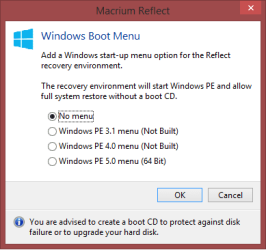
Does anyone know how the Boot Menu option works ?
Does it add a folder to the Active partition, create a new partition, ... ???
I have a triple boot PC with the 3 OS's on a single SSD, no System Reserved partition ...

MacriumBootMenu_01.png
 

My Computer

Computer type
PC/Desktop
Computer Manufacturer/Model Number
home built
OS
Multi-Boot W7_Pro_x64 W8.1_Pro_x64 W10_Pro_x64 +Linux_VMs +Chromium_VM
CPU
AMD Athlon II x4 620
Motherboard
Gigabyte GA-MA785G-UD3H
Memory
6GB GSkill DDR2 800
Graphics Card(s)
AMD 4670 GPU + AMD 4200 IGP
Sound Card
on board Realtek ALC889A
Monitor(s) Displays
RCA 40" LCD TV, Insignia 32" LCD TV, HP 15" LCD monitor
Screen Resolution
1680 x 1050
Hard Drives
OCZ Vertex 3 120GB,
Samsung F3 1TB (3),
Several others - WD, Seagate, Hitachi, ...
PSU
Corsair 500 W
Case
Rosewill mid tower
Cooling
CM 90mm rifle
Keyboard
Gyration wireless, Logitech wireless, Dell USB wired
Mouse
Gyration wireless, Logitech wireless, V7 USB wired
Internet Speed
Spectrum - 100Mbps D / 10Mbps U
Antivirus
Avast, MBAM3, EMET, WinPatrol
Browser
Pale Moon, Firefox, IE
Other Info
2 multi-boot PC's
Mainly HTPC/Office/Gen purpose (no gaming).
Trendnet USB KVM.
LG DVD burner/Blue Ray Player.
Tray system for removable SATA backup drives.

Not currently OCd, under-volted.
I use Hybrid sleep, rarely re-boot or shutdown.

Hauppauge HD-PVR, Avermedia PCIe TV Tuner, Hauppauge PCI TV Tuner.
It just creates a link in the Windows boot menu to something on the local disc. There is no separate partition.
 

My Computer

Computer type
Laptop
Computer Manufacturer/Model Number
Hewlett-Packard/G62-107SA Notebook
OS
Microsoft Windows 7 Home Premium 64-bit Service Pack 1
CPU
Intel(R) Core(TM) i3 CPU M 330 @ 2.13GHz
Motherboard
Hewlett-Packard 1425
Memory
8 GB DDR3
Graphics Card(s)
Intel(R) HD Graphics
Sound Card
Realtek High Definition Audio
Monitor(s) Displays
Builtin
Screen Resolution
1366 x 768 x 32 bits (4294967296 colors) @ 60 Hz
Hard Drives
250 GB SATA Hard Disk Drive 7200 rpm
2TB Seagate GoFlex USB 2 Drive
1TB Iomega Prestige USB 2 Drive
1.5TB Iomega Prestige USB 2 Drive (Samsung)
2TB WD MyBook Live NAS.
Mouse
Logitech Anywhere MX
Internet Speed
152 Mbs download 10 Mbs upload
Antivirus
Norton 360
Browser
Chrome
It just creates a link in the Windows boot menu to something on the local disc. There is no separate partition.

OK, Thanks !
 

My Computer

Computer type
PC/Desktop
Computer Manufacturer/Model Number
home built
OS
Multi-Boot W7_Pro_x64 W8.1_Pro_x64 W10_Pro_x64 +Linux_VMs +Chromium_VM
CPU
AMD Athlon II x4 620
Motherboard
Gigabyte GA-MA785G-UD3H
Memory
6GB GSkill DDR2 800
Graphics Card(s)
AMD 4670 GPU + AMD 4200 IGP
Sound Card
on board Realtek ALC889A
Monitor(s) Displays
RCA 40" LCD TV, Insignia 32" LCD TV, HP 15" LCD monitor
Screen Resolution
1680 x 1050
Hard Drives
OCZ Vertex 3 120GB,
Samsung F3 1TB (3),
Several others - WD, Seagate, Hitachi, ...
PSU
Corsair 500 W
Case
Rosewill mid tower
Cooling
CM 90mm rifle
Keyboard
Gyration wireless, Logitech wireless, Dell USB wired
Mouse
Gyration wireless, Logitech wireless, V7 USB wired
Internet Speed
Spectrum - 100Mbps D / 10Mbps U
Antivirus
Avast, MBAM3, EMET, WinPatrol
Browser
Pale Moon, Firefox, IE
Other Info
2 multi-boot PC's
Mainly HTPC/Office/Gen purpose (no gaming).
Trendnet USB KVM.
LG DVD burner/Blue Ray Player.
Tray system for removable SATA backup drives.

Not currently OCd, under-volted.
I use Hybrid sleep, rarely re-boot or shutdown.

Hauppauge HD-PVR, Avermedia PCIe TV Tuner, Hauppauge PCI TV Tuner.
I like the auto verify feature they added to the free version.
I just created an image with auto verify - nice!

Does anyone know how the Boot Menu option works ?
Does it add a folder to the Active partition, create a new partition, ... ???
I have a triple boot PC with the 3 OS's on a single SSD, no System Reserved partition ...

View attachment 363150

Auto verify is a feature I love and use in my V5 paid version.

I really don't understand exactly how the Boot Menu version works other than it works well for me in V5. When I boot up, I get the screen between the UEFI BIOS splash screen that lets me select Safe Start, etc. and, up toward the top of the screen, there are two lines that lets me choose between going on into Win 7 or into MR's Windows PE with Win 7 being the default selection. If I'm asleep at the switch (which I usually am), the computer will select the default and continue booting after a few seconds. I do not see an additional partition for auto verify. I have no idea how that would work with a triple boot system.
 

My Computer

Computer type
PC/Desktop
Computer Manufacturer/Model Number
Custom Build
OS
Win 7 Ultimate 64 bit
CPU
Intel i7-3930K
Motherboard
ASUS P9X79 WS
Memory
Kingston HyperX Genesis 32GB Kit (8x4GB Modules) 1600MHz DDR
Graphics Card(s)
MSI R7850 Twin Frozr 2GD5/OC Radeon HD 7850 2GB 256-bit GDDR
Sound Card
Asus Xonar Essence STX
Monitor(s) Displays
3x Asus VG248QE 24", Vizio 32" TV
Screen Resolution
1920 x 1080, ?
Hard Drives
Samsung 128GB 840 Pro SSD (1),
Samsung 4TB 850 EVO SSDs (4)
Samsung 4TB 850 EVO SSDs (16) external backup drives used in 2.5" hot swap bays in the computer.
PSU
Corsair HX750w
Case
Antec Two Hundred v2 (modified)
Cooling
Cooler Master GeminII S524 120mm (fan replaced with a 140mm)
Keyboard
Logitech G510s
Mouse
Logitech M525 (two in use)
Internet Speed
=< 32Mbps down, 8Mbps up
Antivirus
AVAST!, MBAM, SAS, Spybot S&D (all but MBAM free) Glary Util
Browser
IE11
Other Info
LSI 9211-8i HBA card (8 SATA III ports), 2.5" & 3.5" Hot Swap Bays, HooToo HT-CR001 PCI-E to USB 3.0 Internal Hub + 6 Slot Card Reader, and LG Model CH12LS28 BD-ROM Optical Drive. Also, ScanSnap S1500 ADF duplexing scanner, Canon 9000F flat bed scanner, Corsair SP2500 2.1 speakers, Samsung CLP 415nw laser color printer, Cyberpower PP2200SW UPS
Yea, I want to play with the Boot Menu option.
I might create a System Reserved partition first, and move the boot code to there...
Right now the boot code is in the Win 8.1 partition, and W7-64 is the default OS.
 

My Computer

Computer type
PC/Desktop
Computer Manufacturer/Model Number
home built
OS
Multi-Boot W7_Pro_x64 W8.1_Pro_x64 W10_Pro_x64 +Linux_VMs +Chromium_VM
CPU
AMD Athlon II x4 620
Motherboard
Gigabyte GA-MA785G-UD3H
Memory
6GB GSkill DDR2 800
Graphics Card(s)
AMD 4670 GPU + AMD 4200 IGP
Sound Card
on board Realtek ALC889A
Monitor(s) Displays
RCA 40" LCD TV, Insignia 32" LCD TV, HP 15" LCD monitor
Screen Resolution
1680 x 1050
Hard Drives
OCZ Vertex 3 120GB,
Samsung F3 1TB (3),
Several others - WD, Seagate, Hitachi, ...
PSU
Corsair 500 W
Case
Rosewill mid tower
Cooling
CM 90mm rifle
Keyboard
Gyration wireless, Logitech wireless, Dell USB wired
Mouse
Gyration wireless, Logitech wireless, V7 USB wired
Internet Speed
Spectrum - 100Mbps D / 10Mbps U
Antivirus
Avast, MBAM3, EMET, WinPatrol
Browser
Pale Moon, Firefox, IE
Other Info
2 multi-boot PC's
Mainly HTPC/Office/Gen purpose (no gaming).
Trendnet USB KVM.
LG DVD burner/Blue Ray Player.
Tray system for removable SATA backup drives.

Not currently OCd, under-volted.
I use Hybrid sleep, rarely re-boot or shutdown.

Hauppauge HD-PVR, Avermedia PCIe TV Tuner, Hauppauge PCI TV Tuner.
Back
Top