Imaging with free Macrium

   Information

This tutorial shows imaging with free Macrium Version 5.0. If you are still using Macrium Version 4.2, go to this Vimeo site where the tutorial of that version is stored.

The Video does not show the recovery part because I have no setup to screen capture it. But Keith (Kado) made this excellent recovery tutorial with text (but no sound) that he captured from a virtual partition.


   Warning


Note that the external disk to which you image must be formatted in NTFS. A disk that is formatted in Fat32 will accept an image, but the recovery programs cannot restore that image. You can, however, mount (open) a Fat32 image as VHD.


   Note
The production of the WinPE recovery CD (which is highly recommended) may take up to 3 hours because Macrium needs to download the 1.7GB WAIK (Windows Application Installation Kit). For your convenience I have uploaded a ready made .iso of the WinPE recovery disc. That can be downloaded in appr. 8 minutes which clearly beats the WAIK download. Once you downloaded and unzipped the folder, you can burn it directly to a CD with e.g. ImgBurn.

Here is the link to my Skydrive site.

Here is an alternate link from FileSwap (courtesy of Gary - Britton30)

I draw your attention to the fact that this WinPE CD can also be used to make images. That may be convenient in case you do not want to install Macrium on your PC.


This video tutorial explains the full cycle of the imaging process which is:

· Initial setups
· Image definition
· Image scheduling
· Image production

The imaging program that was used for this tutorial is free Macrium. But the basic principles are the same for other imaging programs although the user interface will be different.

This video runs for appr. 7 minutes.
There is a related thread on the Vista forum which gives a brief introduction to Macrium followed by a discussion.
You can download the free Macrium edition from here.

Note: If you have a problem with the loudness of the sound output of the video, check the "Loudness Equalization" box in your Playback device. It is under the 'Enhancements' tab.


Last edited by a moderator:
kado897 said:
2. Incremental backups with consolidation of older incrementals into the base image.

Do you have a reference where I can read the HowTo on this. Sound very interesting as I like to use the incremental backups. I have Macrium 6 Server.
 

My Computer

Computer Manufacturer/Model Number
HP Media Center
OS
Windows 7 32 bit
CPU
AMD 5200+ dual core
Memory
2 GB
Graphics Card(s)
NVidia GeForce 6150SE 128 MB
Monitor(s) Displays
CRT
Screen Resolution
1280x1024
Hard Drives
500 GB Sata internal :

SIIG USB 3.0 docking stations w/WD Caviar Black 6 Gb/s drives
Keyboard
PS/2
Mouse
PS/2 Wheel Mouse
Other Info
SIIG USB 3.0 PCIexpress card.
SSD TRIM support is another one I don't get. What does TRIM have to do with Macrium Reflect (my C: drive is an SSD, btw)?


If required, set Advanced Options as follows:
  1. Rapid Delta Restore to copy only changed data blocks and complete the restore process more quickly.
    Note: Only NTFS file systems that are not shrunk can be restored in this way.
  2. SSD Trim to enable TRIM on restore.
    Note: Writing to an unused block is quicker than writing to one in use and results in an increase of both the lifetime and the performance of the device.
  3. Verify Image to chose whether to verify an image before restoring.
  4. Master Boot Record to replace the restore with the Master Boot Record (MBR) from the backup.
    Note: The MBR is a small program that executes when the computer starts up. If this program becomes corrupt then you can have problems starting the computer operating system.
Source: Restoring an image from within Windows - KnowledgeBase - Macrium Software
re: #2: How important is that exactly? I'm not concerned about speed much since it doesn't take me all that long to do a restore and I don't do it very often. I can't and I'm too lazy to check (plus I really need to hit the shower) but does

re: #3: I auto-verify my images when I make them so is it really necessary to verify them again when doing a restore? I have yet to have an image fail to restore; is that because I have MR set to auto-verify them immediately after making the image (I have had an image fail to verify very, very rarely, less than a handful of times, and each time, rerunning the image has fixed it; I figure it's better to find out the image will fail to verify while I still can reimage instead of waiting until I need to use it to do a restore).

re: #4: When I make an image now in V5, I do both the C: and the System Reserved partitions in a single image. Doesn't that also include the MBR which will then get restored when I restore from the image.
 

My Computer

Computer type
PC/Desktop
Computer Manufacturer/Model Number
Custom Build
OS
Win 7 Ultimate 64 bit
CPU
Intel i7-3930K
Motherboard
ASUS P9X79 WS
Memory
Kingston HyperX Genesis 32GB Kit (8x4GB Modules) 1600MHz DDR
Graphics Card(s)
MSI R7850 Twin Frozr 2GD5/OC Radeon HD 7850 2GB 256-bit GDDR
Sound Card
Asus Xonar Essence STX
Monitor(s) Displays
3x Asus VG248QE 24", Vizio 32" TV
Screen Resolution
1920 x 1080, ?
Hard Drives
Samsung 128GB 840 Pro SSD (1),
Samsung 4TB 850 EVO SSDs (4)
Samsung 4TB 850 EVO SSDs (16) external backup drives used in 2.5" hot swap bays in the computer.
PSU
Corsair HX750w
Case
Antec Two Hundred v2 (modified)
Cooling
Cooler Master GeminII S524 120mm (fan replaced with a 140mm)
Keyboard
Logitech G510s
Mouse
Logitech M525 (two in use)
Internet Speed
=< 32Mbps down, 8Mbps up
Antivirus
AVAST!, MBAM, SAS, Spybot S&D (all but MBAM free) Glary Util
Browser
IE11
Other Info
LSI 9211-8i HBA card (8 SATA III ports), 2.5" & 3.5" Hot Swap Bays, HooToo HT-CR001 PCI-E to USB 3.0 Internal Hub + 6 Slot Card Reader, and LG Model CH12LS28 BD-ROM Optical Drive. Also, ScanSnap S1500 ADF duplexing scanner, Canon 9000F flat bed scanner, Corsair SP2500 2.1 speakers, Samsung CLP 415nw laser color printer, Cyberpower PP2200SW UPS
See my responses in bold.

SSD TRIM support is another one I don't get. What does TRIM have to do with Macrium Reflect (my C: drive is an SSD, btw)?


If required, set Advanced Options as follows:
  1. Rapid Delta Restore to copy only changed data blocks and complete the restore process more quickly.
    Note: Only NTFS file systems that are not shrunk can be restored in this way.
  2. SSD Trim to enable TRIM on restore.
    Note: Writing to an unused block is quicker than writing to one in use and results in an increase of both the lifetime and the performance of the device.
  3. Verify Image to chose whether to verify an image before restoring.
  4. Master Boot Record to replace the restore with the Master Boot Record (MBR) from the backup.
    Note: The MBR is a small program that executes when the computer starts up. If this program becomes corrupt then you can have problems starting the computer operating system.
Source: Restoring an image from within Windows - KnowledgeBase - Macrium Software
re: #2: How important is that exactly? I'm not concerned about speed much since it doesn't take me all that long to do a restore and I don't do it very often. I can't and I'm too lazy to check (plus I really need to hit the shower) but does

I don't know to test this, it's what Macrium has documented.
I would use it, and if i find it causes problems, quit using it.
I have it set to use this in my default settings.


re: #3: I auto-verify my images when I make them so is it really necessary to verify them again when doing a restore? I have yet to have an image fail to restore; is that because I have MR set to auto-verify them immediately after making the image (I have had an image fail to verify very, very rarely, less than a handful of times, and each time, rerunning the image has fixed it; I figure it's better to find out the image will fail to verify while I still can reimage instead of waiting until I need to use it to do a restore).

I also verify images when i create them.
I have my default set to NOT verify before restoring, that was already done...

re: #4: When I make an image now in V5, I do both the C: and the System Reserved partitions in a single image. Doesn't that also include the MBR which will then get restored when I restore from the image.

The MBR can be restored or NOT restored in the restore options.
I have my default set to NOT restore the MBR.

I override my default if and when i need to.
 

My Computer

Computer type
PC/Desktop
Computer Manufacturer/Model Number
home built
OS
Multi-Boot W7_Pro_x64 W8.1_Pro_x64 W10_Pro_x64 +Linux_VMs +Chromium_VM
CPU
AMD Athlon II x4 620
Motherboard
Gigabyte GA-MA785G-UD3H
Memory
6GB GSkill DDR2 800
Graphics Card(s)
AMD 4670 GPU + AMD 4200 IGP
Sound Card
on board Realtek ALC889A
Monitor(s) Displays
RCA 40" LCD TV, Insignia 32" LCD TV, HP 15" LCD monitor
Screen Resolution
1680 x 1050
Hard Drives
OCZ Vertex 3 120GB,
Samsung F3 1TB (3),
Several others - WD, Seagate, Hitachi, ...
PSU
Corsair 500 W
Case
Rosewill mid tower
Cooling
CM 90mm rifle
Keyboard
Gyration wireless, Logitech wireless, Dell USB wired
Mouse
Gyration wireless, Logitech wireless, V7 USB wired
Internet Speed
Spectrum - 100Mbps D / 10Mbps U
Antivirus
Avast, MBAM3, EMET, WinPatrol
Browser
Pale Moon, Firefox, IE
Other Info
2 multi-boot PC's
Mainly HTPC/Office/Gen purpose (no gaming).
Trendnet USB KVM.
LG DVD burner/Blue Ray Player.
Tray system for removable SATA backup drives.

Not currently OCd, under-volted.
I use Hybrid sleep, rarely re-boot or shutdown.

Hauppauge HD-PVR, Avermedia PCIe TV Tuner, Hauppauge PCI TV Tuner.

My Computer

Computer type
PC/Desktop
Computer Manufacturer/Model Number
home built
OS
Multi-Boot W7_Pro_x64 W8.1_Pro_x64 W10_Pro_x64 +Linux_VMs +Chromium_VM
CPU
AMD Athlon II x4 620
Motherboard
Gigabyte GA-MA785G-UD3H
Memory
6GB GSkill DDR2 800
Graphics Card(s)
AMD 4670 GPU + AMD 4200 IGP
Sound Card
on board Realtek ALC889A
Monitor(s) Displays
RCA 40" LCD TV, Insignia 32" LCD TV, HP 15" LCD monitor
Screen Resolution
1680 x 1050
Hard Drives
OCZ Vertex 3 120GB,
Samsung F3 1TB (3),
Several others - WD, Seagate, Hitachi, ...
PSU
Corsair 500 W
Case
Rosewill mid tower
Cooling
CM 90mm rifle
Keyboard
Gyration wireless, Logitech wireless, Dell USB wired
Mouse
Gyration wireless, Logitech wireless, V7 USB wired
Internet Speed
Spectrum - 100Mbps D / 10Mbps U
Antivirus
Avast, MBAM3, EMET, WinPatrol
Browser
Pale Moon, Firefox, IE
Other Info
2 multi-boot PC's
Mainly HTPC/Office/Gen purpose (no gaming).
Trendnet USB KVM.
LG DVD burner/Blue Ray Player.
Tray system for removable SATA backup drives.

Not currently OCd, under-volted.
I use Hybrid sleep, rarely re-boot or shutdown.

Hauppauge HD-PVR, Avermedia PCIe TV Tuner, Hauppauge PCI TV Tuner.
kado897 said:
2. Incremental backups with consolidation of older incrementals into the base image.

Do you have a reference where I can read the HowTo on this. Sound very interesting as I like to use the incremental backups. I have Macrium 6 Server.

I don't use incrementals, but until kado897 replies maybe this will help, from the V6 User Guide:

Backup Folder Synchronization - KnowledgeBase - Macrium Software

Looks good. Thanks. :)
 

My Computer

Computer Manufacturer/Model Number
HP Media Center
OS
Windows 7 32 bit
CPU
AMD 5200+ dual core
Memory
2 GB
Graphics Card(s)
NVidia GeForce 6150SE 128 MB
Monitor(s) Displays
CRT
Screen Resolution
1280x1024
Hard Drives
500 GB Sata internal :

SIIG USB 3.0 docking stations w/WD Caviar Black 6 Gb/s drives
Keyboard
PS/2
Mouse
PS/2 Wheel Mouse
Other Info
SIIG USB 3.0 PCIexpress card.
Do you have a reference where I can read the HowTo on this. Sound very interesting as I like to use the incremental backups. I have Macrium 6 Server.

I don't use incrementals, but until kado897 replies maybe this will help, from the V6 User Guide:

Backup Folder Synchronization - KnowledgeBase - Macrium Software

Looks good. Thanks. :)

That was my reference too. I have tested it for about a month retaining 10 daily incrementals on a file and folder backup and it seems to work well.
 

My Computer

Computer type
Laptop
Computer Manufacturer/Model Number
Hewlett-Packard/G62-107SA Notebook
OS
Microsoft Windows 7 Home Premium 64-bit Service Pack 1
CPU
Intel(R) Core(TM) i3 CPU M 330 @ 2.13GHz
Motherboard
Hewlett-Packard 1425
Memory
8 GB DDR3
Graphics Card(s)
Intel(R) HD Graphics
Sound Card
Realtek High Definition Audio
Monitor(s) Displays
Builtin
Screen Resolution
1366 x 768 x 32 bits (4294967296 colors) @ 60 Hz
Hard Drives
250 GB SATA Hard Disk Drive 7200 rpm
2TB Seagate GoFlex USB 2 Drive
1TB Iomega Prestige USB 2 Drive
1.5TB Iomega Prestige USB 2 Drive (Samsung)
2TB WD MyBook Live NAS.
Mouse
Logitech Anywhere MX
Internet Speed
152 Mbs download 10 Mbs upload
Antivirus
Norton 360
Browser
Chrome

My Computer

Computer Manufacturer/Model Number
HP Media Center
OS
Windows 7 32 bit
CPU
AMD 5200+ dual core
Memory
2 GB
Graphics Card(s)
NVidia GeForce 6150SE 128 MB
Monitor(s) Displays
CRT
Screen Resolution
1280x1024
Hard Drives
500 GB Sata internal :

SIIG USB 3.0 docking stations w/WD Caviar Black 6 Gb/s drives
Keyboard
PS/2
Mouse
PS/2 Wheel Mouse
Other Info
SIIG USB 3.0 PCIexpress card.
SSD TRIM support is another one I don't get. What does TRIM have to do with Macrium Reflect (my C: drive is an SSD, btw)?
I'm still not sure either.
I'm still using the latest free V5 and it doesn't appear under Restore - Advanced options. When I perform a system image restore to an SSD, TRIM is always enabled. Why would you not want it enabled when given the option? Maybe Windows 7 doesn't automatically enable TRIM for all SSDs?
 

My Computer

Computer type
PC/Desktop
Computer Manufacturer/Model Number
Own build
OS
Windows 7x64 Home Premium SP1
CPU
Intel i7 2600k
Motherboard
ASUS P8Z68 Deluxe
Memory
G.Skill Ripjaws (DDR3-1600) 2x4GB
Graphics Card(s)
Nvidia GeForce GTS 450; Intel HD Graphics 3000(GT2+)
Monitor(s) Displays
Dell Ultrasharp IPS panel U2311H, Samsung SyncMaster P2350
Screen Resolution
1920x1080
Hard Drives
Samsung 850 Pro SSD 256GB, Samsung SSD 840 120GB, Seagates 1TB Barracuda ST31000528AS x2
PSU
Seasonic M12II 520W
Case
Lian Li Lancool PC-K60
Cooling
Case: 1x120mm, 3x140mm CPU: Hyper 212+
Keyboard
Logitech MK520 (wireless)
Mouse
Logitech MK520
Internet Speed
6-7 Mbps
Antivirus
Norton Security Premium, Malwarebytes on 2 (MSE on 3rd PC)
Browser
FireFox
Other Info
Audio: Logitech Z523 2.1
Macrium Reflect v6 - Worrying

I have just been performing my "pre-MS Updates" backup imaging using Macrium Reflect v6 Free Edition.

I don't know if this is:

  • A bug
  • A glitch on my PC
  • A display error
  • Just poorly worded

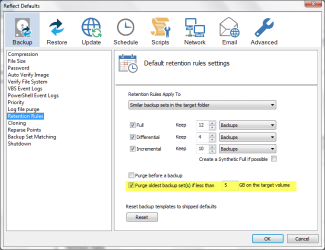
Notice that I have not selected any Purge options (I'll purge my own backups when I see fit).MR v6 Purge 01.png
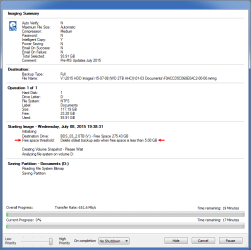
Notice that the Status window shows that a backup image will be purged if free space drops below 5 GB.MR v6 Purge 02.png
 

My Computer

Computer type
PC/Desktop
Computer Manufacturer/Model Number
n/a
OS
W7 Ultimate SP1, LM19.2 MATE, W10 Home 1703, W10 Pro 1703 VM, #All 64 bit
CPU
AMD Phenom II x6 1100T, 3.3 GHz
Motherboard
ASUS M4A88T-M/USB3 (AM3)
Memory
12GB DDR3 1333 G-Skill (4GB x 2), G-Skill (2GB x 2)
Graphics Card(s)
NVIDIA GeForce GTX 660
Sound Card
Realtek?
Monitor(s) Displays
Samsung S23B350
Screen Resolution
1920x1080
Hard Drives
WD Green 2TB (SATA), WD Green 3TB (SATA), WD Blue 4TB (SATA), WD Blue 6TB (SATA)
PSU
Cooler Master
Case
Antec GX300 Tower
Cooling
3x Antec TRICOOL 120mm Fans
Mouse
Wired Optical
Internet Speed
DSL
Antivirus
Avast
Browser
Pale Moon (64 bit)
Other Info
2018-12-27 Upgraded HDDs
2015-12-10 Upgraded case, graphics card, storage
2015-08-15 Upgraded motherboard & RAM
2015-07-15 Upgraded LM17.1 to LM17.2
That looks like a bug if the checkbox was unticked when you created the backup definition. My system defaults are for that box to be ticked.

2015 07 08 002.png
 

My Computer

Computer type
Laptop
Computer Manufacturer/Model Number
Hewlett-Packard/G62-107SA Notebook
OS
Microsoft Windows 7 Home Premium 64-bit Service Pack 1
CPU
Intel(R) Core(TM) i3 CPU M 330 @ 2.13GHz
Motherboard
Hewlett-Packard 1425
Memory
8 GB DDR3
Graphics Card(s)
Intel(R) HD Graphics
Sound Card
Realtek High Definition Audio
Monitor(s) Displays
Builtin
Screen Resolution
1366 x 768 x 32 bits (4294967296 colors) @ 60 Hz
Hard Drives
250 GB SATA Hard Disk Drive 7200 rpm
2TB Seagate GoFlex USB 2 Drive
1TB Iomega Prestige USB 2 Drive
1.5TB Iomega Prestige USB 2 Drive (Samsung)
2TB WD MyBook Live NAS.
Mouse
Logitech Anywhere MX
Internet Speed
152 Mbs download 10 Mbs upload
Antivirus
Norton 360
Browser
Chrome
That looks like a bug if the checkbox was unticked when you created the backup definition. My system defaults are for that box to be ticked.
It is selected by default on my PC too.

I have images dating back to 2009 and I don't want them auto-purged.
 

My Computer

Computer type
PC/Desktop
Computer Manufacturer/Model Number
n/a
OS
W7 Ultimate SP1, LM19.2 MATE, W10 Home 1703, W10 Pro 1703 VM, #All 64 bit
CPU
AMD Phenom II x6 1100T, 3.3 GHz
Motherboard
ASUS M4A88T-M/USB3 (AM3)
Memory
12GB DDR3 1333 G-Skill (4GB x 2), G-Skill (2GB x 2)
Graphics Card(s)
NVIDIA GeForce GTX 660
Sound Card
Realtek?
Monitor(s) Displays
Samsung S23B350
Screen Resolution
1920x1080
Hard Drives
WD Green 2TB (SATA), WD Green 3TB (SATA), WD Blue 4TB (SATA), WD Blue 6TB (SATA)
PSU
Cooler Master
Case
Antec GX300 Tower
Cooling
3x Antec TRICOOL 120mm Fans
Mouse
Wired Optical
Internet Speed
DSL
Antivirus
Avast
Browser
Pale Moon (64 bit)
Other Info
2018-12-27 Upgraded HDDs
2015-12-10 Upgraded case, graphics card, storage
2015-08-15 Upgraded motherboard & RAM
2015-07-15 Upgraded LM17.1 to LM17.2
That looks like a bug if the checkbox was unticked when you created the backup definition. My system defaults are for that box to be ticked.
It is selected by default on my PC too.

I have images dating back to 2009 and I don't want them auto-purged.

Sorry but according to your screenshot the auto purge would only happen if the selected media has less than 5 GB free space. Isn't the solution simple, select a storage with more free space? I mean, who on earth would start creating a system image on storage with has less than that free?
 

My Computer

Computer type
Laptop
Computer Manufacturer/Model Number
HP ENVY 17-1150eg
OS
Windows 10 Pro x64 EN-GB
CPU
1.6 GHz Intel Core i7-720QM Processor
Memory
6 GB
Graphics Card(s)
ATI Mobility Radeon HD 5850 Graphics
Sound Card
Beats sound system with integrated subwoofer
Monitor(s) Displays
17" laptop display, 22" LED and 32" Full HD TV through HDMI
Screen Resolution
1600*900 (1), 1920*1080 (2&3)
Hard Drives
Internal: 2 x 500 GB SATA Hard Disk Drive 7200 rpm
External: 2TB for backups, 3TB USB3 network drive for media
Cooling
As Envy runs a bit warm, I have it on a Cooler Master pad
Keyboard
Logitech diNovo Media Desktop Laser (bluetooth)
Mouse
Logitech Performance Mouse MX
Internet Speed
50/10 Mbps VDSL
Antivirus
Windows Defender 4.3.9431.0
Browser
Maxthon 3.5.2., IE11
Just tangentially, Macrium saved my bacon yesterday. I'll skip the sad part of the story and just say that somehow beyond all logic I went into safe mode and the system decided to refresh or reset the machine. Lost my user account. I had no choice but to boot up the WinPE 5.0 based rescue stick.

Incremental backup restore proceeded without a glitch. Took about 28 minutes reading from a USB 3.0 stick. Good thing the last incremental was only 24 hrs old. :)
 

My Computer

Computer Manufacturer/Model Number
HP Media Center
OS
Windows 7 32 bit
CPU
AMD 5200+ dual core
Memory
2 GB
Graphics Card(s)
NVidia GeForce 6150SE 128 MB
Monitor(s) Displays
CRT
Screen Resolution
1280x1024
Hard Drives
500 GB Sata internal :

SIIG USB 3.0 docking stations w/WD Caviar Black 6 Gb/s drives
Keyboard
PS/2
Mouse
PS/2 Wheel Mouse
Other Info
SIIG USB 3.0 PCIexpress card.
Just tangentially, Macrium saved my bacon yesterday. I'll skip the sad part of the story and just say that somehow beyond all logic I went into safe mode and the system decided to refresh or reset the machine. Lost my user account. I had no choice but to boot up the WinPE 5.0 based rescue stick.

Incremental backup restore proceeded without a glitch. Took about 28 minutes reading from a USB 3.0 stick. Good thing the last incremental was only 24 hrs old. :)

That is why I make an image of my C: drive or partition (including the System Reserved partition) before I make any changes, such as adding or deleting a program or running updates. I update my data backups daily and whenever I add or change critical data. I don't image my data; I would die of old age (I'm already too close to that now) if I did that, even if I used incremental imaging, making the backups due to the large amounts of data I have now. Using a folder/file syncing program—FreeFileSync—is much faster to update and the backup can be used as is until I get a replacement drive if the original drive should die completely.
 

My Computer

Computer type
PC/Desktop
Computer Manufacturer/Model Number
Custom Build
OS
Win 7 Ultimate 64 bit
CPU
Intel i7-3930K
Motherboard
ASUS P9X79 WS
Memory
Kingston HyperX Genesis 32GB Kit (8x4GB Modules) 1600MHz DDR
Graphics Card(s)
MSI R7850 Twin Frozr 2GD5/OC Radeon HD 7850 2GB 256-bit GDDR
Sound Card
Asus Xonar Essence STX
Monitor(s) Displays
3x Asus VG248QE 24", Vizio 32" TV
Screen Resolution
1920 x 1080, ?
Hard Drives
Samsung 128GB 840 Pro SSD (1),
Samsung 4TB 850 EVO SSDs (4)
Samsung 4TB 850 EVO SSDs (16) external backup drives used in 2.5" hot swap bays in the computer.
PSU
Corsair HX750w
Case
Antec Two Hundred v2 (modified)
Cooling
Cooler Master GeminII S524 120mm (fan replaced with a 140mm)
Keyboard
Logitech G510s
Mouse
Logitech M525 (two in use)
Internet Speed
=< 32Mbps down, 8Mbps up
Antivirus
AVAST!, MBAM, SAS, Spybot S&D (all but MBAM free) Glary Util
Browser
IE11
Other Info
LSI 9211-8i HBA card (8 SATA III ports), 2.5" & 3.5" Hot Swap Bays, HooToo HT-CR001 PCI-E to USB 3.0 Internal Hub + 6 Slot Card Reader, and LG Model CH12LS28 BD-ROM Optical Drive. Also, ScanSnap S1500 ADF duplexing scanner, Canon 9000F flat bed scanner, Corsair SP2500 2.1 speakers, Samsung CLP 415nw laser color printer, Cyberpower PP2200SW UPS
Not Selected

That looks like a bug if the checkbox was unticked when you created the backup definition. My system defaults are for that box to be ticked.
It is selected by default on my PC too.

I have images dating back to 2009 and I don't want them auto-purged.

Sorry but according to your screenshot the auto purge would only happen if the selected media has less than 5 GB free space. Isn't the solution simple, select a storage with more free space? I mean, who on earth would start creating a system image on storage with has less than that free?
It should not do anything at all, as the option is not selected.
What is the point of deselecting an option, if the "option" still applies? :confused:

I just imaged my system prior to applying this months updates.
It came to a total of 196 GB.
The previous month's updates came to 168 GB.

If I had seen that I "only" had 190 GB left on my HDD, I would have created my backup images and I could've potentially lost a backup.

Granted that it may only apply to MR v6 images, but at 200 GB a pop it will take less than 5 months to fill up a new 1 TB HDD.

Apparently only people who have paid for Macrium can report (possible) bugs.
 

My Computer

Computer type
PC/Desktop
Computer Manufacturer/Model Number
n/a
OS
W7 Ultimate SP1, LM19.2 MATE, W10 Home 1703, W10 Pro 1703 VM, #All 64 bit
CPU
AMD Phenom II x6 1100T, 3.3 GHz
Motherboard
ASUS M4A88T-M/USB3 (AM3)
Memory
12GB DDR3 1333 G-Skill (4GB x 2), G-Skill (2GB x 2)
Graphics Card(s)
NVIDIA GeForce GTX 660
Sound Card
Realtek?
Monitor(s) Displays
Samsung S23B350
Screen Resolution
1920x1080
Hard Drives
WD Green 2TB (SATA), WD Green 3TB (SATA), WD Blue 4TB (SATA), WD Blue 6TB (SATA)
PSU
Cooler Master
Case
Antec GX300 Tower
Cooling
3x Antec TRICOOL 120mm Fans
Mouse
Wired Optical
Internet Speed
DSL
Antivirus
Avast
Browser
Pale Moon (64 bit)
Other Info
2018-12-27 Upgraded HDDs
2015-12-10 Upgraded case, graphics card, storage
2015-08-15 Upgraded motherboard & RAM
2015-07-15 Upgraded LM17.1 to LM17.2
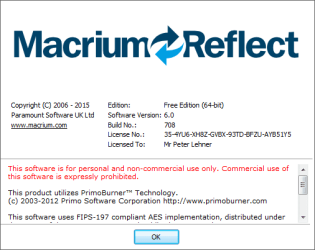
Are you using the latest V6 version, Build No. 708 ?

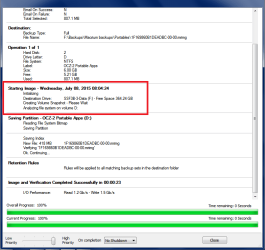
I'm using Build 708 and don't see the "Delete oldest Backup sets..." message.
I'm sure i saw that message before (when i used the initial V6 free build).
Maybe they tweaked this in Build 708 ???

Macrium_Image_02.png
 

My Computer

Computer type
PC/Desktop
Computer Manufacturer/Model Number
home built
OS
Multi-Boot W7_Pro_x64 W8.1_Pro_x64 W10_Pro_x64 +Linux_VMs +Chromium_VM
CPU
AMD Athlon II x4 620
Motherboard
Gigabyte GA-MA785G-UD3H
Memory
6GB GSkill DDR2 800
Graphics Card(s)
AMD 4670 GPU + AMD 4200 IGP
Sound Card
on board Realtek ALC889A
Monitor(s) Displays
RCA 40" LCD TV, Insignia 32" LCD TV, HP 15" LCD monitor
Screen Resolution
1680 x 1050
Hard Drives
OCZ Vertex 3 120GB,
Samsung F3 1TB (3),
Several others - WD, Seagate, Hitachi, ...
PSU
Corsair 500 W
Case
Rosewill mid tower
Cooling
CM 90mm rifle
Keyboard
Gyration wireless, Logitech wireless, Dell USB wired
Mouse
Gyration wireless, Logitech wireless, V7 USB wired
Internet Speed
Spectrum - 100Mbps D / 10Mbps U
Antivirus
Avast, MBAM3, EMET, WinPatrol
Browser
Pale Moon, Firefox, IE
Other Info
2 multi-boot PC's
Mainly HTPC/Office/Gen purpose (no gaming).
Trendnet USB KVM.
LG DVD burner/Blue Ray Player.
Tray system for removable SATA backup drives.

Not currently OCd, under-volted.
I use Hybrid sleep, rarely re-boot or shutdown.

Hauppauge HD-PVR, Avermedia PCIe TV Tuner, Hauppauge PCI TV Tuner.
It should not do anything at all, as the option is not selected.
What is the point of deselecting an option, if the "option" still applies? :confused:

My point is that even it it ticks the box you have unselected and keeps "a safe limit" of 5 GB there, that shouldn't be a problem. A Windows system image is always bigger than 5 GB so that is simply just plain theoretical issue, you will never select a storage location with so little free space.

As I get this, the whole issue could be described like this:

"A deal breaker issue, I think I cannot use this software anymore because it does not let me use a storage location with less than 5GB available space without purging my older images. Of course I know that my images will always be bigger than 5 GB so this automatically selected item will never really purge my images because when I notice there's less than 5 GB free in selected storage media and I want to keep all previous images, there simply is not enough space for my image and I have to of course select a new storage location."
 

My Computer

Computer type
Laptop
Computer Manufacturer/Model Number
HP ENVY 17-1150eg
OS
Windows 10 Pro x64 EN-GB
CPU
1.6 GHz Intel Core i7-720QM Processor
Memory
6 GB
Graphics Card(s)
ATI Mobility Radeon HD 5850 Graphics
Sound Card
Beats sound system with integrated subwoofer
Monitor(s) Displays
17" laptop display, 22" LED and 32" Full HD TV through HDMI
Screen Resolution
1600*900 (1), 1920*1080 (2&3)
Hard Drives
Internal: 2 x 500 GB SATA Hard Disk Drive 7200 rpm
External: 2TB for backups, 3TB USB3 network drive for media
Cooling
As Envy runs a bit warm, I have it on a Cooler Master pad
Keyboard
Logitech diNovo Media Desktop Laser (bluetooth)
Mouse
Logitech Performance Mouse MX
Internet Speed
50/10 Mbps VDSL
Antivirus
Windows Defender 4.3.9431.0
Browser
Maxthon 3.5.2., IE11
Are you using the latest V6 version, Build No. 708 ?

I'm using Build 708 and don't see the "Delete oldest Backup sets..." message.
I'm sure i saw that message before (when i used the initial V6 free build).
Maybe they tweaked this in Build 708 ???

View attachment 365229

There was a bug where the default flag was not copied into the backup definition but that was supposedly fixed in a previous version (The first free edition). There doesn't seem to be any fixes in 708 in that area.
 

My Computer

Computer type
Laptop
Computer Manufacturer/Model Number
Hewlett-Packard/G62-107SA Notebook
OS
Microsoft Windows 7 Home Premium 64-bit Service Pack 1
CPU
Intel(R) Core(TM) i3 CPU M 330 @ 2.13GHz
Motherboard
Hewlett-Packard 1425
Memory
8 GB DDR3
Graphics Card(s)
Intel(R) HD Graphics
Sound Card
Realtek High Definition Audio
Monitor(s) Displays
Builtin
Screen Resolution
1366 x 768 x 32 bits (4294967296 colors) @ 60 Hz
Hard Drives
250 GB SATA Hard Disk Drive 7200 rpm
2TB Seagate GoFlex USB 2 Drive
1TB Iomega Prestige USB 2 Drive
1.5TB Iomega Prestige USB 2 Drive (Samsung)
2TB WD MyBook Live NAS.
Mouse
Logitech Anywhere MX
Internet Speed
152 Mbs download 10 Mbs upload
Antivirus
Norton 360
Browser
Chrome
Are you using the latest V6 version, Build No. 708 ?
Yes according to the "About" dialogue window.MR v6 Version.png
My point is that even it it ticks the box you have unselected and keeps "a safe limit" of 5 GB there, that shouldn't be a problem. A Windows system image is always bigger than 5 GB so that is simply just plain theoretical issue, you will never select a storage location with so little free space.
If I try to write 100 GB to a 5 GB space, it would be my fault if it failed. :)

There was no point in me selecting/deselecting that option, as the software ignored my choice and treated it as chosen/selected.

If that purge option is not chosen/selected, it should not delete my backup images, regardless of how much space is or isn't available on a HDD.

Hypothetical:190 GB - HDD available space
5 GB - Macrium Reflect default purge value

168 GB - Previous backup size

170 GB - Estimated space required for this month's backup (based on past trends)
20 GB - Estimated available space after this backup (190 - 170 = 20)


196 GB - Actual space required for this month's backup
-6 GB - Actual available space after this backup

Since -6 GB < 5 GB, a previous backup will now be deleted.
The 5 GB default value is irrelevant (any value would trigger the deletion of a previous backup).

In that scenario I would rather have the new backup fail (with an error message) than an old backup deleted.
Since MR supports split backup files, it could even ask (in the error message) for a new location to finish the backup.

Maybe MR does bring up a message and an option dialogue window, but I don't want to risk a known good backup to try it out.
 

My Computer

Computer type
PC/Desktop
Computer Manufacturer/Model Number
n/a
OS
W7 Ultimate SP1, LM19.2 MATE, W10 Home 1703, W10 Pro 1703 VM, #All 64 bit
CPU
AMD Phenom II x6 1100T, 3.3 GHz
Motherboard
ASUS M4A88T-M/USB3 (AM3)
Memory
12GB DDR3 1333 G-Skill (4GB x 2), G-Skill (2GB x 2)
Graphics Card(s)
NVIDIA GeForce GTX 660
Sound Card
Realtek?
Monitor(s) Displays
Samsung S23B350
Screen Resolution
1920x1080
Hard Drives
WD Green 2TB (SATA), WD Green 3TB (SATA), WD Blue 4TB (SATA), WD Blue 6TB (SATA)
PSU
Cooler Master
Case
Antec GX300 Tower
Cooling
3x Antec TRICOOL 120mm Fans
Mouse
Wired Optical
Internet Speed
DSL
Antivirus
Avast
Browser
Pale Moon (64 bit)
Other Info
2018-12-27 Upgraded HDDs
2015-12-10 Upgraded case, graphics card, storage
2015-08-15 Upgraded motherboard & RAM
2015-07-15 Upgraded LM17.1 to LM17.2
Hypothetical:190 GB - HDD available space
5 GB - Macrium Reflect default purge value

168 GB - Previous backup size

170 GB - Estimated space required for this month's backup (based on past trends)
20 GB - Estimated available space after this backup (190 - 170 = 20)


196 GB - Actual space required for this month's backup
-6 GB - Actual available space after this backup
Also consider the "Purge before a backup" option.
If that option is unchecked, creating the image should fail, as there is not enough free space to create it.
I haven't tested this to make sure it works as it should...

My backup images are 25GB or less, on multiple HD's, and i check drive space before imaging...
 

My Computer

Computer type
PC/Desktop
Computer Manufacturer/Model Number
home built
OS
Multi-Boot W7_Pro_x64 W8.1_Pro_x64 W10_Pro_x64 +Linux_VMs +Chromium_VM
CPU
AMD Athlon II x4 620
Motherboard
Gigabyte GA-MA785G-UD3H
Memory
6GB GSkill DDR2 800
Graphics Card(s)
AMD 4670 GPU + AMD 4200 IGP
Sound Card
on board Realtek ALC889A
Monitor(s) Displays
RCA 40" LCD TV, Insignia 32" LCD TV, HP 15" LCD monitor
Screen Resolution
1680 x 1050
Hard Drives
OCZ Vertex 3 120GB,
Samsung F3 1TB (3),
Several others - WD, Seagate, Hitachi, ...
PSU
Corsair 500 W
Case
Rosewill mid tower
Cooling
CM 90mm rifle
Keyboard
Gyration wireless, Logitech wireless, Dell USB wired
Mouse
Gyration wireless, Logitech wireless, V7 USB wired
Internet Speed
Spectrum - 100Mbps D / 10Mbps U
Antivirus
Avast, MBAM3, EMET, WinPatrol
Browser
Pale Moon, Firefox, IE
Other Info
2 multi-boot PC's
Mainly HTPC/Office/Gen purpose (no gaming).
Trendnet USB KVM.
LG DVD burner/Blue Ray Player.
Tray system for removable SATA backup drives.

Not currently OCd, under-volted.
I use Hybrid sleep, rarely re-boot or shutdown.

Hauppauge HD-PVR, Avermedia PCIe TV Tuner, Hauppauge PCI TV Tuner.
Back
Top