Impossible activate parental control

Loyo

New member
Local time
11:32 PM
Messages
8
Hi all,
hope this is the right section of the forum.

I can't seem to be able to activate parental control on my windows 7 64 Home Premium (Microsoft Security Essential installed), because every time I try to click on an user account to activate parental control, an error window pop up saying


"Impossible modify settings for parental controls. If the problem persists, please contact system administrator."

Needless to say, the problem persists and I can't seem to be able to do anything about it.

My copy of windows ofc is original.

Thanks!
 

My Computer

Computer type
PC/Desktop
Computer Manufacturer/Model Number
Custom build
OS
Windows 7 Home Premium 64bit
CPU
3,40 gigahertz Intel Core i7-2600K
Motherboard
ASUSTeK COMPUTER INC. P8P67-M Rev X.0x
Memory
8158 Megabytes Usable Installed Memory
Graphics Card(s)
AMD Radeon HD 7900 Series
Hard Drives
SAMSUNG SSD 830 Series
WDC WD20EARX-00PASB0 [Hard drive] (2000,40 GB)
Antivirus
Microsoft Security Essential

My Computer

Computer type
PC/Desktop
Computer Manufacturer/Model Number
Golden Mk. I.4
OS
Windows 10 Pro x64 ; Xubuntu x64
CPU
Intel i7 860 @ 2.80 GHz O/C'ed to 4.0GHz
Motherboard
Gigabyte P55A-UD3R Rev.1. Award BIOS F13
Memory
16GB Corsair Vengance DDR3 @ 661 MHz Dual Channel (9-9-9-24)
Graphics Card(s)
EVGA NVidia GTX 560 1024MB
Sound Card
Realtek Integrated
Monitor(s) Displays
Dual Samsung SyncMaster 2494HS
Screen Resolution
1920*1080 and 1920*1080
Hard Drives
1*Samsung 840 EVO 120GB SSD;
1*OCZ Vertex 2 60GB SSD;
2*Samsung F3 SpinPoint 1TB in RAID0;
1*Samsung F1 SpinPoint 1TB;
2*Western Digital 1TB External USB 3.0
1*Western Digital 500GB External USB 3.0
1*Seagate 500GB External USB 2.0
PSU
Thermaltake ToughPower QFan 750W
Case
Thermaltake Element S VK60001W2Z
Cooling
Corsair H60 Water Cooling, 2*230mm and 2*80mm case fans
Keyboard
Logitech G110
Mouse
Logitech MX518
Hello, thanks for implying I am an idiot :p

I am logged in as admin of course, but the problem remains the same. I have even tried to create another admin account, then modifying parental controls settings with the new admin account, but to no avail.

On the link you reported there is written that "For Parental Controls to work, it needs to have the Parental Controls Service set to its default setting of enabled and Manual." Now, I went into the services panel, but I can not find any parental control setting for windows 7, I mean the only entry of parental control says "The service is a stub for parental control services already present in Vista. It's provided only for compatibility with previous versions", and activating this service does anything for me.

Maybe this can be the problem?


My Computer

Computer type
PC/Desktop
Computer Manufacturer/Model Number
Custom build
OS
Windows 7 Home Premium 64bit
CPU
3,40 gigahertz Intel Core i7-2600K
Motherboard
ASUSTeK COMPUTER INC. P8P67-M Rev X.0x
Memory
8158 Megabytes Usable Installed Memory
Graphics Card(s)
AMD Radeon HD 7900 Series
Hard Drives
SAMSUNG SSD 830 Series
WDC WD20EARX-00PASB0 [Hard drive] (2000,40 GB)
Antivirus
Microsoft Security Essential
Hello Loyo, and welcome to Seven Forums.

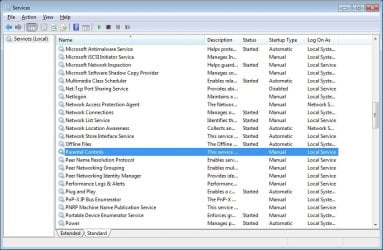
You should see Parental Controls like this below in Services.

Services.jpg
 

My Computer

Computer type
PC/Desktop
Computer Manufacturer/Model Number
Self built custom
OS
64-bit Windows 11 Pro for Workstations
CPU
Intel i7-8700K OC'd to 5 GHz
Motherboard
ASUS ROG Maximus XI Formula Z390
Memory
64 GB (4x16GB) G.SKILL TridentZ RGB DDR4 3600 MHz
Graphics Card(s)
ASUS ROG-STRIX-GTX1080TI-O11G-GAMING
Sound Card
Integrated
Monitor(s) Displays
2 x Samsung Odyssey G7 27"
Screen Resolution
2560x1440
Hard Drives
1TB Samsung 990 PRO M.2,
4TB Samsung 990 PRO PRO M.2,
TerraMaster F8 SSD Plus NAS
PSU
Seasonic Prime Titanium 850W
Case
Thermaltake Core P3
Cooling
Corsair Hydro H115i
Keyboard
Logitech wireless K800
Mouse
Logitech MX Master 4
Internet Speed
2 Gb/s Download and 100 Mb/s Upload
Antivirus
Malwarebyte Anti-Malware Premium
Browser
Google Chrome
Other Info
Logitech Z625 speaker system,
Logitech BRIO 4K Pro webcam,
HP Color LaserJet Pro MFP M477fdn,
APC SMART-UPS RT 1000 XL - SURT1000XLI,
Galaxy S23 Plus phone
Hey! Thanks for your welcome and thanks (both!) for answering me :)

Would you mind telling me if the description of your parental control service match mine? Because my entries are in italian, and I just want to make sure we are speaking about the same service. Mine says something along the line of "The service is a stub for parental control services already present in Vista. It's provided only for compatibility with previous versions" (translated from italian, so the exact words will be a little different).

The right settings I assume are as in you picture, with status = null and startup type = manual, correct?
 

My Computer

Computer type
PC/Desktop
Computer Manufacturer/Model Number
Custom build
OS
Windows 7 Home Premium 64bit
CPU
3,40 gigahertz Intel Core i7-2600K
Motherboard
ASUSTeK COMPUTER INC. P8P67-M Rev X.0x
Memory
8158 Megabytes Usable Installed Memory
Graphics Card(s)
AMD Radeon HD 7900 Series
Hard Drives
SAMSUNG SSD 830 Series
WDC WD20EARX-00PASB0 [Hard drive] (2000,40 GB)
Antivirus
Microsoft Security Essential
Loyo,

That would be the correct service. Mine has the same description.

If the default settings do not help, then you could try setting it to Automatic and Started to see how it behaves.
 

My Computer

Computer type
PC/Desktop
Computer Manufacturer/Model Number
Self built custom
OS
64-bit Windows 11 Pro for Workstations
CPU
Intel i7-8700K OC'd to 5 GHz
Motherboard
ASUS ROG Maximus XI Formula Z390
Memory
64 GB (4x16GB) G.SKILL TridentZ RGB DDR4 3600 MHz
Graphics Card(s)
ASUS ROG-STRIX-GTX1080TI-O11G-GAMING
Sound Card
Integrated
Monitor(s) Displays
2 x Samsung Odyssey G7 27"
Screen Resolution
2560x1440
Hard Drives
1TB Samsung 990 PRO M.2,
4TB Samsung 990 PRO PRO M.2,
TerraMaster F8 SSD Plus NAS
PSU
Seasonic Prime Titanium 850W
Case
Thermaltake Core P3
Cooling
Corsair Hydro H115i
Keyboard
Logitech wireless K800
Mouse
Logitech MX Master 4
Internet Speed
2 Gb/s Download and 100 Mb/s Upload
Antivirus
Malwarebyte Anti-Malware Premium
Browser
Google Chrome
Other Info
Logitech Z625 speaker system,
Logitech BRIO 4K Pro webcam,
HP Color LaserJet Pro MFP M477fdn,
APC SMART-UPS RT 1000 XL - SURT1000XLI,
Galaxy S23 Plus phone
Tried both solutions, neither worked :(

It's like something went wrong when Windows "installed" the parental control, isn't there any way to reinstal them w/o having to re-install the whole OS?
 

My Computer

Computer type
PC/Desktop
Computer Manufacturer/Model Number
Custom build
OS
Windows 7 Home Premium 64bit
CPU
3,40 gigahertz Intel Core i7-2600K
Motherboard
ASUSTeK COMPUTER INC. P8P67-M Rev X.0x
Memory
8158 Megabytes Usable Installed Memory
Graphics Card(s)
AMD Radeon HD 7900 Series
Hard Drives
SAMSUNG SSD 830 Series
WDC WD20EARX-00PASB0 [Hard drive] (2000,40 GB)
Antivirus
Microsoft Security Essential
If you like, you could use the free Microsoft Family Safety instead for now until we can hopefully get Parental Controls fixed.

You could try running a sfc /scannow command to see if it may help with Parental Controls. You may need to run it a few times with restarting the PC after each time.

If that doesn't help, then you could also try a repair install without losing anything to avoid a clean install. To be safe, I would still recommend to back up anything that you do not want to lose first.
 

My Computer

Computer type
PC/Desktop
Computer Manufacturer/Model Number
Self built custom
OS
64-bit Windows 11 Pro for Workstations
CPU
Intel i7-8700K OC'd to 5 GHz
Motherboard
ASUS ROG Maximus XI Formula Z390
Memory
64 GB (4x16GB) G.SKILL TridentZ RGB DDR4 3600 MHz
Graphics Card(s)
ASUS ROG-STRIX-GTX1080TI-O11G-GAMING
Sound Card
Integrated
Monitor(s) Displays
2 x Samsung Odyssey G7 27"
Screen Resolution
2560x1440
Hard Drives
1TB Samsung 990 PRO M.2,
4TB Samsung 990 PRO PRO M.2,
TerraMaster F8 SSD Plus NAS
PSU
Seasonic Prime Titanium 850W
Case
Thermaltake Core P3
Cooling
Corsair Hydro H115i
Keyboard
Logitech wireless K800
Mouse
Logitech MX Master 4
Internet Speed
2 Gb/s Download and 100 Mb/s Upload
Antivirus
Malwarebyte Anti-Malware Premium
Browser
Google Chrome
Other Info
Logitech Z625 speaker system,
Logitech BRIO 4K Pro webcam,
HP Color LaserJet Pro MFP M477fdn,
APC SMART-UPS RT 1000 XL - SURT1000XLI,
Galaxy S23 Plus phone
the /scannow command didn't really help, as twice in a row it couldn't find anything broken. I will try the repair install stuff, though as it seems to take some time I'll do it in the week-end, and let you know.

Thanks! :)
 

My Computer

Computer type
PC/Desktop
Computer Manufacturer/Model Number
Custom build
OS
Windows 7 Home Premium 64bit
CPU
3,40 gigahertz Intel Core i7-2600K
Motherboard
ASUSTeK COMPUTER INC. P8P67-M Rev X.0x
Memory
8158 Megabytes Usable Installed Memory
Graphics Card(s)
AMD Radeon HD 7900 Series
Hard Drives
SAMSUNG SSD 830 Series
WDC WD20EARX-00PASB0 [Hard drive] (2000,40 GB)
Antivirus
Microsoft Security Essential
Yeah, it could take a while to finish a repair install. I hope it goes well for you. :)
 

My Computer

Computer type
PC/Desktop
Computer Manufacturer/Model Number
Self built custom
OS
64-bit Windows 11 Pro for Workstations
CPU
Intel i7-8700K OC'd to 5 GHz
Motherboard
ASUS ROG Maximus XI Formula Z390
Memory
64 GB (4x16GB) G.SKILL TridentZ RGB DDR4 3600 MHz
Graphics Card(s)
ASUS ROG-STRIX-GTX1080TI-O11G-GAMING
Sound Card
Integrated
Monitor(s) Displays
2 x Samsung Odyssey G7 27"
Screen Resolution
2560x1440
Hard Drives
1TB Samsung 990 PRO M.2,
4TB Samsung 990 PRO PRO M.2,
TerraMaster F8 SSD Plus NAS
PSU
Seasonic Prime Titanium 850W
Case
Thermaltake Core P3
Cooling
Corsair Hydro H115i
Keyboard
Logitech wireless K800
Mouse
Logitech MX Master 4
Internet Speed
2 Gb/s Download and 100 Mb/s Upload
Antivirus
Malwarebyte Anti-Malware Premium
Browser
Google Chrome
Other Info
Logitech Z625 speaker system,
Logitech BRIO 4K Pro webcam,
HP Color LaserJet Pro MFP M477fdn,
APC SMART-UPS RT 1000 XL - SURT1000XLI,
Galaxy S23 Plus phone
Just wondering: I saw that when downloading the iso for the repair install, it says that with a valid code you can use the iso for any language. Now I am using an italian version, but I'd like to switch to english...do you think there will be a compatibility problem if I download the iso for english version and "apply it over" the italian version?
 

My Computer

Computer type
PC/Desktop
Computer Manufacturer/Model Number
Custom build
OS
Windows 7 Home Premium 64bit
CPU
3,40 gigahertz Intel Core i7-2600K
Motherboard
ASUSTeK COMPUTER INC. P8P67-M Rev X.0x
Memory
8158 Megabytes Usable Installed Memory
Graphics Card(s)
AMD Radeon HD 7900 Series
Hard Drives
SAMSUNG SSD 830 Series
WDC WD20EARX-00PASB0 [Hard drive] (2000,40 GB)
Antivirus
Microsoft Security Essential
Loyo,

For a repair install, it would be need to be the same as what you currently have installed.

If you wanted to do a clean install instead, then you could use the English version though.
 

My Computer

Computer type
PC/Desktop
Computer Manufacturer/Model Number
Self built custom
OS
64-bit Windows 11 Pro for Workstations
CPU
Intel i7-8700K OC'd to 5 GHz
Motherboard
ASUS ROG Maximus XI Formula Z390
Memory
64 GB (4x16GB) G.SKILL TridentZ RGB DDR4 3600 MHz
Graphics Card(s)
ASUS ROG-STRIX-GTX1080TI-O11G-GAMING
Sound Card
Integrated
Monitor(s) Displays
2 x Samsung Odyssey G7 27"
Screen Resolution
2560x1440
Hard Drives
1TB Samsung 990 PRO M.2,
4TB Samsung 990 PRO PRO M.2,
TerraMaster F8 SSD Plus NAS
PSU
Seasonic Prime Titanium 850W
Case
Thermaltake Core P3
Cooling
Corsair Hydro H115i
Keyboard
Logitech wireless K800
Mouse
Logitech MX Master 4
Internet Speed
2 Gb/s Download and 100 Mb/s Upload
Antivirus
Malwarebyte Anti-Malware Premium
Browser
Google Chrome
Other Info
Logitech Z625 speaker system,
Logitech BRIO 4K Pro webcam,
HP Color LaserJet Pro MFP M477fdn,
APC SMART-UPS RT 1000 XL - SURT1000XLI,
Galaxy S23 Plus phone
Back
Top