Inaccurate SFC/Scannow

GetTheClicker

New member
Local time
3:14 AM
Messages
25
I run the program within windows normally and then in safe mode. Both occasions tell me there are corrupt files but is unable to fix them. Rebooting into f8, repair module I run the scan on every drive X, C, D, E. All drives came up clean.

I'm so confused.

What triggered this search; I was playing Watch Dogs 2 and then I got a bsod. Bugcheck. ntoskrnl.exe and ntkrnlmp.exe.

All the googling and yahooing simply states It could be bad ram. The ram is brand new, the hard drives are brand new, the psu, graphics card, all brand new the only 2 things I've not replaced in years are the CPU and Motherboard.

The system performs as it should except while playing Watch Dogs 2. GTAV has it's own errors from modding but never any BSOD's.

On a side note my event viewer is flooded with Volume Shadow Copy Service errors. It can't start or didn't start in a timely fashion. I go into the system to adjust the limit but can't even do that. The window searches for drives but never finds any and then I get an error box telling me the service couldn't be started. I've also gone into the services to start and it gives me error 1053.

I've attempted a repair install but halfway through I got an error message about corrupted files.

I know the easy solution would be to reinstall but I'd really prefer not to.....
 

My Computer My Computer

Computer type
PC/Desktop
Computer Manufacturer/Model Number
Custom Build
OS
Ohio
CPU
AMD 8350 BE
Motherboard
MSI 970
Memory
32 gigs
Graphics Card(s)
GTX 1080
Hard Drives
Seagate 1tb SSHHDD
There`s no reason to run a SFC on any other drive but C.

How old is your install, because corrupt files have always come from a bad update.

If your installer has corrupted files, then create a new one.

Post what version of Windows you want and what bit version and I`ll post the direct Microsoft download link so you can create a fresh installer.

And please add what version of Windows you`re running to your specs :)
 

My Computer My Computer

Computer type
PC/Desktop
Computer Manufacturer/Model Number
Skylake Special #666
OS
Windows 10 Pro x64
CPU
Intel Core i7 6700K
Motherboard
Asus Sabertooth Z170 Mark 1
Memory
GSkill TridentZ RGB 16GB 3600 16-16-16-36
Graphics Card(s)
EVGA GTX 980 Ti SC x2
Sound Card
Realtek High Definition
Monitor(s) Displays
AOC G2460PG
Screen Resolution
1920 x 1080 144Hz
Hard Drives
Samsung 860 Pro 256GB, Seagate Barracuda 4TB x2
PSU
EVGA 1000 P2, EVGA White Custom Braided Cables
Case
Corsair Vengeance C70 Gunmetal Black
Cooling
Corsair H100i v2, Corsair ML120 x2, Thermal Grizzly Kryonaut
Keyboard
Logitech G910 Orion Spectrum
Mouse
Logitech G700s
Internet Speed
Verizon Fios Quantum Gateway 75/75
Antivirus
Windows Defender, Malwarebytes Free 3.8.3
Browser
Chrome
Other Info
Corsair SP120 x4, LG Blu-ray Drive, Durabrand HT-395 100 Watt Dolby Digital Amp, Corsair H2100 Wireless 7.1 Headset
In windows it's c: but in the repair module it's d:. It's always done that, not sure why so I just wanted to cover all my bases. I just installed a clean version 4 months ago after the main SSHD failed.
 

My Computer My Computer

Computer type
PC/Desktop
Computer Manufacturer/Model Number
Custom Build
OS
Ohio
CPU
AMD 8350 BE
Motherboard
MSI 970
Memory
32 gigs
Graphics Card(s)
GTX 1080
Hard Drives
Seagate 1tb SSHHDD

My Computer My Computer

Computer type
PC/Desktop
Computer Manufacturer/Model Number
Home made Desktop
OS
Windows 10 Pro. 64/ version 1709 Windows 7 Pro/64
CPU
Intel i7-6800K @ 4.3
Motherboard
ASUS X-99 Deluxe II
Memory
Corsair Platinum 16 gig @2400
Graphics Card(s)
EVGA GTX 1070 OC
Monitor(s) Displays
Asus 27" LED LCD/VE278Q
Screen Resolution
1920-1080 or 1280-720 HDMI
Hard Drives
INTEL SSD 730-240 Gb Sata 3.0/
PSU
EVGA Platium 1200W
Case
Phanteks Luxe Tempered Glass 8 fans/ one radiator
Cooling
XSPC/ Water Cooled CPU
Keyboard
Das 4 Professional
Mouse
Logitech M705/MX Anywhere 2-S
Internet Speed
100 mbits
Antivirus
Microsoft Security Essentials/ Malwarebytes Premium 3.0/ SAS
Browser
I.E. 11 default/Firefox/ ISP Time Warner Cable/Spectrum
Other Info
LG BluRay Burner/
Sound system-KLipsch-THX/
Icy Dock ssd Hot Swap bays.
Ok now it claims to be the E drive as before it was D but still not C

Capture.jpg

IMG_20161229_051356.jpg
 

My Computer My Computer

Computer type
PC/Desktop
Computer Manufacturer/Model Number
Custom Build
OS
Ohio
CPU
AMD 8350 BE
Motherboard
MSI 970
Memory
32 gigs
Graphics Card(s)
GTX 1080
Hard Drives
Seagate 1tb SSHHDD
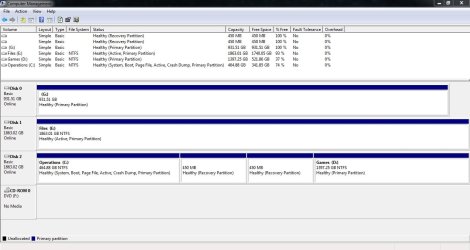
Why is drive E marked Active ?

If it`s just data, mark it inactive.

I love how you named C "Operations" that`s cute.

Also, C should be showing up as Disk 0, not Disk 2

You should make sure that it`s data cable is connected to sata port 1 on the motherboard, it will be clearly marked on the board or there will be a diagram in your motherboard manual.
 

My Computer My Computer

Computer type
PC/Desktop
Computer Manufacturer/Model Number
Skylake Special #666
OS
Windows 10 Pro x64
CPU
Intel Core i7 6700K
Motherboard
Asus Sabertooth Z170 Mark 1
Memory
GSkill TridentZ RGB 16GB 3600 16-16-16-36
Graphics Card(s)
EVGA GTX 980 Ti SC x2
Sound Card
Realtek High Definition
Monitor(s) Displays
AOC G2460PG
Screen Resolution
1920 x 1080 144Hz
Hard Drives
Samsung 860 Pro 256GB, Seagate Barracuda 4TB x2
PSU
EVGA 1000 P2, EVGA White Custom Braided Cables
Case
Corsair Vengeance C70 Gunmetal Black
Cooling
Corsair H100i v2, Corsair ML120 x2, Thermal Grizzly Kryonaut
Keyboard
Logitech G910 Orion Spectrum
Mouse
Logitech G700s
Internet Speed
Verizon Fios Quantum Gateway 75/75
Antivirus
Windows Defender, Malwarebytes Free 3.8.3
Browser
Chrome
Other Info
Corsair SP120 x4, LG Blu-ray Drive, Durabrand HT-395 100 Watt Dolby Digital Amp, Corsair H2100 Wireless 7.1 Headset
Done.... would that have caused an issue? I know how to build a pc but I can't fine tune or overclock it properly.
 

My Computer My Computer

Computer type
PC/Desktop
Computer Manufacturer/Model Number
Custom Build
OS
Ohio
CPU
AMD 8350 BE
Motherboard
MSI 970
Memory
32 gigs
Graphics Card(s)
GTX 1080
Hard Drives
Seagate 1tb SSHHDD
Also, rename your DVD drive Z, no need for it to be named F

And it`s strange you have 2 450 MB Recovery partitions.

What did you do, post another snip.

There`s no need to OC anything.
 

My Computer My Computer

Computer type
PC/Desktop
Computer Manufacturer/Model Number
Skylake Special #666
OS
Windows 10 Pro x64
CPU
Intel Core i7 6700K
Motherboard
Asus Sabertooth Z170 Mark 1
Memory
GSkill TridentZ RGB 16GB 3600 16-16-16-36
Graphics Card(s)
EVGA GTX 980 Ti SC x2
Sound Card
Realtek High Definition
Monitor(s) Displays
AOC G2460PG
Screen Resolution
1920 x 1080 144Hz
Hard Drives
Samsung 860 Pro 256GB, Seagate Barracuda 4TB x2
PSU
EVGA 1000 P2, EVGA White Custom Braided Cables
Case
Corsair Vengeance C70 Gunmetal Black
Cooling
Corsair H100i v2, Corsair ML120 x2, Thermal Grizzly Kryonaut
Keyboard
Logitech G910 Orion Spectrum
Mouse
Logitech G700s
Internet Speed
Verizon Fios Quantum Gateway 75/75
Antivirus
Windows Defender, Malwarebytes Free 3.8.3
Browser
Chrome
Other Info
Corsair SP120 x4, LG Blu-ray Drive, Durabrand HT-395 100 Watt Dolby Digital Amp, Corsair H2100 Wireless 7.1 Headset
I freshly installed windows 7 and then installed windows 10. Didn't like it so I reverted back to 7 ultimate.
 

My Computer My Computer

Computer type
PC/Desktop
Computer Manufacturer/Model Number
Custom Build
OS
Ohio
CPU
AMD 8350 BE
Motherboard
MSI 970
Memory
32 gigs
Graphics Card(s)
GTX 1080
Hard Drives
Seagate 1tb SSHHDD
Back
Top