Increase partition size of my C drive?

Volsere

New member
Local time
1:29 PM
Messages
3
Hi all new to the forums,

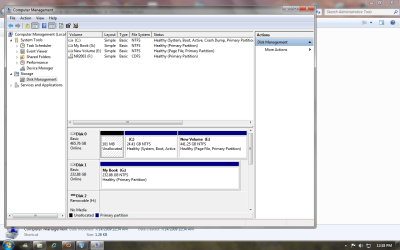
I recently installed windows 7 on a 1TB hdd. When I went about downloading programs from the internet and stuff i noticed my harddrive was partitioned badly in that I have 80 MBs of free space on my C drive that has 7 on it and the D drive has the rest of the space.

There doesn't seem to be any way of increasing the C drive using windows tools, I tried unallocating space from D and increasing C but the option is greyed out for C.

Any help would be appreciated, thanks!
 

My Computer My Computer

At a glance

Windows 7 Ultimate 64 bitAMD Athlon II x4 620 Processor 2.6 GHZ4096MB RAMNVidia GeForce GTS 250
OS
Windows 7 Ultimate 64 bit
CPU
AMD Athlon II x4 620 Processor 2.6 GHZ
Memory
4096MB RAM
Graphics Card(s)
NVidia GeForce GTS 250
Hard Drives
1 TB HDD
Thanks I'll try that
 

My Computer My Computer

At a glance

Windows 7 Ultimate 64 bitAMD Athlon II x4 620 Processor 2.6 GHZ4096MB RAMNVidia GeForce GTS 250
OS
Windows 7 Ultimate 64 bit
CPU
AMD Athlon II x4 620 Processor 2.6 GHZ
Memory
4096MB RAM
Graphics Card(s)
NVidia GeForce GTS 250
Hard Drives
1 TB HDD
Worked awesomely thanks very much :)
 

My Computer My Computer

At a glance

Windows 7 Ultimate 64 bitAMD Athlon II x4 620 Processor 2.6 GHZ4096MB RAMNVidia GeForce GTS 250
OS
Windows 7 Ultimate 64 bit
CPU
AMD Athlon II x4 620 Processor 2.6 GHZ
Memory
4096MB RAM
Graphics Card(s)
NVidia GeForce GTS 250
Hard Drives
1 TB HDD
Volsere, I am stuck with the same predicament you had in that my C drive with my OS is 25GB and has only 1.49GB of space left but my E drive is 441GB with 420GB left. I want to move 120GB over to the C drive to increase it and have downloaded Partition Wizard (not the bootable CD). I am totally lost as to the steps to take to get the 120GB over to my C drive. Anyone want to help a dumbutt out here? Would be greatly appreciated.
 

My Computer My Computer

At a glance

Windows 7
OS
Windows 7
Volsere, I am stuck with the same predicament you had in that my C drive with my OS is 25GB and has only 1.49GB of space left but my E drive is 441GB with 420GB left. I want to move 120GB over to the C drive to increase it and have downloaded Partition Wizard (not the bootable CD). I am totally lost as to the steps to take to get the 120GB over to my C drive. Anyone want to help a dumbutt out here? Would be greatly appreciated.

Burn PW boot bootable CD so you have rescueability.

Back up your files, boot PW CD, select 1 for screen res, right click E drive, select Resize, drag left grey border to the right by 120gb if it will allow that much, click OK.

Next right click C drive, select Resize, drag right grey border to the right to take up the free space you made from E, OK. Apply all steps.
 
Well I was able to use slider to decrease my E drive by 120GB, but when I attempted to increase my C drive by that 120GB, the slider would not go any further to the right. I remember reading something about when 2 partitions are not adjacent to each other you could not increase one to the other. Guess the only other solution is to format the complete HDD and repartition and make my OS drive much larger than what it was.
Greeny56
 

Attachments

  • Partitions.png
    Partitions.png
    59 KB · Views: 1,755
Last edited:

My Computer My Computer

At a glance

Windows 7
OS
Windows 7
You need to use PW to shrink E from the left. Drag the slider from the left edge towards the right>
 

My Computers My Computers

  • At a glance

    7 X64i5 84002x8gb 3200mhz
    Computer type
    PC/Desktop
    OS
    7 X64
    CPU
    i5 8400
    Motherboard
    gigabyte b365m ds3h
    Memory
    2x8gb 3200mhz
    Hard Drives
    various
    PSU
    pure power 11 400w cm
    Case
    Coolermaster
    Cooling
    cryorig m9i
  • At a glance

    7x64g54008gb ddr4 2400
    Computer type
    PC/Desktop
    OS
    7x64
    CPU
    g5400
    Motherboard
    ga b365m ds3h
    Memory
    8gb ddr4 2400
    PSU
    xfx pro 450w
thanks to everyone who responded, but especially gregrocker for the walkthrough tutorial. Don't know exactly what I did, but all of the sudden it worked. Goes to show even a blind squirrel can find a nut!! :D
 

My Computer My Computer

At a glance

Windows 7
OS
Windows 7
Back
Top