
Solved Infection LavasoftTcpService.dll

GokAy

New member
Guru
Gold Member
VIP
Local time
5:33 PM
Messages
5,653
Location
Maltepe - Istanbul
Hello all, last night after logging in to windows I received a warning from ZoneAlarm Extreme Security that 2 files have been infected with the next:

C:\Windows\System32\LavasoftTcpService64.dll - not-a-virus:HEUR.AdWare.Win32.OptimizerMonitor.heur
C:\Windows\SysWOW64\LavasoftTcpService.dll - not-a-virus:AdWare.Win32.OptimizerMonitor.j

I don't use Lavasoft products on my PC, so when I opened IE11 to check what they were there were no connection. My Internet connection was fine though. Anyway, I checked both files and clicked treat in ZA window and it told me after sometime that it wasn't able to treat them and needed to perform an Advanced Disinfection. After closing all open programs as instructed ZA took 5 or so minutes to finish what it was doing. Before it auto-restarted the PC I got a bunch of Bad Image warnings to my running processes.

After the restart the PC booted and logged in to Windows just fine, I then rescanned the PC with ZA/SuperAntiSpyware/Spybot S&D and found nothing.

I am not sure how I got the infection as I am careful about suspicious websites and only use freeware or licensed paid-for software/games etc. Everything is up-to-date and performing scans on a schedule. Also, I haven't installed anything the last few days. Only downloaded WinDirStat and 7StickyNotes from their official download locations (not installed yet).

So my question would be should I use any other scanners to make sure I don't have any left overs in anywhere on my PC? From what I have read in this forum, Malwarebytes/ TDSSkiller/ Rkill have been suggested before but I would like to wait for response from more experienced people.

Thanks for your time.
 

My Computer My Computer

At a glance

Windows 7 Ultimate x64 SP1AMD Phenom 2 1090T2x8GB Kingston HyperX Fury Black 1600Mhz Unga...MSI GTX 970 Gaming 4G
Computer type
PC/Desktop
Computer Manufacturer/Model Number
Custom Build
OS
Windows 7 Ultimate x64 SP1
CPU
AMD Phenom 2 1090T
Motherboard
Gigabyte GA-890FXA-UD5
Memory
2x8GB Kingston HyperX Fury Black 1600Mhz Unganged
Graphics Card(s)
MSI GTX 970 Gaming 4G
Sound Card
Realtek On-Board HD 7.1 Audio / Logitech G35
Monitor(s) Displays
3xAcer GD245HQ
Screen Resolution
1920x1080
Hard Drives
Samsung 850 Pro 512GB SSD - OS /
WD Caviar Black SATA 3 - 1 TBx2 - Dynamic RAID 0 /
WD Caviar Green SATA 2 - 640GBx2 - Dynamic RAID 0 /
WD Caviar Green SATA 2 - 640GB - Internal Backup /
Seagate Barracude SATA 3 - 3TB - External Backup/ Sync
PSU
HighPower 1000W
Case
Cooler Master HAF 932
Cooling
Noctua NH-D14
Keyboard
Logitech G19
Mouse
Logitech G500
Internet Speed
100/4 Mbit Cable (100GB quota)
Antivirus
ZoneAlarm Extreme Security / MBAM Pro / MBAE Free / SAS Free
Browser
IE 11 - Firefox - Chrome
Other Info
Logitech F710/ G27/ G940/ Z5500 // TrackIR 5 // Nvidia 3D Surround Vision

My Computer My Computer

At a glance

Windows 10 Pro. 64/ version 1709 Windows 7 Pr...Intel i7-6800K @ 4.3Corsair Platinum 16 gig @2400EVGA GTX 1070 OC
Computer type
PC/Desktop
Computer Manufacturer/Model Number
Home made Desktop
OS
Windows 10 Pro. 64/ version 1709 Windows 7 Pro/64
CPU
Intel i7-6800K @ 4.3
Motherboard
ASUS X-99 Deluxe II
Memory
Corsair Platinum 16 gig @2400
Graphics Card(s)
EVGA GTX 1070 OC
Monitor(s) Displays
Asus 27" LED LCD/VE278Q
Screen Resolution
1920-1080 or 1280-720 HDMI
Hard Drives
INTEL SSD 730-240 Gb Sata 3.0/
PSU
EVGA Platium 1200W
Case
Phanteks Luxe Tempered Glass 8 fans/ one radiator
Cooling
XSPC/ Water Cooled CPU
Keyboard
Das 4 Professional
Mouse
Logitech M705/MX Anywhere 2-S
Internet Speed
100 mbits
Antivirus
Microsoft Security Essentials/ Malwarebytes Premium 3.0/ SAS
Browser
I.E. 11 default/Firefox/ ISP Time Warner Cable/Spectrum
Other Info
LG BluRay Burner/
Sound system-KLipsch-THX/
Icy Dock ssd Hot Swap bays.

My Computer My Computer

At a glance

Windows 7 Home Premium 64 bit SP1i5-2320 @3.00 GHz6GBNVIDIA GeForce 7300 LE
Computer type
PC/Desktop
Computer Manufacturer/Model Number
ASUS
OS
Windows 7 Home Premium 64 bit SP1
CPU
i5-2320 @3.00 GHz
Memory
6GB
Graphics Card(s)
NVIDIA GeForce 7300 LE
Monitor(s) Displays
Acer S200HQL 19.5 LED
Screen Resolution
1280 x 800 (1900 x 900 max)
Hard Drives
Drive 1: 1 TB SATA internal: C drive
Drive 2: 250 GB SATA internal: User Data Backup
Drive 3: 500 GB SATA USB: Full System Backup 1, Father
Drive 4: 500 GB SATA USB: Full System Backup 2, Son
Drive 5: 40 GB IDE USB: Kindle, ASUS Tabl
Keyboard
ASUS KB34211
Mouse
Logitech m325 cordless
Internet Speed
27Mb down, 3 Mb up cable modem w/Netgear R6400 WiFi
Antivirus
NIS, Spybot S&D, CCleaner, Malwarebytes, MSERT, MRT
Browser
FF v44.0.2;IE11 v11.0.9600.18015,uv11.0.23;Chrome v44.0.2403
Other Info
FF has AdBlockPlus and Ghostery plugins,
Hey guys, an update to the situation.

I went out for a walk and shutdown my PC before doing so. When I came back, I downloaded MBAM and started running a scan. While it was running, ZA showed another warning that the 2 dll's were back. :sarc:

I haven't let ZA do anything just yet. And started to look deeper on what is going on. Meanwhile, MBAM finished the scan and found 3 entries for OpenCandy PUP, which I removed. Nothing with respect to the 2 dll files.

Anyway, here is what I have found:

- ZA list these dll's as medium threat.
- 1 of the dll's changed location and now both are inside SysWOW64.
- There is a service named LavasoftTCPService installed and running.
- The dll's seem to be digitally signed by Lavasoft and eventhough I am not an expert in these things, seems legit. Can put a screenshot if anyone wants.
- When I opened the service properties I saw that the executable is in Prog Files(x86)\Lavasoft\Web Companion\...
- Then I went to Programs and Features and found Web Companion listed there. Installed on 4/8/2015.
- I clean installed my OS that exact day so whatever it is, it has been there all along. Problem is I have never installed Lavasoft software in this install.

I suspect that web companion came with a freeware program I installed, perhaps I forgot to uncheck a checkbox to install it automatically. Hopefully I have just been dumb :p and don't have a real infection.

Now I wonder why I didn't get any warnings up until last night.

I will wait for ESET Online to finish and try a manual uninstall. 47% in and so far ESET found:
- Win32/Toolbar.Montiera.I
- Win32/Toolbar.Conduit
both in the category of potentially unwanted application.

How do we get these PUPs and is there a pro-active way of keeping safe? So far I have only been able to scan and remove these later after they somehow manage to get in the PC.
 

My Computer My Computer

At a glance

Windows 7 Ultimate x64 SP1AMD Phenom 2 1090T2x8GB Kingston HyperX Fury Black 1600Mhz Unga...MSI GTX 970 Gaming 4G
Computer type
PC/Desktop
Computer Manufacturer/Model Number
Custom Build
OS
Windows 7 Ultimate x64 SP1
CPU
AMD Phenom 2 1090T
Motherboard
Gigabyte GA-890FXA-UD5
Memory
2x8GB Kingston HyperX Fury Black 1600Mhz Unganged
Graphics Card(s)
MSI GTX 970 Gaming 4G
Sound Card
Realtek On-Board HD 7.1 Audio / Logitech G35
Monitor(s) Displays
3xAcer GD245HQ
Screen Resolution
1920x1080
Hard Drives
Samsung 850 Pro 512GB SSD - OS /
WD Caviar Black SATA 3 - 1 TBx2 - Dynamic RAID 0 /
WD Caviar Green SATA 2 - 640GBx2 - Dynamic RAID 0 /
WD Caviar Green SATA 2 - 640GB - Internal Backup /
Seagate Barracude SATA 3 - 3TB - External Backup/ Sync
PSU
HighPower 1000W
Case
Cooler Master HAF 932
Cooling
Noctua NH-D14
Keyboard
Logitech G19
Mouse
Logitech G500
Internet Speed
100/4 Mbit Cable (100GB quota)
Antivirus
ZoneAlarm Extreme Security / MBAM Pro / MBAE Free / SAS Free
Browser
IE 11 - Firefox - Chrome
Other Info
Logitech F710/ G27/ G940/ Z5500 // TrackIR 5 // Nvidia 3D Surround Vision
How do we get these PUPs and is there a pro-active way of keeping safe? So far I have only been able to scan and remove these later after they somehow manage to get in the PC.
Hi:

I am not qualified to provide specific malware removal advice.
So, I will leave that to the more expert forum members with proper training, such as jacee and cottonball.

However, to address your specific question about PUPs and their "prevention".
Manual, on-demand scanners, including the Free version of MBAM, can only remove PUPs already on the sytem.
MBAM Premium is highly effective in preventing many PUPs.
More information here, in these articles:
What are the 'PUP' detections, are they threats, and should they be deleted?
Malwarebytes Adopts Aggressive PUP Policy

Having said that, most PUPs find their way on to the system through some sort of user action (or lack thereof). For example, failure to opt out of their installation during the setup wizard of other software is a common way to acquire PUPs. User diligence is very important, along with real-time anti-malware software.

Thank you,
 

My Computer My Computer

At a glance

OEM Windows 7 Ult (x64) SP1Intel Core-i7 3770 @ 3.4 GHz16 GB DDR3 SDRAM @ 1333 MHzNVidia GeForce GT620 1 GB
Computer type
PC/Desktop
Computer Manufacturer/Model Number
Dell Studio XPS 8500
OS
OEM Windows 7 Ult (x64) SP1
CPU
Intel Core-i7 3770 @ 3.4 GHz
Motherboard
"Dell" branded
Memory
16 GB DDR3 SDRAM @ 1333 MHz
Graphics Card(s)
NVidia GeForce GT620 1 GB
Sound Card
THX TruStudio PC
Monitor(s) Displays
Dell U2410 Full HD
Hard Drives
2.0 TB SATA2 @ 7200 RPM
PSU
350W
Keyboard
MS 4000 Ergon - Wired
Mouse
Logitech Anywhere MX
Internet Speed
Cable HSI w/Turbo (router)
Antivirus
KIS-MBAM Premium-MBAE Premium
Browser
Fx (current version); IE
Other Info
And a Win7/64 Pro laptop; And a Win10/64 Pro desktop.
Sorry for jumping in but here's some additional info that might help.

Lavasoft is a legitimate company and probably best known for a free product called Ad-Aware. If you haven't already done so check in Control Panel > Programs and Features for any references to Lavasoft and Ad-Aware. If either or both show up see if you can uninstall.

Another free anti-malware tool I can recommend is called herdProtect. It uses 68 anti-malware search engines. If something questionable is found, whether it be known malware, PUPs, etc, the options to isolate, quarantine and/or remove are pretty easy to follow.

herdProtect - Anti-Malware Multiscanning Platform in the Cloud

One of the best ways to protect your computer is to make regular system images. If malware strikes you can return your computer to its clean condition in usually less than an hour. The machine will be exactly like it was on the day the image was created so the more recent the image the more up to date the restore will be. Here's a couple of tutorials for the native Windows 7 imaging tool and Macrium free.

http://www.sevenforums.com/tutorials/663-backup-complete-computer-create-image-backup.html

http://www.sevenforums.com/tutorials/73828-imaging-free-macrium.html
 

My Computer My Computer

At a glance

Win 7 Pro 64-bitIntel i5 2.4 Ghz8GB DDR3Intel HD 3000
Computer type
Laptop
Computer Manufacturer/Model Number
Sony Vaio VPCEB47GM Laptop
OS
Win 7 Pro 64-bit
CPU
Intel i5 2.4 Ghz
Memory
8GB DDR3
Graphics Card(s)
Intel HD 3000
Sound Card
IDT High Definition
Monitor(s) Displays
15.6 WGXA Anti-Glare LED
Screen Resolution
1280x800
Hard Drives
640Gb 7200rpm
Antivirus
MSE
Browser
Opera (primary) with IE9 backup
^^ Agree, those do appear to be legit Lavasoft files. But I will defer to more expert members on that. ^^
^^ And, yes, having good backups is an important strategy. ^^

As for Herdprotect, I had heard mixed reports about it.
The huge number of search engines can potentially lead to false-positives.
An equally serious concern for me is that it is alleged to employ the work-product of other software developers without full legal permissions. That makes me squeamish, even though the tool is (at least for now) still free.
But it's up to the user whether to try it, of course.

There are other tools, such as adwcleaner and JRT, that also target adware, junkware, PUPs.
However, these are not real-time protection applications, so they cannot *prevent* PUPs, as the OP requests. That's why I mentioned MBAM Premium (I am just a home user with no financial ties to the product or the company).

JMHO

Thanks,
 

My Computer My Computer

At a glance

OEM Windows 7 Ult (x64) SP1Intel Core-i7 3770 @ 3.4 GHz16 GB DDR3 SDRAM @ 1333 MHzNVidia GeForce GT620 1 GB
Computer type
PC/Desktop
Computer Manufacturer/Model Number
Dell Studio XPS 8500
OS
OEM Windows 7 Ult (x64) SP1
CPU
Intel Core-i7 3770 @ 3.4 GHz
Motherboard
"Dell" branded
Memory
16 GB DDR3 SDRAM @ 1333 MHz
Graphics Card(s)
NVidia GeForce GT620 1 GB
Sound Card
THX TruStudio PC
Monitor(s) Displays
Dell U2410 Full HD
Hard Drives
2.0 TB SATA2 @ 7200 RPM
PSU
350W
Keyboard
MS 4000 Ergon - Wired
Mouse
Logitech Anywhere MX
Internet Speed
Cable HSI w/Turbo (router)
Antivirus
KIS-MBAM Premium-MBAE Premium
Browser
Fx (current version); IE
Other Info
And a Win7/64 Pro laptop; And a Win10/64 Pro desktop.
Hey,

@Moxie: Thanks for the info. I am usually very careful about the opt out installations, I guess I missed this one.

@Marsmimar: I know Lavasoft is a legitimate company ;) I used AdAware before, just not in this OS install. And thanks for the image advice. I use Acronis TI 2010 Home with pluspack and do daily images, but this thing was from the day I installed the OS.
Anyway, ESET found 5 more entries which all are Komodia related. From what I gather Komodia is also a legitimate company but has had a problem recently with SSL validation in their products which left people using their services open to abuse?

Here is a link if you are fluent in understanding this kind of tech talk
Will the madness never end? Komodia SSL certificates are EVERYWHERE | Marc's Security Ramblings

I have uninstalled the Web Companion from Programs and Features after ESET finished scan and fixed its findings. After restart, LavasoftTcpService64.dll and its service (Services - though not started) remained. I then went into registry, backed up just in case and deleted everything Lavasoft. It seems ok for now.

Marking the thread as solved for now. Thank you all for advice and information.
 

My Computer My Computer

At a glance

Windows 7 Ultimate x64 SP1AMD Phenom 2 1090T2x8GB Kingston HyperX Fury Black 1600Mhz Unga...MSI GTX 970 Gaming 4G
Computer type
PC/Desktop
Computer Manufacturer/Model Number
Custom Build
OS
Windows 7 Ultimate x64 SP1
CPU
AMD Phenom 2 1090T
Motherboard
Gigabyte GA-890FXA-UD5
Memory
2x8GB Kingston HyperX Fury Black 1600Mhz Unganged
Graphics Card(s)
MSI GTX 970 Gaming 4G
Sound Card
Realtek On-Board HD 7.1 Audio / Logitech G35
Monitor(s) Displays
3xAcer GD245HQ
Screen Resolution
1920x1080
Hard Drives
Samsung 850 Pro 512GB SSD - OS /
WD Caviar Black SATA 3 - 1 TBx2 - Dynamic RAID 0 /
WD Caviar Green SATA 2 - 640GBx2 - Dynamic RAID 0 /
WD Caviar Green SATA 2 - 640GB - Internal Backup /
Seagate Barracude SATA 3 - 3TB - External Backup/ Sync
PSU
HighPower 1000W
Case
Cooler Master HAF 932
Cooling
Noctua NH-D14
Keyboard
Logitech G19
Mouse
Logitech G500
Internet Speed
100/4 Mbit Cable (100GB quota)
Antivirus
ZoneAlarm Extreme Security / MBAM Pro / MBAE Free / SAS Free
Browser
IE 11 - Firefox - Chrome
Other Info
Logitech F710/ G27/ G940/ Z5500 // TrackIR 5 // Nvidia 3D Surround Vision
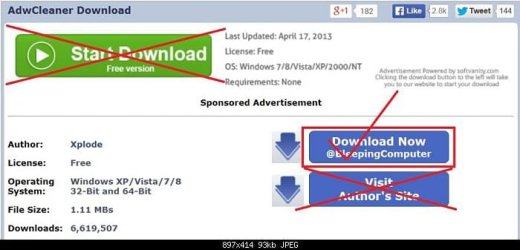
I see that Malwarebytes and Eset found thing. Here is another great program I have a lot of faith in. It's at Bleeping Computer.

AdwCleaner Download


adwcleaner-1 (2).JPG
 

My Computer My Computer

At a glance

Windows 10 Pro. 64/ version 1709 Windows 7 Pr...Intel i7-6800K @ 4.3Corsair Platinum 16 gig @2400EVGA GTX 1070 OC
Computer type
PC/Desktop
Computer Manufacturer/Model Number
Home made Desktop
OS
Windows 10 Pro. 64/ version 1709 Windows 7 Pro/64
CPU
Intel i7-6800K @ 4.3
Motherboard
ASUS X-99 Deluxe II
Memory
Corsair Platinum 16 gig @2400
Graphics Card(s)
EVGA GTX 1070 OC
Monitor(s) Displays
Asus 27" LED LCD/VE278Q
Screen Resolution
1920-1080 or 1280-720 HDMI
Hard Drives
INTEL SSD 730-240 Gb Sata 3.0/
PSU
EVGA Platium 1200W
Case
Phanteks Luxe Tempered Glass 8 fans/ one radiator
Cooling
XSPC/ Water Cooled CPU
Keyboard
Das 4 Professional
Mouse
Logitech M705/MX Anywhere 2-S
Internet Speed
100 mbits
Antivirus
Microsoft Security Essentials/ Malwarebytes Premium 3.0/ SAS
Browser
I.E. 11 default/Firefox/ ISP Time Warner Cable/Spectrum
Other Info
LG BluRay Burner/
Sound system-KLipsch-THX/
Icy Dock ssd Hot Swap bays.
Thank you. This information I think is helping me as I am having this issue right now. I wasn't told I was infected but a game that recently got updated won't update because of the LavasoftTcpService.dll file. I did recently allow Ad-Aware to install with another program so I think I will uninstall it. If it doesn't remove then I will either use AdwCleaner Download as mentioned earlier or, if that doesn't work, then Revo Uninstaller.
 

My Computer My Computer

At a glance

Microsoft Windows 7 Professional Edition Serv...Intel(R) Core(TM)2 Quad Q9550 @2.83GHz (Xeon)...4095 MB (4 x 1024 MBytes DDR2 Dual Symmetric)Sapphire HD 7770 GHz Edition (shows Radeon R7...
Computer type
PC/Desktop
Computer Manufacturer/Model Number
HP-Pavilion-a6000-Desktop-PC
OS
Microsoft Windows 7 Professional Edition Service Pack 1 (build 7601), 64-bit
CPU
Intel(R) Core(TM)2 Quad Q9550 @2.83GHz (Xeon) Socket 775 LGA
Motherboard
ASUSTeK Computer INC. Benicia (P35/G33/G31)
Memory
4095 MB (4 x 1024 MBytes DDR2 Dual Symmetric)
Graphics Card(s)
Sapphire HD 7770 GHz Edition (shows Radeon R7 200)
Sound Card
Realtek High Definition Audio Driver Version 6.0.1.6662
Monitor(s) Displays
HP w19b 18.6" 5:3 (SN: CNC703PN1G)
Screen Resolution
1440 x 900
Hard Drives
1080 GB total
C: (320Gb): WDC WD3200AAKS-75L9A0 ATA
D: (Optical Drive): ATAPI DVD A DH16A6S ATA Device
E: (1Tb): WDC WD10EARS-00S8B1 ATA
F: (Backup 2 Tb): Clikfree Backup Drive USB
PSU
GX750
Case
Black/Blue APEVIA X-Hermes
Cooling
2 Top , 1 back, 1 front fan all 180 mm & side 200mm
Keyboard
Logitech G110
Mouse
Logitech G500s
Internet Speed
High speed cable
Antivirus
Avast! Internet Security 2014.9.0.2021
Browser
Firefox 44 (x86 en-US)
Other Info
BIOS American Megatrends
Date:
09/10/09 10:25:18 Ver: 5.43
Back
Top