Initial Familiarization Win 7 Home Premium 64bit

roduke41

New member
Local time
11:11 AM
Messages
6
Have just replaced laptop with Vista Ultimate to above WIN 7 on Dell STUDIO 1558, 4GB RAM, IE8, with all sorts of specs about which I know nothing.
So experience level dismal as these simple questions will illustrate.
(Not helped by Dell no longer including a Users Manual, either.)

1. RoboForm advises not yet usable 64bit, "..Start IE with 32bit..." How do I do it ?

2. Have used RUN/msconfig to check or uncheck StartUp programs on various versions of Windows, but unavailable here on Win 7. "Getting Started" and other introductory alleged HELP items go all around this, but "...came I out the same window as in I went..."
At instructions to use Control Panel, the subheadings which appeared did not match what was told would.

3. Situation more difficult because WEATHER program I am trying to uncheck from StartUp does not appear on All Programs list; nor do I find it at Ctrl Panel although it has to be there in order to run at StartUp!

4. At Ctrl Panel many programs do not show size as do most of them. Why not? How add to those missing it?

5. My IE default MY.MSN transferred from old (with Vista) to new (with WIN 7) OK, but it was necessary to enter My.Msn as default when shifted to new laptop. Now it is unpredictable whether the old or new version appears and I'd like to know how to eliminate the new in favor of the old which has several "pages" as well as toolbars which do not come with the new.

6. I note on many occasions when I access an item for information or whatever, what comes up has to do with VISTA! Just how do I eliminate this from happening wherever I go to on this WIN 7 only laptop?

Much appreciate the help of you knowledgeable colleagues here, realizing questions will not put any strain on the limits of that knowledge!

Sincerely, :mad:
 

My Computer My Computer

Computer Manufacturer/Model Number
Dell Studio 1558
OS
Win 7 Home Premium 64 bit
CPU
Intel Core i3-330M2.13GHz (3M cache)
Motherboard
320GB 7200 RPM SATA Hard Disk Drive
Memory
4 GB RAM
Graphics Card(s)
Intel Graphics Media Accelerator HD
Sound Card
Integrated High Definition Audio 2.2
Monitor(s) Displays
15.6 High Definition (720p) LED Display with TrueLife & Came
Hard Drives
320GB 7200 RPM SATA Hard Disk Drive
PSU
Don't know what PSU stands for.
Case
metal black
Cooling
No idea
Hello roduke41, welcome to Seven Forums!

Have just replaced laptop with Vista Ultimate to above WIN 7 on Dell STUDIO 1558, 4GB RAM, IE8, with all sorts of specs about which I know nothing.
So experience level dismal as these simple questions will illustrate.
(Not helped by Dell no longer including a Users Manual, either.)

1. RoboForm advises not yet usable 64bit, "..Start IE with 32bit..." How do I do it ?

It's the IE pinned to the taskbar. 64-bit works great, there's just no 64-bit flash player. The 64-bit IE you can only get to from the start menu.

2. Have used RUN/msconfig to check or uncheck StartUp programs on various versions of Windows, but unavailable here on Win 7. "Getting Started" and other introductory alleged HELP items go all around this, but "...came I out the same window as in I went..."
At instructions to use Control Panel, the subheadings which appeared did not match what was told would.

Here's a useful thread at the link below.

http://www.sevenforums.com/crashes-debugging/70248-troubleshooting-msconfig.html

3. Situation more difficult because WEATHER program I am trying to uncheck from StartUp does not appear on All Programs list; nor do I find it at Ctrl Panel although it has to be there in order to run at StartUp!

See the tutorial above.

4. At Ctrl Panel many programs do not show size as do most of them. Why not? How add to those missing it?

At the top right in ctl panej at view select "large icons" from there you can select other options.

5. My IE default MY.MSN transferred from old (with Vista) to new (with WIN 7) OK, but it was necessary to enter My.Msn as default when shifted to new laptop. Now it is unpredictable whether the old or new version appears and I'd like to know how to eliminate the new in favor of the old which has several "pages" as well as toolbars which do not come with the new.

6. I note on many occasions when I access an item for information or whatever, what comes up has to do with VISTA! Just how do I eliminate this from happening wherever I go to on this WIN 7 only laptop?

Windows 7 and Windows Vista are very closely related, what usually works for one works for the other; here's another useful tutorial at the link below.

http://www.sevenforums.com/tutorials/316-compatibility-mode.html?ltr=C

Much appreciate the help of you knowledgeable colleagues here, realizing questions will not put any strain on the limits of that knowledge!

Sincerely, :mad:


Someone else will have suggestions about the rest.

PS, don't be so serious.
 

My Computer My Computer

Computer Manufacturer/Model Number
* BFK Customs *
OS
W 7 64-bit Ultimate
CPU
Intel Q9550 Yorkfield
Motherboard
ASUS P5Q Pro
Memory
8GB Dominator 8500C5D
Graphics Card(s)
ATI : XFX 5870
Sound Card
Realtek HD Audio 7-1
Monitor(s) Displays
1x 47" LCD HDMI & 3x 26" LCD HDMI
Screen Resolution
1920x1080P & 1920x1200
Hard Drives
1x 80GB Intel X25-M G2 SSD : 1x 500GB & 1x 640GB WD Caviar Black(s)
PSU
Corsair 620HX
Case
Cooler Master RC-690
Cooling
Tuniq Tower 120, 2x 140mm and 3x 120mm case fans
Keyboard
Microsoft 500
Mouse
Razer Diamondback 3G
Internet Speed
14 Mb/s
Other Info
1x Koutech 3Gb/s SATA HDD Hot Swap Rack
For your roboform problem, this is how to launch IE in 32 bit:

Internet Explorer is already on your machine in 32- and 64-bit versions. The 64-bit is the default, so you have to drag the 32-bit icon to your Desktop or Quick Launch Bar.

Click Start>Programs> then scroll the list to Internet Explorer. Notice twolistings, one has (64-bit) following it. You want to run the other one. Holdthe CTRL key and drag the 32-bit IE icon to the desktop or the Quick Launch.
 
Last edited:

My Computer My Computer

Computer Manufacturer/Model Number
Too many to describe...
OS
Windows 7 x64 pro/ Windows 7 x86 Pro/ XP SP3 x86
The 32-bit IE is pinned to the taskbar by default at Windows 7 install.
 

My Computer My Computer

Computer Manufacturer/Model Number
* BFK Customs *
OS
W 7 64-bit Ultimate
CPU
Intel Q9550 Yorkfield
Motherboard
ASUS P5Q Pro
Memory
8GB Dominator 8500C5D
Graphics Card(s)
ATI : XFX 5870
Sound Card
Realtek HD Audio 7-1
Monitor(s) Displays
1x 47" LCD HDMI & 3x 26" LCD HDMI
Screen Resolution
1920x1080P & 1920x1200
Hard Drives
1x 80GB Intel X25-M G2 SSD : 1x 500GB & 1x 640GB WD Caviar Black(s)
PSU
Corsair 620HX
Case
Cooler Master RC-690
Cooling
Tuniq Tower 120, 2x 140mm and 3x 120mm case fans
Keyboard
Microsoft 500
Mouse
Razer Diamondback 3G
Internet Speed
14 Mb/s
Other Info
1x Koutech 3Gb/s SATA HDD Hot Swap Rack
Welcome to Seven Forums roduke41.

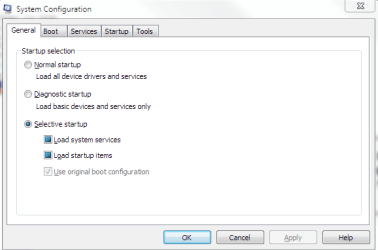
Typing msconfig.exe in the start menu search bar (or run cmd.) should bring up this window. You may have to click yes on a UAC prompt first.

msconfig-general.PNG

click on the startup tab and see if what you want is there.

Gary
 

My Computer My Computer

Computer Manufacturer/Model Number
Dell XPS420
OS
Vista Ult 64 bit Seven Ult RTM x64
CPU
Intel Core2 Quad Q6600 2.40 gigahertz
Memory
Crucial Ballistix 4x2GB PC2 6400
Graphics Card(s)
NVIDIA GeForce 8600 GTS 256 MB
Sound Card
Creative SB X-Fi audio
Monitor(s) Displays
HP w2207 + HPvs15
Screen Resolution
1680x1050 + 1024x768
Hard Drives
2-WD5000AAKS-500 GB
WD5000AAV-500 GB external
Keyboard
Microsoft Comfort Curve
Mouse
MX Revolution
Other Info
Wacom Intuos 2 Graphics Tablet
Experience Index=5.5

My Computer My Computer

Computer Manufacturer/Model Number
* BFK Customs *
OS
W 7 64-bit Ultimate
CPU
Intel Q9550 Yorkfield
Motherboard
ASUS P5Q Pro
Memory
8GB Dominator 8500C5D
Graphics Card(s)
ATI : XFX 5870
Sound Card
Realtek HD Audio 7-1
Monitor(s) Displays
1x 47" LCD HDMI & 3x 26" LCD HDMI
Screen Resolution
1920x1080P & 1920x1200
Hard Drives
1x 80GB Intel X25-M G2 SSD : 1x 500GB & 1x 640GB WD Caviar Black(s)
PSU
Corsair 620HX
Case
Cooler Master RC-690
Cooling
Tuniq Tower 120, 2x 140mm and 3x 120mm case fans
Keyboard
Microsoft 500
Mouse
Razer Diamondback 3G
Internet Speed
14 Mb/s
Other Info
1x Koutech 3Gb/s SATA HDD Hot Swap Rack
Greetings Bare Foot Kid & Bill2 & GarysGold and thank you for prompt helpful information.

Now remains for me to get to work to take advantage of each of the responses!
 

My Computer My Computer

Computer Manufacturer/Model Number
Dell Studio 1558
OS
Win 7 Home Premium 64 bit
CPU
Intel Core i3-330M2.13GHz (3M cache)
Motherboard
320GB 7200 RPM SATA Hard Disk Drive
Memory
4 GB RAM
Graphics Card(s)
Intel Graphics Media Accelerator HD
Sound Card
Integrated High Definition Audio 2.2
Monitor(s) Displays
15.6 High Definition (720p) LED Display with TrueLife & Came
Hard Drives
320GB 7200 RPM SATA Hard Disk Drive
PSU
Don't know what PSU stands for.
Case
metal black
Cooling
No idea
Hello again roduke41.


Be sure to post back to let us know how it sorts out.
 

My Computer My Computer

Computer Manufacturer/Model Number
* BFK Customs *
OS
W 7 64-bit Ultimate
CPU
Intel Q9550 Yorkfield
Motherboard
ASUS P5Q Pro
Memory
8GB Dominator 8500C5D
Graphics Card(s)
ATI : XFX 5870
Sound Card
Realtek HD Audio 7-1
Monitor(s) Displays
1x 47" LCD HDMI & 3x 26" LCD HDMI
Screen Resolution
1920x1080P & 1920x1200
Hard Drives
1x 80GB Intel X25-M G2 SSD : 1x 500GB & 1x 640GB WD Caviar Black(s)
PSU
Corsair 620HX
Case
Cooler Master RC-690
Cooling
Tuniq Tower 120, 2x 140mm and 3x 120mm case fans
Keyboard
Microsoft 500
Mouse
Razer Diamondback 3G
Internet Speed
14 Mb/s
Other Info
1x Koutech 3Gb/s SATA HDD Hot Swap Rack
Back
Top